
SpringBoot實(shí)現(xiàn)Excel導(dǎo)入導(dǎo)出,好用到爆,POI可以扔掉了!
在我們平時(shí)工作中經(jīng)常會(huì)遇到要操作Excel的功能,比如導(dǎo)出個(gè)用戶(hù)信息或者訂單信息的Excel報(bào)表。你肯定聽(tīng)說(shuō)過(guò)POI這個(gè)東西,可以實(shí)現(xiàn)。但是POI實(shí)現(xiàn)的API確實(shí)很麻煩,它需要寫(xiě)那種逐行解析的代碼(類(lèi)似Xml解析)。今天給大家推薦一款非常好用的Excel導(dǎo)入導(dǎo)出工具EasyPoi,希望對(duì)大家有所幫助!
?
EasyPoi簡(jiǎn)介
用慣了SpringBoot的朋友估計(jì)會(huì)想到,有沒(méi)有什么辦法可以直接定義好需要導(dǎo)出的數(shù)據(jù)對(duì)象,然后添加幾個(gè)注解,直接自動(dòng)實(shí)現(xiàn)Excel導(dǎo)入導(dǎo)出功能?
EasyPoi正是這么一款工具,如果你不太熟悉POI,想簡(jiǎn)單地實(shí)現(xiàn)Excel操作,用它就對(duì)了!
EasyPoi的目標(biāo)不是替代POI,而是讓一個(gè)不懂導(dǎo)入導(dǎo)出的人也能快速使用POI完成Excel的各種操作,而不是看很多API才可以完成這樣的工作。
?
集成
在SpringBoot中集成EasyPoi非常簡(jiǎn)單,只需添加如下一個(gè)依賴(lài)即可,真正的開(kāi)箱即用!
<dependency>
????<groupId>cn.afterturngroupId>
????<artifactId>easypoi-spring-boot-starterartifactId>
????<version>4.4.0version>
dependency>
?
使用
接下來(lái)介紹下EasyPoi的使用,以會(huì)員信息和訂單信息的導(dǎo)入導(dǎo)出為例,分別實(shí)現(xiàn)下簡(jiǎn)單的單表導(dǎo)出和具有關(guān)聯(lián)信息的復(fù)雜導(dǎo)出。
簡(jiǎn)單導(dǎo)出
我們以會(huì)員信息列表導(dǎo)出為例,使用EasyPoi來(lái)實(shí)現(xiàn)下導(dǎo)出功能,看看是不是夠簡(jiǎn)單!
首先創(chuàng)建一個(gè)會(huì)員對(duì)象
Member,封裝會(huì)員信息;
/**
?*?購(gòu)物會(huì)員
?*?Created?by?macro?on?2021/10/12.
?*/
@Data
@EqualsAndHashCode(callSuper?=?false)
public?class?Member?{
????@Excel(name?=?"ID",?width?=?10)
????private?Long?id;
????@Excel(name?=?"用戶(hù)名",?width?=?20,?needMerge?=?true)
????private?String?username;
????private?String?password;
????@Excel(name?=?"昵稱(chēng)",?width?=?20,?needMerge?=?true)
????private?String?nickname;
????@Excel(name?=?"出生日期",?width?=?20,?format?=?"yyyy-MM-dd")
????private?Date?birthday;
????@Excel(name?=?"手機(jī)號(hào)",?width?=?20,?needMerge?=?true,?desensitizationRule?=?"3_4")
????private?String?phone;
????private?String?icon;
????@Excel(name?=?"性別",?width?=?10,?replace?=?{"男_0",?"女_1"})
????private?Integer?gender;
}
在此我們就可以看到EasyPoi的核心注解 @Excel,通過(guò)在對(duì)象上添加@Excel注解,可以將對(duì)象信息直接導(dǎo)出到Excel中去,下面對(duì)注解中的屬性做個(gè)介紹;name:Excel中的列名; width:指定列的寬度; needMerge:是否需要縱向合并單元格; format:當(dāng)屬性為時(shí)間類(lèi)型時(shí),設(shè)置時(shí)間的導(dǎo)出導(dǎo)出格式; desensitizationRule:數(shù)據(jù)脫敏處理, 3_4表示只顯示字符串的前3位和后4位,其他為*號(hào);replace:對(duì)屬性進(jìn)行替換; suffix:對(duì)數(shù)據(jù)添加后綴。 接下來(lái)我們?cè)贑ontroller中添加一個(gè)接口,用于導(dǎo)出會(huì)員列表到Excel,具體代碼如下;
/**
?*?EasyPoi導(dǎo)入導(dǎo)出測(cè)試Controller
?*?Created?by?macro?on?2021/10/12.
?*/
@Controller
@Api(tags?=?"EasyPoiController",?description?=?"EasyPoi導(dǎo)入導(dǎo)出測(cè)試")
@RequestMapping("/easyPoi")
public?class?EasyPoiController?{

????@ApiOperation(value?=?"導(dǎo)出會(huì)員列表Excel")
????@RequestMapping(value?=?"/exportMemberList",?method?=?RequestMethod.GET)
????public?void?exportMemberList(ModelMap?map,
?????????????????????????????????HttpServletRequest?request,
?????????????????????????????????HttpServletResponse?response)?{
????????List?memberList?=?LocalJsonUtil.getListFromJson("json/members.json",?Member.class);
????????ExportParams?params?=?new?ExportParams("會(huì)員列表",?"會(huì)員列表",?ExcelType.XSSF);
????????map.put(NormalExcelConstants.DATA_LIST,?memberList);
????????map.put(NormalExcelConstants.CLASS,?Member.class);
????????map.put(NormalExcelConstants.PARAMS,?params);
????????map.put(NormalExcelConstants.FILE_NAME,?"memberList");
????????PoiBaseView.render(map,?request,?response,?NormalExcelConstants.EASYPOI_EXCEL_VIEW);
????}
}
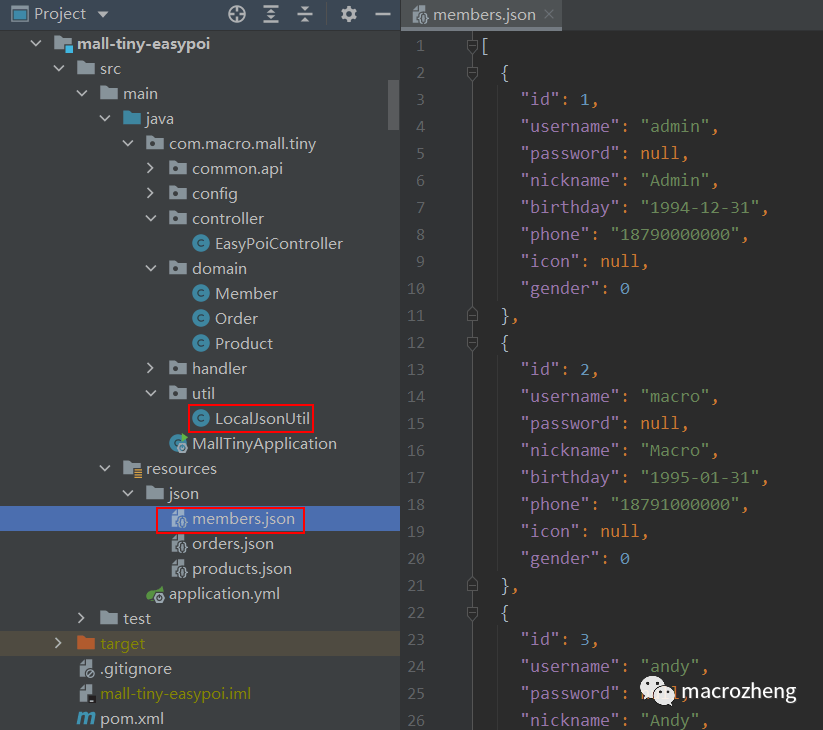
LocalJsonUtil工具類(lèi),可以直接從resources目錄下獲取JSON數(shù)據(jù)并轉(zhuǎn)化為對(duì)象,例如此處使用的 members.json;
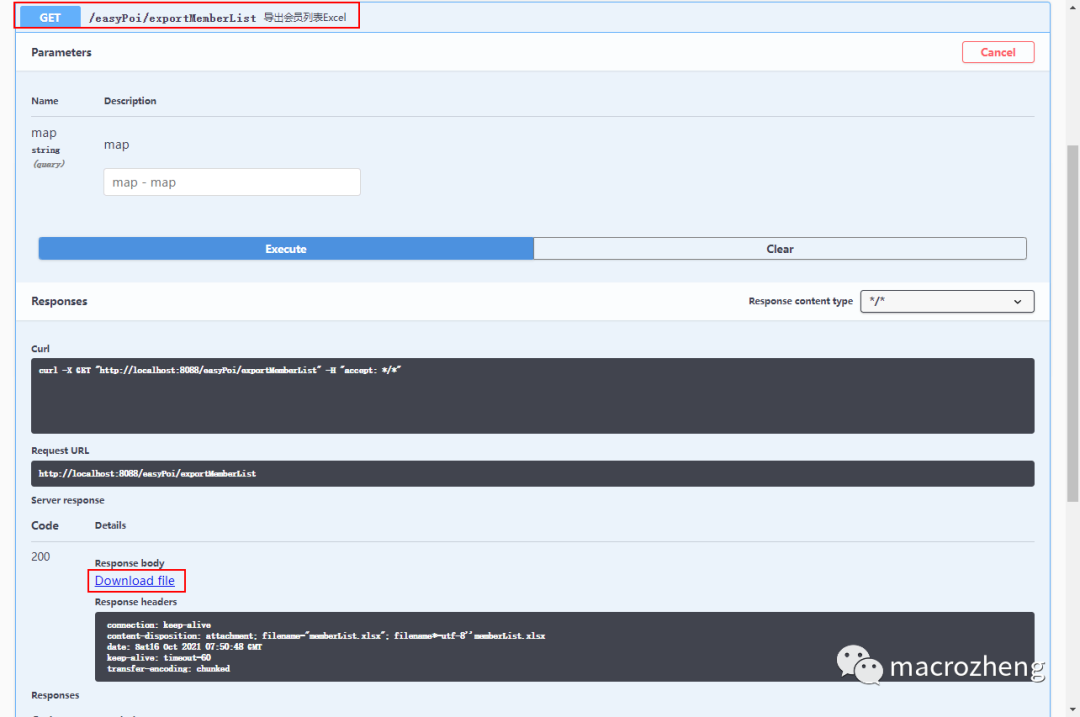
運(yùn)行項(xiàng)目,直接通過(guò)Swagger訪(fǎng)問(wèn)接口,注意在Swagger中訪(fǎng)問(wèn)接口無(wú)法直接下載,需要點(diǎn)擊返回結(jié)果中的下載按鈕才行,訪(fǎng)問(wèn)地址:http://localhost:8088/swagger-ui/
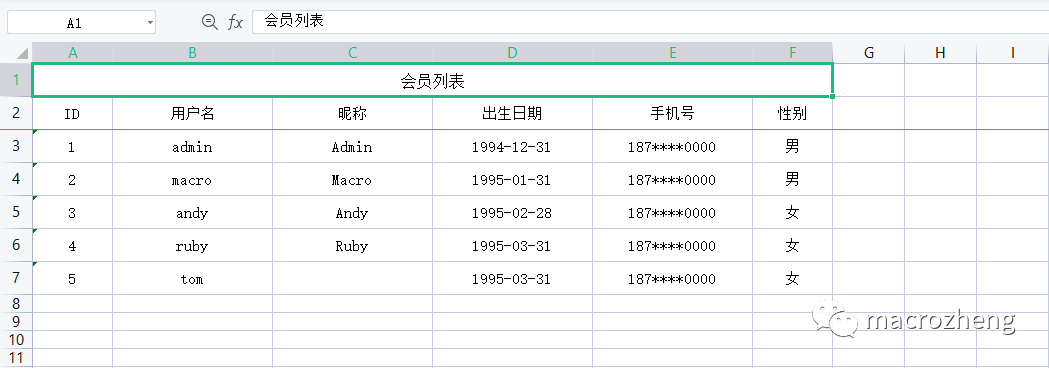
下載完成后,查看下文件,一個(gè)標(biāo)準(zhǔn)的Excel文件已經(jīng)被導(dǎo)出了。
簡(jiǎn)單導(dǎo)入
導(dǎo)入功能實(shí)現(xiàn)起來(lái)也非常簡(jiǎn)單,下面以會(huì)員信息列表的導(dǎo)入為例。
在Controller中添加會(huì)員信息導(dǎo)入的接口,這里需要注意的是使用 @RequestPart注解修飾文件上傳參數(shù),否則在Swagger中就沒(méi)法顯示上傳按鈕了;
/**
?*?EasyPoi導(dǎo)入導(dǎo)出測(cè)試Controller
?*?Created?by?macro?on?2021/10/12.
?*/
@Controller
@Api(tags?=?"EasyPoiController",?description?=?"EasyPoi導(dǎo)入導(dǎo)出測(cè)試")
@RequestMapping("/easyPoi")
public?class?EasyPoiController?{

????@ApiOperation("從Excel導(dǎo)入會(huì)員列表")
????@RequestMapping(value?=?"/importMemberList",?method?=?RequestMethod.POST)
????@ResponseBody
????public?CommonResult?importMemberList(@RequestPart("file")?MultipartFile?file)?{
????????ImportParams?params?=?new?ImportParams();
????????params.setTitleRows(1);
????????params.setHeadRows(1);
????????try?{
????????????List?list?=?ExcelImportUtil.importExcel(
????????????????????file.getInputStream(),
????????????????????Member.class,?params);
????????????return?CommonResult.success(list);
????????}?catch?(Exception?e)?{
????????????e.printStackTrace();
????????????return?CommonResult.failed("導(dǎo)入失敗!");
????????}
????}
}
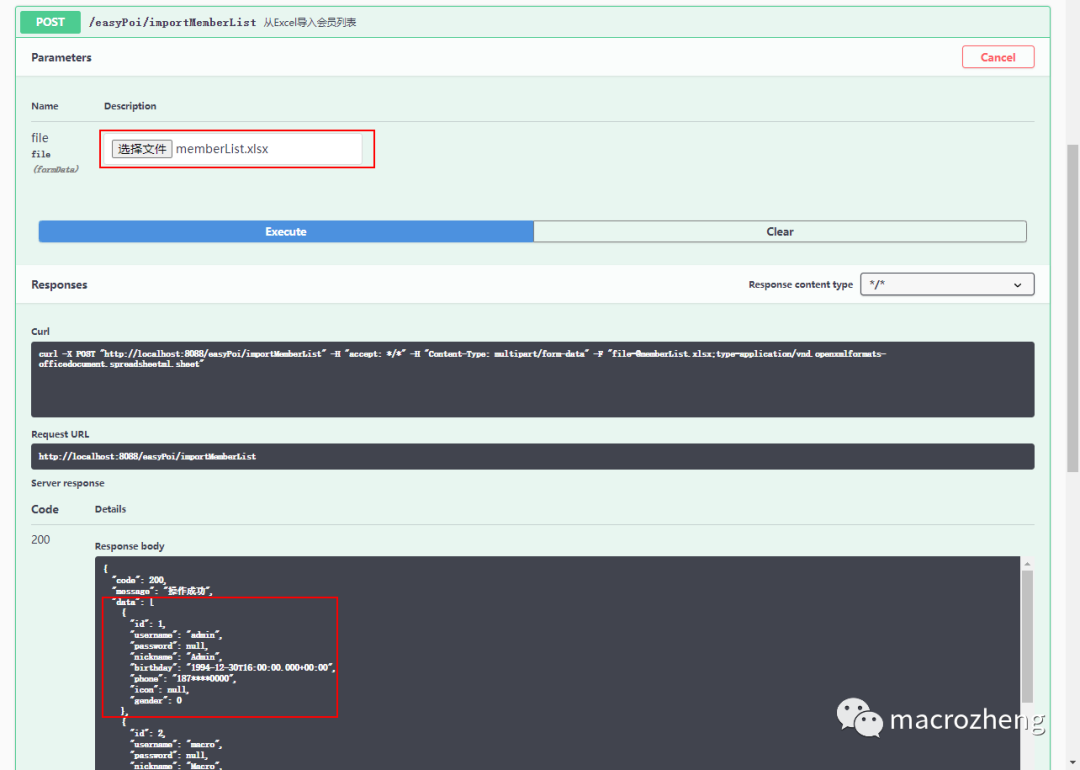
然后在Swagger中測(cè)試接口,選擇之前導(dǎo)出的Excel文件即可,導(dǎo)入成功后會(huì)返回解析到的數(shù)據(jù)。
復(fù)雜導(dǎo)出
當(dāng)然EasyPoi也可以實(shí)現(xiàn)更加復(fù)雜的Excel操作,比如導(dǎo)出一個(gè)嵌套了會(huì)員信息和商品信息的訂單列表,下面我們來(lái)實(shí)現(xiàn)下!
首先添加商品對(duì)象 Product,用于封裝商品信息;
/**
?*?商品
?*?Created?by?macro?on?2021/10/12.
?*/
@Data
@EqualsAndHashCode(callSuper?=?false)
public?class?Product?{
????@Excel(name?=?"ID",?width?=?10)
????private?Long?id;
????@Excel(name?=?"商品SN",?width?=?20)
????private?String?productSn;
????@Excel(name?=?"商品名稱(chēng)",?width?=?20)
????private?String?name;
????@Excel(name?=?"商品副標(biāo)題",?width?=?30)
????private?String?subTitle;
????@Excel(name?=?"品牌名稱(chēng)",?width?=?20)
????private?String?brandName;
????@Excel(name?=?"商品價(jià)格",?width?=?10)
????private?BigDecimal?price;
????@Excel(name?=?"購(gòu)買(mǎi)數(shù)量",?width?=?10,?suffix?=?"件")
????private?Integer?count;
}
然后添加訂單對(duì)象 Order,訂單和會(huì)員是一對(duì)一關(guān)系,使用@ExcelEntity注解表示,訂單和商品是一對(duì)多關(guān)系,使用@ExcelCollection注解表示,Order就是我們需要導(dǎo)出的嵌套訂單數(shù)據(jù);
/**
?*?訂單
?*?Created?by?macro?on?2021/10/12.
?*/
@Data
@EqualsAndHashCode(callSuper?=?false)
public?class?Order?{
????@Excel(name?=?"ID",?width?=?10,needMerge?=?true)
????private?Long?id;
????@Excel(name?=?"訂單號(hào)",?width?=?20,needMerge?=?true)
????private?String?orderSn;
????@Excel(name?=?"創(chuàng)建時(shí)間",?width?=?20,?format?=?"yyyy-MM-dd?HH:mm:ss",needMerge?=?true)
????private?Date?createTime;
????@Excel(name?=?"收貨地址",?width?=?20,needMerge?=?true?)
????private?String?receiverAddress;
????@ExcelEntity(name?=?"會(huì)員信息")
????private?Member?member;
????@ExcelCollection(name?=?"商品列表")
????private?List?productList;
}
接下來(lái)在Controller中添加導(dǎo)出訂單列表的接口,由于有些會(huì)員信息我們不需要導(dǎo)出,可以調(diào)用 ExportParams中的setExclusions方法排除掉;
/**
?*?EasyPoi導(dǎo)入導(dǎo)出測(cè)試Controller
?*?Created?by?macro?on?2021/10/12.
?*/
@Controller
@Api(tags?=?"EasyPoiController",?description?=?"EasyPoi導(dǎo)入導(dǎo)出測(cè)試")
@RequestMapping("/easyPoi")
public?class?EasyPoiController?{

????@ApiOperation(value?=?"導(dǎo)出訂單列表Excel")
????@RequestMapping(value?=?"/exportOrderList",?method?=?RequestMethod.GET)
????public?void?exportOrderList(ModelMap?map,
????????????????????????????????HttpServletRequest?request,
????????????????????????????????HttpServletResponse?response)?{
????????List?orderList?=?getOrderList();
????????ExportParams?params?=?new?ExportParams("訂單列表",?"訂單列表",?ExcelType.XSSF);
????????//導(dǎo)出時(shí)排除一些字段
????????params.setExclusions(new?String[]{"ID",?"出生日期",?"性別"});
????????map.put(NormalExcelConstants.DATA_LIST,?orderList);
????????map.put(NormalExcelConstants.CLASS,?Order.class);
????????map.put(NormalExcelConstants.PARAMS,?params);
????????map.put(NormalExcelConstants.FILE_NAME,?"orderList");
????????PoiBaseView.render(map,?request,?response,?NormalExcelConstants.EASYPOI_EXCEL_VIEW);
????}
}
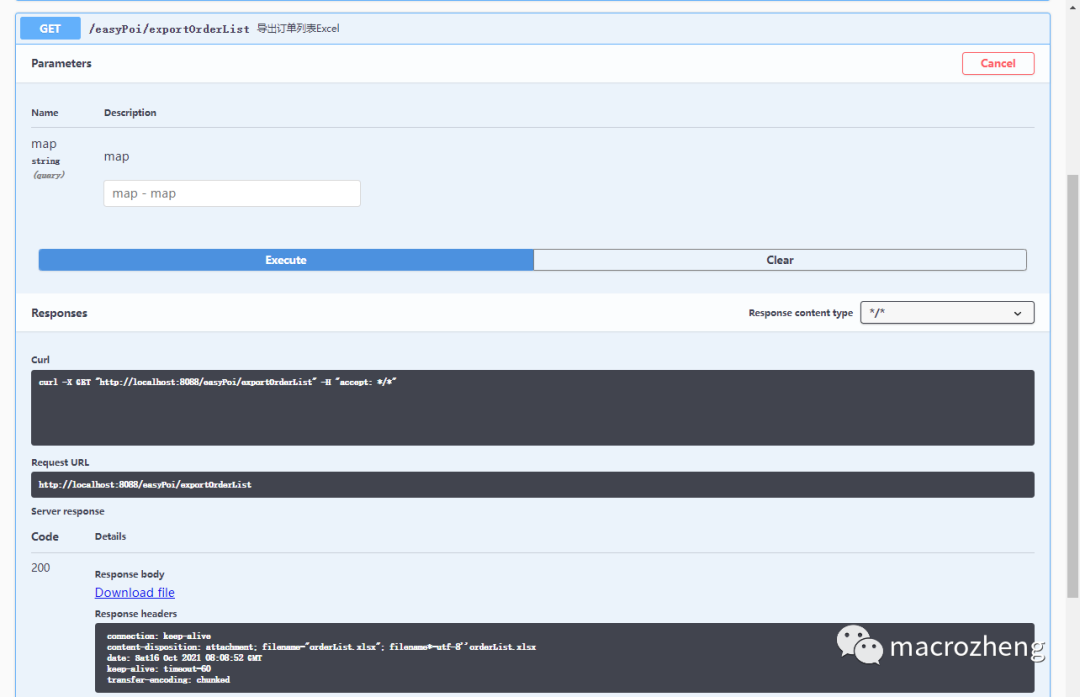
在Swagger中訪(fǎng)問(wèn)接口測(cè)試,導(dǎo)出訂單列表對(duì)應(yīng)Excel;
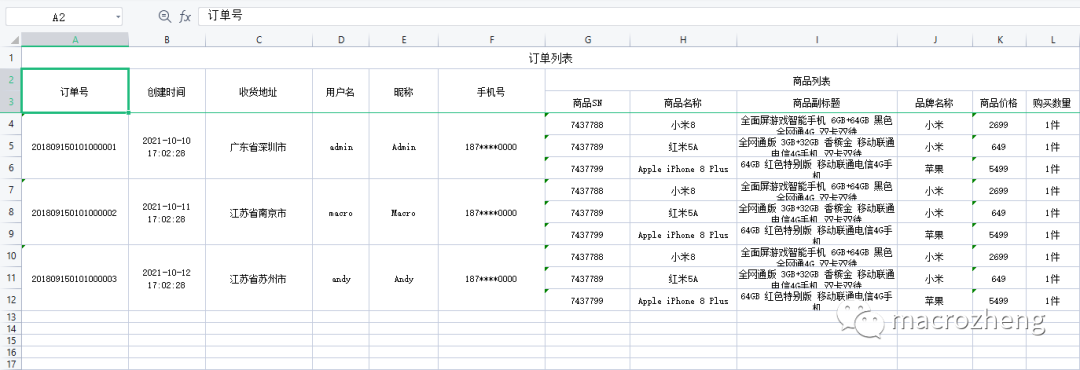
下載完成后,查看下文件,EasyPoi導(dǎo)出復(fù)雜的Excel也是很簡(jiǎn)單的!
自定義處理
如果你想對(duì)導(dǎo)出字段進(jìn)行一些自定義處理,EasyPoi也是支持的,比如在會(huì)員信息中,如果用戶(hù)沒(méi)有設(shè)置昵稱(chēng),我們添加下 暫未設(shè)置信息。
我們需要添加一個(gè)處理器繼承默認(rèn)的 ExcelDataHandlerDefaultImpl類(lèi),然后在exportHandler方法中實(shí)現(xiàn)自定義處理邏輯;
/**
?*?自定義字段處理
?*?Created?by?macro?on?2021/10/13.
?*/
public?class?MemberExcelDataHandler?extends?ExcelDataHandlerDefaultImpl<Member>?{

??@Override
??public?Object?exportHandler(Member?obj,?String?name,?Object?value)?{
????if("昵稱(chēng)".equals(name)){
??????String?emptyValue?=?"暫未設(shè)置";
??????if(value==null){
????????return?super.exportHandler(obj,name,emptyValue);
??????}
??????if(value?instanceof?String&&StrUtil.isBlank((String)?value)){
????????return?super.exportHandler(obj,name,emptyValue);
??????}
????}
????return?super.exportHandler(obj,?name,?value);
??}

??@Override
??public?Object?importHandler(Member?obj,?String?name,?Object?value)?{
????return?super.importHandler(obj,?name,?value);
??}
}
然后修改Controller中的接口,調(diào)用 MemberExcelDataHandler處理器的setNeedHandlerFields設(shè)置需要自定義處理的字段,并調(diào)用ExportParams的setDataHandler設(shè)置自定義處理器;
/**
?*?EasyPoi導(dǎo)入導(dǎo)出測(cè)試Controller
?*?Created?by?macro?on?2021/10/12.
?*/
@Controller
@Api(tags?=?"EasyPoiController",?description?=?"EasyPoi導(dǎo)入導(dǎo)出測(cè)試")
@RequestMapping("/easyPoi")
public?class?EasyPoiController?{

????@ApiOperation(value?=?"導(dǎo)出會(huì)員列表Excel")
????@RequestMapping(value?=?"/exportMemberList",?method?=?RequestMethod.GET)
????public?void?exportMemberList(ModelMap?map,
?????????????????????????????????HttpServletRequest?request,
?????????????????????????????????HttpServletResponse?response)?{
????????List?memberList?=?LocalJsonUtil.getListFromJson("json/members.json",?Member.class);
????????ExportParams?params?=?new?ExportParams("會(huì)員列表",?"會(huì)員列表",?ExcelType.XSSF);
????????//對(duì)導(dǎo)出結(jié)果進(jìn)行自定義處理
????????MemberExcelDataHandler?handler?=?new?MemberExcelDataHandler();
????????handler.setNeedHandlerFields(new?String[]{"昵稱(chēng)"});
????????params.setDataHandler(handler);
????????map.put(NormalExcelConstants.DATA_LIST,?memberList);
????????map.put(NormalExcelConstants.CLASS,?Member.class);
????????map.put(NormalExcelConstants.PARAMS,?params);
????????map.put(NormalExcelConstants.FILE_NAME,?"memberList");
????????PoiBaseView.render(map,?request,?response,?NormalExcelConstants.EASYPOI_EXCEL_VIEW);
????}
}
再次調(diào)用導(dǎo)出接口,我們可以發(fā)現(xiàn)昵稱(chēng)已經(jīng)添加默認(rèn)設(shè)置了。

?
總結(jié)
參考資料
項(xiàng)目官網(wǎng):https://gitee.com/lemur/easypoi
項(xiàng)目源碼地址
https://github.com/macrozheng/mall-learning/tree/master/mall-tiny-easypoi
有道無(wú)術(shù),術(shù)可成;有術(shù)無(wú)道,止于術(shù)
歡迎大家關(guān)注Java之道公眾號(hào)
好文章,我在看??