
Elasticsearch 搜索引擎基礎(chǔ)知識(shí):文檔、索引和 REST API

前幾天寫過一篇《Elasticsearch 7.x 最詳細(xì)安裝及配置》,今天繼續(xù)最新版基礎(chǔ)入門內(nèi)容。這一篇簡(jiǎn)單總結(jié)了 Elasticsearch 7.x 之文檔、索引和 REST API。
什么是文檔
文檔Unique ID
文檔元數(shù)據(jù)
什么是索引
REST API
一、索引文檔(Document)
1.1 白話什么是文檔
從使用案例出發(fā),Elasticsearch 是面向文檔,文檔是所有搜索數(shù)據(jù)的最小單元。
案例一:每個(gè)公司都有業(yè)務(wù)日志平臺(tái),比如交易業(yè)務(wù)日志。 文檔:每一條日志文件中的日志項(xiàng),就是文檔
案例二:可以搜索并播放電影的在線視頻網(wǎng)站 文檔:每一個(gè)電影的具體信息,就是文檔
案例三:可以搜索并下載文件的云存儲(chǔ)網(wǎng)站,類似百度云 文檔:每一個(gè)文件具體內(nèi)容信息,就是文檔
等等案例很多,那么文檔就是類似數(shù)據(jù)庫里面的一條長(zhǎng)長(zhǎng)的存儲(chǔ)記錄。文檔(Document)是索引信息的基本單位。
文檔被序列化成為 JSON 格式,物理保存在一個(gè)索引中。JSON 是一種常見的互聯(lián)網(wǎng)數(shù)據(jù)交換格式:
文檔字段名:JSON 格式由 name/value pairs 組成,對(duì)應(yīng)的 name 就是文檔字段名
文檔字段類型:每個(gè)字段都有對(duì)應(yīng)的字段類型:String、integer、long 等,并支持?jǐn)?shù)據(jù)&嵌套
1.2 文檔的 Unique ID
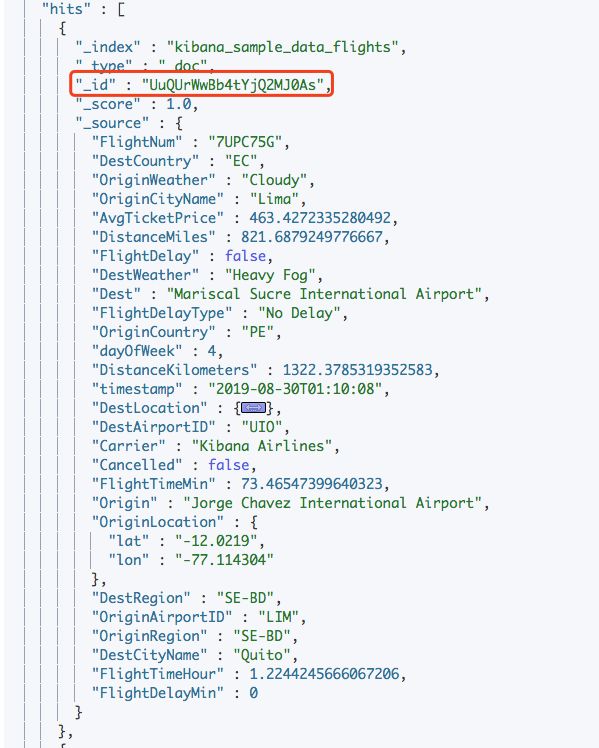
每個(gè)文檔都會(huì)有一個(gè) Unique ID,其字段名稱為 _id :
自行設(shè)置指定 ID 或通過 Elasticsearch 自動(dòng)生成
其值不會(huì)被索引
注意:該 _id 字段的值可以在某些查詢 term, terms, match, query_string, simple_query_string 等中訪問,但不能在 aggregations,scripts 或 sorting 中使用。如果需要對(duì) _id 字段進(jìn)行排序或匯總,建議新建一個(gè)文檔字段復(fù)制 _id 字段的內(nèi)容
PUT my_index/_doc/1
{
  "text": "Document with ID 1"
}

PUT my_index/_doc/2&refresh=true
{
  "text": "Document with ID 2"
}

GET my_index/_search
{
  "query": {
    "terms": {
      "_id": [ "1", "2" ]
    }
  }
}
1.3 文檔元數(shù)據(jù)
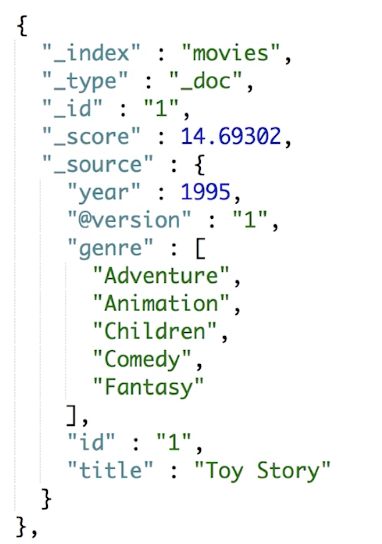
元數(shù)據(jù)是用于標(biāo)注文檔的相關(guān)信息,那么索引文檔的元數(shù)據(jù)如下:
_index 文檔所屬索引名稱
_type 文檔所屬類型名
_id 文檔唯一 ID
_score 文檔相關(guān)性打分
_source 文檔 JSON 數(shù)據(jù)
_version 文檔版本信息
其中 _type 文檔所屬類型名,需要關(guān)注版本不同之間區(qū)別:
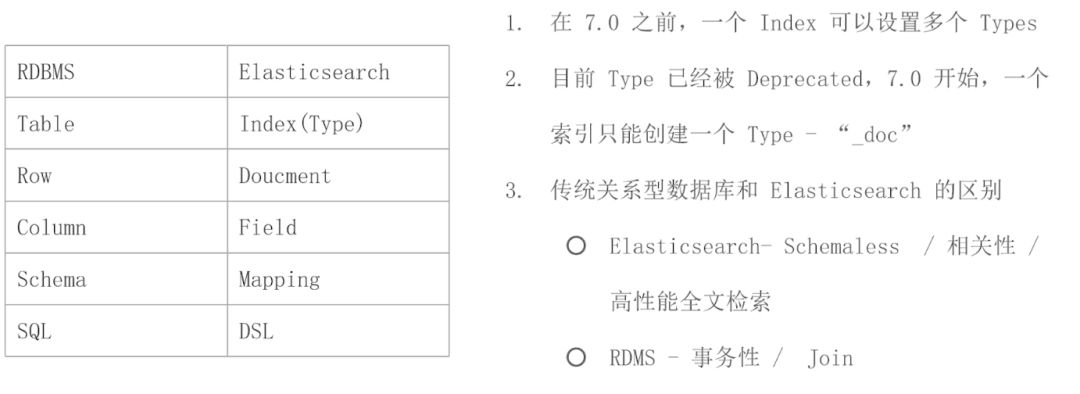
7.0 之前,一個(gè)索引可以設(shè)置多個(gè) types
7.0 開始,被 Deprecated 了。一個(gè)索引只能創(chuàng)建一個(gè) type,值為 _doc
二、索引(Index)
2.1 索引不同意思
作為名詞,索引代表是在 Elasticsearch 集群中,可以創(chuàng)建很多不同索引。也是本小節(jié)要總結(jié)的內(nèi)容。
作為動(dòng)詞,索引代表保存一個(gè)文檔到 Elasticsearch。就是在 Elasticsearch 創(chuàng)建一個(gè)倒排索引的意思
2.2 什么是索引
索引,就是相似類型文檔的集合。類似 Spring Bean 容器裝載著很多 Bean ,ES 索引就是文檔的容器,是一類文檔的集合。
以前導(dǎo)入了 kibana_sample_data_flights 索引,通過 GET 下面這個(gè) URL ,就能得到索引一些信息:
GET http://localhost:9200/kibana_sample_data_flights
結(jié)果如下:
{
    "kibana_sample_data_flights": {
        "aliases": {},
        "mappings": {
            "properties": {
                "AvgTicketPrice": {
                    "type": "float"
                },
                "Cancelled": {
                    "type": "boolean"
                },
                "Carrier": {
                    "type": "keyword"
                },
                "DestLocation": {
                    "type": "geo_point"
                },
                "FlightDelay": {
                    "type": "boolean"
                },
                "FlightDelayMin": {
                    "type": "integer"
                },
                "timestamp": {
                    "type": "date"
                }
            }
        },
        "settings": {
            "index": {
                "number_of_shards": "1",
                "auto_expand_replicas": "0-1",
                "blocks": {
                    "read_only_allow_delete": "true"
                },
                "provided_name": "kibana_sample_data_flights",
                "creation_date": "1566271868125",
                "number_of_replicas": "0",
                "uuid": "SfR20UNiSLKJWIpR1bcrzQ",
                "version": {
                    "created": "7020199"
                }
            }
        }
    }
}
根據(jù)返回結(jié)果,我們知道:
mappings:定義文檔字段的類型
settings:定義不同數(shù)據(jù)分布
aliases:定義索引的別名,可以通過別名訪問該索引
索引,是邏輯空間概念,每個(gè)索引有對(duì)那個(gè)的 Mapping 定義,對(duì)應(yīng)的就是文檔的字段名和字段類型。相比后面會(huì)講到分片,是物理空間概念,索引中存儲(chǔ)數(shù)據(jù)會(huì)分散到分片上。
實(shí)戰(zhàn)經(jīng)驗(yàn)總結(jié):aliases 別名大有作為,比如 my_index 遷移到 my_index_new , 數(shù)據(jù)遷移后,只需要保持一致的別名配置。那么通過別名訪問索引的業(yè)務(wù)方都不需要修改,直接遷移即可。
2.3 跟 MySQL 類比
基本理解了 Elasticsearch 重要的兩個(gè)概念,可以將 ES 關(guān)鍵點(diǎn)跟關(guān)系型數(shù)據(jù)庫類比如下:
三、REST API 方便 ES 被各種語言調(diào)用

如圖,Elasticsearch 提供了 REST API,方便,相關(guān)索引 API 如下:
# 查看索引相關(guān)信息
GET kibana_sample_data_ecommerce

# 查看索引的文檔總數(shù)
GET kibana_sample_data_ecommerce/_count

# 查看前10條文檔,了解文檔格式
POST kibana_sample_data_ecommerce/_search
{
}

# _cat indices API
# 查看indices
GET /_cat/indices/kibana*?v&s=index

# 查看狀態(tài)為綠的索引
GET /_cat/indices?v&health=green

# 按照文檔個(gè)數(shù)排序
GET /_cat/indices?v&s=docs.count:desc

# 查看具體的字段
GET /_cat/indices/kibana*?pri&v&h=health,index,pri,rep,docs.count,mt

# How much memory is used per index?
GET /_cat/indices?v&h=i,tm&s=tm:desc
具體 API 可以通過 POSTMan 等工具操作,或者安裝 kibana ,對(duì)應(yīng)的 Dev Tools 工具進(jìn)行訪問。
(完),更多可以看 ES 7.x 系列教程 bysocket.com
資料:
Elasticsearch 7.x 最詳細(xì)安裝及配置 https://www.bysocket.com/elasticsearch/2417.html
極客時(shí)間 Elasticsearch核心技術(shù)與實(shí)戰(zhàn)
CAT Index API https://www.elastic.co/guide/en/elasticsearch/reference/7.1/cat-indices.html
為什么不再支持單個(gè)Index下,多個(gè)Tyeps https://www.elastic.co/cn/blog/moving-from-types-to-typeless-apis-in-elasticsearch-7-0
OW,文章樣式通過 openwrite.cn 免費(fèi)轉(zhuǎn)換得到~