
五十二、GUI布局tkinter完善Python小項目
「@Author:Runsen」
本次 Python 小項目主要功能:調(diào)用電腦攝像頭實現(xiàn)拍照,并使用百度 API 接口實現(xiàn)圖像識別。
上次完成了API的封裝,這次完成GUI的布局。具體成品如下所示。
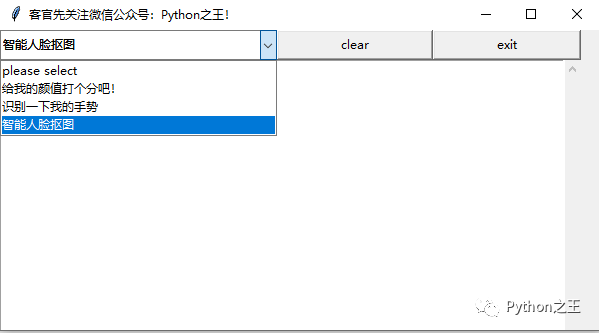
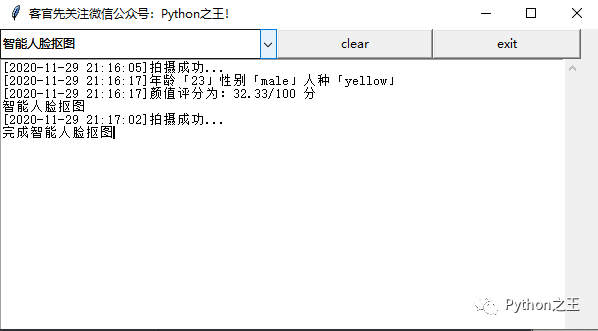
拍照保存圖片采用的是opencv中的imwrite方法,具體的示例查看上上篇文章。
Tkinter 布局邏輯中最推薦使用的Grid布局。實現(xiàn)機制是將Widget邏輯上分割成表格,在指定的位置放置想要的Widget就可以了。
Grid布局參數(shù)說明
| 參數(shù) | 作用 |
|---|---|
| column? | 指定組件插入的列(0 表示第 1 列) 默認值是 0 |
| columnspan? | 指定用多少列(跨列)顯示該組件 |
| row? | 指定組件插入的行(0 表示第 1 行) |
| rowspan? | 指定用多少行(跨行)顯示該組件 |
| in_ | 將該組件放到該選項指定的組件中 指定的組件必須是該組件的父組件 |
| ipadx?? | 水平方向上的內(nèi)邊距 |
| ipady?? | 垂直方向上的內(nèi)邊距 |
| padx? | 水平方向上的外邊距 |
| pady? | 垂直方向上的外邊距 |
| sticky? | 控制組件在 grid 分配的空間中的位置 可以使用 "n", "e", "s", "w" 以及它們的組合來定位(ewsn代表東西南北,上北下南左西右東) 使用加號(+)表示拉長填充,例如 "n" + "s" 表示將組件垂直拉長填充網(wǎng)格,"n" + "s" + "w" + "e" 表示填充整個網(wǎng)格 不指定該值則居中顯示選項 含義 |
具體main.py代碼如下。
"""
@Author:Runsen
@WeChat:RunsenLiu
@微信公眾號:Python之王
@CSDN:https://blog.csdn.net/weixin_44510615
@Github:https://github.com/MaoliRUNsen
@Date:2020/11/29
"""
import?time
import?cv2?as?cv??#?pip?install?opencv-python
import?tkinter?as?tk
from?tkinter?import?ttk??#?下拉框依賴庫
from?tkinter?import?scrolledtext??#?滾動文本框依賴庫
from?tkinter?import?N,E,S,W
#?引入Baidu_API類?(上次文章)
from?baidu_api?import?Baidu_API
#?拍照
def?take_a_photo():
????#?調(diào)用筆記本內(nèi)置攝像頭,所以參數(shù)為0,如果有其他的攝像頭可以調(diào)整參數(shù)為1,2
????cap?=?cv.VideoCapture(0)
????img_path?=?str(int(time.time()))?+?'.jpg'
????while?True:
????????#?從攝像頭讀取圖片
????????sucess,?img?=?cap.read()
????????#?轉(zhuǎn)為灰度圖片
????????#?gray?=?cv.cvtColor(img,?cv.COLOR_BGR2GRAY)#
????????#?顯示攝像頭
????????cv.imshow('----------please?enter?"s"?to?take?a?picture----------',?img)
????????#?保持畫面的持續(xù),無限期等待輸入
????????k?=?cv.waitKey(1)
????????if?k?==?27:
????????????#?通過esc鍵退出攝像
????????????cv.destroyAllWindows()
????????????break
????????elif?k?==?ord("s"):
????????????#?通過s鍵保存圖片,并退出。
????????????cv.imwrite(img_path,?img)
????????????cv.destroyAllWindows()
????????????break
????#?關(guān)閉攝像頭
????cap.release()
????#?打印日志
????scr.insert(tk.END,?'[{}]拍攝成功...\n'.format(time.strftime('%Y-%m-%d?%H:%M:%S')))
????#?返回圖像
????return?img_path
#?----------圖形界面各個組件功能的設(shè)計----------
#?清除窗口日志
def?clear_the_window():
????scr.delete(1.0,?tk.END)
#?退出軟件
def?exit():
????win.quit()
#?下拉框選項選擇
def?select_ttk(event):
????global?numberChosen
????#?顏值評分
????if?numberChosen.current()?==?1:
????????#?獲取圖像
????????img_path?=?take_a_photo()
????????try:
????????????#?向API發(fā)送圖像并獲取信息
????????????score,?age,?gender,?race?=?Baidu_API().face_detect(img_path=img_path)
????????????#?打印日志
????????????scr.insert(tk.END,?'[{}]年齡「{}」性別「{}」人種「{}」\n'.format(time.strftime('%Y-%m-%d?%H:%M:%S'),?age,?gender,?race))
????????????scr.insert(tk.END,?'[{}]顏值評分為:{}/100?分\n'.format(time.strftime('%Y-%m-%d?%H:%M:%S'),?score))
????????except:
????????????scr.insert(tk.END,?'[{}]{}'.format(time.strftime(time.strftime('%Y-%m-%d?%H:%M:%S')),
???????????????????????????????????????????????Baidu_API().face_detect(img_path=img_path)))
????#?手勢識別
????if?numberChosen.current()?==?2:
????????scr.insert(tk.END,?'[{}]請將您的手勢放置攝像頭前...\n'.format(time.strftime('%Y-%m-%d?%H:%M:%S')))
????????time.sleep(0.1)
????????img_path?=?take_a_photo()
????????try:
????????????classname_en,?classname_zh?=?Baidu_API().gesture(img_path=img_path)
????????????scr.insert(tk.END,
???????????????????????'[{}]手勢大意:{}({})\n'.format(time.strftime('%Y-%m-%d?%H:%M:%S'),?classname_zh,?classname_en))
????????except:
????????????scr.insert(tk.END,
???????????????????????'[{}]{}\n'.format(time.strftime('%Y-%m-%d?%H:%M:%S'),?Baidu_API().gesture(img_path=img_path)))
????#?智能人臉摳圖
????if?numberChosen.current()?==?3:
????????scr.insert(tk.END,?'智能人臉摳圖\n'.format(time.strftime('%Y-%m-%d?%H:%M:%S')))
????????img_path?=?take_a_photo()
????????out_path?=?str(int(time.time()))?+?'.jpg'
????????try:
????????????Baidu_API().body_seg(img_path=img_path,?out_path=out_path)
????????????scr.insert(tk.END,?'完成智能人臉摳圖')
????????except:
????????????scr.insert(tk.END,?'[{}]{}\n'.format(time.strftime('%Y-%m-%d?%H:%M:%S'),
?????????????????????????????????????????????????Baidu_API().body_seg(img_path=img_path,?out_path=None)))
#?-------------創(chuàng)建窗口--------------
win?=?tk.Tk()
win.title('客官先關(guān)注微信公眾號:Python之王!')
win.geometry('600x300')
#?------------窗口組件設(shè)計-----------
# grid中的參數(shù):column, columnspan, in, ipadx, ipady, padx, pady, row, rowspan,sticky
#?下拉框組件
number?=?tk.StringVar
numberChosen?=?ttk.Combobox(win,?textvariable=number)
numberChosen['value']?=?('please?select',?'給我的顏值打個分吧!',?'識別一下我的手勢',?'智能人臉摳圖')
numberChosen.current(0)??#?設(shè)置默認值為第一個,即默認下拉框中的內(nèi)容
numberChosen.grid(row=1,?column=1,?rowspan=1,?sticky=N?+?E?+?S?+?W)
#?下拉框觸發(fā)動作?(綁定點擊事件)
numberChosen.bind('<>' ,?select_ttk)
#?清除按鈕組件
tk.Button(win,?cnf={'text':?'clear',?'command':?clear_the_window}).grid(row=1,?column=2,?ipadx=1,?sticky=N?+?E?+?S?+?W)
#?退出按鈕組件
tk.Button(win,?cnf={'text':?'exit',?'command':?exit}).grid(row=1,?column=3,?ipadx=1,?sticky=N?+?E?+?S?+?W)
#?滾動文本框組件
scr?=?scrolledtext.ScrolledText(win)
scr.grid(row=2,?column=1,?columnspan=3,?rowspan=1)
#?使窗口一直顯示
win.mainloop()
最后使用Pyinstaller打包即可。
Java 一次編譯到處運行,Python沒有這么好本事,Python有一個pyinstaller可以打包exe,在window平臺下運行,這也是Python非常不好的方面,而且打包出來的占用內(nèi)存非常的大
安裝:pip install pyinstaller。Pyinstaller具體參數(shù)如下所示。
| 參數(shù) | 含 義 |
|---|---|
| -F | 只生成一個exe文件 |
| –distpath | 指定生成的exe存放的目錄 |
| –workpath | 指定編譯中臨時文件存放的目錄 |
| -i | 創(chuàng)建一個目錄包含:exe文件、依賴文件 |
| –icon= | 指定exe圖標(biāo) |
| -p | 指定exe依賴的包、模塊 |
| -d | 編譯為debug模式,獲取運行中的日志信息 |
| -clean | 清理編譯時臨時文件 |
| -c | 使用控制臺 |
| -w | 使用窗口 |
| -version-file | 添加exe版本信息 |
注意點:有的時候在代碼最后面加上input(),這樣打開exe不會一散而過。由于上面代碼本身就是窗口一直顯示,無需加上input()。
在打包時候,并沒有提示錯誤,可以順利打包成 exe 文件。但是在運行打包好的軟件時,會提示找不到模塊,本人遇到的是找不到第三方模塊,例如 cv2 ?。這時候需要在打包時指定 -p 參數(shù),后面跟上 python 目錄下的第三方庫模板目錄路徑 site-packages ,再打包就成功了。
cd 到代碼的目錄執(zhí)行 pyinstaller main.py -F -p F:\anaconda\Lib\site-packages
如果Pyinstaller打包報錯numpy.core.multiarray failed to import,這是numpy和opencv的不兼容,可以降低numpy的版本。
具體代碼在微信公眾號:Python之王。回復(fù):tkinter
?本文已收錄 GitHub,傳送門~[1] ,里面更有大廠面試完整考點,歡迎 Star。
?
Reference
傳送門~: https://github.com/MaoliRUNsen/runsenlearnpy100
更多的文章
點擊下面小程序

- END -