
你不知道的Vue.nextTick
下方點贊留言的粉絲抽取 2 位免費領(lǐng)取《Vue.js從入門到項目實戰(zhàn)(升級版)》1本(包郵)。推薦理由:開發(fā)理論與編碼實踐結(jié)合,讓你不僅學有所成,更能學以致用!贈送
今晚9點開獎,一切說明本小編說了算。
作者:井柏然
https://juejin.cn/post/7077181211029798942
用過Vue的朋友多多少少都知道
$nextTick~ 在正式講解nextTick之前,我想你應(yīng)該清楚知道 Vue 在更新 DOM 時是異步執(zhí)行的,因為接下來講解過程會結(jié)合組件更新一起講~ 事不宜遲,我們直進主題吧(本文以v2.6.14版本的Vue源碼進行講解)
一、nextTick小測試
你真的了解nextTick嗎?來,直接上題~
<template>
  <div id="app">
    <p ref="name">{{ name }}</p>
    <button @click="handleClick">修改name</button>
  </div>
</template>

<script>
  export default {
  name: 'App',
  data () {
    return {
      name: '井柏然'
    }
  },
  mounted() {
    console.log('mounted', this.$refs.name.innerText)
  },
  methods: {
    handleClick () {
      this.$nextTick(() => console.log('nextTick1', this.$refs.name.innerText))
      this.name = 'jngboran'
      console.log('sync log', this.$refs.name.innerText)
      this.$nextTick(() => console.log('nextTick2', this.$refs.name.innerText))
    }
  }
}
</script>
復(fù)制代碼
請問上述代碼中,當點擊按鈕“修改name”時,'nextTick1','sync log','nextTick2'對應(yīng)的this.$refs.name.innerText分別會輸出什么?注意,這里打印的是DOM的innerText~(文章結(jié)尾處會貼出答案)
如果此時的你有非常堅定的答案,那你可以不用繼續(xù)往下看了~但如果你對自己的答案有所顧慮,那不如跟著我,接著往下看。相信你看完,不需要看到答案都能有個肯定的答案了~!
二、nextTick源碼實現(xiàn)
源碼位于core/util/next-tick中。可以將其分為4個部分來看,直接上代碼
1. 全局變量
callbacks隊列、pending狀態(tài)
const callbacks = [] // 存放cb的隊列
let pending = false // 是否馬上遍歷隊列,執(zhí)行cb的標志
復(fù)制代碼
2. flushCallbacks
遍歷callbacks執(zhí)行每個cb
function flushCallbacks () {
  pending = false // 注意這里,一旦執(zhí)行,pending馬上被重置為false
  const copies = callbacks.slice(0)
  callbacks.length = 0
  for (let i = 0; i < copies.length; i++) {
    copies[i]() // 執(zhí)行每個cb
  }
}
復(fù)制代碼
3. nextTick的異步實現(xiàn)
根據(jù)執(zhí)行環(huán)境的支持程度采用不同的異步實現(xiàn)策略
let timerFunc // nextTick異步實現(xiàn)fn

if (typeof Promise !== 'undefined' && isNative(Promise)) {
  // Promise方案
  const p = Promise.resolve()
  timerFunc = () => {
    p.then(flushCallbacks) // 將flushCallbacks包裝進Promise.then中
  }
  isUsingMicroTask = true
} else if (!isIE && typeof MutationObserver !== 'undefined' && (
  isNative(MutationObserver) ||
  MutationObserver.toString() === '[object MutationObserverConstructor]'
)) {
  // MutationObserver方案
  let counter = 1
  const observer = new MutationObserver(flushCallbacks) // 將flushCallbacks作為觀測變化的cb
  const textNode = document.createTextNode(String(counter)) // 創(chuàng)建文本節(jié)點
  // 觀測文本節(jié)點變化
  observer.observe(textNode, {
    characterData: true
  })
  // timerFunc改變文本節(jié)點的data,以觸發(fā)觀測的回調(diào)flushCallbacks
  timerFunc = () => {
    counter = (counter + 1) % 2
    textNode.data = String(counter)
  }
  isUsingMicroTask = true
} else if (typeof setImmediate !== 'undefined' && isNative(setImmediate)) {
  // setImmediate方案
  timerFunc = () => {
    setImmediate(flushCallbacks)
  }
} else {
  // 最終降級方案setTimeout
  timerFunc = () => {
    setTimeout(flushCallbacks, 0)
  }
}
復(fù)制代碼
這里用個真實案例加深對 MutationObserver的理解。畢竟比起其他三種異步方案,這個應(yīng)該是大家最陌生的const observer = new MutationObserver(() => console.log('觀測到文本節(jié)點變化'))
const textNode = document.createTextNode(String(1))
observer.observe(textNode, {
characterData: true
})
console.log('script start')
setTimeout(() => console.log('timeout1'))
textNode.data = String(2) // 這里對文本節(jié)點進行值的修改
console.log('script end')
復(fù)制代碼知道對應(yīng)的輸出會是怎么樣的嗎? script start、script end會在第一輪宏任務(wù)中執(zhí)行,這點沒問題setTimeout會被放入下一輪宏任務(wù)執(zhí)行MutationObserver是微任務(wù),所以會在本輪宏任務(wù)后執(zhí)行,所以先于setTimeout結(jié)果如下圖: 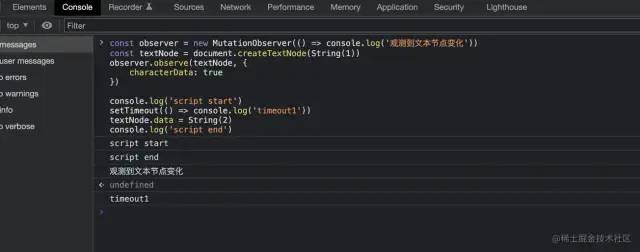
4. nextTick方法實現(xiàn)
cb、Promise方式
export function nextTick (cb?: Function, ctx?: Object) {
  let _resolve
  // 往全局的callbacks隊列中添加cb
  callbacks.push(() => {
    if (cb) {
      try {
        cb.call(ctx)
      } catch (e) {
        handleError(e, ctx, 'nextTick')
      }
    } else if (_resolve) {
      // 這里是支持Promise的寫法
      _resolve(ctx)
    }
  })
  if (!pending) {
    pending = true
    // 執(zhí)行timerFunc,在下一個Tick中執(zhí)行callbacks中的所有cb
    timerFunc()
  }
  // 對Promise的實現(xiàn),這也是我們使用時可以寫成nextTick.then的原因
  if (!cb && typeof Promise !== 'undefined') {
    return new Promise(resolve => {
      _resolve = resolve
    })
  }
}
復(fù)制代碼
深入細節(jié),理解 pending有什么用,如何運作?
案例1,同一輪Tick中執(zhí)行2次`$nextTick`,`timerFunc`只會被執(zhí)行一次
this.$nextTick(() => console.log('nextTick1'))
this.$nextTick(() => console.log('nextTick2'))
復(fù)制代碼
用圖看看更直觀?

三、Vue組件的異步更新
這里如果有對Vue組件化、派發(fā)更新不是十分了解的朋友,可以先戳這里,看圖解Vue響應(yīng)式原理[1]了解下Vue組件化和派發(fā)更新的相關(guān)內(nèi)容再回來看噢~
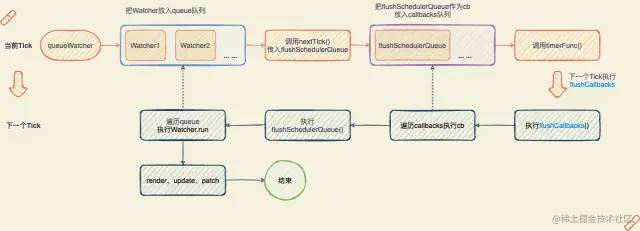
Vue的異步更新DOM其實也是使用nextTick來實現(xiàn)的,跟我們平時使用的$nextTick其實是同一個~
這里我們回顧一下,當我們改變一個屬性值的時候會發(fā)生什么?
 根據(jù)上圖派發(fā)更新過程,我們從watcher.update開時講起,以渲染W(wǎng)atcher為例,進入到
queueWatcher里
1. queueWatcher做了什么?
// 用來存放Wathcer的隊列。注意,不要跟nextTick的callbacks搞混了,都是隊列,但用處不同~
const queue: Array<Watcher> = []

function queueWatcher (watcher: Watcher) {
  const id = watcher.id // 拿到Wathcer的id,這個id每個watcher都有且全局唯一
  if (has[id] == null) {
    // 避免添加重復(fù)wathcer,這也是異步渲染的優(yōu)化做法
    has[id] = true
    if (!flushing) {
      queue.push(watcher)
    }
    if (!waiting) {
      waiting = true
      // 這里把flushSchedulerQueue推進nextTick的callbacks隊列中
      nextTick(flushSchedulerQueue)
    }
  }
}
復(fù)制代碼
2. flushSchedulerQueue做了什么?
function flushSchedulerQueue () {
  currentFlushTimestamp = getNow()
  flushing = true
  let watcher, id
  // 排序保證先父后子執(zhí)行更新,保證userWatcher在渲染W(wǎng)atcher前
  queue.sort((a, b) => a.id - b.id)
  // 遍歷所有的需要派發(fā)更新的Watcher執(zhí)行更新
  for (index = 0; index < queue.length; index++) {
    watcher = queue[index]
    id = watcher.id
    has[id] = null
    // 真正執(zhí)行派發(fā)更新,render -> update -> patch
    watcher.run()
  }
}
復(fù)制代碼
最后,一張圖搞懂組件的異步更新過程
四、回歸題目本身
相信經(jīng)過上文對nextTick源碼的剖析,我們已經(jīng)揭開它神秘的面紗了。這時的你一定可以堅定地把答案說出來了~話不多說,我們一起核實下,看看是不是如你所想!
如圖所示,
mounted時候的innerText是“井柏然”的中文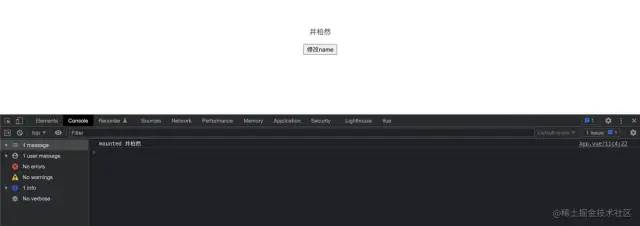
接下來是點擊按鈕后,打印結(jié)果如圖所示

沒錯,輸出結(jié)果如下(意不意外?驚不驚喜?)
sync log 井柏然 nextTick1 井柏然 nextTick2 jngboran 下面簡單分析一下每個輸出:
this.$nextTick(() => console.log('nextTick1', this.$refs.name.innerText))
this.name = 'jngboran'
console.log('sync log', this.$refs.name.innerText)
this.$nextTick(() => console.log('nextTick2', this.$refs.name.innerText))
復(fù)制代碼
sync log:這個同步打印沒什么好說了,相信大部分童鞋的疑問點都不在這里。如果不清楚的童鞋可以先回顧一下EventLoop,這里不多贅述了~nextTick1:注意其雖然是放在$nextTick的回調(diào)中,在下一個tick執(zhí)行,但是他的位置是在this.name = 'jngboran'的前。也就是說,他的cb會比App組件的派發(fā)更新(flushSchedulerQueue)更先進入隊列,當nextTick1打印時,App組件還未派發(fā)更新,所以拿到的還是舊的DOM值。nextTick2就不展開了,大家可以自行分析一下。相信大家對它應(yīng)該是最肯定的,我們平時不就是這樣拿到更新后的DOM嗎?最后來一張圖加深理解
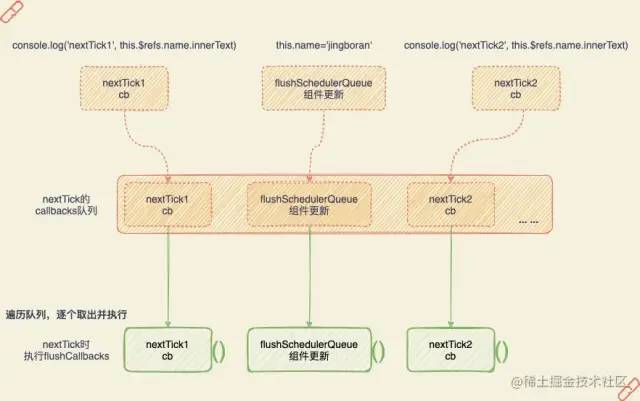
寫在最后,nextTick其實在Vue中也算是比較核心的一個東西了。因為貫穿整個Vue應(yīng)用的組件化、響應(yīng)式的派發(fā)更新與其息息相關(guān)~深入理解nextTick的背后實現(xiàn)原理,不僅能讓你在面試的時候一展風采,更能讓你在日常開發(fā)工作中,少走彎路少踩坑!好了,本文到這里就暫告一段落了,如果讀完能讓你有所收獲,就幫忙點個贊吧~畫圖不易、創(chuàng)作艱辛鴨~