
目標(biāo)檢測(cè)實(shí)戰(zhàn):4種YOLO目標(biāo)檢測(cè)的C++和Python兩種版本實(shí)現(xiàn)

極市導(dǎo)讀
本文作者使用C++編寫一套基于OpenCV的YOLO目標(biāo)檢測(cè),包含了經(jīng)典的YOLOv3,YOLOv4,Yolo-Fastest和YOLObile這4種YOLO目標(biāo)檢測(cè)的實(shí)現(xiàn)。附代碼詳解。 >>加入極市CV技術(shù)交流群,走在計(jì)算機(jī)視覺的最前沿
2020年,新出了幾個(gè)新版本的YOLO目標(biāo)檢測(cè),在微信朋友圈里轉(zhuǎn)發(fā)的最多的有YOLOv4,Yolo-Fastest,YOLObile以及百度提出的PP-YOLO。在此之前,我已經(jīng)在github發(fā)布過(guò)YOLOv4,Yolo-Fastest,YOLObile這三種YOLO基于OpenCV做目標(biāo)檢測(cè)的程序,但是這些程序是用Python編寫的。接下來(lái),我就使用C++編寫一套基于OpenCV的YOLO目標(biāo)檢測(cè),這個(gè)程序里包含了經(jīng)典的YOLOv3,YOLOv4,Yolo-Fastest和YOLObile這4種YOLO目標(biāo)檢測(cè)的實(shí)現(xiàn)。
1. 實(shí)現(xiàn)思路
用面向?qū)ο蟮乃枷攵x一個(gè)類,類的構(gòu)造函數(shù)會(huì)調(diào)用opencv的dnn模塊讀取輸入的.cfg和.weights文件來(lái)初始化YOLO網(wǎng)絡(luò),類有一個(gè)成員函數(shù)detect對(duì)輸入的圖像做目標(biāo)檢測(cè),主要包括前向推理forward和后處理postprocess。這樣就把YOLO目標(biāo)檢測(cè)模型封裝成了一個(gè)類。最后在主函數(shù)main里設(shè)置一個(gè)參數(shù)可以選擇任意一種YOLO做目標(biāo)檢測(cè),讀取一幅圖片,調(diào)用YOLO類里的detect函數(shù)執(zhí)行目標(biāo)檢測(cè),畫出圖片中的物體的類別和矩形框。
2. 實(shí)現(xiàn)步驟
定義類的構(gòu)造函數(shù)和成員函數(shù)和成員變量,如下所示。其中confThreshold是類別置信度閾值,nmsThreshold是重疊率閾值,inpHeight和inpWidth使輸入圖片的高和寬,netname是yolo模型名稱,classes是存儲(chǔ)類別的數(shù)組,本套程序是在COCO數(shù)據(jù)集上訓(xùn)練出來(lái)的模型,因此它存儲(chǔ)有80個(gè)類別。net是使用opencv的dnn模塊讀取配置文件和權(quán)重文件后返回的深度學(xué)習(xí)模型,postprocess是后處理函數(shù),drawPred是在檢測(cè)到圖片里的目標(biāo)后,畫矩形框和類別名。
class YOLO{public:YOLO(Net_config config);void detect(Mat& frame);private:float confThreshold;float nmsThreshold;int inpWidth;int inpHeight;char netname[20];vector<string> classes;Net net;void postprocess(Mat& frame, const vector<Mat>& outs);void drawPred(int classId, float conf, int left, int top, int right, int bottom, Mat& frame);};
接下來(lái),定義一個(gè)結(jié)構(gòu)體和結(jié)構(gòu)體數(shù)組,如下所示。結(jié)構(gòu)體里包含了類別置信度閾值,重疊率閾值,模型名稱,配置文件和權(quán)重文件的路徑,存儲(chǔ)所有類別信息的文檔的路徑,輸入圖片的高和寬。然后在結(jié)構(gòu)體數(shù)組里,包含了四種YOLO模型的參數(shù)集合。
struct Net_config{float confThreshold; // Confidence thresholdfloat nmsThreshold; // Non-maximum suppression thresholdint inpWidth; // Width of network's input imageint inpHeight; // Height of network's input imagestring classesFile;string modelConfiguration;string modelWeights;string netname;};Net_config yolo_nets[4] = {{0.5, 0.4, 416, 416,"coco.names", "yolov3/yolov3.cfg", "yolov3/yolov3.weights", "yolov3"},{0.5, 0.4, 608, 608,"coco.names", "yolov4/yolov4.cfg", "yolov4/yolov4.weights", "yolov4"},{0.5, 0.4, 320, 320,"coco.names", "yolo-fastest/yolo-fastest-xl.cfg", "yolo-fastest/yolo-fastest-xl.weights", "yolo-fastest"},{0.5, 0.4, 320, 320,"coco.names", "yolobile/csdarknet53s-panet-spp.cfg", "yolobile/yolobile.weights", "yolobile"}};
接下來(lái)是YOLO類的構(gòu)造函數(shù),如下所示,它會(huì)根據(jù)輸入的結(jié)構(gòu)體Net_config,來(lái)初始化成員變量,這其中就包括opencv讀取配置文件和權(quán)重文件后返回的深度學(xué)習(xí)模型。
YOLO::YOLO(Net_config config){cout << "Net use " << config.netname << endl;this->confThreshold = config.confThreshold;this->nmsThreshold = config.nmsThreshold;this->inpWidth = config.inpWidth;this->inpHeight = config.inpHeight;strcpy_s(this->netname, config.netname.c_str());ifstream ifs(config.classesFile.c_str());string line;while (getline(ifs, line)) this->classes.push_back(line);this->net = readNetFromDarknet(config.modelConfiguration, config.modelWeights);this->net.setPreferableBackend(DNN_BACKEND_OPENCV);this->net.setPreferableTarget(DNN_TARGET_CPU);}
接下來(lái)的關(guān)鍵的detect函數(shù),在這個(gè)函數(shù)里,首先使用blobFromImage對(duì)輸入圖像做預(yù)處理,然后是做forward前向推理和postprocess后處理。
void YOLO::detect(Mat& frame){Mat blob;blobFromImage(frame, blob, 1 / 255.0, Size(this->inpWidth, this->inpHeight), Scalar(0, 0, 0), true, false);this->net.setInput(blob);vector<Mat> outs;this->net.forward(outs, this->net.getUnconnectedOutLayersNames());this->postprocess(frame, outs);vector<double> layersTimes;double freq = getTickFrequency() / 1000;double t = net.getPerfProfile(layersTimes) / freq;string label = format("%s Inference time : %.2f ms", this->netname, t);putText(frame, label, Point(0, 30), FONT_HERSHEY_SIMPLEX, 1, Scalar(0, 0, 255), 2);//imwrite(format("%s_out.jpg", this->netname), frame);}
postprocess后處理函數(shù)的代碼實(shí)現(xiàn)如下,在這個(gè)函數(shù)里,for循環(huán)遍歷所有的候選框outs,計(jì)算出每個(gè)候選框的最大類別分?jǐn)?shù)值,也就是真實(shí)類別分?jǐn)?shù)值,如果真實(shí)類別分?jǐn)?shù)值大于confThreshold,那么就對(duì)這個(gè)候選框做decode計(jì)算出矩形框左上角頂點(diǎn)的x, y,高和寬的值,然后把真實(shí)類別分?jǐn)?shù)值,真實(shí)類別索引id和矩形框左上角頂點(diǎn)的x, y,高和寬的值分別添加到confidences,classIds和boxes這三個(gè)vector里。在for循環(huán)結(jié)束后,執(zhí)行NMS,去掉重疊率大于nmsThreshold的候選框,剩下的檢測(cè)框就調(diào)用drawPred在輸入圖片里畫矩形框和類別名稱以及分?jǐn)?shù)值。
void YOLO::postprocess(Mat& frame, const vector<Mat>& outs) // Remove the bounding boxes with low confidence using non-maxima suppression{vector<int> classIds;vector<float> confidences;vector<Rect> boxes;for (size_t i = 0; i < outs.size(); ++i){// Scan through all the bounding boxes output from the network and keep only the// ones with high confidence scores. Assign the box's class label as the class// with the highest score for the box.float* data = (float*)outs[i].data;for (int j = 0; j < outs[i].rows; ++j, data += outs[i].cols){Mat scores = outs[i].row(j).colRange(5, outs[i].cols);Point classIdPoint;double confidence;// Get the value and location of the maximum scoreminMaxLoc(scores, 0, &confidence, 0, &classIdPoint);if (confidence > this->confThreshold){int centerX = (int)(data[0] * frame.cols);int centerY = (int)(data[1] * frame.rows);int width = (int)(data[2] * frame.cols);int height = (int)(data[3] * frame.rows);int left = centerX - width / 2;int top = centerY - height / 2;classIds.push_back(classIdPoint.x);confidences.push_back((float)confidence);boxes.push_back(Rect(left, top, width, height));}}}// Perform non maximum suppression to eliminate redundant overlapping boxes with// lower confidencesvector<int> indices;NMSBoxes(boxes, confidences, this->confThreshold, this->nmsThreshold, indices);for (size_t i = 0; i < indices.size(); ++i){int idx = indices[i];Rect box = boxes[idx];this->drawPred(classIds[idx], confidences[idx], box.x, box.y,box.x + box.width, box.y + box.height, frame);}}void YOLO::drawPred(int classId, float conf, int left, int top, int right, int bottom, Mat& frame) // Draw the predicted bounding box{//Draw a rectangle displaying the bounding boxrectangle(frame, Point(left, top), Point(right, bottom), Scalar(0, 0, 255), 3);//Get the label for the class name and its confidencestring label = format("%.2f", conf);if (!this->classes.empty()){CV_Assert(classId < (int)this->classes.size());label = this->classes[classId] + ":" + label;}//Display the label at the top of the bounding boxint baseLine;Size labelSize = getTextSize(label, FONT_HERSHEY_SIMPLEX, 0.5, 1, &baseLine);top = max(top, labelSize.height);//rectangle(frame, Point(left, top - int(1.5 * labelSize.height)), Point(left + int(1.5 * labelSize.width), top + baseLine), Scalar(0, 255, 0), FILLED);putText(frame, label, Point(left, top), FONT_HERSHEY_SIMPLEX, 0.75, Scalar(0, 255, 0), 1);}
最后是主函數(shù)main,代碼實(shí)現(xiàn)如下。在主函數(shù)里的第一行代碼,輸入?yún)?shù)yolo_nets[2]表示選擇了四種YOLO模型里的第三個(gè)yolo-fastest,使用者可以自由設(shè)置這個(gè)參數(shù),從而能自由選擇YOLO模型。接下來(lái)是定義輸入圖片的路徑,opencv讀取圖片,傳入到y(tǒng)olo_model的detect函數(shù)里做目標(biāo)檢測(cè),最后在窗口顯示檢測(cè)結(jié)果。
int main(){YOLO yolo_model(yolo_nets[2]);string imgpath = "person.jpg";Mat srcimg = imread(imgpath);yolo_model.detect(srcimg);static const string kWinName = "Deep learning object detection in OpenCV";namedWindow(kWinName, WINDOW_NORMAL);imshow(kWinName, srcimg);waitKey(0);destroyAllWindows();}
在編寫并調(diào)試完程序后,我多次運(yùn)行程序來(lái)比較這4種YOLO目標(biāo)檢測(cè)網(wǎng)絡(luò)在一幅圖片上的運(yùn)行耗時(shí)。運(yùn)行程序的環(huán)境是win10-cpu,VS2019+opencv4.4.0,這4種YOLO目標(biāo)檢測(cè)網(wǎng)絡(luò)在同一幅圖片上的運(yùn)行耗時(shí)的結(jié)果如下:

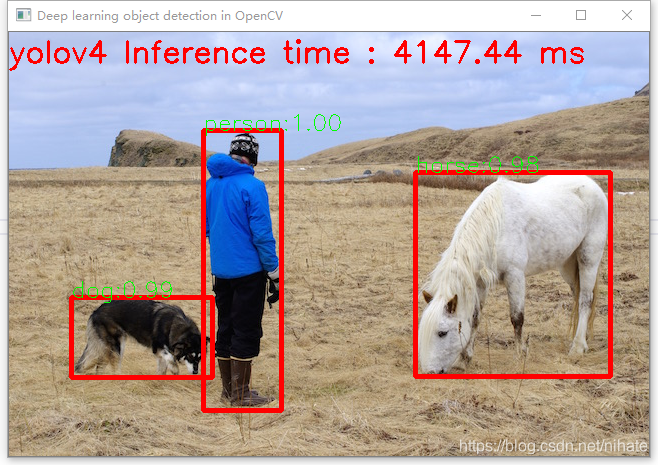

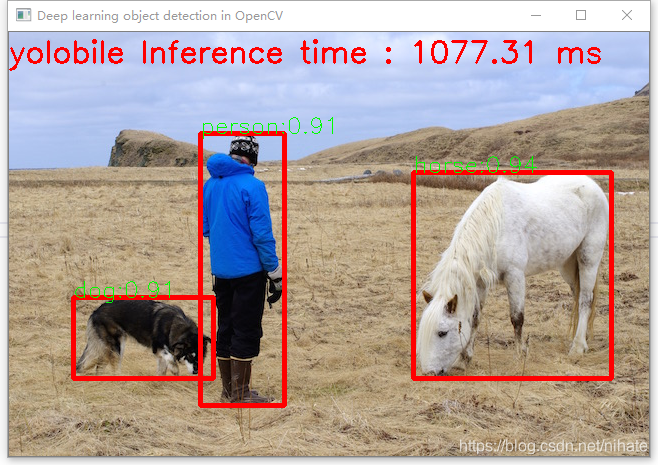
可以看到Y(jié)olo-Fastest運(yùn)行速度最快,YOLObile號(hào)稱是實(shí)時(shí)的,但是從結(jié)果看并不如此。并且查看它們的模型文件,可以看到Y(jié)olo-Fastest的是最小的。如果在ubuntu-gpu環(huán)境里運(yùn)行,它還會(huì)更快。

整個(gè)程序的運(yùn)行不依賴任何深度學(xué)習(xí)框架,只需要依賴OpenCV4這個(gè)庫(kù)就可以運(yùn)行整個(gè)程序,做到了YOLO目標(biāo)檢測(cè)的極簡(jiǎn)主義,這個(gè)在硬件平臺(tái)部署時(shí)是很有意義的。建議在ubuntu系統(tǒng)里運(yùn)行這套程序,上面展示的是在win10-cpu機(jī)器上的運(yùn)行結(jié)果,而在ubuntu系統(tǒng)里運(yùn)行,一張圖片的前向推理耗時(shí)只有win10-cpu機(jī)器上的十分之一。
我把這套程序發(fā)布在github上,這套程序包含了C++和Python兩種版本的實(shí)現(xiàn),地址是 https://github.com/hpc203/yolov34-cpp-opencv-dnn
此外,我也編寫了使用opencv實(shí)現(xiàn)yolov5目標(biāo)檢測(cè),程序依然是包含了C++和Python兩種版本的實(shí)現(xiàn),地址是
https://github.com/hpc203/yolov5-dnn-cpp-python 和 https://github.com/hpc203/yolov5-dnn-cpp-python-v2
考慮到y(tǒng)olov5的模型文件是在pytorch框架里從.pt文件轉(zhuǎn)換生成的.onnx文件,而之前的yolov3,v4都是在darknet框架里生成的.cfg和.weights文件,還有yolov5的后處理計(jì)算與之前的yolov3,v4有所不同,因此我沒(méi)有把yolov5添加到上面的4種YOLO目標(biāo)檢測(cè)程序里。
如果覺得有用,就請(qǐng)分享到朋友圈吧!
公眾號(hào)后臺(tái)回復(fù)“廣東CVPR”獲取CSIG-廣東省CVPR 2021論文學(xué)術(shù)報(bào)告會(huì)回放

# 極市原創(chuàng)作者激勵(lì)計(jì)劃 #
