Cocos Creator 籃球物理游戲開發(fā)實戰(zhàn)
本篇文章教大家實現(xiàn)籃球物理游戲最核心的功能,學(xué)會本篇文章知識點,寫出一款籃球物理游戲分分鐘的事情。
國際慣例先上效果:

知識點
Graphics 組件
關(guān)節(jié)組件 Distance Joint - 距離關(guān)節(jié)
剛體組件
教程
基礎(chǔ)背景搭建
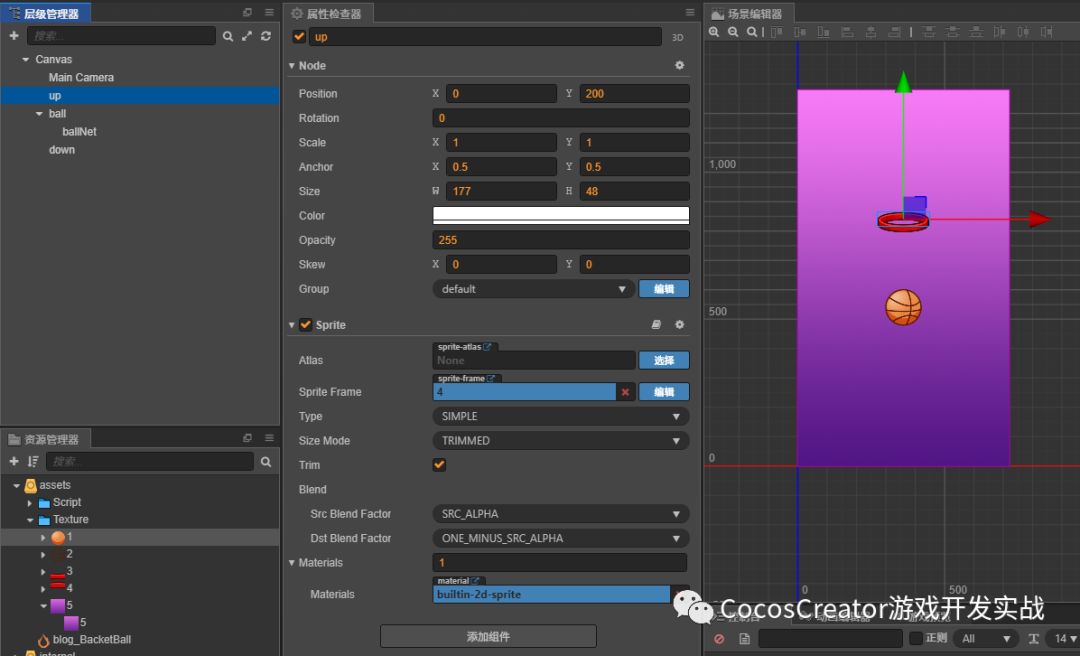
創(chuàng)建三個 sprite 節(jié)點,分別拖入相應(yīng)的圖片資源。
層級關(guān)系如下圖所示:
物理系統(tǒng)
使用物理系統(tǒng)就得添加剛體組件和物理系統(tǒng)的碰撞組件。
添加碰撞分組信息:
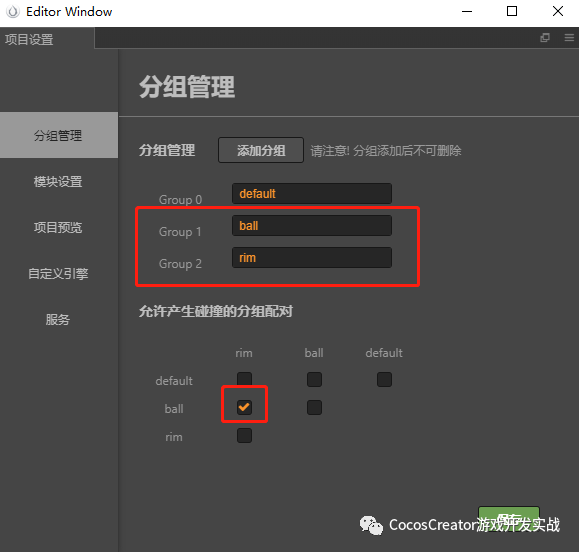
ball 節(jié)點的 group 設(shè)置成 ball,并添加剛體組件和物理碰撞組件,Allow Sleep 勾選去掉,防止靜止不動會自動睡眠。
Gravity Scale(重力)設(shè)置成 0,后續(xù)用代碼賦值。籃球是需要動的所以 type 設(shè)置成動態(tài) Dynamic。

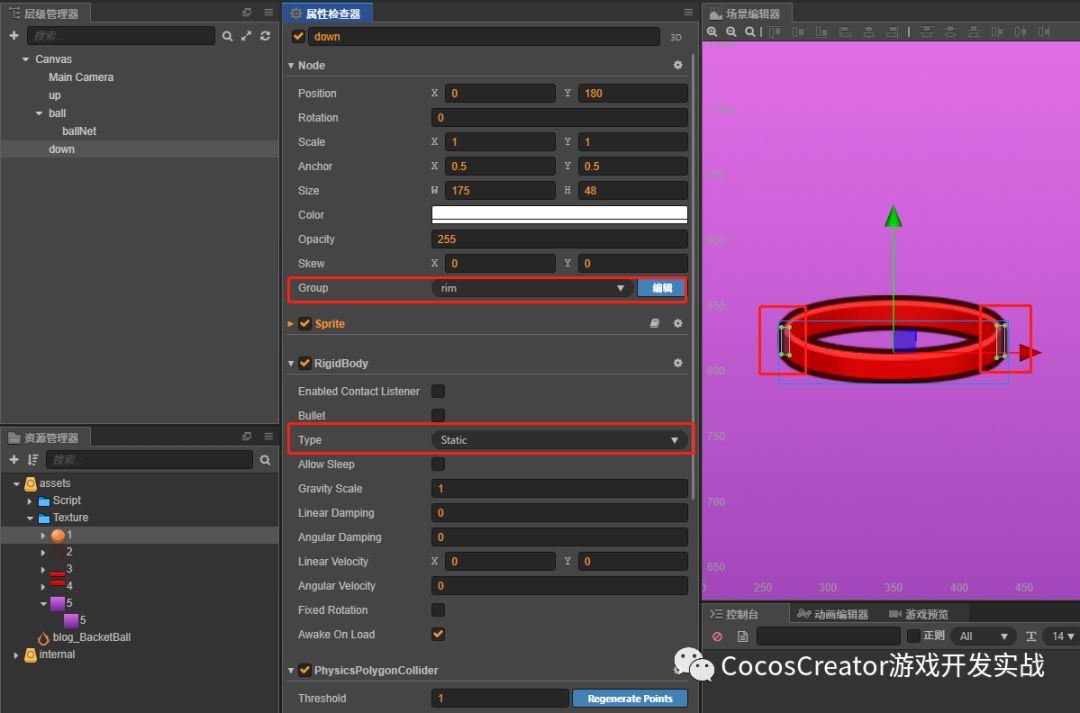
down 節(jié)點的 group 設(shè)置成 rim,并添加剛體組件、創(chuàng)建兩個碰撞組件,一個在籃筐左邊緣,一個在籃筐右邊緣。
籃筐是不需要動的所以 type 設(shè)置成動態(tài) Static,設(shè)置成靜態(tài)后其它屬性不會生效。
籃網(wǎng)制作
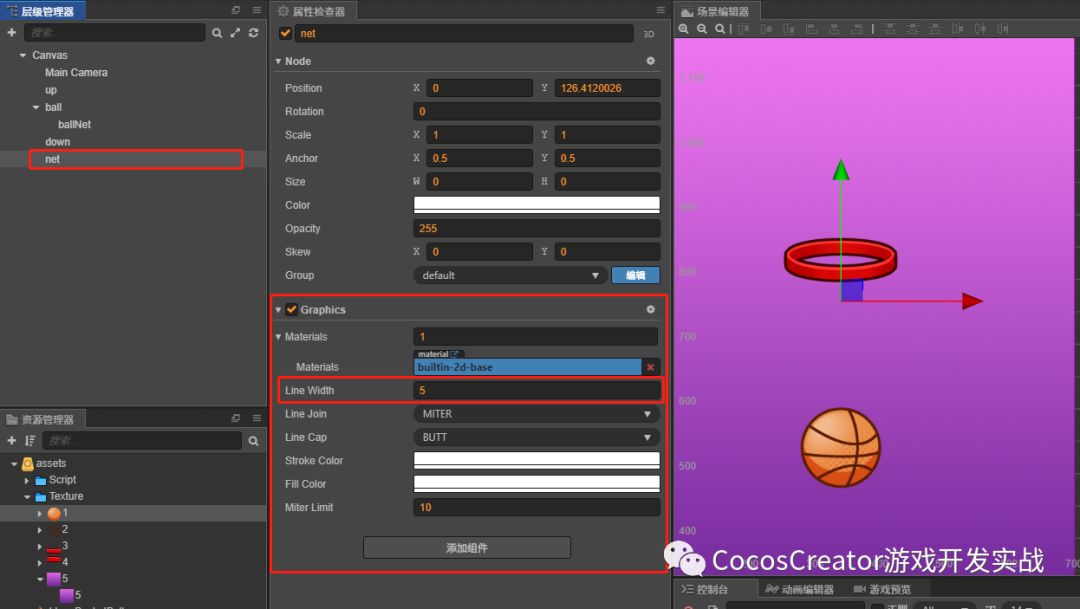
創(chuàng)建繪圖器 Graphics。
在層級管理器中創(chuàng)建一個空節(jié)點并命名為 net,然后在屬性檢查器下方點擊添加組件按鈕,選擇渲染組件 -> Graphics,將 Graphics 組件的 Line Width 設(shè)置為 5(線條適合的寬度)。
繪制籃網(wǎng)需要用到的屬性和接口說明如下所示:
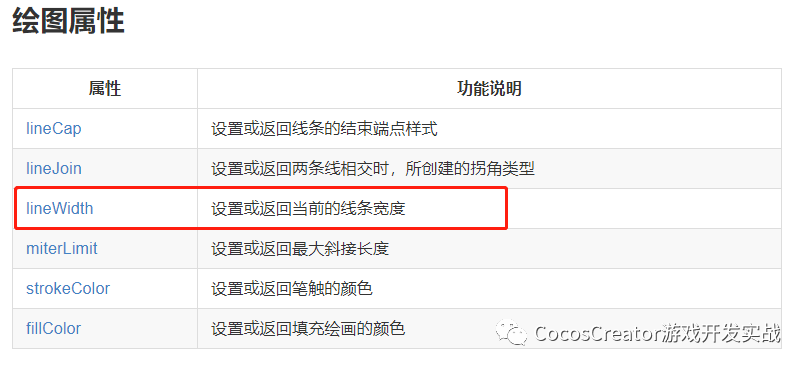
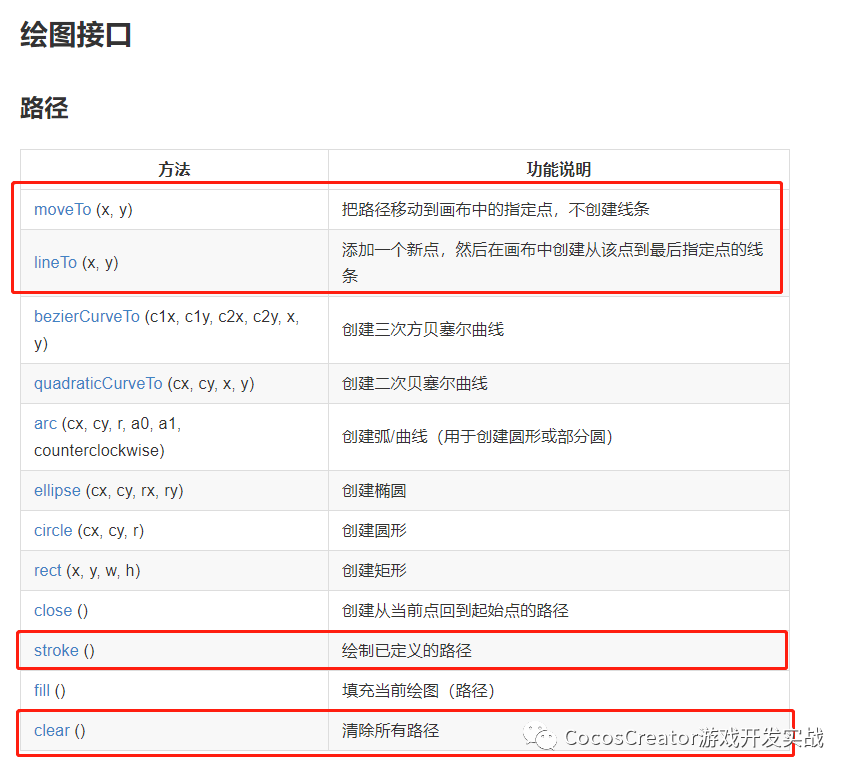
開始繪制籃網(wǎng):
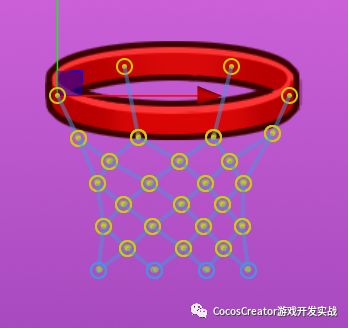
籃網(wǎng)完成圖
1)創(chuàng)建籃筐上的四個點
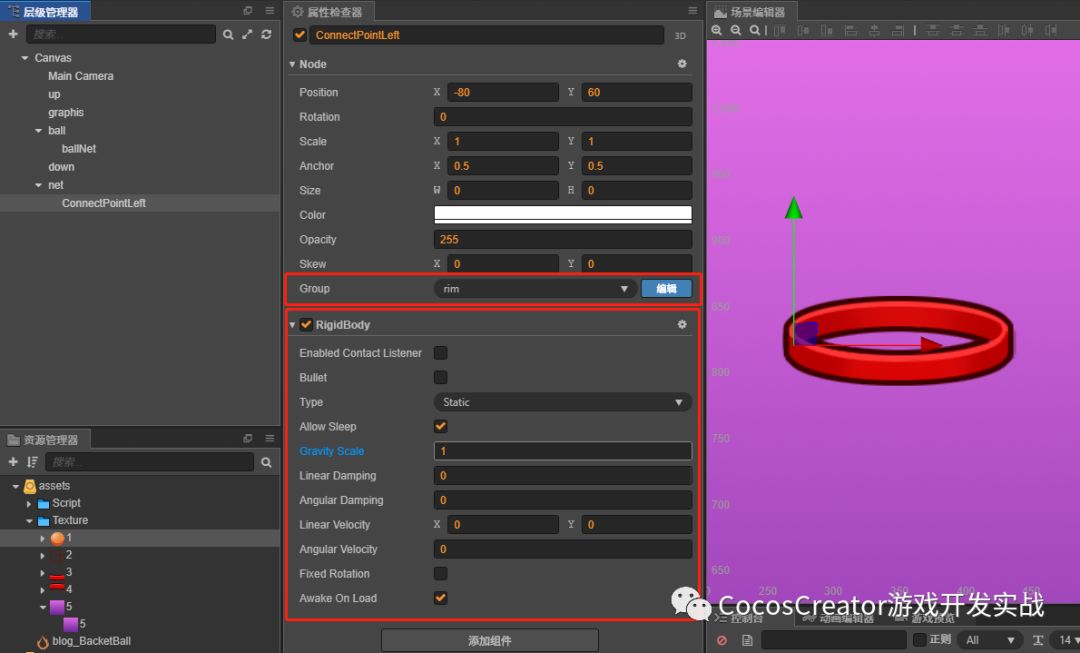
依次創(chuàng)建其它三個點:
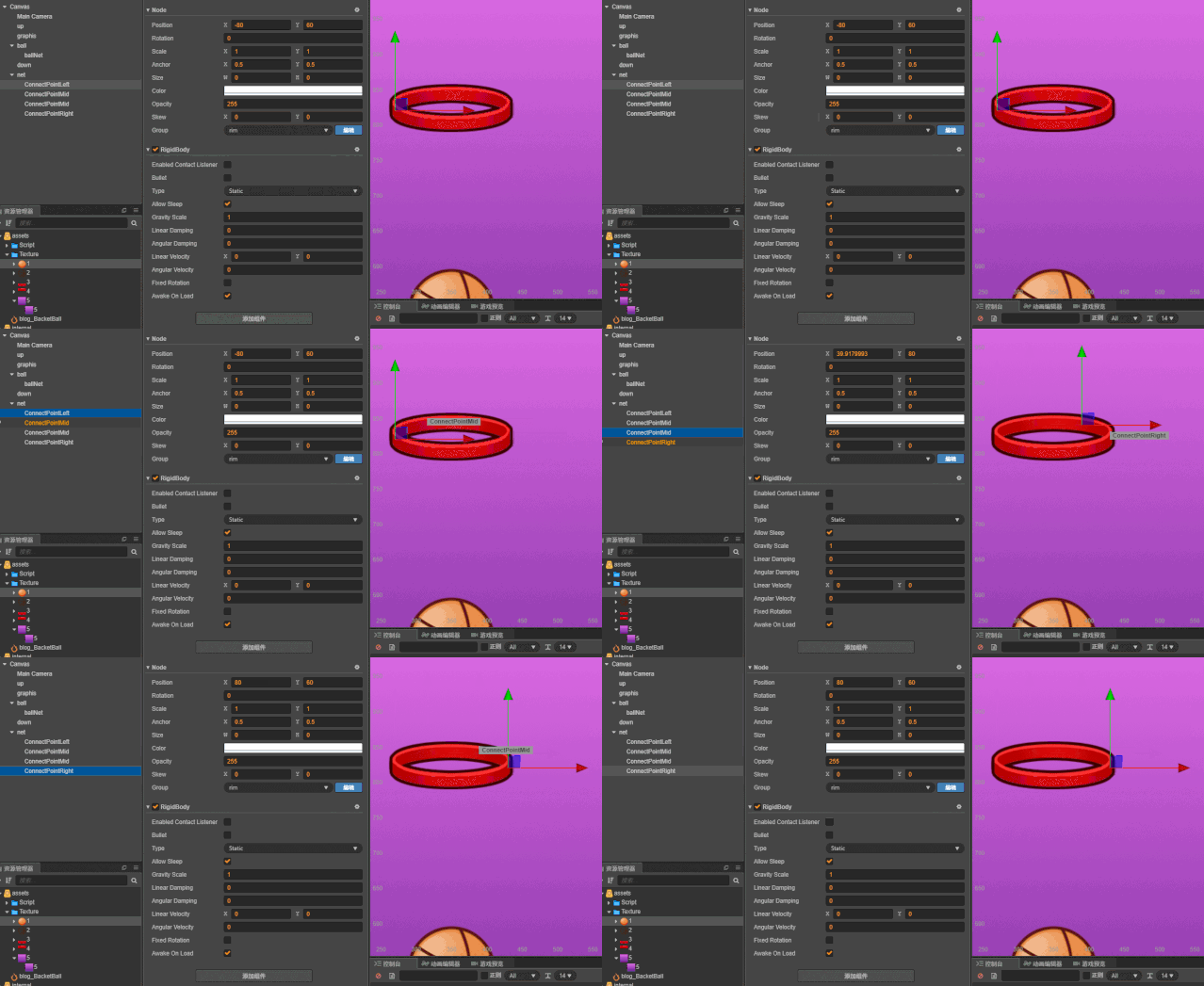
2)創(chuàng)建關(guān)節(jié)組件 Distance Joint - 距離關(guān)節(jié)
添加組件 -> 物理組件 -> Joint -> Distance,距離關(guān)節(jié)組件里的 Distance(關(guān)節(jié)兩端的距離)屬性和 Frequency(彈性系數(shù))屬性后續(xù)通過代碼控制。
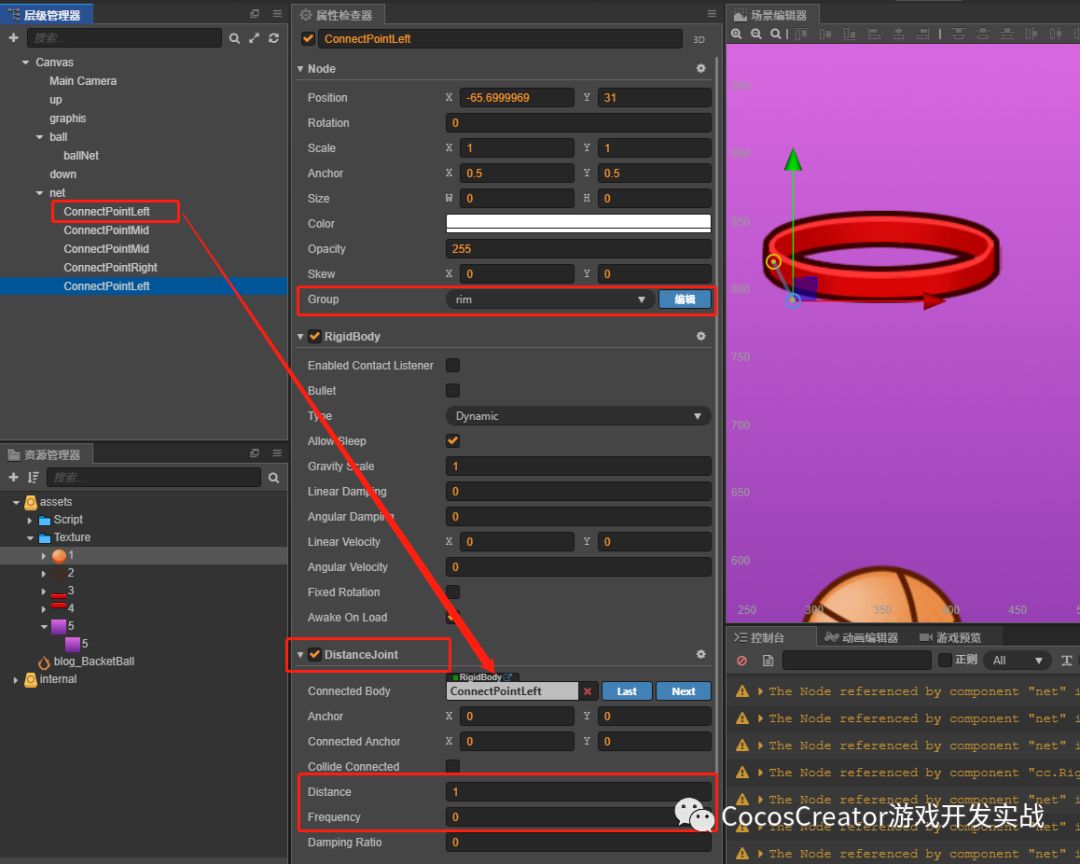
依次創(chuàng)建其它三個點:
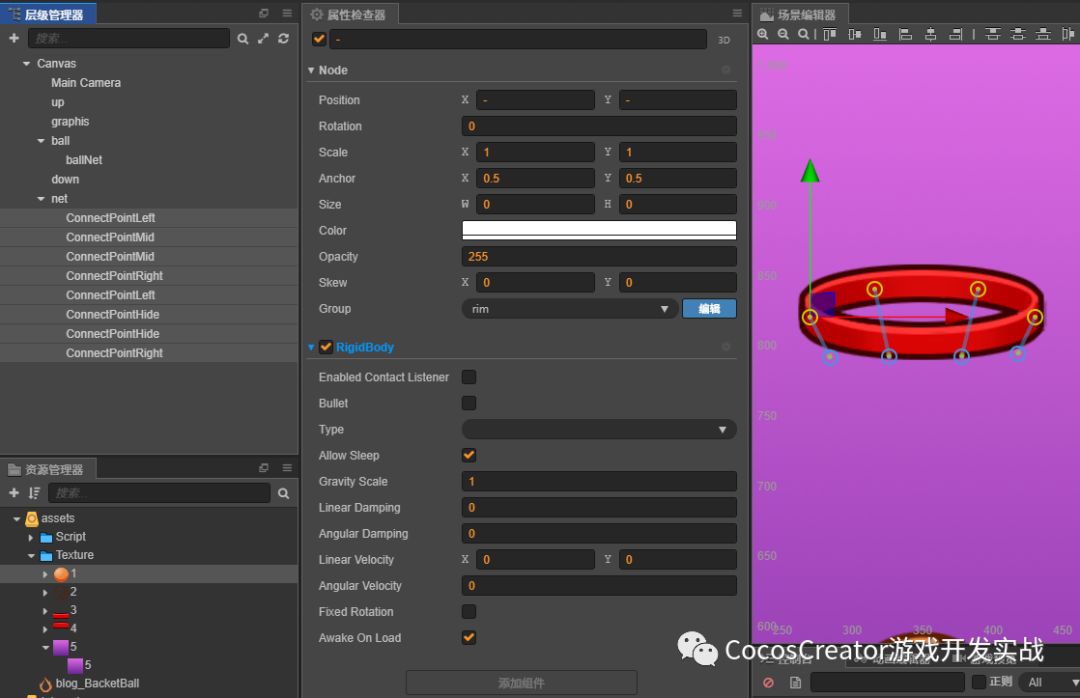
剩下慢慢拼出個籃網(wǎng)的形狀:
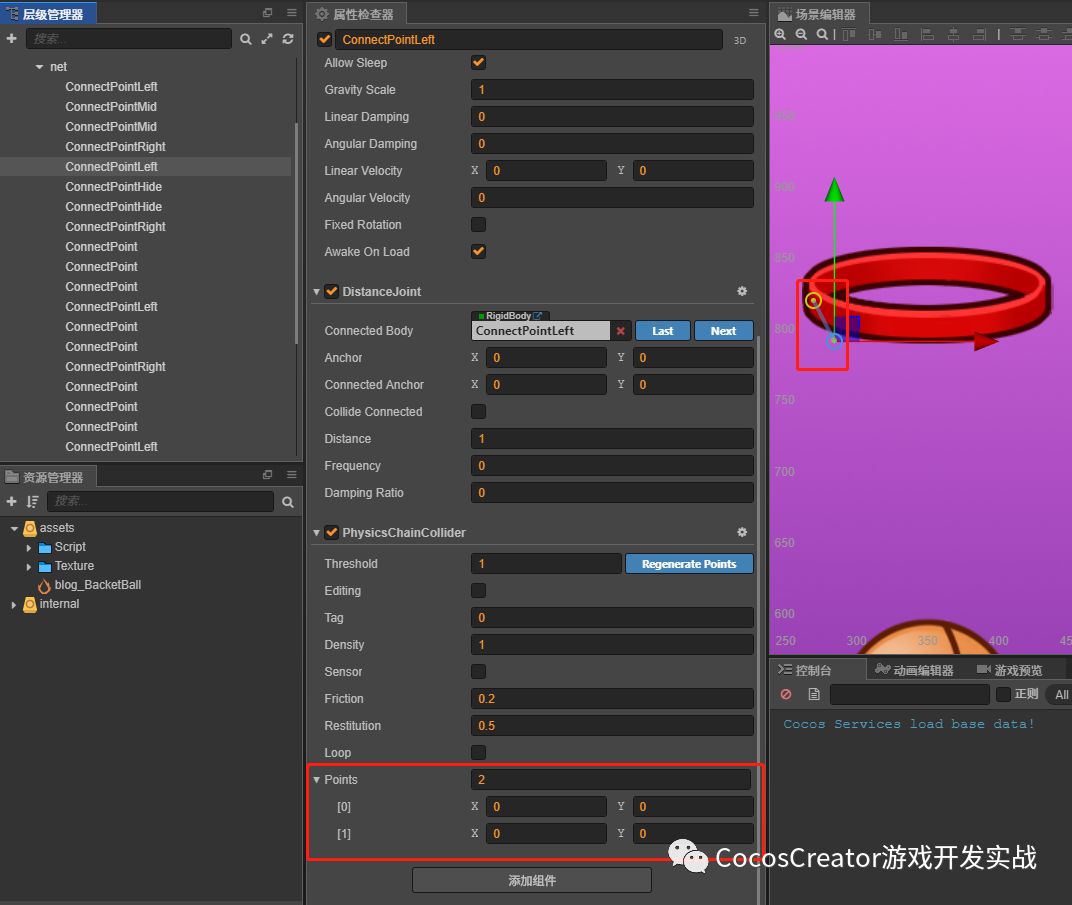
3)添加碰撞組件:添加組件 -> 物理組件 -> Collider -> Chain。(注意:該組件在 v3.0 已移除)給外圍線條添加上碰撞組件。
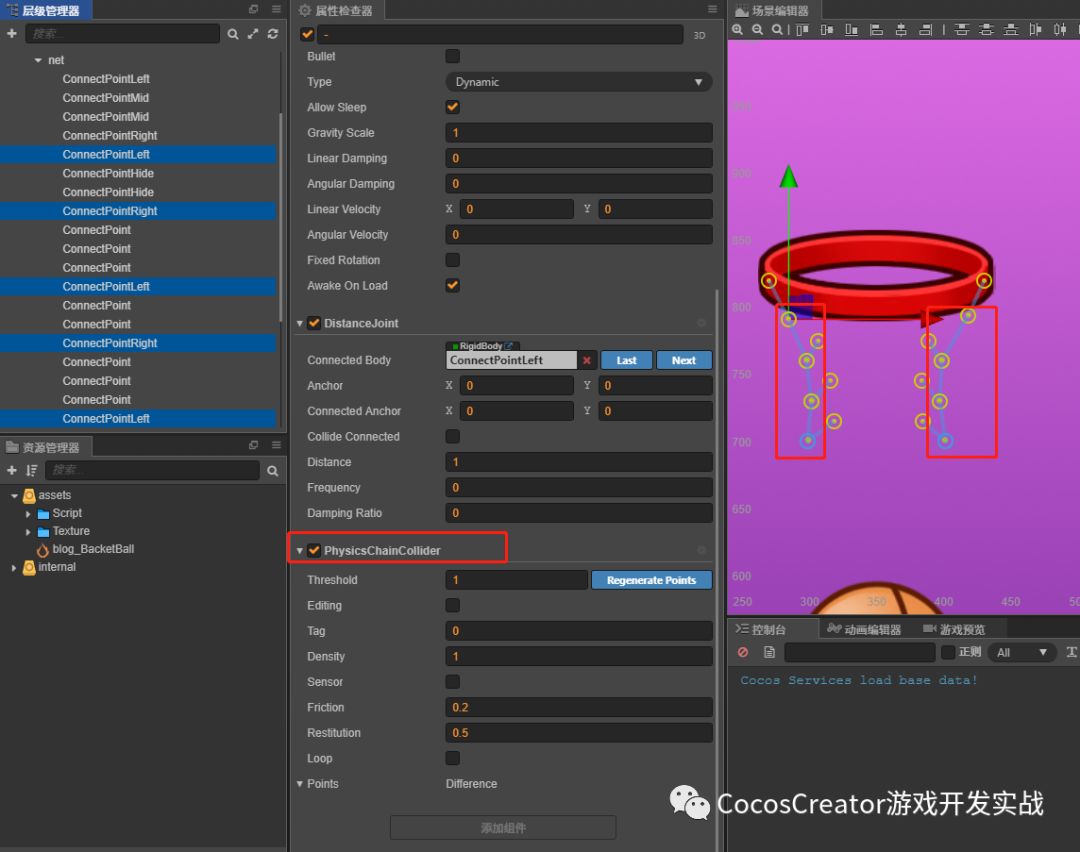
單個節(jié)點詳細說明:碰撞組件中的 Points 寫成 2,是為了把兩點之間連上碰撞。
籃網(wǎng)代碼
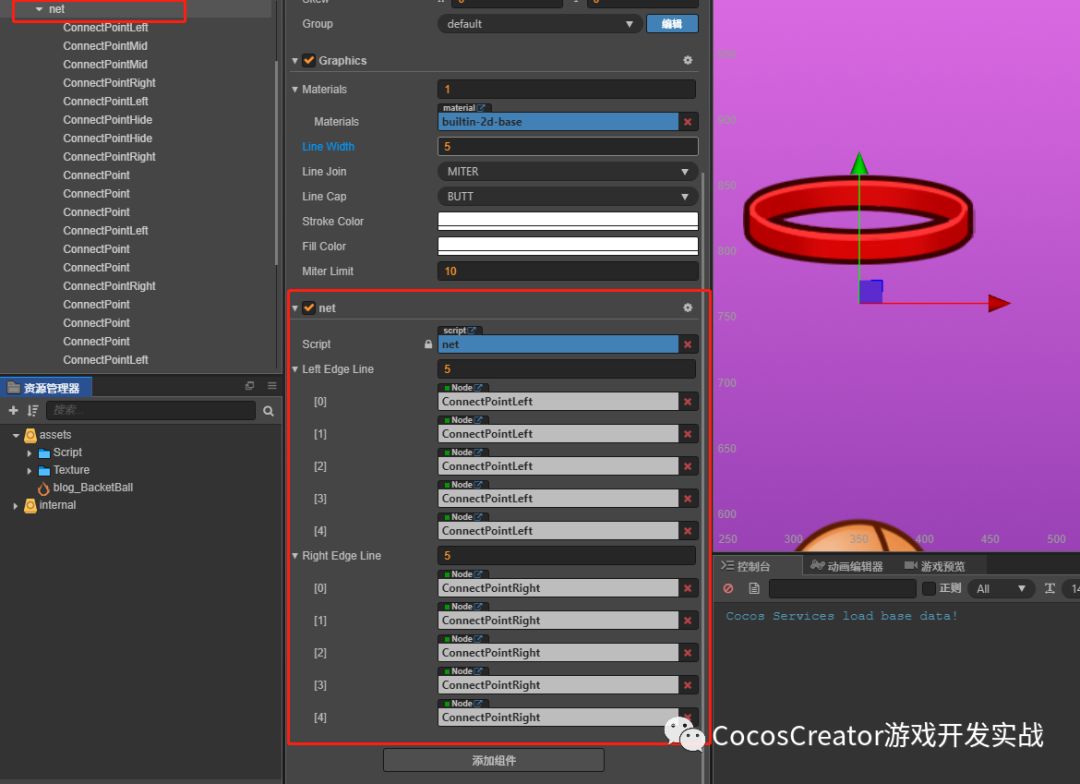
net 節(jié)點添加腳本組件 net,并把兩邊邊緣的節(jié)點存入數(shù)組中。
//net.jsproperties: {LeftEdgeLine: [cc.Node], //左邊緣線條RightEdgeLine: [cc.Node], //右邊緣線條},
設(shè)置 distance 組件的屬性
//net.jsonLoad() {//獲得自身的 Graphics 組件this.graphics = this.node.getComponent(cc.Graphics);//獲得節(jié)點下所有孩子節(jié)點的Distance的組件,返回的是一個數(shù)組this.distanceJoints = this.node.getComponentsInChildren(cc.DistanceJoint);//設(shè)置所有Distanc組件的屬性this.AutoSetDistanceJoint();},//distance屬性設(shè)置是節(jié)點與連接的剛體之間的距離//.mag() 內(nèi)部算法是(x2+y2)開根號//如果發(fā)現(xiàn)籃網(wǎng)相互黏在一起,黏在一起的愿意是彈性系數(shù)太大或者太小,修改彈性系數(shù)到相應(yīng)值即可AutoSetDistanceJoint: function () {for (var i = 0; i < this.distanceJoints.length; i++) {//設(shè)置鏈條的距離this.distanceJoints[i].distance = (this.distanceJoints[i].node.position.sub(this.distanceJoints[i].connectedBody.node.position)).mag();//設(shè)置鏈條的彈性系數(shù)this.distanceJoints[i].frequency = 5}},
渲染籃網(wǎng)
//net.jsupdate: function (dt) {//繪制器初始化this.graphics.clear();for (let i = 0; i < this.distanceJoints.length; i++) {//繪制器渲染籃網(wǎng)this.graphics.moveTo(this.distanceJoints[i].node.position.x, this.distanceJoints[i].node.position.y);this.graphics.lineTo(this.distanceJoints[i].connectedBody.node.x, this.distanceJoints[i].connectedBody.node.y);this.graphics.stroke();}//更新鏈條的碰撞組件this.UpdateAllChainCollider();},UpdateAllChainCollider: function () {//這是是從1開始的,因為籃筐上的四個點是沒有添加distance組件。for (let i = 1; i < this.LeftEdgeLine.length; i++) {//設(shè)置碰撞鏈條位置this.LeftEdgeLine[i].getComponent(cc.PhysicsChainCollider).points[1] = this.LeftEdgeLine[i - 1].position.sub(this.LeftEdgeLine[i].position);this.RightEdgeLine[i].getComponent(cc.PhysicsChainCollider).points[1] = this.RightEdgeLine[i - 1].position.sub(this.RightEdgeLine[i].position);//設(shè)置完調(diào)用 apply()函數(shù)使其生效this.LeftEdgeLine[i].getComponent(cc.PhysicsChainCollider).apply();this.RightEdgeLine[i].getComponent(cc.PhysicsChainCollider).apply();}}
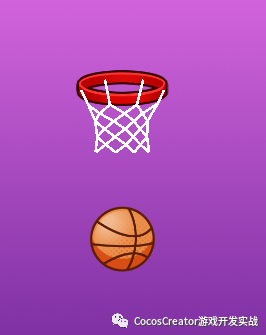
效果
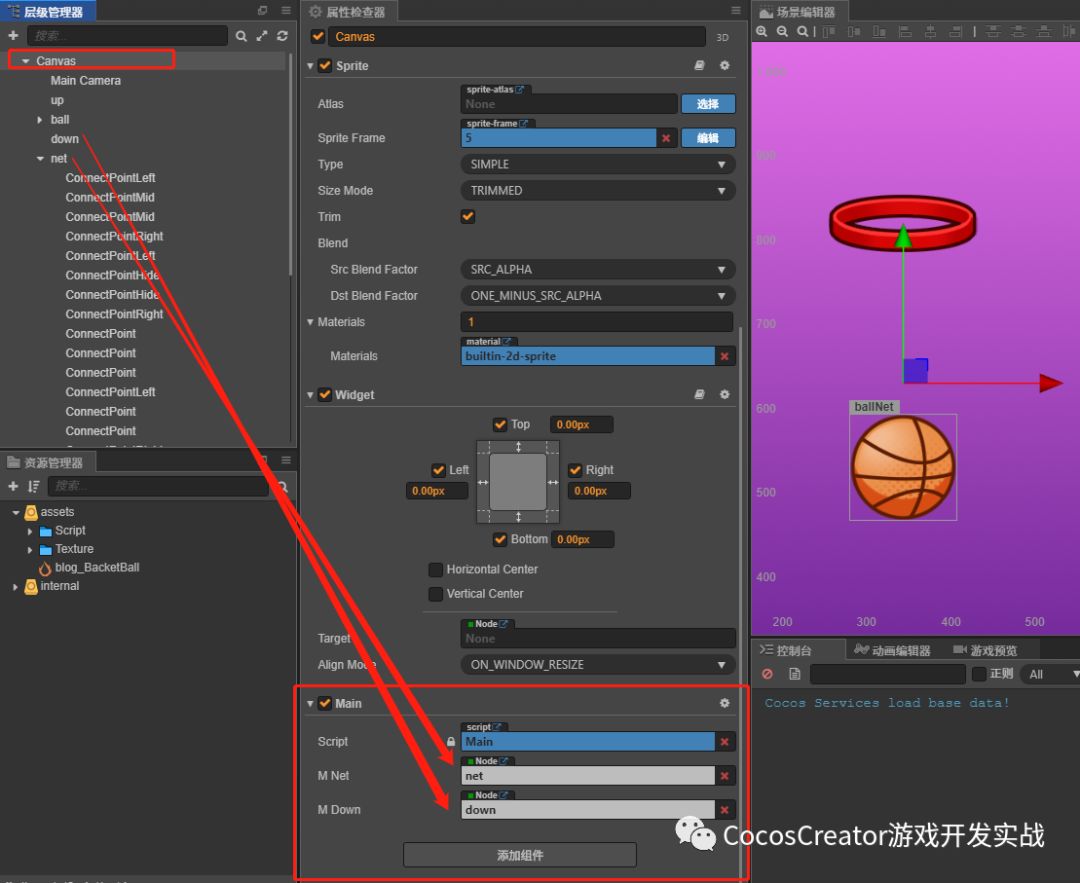
讓籃網(wǎng)動起來,并調(diào)整顯示層級關(guān)系:在 Canvas 節(jié)點上掛載腳本組件 Main.js。
//Main.jsproperties: {m_net: cc.Node,m_down: cc.Node,},onLoad () {//開啟物理系統(tǒng)cc.director.getPhysicsManager().enabled = true;//設(shè)置籃網(wǎng)和籃筐外層的顯示關(guān)系this.m_net.zIndex = 6this.m_down.zIndex = 7},
效果
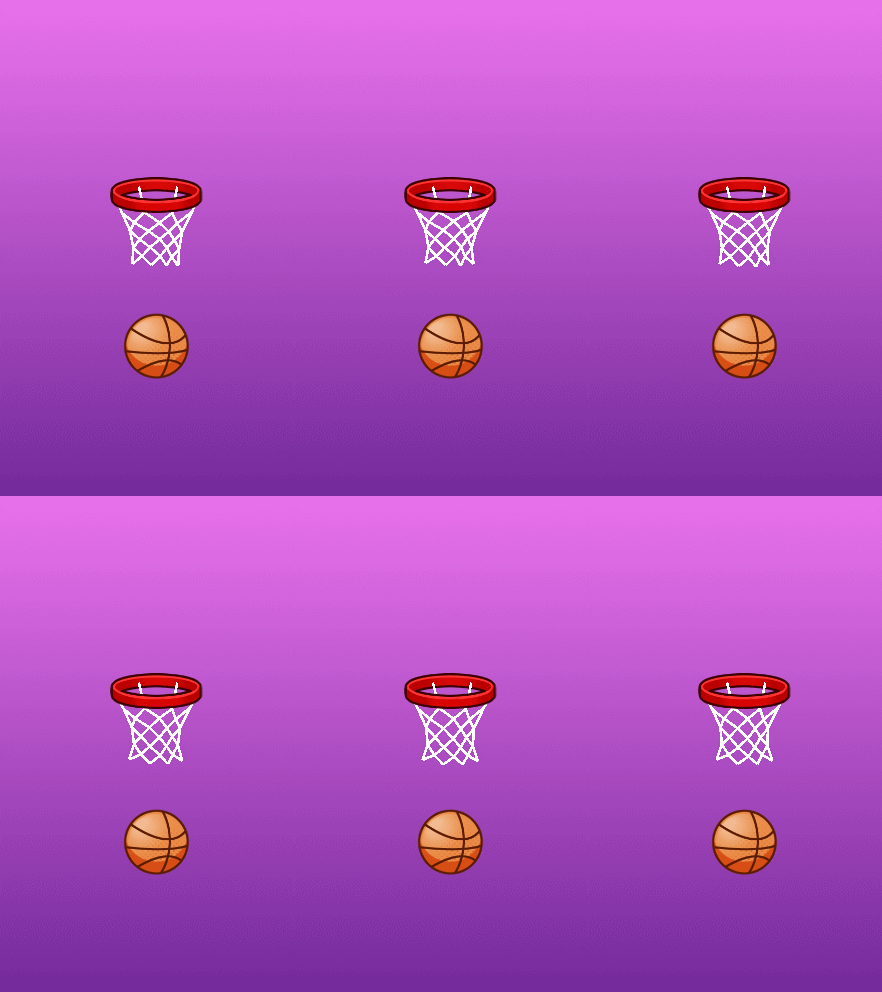
籃球
給籃球添加速度:添加一個向上的速度,使兩者碰撞。
//Main.jsproperties: {m_ball: cc.Node, //籃球節(jié)點m_net: cc.Node,m_down: cc.Node,},
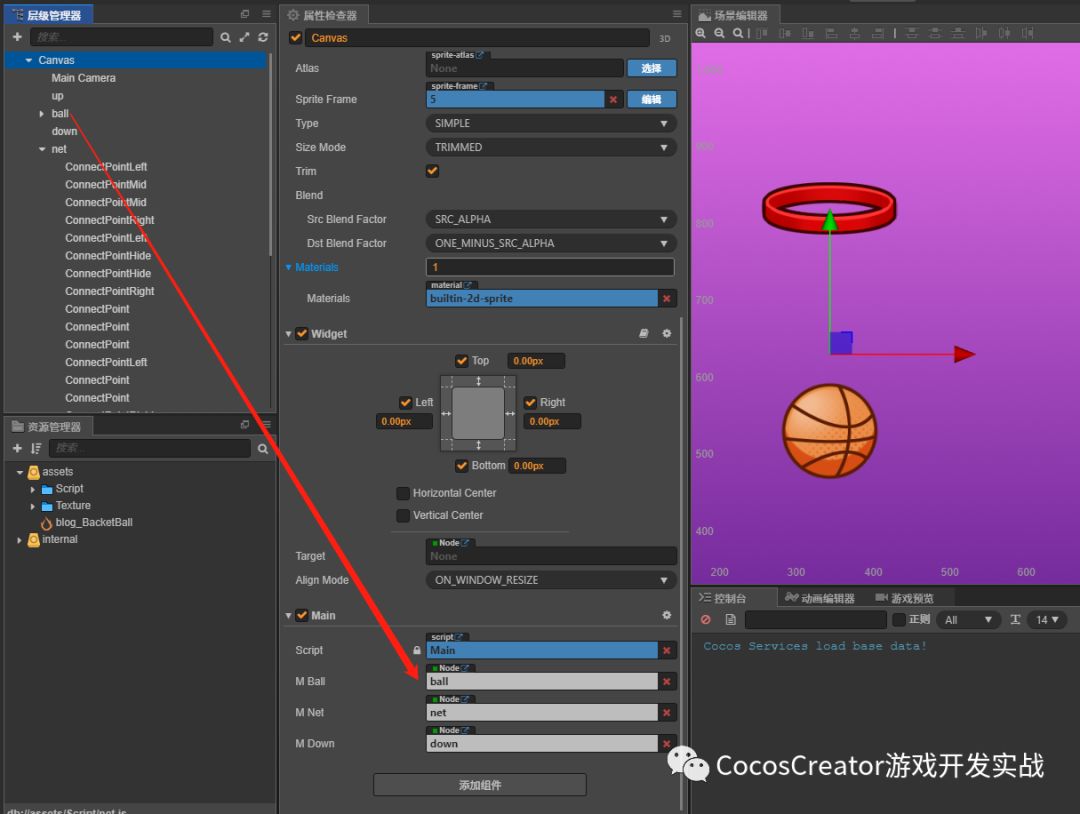
添加觸摸監(jiān)聽,并給籃球賦值速度
//Main.jsonLoad () {//開啟物理系統(tǒng)cc.director.getPhysicsManager().enabled = true;//設(shè)置籃網(wǎng)和籃筐外層的顯示關(guān)系this.m_net.zIndex = 6this.m_down.zIndex = 7//激活觸摸監(jiān)聽this.AddTouchEvent()},AddTouchEvent () {this.node.on(cc.Node.EventType.TOUCH_START,this.onTouchStart,this);},OffTouchEvent () {this.node.off(cc.Node.EventType.TOUCH_START,this.onTouchStart,this);},onTouchStart () {//設(shè)置籃球的速度this.m_ball.getComponent(cc.RigidBody).linearVelocity = cc.v2(0,1600)//設(shè)置籃球的重力this.m_ball.getComponent(cc.RigidBody).gravityScale = 6},
效果:籃網(wǎng)和籃球之間有交互,但是可以看見籃筐內(nèi)的兩根線條是在籃球顯示之前的。
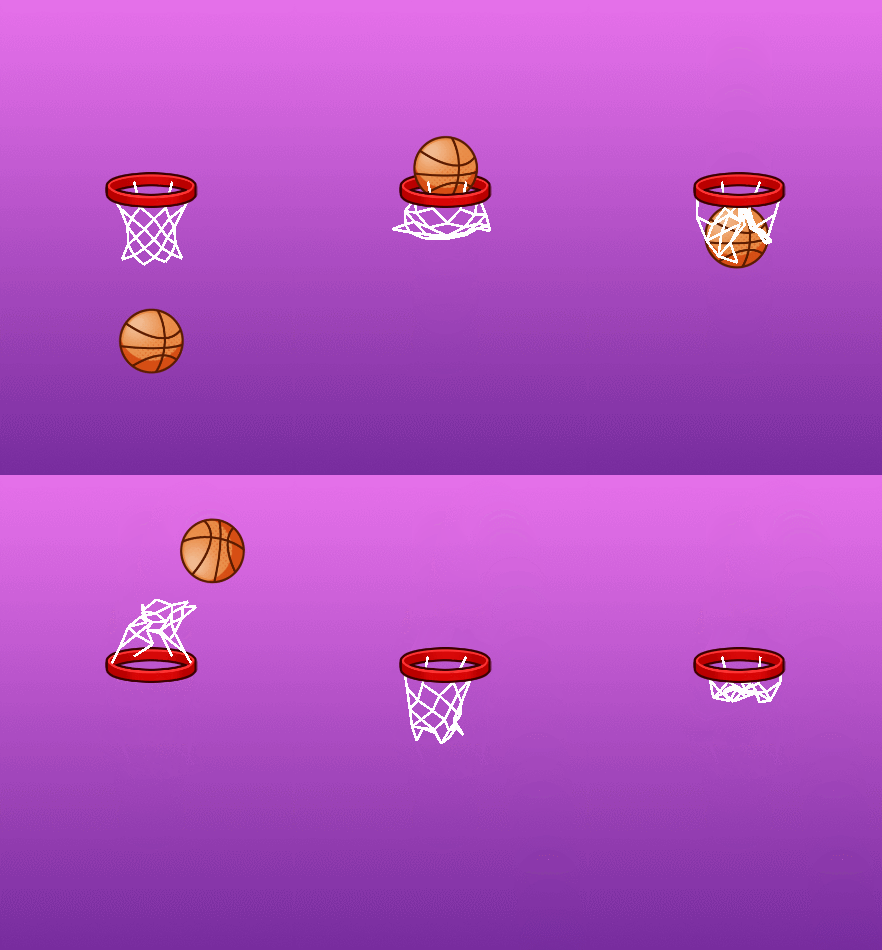
單獨處理兩根線條:新建節(jié)點,添加繪圖組件單獨渲染那兩個節(jié)點。新建的節(jié)點位置是在 ball 節(jié)點和 up 節(jié)點之間。
//net.jsproperties: {m_BottomGraphics: cc.Node,//底部線條渲染器LeftEdgeLine: [cc.Node], //左邊緣線條RightEdgeLine: [cc.Node], //右邊緣線條},

//net.jsonLoad() {//獲得自身的 Graphics 組件this.graphics = this.node.getComponent(cc.Graphics);//獲得渲染籃筐內(nèi)的 Graphices 組件this.bottomGraphics = this.m_BottomGraphics.getComponent(cc.Graphics);//使渲染籃筐內(nèi)的繪圖器和自身繪圖器坐標(biāo)一致this.m_BottomGraphics.setPosition(this.node.getPosition())//獲得節(jié)點下所有子節(jié)點的 Distance 的組件返回的是一個數(shù)組this.distanceJoints = this.node.getComponentsInChildren(cc.DistanceJoint);//設(shè)置所有 Distance 組件的屬性this.AutoSetDistanceJoint();},update: function (dt) {//繪制器初始化this.graphics.clear();this.bottomGraphics.clear();for (let i = 0; i < this.distanceJoints.length; i++) {//渲染籃筐內(nèi)的繪圖器,繪制籃筐內(nèi)的線條if (this.distanceJoints[i].node.name == 'ConnectPointHide') {this.bottomGraphics.moveTo(this.distanceJoints[i].node.position.x, this.distanceJoints[i].node.position.y);this.bottomGraphics.lineTo(this.distanceJoints[i].connectedBody.node.x, this.distanceJoints[i].connectedBody.node.y);this.bottomGraphics.stroke();}else {this.graphics.moveTo(this.distanceJoints[i].node.position.x, this.distanceJoints[i].node.position.y);this.graphics.lineTo(this.distanceJoints[i].connectedBody.node.x, this.distanceJoints[i].connectedBody.node.y);this.graphics.stroke();}}//更新鏈條的碰撞組件this.UpdateAllChainCollider();},
最終效果:
結(jié)語
以上就是籃球物理游戲制作的核心技術(shù),剩下的就是給籃球增加展示效果、左右屏點擊控制籃球等,這些功能的實現(xiàn)在文中都有所提到,看完本篇文章,相信你自己已經(jīng)有能力獨立開發(fā)出一款籃球物理小游戲了。
如果對教程有什么疑問,可以戳【閱讀原文】,與原作者快樂交流。
往期精彩