
Hudi 集成 | Apache Hudi 集成 Spark SQL 搶先體驗
1. 摘要
社區(qū)小伙伴一直期待的Hudi整合Spark SQL的[HUDI-1659](https://github.com/apache/hudi/pull/2645)正在積極Review中并已經(jīng)快接近尾聲,Hudi集成Spark SQL預(yù)計會在下個版本正式發(fā)布,在集成Spark SQL后,會極大方便用戶對Hudi表的DDL/DML操作,下面來看看如何使用Spark SQL操作Hudi表。
2. 環(huán)境準(zhǔn)備
首先需要將[HUDI-1659](https://github.com/apache/hudi/pull/2645)拉取到本地打包,生成SPARK_BUNDLE_JAR(hudi-spark-bundle_2.11-0.9.0-SNAPSHOT.jar)包
2.1 啟動spark-sql
在配置完spark環(huán)境后可通過如下命令啟動spark-sql
spark-sql --jars $PATH_TO_SPARK_BUNDLE_JAR --conf 'spark.serializer=org.apache.spark.serializer.KryoSerializer' --conf 'spark.sql.extensions=org.apache.spark.sql.hudi.HoodieSparkSessionExtension'2.2 設(shè)置并發(fā)度
由于Hudi默認(rèn)upsert/insert/delete的并發(fā)度是1500,對于演示的小規(guī)模數(shù)據(jù)集可設(shè)置更小的并發(fā)度。
set hoodie.upsert.shuffle.parallelism = 1;set hoodie.insert.shuffle.parallelism = 1;set hoodie.delete.shuffle.parallelism = 1;
同時設(shè)置不同步Hudi表元數(shù)據(jù)
set hoodie.datasource.meta.sync.enable=false;3. Create Table
使用如下SQL創(chuàng)建表
create table test_hudi_table (id int,name string,price double,ts long,dt string) using hudipartitioned by (dt)options (primaryKey = 'id',type = 'mor')location 'file:///tmp/test_hudi_table'
說明:表類型為MOR,主鍵為id,分區(qū)字段為dt,合并字段默認(rèn)為ts。
創(chuàng)建Hudi表后查看創(chuàng)建的Hudi表
show create table test_hudi_table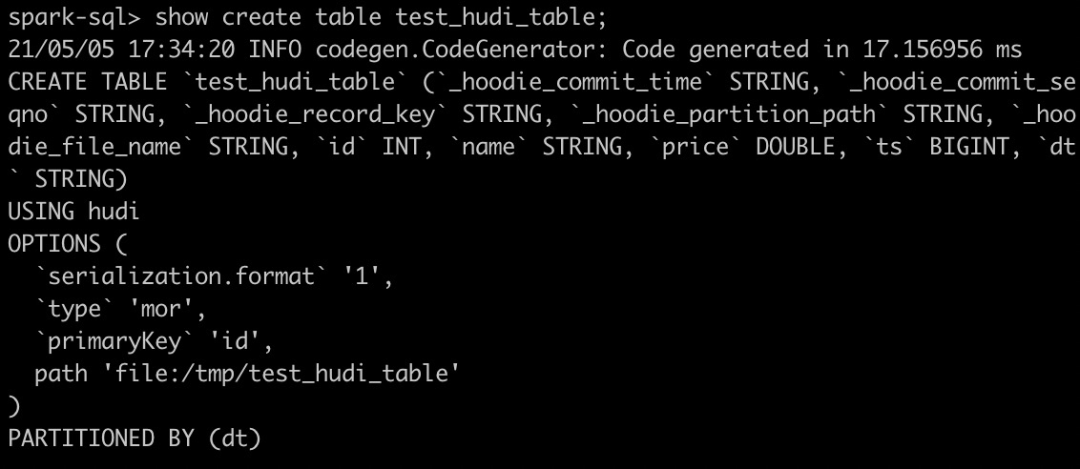
4. Insert Into
4.1 Insert
使用如下SQL插入一條記錄
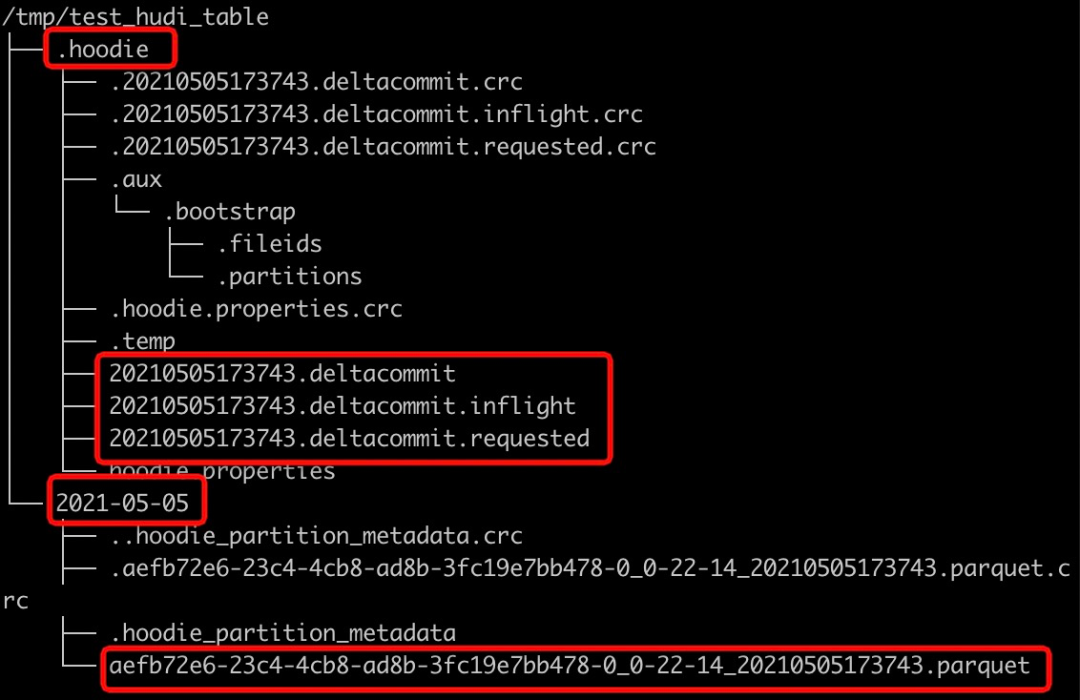
insert into test_hudi_table select 1 as id, 'hudi' as name, 10 as price, 1000 as ts, '2021-05-05' as dtinsert完成后查看Hudi表本地目錄結(jié)構(gòu),生成的元數(shù)據(jù)、分區(qū)和數(shù)據(jù)與Spark Datasource寫入均相同。
4.2 Select
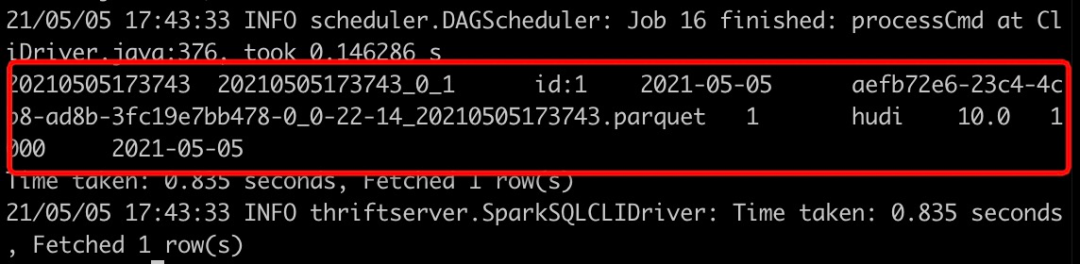
使用如下SQL查詢Hudi表數(shù)據(jù)
select * from test_hudi_table查詢結(jié)果如下
5. Update
5.1 Update
使用如下SQL將id為1的price字段值變更為20
update test_hudi_table set price = 20.0 where id = 15.2 Select
再次查詢Hudi表數(shù)據(jù)
select * from test_hudi_table查詢結(jié)果如下,可以看到price已經(jīng)變成了20.0

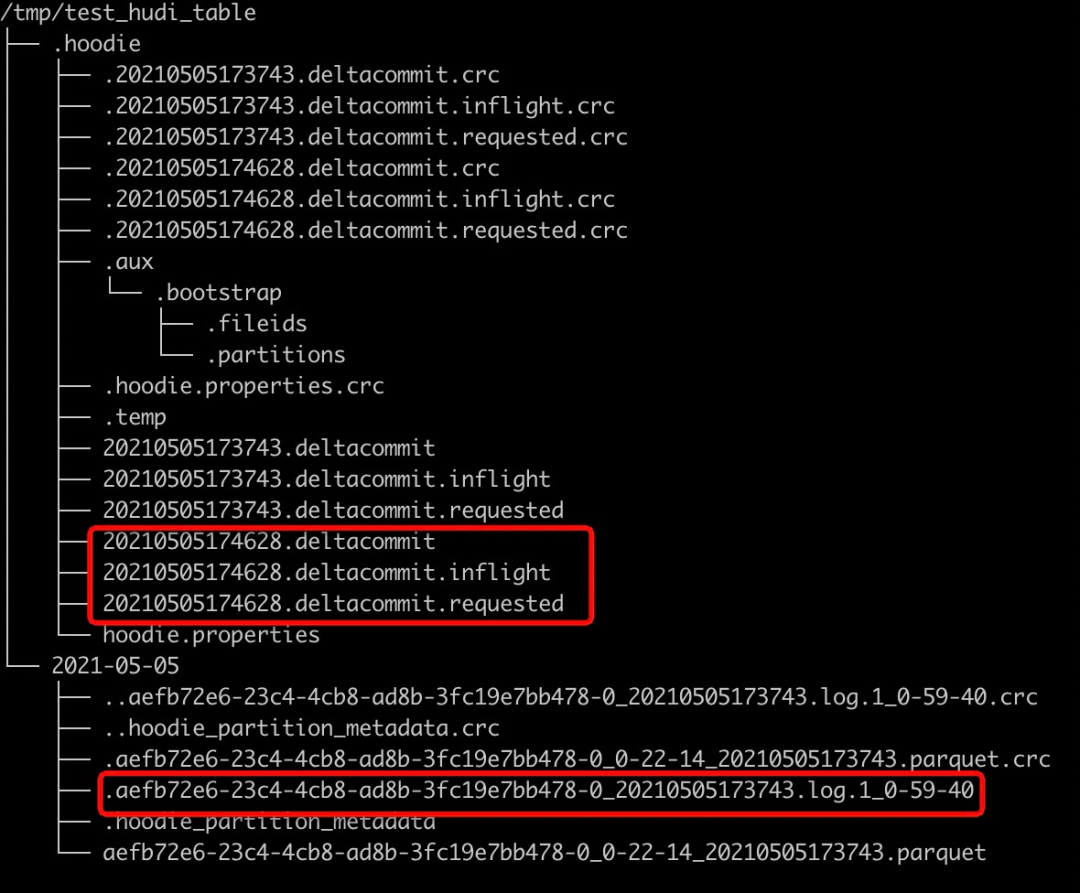
查看Hudi表的本地目錄結(jié)構(gòu)如下,可以看到在update之后又生成了一個deltacommit,同時生成了一個增量log文件。
6. Delete
6.1 Delete
使用如下SQL將id=1的記錄刪除
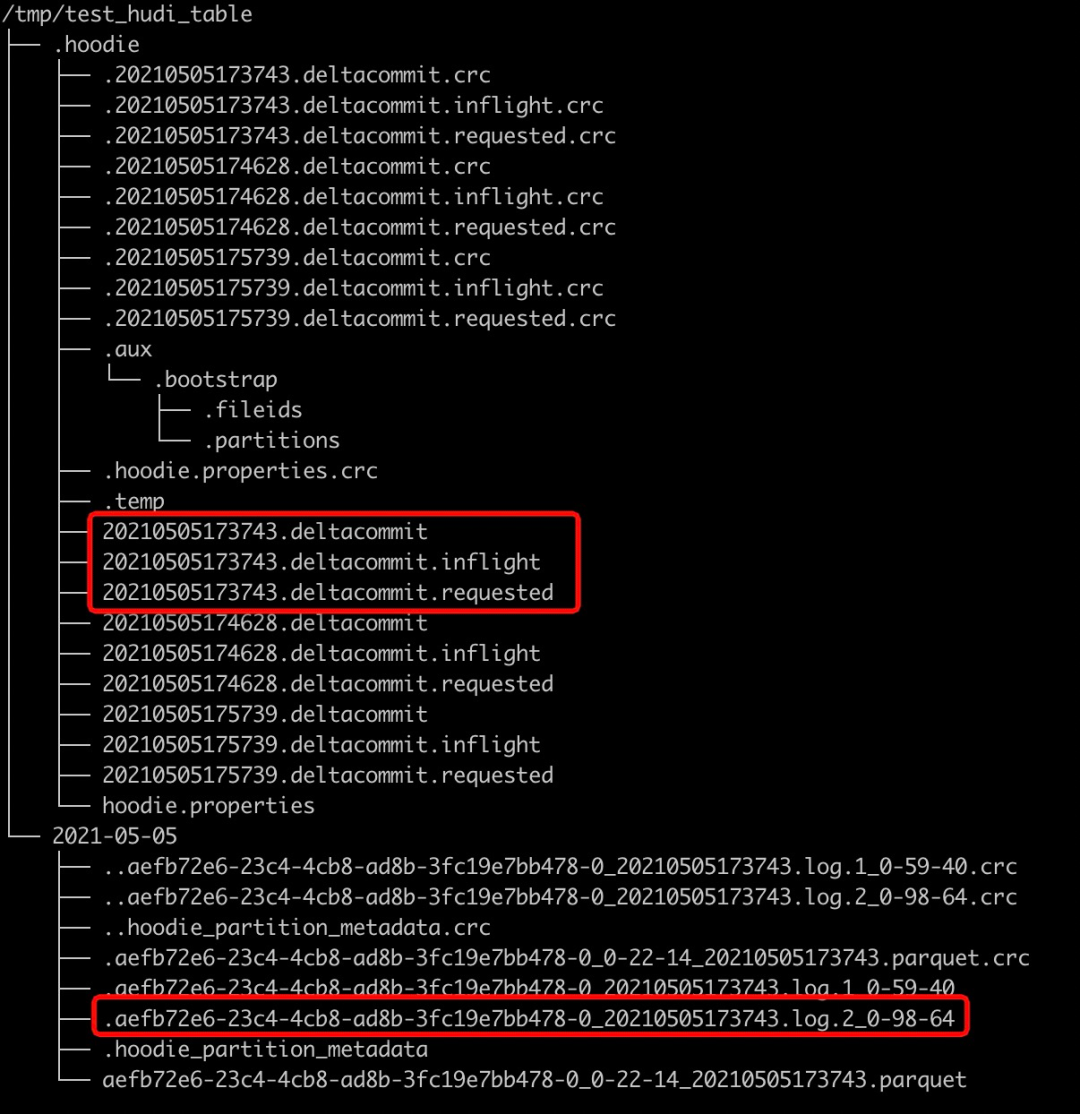
delete from test_hudi_table where id = 1查看Hudi表的本地目錄結(jié)構(gòu)如下,可以看到delete之后又生成了一個deltacommit,同時生成了一個增量log文件。
6.2 Select
再次查詢Hudi表
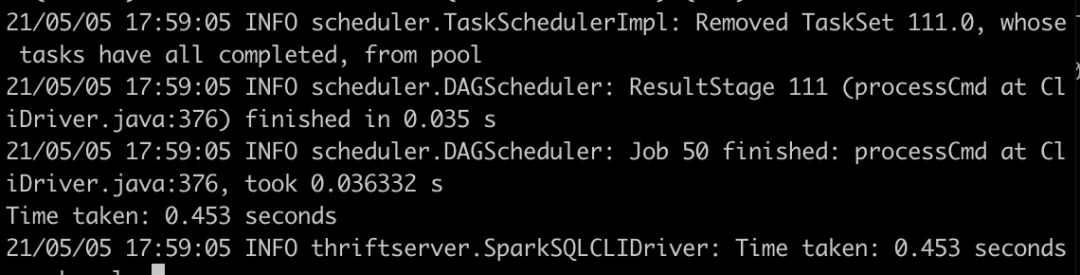
select * from test_hudi_table;查詢結(jié)果如下,可以看到已經(jīng)查詢不到任何數(shù)據(jù)了,表明Hudi表中已經(jīng)不存在任何記錄了。
7. Merge Into
7.1 Merge Into Insert
使用如下SQL向test_hudi_table插入數(shù)據(jù)
merge into test_hudi_table as t0using (select 1 as id, 'a1' as name, 10 as price, 1000 as ts, '2021-03-21' as dt) as s0on t0.id = s0.idwhen not matched and s0.id % 2 = 1 then insert *
7.2 Select
查詢Hudi表數(shù)據(jù)
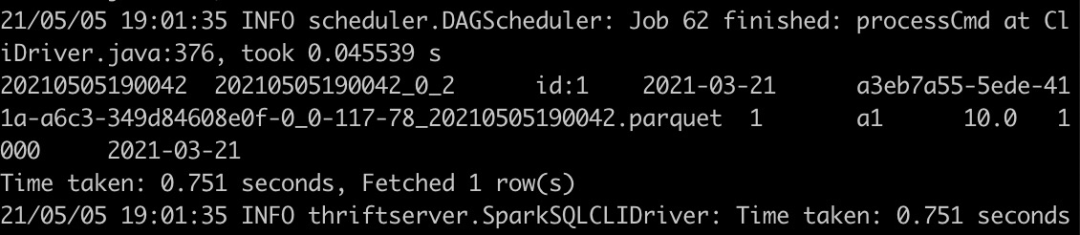
select * from test_hudi_table查詢結(jié)果如下,可以看到Hudi表中存在一條記錄
7.4 Merge Into Update
使用如下SQL更新數(shù)據(jù)
merge into test_hudi_table as t0using (select 1 as id, 'a1' as name, 12 as price, 1001 as ts, '2021-03-21' as dt) as s0on t0.id = s0.idwhen matched and s0.id % 2 = 1 then update set *
7.5 Select
查詢Hudi表
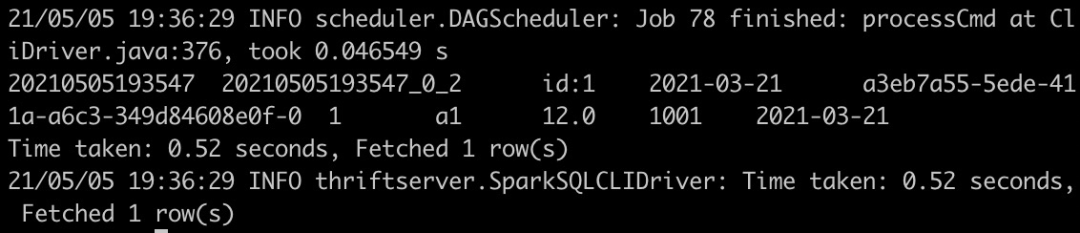
select * from test_hudi_table查詢結(jié)果如下,可以看到Hudi表中的分區(qū)已經(jīng)更新了
7.6 Merge Into Delete
使用如下SQL刪除數(shù)據(jù)
merge into test_hudi_table t0using (select 1 as s_id, 'a2' as s_name, 15 as s_price, 1001 as s_ts, '2021-03-21' as dt) s0on t0.id = s0.s_idwhen matched and s_ts = 1001 then delete
查詢結(jié)果如下,可以看到Hudi表中已經(jīng)沒有數(shù)據(jù)了

8. 刪除表
使用如下命令刪除Hudi表
drop table test_hudi_table;使用show tables查看表是否存在
show tables;可以看到已經(jīng)沒有表了

9. 總結(jié)
通過上面示例簡單展示了通過Spark SQL Insert/Update/Delete Hudi表數(shù)據(jù),通過SQL方式可以非常方便地操作Hudi表,降低了使用Hudi的門檻。另外Hudi集成Spark SQL工作將繼續(xù)完善語法,盡量對標(biāo)Snowflake和BigQuery的語法,如插入多張表(INSERT ALL WHEN condition1 INTO t1 WHEN condition2 into t2),變更Schema以及CALL Cleaner、CALL Clustering等Hudi表服務(wù)。
推薦閱讀
Apache Hudi在Linkflow構(gòu)建實時數(shù)據(jù)湖的生產(chǎn)實踐
Apache Hudi C位!云計算一哥AWS EMR 2020年度回顧