
用 Python 提取 PDF 文本的簡(jiǎn)單方法
你好,我是征哥,一般情況下,Ctrl+C 是最簡(jiǎn)單的方法,當(dāng)無(wú)法 Ctrl+C 時(shí),我們借助于 Python,以下是具體步驟:
第一步,安裝工具庫(kù)
1、tika — 用于從各種文件格式中進(jìn)行文檔類型檢測(cè)和內(nèi)容提取
2、wand — 基于 ctypes 的簡(jiǎn)單 ImageMagick 綁定
3、pytesseract — OCR 識(shí)別工具
創(chuàng)建一個(gè)虛擬環(huán)境,安裝這些工具
python?-m?venv?venv
source?venv/bin/activate
pip?install?tika?wand?pytesseract
第二步,編寫代碼
假如 pdf 文件里面既有文字,又有圖片,以下代碼可以直接識(shí)別文字:
import?io
import?pytesseract
import?sys

from?PIL?import?Image
from?tika?import?parser
from?wand.image?import?Image?as?wi

text_raw?=?parser.from_file("example.pdf")
print(text_raw['content'].strip())
這還不夠,我們還需要能失敗圖片的部分:
def?extract_text_image(from_file,?lang='deu',?image_type='jpeg',?resolution=300):
????print("--?Parsing?image",?from_file,?"--")
????print("---------------------------------")
????pdf_file?=?wi(filename=from_file,?resolution=resolution)
????image?=?pdf_file.convert(image_type)
????image_blobs?=?[]
????for?img?in?image.sequence:
????????img_page?=?wi(image=img)
????????image_blobs.append(img_page.make_blob(image_type))
????extract?=?[]
????for?img_blob?in?image_blobs:
????????image?=?Image.open(io.BytesIO(img_blob))
????????text?=?pytesseract.image_to_string(image,?lang=lang)
????????extract.append(text)
????for?item?in?extract:
????????for?line?in?item.split("\n"):
????????????print(line)
合并一下,完整代碼如下:
import?io
import?sys

from?PIL?import?Image
import?pytesseract
from?wand.image?import?Image?as?wi
from?tika?import?parser


def?extract_text_image(from_file,?lang='deu',?image_type='jpeg',?resolution=300):
????print("--?Parsing?image",?from_file,?"--")
????print("---------------------------------")
????pdf_file?=?wi(filename=from_file,?resolution=resolution)
????image?=?pdf_file.convert(image_type)
????for?img?in?image.sequence:
????????img_page?=?wi(image=img)
????????image?=?Image.open(io.BytesIO(img_page.make_blob(image_type)))
????????text?=?pytesseract.image_to_string(image,?lang=lang)
????????for?part?in?text.split("\n"):
????????????print("{}".format(part))


def?parse_text(from_file):
????print("--?Parsing?text",?from_file,?"--")
????text_raw?=?parser.from_file(from_file)
????print("---------------------------------")
????print(text_raw['content'].strip())
????print("---------------------------------")


if?__name__?==?'__main__':
????parse_text(sys.argv[1])
????extract_text_image(sys.argv[1],?sys.argv[2])
第三步,執(zhí)行
假如 example.pdf 是這樣的:
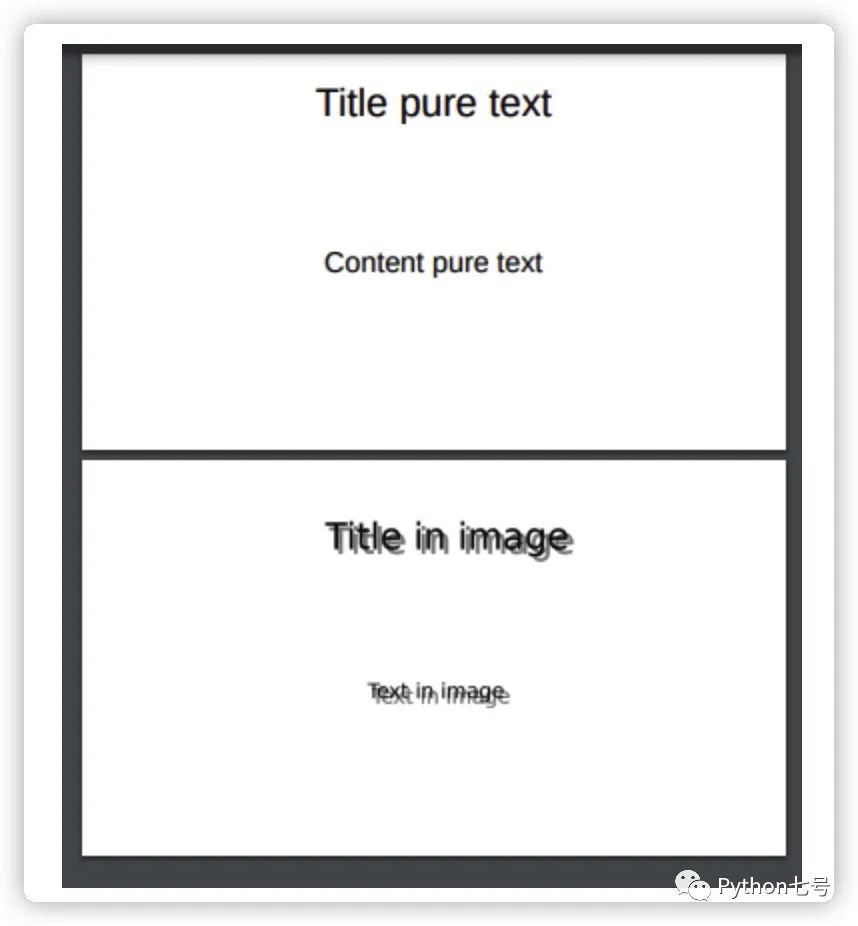
在命令行這樣執(zhí)行:
python?run.py?example.pdf?deu?|?xargs?-0?echo?>?extract.txt?
最終 extract.txt 的結(jié)果如下:
-- Parsing text example.pdf --
---------------------------------
Title pure text

Content pure text


	Slide 1
	Slide 2
---------------------------------
-- Parsing image example.pdf --
---------------------------------
Title pure text

Content pure text

Title in image

Text in image
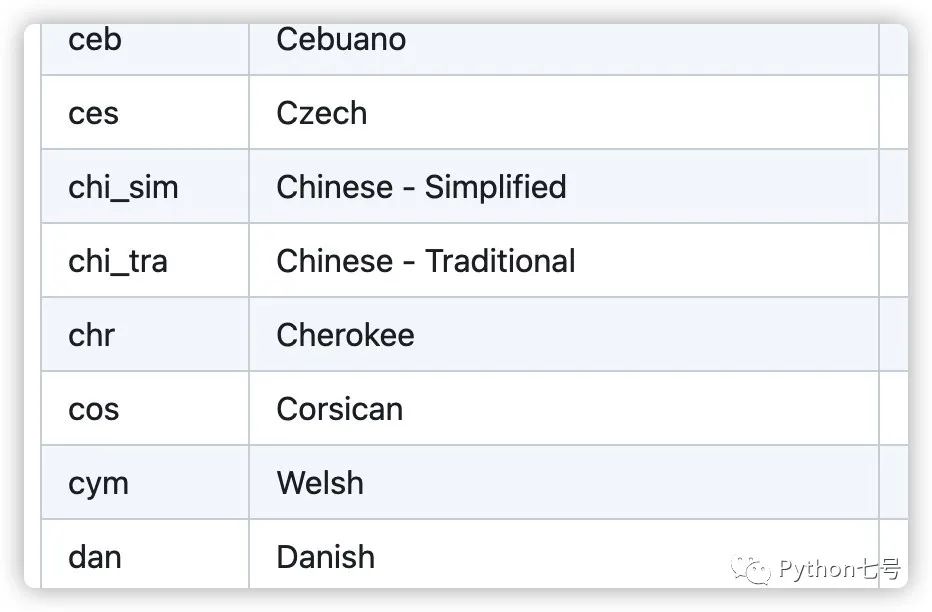
你可能會(huì)問(wèn),如果是簡(jiǎn)體中文,那個(gè) lang 參數(shù)傳遞什么,傳 'chi_sim',其實(shí)是有官方說(shuō)明的,鏈接如下:
https://github.com/tesseract-ocr/tessdoc/blob/main/Data-Files-in-different-versions.md
最后的話
從 PDF 中提取文本的腳本實(shí)現(xiàn)并不復(fù)雜,許多庫(kù)簡(jiǎn)化了工作并取得了很好的效果,如果你知道從 PDF 或任何文件中提取文本的其他方法,請(qǐng)留言告訴我。
推薦閱讀:
評(píng)論
圖片
表情