
用 Python 批量提取 PDF 的表格數(shù)據(jù),保存為 Excel
作者:python與數(shù)據(jù)分析
鏈接:https://www.jianshu.com/p/1e796605248e
公眾號(hào)后臺(tái)回復(fù):「Python提取PDF數(shù)據(jù)」,即可獲取本文完整數(shù)據(jù)。
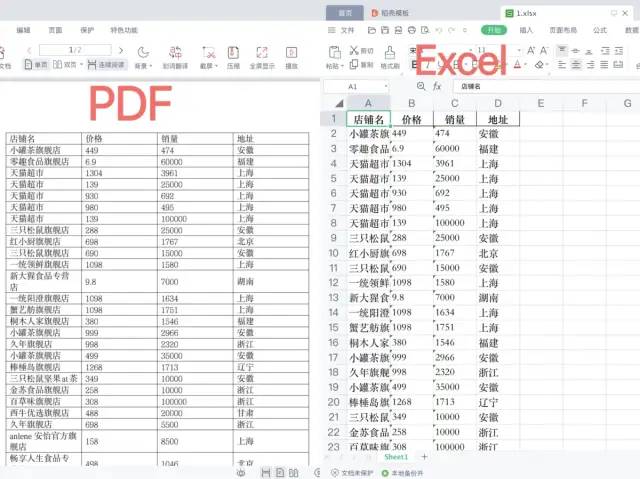
需求:想要提取 PDF 的數(shù)據(jù),保存到 Excel 中。雖然是可以直接利用 WPS 將 PDF 文件輸出成 Excel,但這個(gè)功能是收費(fèi)的,而且如果將大量 PDF轉(zhuǎn) Excel 的時(shí)候,手動(dòng)去輸出是非常耗時(shí)的。我們可以利用 Python 的第三方工具庫(kù) pdfplumber 快速完成這個(gè)功能。
一、實(shí)現(xiàn)效果圖
二、pdfplumber 庫(kù)
pdfplumber 是一個(gè)開(kāi)源 Python 工具庫(kù),可以方便獲取 PDF 的各種信息,包括文本、表格、圖表、尺寸等。完成我們本文的需求,主要使用 pdfplumber 提取 PDF 表格數(shù)據(jù)。
安裝命令
pip?install?pdfplumber
三、代碼實(shí)現(xiàn)
導(dǎo)入相關(guān)包
import?pdfplumber
import?pandas?as?pd
讀取 PDF,并獲取 PDF 的頁(yè)數(shù)
pdf?=?pdfplumber.open("/Users/wangwangyuqing/Desktop/1.pdf")
pages?=?pdf.pages
提取單個(gè) PDF 文件,保存成 Excel
if?len(pages)?>?1:
????tables?=?[]
????for?each?in?pages:
????????table?=?each.extract_table()
????????tables.extend(table)
else:
????tables?=?each.extract_table()

data?=?pd.DataFrame(tables[1:],?columns=tables[0])
data
data.to_excel("/Users/wangwangyuqing/Desktop/1.xlsx",?index=False)
提取文件夾下多個(gè) PDF 文件,保存成 Excel
import?os
import?glob

path?=?r'/Users/wangwangyuqing/Desktop/pdf文件'
for?f?in?glob.glob(os.path.join(path,?"*.pdf")):
????res?=?save_pdf_to_excel(f)
????print(res)


def?save_pdf_to_excel(path):
????#?????print('文件名為:',path.split('/')[-1].split('.')[0]?+?'.xlsx')

????pdf?=?pdfplumber.open(path)
????pages?=?pdf.pages
????if?len(pages)?>?1:
????????tables?=?[]
????????for?each?in?pages:
????????????table?=?each.extract_table()
????????????tables.extend(table)
????else:
????????tables?=?each.extract_table()
????data?=?pd.DataFrame(tables[1:],?columns=tables[0])

????file_name?=?path.split('/')[-1].split('.')[0]?+?'.xlsx'
????data.to_excel("/Users/wangwangyuqing/Desktop/data/{}".format(file_name),?index=False)
????return?'保存成功!'
四、小結(jié)
Python 中還有很多庫(kù)可以處理 pdf,比如 PyPDF2、pdfminer 等,本文選擇 pdfplumber 的原因在于能輕松訪問(wèn)有關(guān) PDF 的所有詳細(xì)信息,包括作者、來(lái)源、日期等,并且用于提取文本和表格的方法靈活可定制。大家可以根據(jù)手頭數(shù)據(jù)需求,再去解鎖 pdfplumber 的更多用法。
原創(chuàng)推薦
太強(qiáng)了!Python 開(kāi)發(fā)桌面小工具,讓代碼替我們干重復(fù)的工作!
情人節(jié),我用 Python 給女朋友做了個(gè)選禮物看板!
分析了汽車(chē)銷(xiāo)量數(shù)據(jù)下滑后,我發(fā)現(xiàn)了其中的秘密!
