
一文了解AsyncHooks
官方文檔[1]
async_hooks 模塊提供了用于跟蹤異步資源的 API。在最近的項(xiàng)目里用到了 Node.js 的 async_hooks 里的 AsyncLocalStorage Api。之前對(duì) async_hooks 也有所耳聞,但沒(méi)有實(shí)踐過(guò),正好趁此機(jī)會(huì)深入了解下。
什么是異步資源
這里的異步資源是指具有關(guān)聯(lián)回調(diào)的對(duì)象,有以下特點(diǎn):
回調(diào)可以被一次或多次調(diào)用。比如 fs.open 創(chuàng)建一個(gè) FSReqCallback 對(duì)象,監(jiān)聽(tīng) complete 事件,異步操作完成后執(zhí)行一次回調(diào),而 net.createServer 創(chuàng)建一個(gè) TCP 對(duì)象,會(huì)監(jiān)聽(tīng) connection 事件,回調(diào)會(huì)被執(zhí)行多次。 資源可以在回調(diào)被調(diào)用之前關(guān)閉 AsyncHook 是對(duì)這些異步資源的抽象,不關(guān)心這些異步的不同 如果用了 worker,每個(gè)線程會(huì)創(chuàng)建獨(dú)立的 async_hooks 接口,使用獨(dú)立的 asyncId。
為什么要追蹤異步資源
因?yàn)?Node.js 基于事件循環(huán)的異步非阻塞 I/O 模型,發(fā)起一次異步調(diào)用,回調(diào)在之后的循環(huán)中才被調(diào)用,此時(shí)已經(jīng)無(wú)法追蹤到是誰(shuí)發(fā)起了這個(gè)異步調(diào)用。
場(chǎng)景一
const fs = require('fs')
function callback(err, data) {
    console.log('callback', data)
}
fs.readFile("a.txt", callback)
console.log('after a')
fs.readFile("b.txt", callback)
console.log('after b')
// after a
// after b
// callback undefined
// callback undefined
我們用上面的例子代表 node 的異步 I/O,執(zhí)行后的結(jié)果也符合我們的預(yù)期,那么問(wèn)題來(lái)了,哪個(gè) callback 是哪個(gè) callback 呢?先執(zhí)行的是 a 的還是 b 的呢?-> 我們無(wú)法從日志中確認(rèn)調(diào)用鏈
場(chǎng)景二
function main() {
  setTimeout(() => {
    throw Error(1)
  }, 0)
}

main()
// Error: 1
//    at Timeout._onTimeout (/Users/zhangruiwu/Desktop/work/async_hooks-test/stack.js:3:11)
//    at listOnTimeout (internal/timers.js:554:17)
//    at processTimers (internal/timers.js:497:7)
異步回調(diào)拋出異常,也拿不到完整的調(diào)用棧。事件循環(huán)讓異步調(diào)用和回調(diào)之間的聯(lián)系斷了。我:斷了的弦,還怎么連?async_hooks: 聽(tīng)說(shuō)有人找我 ??
AsyncHooks
下面是官方的一個(gè) overview:
const async_hooks = require('async_hooks');
// 返回當(dāng)前執(zhí)行上下文的asyncId。
const eid = async_hooks.executionAsyncId();
// 返回觸發(fā)當(dāng)前執(zhí)行上下文的asyncId。
const tid = async_hooks.triggerAsyncId();
// 創(chuàng)建asyncHook實(shí)例,注冊(cè)各種回調(diào)
const asyncHook =
    async_hooks.createHook({ init, before, after, destroy, promiseResolve });
// 開(kāi)啟asyncHook,開(kāi)啟后才會(huì)執(zhí)行回調(diào)
asyncHook.enable();
// 關(guān)閉asyncHook
asyncHook.disable();

//
// 下面是傳入createHook的回調(diào).
//

// 初始化異步操作時(shí)的鉤子函數(shù)
function init(asyncId, type, triggerAsyncId, resource) { }

// 異步回調(diào)執(zhí)行之前的鉤子函數(shù),可能觸發(fā)多次
function before(asyncId) { }

// 異步回調(diào)完成后的鉤子函數(shù)
function after(asyncId) { }

// 異步資源銷毀時(shí)的鉤子函數(shù)
function destroy(asyncId) { }

// 調(diào)用promiseResolve時(shí)的鉤子函數(shù)
function promiseResolve(asyncId) { }
當(dāng)開(kāi)啟 asyncHook 的時(shí)候,每個(gè)異步資源都會(huì)觸發(fā)這些生命周期鉤子。下面介紹了 init 的各個(gè)參數(shù):
asyncId
異步資源的唯一 id,從 1 開(kāi)始的自增
type
標(biāo)識(shí)異步資源的字符串,下面是內(nèi)置的一些 type,也可以自定義
FSEVENTWRAP, FSREQCALLBACK, GETADDRINFOREQWRAP, GETNAMEINFOREQWRAP, HTTPINCOMINGMESSAGE,

HTTPCLIENTREQUEST, JSSTREAM, PIPECONNECTWRAP, PIPEWRAP, PROCESSWRAP, QUERYWRAP,

SHUTDOWNWRAP, SIGNALWRAP, STATWATCHER, TCPCONNECTWRAP, TCPSERVERWRAP, TCPWRAP,

TTYWRAP, UDPSENDWRAP, UDPWRAP, WRITEWRAP, ZLIB, SSLCONNECTION, PBKDF2REQUEST,

RANDOMBYTESREQUEST, TLSWRAP, Microtask, Timeout, Immediate, TickObject
triggerAsyncId
觸發(fā)當(dāng)前異步資源初始化的異步資源的 asyncId。
const { fd } = process.stdout;

async_hooks.createHook({
  init(asyncId, type, triggerAsyncId) {
    const eid = async_hooks.executionAsyncId();
    fs.writeSync(
      fd,
      `${type}(${asyncId}): trigger: ${triggerAsyncId} execution: ${eid}\n`);
  }
}).enable();

net.createServer((conn) => {}).listen(8080);
// 啟動(dòng)后輸出:
// TCPSERVERWRAP(4): trigger: 1 execution: 1 # 創(chuàng)建TCP Server,監(jiān)聽(tīng)connect事件
// TickObject(5): trigger: 4 execution: 1    # listen 回調(diào)

// nc localhost 8080 后的輸出:
// TCPWRAP(6): trigger: 4 execution: 0       # connect回調(diào)
新連接建立后,會(huì)創(chuàng)建 TCPWrap 實(shí)例,它是從 C++里被執(zhí)行的,沒(méi)有 js 堆棧,所以這里 executionAsyncId 是 0。但是這樣就不知道是哪個(gè)異步資源導(dǎo)致它被創(chuàng)建,所以需要 triggerAsyncId 來(lái)聲明哪個(gè)異步資源對(duì)它負(fù)責(zé)。
resource
一個(gè)代表異步資源的對(duì)象,可以從此對(duì)象中獲得一些異步資源相關(guān)的數(shù)據(jù)。比如:GETADDRINFOREQWRAP 類型的異步資源對(duì)象,提供了 hostname。
使用示例
我們看一下官方的一個(gè)示例:
const { fd } = process.stdout;

let indent = 0;
async_hooks.createHook({
  init(asyncId, type, triggerAsyncId) {
    const eid = async_hooks.executionAsyncId();
    const indentStr = ' '.repeat(indent);
    fs.writeSync(
      fd,
      `${indentStr}${type}(${asyncId}):` +
      ` trigger: ${triggerAsyncId} execution: ${eid}\n`);
  },
  before(asyncId) {
    const indentStr = ' '.repeat(indent);
    fs.writeSync(fd, `${indentStr}before:  ${asyncId}\n`);
    indent += 2;
  },
  after(asyncId) {
    indent -= 2;
    const indentStr = ' '.repeat(indent);
    fs.writeSync(fd, `${indentStr}after:  ${asyncId}\n`);
  },
  destroy(asyncId) {
    const indentStr = ' '.repeat(indent);
    fs.writeSync(fd, `${indentStr}destroy:  ${asyncId}\n`);
  },
}).enable();

net.createServer().listen(8080, () => {
  // Let's wait 10ms before logging the server started.
  setTimeout(() => {
    console.log('>>>', async_hooks.executionAsyncId());
  }, 10);
});
啟動(dòng)服務(wù)后的輸出:
TCPSERVERWRAP(4): trigger: 1 execution: 1  # listen 創(chuàng)建TCP server,監(jiān)聽(tīng)connect事件
TickObject(5): trigger: 4 execution: 1     # 執(zhí)行用戶回調(diào)放在了nextTick里
before:  5
  Timeout(6): trigger: 5 execution: 5      # setTimeout
after:  5
destroy:  5
before:  6
>>> 6
  TickObject(7): trigger: 6 execution: 6   # console.log
after:  6
before:  7
after:  7
對(duì)第二行 TickObject 官方的解釋是,沒(méi)有 hostname 去綁定端口是個(gè)同步的操作,所以把用戶回調(diào)放到nextTick[2]去執(zhí)行讓它成為一個(gè)異步回調(diào)。所以一個(gè)思(mian)考(shi)題來(lái)了,求輸出:
const net = require('net');
net.createServer().listen(8080, () => {console.log('listen')})

Promise.resolve().then(() => console.log('c'))
process.nextTick(() => { console.log('b') })
console.log('a')
TIPS:因?yàn)?console.log 是個(gè)異步操作,也會(huì)觸發(fā) AsyncHooks 回調(diào)。所以在 AsyncHooks 回調(diào)中執(zhí)行 console 會(huì)無(wú)限循環(huán):
const { createHook } = require('async_hooks');

createHook({
  init(asyncId, type, triggerAsyncId, resource) {
    console.log(222)
  }
}).enable()

console.log(111)
// internal/async_hooks.js:206
//     fatalError(e);
//     ^
//
// RangeError: Maximum call stack size exceeded
// (Use `node --trace-uncaught ...` to show where the exception was thrown)
可以用同步的方法輸出到文件或者標(biāo)準(zhǔn)輸出:
const { fd } = process.stdout // 1

createHook({
  init(asyncId, type, triggerAsyncId, resource) {
    // console.log(222)
    writeSync(fd, '222\n')
  }
}).enable()

console.log(111)
如何追蹤異步資源
我們用 AsyncHooks 解決上面的兩個(gè)場(chǎng)景的問(wèn)題:
場(chǎng)景一
const fs = require('fs')
const async_hooks = require('async_hooks');
const { fd } = process.stdout;

let indent = 0;
async_hooks.createHook({
  init(asyncId, type, triggerAsyncId) {
    const eid = async_hooks.executionAsyncId();
    const indentStr = ' '.repeat(indent);
    fs.writeSync(
      fd,
      `${indentStr}${type}(${asyncId}):` +
      ` trigger: ${triggerAsyncId} execution: ${eid} \n`);
  },
  before(asyncId) {
    const indentStr = ' '.repeat(indent);
    fs.writeSync(fd, `${indentStr}before:  ${asyncId}\n`);
    indent += 2;
  },
  after(asyncId) {
    indent -= 2;
    const indentStr = ' '.repeat(indent);
    fs.writeSync(fd, `${indentStr}after:  ${asyncId}\n`);
  },
  destroy(asyncId) {
    const indentStr = ' '.repeat(indent);
    fs.writeSync(fd, `${indentStr}destroy:  ${asyncId}\n`);
  },
}).enable();

function callback(err, data) {
    console.log('callback', data)
}

fs.readFile("a.txt", callback)
console.log('after a')
fs.readFile("b.txt", callback)
console.log('after b')
FSREQCALLBACK(4): trigger: 1 execution: 1      # a
after a
TickObject(5): trigger: 1 execution: 1
FSREQCALLBACK(6): trigger: 1 execution: 1      # b
after b
before:  5
after:  5
before:  4
callback undefined
  TickObject(7): trigger: 4 execution: 4       # trigger by a
after:  4
before:  7
after:  7
before:  6
callback undefined
  TickObject(8): trigger: 6 execution: 6       # trigger by b
after:  6
before:  8
after:  8
destroy:  5
destroy:  7
destroy:  4
destroy:  8
destroy:  6
a 的調(diào)用鏈路:1 -> 4 -> 7b 的調(diào)用鏈路:1 -> 6 -> 8 所以第一個(gè) callback 是 a,第二個(gè) callback 是 b
場(chǎng)景二
const async_hooks = require('async_hooks');

function stackTrace() {
  const obj = {}
  Error.captureStackTrace(obj, stackTrace)
  return obj.stack
}

const asyncResourceMap = new Map();
async_hooks.createHook({
  init(asyncId, type, triggerAsyncId) {
    asyncResourceMap.set(asyncId, {
      asyncId,
      type,
      triggerAsyncId,
      stack: stackTrace()
    })
  },
  destroy(asyncId) {
    asyncResourceMap.delete(asyncId)
  },
}).enable();

function main() {
  setTimeout(() => {
    throw Error(1)
  }, 0)
}

main()

function getTrace(asyncId) {
  if (!asyncResourceMap.get(asyncId)) {
    return '';
  }
  const resource = asyncResourceMap.get(asyncId);
  if (resource?.triggerAsyncId) {
    getTrace(resource?.triggerAsyncId);
  }
  console.log(`${resource?.type}(${resource?.asyncId})\n${resource.stack}`)
}

process.on('uncaughtException', (err) => {
  console.log(getTrace(async_hooks.executionAsyncId()))
})
Timeout(2)
Error
    at AsyncHook.init (/Users/zhangruiwu/Desktop/work/async_hooks-test/async-error.js:16:14)
    at emitInitNative (internal/async_hooks.js:199:43)
    at emitInitScript (internal/async_hooks.js:467:3)
    at initAsyncResource (internal/timers.js:157:5)
    at new Timeout (internal/timers.js:191:3)
    at setTimeout (timers.js:157:19)
    at main (/Users/zhangruiwu/Desktop/work/async_hooks-test/async-error.js:25:3)
    at Object.<anonymous> (/Users/zhangruiwu/Desktop/work/async_hooks-test/async-error.js:30:1)
    at Module._compile (internal/modules/cjs/loader.js:1063:30)
    at Object.Module._extensions..js (internal/modules/cjs/loader.js:1092:10)
利用 AsyncHooks + Error.captureStackTrace 能追蹤到完整的調(diào)用鏈
性能影響
使用 AsyncHook 會(huì)帶來(lái)一定的性能開(kāi)銷:
https://github.com/bmeurer/async-hooks-performance-impact
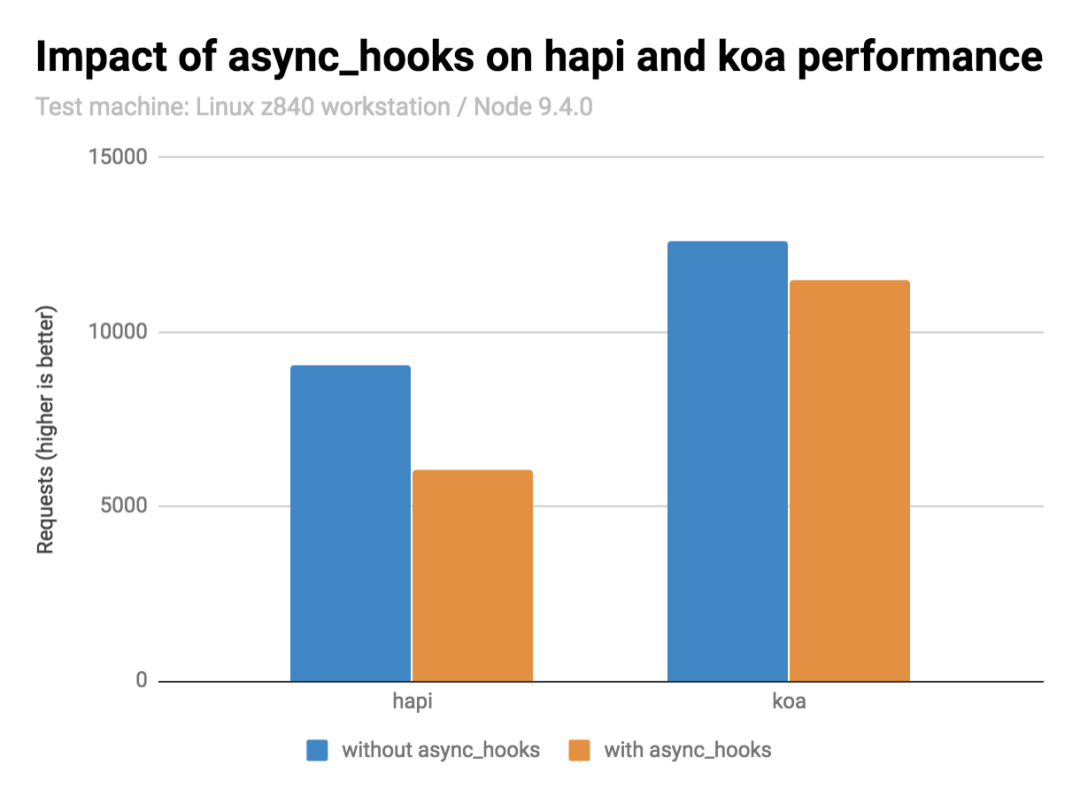
// Node v14.16.0:
regular hapiserver: 11734.73 reqs.
init hapiserver: 8768.21 reqs.
full hapiserver: 6250.5 reqs.

regular koaserver: 17418.8 reqs.
init koaserver: 17183.6 reqs.
full koaserver: 14097.82 reqs.
實(shí)際應(yīng)用
clinic 的性能測(cè)試工具Bubbleprof - Clinic.js[3]就是利用 AsyncHooks + Error.captureStackTrace 追蹤調(diào)用鏈。
AsyncResource
可自定義異步資源
const { AsyncResource, executionAsyncId } = require('async_hooks');

// 一般用于extend,實(shí)例化一個(gè)異步資源
const asyncResource = new AsyncResource(
  type, { triggerAsyncId: executionAsyncId(), requireManualDestroy: false }
);

// 在異步資源的執(zhí)行上下文里運(yùn)行函數(shù):
// * 創(chuàng)建異步資源上下文
// * 觸發(fā)before
// * 執(zhí)行函數(shù)
// * 觸發(fā)after
// * 恢復(fù)原始執(zhí)行上下文
asyncResource.runInAsyncScope(fn, thisArg, ...args);

// 觸發(fā)destory
asyncResource.emitDestroy();

// 返回asyncID
asyncResource.asyncId();

// 返回triggerAsyncId
asyncResource.triggerAsyncId();
下面是個(gè)例子
class MyResource extends asyncHooks.AsyncResource {
    constructor() {
        super('my-resource');
    }

    close() {
        this.emitDestroy();
    }
}

function p() {
    return new Promise(r => {
        setTimeout(() => {
            r()
        }, 1000)
    })
}

let resource = new MyResource;
resource.runInAsyncScope(async () => {
    console.log('hello')
    await p()
})

resource.close();
可以看到 runInAsyncScope 傳入的函數(shù)是在我們自定義的異步資源回調(diào)里執(zhí)行的:
my-resource(4): trigger: 1 execution: 1
before:  4
  PROMISE(5): trigger: 4 execution: 4
hello
  TickObject(6): trigger: 4 execution: 4
  PROMISE(7): trigger: 4 execution: 4
  Timeout(8): trigger: 4 execution: 4
  PROMISE(9): trigger: 7 execution: 4
after:  4
before:  6
after:  6
destroy:  4
destroy:  6
before:  8
after:  8
before:  9
after:  9
destroy:  8
AsyncLocalStorage
用于在回調(diào)和 Promise 鏈中創(chuàng)建異步狀態(tài)。它允許在 Web 請(qǐng)求的整個(gè)生命周期或任何其他異步持續(xù)時(shí)間內(nèi)存儲(chǔ)數(shù)據(jù)。類似于其他語(yǔ)言中的線程本地存儲(chǔ)(TLS)。
const http = require('http');
const { AsyncLocalStorage } = require('async_hooks');

const asyncLocalStorage = new AsyncLocalStorage();

function logWithId(msg) {
  const id = asyncLocalStorage.getStore();
  console.log(`${id !== undefined ? id : '-'}:`, msg);
}

let idSeq = 0;
http.createServer((req, res) => {
  asyncLocalStorage.run(idSeq++, () => {
    logWithId('start');
    // Imagine any chain of async operations here
    setImmediate(() => {
      logWithId('finish');
      res.end();
    });
  });
}).listen(8080);

http.get('http://localhost:8080');
http.get('http://localhost:8080');
// Prints:
//   0: start
//   1: start
//   0: finish
//   1: finish
實(shí)現(xiàn)原理
https://github.com/nodejs/node/blob/master/lib/async_hooks.js#L267
const storageList = [];
const storageHook = createHook({
  init(asyncId, type, triggerAsyncId, resource) {
    const currentResource = executionAsyncResource();
    // Value of currentResource is always a non null object
    for (let i = 0; i < storageList.length; ++i) {
      storageList[i]._propagate(resource, currentResource);
    }
  }
});

class AsyncLocalStorage {
  constructor() {
    this.kResourceStore = Symbol('kResourceStore');
    this.enabled = false;
  }

  disable() {
    if (this.enabled) {
      this.enabled = false;
      // If this.enabled, the instance must be in storageList
      storageList.splice(storageList.indexOf(this), 1);
      if (storageList.length === 0) {
        storageHook.disable();
      }
    }
  }

  // Propagate the context from a parent resource to a child one
  _propagate(resource, triggerResource) {
    const store = triggerResource[this.kResourceStore];
    if (this.enabled) {
      resource[this.kResourceStore] = store;
    }
  }

  enterWith(store) {
    if (!this.enabled) {
      this.enabled = true;
      storageList.push(this);
      storageHook.enable();
    }
    const resource = executionAsyncResource();
    resource[this.kResourceStore] = store;
  }

  run(store, callback, ...args) {
    const resource = new AsyncResource('AsyncLocalStorage');
    return resource.runInAsyncScope(() => {
      this.enterWith(store);
      return callback(...args);
    });
  }

  exit(callback, ...args) {
    if (!this.enabled) {
      return callback(...args);
    }
    this.enabled = false;
    try {
      return callback(...args);
    } finally {
      this.enabled = true;
    }
  }

  getStore() {
    const resource = executionAsyncResource();
    if (this.enabled) {
      return resource[this.kResourceStore];
    }
  }
}
run:
創(chuàng)建 AsyncResource,存儲(chǔ) store
開(kāi)啟 asyncHook(init)
執(zhí)行 run 傳入的函數(shù)
創(chuàng)建新的異步資源時(shí)觸發(fā) init 回調(diào)
將當(dāng)前異步資源的 store 傳遞給新的異步資源
依次類推
getStore:從當(dāng)前異步資源獲取 store
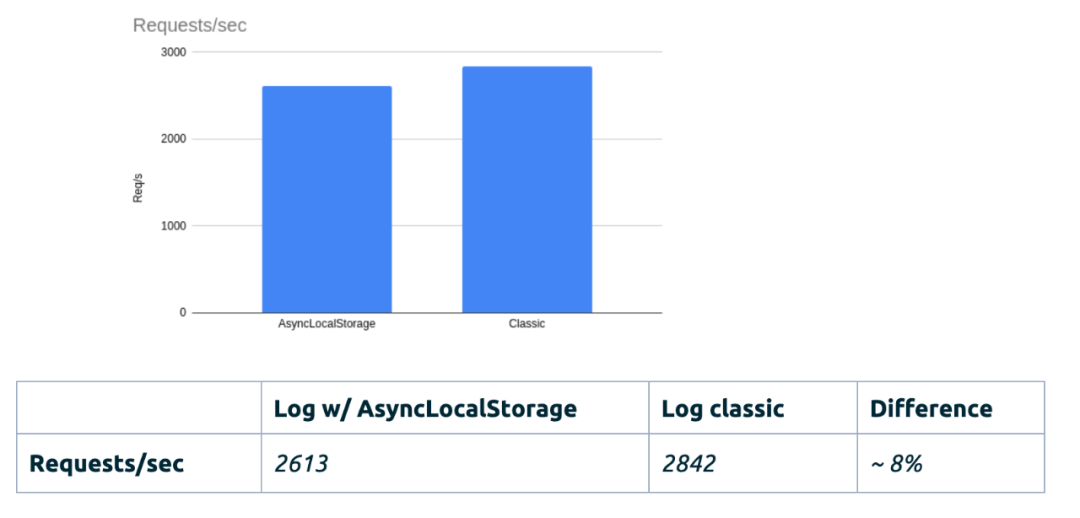
性能影響
Kuzzle[4]的性能基準(zhǔn)測(cè)試,使用了 AsyncLocalStorage 與未使用之間相差 ~ 8%
let fn = async () => /test/.test('test');

Performed 180407 iterations to warmup
Performed 205741 iterations (with ALS enabled)
Performed 6446728 iterations (with ALS disabled)
ALS penalty: 96.8%

let fn = promisify(setTimeout).bind(null, 2);
Performed 44 iterations to warmup
Performed 4214 iterations (with ALS enabled)
Performed 4400 iterations (with ALS disabled)
ALS penalty: 4.23%
所以還是需要結(jié)合實(shí)際應(yīng)用場(chǎng)景評(píng)估性能影響,als 帶來(lái)的損耗跟業(yè)務(wù)代碼相比可能微不足道。
應(yīng)用場(chǎng)景
實(shí)現(xiàn) CLS
Continuation-local storage\(CLS\)[6]類似其他語(yǔ)言的線程本地存儲(chǔ)(TLS), 得名于函數(shù)式編程中的延續(xù)傳遞風(fēng)格Continuation-passing style[7](CPS),CPS 就類似 node 中鏈?zhǔn)交卣{(diào)的風(fēng)格,旨在鏈?zhǔn)胶瘮?shù)調(diào)用過(guò)程中維護(hù)一個(gè)持久的數(shù)據(jù)。cls-hooked[8]是用 async_hooks 實(shí)現(xiàn) CLS 的一個(gè)庫(kù),對(duì)不支持 async_hooks 的版本也做了兼容asynchronous-local-storage[9]是用 ALS 實(shí)現(xiàn)的,對(duì)老版本會(huì)回退到 cls-hooked, 也是這次一體化項(xiàng)目里用到的。下面是官方的示例
const { als } = require('asynchronous-local-storage')
const express = require('express')
const app = express()
const port = 3000

app.use((req, res, next) => {
  als.runWith(() => {
    next();
    }, { user: { id: 'defaultUser' } }); // sets default values
});

app.use((req, res, next) => {
  // overrides default user value
  als.set('user', { id: 'customUser' });
  next();
});

app.get('/', (req, res) => res.send({ user: als.get('user') }))

app.listen(port, () => console.log(`Example app listening at http://localhost:${port}`))
用它我們可以在異步調(diào)用鏈上共享數(shù)據(jù),想獲取數(shù)據(jù)時(shí)隨時(shí)隨地調(diào)一下 get 即可。再看一下上面的例子,既然我們可以在異步調(diào)用鏈上共享數(shù)據(jù)了,那我們中間件還需要傳遞 req, res 參數(shù)嗎?express 和 koa 的中間件設(shè)計(jì)都需要我們?cè)诿總€(gè)中間件間傳遞固定的參數(shù),想要獲取一些就需要從中間件參數(shù)里拿到 ctx。ALS 可以打破這個(gè)限制,獲取 ctx 不必從參數(shù)里拿,沒(méi)有了這個(gè)限制我們可以做一些不一樣的事情,比如 midway 的一體化調(diào)用方案[10]。最近比較火的函數(shù)式框架farrow[11]也是利用了 ALS 給我們帶來(lái)了不一樣的開(kāi)發(fā)體驗(yàn)。
參考資料
Async hooks | Node.js v16.1.0 Documentation[12] bmeurer/async-hooks-performance-impact[13]
Making async_hooks fast \(enough\)[14]
NodeJs async_hooks 詳解[15]
在 Node.js 中使用 Async Hooks 處理 HTTP 請(qǐng)求上下文實(shí)現(xiàn)鏈路追蹤[16]
https://medium.com/nmc-techblog/the-power-of-async-hooks-in-node-js-8a2a84238acb
https://blog.kuzzle.io/nodejs-14-asynclocalstorage-asynchronous-calls
https://itnext.io/request-id-tracing-in-node-js-applications-c517c7dab62d
如果你覺(jué)得這篇內(nèi)容對(duì)你挺有啟發(fā),我想邀請(qǐng)你幫我三個(gè)小忙:
點(diǎn)個(gè)「在看」,讓更多的人也能看到這篇內(nèi)容(喜歡不點(diǎn)在看,都是耍流氓 -_-) 歡迎加我微信「TH0000666」一起交流學(xué)習(xí)... 關(guān)注公眾號(hào)「前端Sharing」,持續(xù)為你推送精選好文。
參考資料
官方文檔: https://nodejs.org/api/async_hooks.html
[2]nextTick: https://github.com/nodejs/node/blob/master/lib/net.js#L1324
[3]Bubbleprof - Clinic.js: https://clinicjs.org/bubbleprof/
[4]Kuzzle: https://blog.kuzzle.io/nodejs-14-asynclocalstorage-asynchronous-calls
[5]AsyncLocalStorage kills 97% of performance in anasyncenvironment · Issue #34493 · nodejs/node: https://github.com/nodejs/node/issues/34493
Continuation-local storage(CLS): https://github.com/othiym23/node-continuation-local-storage
[7]Continuation-passing style: https://en.wikipedia.org/wiki/Continuation-passing_style
[8]cls-hooked: https://github.com/Jeff-Lewis/cls-hooked
[9]asynchronous-local-storage: https://github.com/kibertoad/asynchronous-local-storage
[10]一體化調(diào)用方案: https://www.yuque.com/midwayjs/faas/hooks
[11]farrow: https://github.com/Lucifier129/farrow
[12]Async hooks | Node.js v16.1.0 Documentation: https://nodejs.org/api/async_hooks.html
[13]bmeurer/async-hooks-performance-impact: https://github.com/bmeurer/async-hooks-performance-impact
[14]Making async_hooks fast (enough): https://docs.google.com/document/d/1g8OrG5lMIUhRn1zbkutgY83MiTSMx-0NHDs8Bf-nXxM/preview#heading=h.v9as6odlrky3
[15]NodeJs async_hooks 詳解: https://www.jianshu.com/p/add30d25ada3
[16]在 Node.js 中使用 Async Hooks 處理 HTTP 請(qǐng)求上下文實(shí)現(xiàn)鏈路追蹤: https://cloud.tencent.com/developer/article/1792531