<kbd id="afajh"><form id="afajh"></form></kbd>
<strong id="afajh"><dl id="afajh"></dl></strong>
    <del id="afajh"><form id="afajh"></form></del>
        1. <th id="afajh"><progress id="afajh"></progress></th>
          <b id="afajh"><abbr id="afajh"></abbr></b>
          <th id="afajh"><progress id="afajh"></progress></th>

          國(guó)內(nèi)用戶GitHub訪問(wèn)速度慢怎么辦?老宇哥教你一招解決!

          共 3477字,需瀏覽 7分鐘

           ·

          2022-06-13 22:36

          作者:曉宇,排版:曉宇

          微信公眾號(hào):芯片之家(ID:chiphome-dy)

          GitHub

          作為全球最大的同性交友網(wǎng)站,GitHub可謂是又愛又恨,愛的是太多非常棒的開源項(xiàng)目了,有很大的參考價(jià)值,也方便我們自己托管項(xiàng)目,恨的是這個(gè)網(wǎng)站的訪問(wèn)實(shí)在是太不給力了,基本是隨緣了,不同城市不同網(wǎng)絡(luò)都各不相同,用寬帶,手機(jī)流量也各不相同,大部分是不怎么好的。
          最近發(fā)現(xiàn)一個(gè)叫做Fetch Github Hosts的項(xiàng)目,也許能幫到大家,這里只針對(duì)網(wǎng)絡(luò)不好的同學(xué)哈,fetch-github-hosts是主要為解決研究及學(xué)習(xí)人員訪問(wèn)Github過(guò)慢或其他問(wèn)題而提供的免費(fèi)的Github hosts同步服務(wù),項(xiàng)目開源,有寫具體的使用方法,有需要的同學(xué)可以前往學(xué)習(xí)一下。

          簡(jiǎn)單粗暴的方法

          手動(dòng)添加hosts
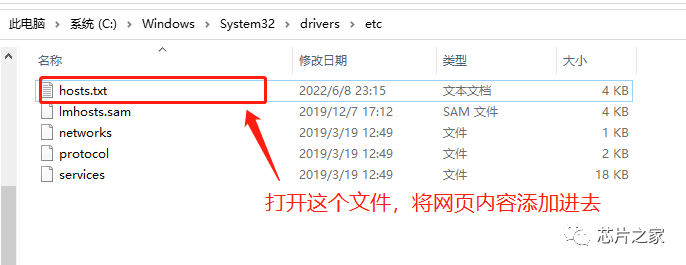
          訪問(wèn)https://hosts.gitcdn.top/hosts.txt這個(gè)網(wǎng)站,將網(wǎng)頁(yè)的全部?jī)?nèi)容粘貼到你的hosts文件中

          Linux / MacOS hosts路徑:/etc/hostsWindows hosts路徑:C:\Windows\System32\drivers\etc\host

          老宇哥這里也順便貼出來(lái),大家復(fù)制即可:

          # fetch-github-hosts begin140.82.112.26               alive.github.com140.82.112.26               live.github.com185.199.108.154             github.githubassets.com140.82.112.21               central.github.com185.199.111.133             desktop.githubusercontent.com185.199.109.153             assets-cdn.github.com185.199.108.133             camo.githubusercontent.com185.199.108.133             github.map.fastly.net146.75.113.194              github.global.ssl.fastly.net52.192.72.89                gist.github.com185.199.108.153             github.io52.192.72.89                github.com192.0.66.2                  github.blog52.69.239.207               api.github.com185.199.109.133             raw.githubusercontent.com185.199.109.133             user-images.githubusercontent.com185.199.111.133             favicons.githubusercontent.com185.199.109.133             avatars5.githubusercontent.com185.199.109.133             avatars4.githubusercontent.com185.199.109.133             avatars3.githubusercontent.com185.199.108.133             avatars2.githubusercontent.com185.199.109.133             avatars1.githubusercontent.com185.199.111.133             avatars0.githubusercontent.com185.199.111.133             avatars.githubusercontent.com52.193.111.178              codeload.github.com52.216.177.203              github-cloud.s3.amazonaws.com52.216.177.203              github-com.s3.amazonaws.com52.217.91.148               github-production-release-asset-2e65be.s3.amazonaws.com52.217.91.148               github-production-user-asset-6210df.s3.amazonaws.com52.217.91.148               github-production-repository-file-5c1aeb.s3.amazonaws.com185.199.109.153             githubstatus.com64.71.144.211               github.community52.237.112.130              github.dev140.82.112.21               collector.github.com13.107.42.16                pipelines.actions.githubusercontent.com185.199.108.133             media.githubusercontent.com185.199.108.133             cloud.githubusercontent.com185.199.108.133             objects.githubusercontent.com# last fetch time: 2022-06-11T23:00:02+08:00# update url: https://hosts.gitcdn.top/hosts.txt# fetch-github-hosts end

          特別注意,在windows中,大家修改完hosts之后,直接保存不了,保存的時(shí)候先另存在桌面,再拖進(jìn)去覆蓋即可!

          刷新生效:

          Linux: /etc/init.d/network restartWindows: ipconfig /flushdnsMacos: sudo killall -HUP mDNSResponder

          試試訪問(wèn)效果

          開源倉(cāng)庫(kù):
          https://github.com/Licoy/fetch-github-hosts

          GitHub鏡像站
          或者使用Github鏡像站,國(guó)內(nèi)可以加速訪問(wèn)GitHub的網(wǎng)站(GitHub加速),使用起來(lái)和官網(wǎng)沒(méi)啥區(qū)別,只是域名不同而已。
          • https://hub.おうか.tw

          • https://hub.連接.臺(tái)灣

          • https://hub.fastgit.xyz

          • https://cdn.githubjs.cf

          • https://gitclone.com

          分享一些技術(shù)開發(fā)的方法工具分享給大家,如果覺(jué)得有用,請(qǐng)為我點(diǎn)贊!

          推薦閱讀:點(diǎn)擊下方圖片即可跳轉(zhuǎn)閱讀


          軟件神器TortoiseGit,曉宇姐姐教你使用圖形化方式管理單片機(jī)程序版本!

          Git使用教程:最詳細(xì)、最傻瓜、最淺顯、真正手把手教!(建議收藏)


          我是老宇哥,一名熱愛學(xué)習(xí)的電子工程師
          關(guān)注我,一起變得更加優(yōu)秀!
          歡迎點(diǎn)分享、收藏、點(diǎn)贊、在看。
          瀏覽 99
          點(diǎn)贊
          評(píng)論
          收藏
          分享

          手機(jī)掃一掃分享

          分享
          舉報(bào)
          評(píng)論
          圖片
          表情
          推薦
          點(diǎn)贊
          評(píng)論
          收藏
          分享

          手機(jī)掃一掃分享

          分享
          舉報(bào)
          <kbd id="afajh"><form id="afajh"></form></kbd>
          <strong id="afajh"><dl id="afajh"></dl></strong>
            <del id="afajh"><form id="afajh"></form></del>
                1. <th id="afajh"><progress id="afajh"></progress></th>
                  <b id="afajh"><abbr id="afajh"></abbr></b>
                  <th id="afajh"><progress id="afajh"></progress></th>
                  国产精品午夜福利电影 | 中文字幕第五页在线观看 | 综合色青娱乐 | 黄 色 视 频在线观看 久久国产精品波多野结衣AV | chaopeng视频在线观看 |