MyBatis 動(dòng)態(tài) SQL(認(rèn)真看看, 以后寫SQL就爽多了)
來自:博客園(作者:阿進(jìn)的寫字臺(tái))
原文鏈接(底部鏈接可直達(dá)):
https://www.cnblogs.com/homejim/
| 元素 | 作用 | 備注 |
|---|---|---|
| if | 判斷語句 | 單條件分支 |
| choose(when、otherwise) | 相當(dāng)于 Java 中的 if else | 多條件分支 |
| trim(where、set) | 輔助元素 | 用于處理 SQL 拼接問題 |
| foreach | 循環(huán)語句 | 批量插入, 更新, 查詢時(shí)經(jīng)常用到 |
| bind | 創(chuàng)建一個(gè)變量, 并綁定到上下文中 | 用于兼容不同的數(shù)據(jù)庫, 防止 SQL 注入等 |
1 數(shù)據(jù)準(zhǔn)備
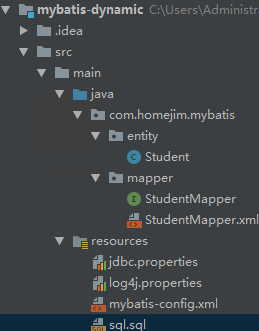
為了后面的演示, 創(chuàng)建了一個(gè) Maven 項(xiàng)目 mybatis-dynamic, 創(chuàng)建了對(duì)應(yīng)的數(shù)據(jù)庫和表
DROP TABLE IF EXISTS `student`;CREATE TABLE `student` (
  `student_id` int(10) unsigned NOT NULL AUTO_INCREMENT COMMENT '編號(hào)',
  `name` varchar(20) DEFAULT NULL COMMENT '姓名',`phone` varchar(20) DEFAULT NULL COMMENT '電話',
  `email` varchar(50) DEFAULT NULL COMMENT '郵箱',
  `sex` tinyint(4) DEFAULT NULL COMMENT '性別',
  `locked` tinyint(4) DEFAULT NULL COMMENT '狀態(tài)(0:正常,1:鎖定)',
  `gmt_created` datetime DEFAULT CURRENT_TIMESTAMP COMMENT '存入數(shù)據(jù)庫的時(shí)間',
  `gmt_modified` datetime DEFAULT CURRENT_TIMESTAMP ON UPDATE CURRENT_TIMESTAMP COMMENT '修改的時(shí)間',
  `delete` int(11) DEFAULT NULL,
  PRIMARY KEY (`student_id`)
) ENGINE=InnoDB AUTO_INCREMENT=7 DEFAULT CHARSET=utf8mb4 COLLATE=utf8mb4_0900_ai_ci COMMENT='學(xué)生表';
對(duì)應(yīng)的項(xiàng)目結(jié)構(gòu)
2 if 標(biāo)簽
if 標(biāo)簽是我們最常使用的。在查詢、刪除、更新的時(shí)候很可能會(huì)使用到。必須結(jié)合 test 屬性聯(lián)合使用。
2.1 在 WHERE 條件中使用 if 標(biāo)簽
這是常見的一種現(xiàn)象, 我們?cè)谶M(jìn)行按條件查詢的時(shí)候, 可能會(huì)有多種情況。
2.1.1 查詢條件
根據(jù)輸入的學(xué)生信息進(jìn)行條件檢索
當(dāng)只輸入用戶名時(shí), 使用用戶名進(jìn)行模糊檢索;
當(dāng)只輸入性別時(shí), 使用性別進(jìn)行完全匹配
當(dāng)用戶名和性別都存在時(shí), 用這兩個(gè)條件進(jìn)行查詢匹配查詢
2.1.2 動(dòng)態(tài) SQL
接口函數(shù)
    /**
 * 根據(jù)輸入的學(xué)生信息進(jìn)行條件檢索
 * 1. 當(dāng)只輸入用戶名時(shí), 使用用戶名進(jìn)行模糊檢索;
 * 2. 當(dāng)只輸入郵箱時(shí), 使用性別進(jìn)行完全匹配
 * 3. 當(dāng)用戶名和性別都存在時(shí), 用這兩個(gè)條件進(jìn)行查詢匹配的用
 * @param student
 * @return
 */
List selectByStudentSelective(Student student);
對(duì)應(yīng)的動(dòng)態(tài) SQL
  <select id="selectByStudentSelective" resultMap="BaseResultMap" parameterType="com.homejim.mybatis.entity.Student">
    select
    "Base_Column_List" />
    from student
    where 1=1
    <if test="name != null and name !=''">
      and name like concat('%', #{name}, '%')
    if>
    <if test="sex != null">
      and sex=#{sex}
    if>
  select>
在此 SQL 語句中, where 1=1 是多條件拼接時(shí)的小技巧, 后面的條件查詢就可以都用 and 了。
同時(shí), 我們添加了 if 標(biāo)簽來處理動(dòng)態(tài) SQL
    <if test="name != null and name !=''">
      and name like concat('%', #{name}, '%')
    if>
    <if test="sex != null">
      and sex=#{sex}
    if>
此 if 標(biāo)簽的 test 屬性值是一個(gè)符合 OGNL 的表達(dá)式, 表達(dá)式可以是 true 或 false。如果表達(dá)式返回的是數(shù)值, 則0為 false, 非 0 為 true;
2.1.3 測(cè)試
      @Test
    public void selectByStudent() {
        SqlSession sqlSession = null;
        sqlSession = sqlSessionFactory.openSession();
        StudentMapper studentMapper = sqlSession.getMapper(StudentMapper.class);
		Student search = new Student();
        search.setName("明");
		System.out.println("只有名字時(shí)的查詢");
        List studentsByName = studentMapper.selectByStudentSelective(search);
        for (int i = 0; i < studentsByName.size(); i++) {
            System.out.println(ToStringBuilder.reflectionToString(studentsByName.get(i), ToStringStyle.MULTI_LINE_STYLE));
        }
		search.setName(null);
        search.setSex((byte) 1);
        System.out.println("只有性別時(shí)的查詢");
        List studentsBySex = studentMapper.selectByStudentSelective(search);
        for (int i = 0; i < studentsBySex.size(); i++) {
            System.out.println(ToStringBuilder.reflectionToString(studentsBySex.get(i), ToStringStyle.MULTI_LINE_STYLE));
        }
		System.out.println("姓名和性別同時(shí)存在的查詢");
        search.setName("明");
        List studentsByNameAndSex = studentMapper.selectByStudentSelective(search);
        for (int i = 0; i < studentsByNameAndSex.size(); i++) {
            System.out.println(ToStringBuilder.reflectionToString(studentsByNameAndSex.get(i), ToStringStyle.MULTI_LINE_STYLE));
        }
		 sqlSession.commit();
        sqlSession.close();
} 只有名字時(shí)的查詢, 發(fā)送的語句和結(jié)果

查詢的條件只發(fā)送了
where 1=1 and name like concat('%', ?, '%')
只有性別時(shí)的查詢, 發(fā)送的語句和結(jié)果

查詢的條件只發(fā)送了
where 1=1 and sex=?
姓名和性別同時(shí)存在的查詢, 發(fā)送的語句和結(jié)果

查詢條件
where 1=1 and name like concat('%', ?, '%') and sex=?
2.2 在 UPDATE 更新列中使用 if 標(biāo)簽
有時(shí)候我們不希望更新所有的字段, 只更新有變化的字段。
2.2.1 更新條件
只更新有變化的字段, 空值不更新。
2.2.1 動(dòng)態(tài) SQL
接口方法
    /**
* 更新非空屬性
*/
int updateByPrimaryKeySelective(Student record);
對(duì)應(yīng)的 SQL
  "updateByPrimaryKeySelective" parameterType="com.homejim.mybatis.entity.Student">
    update student
    <set>
      <if test="name != null">
        `name` = #{name,jdbcType=VARCHAR},
      if>
      <if test="phone != null">
        phone = #{phone,jdbcType=VARCHAR},
      if>
      <if test="email != null">
        email = #{email,jdbcType=VARCHAR},
      if>
      <if test="sex != null">
        sex = #{sex,jdbcType=TINYINT},
      if>
      <if test="locked != null">
        locked = #{locked,jdbcType=TINYINT},
      if>
      <if test="gmtCreated != null">
        gmt_created = #{gmtCreated,jdbcType=TIMESTAMP},
      if>
      <if test="gmtModified != null">
        gmt_modified = #{gmtModified,jdbcType=TIMESTAMP},
      if>
    set>
    where student_id = #{studentId,jdbcType=INTEGER}
2.2.3 測(cè)試
    @Test
public  void updateByStudentSelective() {
        SqlSession sqlSession = null;
        sqlSession = sqlSessionFactory.openSession();
        StudentMapper studentMapper = sqlSession.getMapper(StudentMapper.class);
		Student student = new Student();
        student.setStudentId(1);
        student.setName("明明");
        student.setPhone("13838438888");
 ???????System.out.println(studentMapper.updateByPrimaryKeySelective(student));
        sqlSession.commit();
        sqlSession.close();
}
結(jié)果如下

2.3 在 INSERT 動(dòng)態(tài)插入中使用 if 標(biāo)簽
我們插入數(shù)據(jù)庫中的一條記錄, 不是每一個(gè)字段都有值的, 而是動(dòng)態(tài)變化的。在這時(shí)候使用 if 標(biāo)簽, 可幫我們解決這個(gè)問題。
2.3.1 插入條件
只有非空屬性才插入。
2.3.2 動(dòng)態(tài)SQL
接口方法
    /**
* 非空字段才進(jìn)行插入
*/
int insertSelective(Student record);
對(duì)應(yīng)的SQL
"insertSelective" parameterType="com.homejim.mybatis.entity.Student">
    insert into student
    "(" suffix=")" suffixOverrides=",">
      <if test="studentId != null">
        student_id,
      if>
      <if test="name != null">
        `name`,
      if>
      <if test="phone != null">
        phone,
      if>
      <if test="email != null">
        email,
      if>
      <if test="sex != null">
        sex,
      if>
      <if test="locked != null">
        locked,
      if>
      <if test="gmtCreated != null">
        gmt_created,
      if>
      <if test="gmtModified != null">
        gmt_modified,
      if>

    "values (" suffix=")" suffixOverrides=",">
      <if test="studentId != null">
        #{studentId,jdbcType=INTEGER},
      if>
      <if test="name != null">
        #{name,jdbcType=VARCHAR},
      if>
      <if test="phone != null">
        #{phone,jdbcType=VARCHAR},
      if>
      <if test="email != null">
        #{email,jdbcType=VARCHAR},
      if>
      <if test="sex != null">
        #{sex,jdbcType=TINYINT},
      if>
      <if test="locked != null">
        #{locked,jdbcType=TINYINT},
      if>
      <if test="gmtCreated != null">
        #{gmtCreated,jdbcType=TIMESTAMP},
      if>
      <if test="gmtModified != null">
        #{gmtModified,jdbcType=TIMESTAMP},
      if>
這個(gè) SQL 大家應(yīng)該很熟悉, 畢竟是自動(dòng)生成的。
2.3.3 測(cè)試
    @Test
public  void insertByStudentSelective() {
    SqlSession sqlSession = null;
    sqlSession = sqlSessionFactory.openSession();
    StudentMapper studentMapper = sqlSession.getMapper(StudentMapper.class);
    Student student = new Student();
    student.setName("小飛機(jī)");
    student.setPhone("13838438899");
    student.setEmail("[email protected]");
    student.setLocked((byte) 0);????System.out.println(studentMapper.insertSelective(student));

 ? ?sqlSession.commit();
 ? ?sqlSession.close();
}
對(duì)應(yīng)的結(jié)果

SQL 中, 只有非空的字段才進(jìn)行了插入。
3 choose 標(biāo)簽
choose when otherwise 標(biāo)簽可以幫我們實(shí)現(xiàn) if else 的邏輯。
一個(gè) choose 標(biāo)簽至少有一個(gè) when,最多一個(gè)otherwise
下面是一個(gè)查詢的例子。
3.1 查詢條件
假設(shè) name 具有唯一性, 查詢一個(gè)學(xué)生
當(dāng) studen_id 有值時(shí), 使用 studen_id 進(jìn)行查詢;
當(dāng) studen_id 沒有值時(shí), 使用 name 進(jìn)行查詢;
否則返回空
3.2 動(dòng)態(tài)SQL
接口方法
    /**
* - 當(dāng) studen_id 有值時(shí), 使用 studen_id 進(jìn)行查詢;
* - 當(dāng) studen_id 沒有值時(shí), 使用 name 進(jìn)行查詢;
* - 否則返回空
*/
Student selectByIdOrName(Student record);
對(duì)應(yīng)的SQL
  <select id="selectByIdOrName" resultMap="BaseResultMap" parameterType="com.homejim.mybatis.entity.Student">
    select
    "Base_Column_List" />
    from student
    where 1=1

      <when test="studentId != null">
        and student_id=#{studentId}
      when>
      <when test="name != null and name != ''">
        and name=#{name}
      when>

        and 1=2


  select>
3.3 測(cè)試
@Test
public void selectByIdOrName() {
        SqlSession sqlSession = null;
        sqlSession = sqlSessionFactory.openSession();
        StudentMapper studentMapper = sqlSession.getMapper(StudentMapper.class);
         Student student = new Student();
        student.setName("小飛機(jī)");
        student.setStudentId(1);
		Student studentById = studentMapper.selectByIdOrName(student);
        System.out.println("有 ID 則根據(jù) ID 獲取");
        System.out.println(ToStringBuilder.reflectionToString(studentById, ToStringStyle.MULTI_LINE_STYLE));
        student.setStudentId(null);
        Student studentByName = studentMapper.selectByIdOrName(student);
        System.out.println("沒有 ID 則根據(jù) name 獲取");
        System.out.println(ToStringBuilder.reflectionToString(studentByName, ToStringStyle.MULTI_LINE_STYLE));
        student.setName(null);
        Student studentNull = studentMapper.selectByIdOrName(student);
        System.out.println("沒有 ID 和 name, 返回 null");
        Assert.assertNull(studentNull);
        sqlSession.commit();
        sqlSession.close();
}
有 ID 則根據(jù) ID 獲取, 結(jié)果

沒有 ID 則根據(jù) name 獲取

沒有 ID 和 name, 返回 null

4 trim(set、where)
這三個(gè)其實(shí)解決的是類似的問題。如我們?cè)趯懬懊娴腫在 WHERE 條件中使用 if 標(biāo)簽] SQL 的時(shí)候, where 1=1 這個(gè)條件我們是不希望存在的。
4.1 where
4.1.1 查詢條件
根據(jù)輸入的學(xué)生信息進(jìn)行條件檢索。
當(dāng)只輸入用戶名時(shí), 使用用戶名進(jìn)行模糊檢索;
當(dāng)只輸入性別時(shí), 使用性別進(jìn)行完全匹配
當(dāng)用戶名和性別都存在時(shí), 用這兩個(gè)條件進(jìn)行查詢匹配查詢
不使用 where 1=1。
4.1.2 動(dòng)態(tài) SQL
很顯然, 我們要解決這幾個(gè)問題
當(dāng)條件都不滿足時(shí):此時(shí) SQL 中應(yīng)該要不能有 where , 否則導(dǎo)致出錯(cuò)
當(dāng) if 有條件滿足時(shí):SQL 中需要有 where, 且第一個(gè)成立的 if 標(biāo)簽下的 and | or 等要去掉
這時(shí)候, 我們可以使用 where 標(biāo)簽。
接口方法
    /**
* 根據(jù)輸入的學(xué)生信息進(jìn)行條件檢索
* 1. 當(dāng)只輸入用戶名時(shí), 使用用戶名進(jìn)行模糊檢索;
* 2. 當(dāng)只輸入郵箱時(shí), 使用性別進(jìn)行完全匹配
* 3. 當(dāng)用戶名和性別都存在時(shí), 用這兩個(gè)條件進(jìn)行查詢匹配的用
*/
List selectByStudentSelectiveWhereTag(Student student);
對(duì)應(yīng)的 SQL
  <select id="selectByStudentSelectiveWhereTag" resultMap="BaseResultMap" parameterType="com.homejim.mybatis.entity.Student">
    select
    "Base_Column_List" />
    from student
   <where>
    <if test="name != null and name !=''">
      and name like concat('%', #{name}, '%')
    if>
    <if test="sex != null">
      and sex=#{sex}
    if>
   where>
  select>
4.1.3 測(cè)試
    @Test
    public void selectByStudentWhereTag() {
        SqlSession sqlSession = null;
        sqlSession = sqlSessionFactory.openSession();
        StudentMapper studentMapper = sqlSession.getMapper(StudentMapper.class);
        Student search = new Student();
        search.setName("明");
        System.out.println("只有名字時(shí)的查詢");
        List studentsByName = studentMapper.selectByStudentSelectiveWhereTag(search);
        for (int i = 0; i < studentsByName.size(); i++) {
            System.out.println(ToStringBuilder.reflectionToString(studentsByName.get(i), ToStringStyle.MULTI_LINE_STYLE));
        }
        search.setSex((byte) 1);
        System.out.println("姓名和性別同時(shí)存在的查詢");
        List studentsBySex = studentMapper.selectByStudentSelectiveWhereTag(search);
        for (int i = 0; i < studentsBySex.size(); i++) {
            System.out.println(ToStringBuilder.reflectionToString(studentsBySex.get(i), ToStringStyle.MULTI_LINE_STYLE));
        }
        System.out.println("姓名和性別都不存在時(shí)查詢");
        search.setName(null);
        search.setSex(null);
        List studentsByNameAndSex = studentMapper.selectByStudentSelectiveWhereTag(search);
        for (int i = 0; i < studentsByNameAndSex.size(); i++) {
            System.out.println(ToStringBuilder.reflectionToString(studentsByNameAndSex.get(i), ToStringStyle.MULTI_LINE_STYLE));
        }
        sqlSession.commit();
        sqlSession.close();
    }
只有名字時(shí)的查詢, 有 where

姓名和性別同時(shí)存在的查詢, 有 where

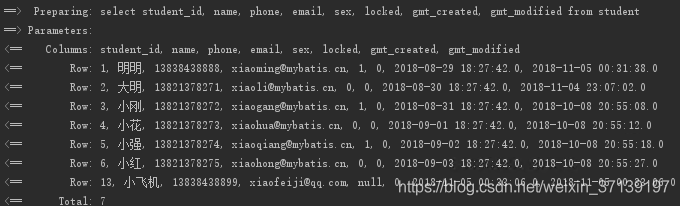
姓名和性別都不存在時(shí)查詢, 此時(shí), where 不會(huì)再出現(xiàn)了。
4.2 set
set 標(biāo)簽也類似, 在 [2.2 在 UPDATE 更新列中使用 if 標(biāo)簽] 中, 如果我們的方法updateByPrimaryKeySelective沒有使用
4.3 trim
set 和 where 其實(shí)都是 trim 標(biāo)簽的一種類型, 該兩種功能都可以使用 trim 標(biāo)簽進(jìn)行實(shí)現(xiàn)。
4.3.1 trim 來表示 where
如以上的 where 標(biāo)簽, 我們也可以寫成
<trim prefix="where" prefixOverrides="AND |OR">
trim>
表示當(dāng) trim 中含有內(nèi)容時(shí), 添加 where, 且第一個(gè)為 and 或 or 時(shí), 會(huì)將其去掉。而如果沒有內(nèi)容, 則不添加 where。
4.3.2 trim 來表示 set
相應(yīng)的, set 標(biāo)簽可以如下表示
<trim prefix="SET" suffixOverrides=",">
trim>
表示當(dāng) trim 中含有內(nèi)容時(shí), 添加 set, 且最后的內(nèi)容為 , 時(shí), 會(huì)將其去掉。而沒有內(nèi)容, 不添加 set
4.3.3 trim 的幾個(gè)屬性
prefix: 當(dāng) trim 元素包含有內(nèi)容時(shí), 增加 prefix 所指定的前綴
prefixOverrides: 當(dāng) trim 元素包含有內(nèi)容時(shí), 去除 prefixOverrides 指定的 前綴
suffix: 當(dāng) trim 元素包含有內(nèi)容時(shí), 增加 suffix 所指定的后綴
suffixOverrides:當(dāng) trim 元素包含有內(nèi)容時(shí), 去除 suffixOverrides 指定的后綴
5 foreach 標(biāo)簽
foreach 標(biāo)簽可以對(duì)數(shù)組, Map 或?qū)崿F(xiàn) Iterable 接口。
foreach 中有以下幾個(gè)屬性
collection: 必填, 集合/數(shù)組/Map的名稱.
item: 變量名。即從迭代的對(duì)象中取出的每一個(gè)值
index: 索引的屬性名。當(dāng)?shù)膶?duì)象為 Map 時(shí), 該值為 Map 中的 Key.
open: 循環(huán)開頭的字符串
close: 循環(huán)結(jié)束的字符串
separator: 每次循環(huán)的分隔符
其他的比較好理解, collection 中的值應(yīng)該怎么設(shè)定呢?
跟接口方法中的參數(shù)相關(guān)。
1. 只有一個(gè)數(shù)組參數(shù)或集合參數(shù)
默認(rèn)情況:集合collection=list, 數(shù)組是collection=array
推薦:使用 @Param 來指定參數(shù)的名稱, 如我們?cè)趨?shù)前@Param("ids"), 則就填寫 collection=ids
2. 多參數(shù)
多參數(shù)請(qǐng)使用 @Param 來指定, 否則SQL中會(huì)很不方便。
3. 參數(shù)是Map
指定為 Map 中的對(duì)應(yīng)的 Key 即可。其實(shí)上面的 @Param 最后也是轉(zhuǎn)化為 Map 的。
4. 參數(shù)是對(duì)象
使用屬性.屬性即可。
5.1 在 where 中使用 foreach
在 where條件中使用, 如按id集合查詢, 按id集合刪除等。
5.1.1 查詢條件
我們希望查詢用戶 id 集合中的所有用戶信息。
5.1.2 動(dòng)態(tài) SQL
函數(shù)接口
    /**
* 獲取 id 集合中的用戶信息
* @param ids
* @return
*/
List selectByStudentIdList(List ids);
對(duì)應(yīng) SQL
  <select id="selectByStudentIdList" resultMap="BaseResultMap">
    select
    "Base_Column_List" />
    from student
    where student_id in
    <foreach collection="list" item="id" open="(" close=")" separator="," index="i">
      #{id}
    foreach>
  select>
5.1.3 測(cè)試
    @Test
    public void selectByStudentIdList() {
        SqlSession sqlSession = null;
        sqlSession = sqlSessionFactory.openSession();
        StudentMapper studentMapper = sqlSession.getMapper(StudentMapper.class);
         List ids = new LinkedList<>();
        ids.add(1);
        ids.add(3);
		 List students = studentMapper.selectByStudentIdList(ids);
        for (int i = 0; i < students.size(); i++) {
            System.out.println(ToStringBuilder.reflectionToString(students.get(i), ToStringStyle.MULTI_LINE_STYLE));
        }
		sqlSession.commit();
        sqlSession.close();
    }
結(jié)果

5.2 foreach 實(shí)現(xiàn)批量插入
可以通過foreach來實(shí)現(xiàn)批量插入。
5.2.1 動(dòng)態(tài)SQL
接口方法
/**
* 批量插入學(xué)生
*/
int insertList(List students) ;
對(duì)應(yīng)的SQL
  "insertList">
    insert into student(name, phone, email, sex, locked)
    values
    <foreach collection="list" item="student" separator=",">
      (
      #{student.name}, #{student.phone},#{student.email},
      #{student.sex},#{student.locked}
      )
    foreach>
5.2.2 測(cè)試
    @Test
    public void insertList() {
        SqlSession sqlSession = null;
        sqlSession = sqlSessionFactory.openSession();
        StudentMapper studentMapper = sqlSession.getMapper(StudentMapper.class);
		 List students = new LinkedList<>();
        Student stu1 = new Student();
        stu1.setName("批量01");
        stu1.setPhone("13888888881");
        stu1.setLocked((byte) 0);
        stu1.setEmail("[email protected]");
        stu1.setSex((byte) 1);
        students.add(stu1);
		Student stu2 = new Student();
        stu2.setName("批量02");
        stu2.setPhone("13888888882");
        stu2.setLocked((byte) 0);
        stu2.setEmail("[email protected]");
        stu2.setSex((byte) 0);
        students.add(stu2);
		System.out.println(studentMapper.insertList(students));
        sqlSession.commit();
        sqlSession.close();
    }
結(jié)果

6 bind 標(biāo)簽
bind 標(biāo)簽是通過 OGNL 表達(dá)式去定義一個(gè)上下文的變量, 這樣方便我們使用。
如在selectByStudentSelective方法中, 有如下
<if test="name != null and name !=''">
      and name like concat('%', #{name}, '%')
if>
在 MySQL 中, 該函數(shù)支持多參數(shù), 但在 Oracle 中只支持兩個(gè)參數(shù)。那么我們可以使用 bind 來讓該 SQL 達(dá)到支持兩個(gè)數(shù)據(jù)庫的作用
<if test="name != null and name !=''">
     <bind name="nameLike" value="'%'+name+'%'"/>
     and name like #{nameLike}
if>
更改后的查詢結(jié)果如下

本文版權(quán)歸作者和博客園共有,歡迎轉(zhuǎn)載,但未經(jīng)作者同意必須保留此段聲明,且在文章頁面明顯位置給出原文連接,否則保留追究法律責(zé)任的權(quán)利。
推薦閱讀:
 喜歡我可以給我設(shè)為星標(biāo)哦