<kbd id="afajh"><form id="afajh"></form></kbd>
<strong id="afajh"><dl id="afajh"></dl></strong>
    <del id="afajh"><form id="afajh"></form></del>
        1. <th id="afajh"><progress id="afajh"></progress></th>
          <b id="afajh"><abbr id="afajh"></abbr></b>
          <th id="afajh"><progress id="afajh"></progress></th>

          Python 3.14 將比 C++ 更快??
          共 8386字,需瀏覽 17分鐘

           ·

          2023-02-04 11:48

          ????關(guān)注后回復(fù) “進(jìn)群” ,拉你進(jìn)程序員交流群????
          來源:DeepHub IMBA
          本文約2400字,建議閱讀9分鐘
          國外大佬將通過分析,證明Python 3.14 將比 C++更快。
          Python 是數(shù)據(jù)科學(xué) (DS) 和機器學(xué)習(xí) (ML) 中最常用的腳本語言之一。根據(jù)“PopularitY of Programming Languages”,Python 是 Google 上搜索次數(shù)最多的語言。除了作為將各種 DS/ML 解決方案連接在一起的出色膠水語言之外,它還有許多庫可以對數(shù)據(jù)進(jìn)行方便處理。

          我們以前也發(fā)過文章做過一些3.11 版的測試。因為這個版本的主要特點是速度顯著提高。

          在這篇文章中,是國外的一個大佬進(jìn)行的數(shù)據(jù)分析,通過他的分析可以證明Python 3.14 將比 C++更快。

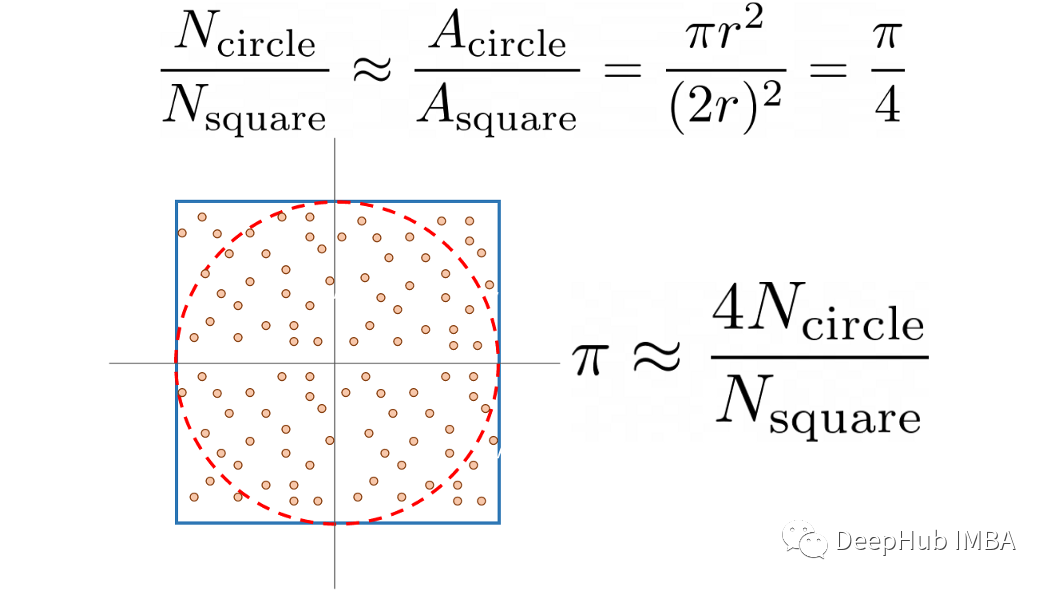
          本文的方法是:使用蒙特卡洛方法估計 Pi。

          這個算法的想法很簡單,但是在大學(xué)的一些數(shù)學(xué)課程中都會有介紹:有一個大小為 2r 的正方形,在這個正方形中我們擬合一個半徑為 r 的圓。采用一個在平面上生成數(shù)字的隨機數(shù)生成器:<-r, r>, <-r, r>。圓上的點與正方形上的點之間的比率(讀取:所有點)是面積比的近似值,我們可以用它來近似 Pi。公式如下:


          將實際估計與測試腳本分開,這樣就可以重復(fù)測試并取平均值。這里還是用 Argparse 對腳本進(jìn)行了參數(shù)化,Argparse 是一個用于解析來自命令行界面 (CLI) 的參數(shù)的標(biāo)準(zhǔn)庫。Python 代碼如下所示:

             
           def estimate_pi(    n_points: int,    show_estimate: bool, ) -> None:    """    Simple Monte Carlo Pi estimation calculation.    Parameters    ----------    n_points        number of random numbers used to for estimation.    show_estimate        if True, will show the estimation of Pi, otherwise        will not output anything.    """    within_circle = 0     for _ in range(n_points):        x, y = (random.uniform(-1, 1) for v in range(2))        radius_squared = x**2 + y**2         if radius_squared <= 1:            within_circle += 1     pi_estimate = 4 * within_circle / n_points     if not show_estimate:        print("Final Estimation of Pi=", pi_estimate)   def run_test(    n_points: int,    n_repeats: int,    only_time: bool, ) -> None:    """    Perform the tests and measure required time.    Parameters    ----------    n_points        number of random numbers used to for estimation.    n_repeats        number of times the test is repeated.    only_time        if True will only print the time, otherwise        will also show the Pi estimate and a neat formatted        time.    """    start_time = time.time()     for _ in range(n_repeats):        estimate_pi(n_points, only_time)     if only_time:        print(f"{(time.time() - start_time)/n_repeats:.4f}")    else:        print(            f"Estimating pi took {(time.time() - start_time)/n_repeats:.4f} seconds per run."        )

          測試多個 Python 版本的最簡單方法是使用 Docker。 要使用 Docker需要安裝它。在 Linux 和 Mac 中它相對容易,在 Windows 中稍微復(fù)雜一些。雖然Docker中運行會有一些效率的降低,但是測試都在Docker進(jìn)行,所以誤差就可以忽略了。要在容器化 Python 環(huán)境中運行本地腳本,可以使用下面命令:


          docker run -it --rm \ -v $PWD/your_script.py:/your_script.py \ python:3.11-rc-slim \ python /yourscript.py

          我們也是用python腳本來自動化這個過程:


          def test_version(image: str) -> float: """ Run single_test on Python Docker image. Parameter --------- image full name of the the docker hub Python image. Returns ------- run_time runtime in seconds per test loop. """ output = subprocess.run([ 'docker', 'run', '-it', '--rm', '-v', f'{cwd}/{SCRIPT}:/{SCRIPT}', image, 'python', f'/{SCRIPT}', '--n_points', str(N_POINTS), '--n_repeats', str(N_REPEATS), '--only-time', ], capture_output=True, text=True, ) avg_time = float(output.stdout.strip()) return avg_time # Get test time for current Python version base_time = test_version(NEW_IMAGE['image']) print(f"The new {NEW_IMAGE['name']} took {base_time} seconds per run.\n") # Compare to previous Python versions for item in TEST_IMAGES: ttime = test_version(item['image']) print( f"{item['name']} took {ttime} seconds per run." f"({NEW_IMAGE['name']} is {(ttime / base_time) - 1:.1%} faster)" )

          這些測試時的結(jié)果具體取決于CPU 。以下是7 個主要 Python 版本的結(jié)果:


          The new Python 3.11 took 6.4605 seconds per run. Python 3.5 took 11.3014 seconds.(Python 3.11 is 74.9% faster) Python 3.6 took 11.4332 seconds.(Python 3.11 is 77.0% faster) Python 3.7 took 10.7465 seconds.(Python 3.11 is 66.3% faster) Python 3.8 took 10.6904 seconds.(Python 3.11 is 65.5% faster) Python 3.9 took 10.9537 seconds.(Python 3.11 is 69.5% faster) Python 3.10 took 8.8467 seconds.(Python 3.11 is 36.9% faster)
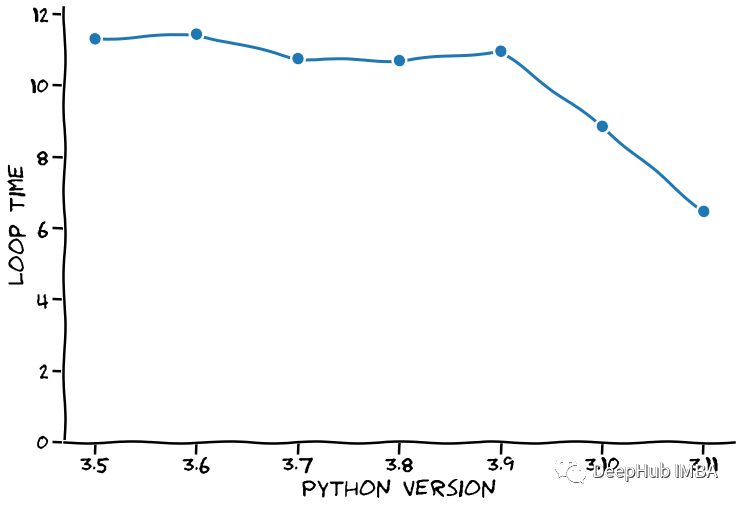
          Python 3.11 的基準(zhǔn)測試平均耗時 6.46 秒。與之前的版本 (3.10) 相比,這幾乎快了 37%。3.9 版和 3.10 版之間的差異大致相同,在下圖中我們進(jìn)行這個數(shù)據(jù)的可視化:


          在談?wù)撍俣葧r,人們總是說:如果你想要速度,為什么不使用 C。

             
            C 比 Python 快得多!

          這里使用了 GNU C++,因為它帶有一個不錯的時間測量庫(chrono),我們的c++代碼如下:


          #include <stdlib.h> #include <stdio.h> #include <chrono> #include <array> #define N_POINTS 10000000 #define N_REPEATS 10 float estimate_pi(int n_points) { double x, y, radius_squared, pi; int within_circle=0; for (int i=0; i < n_points; i++) { x = (double)rand() / RAND_MAX; y = (double)rand() / RAND_MAX; radius_squared = x*x + y*y; if (radius_squared <= 1) within_circle++; } pi=(double)within_circle/N_POINTS * 4; return pi; } int main() { double avg_time = 0; srand(42); for (int i=0; i < N_REPEATS; i++) { auto begin = std::chrono::high_resolution_clock::now(); double pi = estimate_pi(N_POINTS); auto end = std::chrono::high_resolution_clock::now(); auto elapsed = std::chrono::duration_cast<std::chrono::nanoseconds>(end - begin); avg_time += elapsed.count() * 1e-9; printf("Pi is approximately %g and took %.5f seconds to calculate.\n", pi, elapsed.count() * 1e-9); } printf("\nEach loop took on average %.5f seconds to calculate.\n", avg_time / N_REPEATS); }

          C++ 是一種編譯語言,我們需要先編譯源代碼才能使用它:


          g++ -o pi_estimate pi_estimate.c

          編譯后,運行構(gòu)建的可執(zhí)行文件。輸出如下:


          Pi is approximately 3.14227 and took 0.25728 seconds to calculate. Pi is approximately 3.14164 and took 0.25558 seconds to calculate. Pi is approximately 3.1423 and took 0.25740 seconds to calculate. Pi is approximately 3.14108 and took 0.25737 seconds to calculate. Pi is approximately 3.14261 and took 0.25664 seconds to calculate. Each loop took on average 0.25685 seconds to calculate.
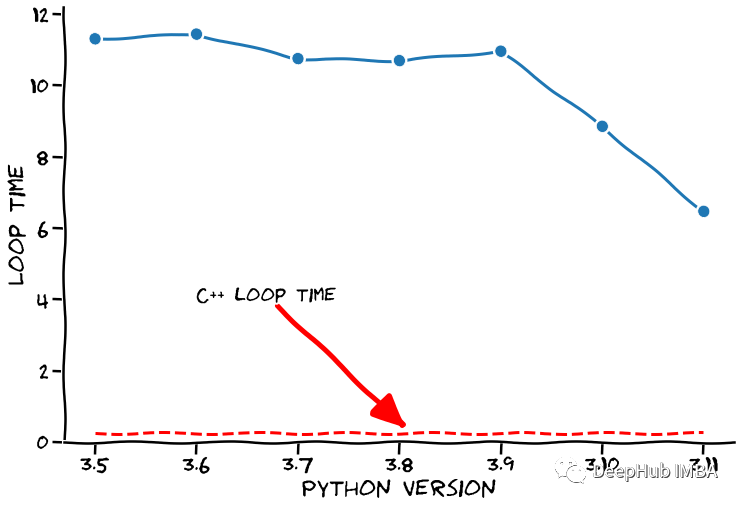
          相同循環(huán)只需要 0.257 秒。讓我們在之前的圖中將其添加為一條線,如下所示。


          我們清楚地看到了C++很快,但是Python 開發(fā)人員提到,接下來的幾個版本將會顯著提高速度,在這個假設(shè)的前提下,我們的絕活就要來了,請大家理清思路注意觀看。

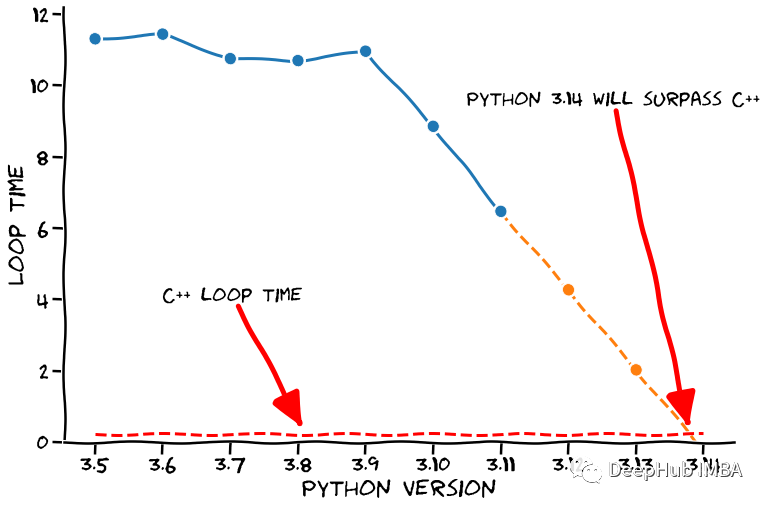
          我們以假設(shè)這個速度會保持下去(是的,超級安全的假設(shè)??)。在這種勢頭固定的情況下,Python 何時會超越 C++ 呢。我們當(dāng)然可以使用外推法來預(yù)測下幾個 Python 版本的循環(huán)時間,見下圖。


          看到了吧,經(jīng)過我們的嚴(yán)密的分析和預(yù)測,如果保持這個速度,Python 3.14 將比 C++ 更快。確切地說,運行完我們測試的時間為 -0.232 秒,它會在我們想要進(jìn)行計算之前完成(太棒了??)。

          下面就是免責(zé)聲明的時間:

          python 3.11的速度的有了很大的進(jìn)步,雖然與編譯語言相比還差了很多但是開發(fā)團(tuán)隊還在速度優(yōu)化這個方向努力,所以希望Python的運行速度還有更大的進(jìn)步。以上只是大佬開的一個玩笑,但上面的代碼都可以在下面的鏈接找到,所以我們的結(jié)論還是有根據(jù)的??

          https://github.com/dennisbakhuis/python3.11_speedtest
          作者:Denn·is Bakhuis

          編輯:黃繼彥

          -End-

          最近有一些小伙伴,讓我?guī)兔φ乙恍?nbsp;面試題 資料,于是我翻遍了收藏的 5T 資料后,匯總整理出來,可以說是程序員面試必備!所有資料都整理到網(wǎng)盤了,歡迎下載!
          點擊??卡片,關(guān)注后回復(fù)【面試題】即可獲取

          在看點這里好文分享給更多人↓↓

          瀏覽 49
          點贊
          評論
          收藏
          分享

          手機掃一掃分享

          分享
          舉報
          評論
          圖片
          表情
          推薦
          點贊
          評論
          收藏
          分享

          手機掃一掃分享

          分享
          舉報
          <kbd id="afajh"><form id="afajh"></form></kbd>
          <strong id="afajh"><dl id="afajh"></dl></strong>
            <del id="afajh"><form id="afajh"></form></del>
                1. <th id="afajh"><progress id="afajh"></progress></th>
                  <b id="afajh"><abbr id="afajh"></abbr></b>
                  <th id="afajh"><progress id="afajh"></progress></th>
                  亚洲新人天堂中文 | 秋霞丝鲁片一区二区三区手机在绒免 | 天堂Av在线成人电影 | 亚洲成人网站在线 | 日韩电影无码麻豆 |