
自學(xué)鴻蒙應(yīng)用開(kāi)發(fā)(18)- Ability內(nèi)部畫(huà)面遷移
本文介紹在鴻蒙應(yīng)用中實(shí)現(xiàn)Ability內(nèi)部Slice之間實(shí)現(xiàn)畫(huà)面遷移的方法。
準(zhǔn)備TabList頁(yè)面布局
在layout目錄下創(chuàng)建主畫(huà)面布局,將其命名為ability_main.xml。
<DirectionalLayoutxmlns:ohos="http://schemas.huawei.com/res/ohos"ohos:background_element="#000000"ohos:height="match_parent"ohos:width="match_parent"ohos:orientation="vertical"><DirectionalLayoutohos:background_element="#FFFF7F"ohos:height="0vp"ohos:weight="1"ohos:width="match_parent"ohos:layout_alignment="center"ohos:orientation="vertical"><Componentohos:height="0vp"ohos:weight="3"ohos:width="match_parent"/><DirectionalLayoutohos:background_element="#CCCCCC"ohos:height="match_content"ohos:width="match_content"ohos:layout_alignment="center"ohos:orientation="vertical"><Imageohos:id="$+id:image"ohos:width="match_content"ohos:height="match_content"ohos:layout_alignment="center"ohos:image_src="$media:DevEco"/><Componentohos:height="20vp"ohos:width="match_parent"/><Textohos:id="$+id:text_helloworld"ohos:height="match_content"ohos:width="match_content"ohos:layout_alignment="horizontal_center"ohos:background_element="$graphic:background_ability_text"ohos:text="你好,鴻蒙!"ohos:text_size="100"/>DirectionalLayout><Componentohos:height="0vp"ohos:weight="5"ohos:width="match_parent"/>DirectionalLayout><DirectionalLayoutohos:background_element="#AAAAAA"ohos:height="match_content"ohos:width="match_parent"ohos:layout_alignment="center"ohos:orientation="horizontal"><Buttonohos:id="$+id:component_view"ohos:width="0"ohos:weight="1"ohos:height="match_content"ohos:text_size="27fp"ohos:text="組件"ohos:layout_alignment="center"ohos:background_element="$graphic:background_button"ohos:right_padding="5vp"ohos:left_padding="5vp"ohos:margin="5vp"/><Buttonohos:id="$+id:list_view"ohos:width="0"ohos:weight="1"ohos:height="match_content"ohos:text_size="27fp"ohos:text="列表"ohos:layout_alignment="center"ohos:background_element="$graphic:background_button"ohos:right_padding="5vp"ohos:left_padding="5vp"ohos:margin="5vp"/><Buttonohos:id="$+id:tab_view"ohos:width="0"ohos:weight="1"ohos:height="match_content"ohos:text_size="27fp"ohos:text="標(biāo)簽頁(yè)"ohos:layout_alignment="center"ohos:background_element="$graphic:background_button"ohos:right_padding="5vp"ohos:left_padding="5vp"ohos:margin="5vp"/>DirectionalLayout>DirectionalLayout>
布局代碼中第59行~第97行的用于生成分別向組件Slice,列表Slice和標(biāo)簽頁(yè)Slice進(jìn)行遷移的按鈕。程序執(zhí)行時(shí)的畫(huà)面表示如下:
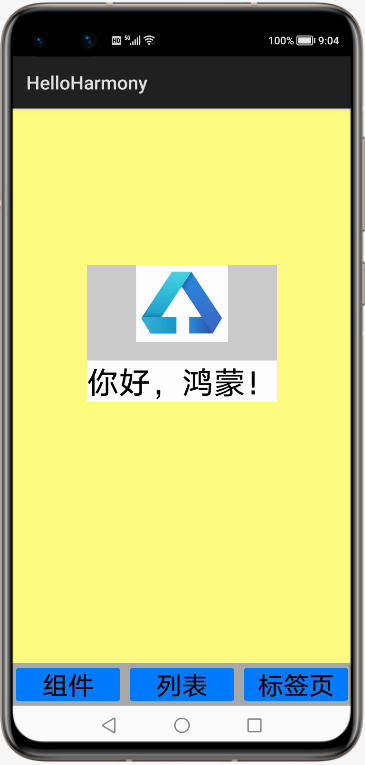
畫(huà)面背景配色主要為了區(qū)別每個(gè)組件的范圍,沒(méi)有考慮美感。
增加路由規(guī)則
如代碼第16行~第19行所示,首先在Ability類(lèi)中為每個(gè)遷移增加路由規(guī)則。代碼中為每個(gè)遷移指定名稱(chēng)和Slice類(lèi)。
package com.example.helloharmony;import com.example.helloharmony.slice.ComponentAbilitySlice;import com.example.helloharmony.slice.ListAbilitySlice;import com.example.helloharmony.slice.MainAbilitySlice;import com.example.helloharmony.slice.TablistAbilitySlice;import ohos.aafwk.ability.Ability;import ohos.aafwk.content.Intent;import ohos.agp.components.TabList;public class MainAbility extends Ability {@Overridepublic void onStart(Intent intent) {super.onStart(intent);super.setMainRoute(MainAbilitySlice.class.getName());// set the action routeaddActionRoute("action.component", ComponentAbilitySlice.class.getName());addActionRoute("action.list", ListAbilitySlice.class.getName());addActionRoute("action.tab", TablistAbilitySlice.class.getName());}}
這些規(guī)則名稱(chēng)還需要在config.json文件中定義,具體如下面代碼中第36行~第38行所示:
{"app": {"bundleName": "com.example.helloharmony","vendor": "example","version": {"code": 1,"name": "1.0"},"apiVersion": {"compatible": 3,"target": 4,"releaseType": "Beta1"}},"deviceConfig": {},"module": {"package": "com.example.helloharmony","name": ".MyApplication","deviceType": ["phone"],"distro": {"deliveryWithInstall": true,"moduleName": "entry","moduleType": "entry"},"abilities": [{"skills": [{"entities": ["entity.system.home"],"actions": ["action.system.home","action.component","action.list","action.tab"]}],"orientation": "unspecified","name": "com.example.helloharmony.MainAbility","icon": "$media:icon","description": "$string:mainability_description","label": "HelloHarmony","type": "page","launchType": "standard"}]}}
實(shí)現(xiàn)畫(huà)面遷移動(dòng)作
如下面代碼中第13行~第21行所示,為3個(gè)按鈕增加向組件畫(huà)面、列表畫(huà)面和標(biāo)簽頁(yè)畫(huà)面遷移的代碼:
package com.example.helloharmony.slice;import?com.example.helloharmony.ResourceTable;import?ohos.aafwk.ability.AbilitySlice;import?ohos.aafwk.content.Intent;import?ohos.agp.components.Button;public class MainAbilitySlice extends AbilitySlice {public void onStart(Intent intent) {super.onStart(intent);super.setUIContent(ResourceTable.Layout_ability_main);//組件畫(huà)面遷移按鈕Button component_button = (Button) findComponentById(ResourceTable.Id_component_view);component_button.setClickedListener(listener -> present(new ComponentAbilitySlice(), new Intent()));//列表畫(huà)面遷移按鈕Button list_button = (Button) findComponentById(ResourceTable.Id_list_view);list_button.setClickedListener(listener -> present(new ListAbilitySlice(), new Intent()));//標(biāo)簽頁(yè)畫(huà)面遷移按鈕Button tab_button = (Button) findComponentById(ResourceTable.Id_tab_view);tab_button.setClickedListener(listener -> present(new TablistAbilitySlice(), new Intent()));}public void onActive() {super.onActive();}public void onForeground(Intent intent) {super.onForeground(intent);}}
組件畫(huà)面、列表畫(huà)面和標(biāo)簽頁(yè)畫(huà)面的實(shí)際表現(xiàn)和前面幾篇文章中的表現(xiàn)完全相同,這里不再重復(fù)。
參考文檔
Page與AbilitySlice基本概念
https://developer.harmonyos.com/cn/docs/documentation/doc-guides/ability-page-concept-0000000000033573
AbilitySlice間導(dǎo)航
https://developer.harmonyos.com/cn/docs/documentation/doc-guides/ability-page-switching-0000000000037999
新書(shū)介紹
《實(shí)戰(zhàn)Python設(shè)計(jì)模式》是作者最近出版的新書(shū),拜托多多關(guān)注!

本書(shū)利用Python 的標(biāo)準(zhǔn)GUI 工具包tkinter,通過(guò)可執(zhí)行的示例對(duì)23 個(gè)設(shè)計(jì)模式逐個(gè)進(jìn)行說(shuō)明。這樣一方面可以使讀者了解真實(shí)的軟件開(kāi)發(fā)工作中每個(gè)設(shè)計(jì)模式的運(yùn)用場(chǎng)景和想要解決的問(wèn)題;另一方面通過(guò)對(duì)這些問(wèn)題的解決過(guò)程進(jìn)行說(shuō)明,讓讀者明白在編寫(xiě)代碼時(shí)如何判斷使用設(shè)計(jì)模式的利弊,并合理運(yùn)用設(shè)計(jì)模式。
對(duì)設(shè)計(jì)模式感興趣而且希望隨學(xué)隨用的讀者通過(guò)本書(shū)可以快速跨越從理解到運(yùn)用的門(mén)檻;希望學(xué)習(xí)Python GUI 編程的讀者可以將本書(shū)中的示例作為設(shè)計(jì)和開(kāi)發(fā)的參考;使用Python 語(yǔ)言進(jìn)行圖像分析、數(shù)據(jù)處理工作的讀者可以直接以本書(shū)中的示例為基礎(chǔ),迅速構(gòu)建自己的系統(tǒng)架構(gòu)。
覺(jué)得本文有幫助?請(qǐng)分享給更多人。
關(guān)注微信公眾號(hào)【面向?qū)ο笏伎肌枯p松學(xué)習(xí)每一天!
面向?qū)ο箝_(kāi)發(fā),面向?qū)ο笏伎迹?/span>