Vite原理分析

本文由字節(jié)跳動(dòng)折曜原創(chuàng),授權(quán)前端鐵蛋公眾號發(fā)表,原文鏈接:https://juejin.im/post/6881078539756503047

Vite是什么

Vite,一個(gè)基于瀏覽器原生ES模塊的開發(fā)服務(wù)器。利用瀏覽器去解析模塊,在服務(wù)器端按需編譯返回,完全跳過了打包這個(gè)概念,服務(wù)器隨起隨用。同時(shí)另有有Vue文件支持,還搞定定了熱更新,而且熱更新的速度不會(huì)隨著模塊增加而變慢。
Vite(讀音)[法語],法語,快的意思是一個(gè)由原生ES模塊驅(qū)動(dòng)的Web開發(fā)工具。在開發(fā)環(huán)境下基于瀏覽器原生ES導(dǎo)入開發(fā),在生產(chǎn)環(huán)境下進(jìn)行匯總打包。
閃電般快速的冷服務(wù)器啟動(dòng)-閃電般的冷啟動(dòng)速度
即時(shí)熱模塊更換(HMR)-即時(shí)熱模塊更換(熱更新)
真正的按需編譯-真正的按需編譯
為了實(shí)現(xiàn)上述特點(diǎn),Vite要求項(xiàng)目完全由ES模塊模塊組成,common.js模塊不能直接在Vite上使用。因此不能直接在生產(chǎn)環(huán)境中使用。在打包上依舊還是使用rollup等傳統(tǒng)打包工具。因此Vite目前更像是一個(gè)webpack-dev-server的開發(fā)工具。
ES Module的更多介紹以vite自帶的demo為示例。
<template><img alt="Vue logo" src="./assets/logo.png" /><HelloWorld msg="Hello Vue 3.0 + Vite" /></template><script>import HelloWorld from './components/HelloWorld.vue'export default {name: 'App',components: {HelloWorld}}</script>
當(dāng)瀏覽器解析從'./components/HelloWorld.vue'時(shí),會(huì)往當(dāng)前域名發(fā)送一個(gè)請求獲取對應(yīng)的資源。

值得一提的是我們平時(shí)在Webpack中寫的mjs格式的代碼最終被Webpack打包成cjs。最終在瀏覽器上還是以cjs的形式運(yùn)行的。所以并不是真正的mjs。
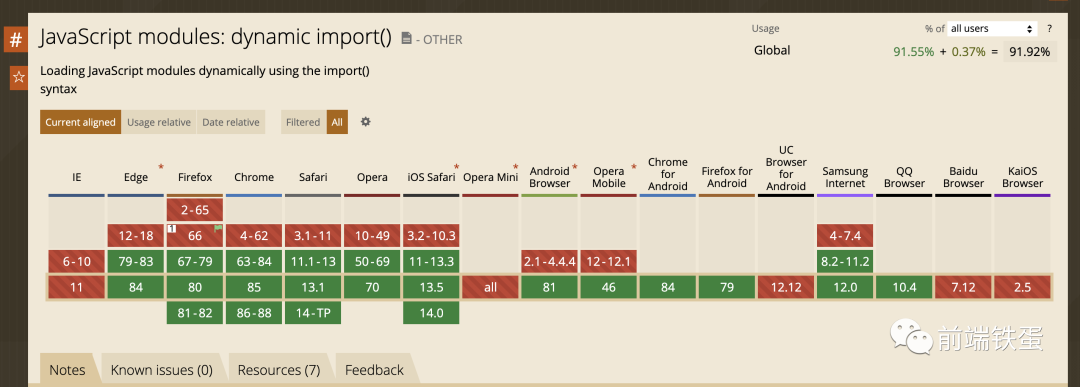
Vite采用了ES模塊來實(shí)現(xiàn)模塊的加載。目前基于web標(biāo)準(zhǔn)的ES模塊已經(jīng)覆蓋了超過90%的瀏覽器。
Webpack&Vite原理對比
當(dāng)我們使用如webpack的打包工具時(shí),經(jīng)常會(huì)遇到遇到一小行代碼,webpack常常需要耗時(shí)數(shù)秒甚至幾秒鐘進(jìn)行重新打包。這是因?yàn)閣ebpack需要將所有模塊打包成一個(gè)一個(gè)或多個(gè)模塊。

如下面的代碼為例,當(dāng)我們使用如webpack類的打包工具時(shí)。最終將所有代碼打包入一個(gè)bundle.js文件中。
// a.jsexport const a = 10// b.jsexport const b = 20;// main.jsimport { a } from 'a.js'import { b } from 'b.js'export const getNumber = () => {return a + b;}// bundle.jsconst a = 10;const b = 20;const getNumber = () => {return a + b;}export { getNumber };
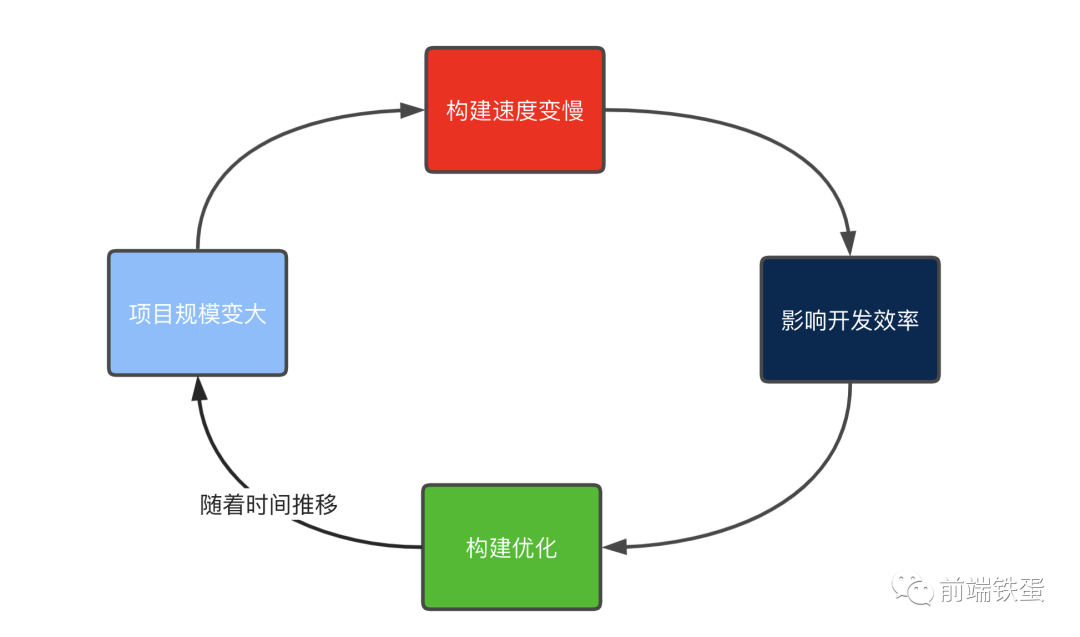
不可避免的,當(dāng)我們修改模塊中的一個(gè)子模塊b.js,整個(gè)bundle.js都需要重新打包,隨著項(xiàng)目規(guī)模的擴(kuò)大,重新打包(熱更新)的時(shí)間越來越長。我們常用如thread-loader,cache-loader,代碼分片等方法進(jìn)行優(yōu)化。但通過項(xiàng)目規(guī)模的進(jìn)一步擴(kuò)大,熱更新速度又將變慢,又將開始新一輪的優(yōu)化。通過項(xiàng)目規(guī)模的不斷擴(kuò)大,基于bunder的項(xiàng)目優(yōu)化也將達(dá)到一定的極限。
Webpack之所以慢,是因?yàn)閃ebpack會(huì)使多個(gè)資源構(gòu)成一個(gè)或多個(gè)捆綁。如果我們跳過打包的過程,當(dāng)需要某個(gè)模塊時(shí)再通過請求去獲取是不是能完美解決這個(gè)問題呢?
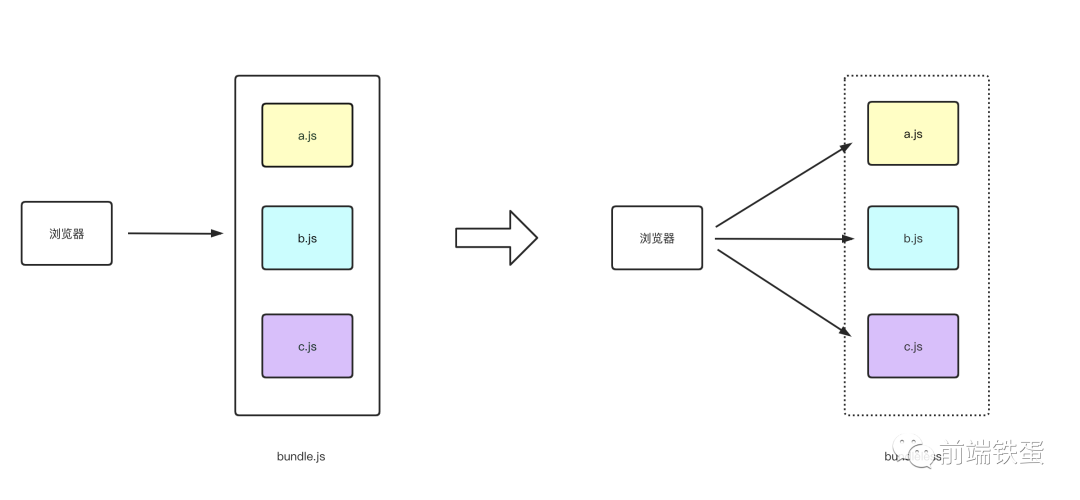
因此,Vite來了。一個(gè)由原生ES模塊驅(qū)動(dòng)的Web開發(fā)的工具,完全做到按需加載,一勞永逸的解決了熱更新慢的問題!
Vite實(shí)現(xiàn)
Vite的基本實(shí)現(xiàn)原理,就是啟動(dòng)一個(gè)koa服務(wù)器攔截瀏覽器請求ES模塊的請求。通過路徑查找目錄下對應(yīng)文件的文件做一定的處理最終以ES模塊格式返回給客戶端

這里稍微提一下Vite對js / ts的處理沒有使用如gulp,rollup等傳統(tǒng)打包工具,其他使用了esbuild。esbuild是一個(gè)全新的js打包工具,支持如babel,壓縮等的功能,他的特點(diǎn)是快(比rollup等工具會(huì)快上幾十倍)!你可以點(diǎn)擊這里了解更多關(guān)于esbuild的知識。
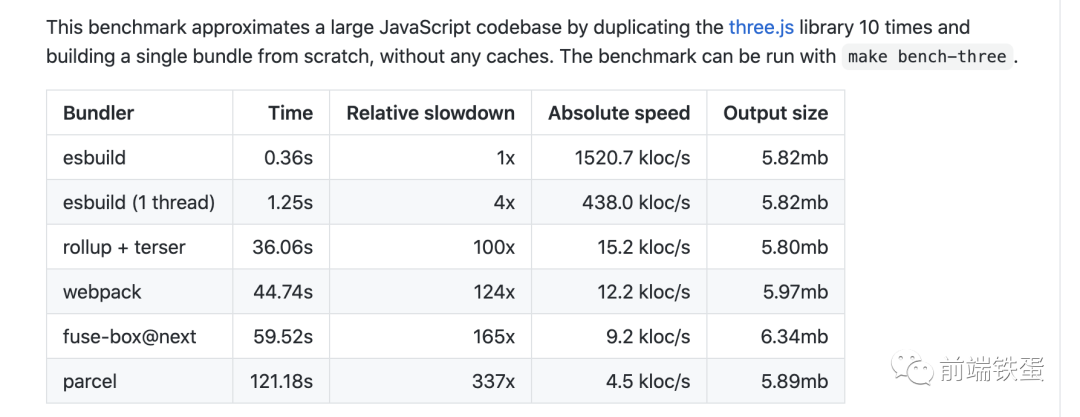
而快的首要是他使用了go作為另一種語言(go這樣的靜態(tài)語言會(huì)比動(dòng)態(tài)語言快很多)。
首先說一下基于ES模塊模塊的局限性,在我們平時(shí)寫代碼時(shí)。怎么不是相對路徑的引用,又直接引用一個(gè)node_modules模塊時(shí),我們都是以如下的格式進(jìn)行引用。
import vue from 'vue'如Webpack&gulp等打包工具會(huì)幫我們找到模塊的路徑。但瀏覽器只能通過相對路徑去尋找。為了解決這個(gè)問題,Vite采取了一些特殊處理。以Vite官方演示如何,當(dāng)我們請求時(shí)本地主機(jī):3000
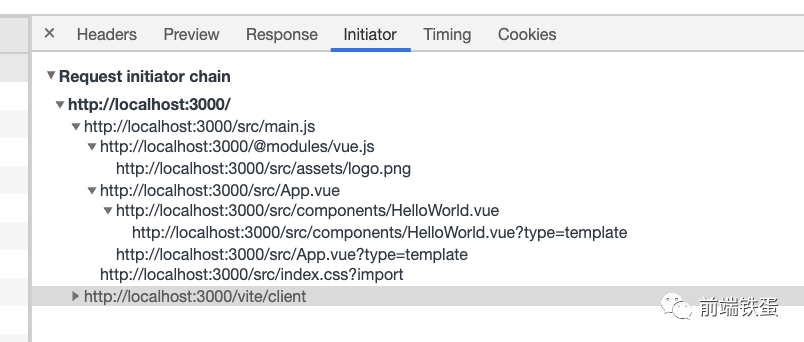
Vite先返回index.html代碼,渲染index.html后發(fā)送請求src / main.js。main.js代碼如下。
import { createApp } from 'vue'import App from './App.vue'import './index.css'createApp(App).mount('#app')

可以觀察到瀏覽器請求vue.js時(shí),請求路徑是@ modules / vue.js。在Vite中約定路徑中的請求路徑滿足/ ^ \ / @ modules \ //格式時(shí),被認(rèn)為是一個(gè)node_modules模塊。
如何將代碼中的/:id轉(zhuǎn)換為/ @ modules /:id
Vite對ES模塊進(jìn)行形式化的js文件模塊的處理使用了。Lexer會(huì)返回js文件中引入的模塊并以交換形式返回。Vite通過該變量判斷是否為一個(gè)node_modules模塊。。
// Plugin for rewriting served js.// - Rewrites named module imports to `/@modules/:id` requests, e.g.// "vue" => "/@modules/vue"export const moduleRewritePlugin: ServerPlugin = ({root,app,watcher,resolver}) => {app.use(async (ctx, next) => {await initLexerconst importer = removeUnRelatedHmrQuery(resolver.normalizePublicPath(ctx.url))ctx.body = rewriteImports(root,content!,importer,resolver,ctx.query.t)}})
我們還能有另一個(gè)形式進(jìn)行一個(gè)ES模塊形式的引入,那就是直接使用腳本標(biāo)簽,對于腳本標(biāo)簽引入的模塊也會(huì)有對應(yīng)的處理。
const scriptRE = /(<script\b[^>]*>)([\s\S]*?)<\/script>/gmconst srcRE = /\bsrc=(?:"([^"]+)"|'([^']+)'|([^'"\s]+)\b)/async function rewriteHtml(importer: string, html: string) {await initLexerhtml = html!.replace(scriptRE, (matched, openTag, script) => {if (script) {} else {const srcAttr = openTag.match(srcRE)if (srcAttr) {// register script as a import dep for hmrconst importee = resolver.normalizePublicPath(cleanUrl(slash(path.resolve('/', srcAttr[1] || srcAttr[2]))))ensureMapEntry(importerMap, importee).add(importer)}return matched}})return injectScriptToHtml(html, devInjectionCode)}
通過/ @ modules /:id在node_modules文件下找到對應(yīng)模塊
瀏覽器發(fā)送路徑為/ @ modules /:id的對應(yīng)請求后。會(huì)被Vite客戶端做一層攔截,最終找到對應(yīng)的模塊代碼進(jìn)行返回。
export const moduleRE = /^\/@modules\//// plugin for resolving /@modules/:id requests.app.use(async (ctx, next) => {if (!moduleRE.test(ctx.path)) {return next()}// path maybe contain encode charsconst id = decodeURIComponent(ctx.path.replace(moduleRE, ''))ctx.type = 'js'const serve = async (id: string, file: string, type: string) => {moduleIdToFileMap.set(id, file)moduleFileToIdMap.set(file, ctx.path)debug(`(${type}) ${id} -> ${getDebugPath(root, file)}`)await ctx.read(file)return next()} }// aliasconst importerFilePath = importer ? resolver.requestToFile(importer) : rootconst nodeModulePath = resolveNodeModuleFile(importerFilePath, id)if (nodeModulePath) {return serve(id, nodeModulePath, 'node_modules')}})
.vue文件的處理
當(dāng)Vite遇到一個(gè).vue后綴的文件時(shí)。由于.vue模板文件的特殊性,它被分割成template,css,腳本模塊三個(gè)模塊進(jìn)行分別處理。最后放入script,template,css發(fā)送多個(gè)請求獲取。

如上圖App.vue獲取腳本,App.vue?type = template獲取模板,App.vue?type = style。這些代碼都被插入在app.vue中。
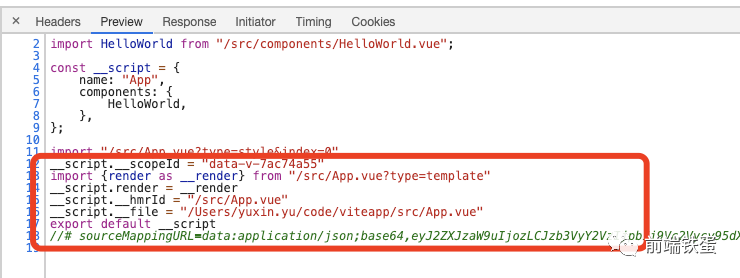
if (descriptor.customBlocks) {descriptor.customBlocks.forEach((c, i) => {const attrsQuery = attrsToQuery(c.attrs, c.lang)const blockTypeQuery = `&blockType=${qs.escape(c.type)}`let customRequest =publicPath + `?type=custom&index=${i}${blockTypeQuery}${attrsQuery}`const customVar = `block${i}`code += `\nimport ${customVar} from ${JSON.stringify(customRequest)}\n`code += `if (typeof ${customVar} === 'function') ${customVar}(__script)\n`})}if (descriptor.template) {const templateRequest = publicPath + `?type=template`code += `\nimport { render as __render } from ${JSON.stringify(templateRequest)}`code += `\n__script.render = __render`}code += `\n__script.__hmrId = ${JSON.stringify(publicPath)}`code += `\n__script.__file = ${JSON.stringify(filePath)}`code += `\nexport default __script`
當(dāng)請求的路徑符合imageRE,mediaRE,fontsRE或JSON格式,會(huì)被認(rèn)為是一個(gè)靜態(tài)資源。靜態(tài)資源將處理成ES模塊模塊返回。
// src/node/utils/pathUtils.tsconst imageRE = /\.(png|jpe?g|gif|svg|ico|webp)(\?.*)?$/const mediaRE = /\.(mp4|webm|ogg|mp3|wav|flac|aac)(\?.*)?$/const fontsRE = /\.(woff2?|eot|ttf|otf)(\?.*)?$/iexport const isStaticAsset = (file: string) => {return imageRE.test(file) || mediaRE.test(file) || fontsRE.test(file)}// src/node/server/serverPluginAssets.tsapp.use(async (ctx, next) => {if (isStaticAsset(ctx.path) && isImportRequest(ctx)) {ctx.type = 'js'ctx.body = `export default ${JSON.stringify(ctx.path)}`return}return next()})export const jsonPlugin: ServerPlugin = ({ app }) => {app.use(async (ctx, next) => {await next()// handle .json imports// note ctx.body could be null if upstream set status to 304if (ctx.path.endsWith('.json') && isImportRequest(ctx) && ctx.body) {ctx.type = 'js'ctx.body = dataToEsm(JSON.parse((await readBody(ctx.body))!), {namedExports: true,preferConst: true})}})}
Vite的熱加載原理,實(shí)際上就是在客戶端與服務(wù)端建立了一個(gè)websocket鏈接,當(dāng)代碼被修改時(shí),服務(wù)端發(fā)送消息通知客戶端去請求修改模塊的代碼,完成熱更新。
服務(wù)端做的就是監(jiān)聽代碼文件的更改,在適當(dāng)?shù)臅r(shí)機(jī)向客戶端發(fā)送websocket信息通知客戶端去請求新的模塊代碼。
Vite的websocket相關(guān)代碼在處理html中時(shí)被編寫代碼中。
export const clientPublicPath = `/vite/client`const devInjectionCode = `\n<script type="module">import "${clientPublicPath}"</script>\n`async function rewriteHtml(importer: string, html: string) {return injectScriptToHtml(html, devInjectionCode)}
當(dāng)request.path路徑是/ vite / client時(shí),請求獲取對應(yīng)的客戶端代碼,因此在客戶端中我們創(chuàng)建了一個(gè)websocket服務(wù)并與服務(wù)端建立了連接。Vite會(huì)接受到來自客戶端的消息。通過不同的消息觸發(fā)一些事件。做到瀏覽器端的即時(shí)熱模塊更換(熱更新)。
// Listen for messagessocket.addEventListener('message', async ({ data }) => {const payload = JSON.parse(data) as HMRPayload | MultiUpdatePayloadif (payload.type === 'multi') {payload.updates.forEach(handleMessage)} else {handleMessage(payload)}})async function handleMessage(payload: HMRPayload) {const { path, changeSrcPath, timestamp } = payload as UpdatePayloadconsole.log(path)switch (payload.type) {case 'connected':console.log(`[vite] connected.`)breakcase 'vue-reload':queueUpdate(import(`${path}?t=${timestamp}`).catch((err) => warnFailedFetch(err, path)).then((m) => () => {__VUE_HMR_RUNTIME__.reload(path, m.default)console.log(`[vite] ${path} reloaded.`)}))breakcase 'vue-rerender':const templatePath = `${path}?type=template`import(`${templatePath}&t=${timestamp}`).then((m) => {__VUE_HMR_RUNTIME__.rerender(path, m.render)console.log(`[vite] ${path} template updated.`)})breakcase 'style-update':// check if this is referenced in html via <link>const el = document.querySelector(`link[href*='${path}']`)if (el) {el.setAttribute('href',`${path}${path.includes('?') ? '&' : '?'}t=${timestamp}`)break}// imported CSSconst importQuery = path.includes('?') ? '&import' : '?import'await import(`${path}${importQuery}&t=${timestamp}`)console.log(`[vite] ${path} updated.`)breakcase 'style-remove':removeStyle(payload.id)breakcase 'js-update':queueUpdate(updateModule(path, changeSrcPath, timestamp))breakcase 'custom':const cbs = customUpdateMap.get(payload.id)if (cbs) {cbs.forEach((cb) => cb(payload.customData))}breakcase 'full-reload':if (path.endsWith('.html')) {// if html file is edited, only reload the page if the browser is// currently on that page.const pagePath = location.pathnameif (pagePath === path ||(pagePath.endsWith('/') && pagePath + 'index.html' === path)) {location.reload()}return} else {location.reload()}}}
Vite做的一些優(yōu)化
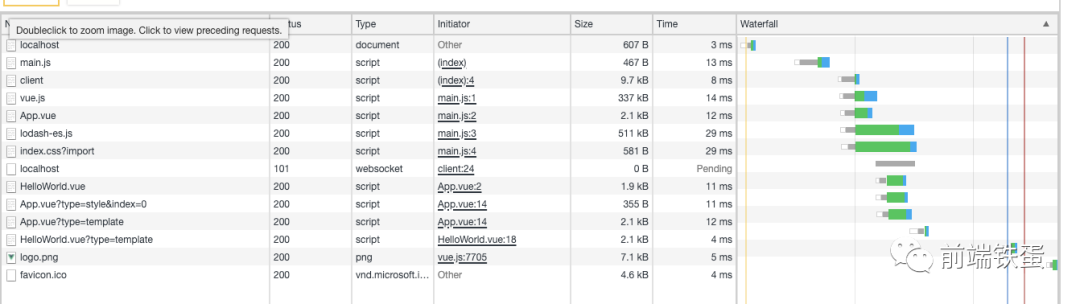
Vite基于的ES模塊,在使用某些模塊時(shí)。由于模塊依賴了另一些模塊,依賴的模塊又基于另一些模塊。會(huì)出現(xiàn)頁面初始化時(shí)一次發(fā)送多個(gè)模塊請求的情況。此處以lodash-es實(shí)際上,一共發(fā)送了651個(gè)請求。一共花費(fèi)1.53s。

Vite為了優(yōu)化這個(gè)情況,給了一個(gè)Optimize指令。我們可以直接使用vite Optimize使用它

優(yōu)化原理性webpack的dll插件,提前將package.json中依賴項(xiàng)打包成一個(gè)esmodule模塊。這樣在頁面初始化時(shí)能減少大量請求。

優(yōu)化后僅發(fā)送了14個(gè)請求
順便提一嘴,有的人肯定會(huì)問:如果我的組件封裝很深,一個(gè)組件import了十個(gè)組件,十個(gè)組件又import了十個(gè)組件怎么處理。這是粗略的提一下我的想法:
首先可以看到請求lodash時(shí)651個(gè)請求只耗時(shí)1.53s。這個(gè)耗時(shí)是完全可以接受的。
Vite是完全按需加載的,在頁面初始化時(shí)只會(huì)請求初始化頁面的一些組件。(使用一些如dynamic import的優(yōu)化)
ES模塊是有一些優(yōu)化的,瀏覽器會(huì)給請求的模塊做一次緩存。當(dāng)請求路徑完全相同時(shí),瀏覽器會(huì)使用瀏覽器緩存的代碼。關(guān)于ES模塊的更多信息可以看https://segmentfault.com/a/1190000014318751
Vite只是一個(gè)用于開發(fā)環(huán)境的工具,上線仍會(huì)打包成一個(gè)commonJs文件進(jìn)行調(diào)用。正基于上述這些原因,Vite啟動(dòng)的項(xiàng)目在剛進(jìn)入頁面時(shí)會(huì)發(fā)送大量請求。但是它耗費(fèi)的時(shí)候是完全可以接受的(會(huì)比webpack打包快)。而且由于緩存的原因,當(dāng)修改代碼時(shí),只會(huì)請求修改部分的代碼(發(fā)送請求會(huì)附上一個(gè)t = timestamp的參數(shù))。
Vite vs Webpack
我們以vite與vue-cli創(chuàng)建的模板項(xiàng)目為例。

從左到右依次是:vue-cli3 + vue3的演示,vite 1.0.0-rc + vue 3的演示,vue-cli3 + vue2的演示。-cli3啟動(dòng)Vue2大概需要5s左右,vue-cli3啟動(dòng)Vue3需要4s左右,而vite只需要1s左右的時(shí)間。從理論上講Vite是ES模塊實(shí)現(xiàn)的。增加。而Webpack隨著代碼體積的增加啟動(dòng)時(shí)間是要明顯增加的。
Vite熱更新速度很難用圖直接比較(在項(xiàng)目多個(gè)時(shí)熱更新速度都挺快的),只能從理論上講講,因?yàn)閂ite修改代碼后只是重新請求修改部分的代碼不受代碼體積的影響,而且使用了esbuild這種理論上快的webpack打包數(shù)十倍的工具。因此,在webpack這種時(shí)候修改都需要重新打包bundle的項(xiàng)目是能明顯提升熱更新速度的。
已經(jīng)說了這么多,是不是很想在React中也嘗試Vite呢?由于社區(qū)的貢獻(xiàn),Vite已經(jīng)支持react開發(fā)了。你可以使用npm init vite-app --template react嘗試使用。
往期推薦
圍觀

丨
熱文
丨
熱文
丨
熱文
丨
熱文
丨