
vue3構(gòu)建工具vite原理之 手寫vite
轉(zhuǎn)載自:舜岳
https://juejin.cn/post/6898116372887240712
vite實現(xiàn)原理是什么?
當聲明一個 script 標簽類型為 module 時
如: <script type="module" src="/src/main.js"></script>
瀏覽器就會像服務(wù)器發(fā)起一個GET http://localhost:3000/src/main.js請求main.js文件:
// /src/main.js:
import { createApp } from 'vue'
import App from './App.vue'

createApp(App).mount('#app')
瀏覽器請求到了main.js文件,檢測到內(nèi)部含有import引入的包,又會對其內(nèi)部的 import 引用發(fā)起 HTTP 請求獲取模塊的內(nèi)容文件
如: GET http://localhost:3000/@modules/vue.js
如: GET http://localhost:3000/src/App.vue
其Vite 的主要功能就是通過劫持瀏覽器的這些請求,并在后端進行相應(yīng)的處理將項目中使用的文件通過簡單的分解與整合,然后再返回給瀏覽器渲染頁面,vite整個過程中沒有對文件進行打包編譯,所以其運行速度比原始的webpack開發(fā)編譯速度快出許多!
vite做了哪些事?
1. 重寫引入模塊路徑前面加上/@modules/, 重寫后瀏覽器會再次發(fā)送請求
原main.js文件: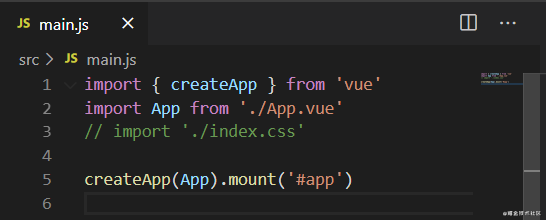
通過vite構(gòu)建后請求的main.js文件:
2. 攔截含有/@modules/的請求, 去node_modules引入對應(yīng)的模塊并返回
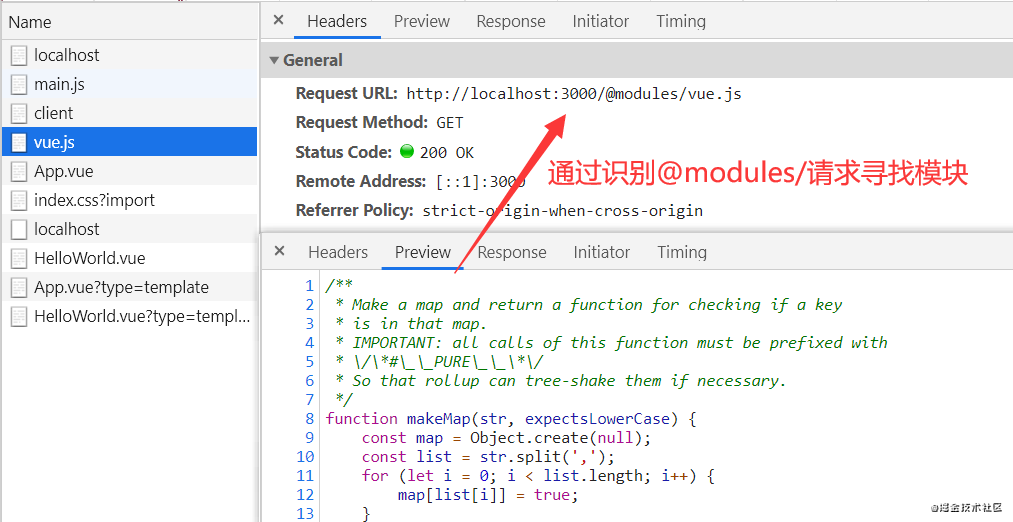
3. 解析.vue文件
如app.vue文件如下:
<template>
  <HelloWorld msg="Hello Vue 3.0 + Vite" />
</template>

<script>
import HelloWorld from './components/HelloWorld.vue'

export default {
  name: 'App',
  components: {
    HelloWorld
  }
}
</script>
被解析成render函數(shù)返回給瀏覽器渲染頁面:
請求:http://localhost:3000/src/App.vue
vue文件時,koa中間件檢測到請求的是vue模板文件,則會在請求后面添加一個type=template參數(shù)
如: http://localhost:3000/src/App.vue?type=template
koa通過這個參數(shù)來判斷是請求vue模板文件,并編譯成js文件返回給瀏覽器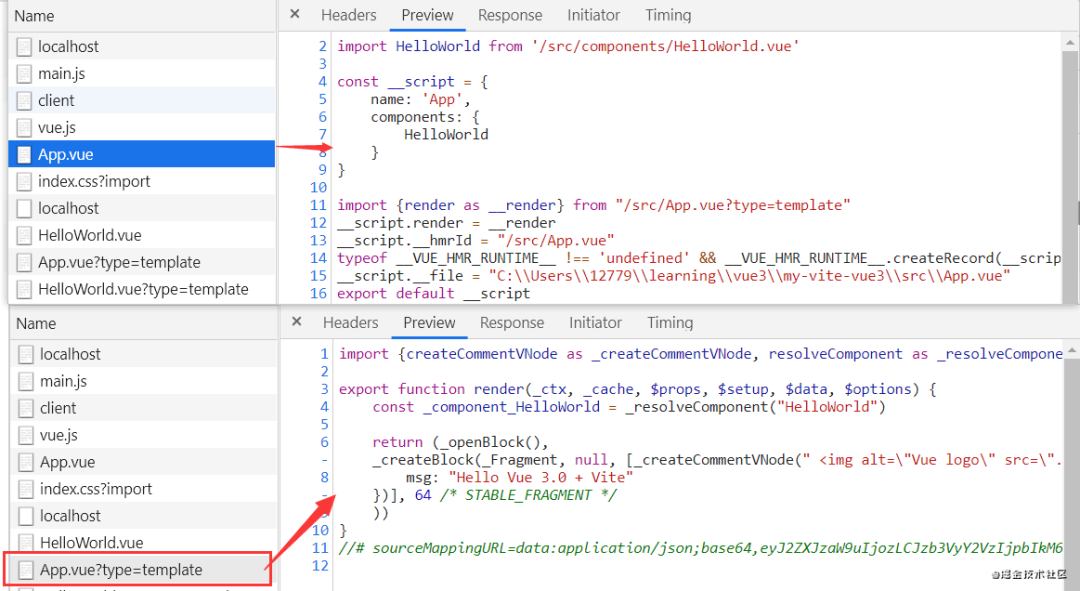
4. 靜態(tài)服務(wù)插件 實現(xiàn)可以返回靜態(tài)文件的功能
app.use(static(root))
app.use(static(path.resolve(root, 'public')))
手寫vite代碼 實現(xiàn)以上4種功能:
新建一個vite項目:
npm instal -g create-vite-app    //全局安裝最新vite構(gòu)建工具 (默認最新)
create-vite-app my-vite-vue3     //創(chuàng)建一個名為myvitevue3的項目

cd my-vite-vue3  //進入項目
yarn install     //安裝項目依賴
yarn dev         //啟動項目
下面我們在根目錄新建vite/index.js文件
通過運行node vite/index.js代替yarn dev啟動項目
使用自實現(xiàn)的vite來模擬vite的這4個功能
如圖所述則是使用自寫vite渲染的頁面: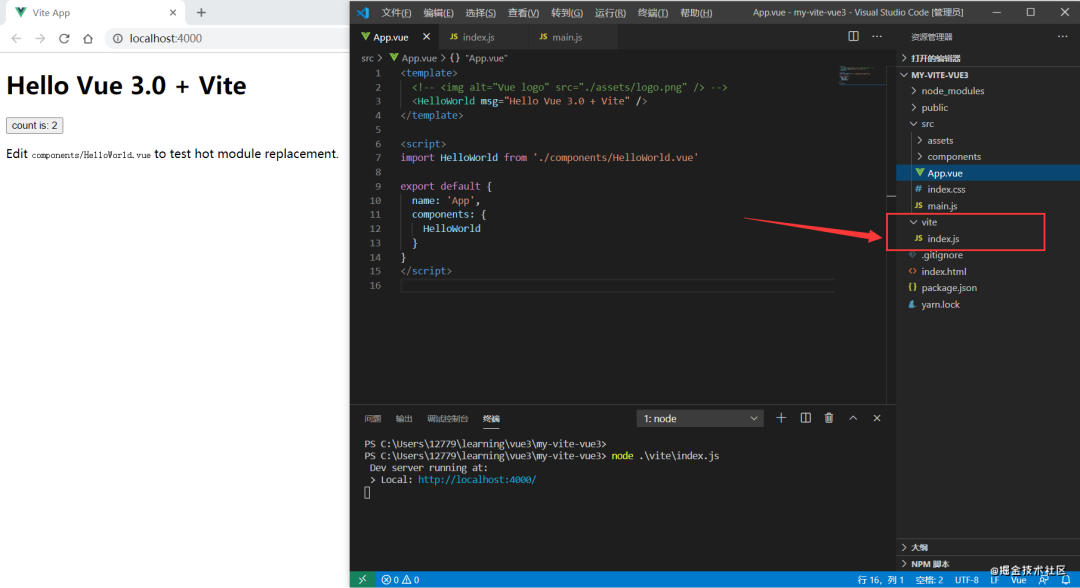
//vite/index.js
const fs = require('fs').promises
const Koa = require('koa')
const path = require('path')
const chalk = require('chalk')
const static = require('koa-static')
const { parse } = require('es-module-lexer')
const MagicString = require('magic-string')
const { Readable } = require('stream')

//讀取body方法
async function readBody(stream) {
 if (stream instanceof Readable) {
  return new Promise((resolve) => {
   let res = ''
   stream.on('data', function (chunk) {
    res += chunk
   });
   stream.on('end', function () {
    resolve(res)
   })
  })
 } else {
  return stream;
 }
}

//koa中間件
const resolvePlugin = [
 // 1. 重寫引入模塊路徑前面加上/@modules/vue, 重寫后瀏覽器會再次發(fā)送請求
 ({ app, root }) => {
  function rewriteImports(source) {
   let imports = parse(source)[0];
   let ms = new MagicString(source);
   if (imports.length > 0) {
    for (let i = 0; i < imports.length; i++) {
     let { s, e } = imports[i];
     let id = source.slice(s, e); // 應(yīng)用的標識 vue  ./App.vue
     // 不是./ 或者 /
     if (/^[^\/\.]/.test(id)) {
      id = `/@modules/${id}`;
      ms.overwrite(s, e, id)
     }
    }
   }
   return ms.toString();
  }
  app.use(async (ctx, next) => {
   await next(); // 靜態(tài)服務(wù)
   // 默認會先執(zhí)行 靜態(tài)服務(wù)中間件 會將結(jié)果放到 ctx.body
   // 需要將流轉(zhuǎn)換成字符串 , 只需要處理js中的引用問題
   if (ctx.body && ctx.response.is('js')) {
    let r = await readBody(ctx.body); // vue => /@modules
    const result = rewriteImports(r);
    ctx.body = result;
   }
  })
 },

 // 2. 攔截含有/@modules/vue的請求, 去node_modules引入對應(yīng)的模塊并返回
 ({ app, root }) => {
  const reg = /^\/@modules\//
  app.use(async (ctx, next) => {
   // 如果沒有匹配到 /@modules/vue 就往下執(zhí)行即可
   if (!reg.test(ctx.path)) {
    return next();
   }
   const id = ctx.path.replace(reg, '');

   let mapping = {
    vue: path.resolve(root, 'node_modules', '@vue/runtime-dom/dist/runtime-dom.esm-browser.js'),
   }
   const content = await fs.readFile(mapping[id], 'utf8');
   ctx.type = 'js'; // 返回的文件是js
   ctx.body = content;
  })
 },

 // 3. 解析.vue文件
 ({ app, root }) => {
  app.use(async (ctx, next) => {
   if (!ctx.path.endsWith('.vue')) {
    return next();
   }
   const filePath = path.join(root, ctx.path);
   const content = await fs.readFile(filePath, 'utf8');
   // 引入.vue文件解析模板
   const { compileTemplate, parse } = require(path.resolve(root, 'node_modules', '@vue/compiler-sfc/dist/compiler-sfc.cjs'))
   let { descriptor } = parse(content);
   if (!ctx.query.type) {
    //App.vue
    let code = ''
    if (descriptor.script) {
     let content = descriptor.script.content;
     code += content.replace(/((?:^|\n|;)\s*)export default/, '$1const __script=');
    }
    if (descriptor.template) {
     const requestPath = ctx.path + `?type=template`;
     code += `\nimport { render as __render } from "${requestPath}"`;
     code += `\n__script.render = __render`
    }
    code += `\nexport default __script`
    ctx.type = 'js';
    ctx.body = code
   }
   if (ctx.query.type == 'template') {
    ctx.type = 'js';
    let content = descriptor.template.content
    const { code } = compileTemplate({ source: content }); // 將app.vue中的模板 轉(zhuǎn)換成render函數(shù)
    ctx.body = code;
   }
  })
 },

 // 4. 靜態(tài)服務(wù)插件 實現(xiàn)可以返回文件的功能
 ({ app, root }) => {
  app.use(static(root))
  app.use(static(path.resolve(root, 'public')))
 }
]

function createServer() {
 let app = new Koa()
 const context = {     // 直接創(chuàng)建一個上下文 來給不同的插件共享功能
  app,
  root: process.cwd() // C:\Users\...\my-vite-vue3
 }

 // 運行中間件
 resolvePlugin.forEach(plugin => plugin(context))

 return app
}

createServer().listen(4000, () => {
 console.log(' Dev server running at:')
 console.log(` > Local: ${chalk.cyan('http://localhost:4000/')}`)
})
圖片和css文件我們還沒有處理,所以除去app.vue引入的圖片與main.js內(nèi)引入的css即可實現(xiàn)對應(yīng)的功能