
給 Strapi 應(yīng)用添加健康檢查端點(diǎn)
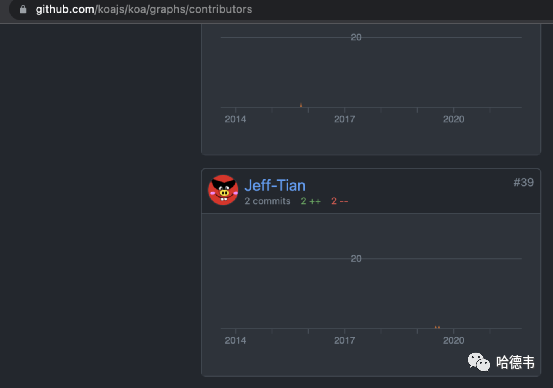
今天繼續(xù)上周的主題,給 k8s 集群里的服務(wù)添加健康檢查探針。上一篇《給 SpringBoot 服務(wù)添加健康檢查》是針對(duì) Java 服務(wù)的。除了 java 服務(wù),公司還有一個(gè) CMS 系統(tǒng)部署在 k8s 集群中,基于 Strapi 開發(fā),是一個(gè) nodejs 項(xiàng)目。粗看了一下 Strapi,感覺(jué)它的理念和 Koa 很像,仔細(xì)看它果然依賴 koa,并且文檔中也提到了 Koa。這讓我比較激動(dòng),畢竟,我也是 Koa 項(xiàng)目的 Contributor(盡管只有一丟丟貢獻(xiàn)):
先追求有,再追求好
如同上一篇給 SpringBoot 服務(wù)添加健康檢查路由一樣,本篇介紹只追求有,即添加最簡(jiǎn)單的實(shí)現(xiàn)。要完美的話,還需要寫一些額外的代碼,以便在一些外部依賴(比如數(shù)據(jù)庫(kù))發(fā)生問(wèn)題時(shí)得到通知,并讓健康檢查端點(diǎn)返回錯(cuò)誤。
測(cè)試
如同上一篇一樣,仍然是在寫實(shí)現(xiàn)代碼前,先把測(cè)試寫好,即把最終效果寫下來(lái),這是一種以終為始的思維方式,有助于避免掉進(jìn)軟件開發(fā)的焦油坑:《我是如何從焦油坑里爬出來(lái)的》。
添加測(cè)試工具
由于項(xiàng)目里沒(méi)有引入測(cè)試工具,先補(bǔ)上:
yarn add --dev jest supertest sqlite3jest 是 Facebook(現(xiàn)在叫 Meta?)開發(fā)的測(cè)試框架。supertest 用來(lái)測(cè)試 Web 服務(wù),而 sqlite3 可以簡(jiǎn)化測(cè)試時(shí)的數(shù)據(jù)庫(kù)依賴。
測(cè)試配置
增加 config/env/test/database.json 指定測(cè)試時(shí)使用 sqlite:
{"defaultConnection": "default","connections": {"default": {"connector": "bookshelf","settings": {"client": "sqlite","filename": ".tmp/test.db"},"options": {"useNullAsDefault": true,"pool": {"min": 0,"max": 1}}}}}
測(cè)試命令
在 package.json 里的 scripts 字段中加入測(cè)試相關(guān)命令:
+ "test": "jest --forceExit --detectOpenHandles"在 package.json 的最后添加:
"jest": {"testPathIgnorePatterns": ["/node_modules/",".tmp",".cache"],"testEnvironment": "node"}
健康檢查測(cè)試用例
tests/healthz/index.test.js
const Strapi = require('strapi');const http = require('http');const request = require('supertest')let instance;async function setupStrapi() {if (!instance) {/** the following code in copied from `./node_modules/strapi/lib/Strapi.js` */await Strapi().load();instance = strapi; // strapi is global nowawait instance.app.use(instance.router.routes()) // populate KOA routes.use(instance.router.allowedMethods()); // populate KOA methodsinstance.server = http.createServer(instance.app.callback());}return instance;}jest.setTimeout(20000)describe('Health Check', () => {beforeAll(async () => {await setupStrapi()})it('should live', async () => {await request(strapi.server).get('/healthz/liveness').expect(200).then(data => {expect(data.text).toBe('I\'m alive!')})})it('should ready', async()=>{await request(strapi.server).get('/healthz/readiness').expect(200).then(data => {expect(data.text).toBe('I\'m ready!')})})})
實(shí)現(xiàn)路由
首先增加 api/healthz 目錄
添加路由配置
api/healthz/config/routes.json
{"routes": [{"method": "GET","path": "/healthz","handler": "Healthz.index"},{"method": "GET","path": "/healthz/liveness","handler": "Healthz.liveness"},{"method": "GET","path": "/healthz/readiness","handler": "Healthz.readiness"}]}
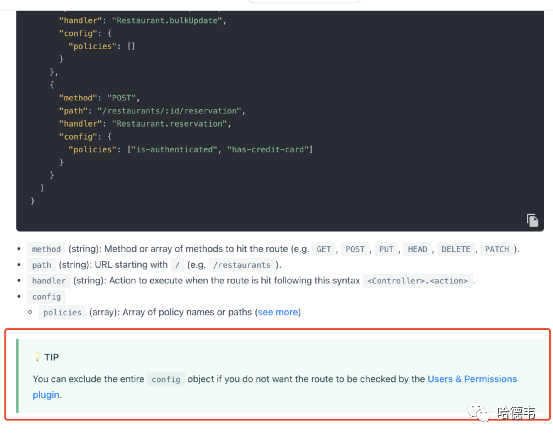
注意,一定不要使用官方的默認(rèn)示例,不能含有 policies 數(shù)組:
{"routes": [{"method": "GET","path": "/healthz","handler": "Healthz.index","config": {"policies": []}}]}
如果這樣,運(yùn)行測(cè)試就會(huì)得到 403 的錯(cuò)誤,原因是它會(huì)觸發(fā) user permissions 插件的權(quán)限檢查。盡管你可以通過(guò)管理后臺(tái)配置其權(quán)限公開訪問(wèn):
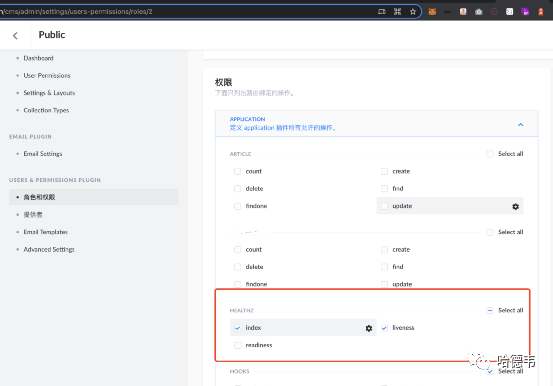
但是對(duì)于健康檢查接口,沒(méi)有必要專門配置權(quán)限,直接繞開權(quán)限插件即可:
實(shí)現(xiàn)路由邏輯
api/healthz/controllers/Healthz.js
module.exports = {// GET /healthzasync index(ctx) {ctx.send('Hello World!')},async readiness(ctx) {ctx.send('I\'m ready!')},async liveness(ctx) {ctx.send('I\'m alive!')},}
運(yùn)行測(cè)試,通過(guò)。
添加 deployment 配置
readinessProbe:httpGet:path: /healthz/readinessport: 1337initialDelaySeconds: 30timeoutSeconds: 10livenessProbe:httpGet:path: /healthz/livenessport: 1337initialDelaySeconds: 130timeoutSeconds: 10
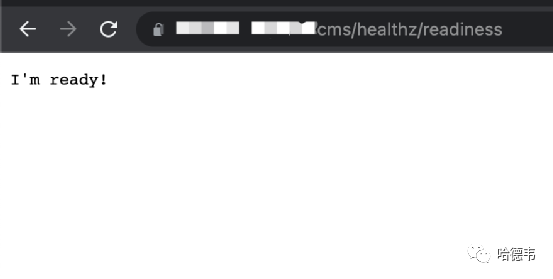
部署后可以驗(yàn)證:
在 k8s 集群里查看是否生效:
kubectl describe pod/your-pod...Containers:cms:Container ID: docker://7245d2d8644d6bcc7c7ff39fdea5e680457c4edf2ff70610a8607c3cef5d3332Image: 13659932xxxx.dkr.ecr.cn-northwest-1.amazonaws.com.cn/cms:cccc1aecImage ID: docker-pullable://13659932xxx.dkr.ecr.cn-northwest-1.amazonaws.com.cn/cms@sha256:bc4317cc2347eb2aed74b8e4e9f39b901b613e4bbc7781e09957e2eb4a0bd0dbPort: 1337/TCPHost Port: 0/TCPState: RunningStarted: Mon, 15 Nov 2021 10:23:42 +0000Ready: TrueRestart Count: 0Limits:cpu: 1memory: 2000MiRequests:cpu: 500mmemory: 1000MiLiveness: http-get http://:1337/healthz/liveness delay=130s timeout=10s period=10s #success=1 #failure=3Readiness: http-get http://:1337/healthz/readiness delay=30s timeout=10s period=10s #success=1 #failure=3Environment Variables from:...
注意以上輸出的 Liveness 和 Readiness 部分,小功告成!