
node 寫爬蟲,原來這么簡單

作者:CarsonXu
原文地址:https://juejin.im/post/5eca37f951882543345e81df
前言
今天給大家?guī)淼氖莕ode簡單爬蟲,對于前端小白也是非常好理解且會非常有成就感的小技能
爬蟲的思路可以總結(jié)為:請求?url - > html(信息) -> 解析html
這篇文章呢,就帶大家爬取豆瓣TOP250電影的信息。
工具
爬蟲必備工具:cheeriocheerio?簡單介紹:cheerio?是?jquery?核心功能的一個(gè)快速靈活而又簡潔的實(shí)現(xiàn),主要是為了用在服務(wù)器端需要對?DOM?進(jìn)行操作的地方。大家可以簡單的理解為用來解析?html?非常方便的工具。使用之前只需要在終端安裝即可?npm install cheerio
node爬蟲步驟解析
一、選取網(wǎng)頁url,使用http協(xié)議get到網(wǎng)頁數(shù)據(jù)
豆瓣TOP250鏈接地址:https://movie.douban.com/top250
首先我們請求http協(xié)議,通過http來拿到網(wǎng)頁的所有數(shù)據(jù)
const?https?=?require('https');
https.get('https://movie.douban.com/top250',function(res){
????//?分段返回的?自己拼接
????let?html?=?'';
????//?有數(shù)據(jù)產(chǎn)生的時(shí)候?拼接
????res.on('data',function(chunk){
????????html?+=?chunk;
????})
????//?拼接完成
????res.on('end',function(){
????????console.log(html);
????})
})
上面代碼呢,大家一定要注意我們請求數(shù)據(jù)時(shí),拿到的數(shù)據(jù)是分段拿到的,我們需要通過自己把數(shù)據(jù)拼接起來
res.on('data',function(chunk){
????????html?+=?chunk;
????})
拼接完成時(shí) 我們可以輸出一下,看一下我們是否拿到了完整數(shù)據(jù)
res.on('end',function(){
????????console.log(html);
????})
二、使用cheerio工具解析需要的內(nèi)容
const?cheerio?=?require('cheerio');
res.on('end',function(){
????????console.log(html);
????????const?$?=?cheerio.load(html);
????????let?allFilms?=?[];
????????$('li?.item').each(function(){
????????????//?this?循環(huán)時(shí)?指向當(dāng)前這個(gè)電影
????????????//?當(dāng)前這個(gè)電影下面的title
????????????//?相當(dāng)于this.querySelector?
????????????const?title?=?$('.title',?this).text();
????????????const?star?=?$('.rating_num',this).text();
????????????const?pic?=?$('.pic?img',this).attr('src');
????????????//?console.log(title,star,pic);
????????????//?存?數(shù)據(jù)庫
????????????//?沒有數(shù)據(jù)庫存成一個(gè)json文件?fs
????????????allFilms.push({
????????????????title,star,pic
????????????})
????????})
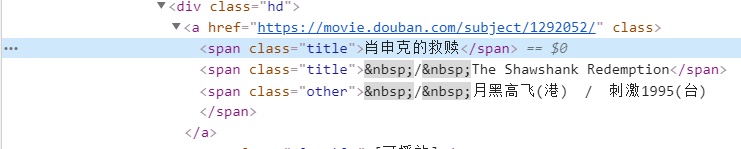
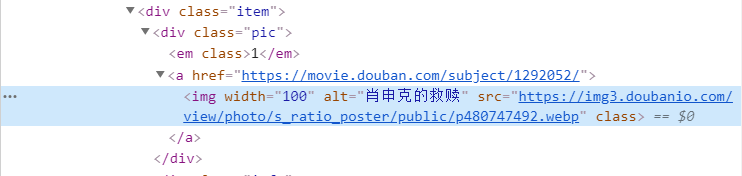
可以通過檢查網(wǎng)頁源代碼查看需要的內(nèi)容在哪個(gè)標(biāo)簽下面,然后通過$符號來拿到需要的內(nèi)容,這里我就拿了電影的名字、評分、電影圖片
 ?
? ?
? ?
?到了這時(shí)候,你會發(fā)現(xiàn),node?爬蟲實(shí)現(xiàn)是非常簡單的,我們只需要認(rèn)真分析一下我們拿到的?html?數(shù)據(jù),將需要的內(nèi)容拿出來保存在本地就基本完成了
保存數(shù)據(jù)
下面就是保存數(shù)據(jù)了,我將數(shù)據(jù)保存在?films.json?文件中 將數(shù)據(jù)保存到文件中,我們引入一個(gè)fs模塊,將數(shù)據(jù)寫入文件中去
const?fs?=?require('fs');
fs.writeFile('./films.json',?JSON.stringify(allFilms),function(err){
????????????if(!err){
????????????????console.log('文件寫入完畢');
????????????}
????????})
文件寫入代碼需要寫在?res.on('end')?里面,數(shù)據(jù)讀完->寫入 寫入完成,可以查看一下films.json,里面是有爬取的數(shù)據(jù)的。
下載圖片
我們爬取的圖片數(shù)據(jù)是圖片地址,如果我們要將圖片保存到本地呢?這時(shí)候只需要跟前面請求網(wǎng)頁數(shù)據(jù)一樣,把圖片地址url請求回來,每一張圖片寫入到本地即可
function downloadImage(allFilms) { for(let i=0; i./images/${i}.png,str,'binary',function(err){ if(!err){ console.log(第${i}張圖片下載成功); } }) }) }) } } 復(fù)制代碼 下載圖片的步驟跟爬取網(wǎng)頁數(shù)據(jù)的步驟是一模一樣的,我們將圖片的格式保存為.png寫好了下載圖片的函數(shù),我們在?res.on('end')?里面調(diào)用一下函數(shù)就大功告成了
源碼
//?請求?url?-?>?html(信息)??->?解析html
const?https?=?require('https');
const?cheerio?=?require('cheerio');
const?fs?=?require('fs');
//?請求?top250
//?瀏覽器輸入一個(gè)?url,?get
https.get('https://movie.douban.com/top250',function(res){
????//?console.log(res);
????//?分段返回的?自己拼接
????let?html?=?'';
????//?有數(shù)據(jù)產(chǎn)生的時(shí)候?拼接
????res.on('data',function(chunk){
????????html?+=?chunk;
????})
????//?拼接完成
????res.on('end',function(){
????????console.log(html);
????????const?$?=?cheerio.load(html);
????????let?allFilms?=?[];
????????$('li?.item').each(function(){
????????????//?this?循環(huán)時(shí)?指向當(dāng)前這個(gè)電影
????????????//?當(dāng)前這個(gè)電影下面的title
????????????//?相當(dāng)于this.querySelector?
????????????const?title?=?$('.title',?this).text();
????????????const?star?=?$('.rating_num',this).text();
????????????const?pic?=?$('.pic?img',this).attr('src');
????????????//?console.log(title,star,pic);
????????????//?存?數(shù)據(jù)庫
????????????//?沒有數(shù)據(jù)庫存成一個(gè)json文件?fs
????????????allFilms.push({
????????????????title,star,pic
????????????})
????????})
????????//?把數(shù)組寫入json里面
????????fs.writeFile('./films.json',?JSON.stringify(allFilms),function(err){
????????????if(!err){
????????????????console.log('文件寫入完畢');
????????????}
????????})
????????//?圖片下載一下
????????downloadImage(allFilms);
????})
})

function?downloadImage(allFilms)?{
????for(let?i=0;?i????????const?picUrl?=?allFilms[i].pic;
????????//?請求?->?拿到內(nèi)容
????????//?fs.writeFile('./xx.png','內(nèi)容')
????????https.get(picUrl,function(res){
????????????res.setEncoding('binary');
????????????let?str?=?'';
????????????res.on('data',function(chunk){
????????????????str?+=?chunk;
????????????})
????????????res.on('end',function(){
????????????????fs.writeFile(`./images/${i}.png`,str,'binary',function(err){
????????????????????if(!err){
????????????????????????console.log(`第${i}張圖片下載成功`);
????????????????????}
????????????????})
????????????})
????????})
????}
}
總結(jié)
爬蟲不是只有?python?才行的,我們?node?也很方便簡單,前端新手掌握一個(gè)小技能也是非常不錯(cuò)的,對自身的?node?學(xué)習(xí)有很大的幫助,本文的爬蟲技巧只是入門,感興趣小伙伴可以繼續(xù)探究。