
【W(wǎng)eb技術(shù)】1346- 前端虛擬列表的實(shí)現(xiàn)原理

作者:字節(jié)跳動(dòng) fe @程翯
近期在某平臺(tái)開(kāi)發(fā)迭代的過(guò)程中遇到了超長(zhǎng)List嵌套在antd Modal里加載慢,卡頓的情況。于是心血來(lái)潮決定從零自己實(shí)現(xiàn)一個(gè)虛擬滾動(dòng)列表來(lái)優(yōu)化一下整體的體驗(yàn)。
改造前:
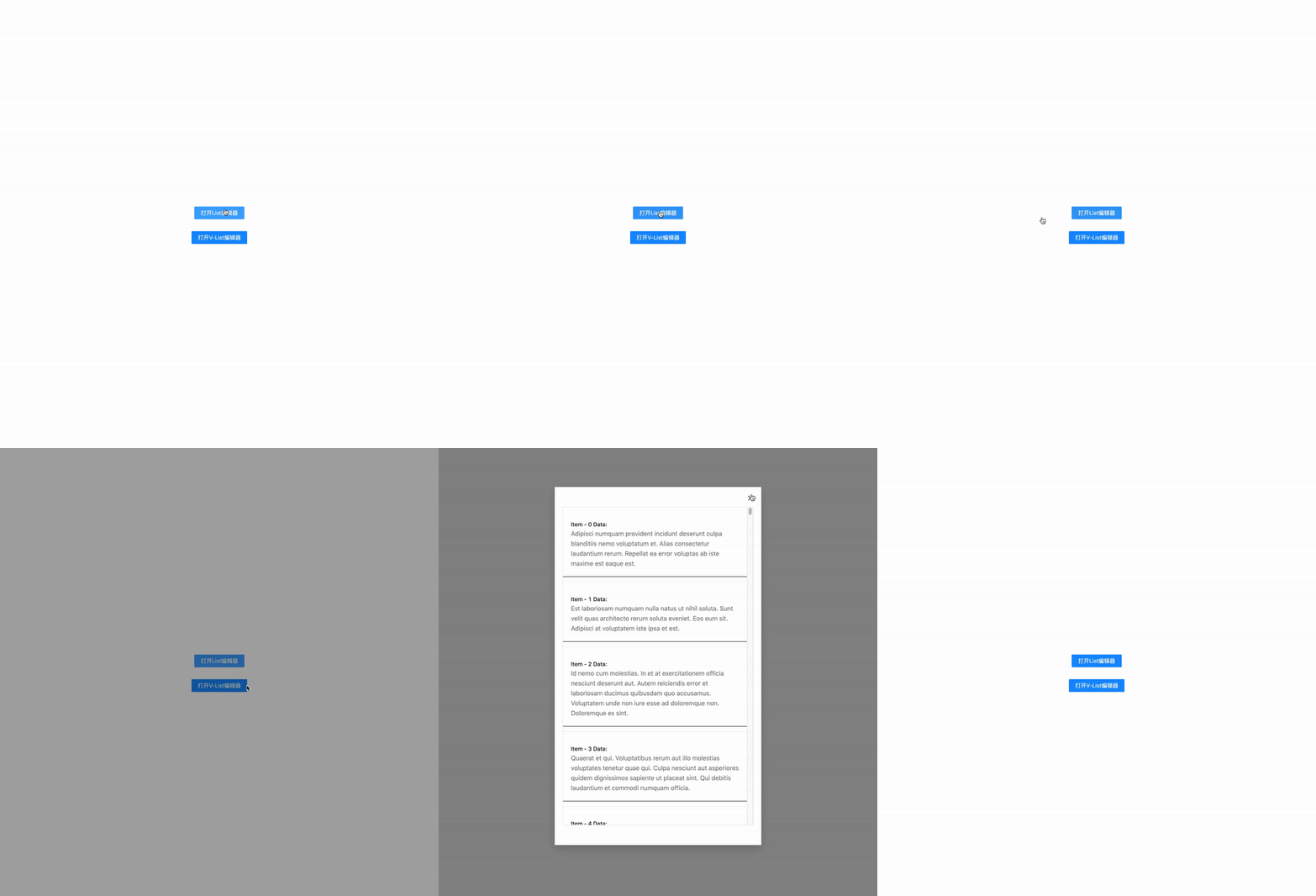
我們可以看出來(lái)在改造之前,打開(kāi)編輯窗口Modal的時(shí)候會(huì)出現(xiàn)短暫的卡頓,并且在點(diǎn)擊Cancel關(guān)閉后也并不是立即響應(yīng)而是稍作遲疑之后才關(guān)閉的
改造后:
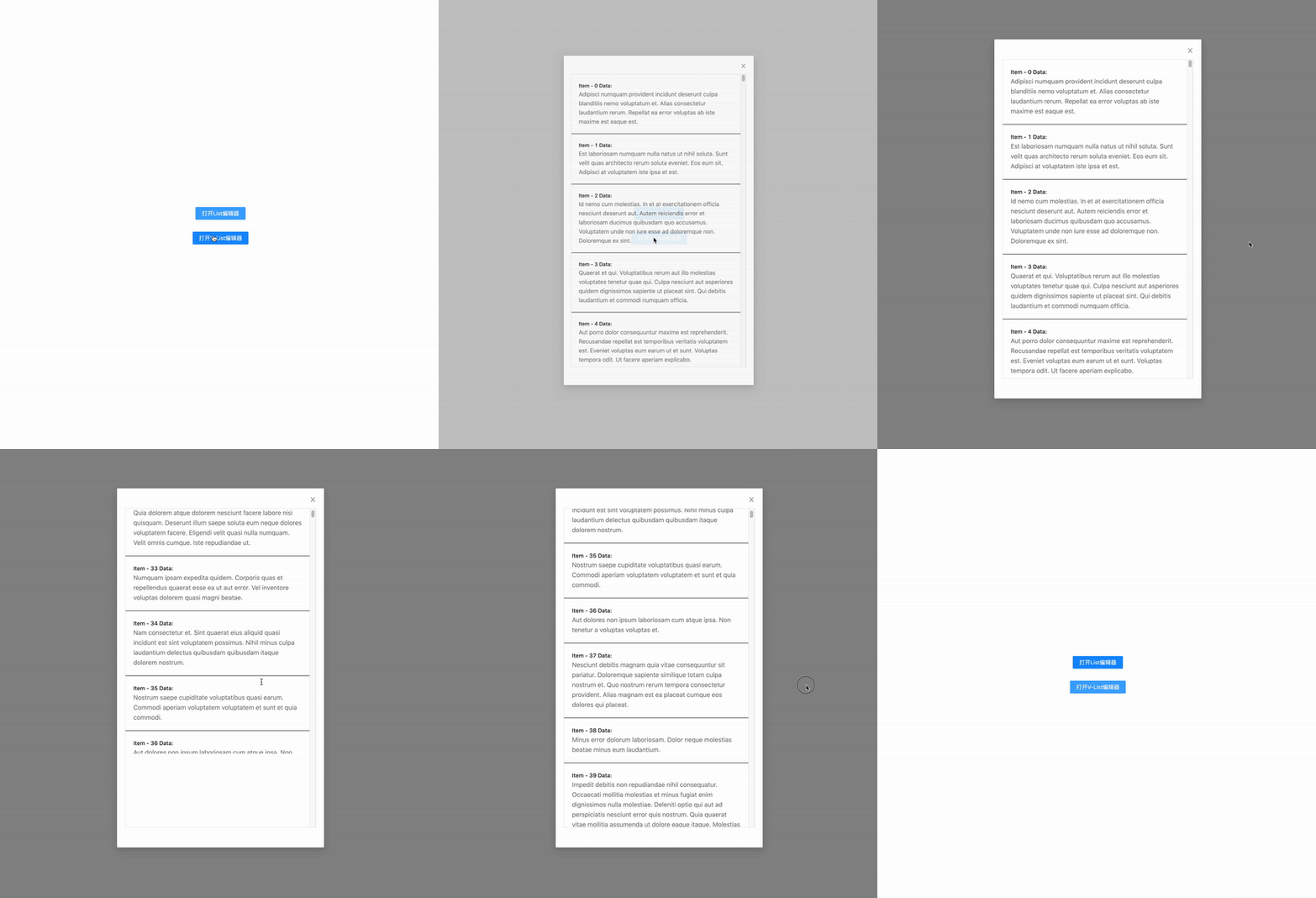
改造完成后我們可以觀察到整個(gè)Modal的打開(kāi)比之前變得流暢了不少,可以做到立即響應(yīng)用戶的點(diǎn)擊事件喚起/關(guān)閉Modal
性能對(duì)比Demo: https://codesandbox.io/s/a-v-list-has-dynamic-inner-height-modal-demo-l66py
0x0 基礎(chǔ)知識(shí)
所以什么是虛擬滾動(dòng)/列表呢?
一個(gè)虛擬列表是指當(dāng)我們有成千上萬(wàn)條數(shù)據(jù)需要進(jìn)行展示但是用戶的“視窗”(一次性可見(jiàn)內(nèi)容)又不大時(shí)我們可以通過(guò)巧妙的方法只渲染用戶最大可見(jiàn)條數(shù)+“BufferSize”個(gè)元素并在用戶進(jìn)行滾動(dòng)時(shí)動(dòng)態(tài)更新每個(gè)元素中的內(nèi)容從而達(dá)到一個(gè)和長(zhǎng)list滾動(dòng)一樣的效果但花費(fèi)非常少的資源。
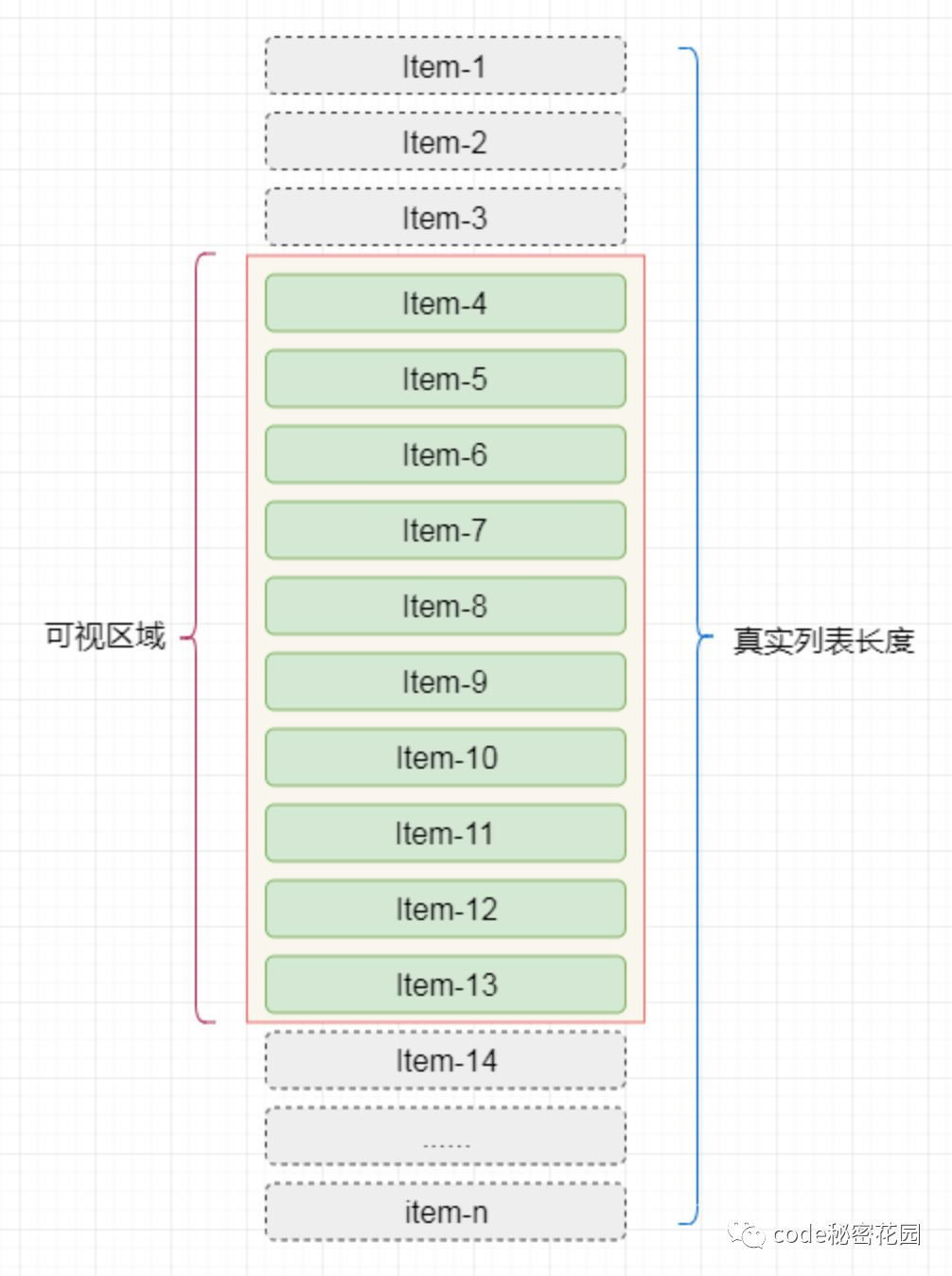
(從上圖中我們可以發(fā)現(xiàn)實(shí)際用戶每次能看到的元素/內(nèi)容只有item-4 ~ item-13 也就是9個(gè)元素)
0x1 實(shí)現(xiàn)一個(gè)“定高”虛擬列表
首先我們需要定義幾個(gè)變量/名稱(chēng)。 從上圖中我們可以看出來(lái)用戶實(shí)際可見(jiàn)區(qū)域的開(kāi)始元素是Item-4,所以他在數(shù)據(jù)數(shù)組中對(duì)應(yīng)的下標(biāo)也就是我們的 startIndex同理Item-13對(duì)應(yīng)的數(shù)組下標(biāo)則應(yīng)該是我們的 endIndex所以Item-1,Item-2和Item-3則是被用戶的向上滑動(dòng)操作所隱藏,所以我們稱(chēng)它為 startOffset(scrollTop)
因?yàn)槲覀冎粚?duì)可視區(qū)域的內(nèi)容做了渲染,所以為了保持整個(gè)容器的行為和一個(gè)長(zhǎng)列表相似(滾動(dòng))我們必須保持原列表的高度,所以我們將HTML結(jié)構(gòu)設(shè)計(jì)成如下
<div?className="vListContainer">
??<div?className="phantomContent">
????...
????
????
????
????....
??div>
div>
其中:
vListContainer為可視區(qū)域的容器,具有overflow-y: auto屬性。在 phantom中的每條數(shù)據(jù)都應(yīng)該具有position: absolute屬性phantomContent則是我們的“幻影”部分,其主要目的是為了還原真實(shí)List的內(nèi)容高度從而模擬正常長(zhǎng)列表滾動(dòng)的行為。接著我們對(duì)
vListContainer綁定一個(gè)onScroll的響應(yīng)函數(shù),并在函數(shù)中根據(jù)原生滾動(dòng)事件的scrollTop 屬性來(lái)計(jì)算我們的startIndex和endIndex列表總高度: phantomHeight = total * rowHeight可視范圍內(nèi)展示元素?cái)?shù): limit = Math.ceil(height/rowHeight)我們需要一個(gè)固定的列表元素高度: rowHeight我們需要知道當(dāng)前l(fā)ist一共有多少條數(shù)據(jù): total我們需要知道當(dāng)前用戶可視區(qū)域的高度: height在開(kāi)始計(jì)算之前,我們先要定義幾個(gè)數(shù)值: 在有了上述數(shù)據(jù)之后我們可以通過(guò)計(jì)算得出下列數(shù)據(jù):
(注意此處我們用的是向上取整)
所以我們可以在onScroll 回調(diào)中進(jìn)行下列計(jì)算:
onScroll(evt:?any)?{
??//?判斷是否是我們需要響應(yīng)的滾動(dòng)事件
??if?(evt.target?===?this.scrollingContainer.current)?{
????const?{?scrollTop?}?=?evt.target;
????const?{?startIndex,?total,?rowHeight,?limit?}?=?this;

????//?計(jì)算當(dāng)前startIndex
????const?currentStartIndex?=?Math.floor(scrollTop?/?rowHeight);

????//?如果currentStartIndex?和?startIndex?不同(我們需要更新數(shù)據(jù)了)
????if?(currentStartIndex?!==?startIndex?)?{
??????this.startIndex?=?currentStartIndex;
??????this.endIndex?=?Math.min(currentStartIndedx?+?limit,?total?-?1);
??????this.setState({?scrollTop?});
????}
??}
}
當(dāng)我們一旦有了startIndex 和 endIndex 我們就可以渲染其對(duì)應(yīng)的數(shù)據(jù):
renderDisplayContent?=?()?=>?{
??const?{?rowHeight,?startIndex,?endIndex?}?=?this;
??const?content?=?[];
??
??//?注意這塊我們用了?<=?是為了渲染x+1個(gè)元素用來(lái)在讓滾動(dòng)變得連續(xù)(永遠(yuǎn)渲染在判斷&渲染x+2)
??for?(let?i?=?startIndex;?i?<=?endIndex;?++i)?{
????//?rowRenderer?是用戶定義的列表元素渲染方法,需要接收一個(gè)?index?i?和
????//????當(dāng)前位置對(duì)應(yīng)的style
????content.push(
??????rowRenderer({
????????index:?i,?
????????style:?{
??????????width:?'100%',
??????????height:?rowHeight?+?'px',
??????????position:?"absolute",
??????????left:?0,
??????????right:?0,
??????????top:?i?*?rowHeight,
??????????borderBottom:?"1px?solid?#000",
????????}
??????})
????);
??}
??
??return?content;
};
線上Demo:https://codesandbox.io/s/a-naive-v-list-f0ghm
原理:
所以這個(gè)滾動(dòng)效果究竟是怎么實(shí)現(xiàn)的呢?首先我們?cè)趘ListContainer中渲染了一個(gè)真實(shí)list高度的“幻影”容器從而允許用戶進(jìn)行滾動(dòng)操作。其次我們監(jiān)聽(tīng)了onScroll事件,并且在每次用戶觸發(fā)滾動(dòng)是動(dòng)態(tài)計(jì)算當(dāng)前滾動(dòng)Offset(被滾上去隱藏了多少)所對(duì)應(yīng)的開(kāi)始下標(biāo)(index)是多少。當(dāng)我們發(fā)現(xiàn)新的下邊和我們當(dāng)前展示的下標(biāo)不同時(shí)進(jìn)行賦值并且setState觸發(fā)重繪。當(dāng)用戶當(dāng)前的滾動(dòng)offset未觸發(fā)下標(biāo)更新時(shí),則因?yàn)楸旧韕hantom的長(zhǎng)度關(guān)系讓虛擬列表?yè)碛泻推胀斜硪粯拥臐L動(dòng)能力。當(dāng)觸發(fā)重繪時(shí)因?yàn)槲覀冇?jì)算的是startIndex 所以用戶感知不到頁(yè)面的重繪(因?yàn)楫?dāng)前滾動(dòng)的下一幀和我們重繪完的內(nèi)容是一致的)。
優(yōu)化:
對(duì)于上邊我們實(shí)現(xiàn)的虛擬列表,大家不難發(fā)現(xiàn)一但進(jìn)行了快速滑動(dòng)就會(huì)出現(xiàn)列表閃爍的現(xiàn)象/來(lái)不及渲染、空白的現(xiàn)象。還記得我們一開(kāi)始說(shuō)的 **渲染用戶最大可見(jiàn)條數(shù)+“BufferSize” 么?對(duì)于我們渲染的實(shí)際內(nèi)容,我們可以對(duì)其上下加入Buffer的概念(即上下多渲染一些元素用來(lái)過(guò)渡快速滑動(dòng)時(shí)來(lái)不及渲染的問(wèn)題)。優(yōu)化后的onScroll 函數(shù)如下:
onScroll(evt:?any)?{
??........
??//?計(jì)算當(dāng)前startIndex
??const?currentStartIndex?=?Math.floor(scrollTop?/?rowHeight);
????
??//?如果currentStartIndex?和?startIndex?不同(我們需要更新數(shù)據(jù)了)
??if?(currentStartIndex?!==?originStartIdx)?{
????//?注意,此處我們引入了一個(gè)新的變量叫originStartIdx,起到了和之前startIndex
????//????相同的效果,記錄當(dāng)前的?真實(shí)?開(kāi)始下標(biāo)。
????this.originStartIdx?=?currentStartIndex;
????//?對(duì)?startIndex?進(jìn)行?頭部?緩沖區(qū)?計(jì)算
????this.startIndex?=?Math.max(this.originStartIdx?-?bufferSize,?0);
????//?對(duì)?endIndex?進(jìn)行?尾部?緩沖區(qū)?計(jì)算
????this.endIndex?=?Math.min(
??????this.originStartIdx?+?this.limit?+?bufferSize,
??????total?-?1
????);

????this.setState({?scrollTop:?scrollTop?});
??}
}
線上Demo:https://codesandbox.io/s/A-better-v-list-bkw1t
0x2 列表元素高度自適應(yīng)
現(xiàn)在我們已經(jīng)實(shí)現(xiàn)了“定高”元素的虛擬列表的實(shí)現(xiàn),那么如果說(shuō)碰到了高度不固定的超長(zhǎng)列表的業(yè)務(wù)場(chǎng)景呢?
一般碰到不定高列表元素時(shí)有三種虛擬列表實(shí)現(xiàn)方式:
對(duì)輸入數(shù)據(jù)進(jìn)行更改,傳入每一個(gè)元素對(duì)應(yīng)的高度 dynamicHeight[i] = x x 為元素i 的行高
需要實(shí)現(xiàn)知道每一個(gè)元素的高度(不切實(shí)際)
將當(dāng)前元素先在屏外進(jìn)行繪制并對(duì)齊高度進(jìn)行測(cè)量后再將其渲染到用戶可視區(qū)域內(nèi)
這種方法相當(dāng)于雙倍渲染消耗(不切實(shí)際)
傳入一個(gè)estimateHeight 屬性先對(duì)行高進(jìn)行估計(jì)并渲染,然后渲染完成后獲得真實(shí)行高并進(jìn)行更新和緩存
會(huì)引入多余的transform(可以接受),會(huì)在后邊講為什么需要多余的transform...
讓我們暫時(shí)先回到 HTML 部分
"vListContainer">
??"phantomContent">
????...
????
????
????
????....
??</div>
div>
"vListContainer" >
??"phantomContent"?/>
??"actualContent">
????...
????
????
????
????....
??</div>
div>
在我們實(shí)現(xiàn) “定高” 虛擬列表時(shí),我們是采用了把元素渲染在 phantomContent容器里,并且通過(guò)設(shè)置每一個(gè)item的position為absolute加上定義top屬性等于i * rowHeight來(lái)實(shí)現(xiàn)無(wú)論怎么滾動(dòng),渲染內(nèi)容始終是在用戶的可視范圍內(nèi)的。在列表高度不能確定的情況下,我們就無(wú)法準(zhǔn)確的通過(guò)estimateHeight來(lái)計(jì)算出當(dāng)前元素所處的y位置,所以我們需要一個(gè)容器來(lái)幫我們做這個(gè)絕對(duì)定位。actualContent 則是我們新引入的列表內(nèi)容渲染容器,通過(guò)在此容器上設(shè)置 position: absolute屬性來(lái)避免在每個(gè)item上設(shè)置。有一點(diǎn)不同的是,因?yàn)槲覀兏挠胊ctualContent 容器。當(dāng)我們進(jìn)行滑動(dòng)時(shí)需要?jiǎng)討B(tài)的對(duì)容器的位置進(jìn)行一個(gè) y-transform 從而實(shí)現(xiàn)容器永遠(yuǎn)處于用戶的視窗之中:
getTransform()?{
??const?{?scrollTop?}?=?this.state;
??const?{?rowHeight,?bufferSize,?originStartIdx?}?=?this;
??//?當(dāng)前滑動(dòng)offset?-?當(dāng)前被截?cái)嗟模](méi)有完全消失的元素)距離?-?頭部緩沖區(qū)距離
??return?`translate3d(0,${
????scrollTop?-
????(scrollTop?%?rowHeight)?-
????Math.min(originStartIdx,?bufferSize)?*?rowHeight
??}px,0)`;
}
線上Demo:https://codesandbox.io/s/a-v-list-achieved-by-transform-container-29mbc
(注:當(dāng)沒(méi)有高度自適應(yīng)要求時(shí)且沒(méi)有實(shí)現(xiàn)cell復(fù)用時(shí),把元素通過(guò)absolute渲染在phantom里會(huì)比通過(guò)transform的性能要好一些。因?yàn)槊看武秩綾ontent時(shí)都會(huì)進(jìn)行重排,但是如果使用transform時(shí)就相當(dāng)于進(jìn)行了( 重排 + transform) > 重排)
回到列表元素高度自適應(yīng)這個(gè)問(wèn)題上來(lái),現(xiàn)在我們有了一個(gè)可以在內(nèi)部進(jìn)行正常block排布的元素渲染容器(actualContent ),我們現(xiàn)在就可以直接在不給定高度的情況下先把內(nèi)容都渲染進(jìn)去。對(duì)于之前我們需要用rowHeight 做高度計(jì)算的地方,我們統(tǒng)一替換成estimateHeight 進(jìn)行計(jì)算。 limit = Math.ceil(height / estimateHeight)phantomHeight = total * estimateHeight同時(shí)為了避免重復(fù)計(jì)算每一個(gè)元素渲染后的高度(getBoundingClientReact().height) 我們需要一個(gè)數(shù)組來(lái)存儲(chǔ)這些高度
interface?CachedPosition?{
??index:?number;?????????//?當(dāng)前pos對(duì)應(yīng)的元素的下標(biāo)
??top:?number;???????????//?頂部位置
??bottom:?number;????????//?底部位置
??height:?number;????????//?元素高度
??dValue:?number;????????//?高度是否和之前(estimate)存在不同
}

cachedPositions:?CachedPosition[]?=?[];

//?初始化cachedPositions
initCachedPositions?=?()?=>?{
??const?{?estimatedRowHeight?}?=?this;
??this.cachedPositions?=?[];
??for?(let?i?=?0;?i?this.total;?++i)?{
????this.cachedPositions[i]?=?{
??????index:?i,
??????height:?estimatedRowHeight,?????????????//?先使用estimateHeight估計(jì)
??????top:?i?*?estimatedRowHeight,????????????//?同上
??????bottom:?(i?+?1)?*?estimatedRowHeight,???//?same?above
??????dValue:?0,
????};
??}
};
當(dāng)我們計(jì)算完(初始化完) cachedPositions 之后由于我們計(jì)算了每一個(gè)元素的top和bottom,所以phantom 的高度就是cachedPositions 中最后一個(gè)元素的bottom值
this.phantomHeight?=?this.cachedPositions[cachedPositionsLen?-?1].bottom;
當(dāng)我們根據(jù)estimateHeight 渲染完用戶視窗內(nèi)的元素后,我們需要對(duì)渲染出來(lái)的元素做實(shí)際高度更新,此時(shí)我們可以利用componentDidUpdate 生命周期鉤子來(lái)計(jì)算、判斷和更新:
componentDidUpdate()?{
??......
??//?actualContentRef必須存在current?(已經(jīng)渲染出來(lái))?+?total?必須?>?0
??if?(this.actualContentRef.current?&&?this.total?>?0)?{
????this.updateCachedPositions();
??}
}

updateCachedPositions?=?()?=>?{
??//?update?cached?item?height
??const?nodes:?NodeListOf<any>?=?this.actualContentRef.current.childNodes;
??const?start?=?nodes[0];

??//?calculate?height?diff?for?each?visible?node...
??nodes.forEach((node:?HTMLDivElement)?=>?{
????if?(!node)?{
??????//?scroll?too?fast?...
??????return;
????}
????const?rect?=?node.getBoundingClientRect();
????const?{?height?}?=?rect;
????const?index?=?Number(node.id.split('-')[1]);
????const?oldHeight?=?this.cachedPositions[index].height;
????const?dValue?=?oldHeight?-?height;

????if?(dValue)?{
??????this.cachedPositions[index].bottom?-=?dValue;
??????this.cachedPositions[index].height?=?height;
??????this.cachedPositions[index].dValue?=?dValue;
????}
??});

??//?perform?one?time?height?update...
??let?startIdx?=?0;
??
??if?(start)?{
????startIdx?=?Number(start.id.split('-')[1]);
??}
??
??const?cachedPositionsLen?=?this.cachedPositions.length;
??let?cumulativeDiffHeight?=?this.cachedPositions[startIdx].dValue;
??this.cachedPositions[startIdx].dValue?=?0;

??for?(let?i?=?startIdx?+?1;?i?????const?item?=?this.cachedPositions[i];
????//?update?height
????this.cachedPositions[i].top?=?this.cachedPositions[i?-?1].bottom;
????this.cachedPositions[i].bottom?=?this.cachedPositions[i].bottom?-?cumulativeDiffHeight;

????if?(item.dValue?!==?0)?{
??????cumulativeDiffHeight?+=?item.dValue;
??????item.dValue?=?0;
????}
??}

??//?update?our?phantom?div?height
??const?height?=?this.cachedPositions[cachedPositionsLen?-?1].bottom;
??this.phantomHeight?=?height;
??this.phantomContentRef.current.style.height?=?`${height}px`;
};
當(dāng)我們現(xiàn)在有了所有元素的準(zhǔn)確高度和位置值時(shí),我們獲取當(dāng)前scrollTop (Offset)所對(duì)應(yīng)的開(kāi)始元素的方法修改為通過(guò) cachedPositions 獲取:
因?yàn)槲覀兊腸achedPositions 是一個(gè)有序數(shù)組,所以我們?cè)谒阉鲿r(shí)可以利用二分查找來(lái)降低時(shí)間復(fù)雜度
getStartIndex?=?(scrollTop?=?0)?=>?{
??let?idx?=?binarySearchnumber>(this.cachedPositions,?scrollTop,?
????(currentValue:?CachedPosition,?targetValue:?number)?=>?{
??????const?currentCompareValue?=?currentValue.bottom;
??????if?(currentCompareValue?===?targetValue)?{
????????return?CompareResult.eq;
??????}

??????if?(currentCompareValue?????????return?CompareResult.lt;
??????}

??????return?CompareResult.gt;
????}
??);

??const?targetItem?=?this.cachedPositions[idx];

??//?Incase?of?binarySearch?give?us?a?not?visible?data(an?idx?of?current?visible?-?1)...
??if?(targetItem.bottom?????idx?+=?1;
??}

??return?idx;
};

??

onScroll?=?(evt:?any)?=>?{
??if?(evt.target?===?this.scrollingContainer.current)?{
????....
????const?currentStartIndex?=?this.getStartIndex(scrollTop);
????....
??}
};
二分查找實(shí)現(xiàn):
export?enum?CompareResult?{
??eq?=?1,
??lt,
??gt,
}


export?function?binarySearch<T,?VT>(list:?T[],?value:?VT,?compareFunc:?(current:?T,?value:?VT)?=>?CompareResult)?{
??let?start?=?0;
??let?end?=?list.length?-?1;
??let?tempIndex?=?null;

??while?(start?<=?end)?{
????tempIndex?=?Math.floor((start?+?end)?/?2);
????const?midValue?=?list[tempIndex];
????const?compareRes:?CompareResult?=?compareFunc(midValue,?value);

????if?(compareRes?===?CompareResult.eq)?{
??????return?tempIndex;
????}
????
????if?(compareRes?===?CompareResult.lt)?{
??????start?=?tempIndex?+?1;
????}?else?if?(compareRes?===?CompareResult.gt)?{
??????end?=?tempIndex?-?1;
????}
??}

??return?tempIndex;
}
最后,我們滾動(dòng)后獲取transform的方法改造成如下:
getTransform?=?()?=>
????`translate3d(0,${this.startIndex?>=?1???this.cachedPositions[this.startIndex?-?1].bottom?:?0}px,0)`;
線上Demo: https://codesandbox.io/s/a-v-list-has-dynamic-inner-height-yh0r7