
世界人工智能大賽OCR賽題方案!
賽題背景
賽題任務
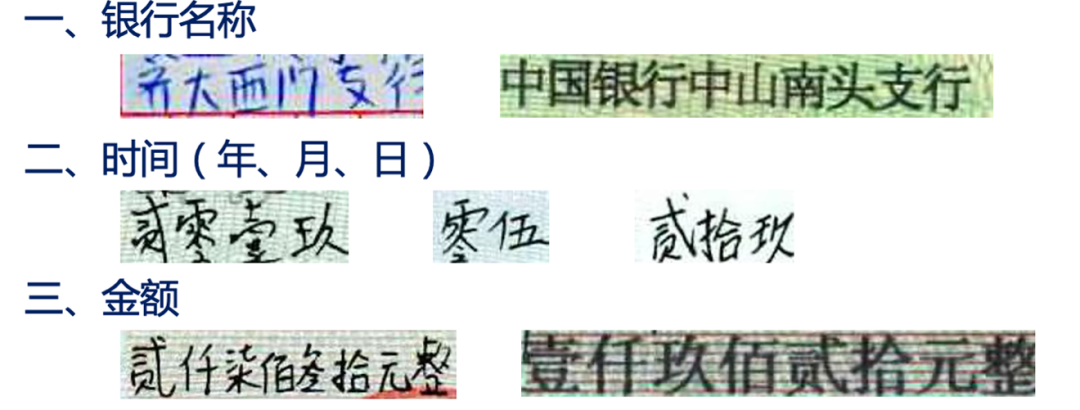
本次賽題將提供手寫體圖像切片數(shù)據(jù)集,數(shù)據(jù)集從真實業(yè)務場景中,經(jīng)過切片脫敏得到,參賽隊伍通過識別技術(shù),獲得對應的識別結(jié)果。即:
輸入:手寫體圖像切片數(shù)據(jù)集 輸出:對應的識別結(jié)果
代碼說明
本項目是PaddlePaddle 2.0動態(tài)圖實現(xiàn)的CRNN文字識別模型,可支持長短不一的圖片輸入。CRNN是一種端到端的識別模式,不需要通過分割圖片即可完成圖片中全部的文字識別。CRNN的結(jié)構(gòu)主要是CNN+RNN+CTC,它們分別的作用是:
使用深度CNN,對輸入圖像提取特征,得到特征圖; 使用雙向RNN(BLSTM)對特征序列進行預測,對序列中的每個特征向量進行學習,并輸出預測標簽(真實值)分布; 使用 CTC Loss,把從循環(huán)層獲取的一系列標簽分布轉(zhuǎn)換成最終的標簽序列。 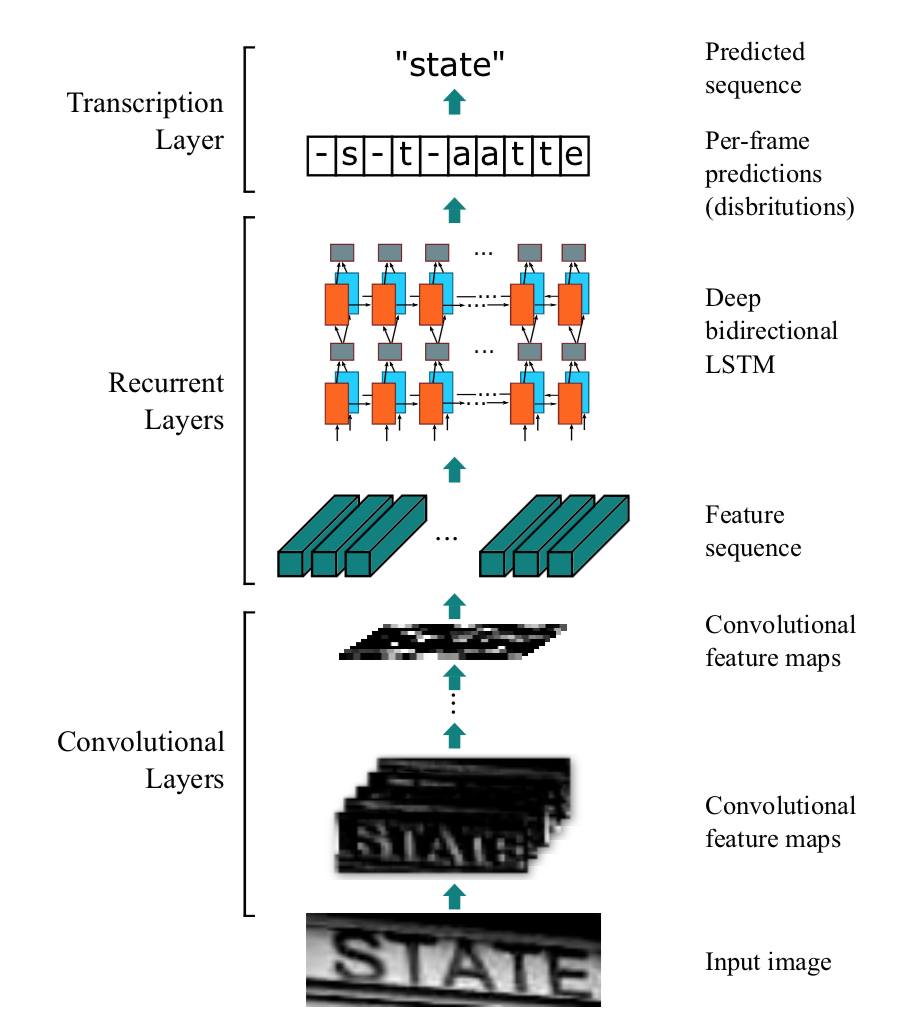
CRNN的結(jié)構(gòu)如下,一張高為32的圖片,寬度隨意,一張圖片經(jīng)過多層卷積之后,高度就變成了1,經(jīng)過paddle.squeeze()就去掉了高度,也就說從輸入的圖片BCHW經(jīng)過卷積之后就成了BCW。然后把特征順序從BCW改為WBC輸入到RNN中,經(jīng)過兩次的RNN之后,模型的最終輸入為(W, B, Class_num)。這恰好是CTCLoss函數(shù)的輸入。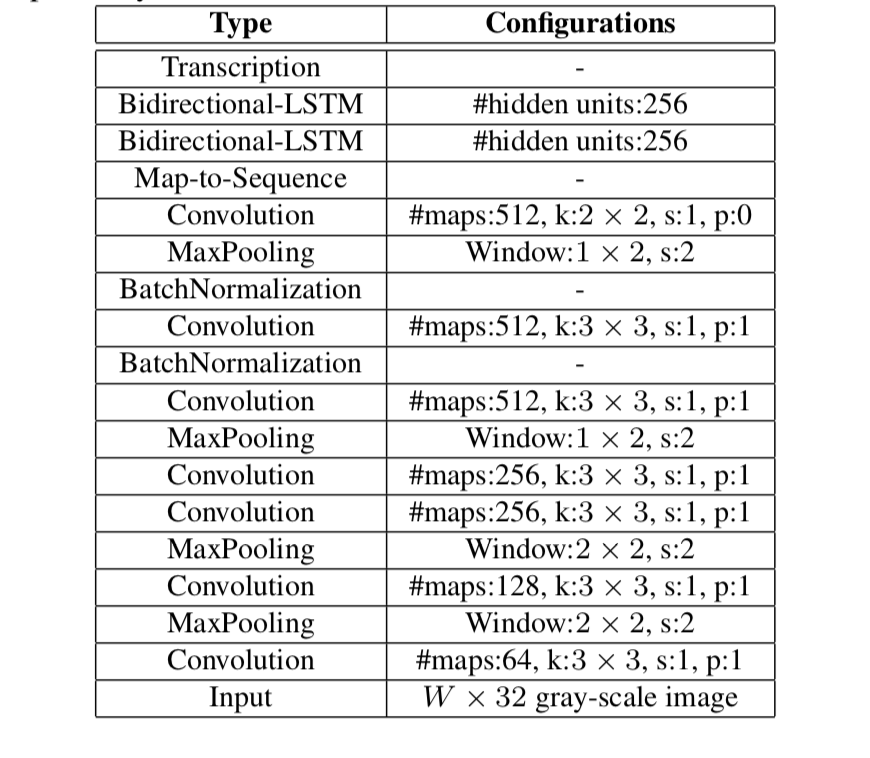
代碼詳情
使用環(huán)境:
PaddlePaddle 2.0.1 Python 3.7
!\rm?-rf?__MACOSX/?測試集/?訓練集/?dataset/
!unzip?2021A_T1_Task1_數(shù)據(jù)集含訓練集和測試集.zip?>?out.log
步驟1:生成額外的數(shù)據(jù)集
這一步可以跳過,如果想要獲取更好的精度,可以自己添加。
import?os
import?time
from?random?import?choice,?randint,?randrange

from?PIL?import?Image,?ImageDraw,?ImageFont

#?驗證碼圖片文字的字符集
characters?=?'拾伍佰正仟萬捌貳整陸玖圓叁零角分肆柒億壹元'

def?selectedCharacters(length):
????result?=?''.join(choice(characters)?for?_?in?range(length))
????return?result

def?getColor():
????r?=?randint(0,?100)
????g?=?randint(0,?100)
????b?=?randint(0,?100)
????return?(r,?g,?b)

def?main(size=(200,?100),?characterNumber=6,?bgcolor=(255,?255,?255)):
????#?創(chuàng)建空白圖像和繪圖對象
????imageTemp?=?Image.new('RGB',?size,?bgcolor)
????draw01?=?ImageDraw.Draw(imageTemp)

????#?生成并計算隨機字符串的寬度和高度
????text?=?selectedCharacters(characterNumber)
????print(text)
????font?=?ImageFont.truetype(font_path,?40)
????width,?height?=?draw01.textsize(text,?font)
????if?width?+?2?*?characterNumber?>?size[0]?or?height?>?size[1]:
????????print('尺寸不合法')
????????return

????#?繪制隨機字符串中的字符
????startX?=?0
????widthEachCharater?=?width?//?characterNumber
????for?i?in?range(characterNumber):
????????startX?+=?widthEachCharater?+?1
????????position?=?(startX,?(size[1]?-?height)?//?2)
????????draw01.text(xy=position,?text=text[i],?font=font,?fill=getColor())

????#?對像素位置進行微調(diào),實現(xiàn)扭曲的效果
????imageFinal?=?Image.new('RGB',?size,?bgcolor)
????pixelsFinal?=?imageFinal.load()
????pixelsTemp?=?imageTemp.load()
????for?y?in?range(size[1]):
????????offset?=?randint(-1,?0)
????????for?x?in?range(size[0]):
????????????newx?=?x?+?offset
????????????if?newx?>=?size[0]:
????????????????newx?=?size[0]?-?1
????????????elif?newx?????????????????newx?=?0
????????????pixelsFinal[newx,?y]?=?pixelsTemp[x,?y]

????#?繪制隨機顏色隨機位置的干擾像素
????draw02?=?ImageDraw.Draw(imageFinal)
????for?i?in?range(int(size[0]?*?size[1]?*?0.07)):
????????draw02.point((randrange(0,?size[0]),?randrange(0,?size[1])),?fill=getColor())

????#?保存并顯示圖片
????imageFinal.save("dataset/images/%d_%s.jpg"?%?(round(time.time()?*?1000),?text))

def?create_list():
????images?=?os.listdir('dataset/images')
????f_train?=?open('dataset/train_list.txt',?'w',?encoding='utf-8')
????f_test?=?open('dataset/test_list.txt',?'w',?encoding='utf-8')
????for?i,?image?in?enumerate(images):
????????image_path?=?os.path.join('dataset/images',?image).replace('\\',?'/')
????????label?=?image.split('.')[0].split('_')[1]
????????if?i?%?100?==?0:
????????????f_test.write('%s\t%s\n'?%?(image_path,?label))
????????else:
????????????f_train.write('%s\t%s\n'?%?(image_path,?label))

def?creat_vocabulary():
????#?生成詞匯表
????with?open('dataset/train_list.txt',?'r',?encoding='utf-8')?as?f:
????????lines?=?f.readlines()
????v?=?set()
????for?line?in?lines:
????????_,?label?=?line.replace('\n',?'').split('\t')
????????for?c?in?label:
????????????v.add(c)

????vocabulary_path?=?'dataset/vocabulary.txt'
????with?open(vocabulary_path,?'w',?encoding='utf-8')?as?f:
????????f.write('?\n')
????????for?c?in?v:
????????????f.write(c?+?'\n')

if?__name__?==?'__main__':
????if?not?os.path.exists('dataset/images'):
????????os.makedirs('dataset/images')
步驟2:安裝依賴環(huán)境
!pip?install?Levenshtein
Looking?in?indexes:?https://pypi.tuna.tsinghua.edu.cn/simple
Requirement?already?satisfied:?Levenshtein?in?/opt/conda/envs/python35-paddle120-env/lib/python3.7/site-packages?(0.16.0)
Requirement?already?satisfied:?rapidfuzz<1.9,>=1.8.2?in?/opt/conda/envs/python35-paddle120-env/lib/python3.7/site-packages?(from?Levenshtein)?(1.8.2)
步驟3:讀取數(shù)據(jù)集
import?glob,?codecs,?json,?os
import?numpy?as?np

date_jpgs?=?glob.glob('./訓練集/date/images/*.jpg')
amount_jpgs?=?glob.glob('./訓練集/amount/images/*.jpg')

lines?=?codecs.open('./訓練集/date/gt.json',?encoding='utf-8').readlines()
lines?=?''.join(lines)
date_gt?=?json.loads(lines.replace(',\n}',?'}'))

lines?=?codecs.open('./訓練集/amount/gt.json',?encoding='utf-8').readlines()
lines?=?''.join(lines)
amount_gt?=?json.loads(lines.replace(',\n}',?'}'))
data_path?=?date_jpgs?+?amount_jpgs
date_gt.update(amount_gt)

s?=?''
for?x?in?date_gt:
????s?+=?date_gt[x]

char_list?=?list(set(list(s)))
char_list?=?char_list
步驟4:構(gòu)造訓練集
!mkdir?dataset
!mkdir?dataset/images
!cp?訓練集/date/images/*.jpg?dataset/images
!cp?訓練集/amount/images/*.jpg?dataset/images
mkdir:?cannot?create?directory?‘dataset’:?File?exists
mkdir:?cannot?create?directory?‘dataset/images’:?File?exists
with?open('dataset/vocabulary.txt',?'w')?as?up:
????for?x?in?char_list:
????????up.write(x?+?'\n')

data_path?=?glob.glob('dataset/images/*.jpg')
np.random.shuffle(data_path)
with?open('dataset/train_list.txt',?'w')?as?up:
????for?x?in?data_path[:-100]:
????????up.write(f'{x}\t{date_gt[os.path.basename(x)]}\n')

with?open('dataset/test_list.txt',?'w')?as?up:
????for?x?in?data_path[-100:]:
????????up.write(f'{x}\t{date_gt[os.path.basename(x)]}\n')
執(zhí)行上面程序生成的圖片會放在dataset/images目錄下,生成的訓練數(shù)據(jù)列表和測試數(shù)據(jù)列表分別放在dataset/train_list.txt和dataset/test_list.txt,最后還有個數(shù)據(jù)詞匯表dataset/vocabulary.txt。
數(shù)據(jù)列表的格式如下,左邊是圖片的路徑,右邊是文字標簽。
dataset/images/1617420021182_c1dw.jpg?c1dw
dataset/images/1617420021204_uvht.jpg?uvht
dataset/images/1617420021227_hb30.jpg?hb30
dataset/images/1617420021266_4nkx.jpg?4nkx
dataset/images/1617420021296_80nv.jpg?80nv
以下是數(shù)據(jù)集詞匯表的格式,一行一個字符,第一行是空格,不代表任何字符。
f
s
2
7
3
n
d
w
訓練自定義數(shù)據(jù),參考上面的格式即可。
步驟5:訓練模型
不管你是自定義數(shù)據(jù)集還是使用上面生成的數(shù)據(jù),只要文件路徑正確,即可開始進行訓練。該訓練支持長度不一的圖片輸入,但是每一個batch的數(shù)據(jù)的數(shù)據(jù)長度還是要一樣的,這種情況下,筆者就用了collate_fn()函數(shù),該函數(shù)可以把數(shù)據(jù)最長的找出來,然后把其他的數(shù)據(jù)補0,加到相同的長度。同時該函數(shù)還要輸出它其中每條數(shù)據(jù)標簽的實際長度,因為損失函數(shù)需要輸入標簽的實際長度。
在訓練過程中,程序會使用VisualDL記錄訓練結(jié)果
import?paddle
import?numpy?as?np
import?os
from?datetime?import?datetime
from?utils.model?import?Model
from?utils.decoder?import?ctc_greedy_decoder,?label_to_string,?cer
from?paddle.io?import?DataLoader
from?utils.data?import?collate_fn
from?utils.data?import?CustomDataset
from?visualdl?import?LogWriter

#?訓練數(shù)據(jù)列表路徑
train_data_list_path?=?'dataset/train_list.txt'
#?測試數(shù)據(jù)列表路徑
test_data_list_path?=?'dataset/test_list.txt'
#?詞匯表路徑
voc_path?=?'dataset/vocabulary.txt'
#?模型保存的路徑
save_model?=?'models/'
#?每一批數(shù)據(jù)大小
batch_size?=?32
#?預訓練模型路徑
pretrained_model?=?None
#?訓練輪數(shù)
num_epoch?=?100
#?初始學習率大小
learning_rate?=?1e-3
#?日志記錄噐
writer?=?LogWriter(logdir='log')

def?train():
????#?獲取訓練數(shù)據(jù)
????train_dataset?=?CustomDataset(train_data_list_path,?voc_path,?img_height=32)
????train_loader?=?DataLoader(dataset=train_dataset,?batch_size=batch_size,?collate_fn=collate_fn,?shuffle=True)
????#?獲取測試數(shù)據(jù)
????test_dataset?=?CustomDataset(test_data_list_path,?voc_path,?img_height=32,?is_data_enhance=False)
????test_loader?=?DataLoader(dataset=test_dataset,?batch_size=batch_size,?collate_fn=collate_fn)
????#?獲取模型
????model?=?Model(train_dataset.vocabulary,?image_height=train_dataset.img_height,?channel=1)
????paddle.summary(model,?input_size=(batch_size,?1,?train_dataset.img_height,?500))
????#?設(shè)置優(yōu)化方法
????boundaries?=?[30,?100,?200]
????lr?=?[0.1?**?l?*?learning_rate?for?l?in?range(len(boundaries)?+?1)]
????scheduler?=?paddle.optimizer.lr.PiecewiseDecay(boundaries=boundaries,?values=lr,?verbose=False)
????optimizer?=?paddle.optimizer.Adam(parameters=model.parameters(),
??????????????????????????????????????learning_rate=scheduler,
??????????????????????????????????????weight_decay=paddle.regularizer.L2Decay(1e-4))
????#?獲取損失函數(shù)
????ctc_loss?=?paddle.nn.CTCLoss()
????#?加載預訓練模型
????if?pretrained_model?is?not?None:
????????model.set_state_dict(paddle.load(os.path.join(pretrained_model,?'model.pdparams')))
????????optimizer.set_state_dict(paddle.load(os.path.join(pretrained_model,?'optimizer.pdopt')))

????train_step?=?0
????test_step?=?0
????#?開始訓練
????for?epoch?in?range(num_epoch):
????????for?batch_id,?(inputs,?labels,?input_lengths,?label_lengths)?in?enumerate(train_loader()):
????????????out?=?model(inputs)
????????????#?計算損失
????????????input_lengths?=?paddle.full(shape=[batch_size],?fill_value=out.shape[0],?dtype='int64')
????????????loss?=?ctc_loss(out,?labels,?input_lengths,?label_lengths)
????????????loss.backward()
????????????optimizer.step()
????????????optimizer.clear_grad()
????????????#?多卡訓練只使用一個進程打印
????????????if?batch_id?%?100?==?0:
????????????????print('[%s]?Train?epoch?%d,?batch?%d,?loss:?%f'?%?(datetime.now(),?epoch,?batch_id,?loss))
????????????????writer.add_scalar('Train?loss',?loss,?train_step)
????????????????train_step?+=?1
????????#?執(zhí)行評估
????????if?epoch?%?10?==?0:
????????????model.eval()
????????????cer?=?evaluate(model,?test_loader,?train_dataset.vocabulary)
????????????print('[%s]?Test?epoch?%d,?cer:?%f'?%?(datetime.now(),?epoch,?cer))
????????????writer.add_scalar('Test?cer',?cer,?test_step)
????????????test_step?+=?1
????????????model.train()
????????#?記錄學習率
????????writer.add_scalar('Learning?rate',?scheduler.last_lr,?epoch)
????????scheduler.step()
????????#?保存模型
????????paddle.save(model.state_dict(),?os.path.join(save_model,?'model.pdparams'))
????????paddle.save(optimizer.state_dict(),?os.path.join(save_model,?'optimizer.pdopt'))

#?評估模型
def?evaluate(model,?test_loader,?vocabulary):
????cer_result?=?[]
????for?batch_id,?(inputs,?labels,?_,?_)?in?enumerate(test_loader()):
????????#?執(zhí)行識別
????????outs?=?model(inputs)
????????outs?=?paddle.transpose(outs,?perm=[1,?0,?2])
????????outs?=?paddle.nn.functional.softmax(outs)
????????#?解碼獲取識別結(jié)果
????????labelss?=?[]
????????out_strings?=?[]
????????for?out?in?outs:
????????????out_string?=?ctc_greedy_decoder(out,?vocabulary)
????????????out_strings.append(out_string)
????????for?i,?label?in?enumerate(labels):
????????????label_str?=?label_to_string(label,?vocabulary)
????????????labelss.append(label_str)
????????for?out_string,?label?in?zip(*(out_strings,?labelss)):
????????????#?計算字錯率
????????????c?=?cer(out_string,?label)?/?float(len(label))
????????????cer_result.append(c)
????cer_result?=?float(np.mean(cer_result))
????return?cer_result

if?__name__?==?'__main__':
????train()
步驟6:模型預測
訓練結(jié)束之后,使用保存的模型進行預測。通過修改image_path指定需要預測的圖片路徑,解碼方法,筆者使用了一個最簡單的貪心策略。
import?os
from?PIL?import?Image
import?numpy?as?np
import?paddle

from?utils.model?import?Model
from?utils.data?import?process
from?utils.decoder?import?ctc_greedy_decoder

with?open('dataset/vocabulary.txt',?'r',?encoding='utf-8')?as?f:
????vocabulary?=?f.readlines()

vocabulary?=?[v.replace('\n',?'')?for?v?in?vocabulary]

save_model?=?'models/'
model?=?Model(vocabulary,?image_height=32)
model.set_state_dict(paddle.load(os.path.join(save_model,?'model.pdparams')))
model.eval()

def?infer(path):
????data?=?process(path,?img_height=32)
????data?=?data[np.newaxis,?:]
????data?=?paddle.to_tensor(data,?dtype='float32')
????#?執(zhí)行識別
????out?=?model(data)
????out?=?paddle.transpose(out,?perm=[1,?0,?2])
????out?=?paddle.nn.functional.softmax(out)[0]
????#?解碼獲取識別結(jié)果
????out_string?=?ctc_greedy_decoder(out,?vocabulary)

????# print('預測結(jié)果:%s'?% out_string)
????return?out_string

if?__name__?==?'__main__':
????image_path?=?'dataset/images/0_8bb194207a248698017a854d62c96104.jpg'
????display(Image.open(image_path))
????print(infer(image_path))

貳零貳零貳壹
from?tqdm?import?tqdm,?tqdm_notebook

result_dict?=?{}
for?path?in?tqdm(glob.glob('./測試集/date/images/*.jpg')):
????text?=?infer(path)
????result_dict[os.path.basename(path)]?=?{
????????'result':?text,
????????'confidence':?0.9
????}

for?path?in?tqdm(glob.glob('./測試集/amount/images/*.jpg')):
????text?=?infer(path)
????result_dict[os.path.basename(path)]?=?{
????????'result':?text,
????????'confidence':?0.9
????}
with?open('answer.json',?'w',?encoding='utf-8')?as?up:
????json.dump(result_dict,?up,?ensure_ascii=False,?indent=4)

!zip?answer.json.zip?answer.json
??adding:?answer.json?(deflated?85%)