前端生成海報的 N 種方案和優(yōu)劣對比
點擊上方關注 前端技術江湖,一起學習,天天進步

一、背景
工作中做了很多生成海報的功能,不同需求,不同場景,使用了幾種方案,各有優(yōu)劣。一直想要整理一下,但這個過程中的思考和遇到的問題沒有記錄下來,比如圖片的跨域問題,文字的問題,做完沒有記錄,無跡可尋,以至于很難開始。最近重新回顧了一下,整理了一篇文檔,或有疏漏和不準確之處,歡迎交流。
二、業(yè)務應用
pc:
1.分享海報
H5應用:
1.分享優(yōu)惠券
2.年度賬單
3.分享海報
三、實現(xiàn)方式及兼容性問題
第三方庫
1. html2canvas
版本 1.0.0rc7
https://github.com/niklasvh/h...
star:22k
時間 2021-01-06
首頁測試demo:https://html2canvas.hertzen.com/
兼容性測試
安卓
? 6.0 koobee ? 5.0.2 vovoY51A
安卓微信版本-內置
? 7.0.3 ? 7.0.22
ios
? 14.2 ? 11.2.1
ios微信內置
? 7.0.20 ? 7.0.1
優(yōu)點:
兼容性更好,官方描述如下:
Browser compatibility
The library should work fine on the following browsers (with Promise polyfill):

Firefox 3.5+
Google Chrome
Opera 12+
IE9+
Safari 6+
As each CSS property needs to be manually built to be supported, there are a number of properties that are not yet supported.
缺點:
一些屬性不支持轉化:如不支持偽類,border不支持dash,不支持text-shadow,(即還原程度需要和設計溝通,或者考慮采用圖片等形式去替換顯示元素)
features:https://html2canvas.hertzen.c...
備注
rc5出現(xiàn)過ios生成不了圖片的問題,還原到rc4就可以了
https://github.com/niklasvh/h...
看到issue里有出現(xiàn)ios某些版本下微信失敗的情況,暫沒有復現(xiàn)
2 dom-to-img
版本2.6.0
https://github.com/tsayen/dom...
star:6.9k
優(yōu)點
元素齊全,還原度高
缺點
不兼容safari,所以建議只在Chrome下使用
沒有維護更新了
兼容性問題
1.作者明確表示不支持safari,因為foreignObject的安全性問題(明說了不支持,我仔細看文檔 => 白作工 )
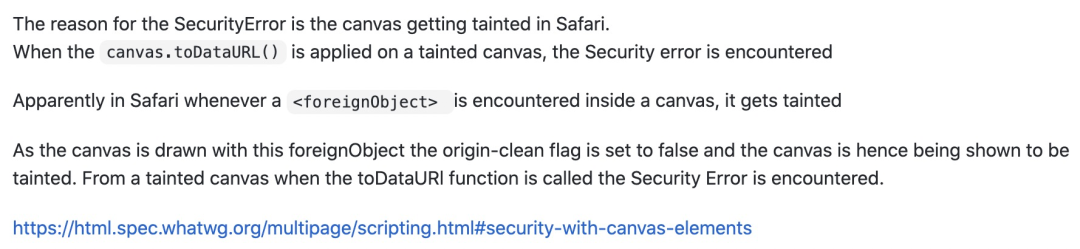
鏈接:
https://github.com/tsayen/dom... https://html.spec.whatwg.org/... SVG在Web攻擊中的應用: https://www.anquanke.com/post...
2.iOS14.2下,圖片丟失問題
其實在測的時候,發(fā)現(xiàn)ios14.2下生成圖片第一次始終會出現(xiàn)圖片丟失,第二次或第三次正常
解決方案,2~3次調用,取最后一次(看issue里有些機型還是不支持的)
3.低端安卓機上會出現(xiàn)失敗情況,主要是文字的問題(這里是我寫過的舊的記錄,不是很確定)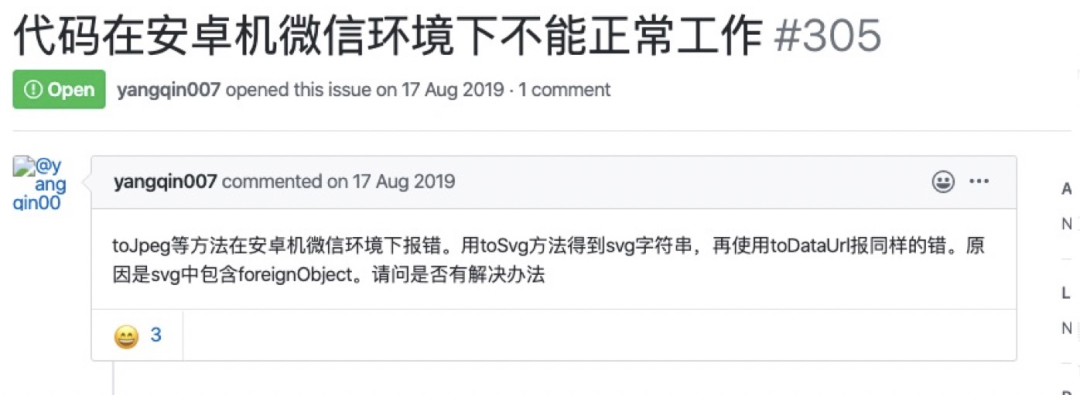
應用于Pc或android
清晰度問題:\(看到很多人說要去改源碼,其實不用的,作者是提供了參數(shù)了\)
通過scale放大設備的DPR倍數(shù)
let elm = document.getElementById('my-node')
const scale = window.devicePixelRatio
this.loader.open()
await this.$nextTick()
domtoimage
    .toBlob(elm, {
         quantity: 1,
         width: elm.offsetWidth * scale, // 畫布放大
         height: elm.offsetHeight * scale,
        style: {
            transform: `scale(${scale})`, // 元素放大
            transformOrigin: '0 0',
        },
    })
    .then(this.upload) // 處理結果
    .catch(function (error) {
        this.loader.close()
        console.error('oops, something went wrong!', error)
    })
前端canvas繪制
0.canvas
let canvasBox = document.createElement('canvas')
let ctx = canvasBox.getContext(
                    '2d'
                ) as CanvasRenderingContext2D
1.img
let bgImag = ''
ctx.drawImage(bgImg, 0, 0)
1.2圖片跨域問題
解決辦法 :
1)使用 crossOrigin 屬性。
解決canvas圖片getImageData,toDataURL跨域問題
2)圖片本身也需要允許跨域
3)設置 useCORS:true,原理相同,但使用以上跨域方法,若同時設置為 allowTaint:true ,仍然會認為畫布已被污染而不可用;
2.文字
2.2文字換行
核心:計算所有文字,根據(jù)每行可顯示的最大寬度,來拆分成每行渲染
參考:https://www.zhangxinxu.com/wordpress/2018/02/canvas-text-break-line-letter-spacing-vertical/
2.2字體類型
2.2.1.只采用默認字體或少量定制字體(Fontmin獲取特定字體的字體,寫死的數(shù)據(jù),如果換行需要計算換行問題-空格回車等奇葩問題)- ==@font-face,這樣使用是涉及版權問題的,確保你們有該字體的版權==
@font-face {
    font-family: "DIN Condensed";
    // prettier-ignore
    src: url("~@/assets/fonts/DIN-Condensed-Bold.woff") format("woff"), url("~@/assets/fonts/DIN-Condensed-Bold.ttf") format("ttf");
}

@font-face {
    font-family: "PingFang SC Bold";
    // prettier-ignore
    src: url("~@/assets/fonts/PingFang-SC-Bold.ttf") format("ttf"), url("~@/assets/fonts/PingFang-SC-Bold.woff") format("woff");
}
ctx.fillText('20px PingFang SC Bold', x, y)
ctx.fillText('20px', x, y)
2.2.2(一定要完整某種字體的情況下:動態(tài)變化的數(shù)據(jù),需要接口支持)
svg to img
直接domtoSvg也有安卓失敗的問題
let svg = 接口獲取svg(參考年度賬單)
let svgBase64: string =
    'data:image/svg+xml;base64,' +
    window.btoa(
        unescape(encodeURIComponent(svg))
    )

await this.loadImg(svgBase64).then(
    img => {
        ctxC.drawImage(
            img,
            ~~(20 * this.scale),
            ~~(186 * this.scale)
        )
    }
)
3.手機端比例計算
// 盡量使用整數(shù)

// devicePixelRatio
protected imgQuality = window.devicePixelRatio

// 和設計稿的比例 設計稿寬度是640
get scale() {
    return (document.body.clientWidth * this.imgQuality) / 640
}

// 畫布寬高,避免生成的圖片模糊情況出現(xiàn)
canvasBox.width = Math.ceil(
    document.body.clientWidth * this.imgQuality
)
canvasBox.height = Math.ceil(980 * this.scale)

// 二維碼的寬度
get qrCodeSize() {
    return ~~(155 * this.scale) // rpx * scale
}
4.常見元素/線/圓/圓角矩形
// 畫布和設計稿750的比例
scale =  (document.body.clientWidth * this.imgQuality) / 750
線:
**
 * 畫線
 */
export function drawLine(
    ctx: CanvasRenderingContext2D,
    data: {
        x: number
        y: number
        width: number
        height: number
        strokeStyle: string
    },
    scale: number
) {
    let x = data.x * scale
    let y = data.y * scale
    let dx = (data.x + data.width) * scale
    let dy = data.y * scale

    // 開始一個新的繪制路徑
    ctx.beginPath()
    // 定義直線的起點坐標為(10,10)
    ctx.moveTo(x, y)
    // 定義直線的終點坐標為(50,10)
    ctx.lineTo(dx, dy)
    // 顏色
    ctx.strokeStyle = data.strokeStyle
    // 沿著坐標點順序的路徑繪制直線
    ctx.stroke()
    // 關閉當前的繪制路徑
    ctx.closePath()
}

圓:
/**
 * 畫圓
 */
export function drawCircle(
    ctx: CanvasRenderingContext2D,
    data: {
        x: number // 圓心
        y: number
        size: number // 半徑
        fillStyle: string
    },
    scale: number
) {
    ctx.save()
    ctx.beginPath()
    ctx.arc(
        ~~(data.x * scale),
        ~~(data.y * scale),
        ~~(data.size * scale),
        0,
        ~~(data.size * scale * Math.PI)
    )
    ctx.fillStyle = data.fillStyle
    ctx.fill()
    ctx.restore()
}

矩形:

/**
 * 畫圓角矩形
 */
export function drawRoundRect(
    ctx: CanvasRenderingContext2D,
    data: {
        x: number
        y: number
        width: number
        height: number
        radius: number
        fillStyle: string
    },
    scale: number
) {
    let width = ~~(data.width * scale)
    let height = ~~(data.height * scale)
    let radius = ~~(data.radius * scale)
    let fillStyle = data.fillStyle
    ctx.save()
    ctx.translate(~~(data.x * scale), ~~(data.y * scale))
    ctx.beginPath()
    // 從右下角順時針繪制,弧度從0到1/2PI
    ctx.arc(width - radius, height - radius, radius, 0, Math.PI / 2)

    // 矩形下邊線
    ctx.lineTo(radius, height)

    // 左下角圓弧,弧度從1/2PI到PI
    ctx.arc(radius, height - radius, radius, Math.PI / 2, Math.PI)

    // 矩形左邊線
    ctx.lineTo(0, radius)

    // 左上角圓弧,弧度從PI到3/2PI
    ctx.arc(radius, radius, radius, Math.PI, (Math.PI * 3) / 2)

    // 上邊線
    ctx.lineTo(width - radius, 0)

    // 右上角圓弧
    ctx.arc(width - radius, radius, radius, (Math.PI * 3) / 2, Math.PI * 2)

    // 右邊線
    ctx.lineTo(width, height - radius)
    ctx.closePath()
    ctx.fillStyle = fillStyle
    ctx.fill()
    ctx.restore()
}
5.canvasBox.toBlob
canvasBox.toBlob(async data => {
    if (data) {
        //上傳到7niu
        this.url = await uploadFile(data)
    }
})
6.圖片保存
PC
import { saveAs } from 'file-saver'
saveAs(blob, filename)
H5
長按保存
包殼的H5是可以實現(xiàn)直接下載的,但為了交互了一致性,還是用了長按
接口生成
接口生成,傳入元素和位置等信息,接口直接生成返回圖片。需要后端實現(xiàn)。(具體的性能和使用案例,歡迎討論。)
優(yōu)點
不需要考慮兼容性等問題
缺點
不支持字數(shù)或字體類型過多,服務器壓力較大(看具體實現(xiàn)方案),元素越多,接口越慢
這個方案其實也是用后端的邏輯實現(xiàn)了繪制元素,輸出圖片(過程中遇到的問題:如換行情況下需要計算字體高度(同一字體的中英文寬度不同)和后續(xù)元素的相對位置發(fā)生變化)
四、圖片跨域
如果存在跨域圖片無法下載,仔細閱讀以下文字:
來源:https://segmentfault.com/q/10...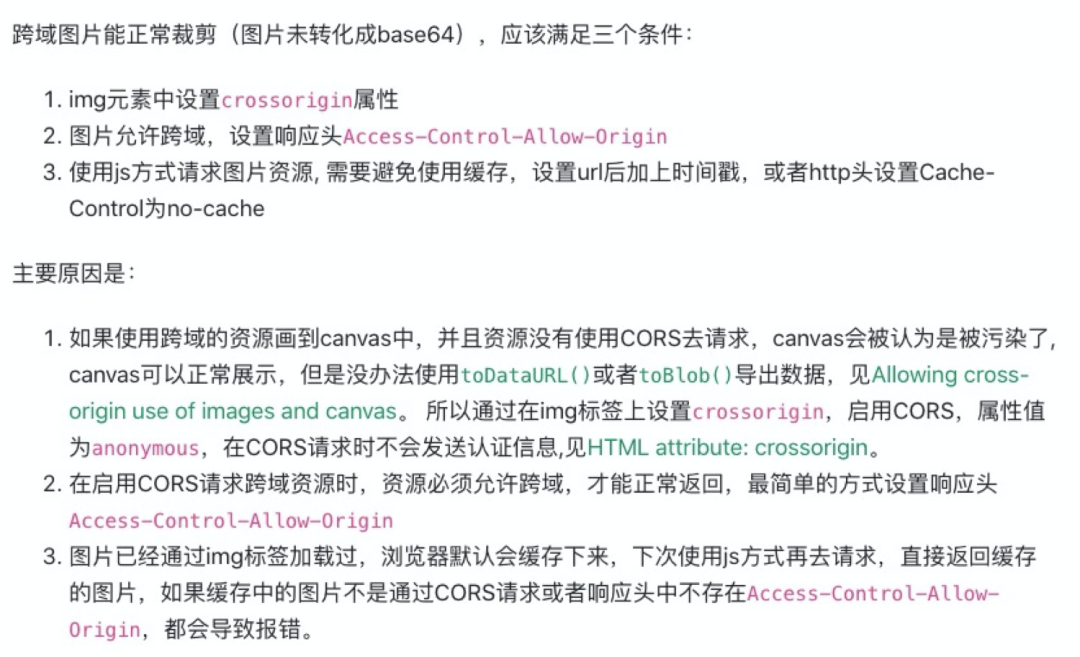
五、總結
無特殊情況時,pc下使用dom-to-image即可。
至于h5,回顧了一下自己繪制海報的實現(xiàn)歷程:
1.第三方庫(兼容性問題,太久遠以至于不記得發(fā)生了什么,只記得這個方案被駁回了)
2.接口繪制(服務器過載性能問題,速度過慢)
3.前端canvas繪制(+部分元素接口繪制好返回圖片或svg,基本沒什么兼容問題)(速度過慢)
4.第三方庫(html2canvas,測試了一些版本環(huán)境的兼容性,但項目暫未上線,需要觀察)
目前最優(yōu)解看起來是html2canvas,但是有些效果無法實現(xiàn),需要在還原度和性能上做取舍。
六、更好的方案?
一些常用的app的海報生成是更快的,體驗也更好,不知道是不是存在更好的解決方案?還是h5的限制?
七、參考
【JS】節(jié)點截圖的最終解決方案dom-to-image與html2canvas:https://blog.csdn.net/Mcky_Lo... 移動端H5頁面截圖:https://cloud.tencent.com/dev... 把DOM節(jié)點生成base64圖片:https://www.jianshu.com/p/c5c... 更優(yōu)雅地基于 canvas 在前端畫海報:https://juejin.cn/post/684490... canvas文本繪制自動換行、字間距、豎排等實現(xiàn) https://www.zhangxinxu.com/wo... 圖片跨域問題:https://segmentfault.com/q/1010000008648867
來自:SegmentFault,作者:JiaXinYi
鏈接:https://segmentfault.com/a/1190000038910770
The End
歡迎自薦投稿到《前端技術江湖》,如果你覺得這篇內容對你挺有啟發(fā),記得點個 「在看」哦
點個『在看』支持下