
前端 “一鍵換膚“ 的 N 種方案
前端瓶子君,關(guān)注公眾號(hào)
回復(fù)算法,加入前端編程面試算法每日一題群
前言
現(xiàn)在越來越多的網(wǎng)站都提供了擁有換膚(切換主題)功能,如 ElementUI[2],既是為了迎合用戶需求,或是為了凸顯自己特點(diǎn),因此提供了個(gè)性化定制的功能.
其實(shí)之前就想了解和實(shí)現(xiàn) “一鍵換膚” 功能,但是由于種種原因一直拖到了現(xiàn)在.
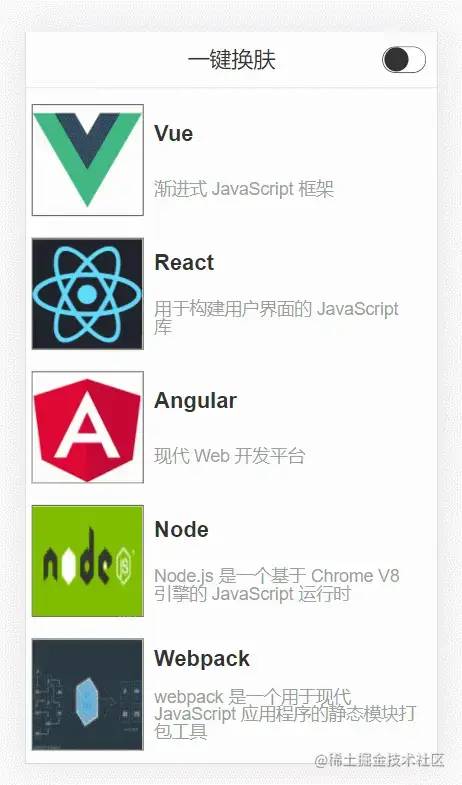
CSS 樣式覆蓋實(shí)現(xiàn)
核心
通過切換 css 選擇器的方式實(shí)現(xiàn)主題樣式的切換.
-
在組件中保留不變的樣式,將需要變化的樣式進(jìn)行抽離 -
提供多種樣式,給不同的主題定義一個(gè)對(duì)應(yīng)的 CSS 選擇器 -
根據(jù)不同主題設(shè)置不同的樣式
實(shí)現(xiàn)
下面通過 vuex 存儲(chǔ)和控制全局的主題色,其代碼如下:
import { createStore } from 'vuex'

// 創(chuàng)建一個(gè)新的 store 實(shí)例
const store = createStore({
  state () {
    return {
      theme: 'light'
    }
  },
  mutations: {
    setTheme (state, payload) {
      state.theme = payload
      document.querySelector('body').className = payload
    }
  }
})

export default store
復(fù)制代碼
在 template 模板中通過 vuex 中的主題設(shè)置對(duì)應(yīng)類名,如頭部代碼如下:
<template>
  <div :class="['header', store.state.theme]">
    <span>{{title}}</span>
    <input v-model="checked" type="checkbox" class="switch" @change="changeTheme" />
  </div>
</template>
復(fù)制代碼
下面 theme.css 中通過 .light 和 .dark 兩個(gè)類選擇器來區(qū)分明亮主題和暗黑主題,并且事先準(zhǔn)備了它們對(duì)應(yīng)的樣式,如下:
/* light 默認(rèn)主題*/
body.light {
  background-color: #fff;
}

.header.light {
  background-color: #fff;
  border-bottom: 1px solid #d6d6d6;
  color: rgb(51, 50, 50);
}

.list.light .title {
  color: rgb(51, 50, 50);
}
.list.light .describe{
  color: rgb(158, 158, 158);
}

.list.light .left{
  border: 1px solid rgb(51, 50, 50);
}

/* dark 暗黑主題 */
body.dark {
  background-color: rgb(51, 50, 50);
}

.header.dark {
  background-color: rgb(51, 50, 50);
  border-bottom: 1px solid #fff;
  color: #fff;
}

.list.dark .title {
  color: #fff;
}
.list.dark .describe{
  color: rgb(201, 201, 201);
}
.list.dark .left{
  border: 1px solid #fff;
  background-color: #fff;
}
復(fù)制代碼
缺點(diǎn)
-
多種主題樣式都要引入,導(dǎo)致代碼量增大 -
樣式不易管理 -
查找樣式復(fù)雜 -
開發(fā)效率低 -
拓展性差 -
...
實(shí)現(xiàn)多套 CSS 主題樣式
核心
實(shí)現(xiàn)多套 CSS 主題樣式,根據(jù)用戶切換操作,通過 link 標(biāo)簽動(dòng)態(tài)加載不同的主題樣式,主要解決了多個(gè)主題色被編譯到一個(gè)文件中導(dǎo)致單個(gè)文件過大.
實(shí)現(xiàn)
css 部分直接拆分成 ligth.css 和 dark.css 兩個(gè)文件:
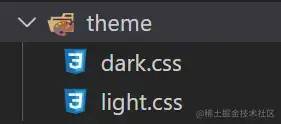
設(shè)置主題部分的 setTheme.js 代碼如下:
export default function setTheme(theme = 'ligth') {
  let link = document.querySelector('#theme-link')
  let href = "/theme/" + theme + ".css"

  if (!link) {
    let head = document.querySelector('head')
    link = document.createElement('link')
    link.id = '#theme-link'
    link.rel = "stylesheet"
    link.href = href
    head.appendChild(link)
  } else {
    link.href = href
  }
}
復(fù)制代碼
缺點(diǎn)
-
需要重復(fù) CV 多份樣式文件進(jìn)行單獨(dú)修改 -
沒有單獨(dú)提取出可變的樣式部分 -
需要提前知道打包后的文件路徑,否則可能導(dǎo)致主題樣式引入錯(cuò)誤 -
...
CSS 變量實(shí)現(xiàn)
核心
通過 body.style.setProperty(key, value) 動(dòng)態(tài)修改 body 上的 CSS 變量,使得頁面上的其他部分可以應(yīng)用最新的 CSS 變量對(duì)應(yīng)的樣式.
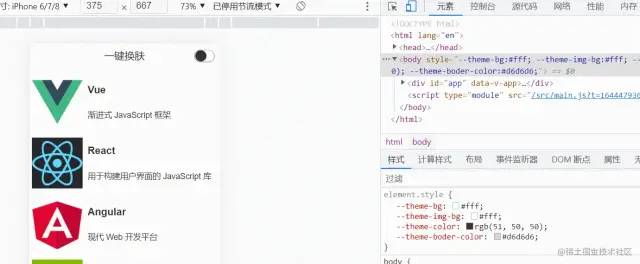
實(shí)現(xiàn)
theme.css 中負(fù)責(zé)定義全局的 CSS 變量,代碼如下:
/* 實(shí)現(xiàn)方式一 */
:root {
  --theme-bg: initial; // 背景色
  --theme-color: initial; // 字體色
  --theme-boder-color: initial; // 邊框色
}

====================================================

/* 實(shí)現(xiàn)方式二 */
/* 默認(rèn)值:light */
:root {
  --theme-bg: #fff;
  --theme-color: rgb(51, 50, 50);
  --theme-img-bg: #fff;
  --theme-boder-color: #d6d6d6;
}

/* 暗黑:dark */
[data-theme='dark'] {
  --theme-bg: rgb(51, 50, 50);
  --theme-color: #fff;
  --theme-boder-color: #fff;
}
復(fù)制代碼
themeUtil.js 中負(fù)責(zé)獲取當(dāng)前對(duì)應(yīng)樣式值,以及設(shè)置 body 上的 CSS 變量值,如下:
const darkTheme = 'rgb(51, 50, 50)'
const lightTheme = '#fff'
const lightBorderTheme = '#d6d6d6'

// 獲取對(duì)應(yīng)的主題色值
export const getThemeMap = (isLight) => {
  return {
    'theme-bg': isLight ? lightTheme : darkTheme,
    'theme-color': isLight ? darkTheme : lightTheme,
    'theme-boder-color': isLight ? lightBorderTheme : lightTheme,
  }
}

// 設(shè)置主題色值
export const setTheme = (isLight = true) => {
  const themeMap = getThemeMap(isLight)
  const body = document.body
  /* 實(shí)現(xiàn)方式一 */
  Object.keys(themeMap).forEach(key => {
    body.style.setProperty(`--${key}`, themeMap[key])
  })

  /* 實(shí)現(xiàn)方式二 */
  // body.style.setProperty('data-theme', isLight ? 'light' : 'dark')
}

復(fù)制代碼
通過 var() 在組件中應(yīng)用對(duì)應(yīng) CSS 變量,比如在頭部中的使用:
<style scoped>
.header {
  ...省略
  color: var(--theme-color);
  border-bottom: 1px solid var(--theme-boder-color);
  background-color: var(--theme-bg);
}
...省略
</style>
復(fù)制代碼
缺點(diǎn)
缺點(diǎn)就是兼容性不好

兼容
通過 css-vars-ponyfill 對(duì) CSS 變量進(jìn)行兼容處理,themeUtil.js 中代碼改變?nèi)缦拢?/p>
import cssVars from "css-vars-ponyfill";
const darkTheme = 'rgb(51, 50, 50)'
const lightTheme = '#fff'
const lightBorderTheme = '#d6d6d6'
// 這里定義的 鍵/值 對(duì),是為了給 cssVars 傳參
export const getThemeMap = (isLight) => {
return {
'--theme-bg': isLight ? lightTheme : darkTheme,
'--theme-img-bg': lightTheme,
'--theme-color': isLight ? darkTheme : lightTheme,
'--theme-boder-color': isLight ? lightBorderTheme : lightTheme,
}
}
export const setTheme = (isLight = true) => {
const themeMap = getThemeMap(isLight)
const body = document.body
/* 實(shí)現(xiàn)方式一 */
Object.keys(themeMap).forEach(key => {
body.style.setProperty(key, themeMap[key])
})
/* 實(shí)現(xiàn)方式二 */
// body.style.setProperty('data-theme', isLight ? 'light' : 'dark')
// 實(shí)現(xiàn)兼容方案
cssVars({
watch: true, // 添加、刪除、修改 <link> 或 <style> 元素的禁用或 href 屬性時(shí),ponyfill 將自行調(diào)用
variables: themeMap, // variables 自定義屬性名/值對(duì)的集合
onlyLegacy: false, // false 默認(rèn)將 css 變量編譯為瀏覽器識(shí)別的 css 樣式 ;true 當(dāng)瀏覽器不支持css變量的時(shí)候?qū)ss變量編譯為識(shí)別的css
});
}
復(fù)制代碼
主題圖片切換

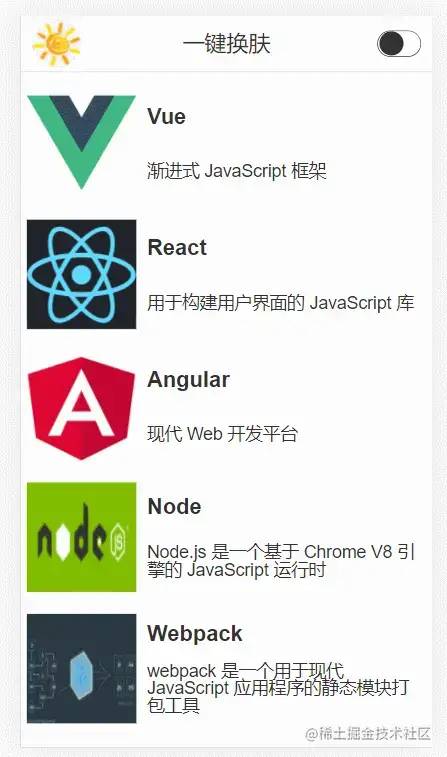
實(shí)現(xiàn)了前面的內(nèi)容之后,現(xiàn)在給分別給 light 和 dark 主題添加一個(gè) logo,這一部分其實(shí)很簡單了,下面的示例代碼是基于 Vue3 進(jìn)行實(shí)現(xiàn)的
// Header.vue
<script setup>
import { ref } from 'vue'
import { setTheme } from '../style/themeUtil'

defineProps({
  title: String
})

const checked = ref(false)

const logoUrl = ref('')

const loadImg = async () => {
  let name = !checked.value ? 'light' : 'dark'
  let ext = !checked.value ? 'png' : 'jpg'
  let res = await import(`../assets/logo-${name}.${ext}`)
  logoUrl.value = res.default
}

loadImg()

const changeTheme = (event) => {
  setTheme(!checked.value)
  loadImg()
}

</script>

<template>
  <div class="header">
    <img class="logo" :src="logoUrl" />
    <span>{{ title }}</span>
    <input v-model="checked" type="checkbox" class="switch" @change="changeTheme" />
  </div>
</template>
復(fù)制代碼
效果如下
最后
以上就是目前了解到一些的換膚方案,以上全部基于 css 去實(shí)現(xiàn)的,不過知道了原理就可以結(jié)合 less 和 sass 進(jìn)行更好的實(shí)現(xiàn)。如果有更好的方案,歡迎貼在評(píng)論區(qū)進(jìn)行分享!!!
關(guān)于本文
作者:熊的貓
https://juejin.cn/post/7063010855167721486