使用 web-vitals 監(jiān)控 web app 的性能
是什么?
Vitals
英漢翻譯:
n. 命脈(vital的復(fù)數(shù));(人體的)重要器官;要害
網(wǎng)絡(luò)釋義:
vitals: 重要器官 Striking the Vitals: 攻其要害
web vitals[1] 指的是一些關(guān)鍵指標(biāo),可以用來量化網(wǎng)頁(yè)的用戶體驗(yàn),定義如何改進(jìn)網(wǎng)頁(yè)的質(zhì)量(這是 google 推出的用戶體驗(yàn)量化指標(biāo))。從 React 16 到 React 17 我們可以看到一個(gè)變化是原先 /src 目錄下的 serviceWorker[2] 被替換成了 webVitals,React 團(tuán)隊(duì)可能認(rèn)為對(duì)于大多數(shù) web 應(yīng)用 webVitals 相比 serviceWorker 更有用。這里[3]有一個(gè) google 開源的實(shí)現(xiàn),相關(guān)下載也很簡(jiǎn)單:
npm install web-vitals有哪些關(guān)鍵指標(biāo)
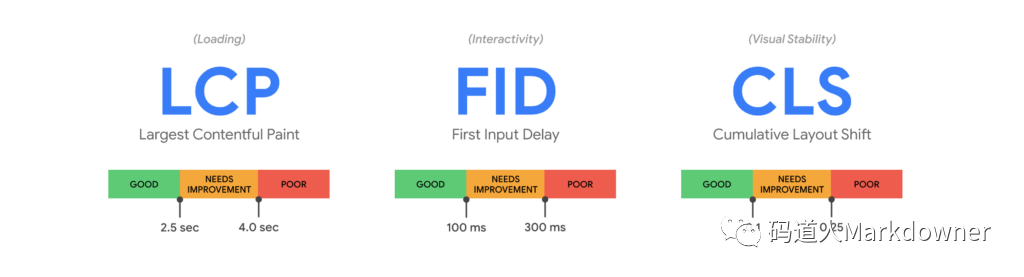
這些關(guān)鍵指標(biāo)只是 web vitals 的一個(gè)子集,不是全部,但幾乎每個(gè)網(wǎng)站都需要關(guān)注這三個(gè)指標(biāo):
LCP (Largest Contentful Paint)
最大內(nèi)容渲染時(shí)間:指的是從用戶請(qǐng)求網(wǎng)址到窗口中渲染最大可見內(nèi)容所需要的事件(最大可見內(nèi)容通常是圖片或者視頻,或者大塊的文本)
FID (First Input Delay)
首次輸入延遲:指的是從用戶首次與網(wǎng)頁(yè)互動(dòng)(點(diǎn)擊鏈接、按鈕等)到瀏覽器響應(yīng)此次互動(dòng)直接的時(shí)間。用于判斷網(wǎng)頁(yè)進(jìn)入互動(dòng)狀態(tài)的時(shí)間。
CLS (Cumulative Layout Shift)
累計(jì)布局偏移:得分范圍0-1,指的是網(wǎng)頁(yè)布局在加載期間的偏移量,0表示沒有偏移,1表示最大偏移,這個(gè)指標(biāo)指示用戶與網(wǎng)站的交互體驗(yàn),如果網(wǎng)址在加載過程布局一直跳動(dòng),用戶體驗(yàn)會(huì)很差。比如加載一張圖片,但沒有大小空白占位,導(dǎo)致圖片顯示時(shí)頁(yè)面高度跳動(dòng)。
哪些測(cè)量工具支持這些指標(biāo)?
| 測(cè)量工具 | LCP | FID | CLS |
| Chrome User Experience Report | ? | ? | ? |
| PageSpeed Insights | ? | ? | ? |
| Search Console (Core Web Vitals report) | ? | ? | ? |
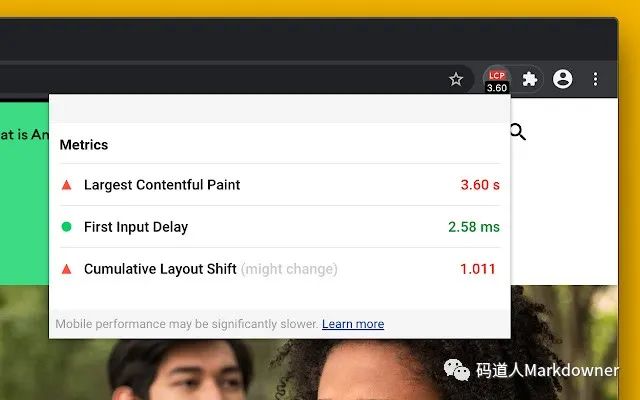
如果你使用 chrome,還可以使用這個(gè)chrome 插件[4],可以直接看到網(wǎng)頁(yè)的指標(biāo),如圖:
怎樣的指標(biāo)才算好?
一般可以按下面表格評(píng)估應(yīng)用的用戶體驗(yàn):
| 良好 | 需要改進(jìn) | 速度慢 | |
| LCP | <=2.5 秒 | <=4 秒 | >4 秒 |
| FID | <=100 毫秒 | <=300 毫秒 | >300 毫秒 |
| CLS | <=0.1 | <=0.25 | >0.25 |
怎么用?
簡(jiǎn)單打印指標(biāo)
React 17 開箱代碼已經(jīng)提供了基本使用方法:
import { ReportHandler } from 'web-vitals';const reportWebVitals = (onPerfEntry?: ReportHandler) => {if (onPerfEntry && onPerfEntry instanceof Function) {import('web-vitals').then(({ getCLS, getFID, getFCP, getLCP, getTTFB }) => {getCLS(onPerfEntry);getFID(onPerfEntry);getFCP(onPerfEntry);getLCP(onPerfEntry);getTTFB(onPerfEntry);});}};export default reportWebVitals;
在 index.ts 中簡(jiǎn)單使用:
import React from 'react';import ReactDOM from 'react-dom';import './index.scss';import App from './App';import reportWebVitals from './reportWebVitals';ReactDOM.render(</React.StrictMode>,document.getElementById('root'));reportWebVitals(console.log);
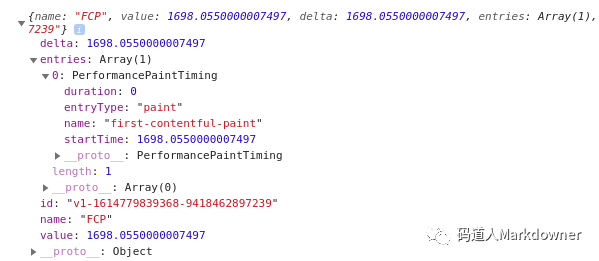
這樣可以看到類似的打印信息:
與 google analytics 結(jié)合使用(前提已經(jīng)部署 analytics.js 或者 gtag.js 代碼)
使用 analytics.js
function sendToGoogleAnalytics({name, delta, id}) {ga('send', 'event', {eventCategory: 'Web Vitals',eventAction: name,eventLabel: id,// analytics 只能接受整數(shù)eventValue: Math.round(name === 'CLS' ? delta * 1000 : delta),nonInteraction: true,transport: 'beacon',});}
使用 gtag.js
function sendToGoogleAnalytics({name, delta, id}) {gtag('event', name, {event_category: 'Web Vitals',event_label: id,value: Math.round(name === 'CLS' ? delta * 1000 : delta),non_interaction: true,});}
可以在 google analytics 的事件中看到:
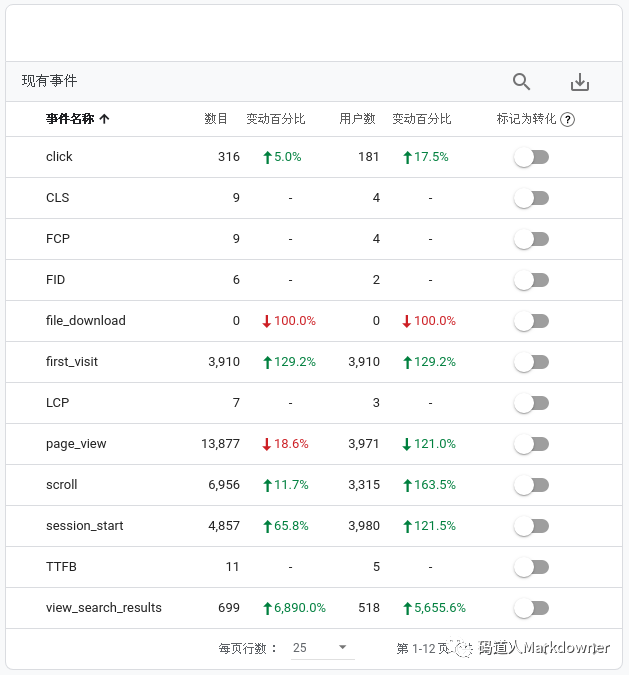
我們隨便點(diǎn)進(jìn)一個(gè)事件 CLS,可以看到監(jiān)控?cái)?shù)據(jù):
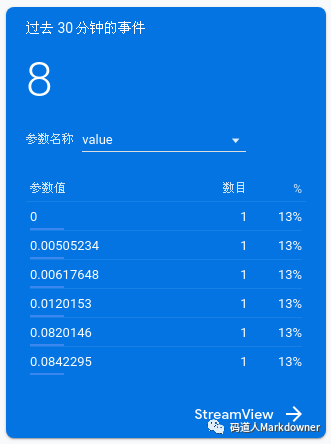
可以看到整體 CLS <= 0.1,說明網(wǎng)頁(yè)加載過程中沒有過大的頁(yè)面跳動(dòng),用戶體驗(yàn)較好
參考資料
Web Vitals[5]
GoogleChrome/web-vitals[6]
Getting started with measuring Web Vitals[7]
Measuring Performance[8]
"核心網(wǎng)頁(yè)指標(biāo)"報(bào)告[9]
Google Analytics中g(shù)tag.js和analytics.js到底有什么區(qū)別[10]
References
[1] web vitals: https://web.dev/vitals/[2] serviceWorker: https://developer.mozilla.org/en-US/docs/Web/API/Service_Worker_API[3] 這里: https://github.com/GoogleChrome/web-vitals[4] chrome 插件: https://chrome.google.com/webstore/detail/web-vitals/ahfhijdlegdabablpippeagghigmibma?hl=en[5] Web Vitals: https://web.dev/vitals/[6] GoogleChrome/web-vitals: https://github.com/GoogleChrome/web-vitals[7] Getting started with measuring Web Vitals: https://web.dev/vitals-measurement-getting-started/[8] Measuring Performance: https://create-react-app.dev/docs/measuring-performance/[9] "核心網(wǎng)頁(yè)指標(biāo)"報(bào)告: https://support.google.com/webmasters/answer/9205520?hl=zh-Hans[10] Google Analytics中g(shù)tag.js和analytics.js到底有什么區(qū)別: https://www.guozhenyi.com/p/anb8h35744d8