
使用 Prometheus 和 Grafana 監(jiān)控 Rust Web 應用程序
項目不能裸奔,監(jiān)控必不可少。本文介紹如何對 Rust Web 應用進行監(jiān)控。
01 概述
在本文中,我將向你展示如何設(shè)置 Rust Web 應用程序的監(jiān)控。該應用程序?qū)⒐_ Prometheus 指標,這些指標將使用 Grafana 進行可視化。監(jiān)控的應用是 mongodb-redis demo[1],這里[2]有詳細介紹 。最終架構(gòu)如下:

監(jiān)控系統(tǒng)包括:
Prometheus[3] — 收集實時指標并將其記錄在時間序列數(shù)據(jù)庫中的監(jiān)控平臺 Grafana[4] — 可觀察性和數(shù)據(jù)可視化平臺 AlertManager[5] — 處理 Prometheus 服務器發(fā)送的警報(例如,當你的應用程序出現(xiàn)問題時)并通過電子郵件、Slack、Telegram 或其他渠道通知最終用戶的應用程序 cAdvisor[6] — 一個平臺,可讓容器用戶了解其正在運行的容器的資源使用情況和性能特征。(實際上,它收集有關(guān)方案中所有 Docker 容器的信息
要一次啟動所有工具,你可以使用以下命令:
清單 1. Docker Compose 文件[7]
version:?'3.8'
services:

??prometheus:
????image:?prom/prometheus:latest
????container_name:?prometheus
????restart:?always
????ports:
??????-?'9090:9090'
????volumes:
??????-?./monitoring/prometheus:/etc/prometheus
????command:
??????-?'--config.file=/etc/prometheus/prometheus.yml'
??????-?'--web.external-url=http://localhost:9090'

??grafana:
????image:?grafana/grafana:latest
????container_name:?grafana
????restart:?always
????ports:
??????-?'3000:3000'
????volumes:
??????-?./monitoring/grafana/data:/var/lib/grafana
??????-?./monitoring/grafana/provisioning:/etc/grafana/provisioning
????environment:
??????-?GF_SECURITY_ADMIN_USER=admin
??????-?GF_SECURITY_ADMIN_PASSWORD=admin

??alertmanager:
????image:?prom/alertmanager:latest
????container_name:?alertmanager
????ports:
??????-?'9093:9093'
????volumes:
??????-?./monitoring/alertmanager:/etc/alertmanager
????command:
??????-?'--config.file=/etc/alertmanager/alertmanager.yml'
??????-?'--web.external-url=http://localhost:9093'

??cadvisor:
????image:?gcr.io/cadvisor/cadvisor:latest
????container_name:?cadvisor
????restart:?always
????ports:
??????-?'8080:8080'
????volumes:
??????-?/:/rootfs:ro
??????-?/var/run:/var/run:rw
??????-?/sys:/sys:ro
??????-?/var/lib/docker/:/var/lib/docker:ro
02 在 Rust 應用程序中公開 Prometheus 指標
指標展示是用prometheus crate[8] 實現(xiàn)的。
Prometheus 指標有四種核心類型[9]:計數(shù)器、儀表、直方圖和摘要。前三個將在文章中介紹(該 crate 目前不支持[10] 摘要類型)。
指標定義
可以通過以下方式創(chuàng)建和注冊指標:
清單 2.指標創(chuàng)建和注冊[11]
lazy_static!?{
????pub?static?ref?HTTP_REQUESTS_TOTAL:?IntCounterVec?=?register_int_counter_vec!(
????????opts!("http_requests_total",?"HTTP?requests?total"),
????????&["method",?"path"]
????)
????.expect("Can't?create?a?metric");
????pub?static?ref?HTTP_CONNECTED_SSE_CLIENTS:?IntGauge?=
????????register_int_gauge!(opts!("http_connected_sse_clients",?"Connected?SSE?clients"))
????????????.expect("Can't?create?a?metric");
????pub?static?ref?HTTP_RESPONSE_TIME_SECONDS:?HistogramVec?=?register_histogram_vec!(
????????"http_response_time_seconds",
????????"HTTP?response?times",
????????&["method",?"path"],
????????HTTP_RESPONSE_TIME_CUSTOM_BUCKETS.to_vec()
????)
????.expect("Can't?create?a?metric");
}
在上面的代碼片段中,自定義指標被添加到默認注冊表中;也可以在自定義注冊表中注冊它們(參見 示例[12])。
此外,將詳細描述度量的目的和用途。
計數(shù)器
如果我們想統(tǒng)計所有傳入的 HTTP 請求,可以使用 IntCounter[13] 類型。但是不僅可以查看請求的總數(shù),還可以查看其他一些維度,例如請求的路徑和方法,這會更有用。這可以通過 IntCounterVec[14] 完成;HTTP_REQUESTS_TOTAL該類型用于自定義 Actix 中間件,如下所示:
清單3.使用[15] HTTP_REQUESTS_TOTAL 度量
let?request_method?=?req.method().to_string();
let?request_path?=?req.path();
metrics::HTTP_REQUESTS_TOTAL
????.with_label_values(&[&request_method,?request_path])
????.inc();
向 API 發(fā)出一些請求后,將產(chǎn)生如下內(nèi)容:
清單 4. HTTP_REQUESTS_TOTAL 指標的輸出
#?HELP?http_requests_total?HTTP?requests?total
#?TYPE?http_requests_total?counter
http_requests_total{method="GET",path="/"}?1
http_requests_total{method="GET",path="/events"}?1
http_requests_total{method="GET",path="/favicon.ico"}?3
http_requests_total{method="GET",path="/metrics"}?22
http_requests_total{method="GET",path="/planets"}?20634
度量的每個樣本都有method和path 標簽(度量的屬性),因此 Prometheus 可以區(qū)分樣本。
如上一個片段所示,還觀察到對 GET /metrics(Prometheus 服務器從中收集應用程序指標的端點)的請求。
計量器
Gauge 與計數(shù)器的不同之處在于它的值可以下降。儀表示例顯示了當前使用 SSE 連接的客戶端數(shù)量。儀表的使用方法如下:
清單5.使用[16] HTTP_CONNECTED_SSE_CLIENTS度量
crate::metrics::HTTP_CONNECTED_SSE_CLIENTS.inc();

crate::metrics::HTTP_CONNECTED_SSE_CLIENTS.set(broadcaster_mutex.clients.len()?as?i64)
訪問 http://localhost:9000,將建立通過 SSE 的連接,并且指標將增加。之后,它的輸出將如下所示:
清單 6. HTTP_CONNECTED_SSE_CLIENTS 指標的輸出
#?HELP?http_connected_sse_clients?Connected?SSE?clients
#?TYPE?http_connected_sse_clients?gauge
http_connected_sse_clients?1
廣播器
為了實現(xiàn) SSE 客戶端規(guī)范,需要重構(gòu)應用程序的代碼并 實現(xiàn)[17] 廣播器。它將所有連接的(使用sse function[18])客戶端存儲在一個向量中,并定期 ping 每個客戶端(在remove_stale_clients function 中[19])以確保連接仍然有效,否則從向量中刪除斷開連接的客戶端。廣播器只允許打開一個 Redis Pub/Sub 連接[20];來自它的消息被發(fā)送(廣播)到所有客戶端。
直方圖
在本指南中,直方圖[21]用于收集有關(guān)響應時間的數(shù)據(jù)。與請求計數(shù)器的情況一樣,跟蹤是在 Actix 中間件中完成的;它是使用以下代碼實現(xiàn)的:
清單 7.響應時間觀察[22]
let?request_method?=?req.method().to_string();
let?request_path?=?req.path();
let?histogram_timer?=?metrics::HTTP_RESPONSE_TIME_SECONDS
????.with_label_values(&[&request_method,?request_path])
????.start_timer();

histogram_timer.observe_duration();
我認為這種方法并不精確(問題是這一時間比實際響應時間少多少),但觀察數(shù)據(jù)將有助于作為直方圖的示例,并在 Grafana 進一步可視化。
直方圖采樣觀察并在可配置的桶中對它們進行計數(shù)(有默認的桶,但很可能你需要定義為你的用例定制的桶);要配置它們,很高興知道度量值的大致分布。在此應用程序中,響應時間非常小,因此使用以下配置:
清單 8.響應時間段[23]
const?HTTP_RESPONSE_TIME_CUSTOM_BUCKETS:?&[f64;?14]?=?&[
????0.0005,?0.0008,?0.00085,?0.0009,?0.00095,?0.001,?0.00105,?0.0011,?0.00115,?0.0012,?0.0015,
????0.002,?0.003,?1.0,
];
輸出如下所示(僅顯示部分數(shù)據(jù)以節(jié)省空間):
清單 9. HTTP_RESPONSE_TIME_SECONDS 指標的輸出
#?HELP?http_response_time_seconds?HTTP?response?times
#?TYPE?http_response_time_seconds?histogram
http_response_time_seconds_bucket{method="GET",path="/planets",le="0.0005"}?0
http_response_time_seconds_bucket{method="GET",path="/planets",le="0.0008"}?6
http_response_time_seconds_bucket{method="GET",path="/planets",le="0.00085"}?1307
http_response_time_seconds_bucket{method="GET",path="/planets",le="0.0009"}?10848
http_response_time_seconds_bucket{method="GET",path="/planets",le="0.00095"}?22334
http_response_time_seconds_bucket{method="GET",path="/planets",le="0.001"}?31698
http_response_time_seconds_bucket{method="GET",path="/planets",le="0.00105"}?38973
http_response_time_seconds_bucket{method="GET",path="/planets",le="0.0011"}?44619
http_response_time_seconds_bucket{method="GET",path="/planets",le="0.00115"}?48707
http_response_time_seconds_bucket{method="GET",path="/planets",le="0.0012"}?51495
http_response_time_seconds_bucket{method="GET",path="/planets",le="0.0015"}?57066
http_response_time_seconds_bucket{method="GET",path="/planets",le="0.002"}?59542
http_response_time_seconds_bucket{method="GET",path="/planets",le="0.003"}?60532
http_response_time_seconds_bucket{method="GET",path="/planets",le="1"}?60901
http_response_time_seconds_bucket{method="GET",path="/planets",le="+Inf"}?60901
http_response_time_seconds_sum{method="GET",path="/planets"}?66.43133770000004
http_response_time_seconds_count{method="GET",path="/planets"}?60901
數(shù)據(jù)顯示落入特定觀察值桶中的觀察值數(shù)量。輸出還提供有關(guān)總計數(shù)和觀測值總和的信息。
系統(tǒng)指標
process功能支持導出進程指標[24],例如 CPU 或內(nèi)存使用情況。你所需要的只是在Cargo.toml 之后,你會得到這樣的東西:
清單 10. process 度量的輸出
#?HELP?process_cpu_seconds_total?Total?user?and?system?CPU?time?spent?in?seconds.
#?TYPE?process_cpu_seconds_total?counter
process_cpu_seconds_total?134.49
#?HELP?process_max_fds?Maximum?number?of?open?file?descriptors.
#?TYPE?process_max_fds?gauge
process_max_fds?1048576
#?HELP?process_open_fds?Number?of?open?file?descriptors.
#?TYPE?process_open_fds?gauge
process_open_fds?37
#?HELP?process_resident_memory_bytes?Resident?memory?size?in?bytes.
#?TYPE?process_resident_memory_bytes?gauge
process_resident_memory_bytes?15601664
#?HELP?process_start_time_seconds?Start?time?of?the?process?since?unix?epoch?in?seconds.
#?TYPE?process_start_time_seconds?gauge
process_start_time_seconds?1636309802.38
#?HELP?process_threads?Number?of?OS?threads?in?the?process.
#?TYPE?process_threads?gauge
process_threads?6
#?HELP?process_virtual_memory_bytes?Virtual?memory?size?in?bytes.
#?TYPE?process_virtual_memory_bytes?gauge
process_virtual_memory_bytes?439435264
請注意,prometheuscrate 支持導出在 Linux 上運行的應用程序的進程指標(例如在 這樣[25] 的 Docker 容器中)。
指標展示的端點
Actix 配置為使用此處理程序處理 GET/metrics 請求:
清單 11.指標處理程序[26]
pub?async?fn?metrics()?->?Result?{
????let?encoder?=?TextEncoder::new();
????let?mut?buffer?=?vec![];
????encoder
????????.encode(&prometheus::gather(),?&mut?buffer)
????????.expect("Failed?to?encode?metrics");

????let?response?=?String::from_utf8(buffer.clone()).expect("Failed?to?convert?bytes?to?string");
????buffer.clear();

????Ok(HttpResponse::Ok()
????????.insert_header(header::ContentType(mime::TEXT_PLAIN))
????????.body(response))
}
現(xiàn)在,在成功配置應用程序后,你可以通過執(zhí)行 GET http://localhost:9000/metrics 請求來獲取之前描述的所有指標。Prometheus 服務器使用端點來收集應用程序的指標。
指標以簡單的基于文本的格式[27]公開。
03 用于指標收集的 Prometheus 設(shè)置
Prometheus 使用以下配置收集(抓取)指標:
清單 12.用于度量收集的 Prometheus 配置[28]
scrape_configs:

??-?job_name:?mongodb_redis_web_app
????scrape_interval:?5s
????static_configs:
??????-?targets:?['host.docker.internal:9000']

??-?job_name:?cadvisor
????scrape_interval:?5s
????static_configs:
??????-?targets:?['cadvisor:8080']
在配置中,指定了兩個作業(yè)(jobs)。前者收集應用程序之前描述的指標,后者收集運行容器的資源使用和性能指標(將在關(guān)于 cAdvisor 的部分詳細描述)。scrape_interval 指定抓取目標的頻率。metrics_path參數(shù)未指定,因此 Prometheus 期望指標可用于路徑上的目標/metrics。
表達式瀏覽器和圖形界面
要使用 Prometheus 的內(nèi)置表達式瀏覽器,請打開 http://localhost:9090/graph 并嘗試查詢前面描述的任何指標,例如,http_requests_total。使用 “Graph” 選項卡可視化數(shù)據(jù)。
PromQL[29] 允許你進行更復雜的查詢;讓我們考慮幾個例子。
返回帶有指標
http_requests_total和給定作業(yè)的所有時間序列:
http_requests_total{job="mongodb_redis_web_app"}
`job`和`instance`標簽[會自動連接](https://prometheus.io/docs/concepts/jobs_instances/?"會自動連接")到由 Prometheus 服務器記下的時間序列。

-?在最近 5 分鐘內(nèi)測量的傳入請求的每秒返回率:

```rust
rate(http_requests_total[5m])
你可以在此處[30]找到更多示例。
04 用于度量可視化的 Grafana 設(shè)置
在這個項目中,Grafana 配置如下:
數(shù)據(jù)源(Grafana 將從那里請求數(shù)據(jù))
清單 13. Grafana 的數(shù)據(jù)源配置[31]
apiVersion:?1

datasources:
??-?name:?Prometheus
????type:?prometheus
????access:?proxy
????url:?prometheus:9090
????isDefault:?true
儀表板提供程序(Grafana 將從那里加載儀表板)
清單 14. Grafana 的儀表板配置[32]
apiVersion:?1

providers:
??-?name:?'default'
????folder:?'default'
????type:?file
????allowUiUpdates:?true
????updateIntervalSeconds:?30
????options:
??????path:?/etc/grafana/provisioning/dashboards
??????foldersFromFilesStructure:?true
啟動 Docker Compose[33] 文件中指定的項目后,打開 http://localhost:3000/,使用admin/admin 憑據(jù)登錄,然后找到webapp_metrics儀表板。稍后,它看起來像這樣:
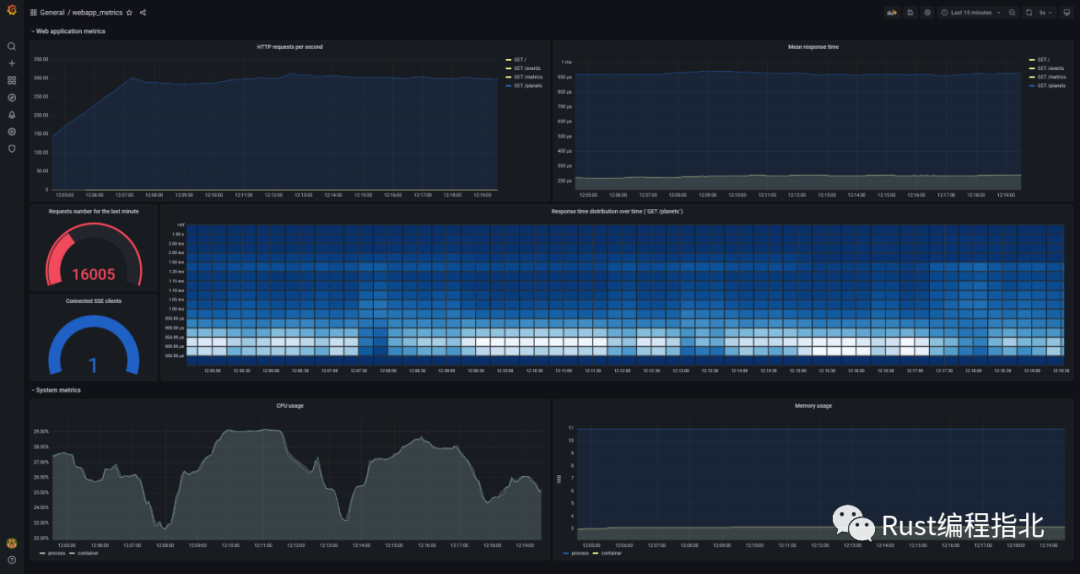
儀表板顯示應用程序在簡單負載測試下的狀態(tài)。(如果你啟動一些負載測試,為了更好地查看圖形(特別是直方圖),你需要以某種方式禁用MAX_REQUESTS_PER_MINUTE 限制[34],例如,通過該數(shù)字的急劇增加。)
為了可視化數(shù)據(jù),儀表板[35] 使用 PromQL 查詢,這些查詢利用了之前描述的指標,例如:
rate(http_response_time_seconds_sum[5m]) / rate(http_response_time_seconds_count[5m])顯示過去五分鐘的平均響應時間
sum(increase(http_response_time_seconds_bucket{path="/planets"}[30s])) by (le)用于以熱圖[36]的形式可視化響應時間分布。熱圖就像直方圖,但隨著時間的推移,每個時間片代表自己的直方圖
rate(process_cpu_seconds_total{job="mongodb_redis_web_app"}[1m]),sum(rate(container_cpu_usage_seconds_total{name='mongodb-redis'}[1m])) by (name)
顯示過去五分鐘的 CPU 使用率。請求的數(shù)據(jù)來自兩個不同的來源,分別顯示進程和容器的 CPU 使用率。兩張圖幾乎一模一樣。(sum使用是因為container_cpu_usage_seconds_total提供了有關(guān)每個內(nèi)核使用情況的信息。
05 使用 cAdvisor 監(jiān)控應用容器的指標
除了進程的系統(tǒng)指標(如之前所示),還可以導出 Docker 容器的系統(tǒng)指標。這可以使用 cAdvisor 來完成。
cAdvisor 的 Web UI 可通過 http://localhost:8080/。所有正在運行的 Docker 容器都顯示在 http://localhost:8080/docker/:
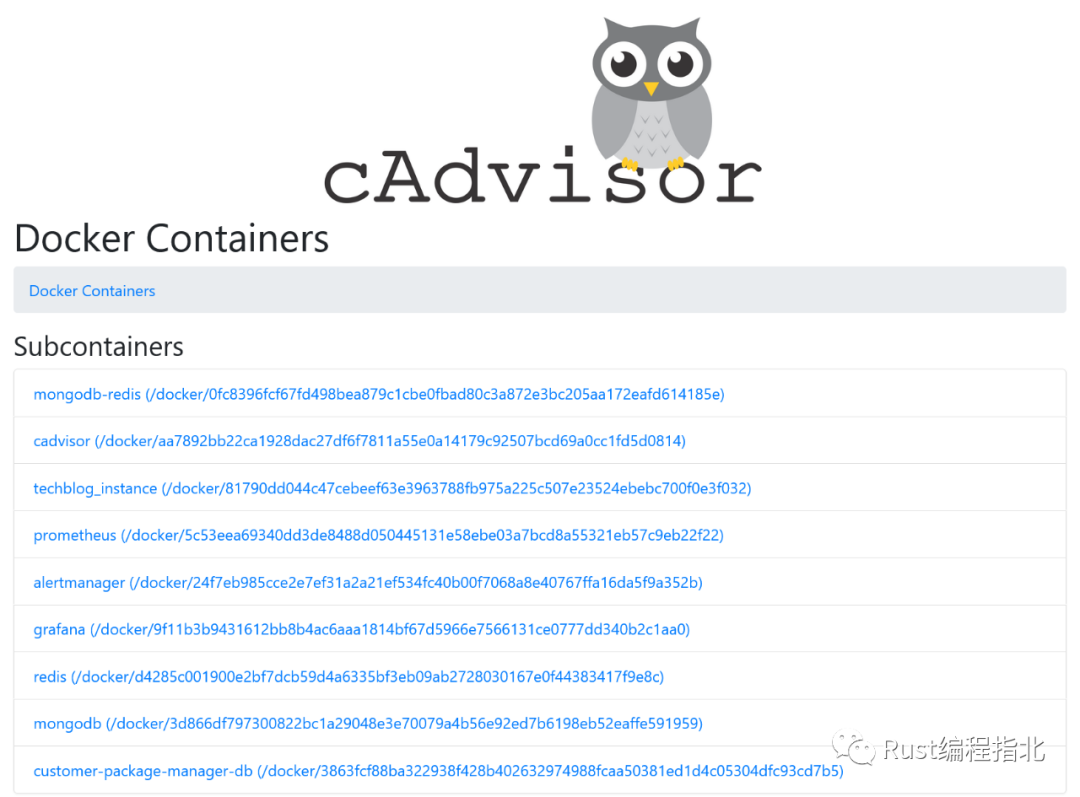
你可以獲取有關(guān)任何容器的資源使用情況的信息:
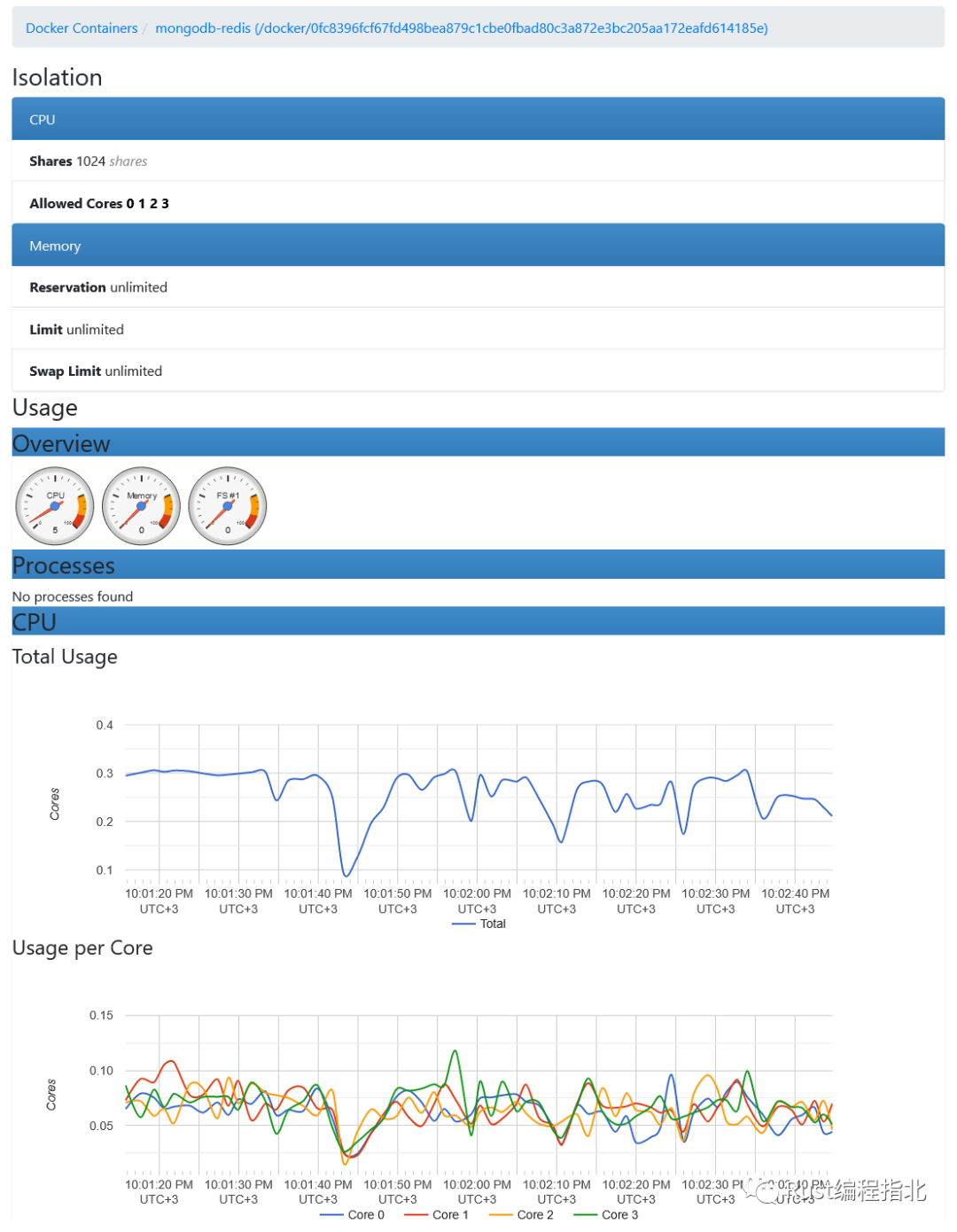
Prometheus 服務器從http://localhost:8080/metrics 收集指標。
此處[37]列出了 cAdvisor 導出的指標。
機器的系統(tǒng)指標可以使用 Node exporter[38] 或 Windows exporter[39] 導出。
06 使用規(guī)則和 AlertManager 設(shè)置警報通知
在這個項目中,Prometheus 配置的以下部分負責警報:
清單 15.用于警報的 Prometheus 配置[40]
rule_files:
??-?'rules.yml'

alerting:
??alertmanagers:
????-?static_configs:
????????-?targets:?['alertmanager:9093']
該alerting部分定義了 Prometheus 服務器與之通信的 AlertManager 實例。
警報規(guī)則[41]允許你根據(jù) PromQL 表達式定義一些條件:
清單 16. rules.yml 中的警報規(guī)則示例[42]
groups:
-?name:?default
??rules:
??-?alert:?SseClients
????expr:??http_connected_sse_clients?>?0
????for:?1m
????labels:
??????severity:?high
????annotations:
??????summary:?Too?many?SSE?clients
alert - 警報的名稱 expr – Prometheus 表達式形式的實際規(guī)則定義 for – 在發(fā)出警報之前需要打破規(guī)則多長時間。在我們的例子中,如果 SSE 客戶端的數(shù)量在 1 分鐘內(nèi)保持大于 0,則會發(fā)出警報 labels - 可以附加到警報的額外信息,例如嚴重性 annotations - 可以附加到警報的額外描述,例如摘要
SSE 客戶端編號大于 0 的規(guī)則不是通常為應用程序設(shè)置的規(guī)則。它被用作示例,因為我們只要提出一個請求就很容易違反規(guī)則。
如果規(guī)則被破壞,Prometheus 服務器將向 AlertManager 實例發(fā)送警報。它提供了許多功能,例如警報重復數(shù)據(jù)刪除、分組、靜音和向最終用戶發(fā)送通知。我們將只考慮路由能力:警報將發(fā)送到電子郵件。
AlertManager 配置如下:
清單 17. AlertManager 配置[43]
route:
??receiver:?gmail

receivers:
-?name:?gmail
??email_configs:
??-?to:?[email protected]
????from:?[email protected]
????smarthost:?smtp.gmail.com:587
????auth_username:?[email protected]
????auth_identity:?[email protected]
????auth_password:?password
在這個項目中,AlertManager 配置了一個 Gmail 帳戶。要生成應用密碼,你可以使用本指南[44]。
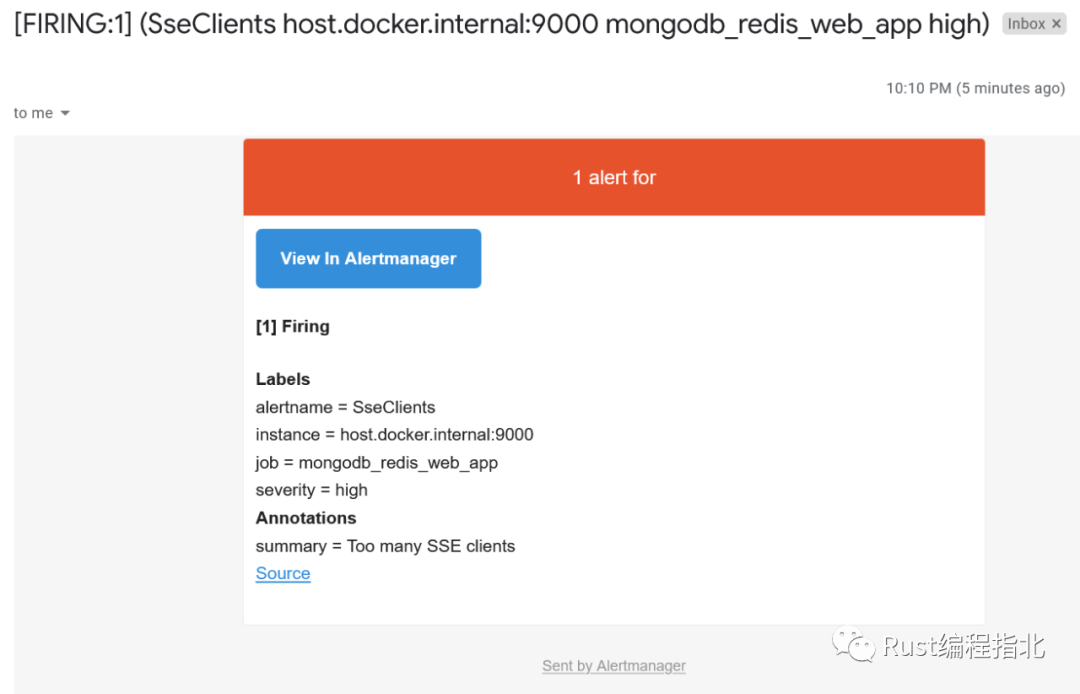
要觸發(fā)SseClients警報規(guī)則,你只需http://localhost:9000。這會將http_connected_sse_clients指標增加 1。你可以在http://localhost:9090/alerts 上跟蹤SseClients警報的狀態(tài)。觸發(fā)后,警報將轉(zhuǎn)到Pending狀態(tài)。在rules.yml中定義的for間隔過后(在本例中為1分鐘),警報將進入Firing狀態(tài)。
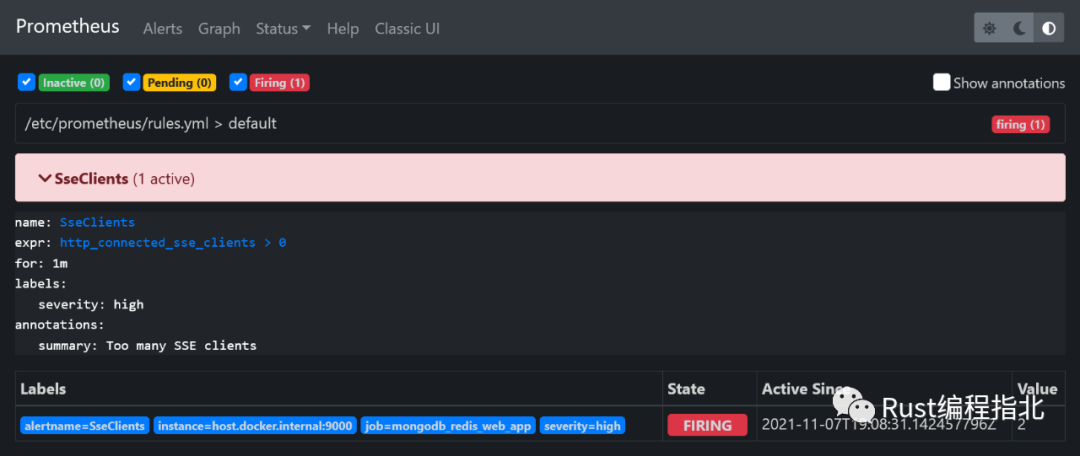
這將導致 Prometheus 服務器向 AlertManager 發(fā)送警報。它將決定如何處理警報,在我們的例子中發(fā)送電子郵件:
07 使用 Prometheus 導出器監(jiān)控第三方系統(tǒng)
對于 MongoDB、Redis 等第三方工具,可以使用 Prometheus 導出器[45]設(shè)置監(jiān)控 。
08 啟動
docker?compose?up?--build
09 結(jié)論
在本文中,我展示了如何在 Rust Web 應用程序中設(shè)置指標展示、使用 Prometheus 收集它們以及使用 Grafana 進行數(shù)據(jù)可視化。此外,還展示了如何開始使用 cAdvisor 收集容器的指標以及使用 AlertManager 發(fā)出警報。
原文鏈接:https://romankudryashov.com/blog/2021/11/monitoring-rust-web-application/
參考資料
mongodb-redis demo: https://github.com/rkudryashov/exploring-rust-ecosystem/tree/master/mongodb-redis
[2]這里: https://romankudryashov.com/blog/2021/06/mongodb-redis-rust/
[3]Prometheus: https://prometheus.io/
[4]Grafana: https://grafana.com/
[5]AlertManager: https://prometheus.io/docs/alerting/latest/alertmanager/
[6]cAdvisor: https://github.com/google/cadvisor
[7]Docker Compose 文件: https://github.com/rkudryashov/exploring-rust-ecosystem/blob/master/mongodb-redis/docker-compose.override.yml
[8]crate: https://github.com/tikv/rust-prometheus
[9]四種核心類型: https://prometheus.io/docs/concepts/metric_types/
[10]不支持: https://github.com/tikv/rust-prometheus/issues/5
[11]指標創(chuàng)建和注冊: https://github.com/rkudryashov/exploring-rust-ecosystem/blob/master/mongodb-redis/src/metrics.rs
[12]示例: https://github.com/tikv/rust-prometheus/blob/master/examples/example_custom_registry.rs
[13]IntCounter: https://docs.rs/prometheus/latest/prometheus/type.IntCounter.html
[14]IntCounterVec: https://docs.rs/prometheus/latest/prometheus/type.IntCounterVec.html
[15]使用: https://github.com/rkudryashov/exploring-rust-ecosystem/blob/master/mongodb-redis/src/main.rs
[16]使用: https://github.com/rkudryashov/exploring-rust-ecosystem/blob/master/mongodb-redis/src/broadcaster.rs
[17]實現(xiàn): https://github.com/rkudryashov/exploring-rust-ecosystem/blob/master/mongodb-redis/src/broadcaster.rs
[18]function: https://github.com/rkudryashov/exploring-rust-ecosystem/blob/master/mongodb-redis/src/handlers.rs
[19]function 中: https://github.com/rkudryashov/exploring-rust-ecosystem/blob/master/mongodb-redis/src/broadcaster.rs
[20]連接: https://github.com/rkudryashov/exploring-rust-ecosystem/blob/master/mongodb-redis/src/redis.rs
[21]直方圖: https://prometheus.io/docs/practices/histograms/
[22]響應時間觀察: https://github.com/rkudryashov/exploring-rust-ecosystem/blob/master/mongodb-redis/src/main.rs
[23]響應時間段: https://github.com/rkudryashov/exploring-rust-ecosystem/blob/master/mongodb-redis/src/metrics.rs
[24]進程指標: https://prometheus.io/docs/instrumenting/writing_clientlibs/#process-metrics
[25]這樣: https://github.com/rkudryashov/exploring-rust-ecosystem/blob/master/mongodb-redis/Dockerfile
[26]指標處理程序: https://github.com/rkudryashov/exploring-rust-ecosystem/blob/master/mongodb-redis/src/handlers.rs
[27]格式: https://github.com/prometheus/docs/blob/main/content/docs/instrumenting/exposition_formats.md
[28]配置: https://github.com/rkudryashov/exploring-rust-ecosystem/blob/master/mongodb-redis/monitoring/prometheus/prometheus.yml
[29]PromQL: https://prometheus.io/docs/prometheus/latest/querying/basics/
[30]在此處: https://prometheus.io/docs/prometheus/latest/querying/examples/
[31]數(shù)據(jù)源配置: https://github.com/rkudryashov/exploring-rust-ecosystem/blob/master/mongodb-redis/monitoring/grafana/provisioning/datasources/datasources.yml
[32]儀表板配置: https://github.com/rkudryashov/exploring-rust-ecosystem/blob/master/mongodb-redis/monitoring/grafana/provisioning/dashboards/providers.yml
[33]Docker Compose: https://github.com/rkudryashov/exploring-rust-ecosystem/blob/master/mongodb-redis/docker-compose.override.yml
[34]限制: https://github.com/rkudryashov/exploring-rust-ecosystem/blob/master/mongodb-redis/src/services.rs
[35]儀表板: https://github.com/rkudryashov/exploring-rust-ecosystem/blob/master/mongodb-redis/monitoring/grafana/provisioning/dashboards/webapp_metrics.json
[36]熱圖: https://grafana.com/docs/grafana/latest/basics/intro-histograms/
[37]此處: https://github.com/google/cadvisor/blob/master/docs/storage/prometheus.md
[38]Node exporter: https://github.com/prometheus/node_exporter
[39]Windows exporter: https://github.com/prometheus-community/windows_exporter
[40]配置: https://github.com/rkudryashov/exploring-rust-ecosystem/blob/master/mongodb-redis/monitoring/prometheus/prometheus.yml
[41]警報規(guī)則: https://prometheus.io/docs/prometheus/latest/configuration/alerting_rules/
[42]示例: https://github.com/rkudryashov/exploring-rust-ecosystem/blob/master/mongodb-redis/monitoring/prometheus/rules.yml
[43]AlertManager 配置: https://github.com/rkudryashov/exploring-rust-ecosystem/blob/master/mongodb-redis/monitoring/alertmanager/alertmanager.yml
[44]本指南: https://support.google.com/accounts/answer/185833?hl=en
[45]導出器: https://prometheus.io/docs/instrumenting/exporters/
推薦閱讀
我是 polarisxu,北大碩士畢業(yè),曾在 360 等知名互聯(lián)網(wǎng)公司工作,10多年技術(shù)研發(fā)與架構(gòu)經(jīng)驗!2012 年接觸 Go 語言并創(chuàng)建了 Go 語言中文網(wǎng)!著有《Go語言編程之旅》、開源圖書《Go語言標準庫》等。
堅持輸出技術(shù)(包括 Go、Rust 等技術(shù))、職場心得和創(chuàng)業(yè)感悟!歡迎關(guān)注「polarisxu」一起成長!也歡迎加我微信好友交流:gopherstudio