
【總結(jié)】1100- 15 個(gè) ElementUI 問(wèn)題清單總結(jié)

作者:8號(hào)的凌晨4點(diǎn)
https://juejin.cn/post/6981083988286767117
1、form 下面只有一個(gè) input 時(shí)回車鍵刷新頁(yè)面
原因是觸發(fā)了表單默認(rèn)的提交行為,給el-form 加上@submit.native.prevent就行了。
<el-form?inline?@submit.native.prevent>
??<el-form-item?label="訂單號(hào)">
????<el-input
??????v-model="query.orderNo"
??????:placeholder="輸入訂單號(hào)查詢"
??????clearable
??????@keyup.enter.native="enterInput"
????/>
??el-form-item>
el-form>
2、表格固定列最后一行顯示不全
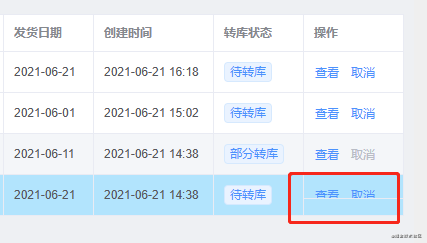
這種情況有時(shí)在寬度剛好處于臨界值狀態(tài)時(shí)會(huì)出現(xiàn)。因?yàn)楣潭惺仟?dú)立于表格body動(dòng)態(tài)計(jì)算高度的,出現(xiàn)了固定列高度小于表格高度所以造成最后一行被遮擋。
//?設(shè)置全局
.el-table__fixed-right?{
??height:?100%?!important;
}
3、氣泡確認(rèn)框文檔里的confirm事件不生效
版本:element-ui: "2.13.2", vue: "2.6.10"
//?將confirm改為onConfirm
@onConfirm="onDeleteOrder(row.id)"
4、輸入框用正則限制但綁定值未更新
看到項(xiàng)目里有下面這么一段代碼:
<el-input?
??v-model="form.retailMinOrder"?
??placeholder="請(qǐng)輸入"?
??onkeyup="value=value.replace(/[^\d.]/g,'')"?
/>
這樣做雖然輸入框的顯示是正確的,但綁定的值是沒(méi)有更新的,將 onkeyup 改為 oninput 即可。
PS:經(jīng)評(píng)論區(qū)的兄弟指正,輸入中文后 v-model 會(huì)失效,下面的方式更好一點(diǎn):
<el-input?
??v-model="form.retailMinOrder"?
??placeholder="請(qǐng)輸入"?
??@keyup.native="form.retailMinOrder=form.retailMinOrder.replace(/[^\d.]/g,'')"
/>
5、去除type="number"輸入框聚焦時(shí)的上下箭頭

/*?設(shè)置全局?*/
.clear-number-input.el-input::-webkit-outer-spin-button,
.clear-number-input.el-input::-webkit-inner-spin-button?{
??margin:?0;
??-webkit-appearance:?none?!important;
}?
.clear-number-input.el-input?input[type="number"]::-webkit-outer-spin-button,
.clear-number-input.el-input?input[type="number"]::-webkit-inner-spin-button?{
??margin:?0;
??-webkit-appearance:?none?!important;
}
.clear-number-input.el-input?{
??-moz-appearance:?textfield;
}?
.clear-number-input.el-input?input[type="number"]?{
??-moz-appearance:?textfield;
}
<el-input?type="number"?class="clear-number-input"?/>
6、只校驗(yàn)表單其中一個(gè)字段
在一些用戶注冊(cè)場(chǎng)景中,提交整個(gè)表單前有時(shí)候我們會(huì)做一些單獨(dú)字段的校驗(yàn),例如發(fā)送手機(jī)驗(yàn)證碼,發(fā)送時(shí)我們只需要校驗(yàn)手機(jī)號(hào)碼這個(gè)字段,可以這樣做:
this.$refs['form'].validateField('mobile',?valid?=>?{
??if?(valid)?{
????//?發(fā)送驗(yàn)證碼
??}
})
如果需要多個(gè)參數(shù),將參數(shù)改為數(shù)組形式即可。
7、彈窗重新打開(kāi)時(shí)表單上次的校驗(yàn)信息未清除
有人會(huì)在open時(shí)在$nextTick里重置表單,而我選擇在關(guān)閉時(shí)進(jìn)行重置。
"onClose">
??<el-form?ref="form">
??el-form>
</el-dialog>

//?彈窗關(guān)閉時(shí)重置表單
onClose()?{
??this.$refs['form'].resetFields()
}
8、表頭與內(nèi)容錯(cuò)位
網(wǎng)上也有其他一些辦法,但我記得對(duì)我沒(méi)什么作用,后來(lái)我是用下面這個(gè)辦法:
//?全局設(shè)置
.el-table--scrollable-y?.el-table__body-wrapper?{
?overflow-y:?overlay?!important;
}
9、表單多級(jí)數(shù)據(jù)結(jié)構(gòu)校驗(yàn)問(wèn)題
<el-form?:model="form">
??<el-form-item?label="部門"?prop="dept">el-form-item>
??<el-form-item?label="姓名"?prop="user.name">el-form-item>
el-form>
rules:?{
??'user.name':?[{?required:?true,?message:?'姓名不能為空',?trigger:?'blur'?}]
}
10、表格跨分頁(yè)多選
看到項(xiàng)目里有小伙伴手動(dòng)添加代碼去處理這個(gè)問(wèn)題,其實(shí)根據(jù)文檔,只需加上row-key和reserve-selection即可。
<el-table?row-key="id">
??<el-table-column?type="selection"?reserve-selection>el-table-column>
el-table>
11、根據(jù)條件高亮行并去除默認(rèn)hover顏色
class-name="tableRowClassName">
</el-table>

tableRowClassName({?row?})?{
??return?row.status?===?2???'highlight'?:?''
}

//?設(shè)置全局
.el-table?.highlight?{
??background-color:?#b6e8fe;
??&:hover?>?td?{
????background-color:?initial?!important;
??}
??td?{
????background-color:?initial?!important;
??}
}
12、表單不想顯示label但又想顯示必填星號(hào)怎么辦
//?label給個(gè)空格即可
<el-form>
??<el-table>
????<el-table-column?label="名稱">
??????<template>
????????<el-form-item?label="?">
???????????<el-input?placeholder="名稱不能為空"?/>
????????el-form-item>
??????template>
????el-table-column>
??el-table>
el-form>
13、table 內(nèi)嵌 input 調(diào)用 focus 方法無(wú)效
<el-table>
??<el-table-column?label="名稱">
????<template>
??????<el-input?ref="inputRef"?/>
????template>
??el-table-column>
el-table>

//?無(wú)效
this.$refs['inputRef'].focus()
this.$refs['inputRef'][0].focus()
this.$refs['inputRef'].$el.children[0].focus()

//?有效
<el-input?id="inputRef"?/>
document.getElementById('inputRef').focus()
14、表格內(nèi)容超出省略
看到有小伙伴在代碼里自己手動(dòng)去添加CSS來(lái)實(shí)現(xiàn),害,又是一個(gè)不看文檔的反面例子,其實(shí)只要加個(gè)show-overflow-tooltip就可以了,還自帶tooltip效果,不香嗎?
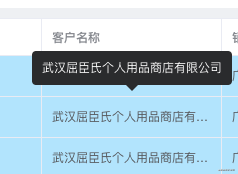
<el-table-column?label="客戶名稱"?prop="customerName"?show-overflow-tooltip>
el-table-column>
15、el-tree 展開(kāi)/收起所有節(jié)點(diǎn)
"tree"></el-tree>

expandTree(expand?=?true)?{
??const?nodes?=?this.$refs['tree'].store._getAllNodes()
??nodes.forEach(node?=>?{
????node.expanded?=?expand
??})
}

回復(fù)“加群”與大佬們一起交流學(xué)習(xí)~
點(diǎn)擊“閱讀原文”查看 120+ 篇原創(chuàng)文章