
SpringBoot + kaptcha 生成驗(yàn)證碼
點(diǎn)擊上方藍(lán)色字體,選擇“標(biāo)星公眾號(hào)”
優(yōu)質(zhì)文章,第一時(shí)間送達(dá)
66套java從入門到精通實(shí)戰(zhàn)課程分享
驗(yàn)證碼生成使用的是 Google 的 kaptcha 框架,固定的代碼,只需要自己配置一些參數(shù)即可,下面的代碼是主要的代碼,像項(xiàng)目的前端代碼、驗(yàn)證生成的驗(yàn)證碼之類的代碼沒有給出,所以需要一定的springboot基礎(chǔ)
pom
需要引入 kaptcha 的 Maven 依賴
?com.github.penggle
?kaptcha
?2.3.2
KaptchaConfig
即 kaptcha 的配置文件
import?java.util.Properties;

import?org.springframework.context.annotation.Bean;
import?org.springframework.stereotype.Component;

import?com.google.code.kaptcha.impl.DefaultKaptcha;
import?com.google.code.kaptcha.util.Config;

@Component
public?class?KaptchaConfig?{
?@Bean
?public?DefaultKaptcha?getDefaultKaptcha()?{
??com.google.code.kaptcha.impl.DefaultKaptcha?defaultKaptcha?=?new?com.google.code.kaptcha.impl.DefaultKaptcha();
??Properties?properties?=?new?Properties();
??//?圖片邊框
??properties.setProperty("kaptcha.border",?"no");
??//?邊框顏色
??properties.setProperty("kaptcha.border.color",?"105,179,90");
??//?字體顏色
??properties.setProperty("kaptcha.textproducer.font.color",?"black");
??//?圖片寬
??properties.setProperty("kaptcha.image.width",?"120");
??//?圖片高
??properties.setProperty("kaptcha.image.height",?"50");
??//?字體大小
??properties.setProperty("kaptcha.textproducer.font.size",?"30");
??//?session?key
??properties.setProperty("kaptcha.session.key",?"code");
??//?驗(yàn)證碼長(zhǎng)度
??properties.setProperty("kaptcha.textproducer.char.length",?"5");
??//?字體
//??properties.setProperty("kaptcha.textproducer.font.names",?"宋體,楷體,微軟雅黑");
??Config?config?=?new?Config(properties);
??defaultKaptcha.setConfig(config);

??return?defaultKaptcha;
?}
}
KaptchaController
驗(yàn)證碼控制層
package?com.cun.controller;

import?java.awt.image.BufferedImage;
import?java.io.ByteArrayOutputStream;

import?javax.imageio.ImageIO;
import?javax.servlet.ServletOutputStream;
import?javax.servlet.http.HttpServletRequest;
import?javax.servlet.http.HttpServletResponse;

import?org.springframework.beans.factory.annotation.Autowired;
import?org.springframework.stereotype.Controller;
import?org.springframework.web.bind.annotation.RequestMapping;
import?org.springframework.web.servlet.ModelAndView;

import?com.google.code.kaptcha.impl.DefaultKaptcha;

@Controller
public?class?KaptchaController?{
?
?//驗(yàn)證碼工具
?@Autowired
?DefaultKaptcha?defaultKaptcha;
?
?/**
??*?2、生成驗(yàn)證碼
??*?@param?httpServletRequest
??*?@param?httpServletResponse
??*?@throws?Exception
??*/
?@RequestMapping("/defaultKaptcha")
?public?void?defaultKaptcha(HttpServletRequest?httpServletRequest,?HttpServletResponse?httpServletResponse)
???throws?Exception?{
??byte[]?captchaChallengeAsJpeg?=?null;
??ByteArrayOutputStream?jpegOutputStream?=?new?ByteArrayOutputStream();
??try?{
???//?生產(chǎn)驗(yàn)證碼字符串并保存到session中
???String?createText?=?defaultKaptcha.createText();
???httpServletRequest.getSession().setAttribute("rightCode",?createText);
???//?使用生產(chǎn)的驗(yàn)證碼字符串返回一個(gè)BufferedImage對(duì)象并轉(zhuǎn)為byte寫入到byte數(shù)組中
???BufferedImage?challenge?=?defaultKaptcha.createImage(createText);
???ImageIO.write(challenge,?"jpg",?jpegOutputStream);
??}?catch?(IllegalArgumentException?e)?{
???httpServletResponse.sendError(HttpServletResponse.SC_NOT_FOUND);
???return;
??}

??//?定義response輸出類型為image/jpeg類型,使用response輸出流輸出圖片的byte數(shù)組
??captchaChallengeAsJpeg?=?jpegOutputStream.toByteArray();
??httpServletResponse.setHeader("Cache-Control",?"no-store");
??httpServletResponse.setHeader("Pragma",?"no-cache");
??httpServletResponse.setDateHeader("Expires",?0);
??httpServletResponse.setContentType("image/jpeg");
??ServletOutputStream?responseOutputStream?=?httpServletResponse.getOutputStream();
??responseOutputStream.write(captchaChallengeAsJpeg);
??responseOutputStream.flush();
??responseOutputStream.close();
?}
效果
訪問localhost:8080//defaultKaptcha(不同的端口不同訪問鏈接)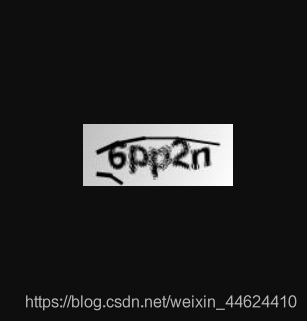
版權(quán)聲明:本文為博主原創(chuàng)文章,遵循 CC 4.0 BY-SA 版權(quán)協(xié)議,轉(zhuǎn)載請(qǐng)附上原文出處鏈接和本聲明。
本文鏈接:
https://blog.csdn.net/weixin_44624410/article/details/110728397
粉絲福利:Java從入門到入土學(xué)習(xí)路線圖
???

?長(zhǎng)按上方微信二維碼?2 秒
感謝點(diǎn)贊支持下哈?
評(píng)論
圖片
表情