
SpringBoot 分布式驗證碼登錄方案
 來源:碼畜君
?? 歡迎加入小哈的星球 ,你將獲得: 專屬的項目實戰(zhàn)/ Java 學(xué)習(xí)路線 / 一對一提問 / 學(xué)習(xí)打卡
目前, 正在星球內(nèi)部帶小伙伴做第一個項目:前后端分離博客,手摸手,后端 + 前端全棧開發(fā),從 0 到 1 講解每個功能點開發(fā)步驟,1v1 答疑,直到項目上線。目前已更新了90小節(jié),累計12w+字,講解圖:612張,還在持續(xù)爆肝中.. 后續(xù)還會上新更多項目,如秒殺系統(tǒng), 在線商城, IM即時通訊等,戳我加入學(xué)習(xí),已有280+小伙伴加入(超低價)
-
前言 -
前后端未分離的驗證碼登錄方案 -
驗證碼生成流程如下 -
登錄驗證流程如下 -
前后端分離的驗證碼登錄方案 -
驗證碼生成流程如下 -
登錄驗證流程如下 -
動手?jǐn)]輪子 -
Kaptcha介紹 -
新建項目并加入依賴 -
驗證碼獲取和查看
前言
為了防止世界被破壞,為了守護(hù)世界的和平。。。說錯了,重來~
為了防止驗證系統(tǒng)被暴力破解,很多系統(tǒng)都增加了驗證碼效驗,比較常見的就是圖片二維碼,業(yè)內(nèi)比較安全的是短信驗證碼,當(dāng)然還有一些拼圖驗證碼,加入人工智能的二維碼等等,我們今天的主題就是前后端分離的圖片二維碼登錄方案。
前后端未分離的驗證碼登錄方案
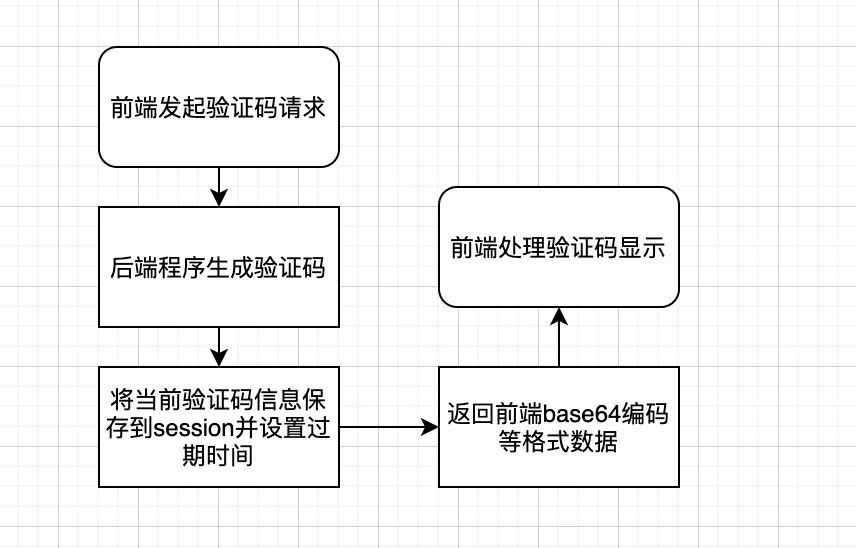
傳統(tǒng)的項目大都是基于session交互的,前后端都在一個項目里面,比如傳統(tǒng)的SSH項目或者一些JSP系統(tǒng),當(dāng)前端頁面觸發(fā)到獲取驗證碼請求,可以將驗證碼里面的信息存在上下文中,所以登錄的時候只需要 用戶名、密碼、驗證碼即可。
驗證碼生成流程如下
登錄驗證流程如下
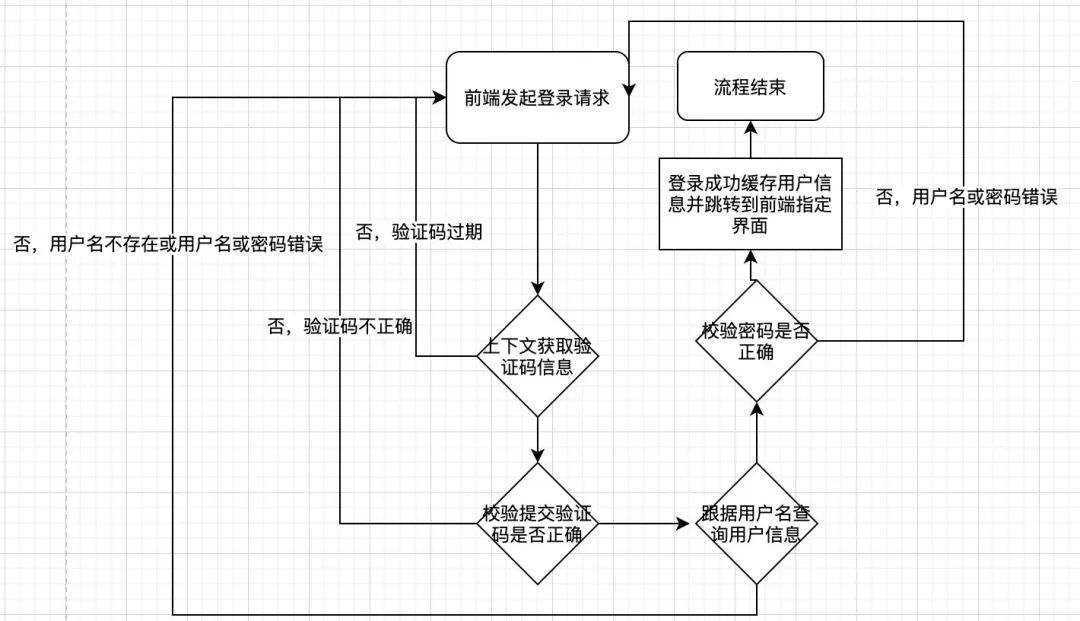
可以發(fā)現(xiàn),整個登錄流程還是依賴session上下文的,并且由后端調(diào)整頁面。
前后端分離的驗證碼登錄方案
隨著系統(tǒng)和業(yè)務(wù)的不停升級,前后端代碼放在一起的項目越來越臃腫,已經(jīng)無法快速迭代和職責(zé)區(qū)分了,于是紛紛投入了前后端分離的懷抱,發(fā)現(xiàn)代碼和職責(zé)分離以后,開發(fā)效率越來越高了,功能迭代還越來越快,但是以前的驗證碼登錄方案就要更改了。
驗證碼生成流程如下
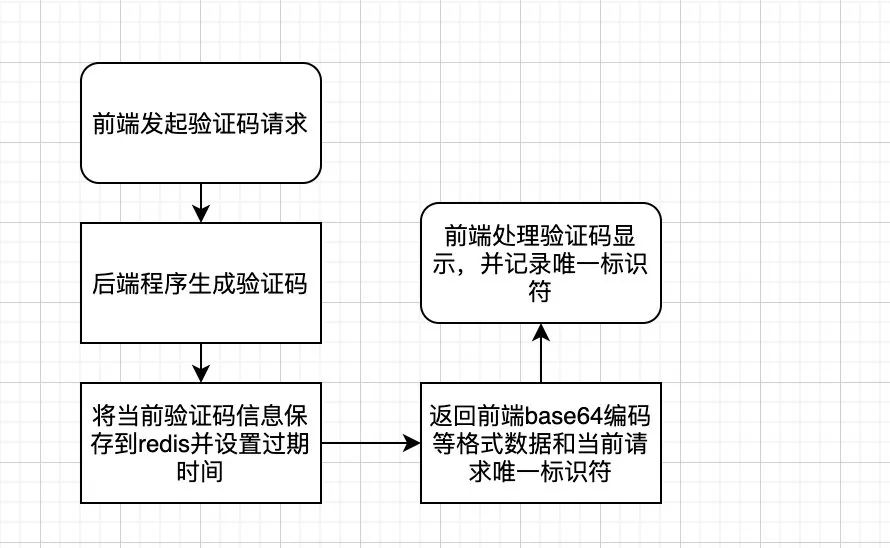
對比原來的方案,增加了redis中間件,不再是存在session里面了,但是后面怎么區(qū)分這個驗證碼是這個請求生成的呢?所以我們加入了唯一標(biāo)識符來區(qū)分
登錄驗證流程如下
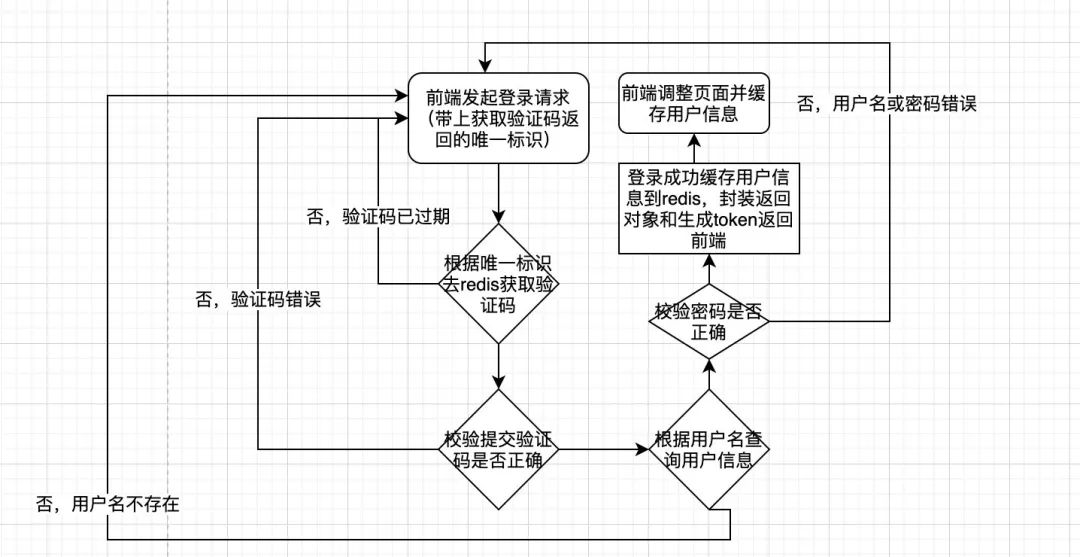
可以發(fā)現(xiàn),基于前后端分離的分布式項目登錄方案對比原來,加了一個redis中間件和token返回,不再依賴上下文session,并且頁面調(diào)整也是由后端換到了前端
動手?jǐn)]輪子
基于驗證碼的輪子還是挺多的,本文就以Kaptcha這個項目為例,通過springboot項目集成Kaptcha來實現(xiàn)驗證碼生成和登錄方案。
Kaptcha介紹
Kaptcha是一個基于SimpleCaptcha的驗證碼開源項目
我找的這個輪子是基于SimpleCaptcha二次封裝的,maven依賴如下
<!--Kaptcha是一個基于SimpleCaptcha的驗證碼開源項目-->
<dependency>
  <groupId>com.github.penggle</groupId>
  <artifactId>kaptcha</artifactId>
  <version>2.3.2</version>
</dependency>
新建項目并加入依賴
依賴主要有 SpringBoot、Kaptcha、Redis
pom.xml
<?xml version="1.0" encoding="UTF-8"?>
<project xmlns="http://maven.apache.org/POM/4.0.0"
         xmlns:xsi="http://www.w3.org/2001/XMLSchema-instance"
         xsi:schemaLocation="http://maven.apache.org/POM/4.0.0 http://maven.apache.org/xsd/maven-4.0.0.xsd">
    <modelVersion>4.0.0</modelVersion>

    <groupId>com.lzp</groupId>
    <artifactId>kaptcha</artifactId>
    <version>1.0-SNAPSHOT</version>

    <parent>
        <groupId>org.springframework.boot</groupId>
        <artifactId>spring-boot-starter-parent</artifactId>
        <version>2.3.0.RELEASE</version>
        <relativePath/> <!-- lookup parent from repository -->
    </parent>

    <dependencies>
        <!--Kaptcha是一個基于SimpleCaptcha的驗證碼開源項目-->
        <dependency>
            <groupId>com.github.penggle</groupId>
            <artifactId>kaptcha</artifactId>
            <version>2.3.2</version>
        </dependency>

        <dependency>
            <groupId>org.springframework.boot</groupId>
            <artifactId>spring-boot-starter-web</artifactId>
        </dependency>


        <dependency>
            <groupId>org.springframework.boot</groupId>
            <artifactId>spring-boot-starter-data-redis</artifactId>
        </dependency>

        <!-- redis依賴commons-pool 這個依賴一定要添加 -->
        <dependency>
            <groupId>org.apache.commons</groupId>
            <artifactId>commons-pool2</artifactId>
        </dependency>

        <dependency>
            <groupId>com.alibaba</groupId>
            <artifactId>fastjson</artifactId>
            <version>1.2.3</version>
        </dependency>

        <dependency>
            <groupId>com.fasterxml.jackson.core</groupId>
            <artifactId>jackson-databind</artifactId>
        </dependency>

    </dependencies>


    <build>
        <plugins>
            <plugin>
                <groupId>org.springframework.boot</groupId>
                <artifactId>spring-boot-maven-plugin</artifactId>
            </plugin>
        </plugins>
    </build>

</project>
Redis配置類RedisConfig
@Configuration
public class RedisConfig {

    @Bean
    public RedisTemplate<String, Object> redisTemplate(LettuceConnectionFactory redisConnectionFactory){
        RedisTemplate<String, Object> redisTemplate = new RedisTemplate<String, Object>();
        redisTemplate.setKeySerializer(new StringRedisSerializer());
        redisTemplate.setValueSerializer(new GenericJackson2JsonRedisSerializer());
        redisTemplate.setHashKeySerializer(new StringRedisSerializer());
        redisTemplate.setHashValueSerializer(new GenericJackson2JsonRedisSerializer());
        redisTemplate.setConnectionFactory(redisConnectionFactory);
        return redisTemplate;
    }

}
驗證碼配置類KaptchaConfig
@Configuration
public class KaptchaConfig {
    @Bean
    public DefaultKaptcha producer(){

        DefaultKaptcha defaultKaptcha = new DefaultKaptcha();
        Properties properties = new Properties();
        properties.setProperty("kaptcha.border", "no");
        properties.setProperty("kaptcha.border.color", "105,179,90");
        properties.setProperty("kaptcha.textproducer.font.color", "black");
        properties.setProperty("kaptcha.image.width", "110");
        properties.setProperty("kaptcha.image.height", "40");
        properties.setProperty("kaptcha.textproducer.char.string","23456789abcdefghkmnpqrstuvwxyzABCDEFGHKMNPRSTUVWXYZ");
        properties.setProperty("kaptcha.textproducer.font.size", "30");
        properties.setProperty("kaptcha.textproducer.char.space","3");
        properties.setProperty("kaptcha.session.key", "code");
        properties.setProperty("kaptcha.textproducer.char.length", "4");
        properties.setProperty("kaptcha.textproducer.font.names", "宋體,楷體,微軟雅黑");
//        properties.setProperty("kaptcha.obscurificator.impl","com.xxx");可以重寫實現(xiàn)類
        properties.setProperty("kaptcha.noise.impl","com.google.code.kaptcha.impl.NoNoise");
        Config config = new Config(properties);
        defaultKaptcha.setConfig(config);

        return defaultKaptcha;
    }
驗證碼控制層CaptchaController
為了方便代碼寫一塊了,講究看
package com.lzp.kaptcha.controller;

import com.google.code.kaptcha.impl.DefaultKaptcha;
import com.lzp.kaptcha.service.CaptchaService;
import com.lzp.kaptcha.vo.CaptchaVO;
import org.springframework.beans.factory.annotation.Autowired;
import org.springframework.web.bind.annotation.GetMapping;
import org.springframework.web.bind.annotation.RequestMapping;
import org.springframework.web.bind.annotation.ResponseBody;
import org.springframework.web.bind.annotation.RestController;
import sun.misc.BASE64Encoder;

import javax.imageio.ImageIO;
import java.awt.image.BufferedImage;
import java.io.ByteArrayOutputStream;
import java.io.IOException;

@RestController
@RequestMapping("/captcha")
public class CaptchaController {

    @Autowired
    private DefaultKaptcha producer;

    @Autowired
    private CaptchaService captchaService;

    @ResponseBody
    @GetMapping("/get")
    public CaptchaVO getCaptcha() throws IOException {

        // 生成文字驗證碼
        String content = producer.createText();
        // 生成圖片驗證碼
        ByteArrayOutputStream outputStream = null;
        BufferedImage image = producer.createImage(content);

        outputStream = new ByteArrayOutputStream();
        ImageIO.write(image, "jpg", outputStream);
        // 對字節(jié)數(shù)組Base64編碼
        BASE64Encoder encoder = new BASE64Encoder();

        String str = "data:image/jpeg;base64,";
        String base64Img = str + encoder.encode(outputStream.toByteArray()).replace("\n", "").replace("\r", "");

        CaptchaVO captchaVO  =captchaService.cacheCaptcha(content);
        captchaVO.setBase64Img(base64Img);

        return  captchaVO;
    }

}
驗證碼返回對象CaptchaVO
package com.lzp.kaptcha.vo;

public class CaptchaVO {
    /**
     * 驗證碼標(biāo)識符
     */
    private String captchaKey;
    /**
     * 驗證碼過期時間
     */
    private Long expire;
    /**
     * base64字符串
     */
    private String base64Img;

    public String getCaptchaKey() {
        return captchaKey;
    }

    public void setCaptchaKey(String captchaKey) {
        this.captchaKey = captchaKey;
    }

    public Long getExpire() {
        return expire;
    }

    public void setExpire(Long expire) {
        this.expire = expire;
    }

    public String getBase64Img() {
        return base64Img;
    }

    public void setBase64Img(String base64Img) {
        this.base64Img = base64Img;
    }
}
Redis封裝類 RedisUtils
網(wǎng)上隨意找的,類里面注明來源,將就用,代碼較多就不貼了,文末有代碼獲取
驗證碼方法層CaptchaService
package com.lzp.kaptcha.service;

import com.lzp.kaptcha.utils.RedisUtils;
import com.lzp.kaptcha.vo.CaptchaVO;
import org.springframework.beans.factory.annotation.Autowired;
import org.springframework.beans.factory.annotation.Value;
import org.springframework.stereotype.Service;

import java.util.UUID;

@Service
public class CaptchaService {

    @Value("${server.session.timeout:300}")
    private Long timeout;

    @Autowired
    private RedisUtils redisUtils;


    private final String CAPTCHA_KEY = "captcha:verification:";

    public CaptchaVO cacheCaptcha(String captcha){
        //生成一個隨機(jī)標(biāo)識符
        String captchaKey = UUID.randomUUID().toString();

        //緩存驗證碼并設(shè)置過期時間
        redisUtils.set(CAPTCHA_KEY.concat(captchaKey),captcha,timeout);

        CaptchaVO captchaVO = new CaptchaVO();
        captchaVO.setCaptchaKey(captchaKey);
        captchaVO.setExpire(timeout);

        return captchaVO;
    }

}
用戶登錄對象封裝LoginDTO
package com.lzp.kaptcha.dto;

public class LoginDTO {

    private String userName;

    private String pwd;

    private String captchaKey;

    private String captcha;

    public String getUserName() {
        return userName;
    }

    public void setUserName(String userName) {
        this.userName = userName;
    }

    public String getPwd() {
        return pwd;
    }

    public void setPwd(String pwd) {
        this.pwd = pwd;
    }

    public String getCaptchaKey() {
        return captchaKey;
    }

    public void setCaptchaKey(String captchaKey) {
        this.captchaKey = captchaKey;
    }

    public String getCaptcha() {
        return captcha;
    }

    public void setCaptcha(String captcha) {
        this.captcha = captcha;
    }
}
登錄控制層UserController
這塊我寫邏輯代碼了,相信大家都看的懂
package com.lzp.kaptcha.controller;

import com.lzp.kaptcha.dto.LoginDTO;
import com.lzp.kaptcha.utils.RedisUtils;
import com.lzp.kaptcha.vo.UserVO;
import org.springframework.beans.factory.annotation.Autowired;
import org.springframework.web.bind.annotation.PostMapping;
import org.springframework.web.bind.annotation.RequestBody;
import org.springframework.web.bind.annotation.RequestMapping;
import org.springframework.web.bind.annotation.RestController;

@RestController
@RequestMapping("/user")
public class UserController {

    @Autowired
    private RedisUtils redisUtils;

    @PostMapping("/login")
    public UserVO login(@RequestBody LoginDTO loginDTO)  {
        Object captch = redisUtils.get(loginDTO.getCaptchaKey());
        if(captch == null){
            // throw 驗證碼已過期
        }
        if(!loginDTO.getCaptcha().equals(captch)){
            // throw 驗證碼錯誤
        }
        // 查詢用戶信息

        //判斷用戶是否存在 不存在拋出用戶名密碼錯誤

        //判斷密碼是否正確,不正確拋出用戶名密碼錯誤

        //構(gòu)造返回到前端的用戶對象并封裝信息和生成token

        return new UserVO();
    }
}
驗證碼獲取和查看
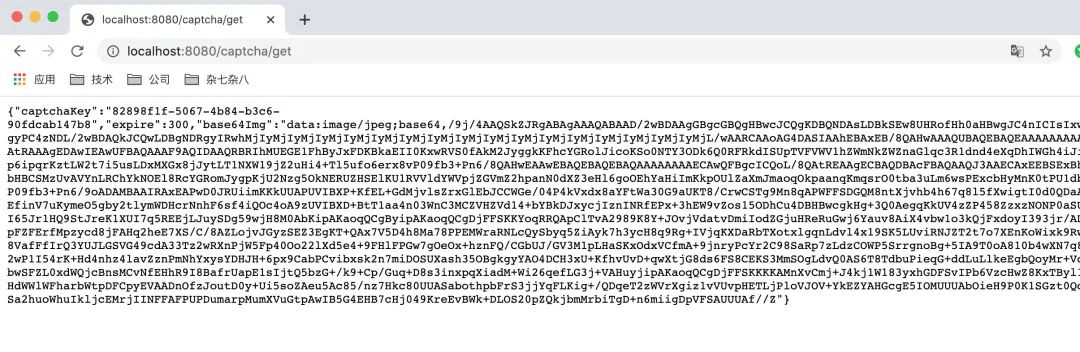
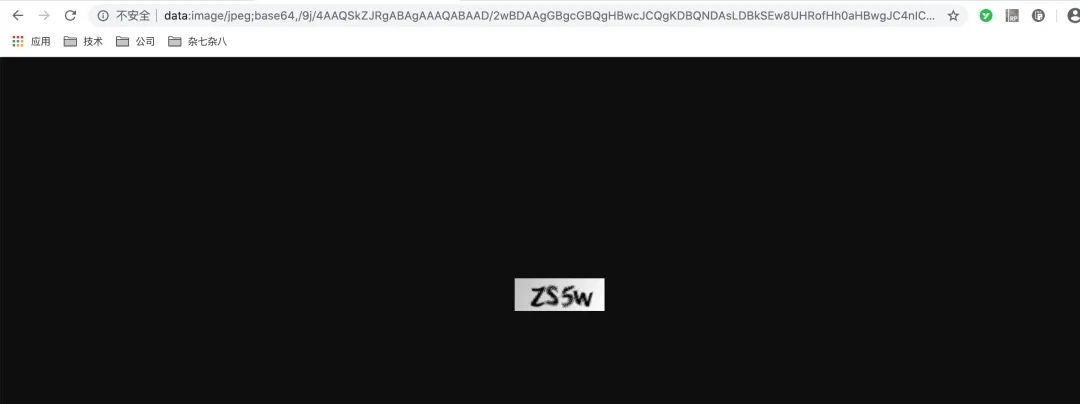
?? 歡迎加入小哈的星球 ,你將獲得: 專屬的項目實戰(zhàn) / Java 學(xué)習(xí)路線 / 一對一提問 / 學(xué)習(xí)打卡
目前, 正在星球內(nèi)部帶小伙伴做第一個項目:前后端分離博客,手摸手,后端 + 前端全棧開發(fā),從 0 到 1 講解每個功能點開發(fā)步驟,1v1 答疑,直到項目上線。目前已更新了90小節(jié),累計12w+字,講解圖:612張,還在持續(xù)爆肝中.. 后續(xù)還會上新更多項目,如秒殺系統(tǒng), 在線商城, IM即時通訊等,戳我加入學(xué)習(xí),已有280+小伙伴加入(超低價)

1. 巧用 Redis,實現(xiàn)微博 Feed 流功能!
最近面試BAT,整理一份面試資料《Java面試BATJ通關(guān)手冊》,覆蓋了Java核心技術(shù)、JVM、Java并發(fā)、SSM、微服務(wù)、數(shù)據(jù)庫、數(shù)據(jù)結(jié)構(gòu)等等。
獲取方式:點“在看”,關(guān)注公眾號并回復(fù) Java 領(lǐng)取,更多內(nèi)容陸續(xù)奉上。
PS:因公眾號平臺更改了推送規(guī)則,如果不想錯過內(nèi)容,記得讀完點一下“在看”,加個“星標(biāo)”,這樣每次新文章推送才會第一時間出現(xiàn)在你的訂閱列表里。
點“在看”支持小哈呀,謝謝啦