
Spring Boot + MyBatis + MySQL讀寫分離
關(guān)注我們,設(shè)為星標(biāo),每天7:30不見不散,架構(gòu)路上與您共享 回復(fù)"架構(gòu)師"獲取資源
1. 引言
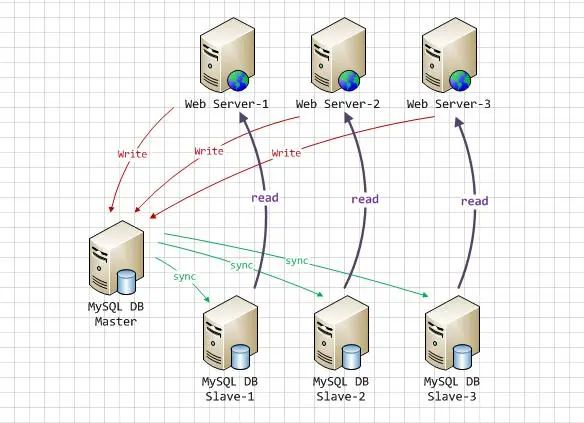
讀寫分離要做的事情就是對(duì)于一條SQL該選擇哪個(gè)數(shù)據(jù)庫(kù)去執(zhí)行,至于誰(shuí)來(lái)做選擇數(shù)據(jù)庫(kù)這件事兒,無(wú)非兩個(gè),要么中間件幫我們做,要么程序自己做。因此,一般來(lái)講,讀寫分離有兩種實(shí)現(xiàn)方式。
地址:www.cnblogs.com/cjsblog/p/9706370.html<?xml version="1.0" encoding="UTF-8"?>
<project xmlns="http://maven.apache.org/POM/4.0.0" xmlns:xsi="http://www.w3.org/2001/XMLSchema-instance"
xsi:schemaLocation="http://maven.apache.org/POM/4.0.0 http://maven.apache.org/xsd/maven-4.0.0.xsd">
<modelVersion>4.0.0</modelVersion>
<groupId>com.cjs.example</groupId>
<artifactId>cjs-datasource-demo</artifactId>
<version>0.0.1-SNAPSHOT</version>
<packaging>jar</packaging>
<name>cjs-datasource-demo</name>
<description></description>
<parent>
<groupId>org.springframework.boot</groupId>
<artifactId>spring-boot-starter-parent</artifactId>
<version>2.0.5.RELEASE</version>
<relativePath/> <!-- lookup parent from repository -->
</parent>
<properties>
<project.build.sourceEncoding>UTF-8</project.build.sourceEncoding>
<project.reporting.outputEncoding>UTF-8</project.reporting.outputEncoding>
<java.version>1.8</java.version>
</properties>
<dependencies>
<dependency>
<groupId>org.springframework.boot</groupId>
<artifactId>spring-boot-starter-aop</artifactId>
</dependency>
<dependency>
<groupId>org.springframework.boot</groupId>
<artifactId>spring-boot-starter-jdbc</artifactId>
</dependency>
<dependency>
<groupId>org.springframework.boot</groupId>
<artifactId>spring-boot-starter-web</artifactId>
</dependency>
<dependency>
<groupId>org.mybatis.spring.boot</groupId>
<artifactId>mybatis-spring-boot-starter</artifactId>
<version>1.3.2</version>
</dependency>
<dependency>
<groupId>org.apache.commons</groupId>
<artifactId>commons-lang3</artifactId>
<version>3.8</version>
</dependency>
<dependency>
<groupId>mysql</groupId>
<artifactId>mysql-connector-java</artifactId>
<scope>runtime</scope>
</dependency>
<dependency>
<groupId>org.springframework.boot</groupId>
<artifactId>spring-boot-starter-test</artifactId>
<scope>test</scope>
</dependency>
</dependencies>
<build>
<plugins>
<plugin>
<groupId>org.springframework.boot</groupId>
<artifactId>spring-boot-maven-plugin</artifactId>
</plugin>
<!--<plugin>
<groupId>org.mybatis.generator</groupId>
<artifactId>mybatis-generator-maven-plugin</artifactId>
<version>1.3.5</version>
<dependencies>
<dependency>
<groupId>mysql</groupId>
<artifactId>mysql-connector-java</artifactId>
<version>5.1.46</version>
</dependency>
</dependencies>
<configuration>
<configurationFile>${basedir}/src/main/resources/myBatisGeneratorConfig.xml</configurationFile>
<overwrite>true</overwrite>
</configuration>
<executions>
<execution>
<id>Generate MyBatis Artifacts</id>
<goals>
<goal>generate</goal>
</goals>
</execution>
</executions>
</plugin>-->
</plugins>
</build>
</project>
spring:
  datasource:
    master:
      jdbc-url: jdbc:mysql://192.168.102.31:3306/test
      username: root
      password: 123456
      driver-class-name: com.mysql.jdbc.Driver
    slave1:
      jdbc-url: jdbc:mysql://192.168.102.56:3306/test
      username: pig # 只讀賬戶
      password: 123456
      driver-class-name: com.mysql.jdbc.Driver
    slave2:
      jdbc-url: jdbc:mysql://192.168.102.36:3306/test
      username: pig # 只讀賬戶
      password: 123456
      driver-class-name: com.mysql.jdbc.Driver
/**
 * 關(guān)于數(shù)據(jù)源配置,參考SpringBoot官方文檔第79章《Data Access》
 * 79. Data Access
 * 79.1 Configure a Custom DataSource
 * 79.2 Configure Two DataSources
 */

@Configuration
public class DataSourceConfig {

    @Bean
    @ConfigurationProperties("spring.datasource.master")
    public DataSource masterDataSource() {
        return DataSourceBuilder.create().build();
    }

    @Bean
    @ConfigurationProperties("spring.datasource.slave1")
    public DataSource slave1DataSource() {
        return DataSourceBuilder.create().build();
    }

    @Bean
    @ConfigurationProperties("spring.datasource.slave2")
    public DataSource slave2DataSource() {
        return DataSourceBuilder.create().build();
    }

    @Bean
    public DataSource myRoutingDataSource(@Qualifier("masterDataSource") DataSource masterDataSource,
                                          @Qualifier("slave1DataSource") DataSource slave1DataSource,
                                          @Qualifier("slave2DataSource") DataSource slave2DataSource) {
        Map<Object, Object> targetDataSources = new HashMap<>();
        targetDataSources.put(DBTypeEnum.MASTER, masterDataSource);
        targetDataSources.put(DBTypeEnum.SLAVE1, slave1DataSource);
        targetDataSources.put(DBTypeEnum.SLAVE2, slave2DataSource);
        MyRoutingDataSource myRoutingDataSource = new MyRoutingDataSource();
        myRoutingDataSource.setDefaultTargetDataSource(masterDataSource);
        myRoutingDataSource.setTargetDataSources(targetDataSources);
        return myRoutingDataSource;
    }

}
@EnableTransactionManagement
@Configuration
public class MyBatisConfig {

    @Resource(name = "myRoutingDataSource")
    private DataSource myRoutingDataSource;

    @Bean
    public SqlSessionFactory sqlSessionFactory() throws Exception {
        SqlSessionFactoryBean sqlSessionFactoryBean = new SqlSessionFactoryBean();
        sqlSessionFactoryBean.setDataSource(myRoutingDataSource);
        sqlSessionFactoryBean.setMapperLocations(new PathMatchingResourcePatternResolver().getResources("classpath:mapper/*.xml"));
        return sqlSessionFactoryBean.getObject();
    }

    @Bean
    public PlatformTransactionManager platformTransactionManager() {
        return new DataSourceTransactionManager(myRoutingDataSource);
    }
}
package com.cjs.example.enums;

public enum DBTypeEnum {

    MASTER, SLAVE1, SLAVE2;

}
public class DBContextHolder {

    private static final ThreadLocal<DBTypeEnum> contextHolder = new ThreadLocal<>();

    private static final AtomicInteger counter = new AtomicInteger(-1);

    public static void set(DBTypeEnum dbType) {
        contextHolder.set(dbType);
    }

    public static DBTypeEnum get() {
        return contextHolder.get();
    }

    public static void master() {
        set(DBTypeEnum.MASTER);
        System.out.println("切換到master");
    }

    public static void slave() {
        // 輪詢
        int index = counter.getAndIncrement() % 2;
        if (counter.get() > 9999) {
            counter.set(-1);
        }
        if (index == 0) {
            set(DBTypeEnum.SLAVE1);
            System.out.println("切換到slave1");
        }else {
            set(DBTypeEnum.SLAVE2);
            System.out.println("切換到slave2");
        }
    }

}
package com.cjs.example.bean;

import org.springframework.jdbc.datasource.lookup.AbstractRoutingDataSource;
import org.springframework.lang.Nullable;

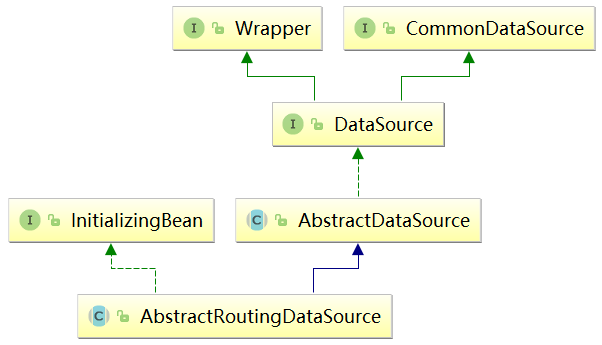
public class MyRoutingDataSource extends AbstractRoutingDataSource {
    @Nullable
    @Override
    protected Object determineCurrentLookupKey() {
        return DBContextHolder.get();
    }

}
@Aspect
@Component
public class DataSourceAop {

    @Pointcut("!@annotation(com.cjs.example.annotation.Master) " +
            "&& (execution(* com.cjs.example.service..*.select*(..)) " +
            "|| execution(* com.cjs.example.service..*.get*(..)))")
    public void readPointcut() {

    }

    @Pointcut("@annotation(com.cjs.example.annotation.Master) " +
            "|| execution(* com.cjs.example.service..*.insert*(..)) " +
            "|| execution(* com.cjs.example.service..*.add*(..)) " +
            "|| execution(* com.cjs.example.service..*.update*(..)) " +
            "|| execution(* com.cjs.example.service..*.edit*(..)) " +
            "|| execution(* com.cjs.example.service..*.delete*(..)) " +
            "|| execution(* com.cjs.example.service..*.remove*(..))")
    public void writePointcut() {

    }

    @Before("readPointcut()")
    public void read() {
        DBContextHolder.slave();
    }

    @Before("writePointcut()")
    public void write() {
        DBContextHolder.master();
    }


    /**
     * 另一種寫法:if...else... 判斷哪些需要讀從數(shù)據(jù)庫(kù),其余的走主數(shù)據(jù)庫(kù)
     */
// @Before("execution(* com.cjs.example.service.impl.*.*(..))")
// public void before(JoinPoint jp) {
// String methodName = jp.getSignature().getName();
//
// if (StringUtils.startsWithAny(methodName, "get", "select", "find")) {
// DBContextHolder.slave();
// }else {
// DBContextHolder.master();
// }
// }
}
package com.cjs.example.annotation;

public @interface Master {
}
@Service
public class MemberServiceImpl implements MemberService {

    @Autowired
    private MemberMapper memberMapper;

    @Transactional
    @Override
    public int insert(Member member) {
        return memberMapper.insert(member);
    }

    @Master
    @Override
    public int save(Member member) {
        return memberMapper.insert(member);
    }

    @Override
    public List<Member> selectAll() {
        return memberMapper.selectByExample(new MemberExample());
    }

    @Master
    @Override
    public String getToken(String appId) {
        // 有些讀操作必須讀主數(shù)據(jù)庫(kù)
        // 比如,獲取微信access_token,因?yàn)楦叻鍟r(shí)期主從同步可能延遲
        // 這種情況下就必須強(qiáng)制從主數(shù)據(jù)讀
        return null;
    }
}
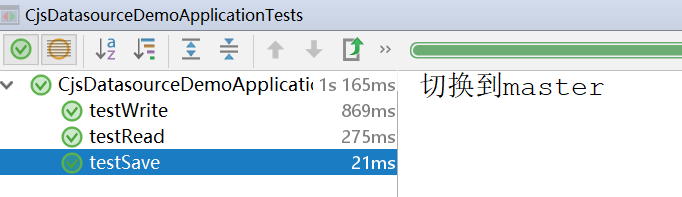
@RunWith(SpringRunner.class)
@SpringBootTest
public class CjsDatasourceDemoApplicationTests {

    @Autowired
    private MemberService memberService;

    @Test
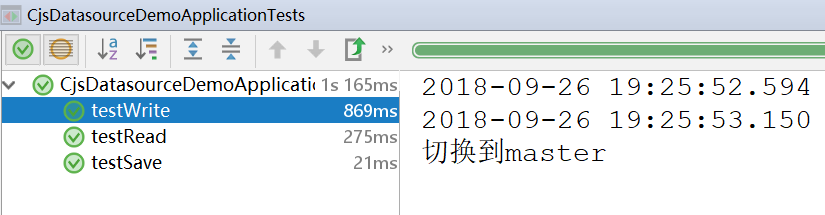
    public void testWrite() {
        Member member = new Member();
        member.setName("zhangsan");
        memberService.insert(member);
    }

    @Test
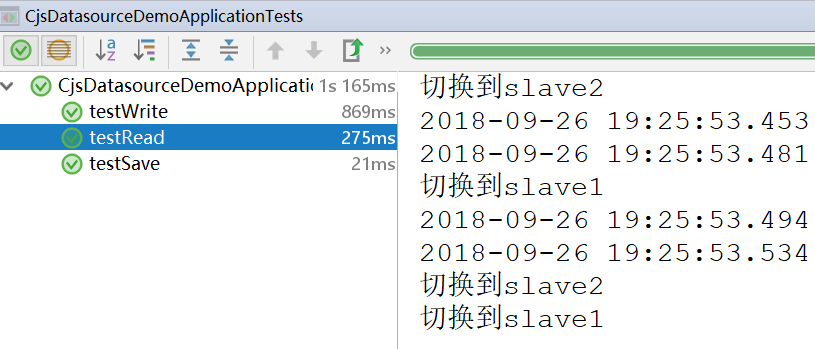
    public void testRead() {
        for (int i = 0; i < 4; i++) {
            memberService.selectAll();
        }
    }

    @Test
    public void testSave() {
        Member member = new Member();
        member.setName("wangwu");
        memberService.save(member);
    }

    @Test
    public void testReadFromMaster() {
        memberService.getToken("1234");
    }

}

6. 參考
https://www.jianshu.com/p/f2f4256a2310
http://www.cnblogs.com/gl-developer/p/6170423.html
https://www.cnblogs.com/huangjuncong/p/8576935.html
https://blog.csdn.net/liu976180578/article/details/77684583

到此文章就結(jié)束了。如果今天的文章對(duì)你在進(jìn)階架構(gòu)師的路上有新的啟發(fā)和進(jìn)步,歡迎轉(zhuǎn)發(fā)給更多人。歡迎加入架構(gòu)師社區(qū)技術(shù)交流群,眾多大咖帶你進(jìn)階架構(gòu)師,在后臺(tái)回復(fù)“加群”即可入群。
這些年小編給你分享過(guò)的干貨
1.SpringBoot物流管理項(xiàng)目,拿去學(xué)習(xí)吧(附源碼)
2.ERP系統(tǒng),自帶進(jìn)銷存+財(cái)務(wù)+生產(chǎn)功能,拿來(lái)即用(附源碼)
3.帶工作流的SpringBoot后臺(tái)管理項(xiàng)目快速開發(fā)(附源碼)
4.最好的OA系統(tǒng),拿來(lái)即用,非常方便(附源碼)
5.SpringBoot+Vue完整的外賣系統(tǒng),手機(jī)端和后臺(tái)管理,附源碼!
6.SpringBoot+Vue 可視化拖拽編輯的大屏項(xiàng)目(附源碼)

轉(zhuǎn)發(fā)在看就是最大的支持??