
EasyExcel 帶格式多線程導出百萬數(shù)據(jù)(實測好用)
大家好,我是寶哥!
前言
以下為結(jié)合實際情況作的方案設(shè)計,導出閾值以及單sheet頁條數(shù)都可以根據(jù)實際情況調(diào)整
大佬可直接跳過新手教程,直接查看文末代碼
1. 背景說明
針對明細報表,用戶會選擇針對當前明細數(shù)據(jù)進行導出,便于本地或者線下進行處理或者計算等需求。不過一般在這種大數(shù)據(jù)量的導出任務下,會引發(fā)以下問題:
響應時間較慢; 內(nèi)存資源占用過大,基本上一個大數(shù)據(jù)量的導出會消耗可視化服務的所有資源,引起內(nèi)存回收,其它接口無響應;
考慮到單個excel文件過大,采用壓縮文件流zip的方式,一個excel只有一個頁簽,一個頁簽最多十萬條數(shù)據(jù),所以少于十萬條數(shù)據(jù),會導出excel文件,而非zip壓縮文件。
另外,這里導出功能的速率不能單以數(shù)據(jù)條數(shù)為量級進行衡量,平常一般一萬條數(shù)據(jù)就是1M字節(jié)。較為準確的公式如下(借此就可以評估出很多數(shù)據(jù)導出的文件大小):
文件大小1M字節(jié) = 字段列數(shù)15個 * 數(shù)據(jù)條數(shù)一萬條
2. 方案概述
(1)大數(shù)據(jù)量導出問題主要是以下三個地方:
資源占用 內(nèi)存(也是資源的一個,單獨說明) 響應時間
針對以上三個問題,大方向考慮的是多線程結(jié)合數(shù)據(jù)流寫入的方式。多線程:使用空間換時間,主要是加快接口響應時間,但是這里線程數(shù)不宜過多,一味加快響應時間提升線程數(shù),資源占用會非常嚴重,故會考慮線程池,線程池的線程數(shù)為10;數(shù)據(jù)流:數(shù)據(jù)的IO-讀取/寫入等操作一般都是通過“數(shù)據(jù)包”的方式,即將結(jié)果數(shù)據(jù)作為一個整體,這樣如果數(shù)據(jù)量多的話,會非常占用內(nèi)存,所以采用數(shù)據(jù)流的方式,而且導出的時候會進行格式設(shè)置(單元格合并、背景色、字體樣式等),一直使用的是Alibaba EasyExcel組件,并且Alibaba EasyExcel組件支持數(shù)據(jù)流的方式讀取/寫入數(shù)據(jù)。
(2)將寫入導出Excel等功能單獨分開成一個微服務:
注意:如果單個服務分配的資源足夠的話,可以不用將導出功能與原應用服務拆開,這里可以省略
搶占資源 由于導出功能內(nèi)存溢出,如果不做分離獨立,整個應用服務也會宕機
(3)注意:
多線程下,同一頁簽的寫入不可同步,即Alibaba EasyExcel組件的文件寫入流SheetWriter是異步的; 多線程下,每個線程所用的文件寫入SheetWriter是一個復制,依舊會占用大量內(nèi)存; 微服務拆分時,數(shù)據(jù)讀取和文件寫入是在一個線程下的,所以新的微服務也要實現(xiàn)一套數(shù)據(jù)讀取邏輯; 壓縮文件使用壓縮文件流,ZipOutputStream,不需要暫存本地;
(4)方案設(shè)計:
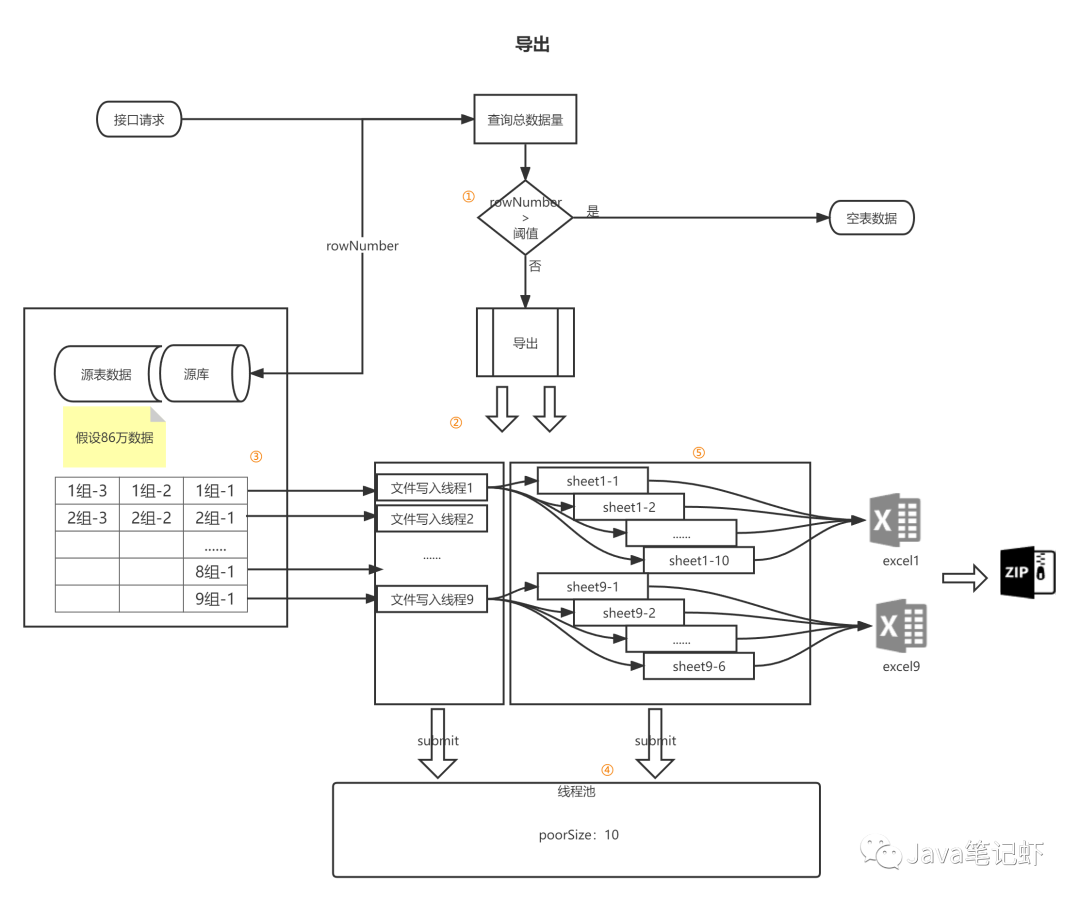
標注說明
1) 閾值可以進行設(shè)置,考慮到業(yè)務場景以及資源使用,這里閾值數(shù)據(jù)量為100w條,超過一百萬會導出空表(而非導出一百萬數(shù)據(jù))
2) 導出進行多線程,啟用最多十個多線程(默認最多一百萬條數(shù)據(jù),一個sheet頁十萬條數(shù)據(jù)),每個線程會進行兩個動作,查詢數(shù)據(jù)以及數(shù)據(jù)寫入操作,(如果數(shù)據(jù)量較少,依舊是適用的)
3) 說明圖,以86萬數(shù)據(jù)為例,也就是說會啟用九個文件寫入線程,一個文件寫入線程生成一個excel導出文件;
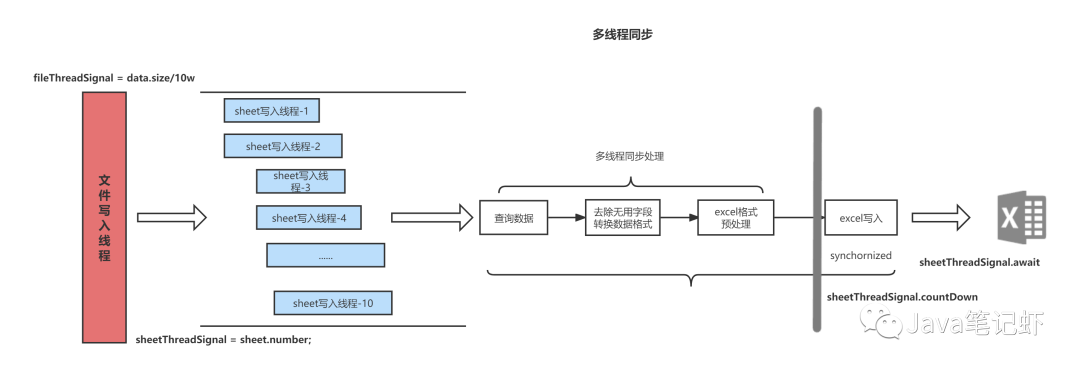
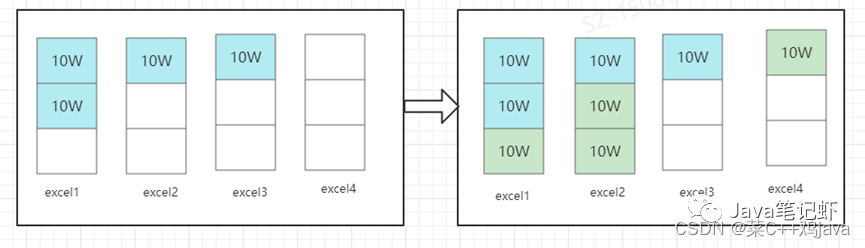
4) 線程池為隊列線程,即后來的線程進入排隊等待,隊列長度(線程池大小)為10;
5) 每個文件寫入線程會生成最多十個sheet(默認一個sheet頁十萬數(shù)據(jù))寫入線程(最后一個文件寫入線程可能會少于十個)。
(5)maven依賴:
<!-- easyexcel -->
<dependency>
    <groupId>com.alibaba</groupId>
    <artifactId>easyexcel</artifactId>
    <version>2.1.7</version>
</dependency>
3. 詳細設(shè)計
(1)文件寫入多線程,按每個文件十萬條數(shù)據(jù)進行導出,每個文件寫入線程生成一個excel文件(單頁簽);
ROW_SIZE:一次查詢的數(shù)據(jù)量,此處設(shè)置為10000條ROW_PAGE:一個頁簽多少次查詢,此處設(shè)置為10次;
private static Interger ROW_SIZE = 10000;
private static interger ROW_PAGE = 10;
/**
* divide into sheets with 10W data per sheet
* */
int sheetCount = (rowCount/ (ROW_SIZE*ROW_PAGE))+1;
for(int i=0;i<sheetCount;i++){
  threadExecutor.submit(()->{sheetWrite()});
}
(2)sheet寫入多線程,最后一個文件寫入線程的最后一個sheet寫入線程可能不足1W條數(shù)據(jù);
// 單sheet頁寫入數(shù)
int sheetThreadCount = rowCount - (i+1)*(ROW_SIZE*ROW_PAGE) > 0 ? ROW_PAGE : (rowCount - i*(ROW_SIZE*ROW_PAGE))/ROW_SIZE+1;
CountDownLatch threadSignal = new CountDownLatch(sheetThreadCount);
for(int j=0;j<sheetThreadCount;j++) {
  threadExecutor.submit(()->{excelWriter()});
}
threadSignal.await();
(3)異步寫入sheet文件,不同的文件寫入線程寫入不同的文件,所以只需要保證同一個文件寫入線程下不同sheet寫入線程的excelWriter異步即可;
// 獲取數(shù)據(jù)
// todo
// 數(shù)據(jù)格式處理
Synchronized(excelWriter){
  WriteSheet writeSheet = EasyExcel.writerSheet(sheetNo, "第" + (sheetNo+1) + "頁數(shù)據(jù)");
  excelWriter.write(lists, writeSheet);
}
(4)壓縮文件,將多個excel壓縮成一個zip,最后上傳至fast dfs,返回前端下載地址,使用hutool封裝的ZipUtil方法;
package cn.hutool.core.util;
String[] paths = new String[10];
FileInputStream[] ins = new FileInputStream[10];
ZipUtil.zip(OutputStream out, String[] paths, InputStream[] ins);
byte[] bytes = outputStream.toByteArray();
// 上傳文件到FastDFS  返回上傳路徑
String path = fastWrapper.uploadFile(bytes, bytes.length, "zip");
return path + "?filename=" + fileName;
4. 緩存
每次請求是生成一個文件并上傳至FastDFS服務器上,然后將下載路徑返回給前端,有時多個用戶頻繁下載同一個文件(或者用戶短時間內(nèi)點擊同一個下載任務)。針對以上情況,考慮采用緩存,將第一次的數(shù)據(jù)緩存下來。
① 請求參數(shù)較多,需要根據(jù)參數(shù)判斷是否為同一個下載文件請求;
數(shù)據(jù)集ID 過濾器 數(shù)據(jù)量 數(shù)據(jù)集字段(先根據(jù)ID排序,再進行拼接)
② 設(shè)置過期時間(30分鐘),不考慮數(shù)據(jù)一致性的問題(即數(shù)據(jù)源數(shù)據(jù)更改后,再更新緩存)。僅僅是做初步工作,即短時間內(nèi),只要符合條件①且時間未過期,就采用同一份數(shù)據(jù);
③ 當請求下載的為同一份文件時,只是文件名不同時,依舊采用同一份緩存數(shù)據(jù);
注:針對于數(shù)據(jù)一致性的問題,不對單個數(shù)據(jù)的內(nèi)容變更進行考慮,原因是大數(shù)據(jù)量下,數(shù)據(jù)是否有變更的判斷較為復雜,不現(xiàn)實。這里只判斷在相同的請求條件下的總條數(shù)。
5. 可行性驗證
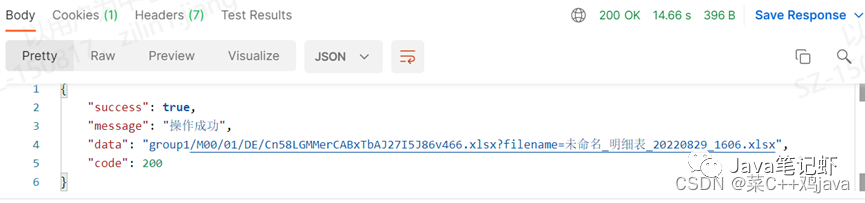
(1)單個文件寫入下,176個字段,14140條數(shù)據(jù),excel大小15M,響應時間為14.66s(未報錯,未觸發(fā)異常)
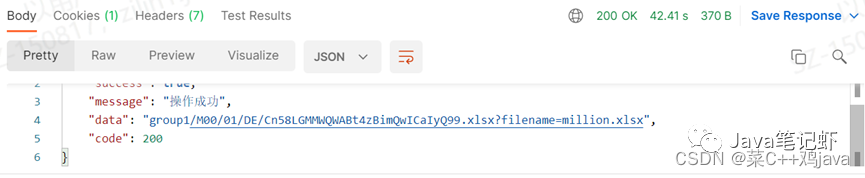
(2)單個文件寫入下,14個字段,98萬數(shù)據(jù),excel大小為96M,響應時間為42.41s(未報錯,未觸發(fā)異常)
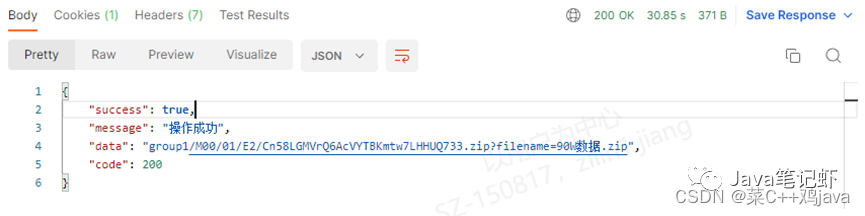
(3)拆分微服務下,14個字段,98萬數(shù)據(jù),zip大小為104M,平均響應時間為27.34s(未報錯,未觸發(fā)異常)
6. 代碼
文件導出核心代碼
TableExport.java
public String exportTable(ExportTable exportTable) throws Exception {
  StringBuffer path = new StringBuffer();
        ByteArrayOutputStream outputStream = new ByteArrayOutputStream();
        StringBuffer sign = new StringBuffer ();
        //redis key
        sign.append(exportTable.getId());
  try {
   // 用來記錄需要為 行 列設(shè)置樣式
            Map<String, Map<Integer, List<Map<Integer, ExportTable.ExportColumn.Font>>>> map = new HashMap<>();
            sign.append("#").append(String.join(",", fields.stream().map(e-> e.isShow()?"true":"false").collect(Collectors.toList())));
            setFontStyle(0, 0, exportTable.getFields(), map);
            // 獲取表頭長度
            int headRow = head.stream().max(Comparator.comparingInt(List::size)).get().size();

            // 數(shù)據(jù)量超過十萬 則不帶樣式
            // 只處理表頭:表頭合并 表頭隱藏 表頭凍結(jié)
            if(rowCount*fields.size() > ROW_SIZE*6.4){
                map.put("cellStyle", null);
            }
            sign.append("#").append(exportTable.getStyle());
            // 數(shù)據(jù)量超過百萬或者數(shù)據(jù)為空,只返回有表頭得單元格
            if(rowCount==0 || rowCount*fields.size() >= ROW_SIZE*1500){
                EasyExcel.write(outputStream)
                        // 這里放入動態(tài)頭
                        .head(head).sheet("數(shù)據(jù)")
                        // 傳入表頭樣式
                        .registerWriteHandler(EasyExcelUtils.getStyleStrategy())
                        // 當然這里數(shù)據(jù)也可以用 List<List<String>> 去傳入
                        .doWrite(new LinkedList<>());
                byte[] bytes = outputStream.toByteArray();
                // 上傳文件到FastDFS  返回上傳路徑
                return fastWrapper.uploadFile(bytes, bytes.length, "xlsx") + "?filename=" + fileName + ".xlsx";
            }
            sign.append("#").append(rowCount);
            String fieldSign = fields.stream().sorted(Comparator.comparing(ExportTable.ExportColumn::getId))
                    .map(e->e.getId()).collect(Collectors.joining(","));
            sign.append("#").append(fieldSign);
            /**
             * 相同的下載文件請求 直接返回
             * the redis combines with datasetId - filter - size of data - fields
             */
            if (redisClientImpl.hasKey(sign.toString())){
                return redisClientImpl.get(sign.toString()).toString();
            }
            /**
             * 分sheet頁
             * divide into sheets with 10M data per sheet
             */
            int sheetCount = (rowCount/ (ROW_SIZE*ROW_PAGE))+1;
            String[] paths = new String[sheetCount];
            ByteArrayInputStream[] ins = new ByteArrayInputStream[sheetCount];

            CountDownLatch threadSignal = new CountDownLatch(sheetCount);
            for(int i=0;i<sheetCount;i++) {
                int finalI = i;
                String finalTable = table;
                Datasource finalDs = ds;
                String finalOrder = order;
                int finalRowCount = rowCount;
                threadExecutor.submit(()->{
                    // excel文件流
                    ByteArrayOutputStream singleOutputStream = new ByteArrayOutputStream();
                    ExcelWriter excelWriter = EasyExcel.write(singleOutputStream).build();
                    // 單sheet頁寫入數(shù)
                    int sheetThreadCount = finalI == (sheetCount-1) ? (finalRowCount - finalI *(ROW_SIZE*ROW_PAGE))/ROW_SIZE+1 : ROW_PAGE;
                    CountDownLatch sheetThreadSignal = new CountDownLatch(sheetThreadCount);
                    for(int j=0;j<sheetThreadCount;j++) {
                        int page = finalI *ROW_PAGE + j + 1;
                        // 最后一頁數(shù)據(jù)
                        int pageSize = j==(sheetThreadCount-1)&& finalI ==(sheetCount-1) ? finalRowCount %ROW_SIZE : ROW_SIZE;
                        threadExecutor.submit(()->{
                            try {
                                writeExcel(dataSetTableRequest, datasetTable, finalTable, qp,
                                        datasetTableFields, exportTable, page, pageSize, finalDs, datasourceProvider,
                                        fieldArray, fields, head, map, headRow, excelWriter, mergeIndex, finalOrder);
                                sheetThreadSignal.countDown();
                            } catch (Exception e) {
                                e.printStackTrace();
                            }
                        });
                    }
                    try {
                        sheetThreadSignal.await();
                    } catch (InterruptedException e) {
                        e.printStackTrace();
                    }
                    // 關(guān)閉寫入流
                    excelWriter.finish();
                    paths[finalI] = (finalI +1) + "-" + fileName + ".xlsx";
                    // 單文件
                    if (sheetCount == 1){
                        // xlsx
                        // 將sign存入redis并設(shè)置過期時間
                    }
                    threadSignal.countDown();
                });
            }
            threadSignal.await();

            if (sheetCount != 1){
                ZipUtil.zip(outputStream, paths, ins);
                byte[] bytes = outputStream.toByteArray();
                // 上傳文件到FastDFS  返回上傳路徑
                path.append(fastWrapper.uploadFile(bytes, bytes.length, "zip"))
                        .append("?filename=").append(fileName).append(".zip");
                // 將sign存入redis并設(shè)置過期時間
                redisClientImpl.set(sign.toString(), path.toString(), SYS_REDIS_EXPIRE_TIME);
            }
        } catch (Exception e) {
            e.printStackTrace();
        }
        return path.toString();
 }

 private void writeExcel(ExcelWriter excelWriter){
  //數(shù)據(jù)查詢
  // todo
  synchronized (excelWriter) {
  WriteSheet writeSheet = EasyExcel.writerSheet(0, "第" + 1 + "頁數(shù)據(jù)")
                            // 這里放入動態(tài)頭
                            .head(head)
                            //傳入樣式
                            .registerWriteHandler(EasyExcelUtils.getStyleStrategy())
                            .registerWriteHandler(new CellColorSheetWriteHandler(map, headRow))
                            .registerWriteHandler(new MergeStrategy(lists.size(), mergeIndex))
                            // 當然這里數(shù)據(jù)也可以用 List<List<String>> 去傳入
                            .build();
                    excelWriter.write(lists, writeSheet);
  }
 }
Excel導出的文件流樣式處理類。
CellColorSheetWriteHandler.java
import com.alibaba.excel.metadata.CellData;
import com.alibaba.excel.metadata.Head;
import com.alibaba.excel.util.StyleUtil;
import com.alibaba.excel.write.handler.CellWriteHandler;
import com.alibaba.excel.write.metadata.holder.WriteSheetHolder;
import com.alibaba.excel.write.metadata.holder.WriteTableHolder;
import com.alibaba.excel.write.metadata.style.WriteCellStyle;
import org.apache.commons.lang3.StringUtils;
import org.apache.poi.ss.usermodel.*;
import org.apache.poi.xssf.usermodel.XSSFCellStyle;
import org.apache.poi.xssf.usermodel.XSSFColor;
import org.apache.poi.xssf.usermodel.XSSFFont;

import java.awt.Color;
import java.util.List;
import java.util.Map;
import java.util.concurrent.atomic.AtomicInteger;

/**
 * @Author 菜鳥
 * @description 攔截處理單元格創(chuàng)建
 */
public class CellColorSheetWriteHandler implements CellWriteHandler
{
    /**
     * 多行表頭行號
     */
    private int headRow;

    /**
     * 字體
     */
    private ExportTable.ExportColumn.Font columnFont = new ExportTable.ExportColumn.Font();

    private static volatile XSSFCellStyle cellStyle = null;

    public static XSSFCellStyle getCellStyle(Workbook workbook, WriteCellStyle contentWriteCellStyle) {
        if(cellStyle == null) {
            synchronized (XSSFCellStyle.class) {
                if(cellStyle == null) {
                    cellStyle =(XSSFCellStyle) StyleUtil.buildHeadCellStyle(workbook, contentWriteCellStyle);
                }
            }
        }
        return cellStyle;
    }

    /**
     * 字體
     * Map<Integer, ExportTable.ExportColumn.Font> 當前列的字段樣式
     * Map<Integer, List<Map<...>>> 當前行包含那幾列需要設(shè)置樣式
     * String head:表頭;
     * String cell:內(nèi)容;
     */
    private Map<String, Map<Integer, List<Map<Integer, ExportTable.ExportColumn.Font>>>> map;

    /**
     * 有參構(gòu)造
     */
    public CellColorSheetWriteHandler(Map<String, Map<Integer, List<Map<Integer, ExportTable.ExportColumn.Font>>>> map, int headRow) {
        this.map = map;
        this.headRow = headRow;
    }

    /**
     * 在單元上的所有操作完成后調(diào)用
     */
    @Override
    public void afterCellDispose(WriteSheetHolder writeSheetHolder, WriteTableHolder writeTableHolder, List<CellData> cellDataList, Cell cell, Head head, Integer relativeRowIndex, Boolean isHead) {
        // 當前行的第column列
        int column = cell.getColumnIndex();
        // 當前第row行
        int row = cell.getRowIndex();
        AtomicInteger fixNum = new AtomicInteger();
        // 處理行,表頭
        if (headRow > row && map.containsKey("head")){
            Map<Integer, List<Map<Integer, ExportTable.ExportColumn.Font>>> fonts = map.get("head");
            fonts.get(row).forEach(e->{
                e.entrySet().forEach(ele -> {
                    // 獲取凍結(jié)字段
                    if (null != ele.getValue().getFixed() && !StringUtils.isEmpty(ele.getValue().getFixed())) {
                        fixNum.getAndIncrement();
                    }
                    // 字段隱藏
                    if(!ele.getValue().isShow()){
                        writeSheetHolder.getSheet().setColumnHidden(ele.getKey(), true);
                    }
                });
            });
            if (fixNum.get() > 0 && row == 0) {
                writeSheetHolder.getSheet().createFreezePane(fixNum.get(), headRow, fixNum.get(), headRow);
            }else{
                writeSheetHolder.getSheet().createFreezePane(0, headRow, 0, headRow);
            }
            setStyle(fonts, row, column, cell, writeSheetHolder, head);
        }
        // 處理內(nèi)容
        if (headRow <= row && map.containsKey("cell") && !map.containsKey("cellStyle")) {
            Map<Integer, List<Map<Integer, ExportTable.ExportColumn.Font>>> fonts = map.get("cell");
            setStyle(fonts, -1, column, cell, writeSheetHolder, head);
        }
    }

    private void setStyle(Map<Integer, List<Map<Integer, ExportTable.ExportColumn.Font>>> fonts, int row, int column, Cell cell, WriteSheetHolder writeSheetHolder, Head head){
        fonts.get(row).forEach(e->{
            if (e.containsKey(column)){
                // 根據(jù)單元格獲取workbook
                Workbook workbook = cell.getSheet().getWorkbook();
                //設(shè)置列寬
                if(null != e.get(column).getWidth() && !e.get(column).getWidth().isEmpty()) {
                    writeSheetHolder.getSheet().setColumnWidth(head.getColumnIndex(), Integer.parseInt(e.get(column).getWidth()) * 20);
                }else{
                    writeSheetHolder.getSheet().setColumnWidth(head.getColumnIndex(),2000);
                }
                // 單元格策略
                WriteCellStyle contentWriteCellStyle = new WriteCellStyle();
                // 設(shè)置垂直居中為居中對齊
                contentWriteCellStyle.setVerticalAlignment(VerticalAlignment.CENTER);
                // 設(shè)置左右對齊方式
                if(null != e.get(column).getAlign() && !e.get(column).getAlign().isEmpty()) {
                    contentWriteCellStyle.setHorizontalAlignment(getHorizontalAlignment(e.get(column).getAlign()));
                }else{
                    contentWriteCellStyle.setHorizontalAlignment(HorizontalAlignment.LEFT);
                }
                if (!e.get(column).equal(columnFont) || column == 0){
                    /**
                     * Prevent the creation of a large number of objects
                     * Defects of the EasyExcel tool(巨坑,簡直脫發(fā)神器)
                     */
                    cellStyle = (XSSFCellStyle) StyleUtil.buildHeadCellStyle(workbook, contentWriteCellStyle);
                    // 設(shè)置單元格背景顏色
                    if(null != e.get(column).getBackground() && !e.get(column).getBackground().isEmpty()) {
                        cellStyle.setFillForegroundColor(new XSSFColor(hex2Color(e.get(column).getBackground())));
                    }else{
                        if(cell.getRowIndex() >= headRow)
                            cellStyle.setFillForegroundColor(IndexedColors.WHITE.getIndex());
                    }

                    // 創(chuàng)建字體實例
                    Font font = workbook.createFont();
                    // 設(shè)置字體是否加粗
                    if(null != e.get(column).getFontWeight() && !e.get(column).getFontWeight().isEmpty())
                        font.setBold(getBold(e.get(column).getFontWeight()));
                    // 設(shè)置字體和大小
                    if(null != e.get(column).getFontFamily() && !e.get(column).getFontFamily().isEmpty())
                        font.setFontName(e.get(column).getFontFamily());
                    if(0 != e.get(column).getFontSize())
                        font.setFontHeightInPoints((short) e.get(column).getFontSize());
                    XSSFFont xssfFont = (XSSFFont)font;
                    //設(shè)置字體顏色
                    if(null != e.get(column).getColor() && !e.get(column).getColor().isEmpty())
                        xssfFont.setColor(new XSSFColor(hex2Color(e.get(column).getColor())));
                    cellStyle.setFont(xssfFont);
                    // 記錄上一個樣式
                    columnFont = e.get(column);
                }

                // 設(shè)置當前行第column列的樣式
                cell.getRow().getCell(column).setCellStyle(cellStyle);
                // 設(shè)置行高
                cell.getRow().setHeight((short) 400);
            }
        });
    }
}
Excel導出的默認樣式設(shè)置類。
EasyExcelUtils.java
public static HorizontalCellStyleStrategy getStyleStrategy(){
        // 頭的策略
        WriteCellStyle headWriteCellStyle = new WriteCellStyle();
        // 背景設(shè)置為灰色
        headWriteCellStyle.setFillForegroundColor(IndexedColors.GREY_25_PERCENT.getIndex());
        WriteFont headWriteFont = new WriteFont();
        headWriteFont.setFontHeightInPoints((short)12);
        // 字體樣式
        headWriteFont.setFontName("Frozen");
        // 字體顏色
        headWriteFont.setColor(IndexedColors.BLACK1.getIndex());
        headWriteCellStyle.setWriteFont(headWriteFont);
        // 自動換行
        headWriteCellStyle.setWrapped(false);
        // 水平對齊方式(修改默認對齊方式——4.14 版本1.3.2)
        headWriteCellStyle.setHorizontalAlignment(HorizontalAlignment.LEFT);
        // 垂直對齊方式
        headWriteCellStyle.setVerticalAlignment(VerticalAlignment.CENTER);

        // 內(nèi)容的策略
        WriteCellStyle contentWriteCellStyle = new WriteCellStyle();
        // 這里需要指定 FillPatternType 為FillPatternType.SOLID_FOREGROUND 不然無法顯示背景顏色.頭默認了 FillPatternType所以可以不指定
        //        contentWriteCellStyle.setFillPatternType(FillPatternType.SQUARES);
        // 背景白色
        contentWriteCellStyle.setFillForegroundColor(IndexedColors.WHITE.getIndex());
        // 水平對齊方式(修改默認對齊方式——4.14 版本1.3.2)
        contentWriteCellStyle.setHorizontalAlignment(HorizontalAlignment.LEFT);
        WriteFont contentWriteFont = new WriteFont();
        // 字體大小
        contentWriteFont.setFontHeightInPoints((short)12);
        // 字體樣式
        contentWriteFont.setFontName("Calibri");
        contentWriteCellStyle.setWriteFont(contentWriteFont);
        // 這個策略是 頭是頭的樣式 內(nèi)容是內(nèi)容的樣式 其他的策略可以自己實現(xiàn)
        return new HorizontalCellStyleStrategy(headWriteCellStyle, contentWriteCellStyle);
    }
Excel導出合并單元格處理類。
MergeStrategy.class
import com.alibaba.excel.metadata.Head;
import com.alibaba.excel.write.merge.AbstractMergeStrategy;
import org.apache.commons.collections.map.HashedMap;
import org.apache.poi.ss.usermodel.Cell;
import org.apache.poi.ss.usermodel.Sheet;
import org.apache.poi.ss.util.CellRangeAddress;

import java.util.*;

/**
 * @Author 菜雞
 * @description 合并單元格策略
 */
public class MergeStrategy extends AbstractMergeStrategy
{

    /**
     * 合并的列編號,從0開始
     * 指定的index或自己按字段順序數(shù)
     */
    private Set<Integer> mergeCellIndex = new HashSet<>();

    /**
     * 數(shù)據(jù)集大小,用于區(qū)別結(jié)束行位置
     */
    private Integer maxRow = 0;

    // 禁止無參聲明
    private MergeStrategy() {
    }

    public MergeStrategy(Integer maxRow, Set<Integer> mergeCellIndex) {
        this.mergeCellIndex = mergeCellIndex;
        this.maxRow = maxRow;
    }

    private Map<Integer, MergeRange> lastRow = new HashedMap();

    @Override
    protected void merge(Sheet sheet, Cell cell, Head head, Integer relativeRowIndex) {
        int currentCellIndex = cell.getColumnIndex();
        // 判斷該行是否需要合并
        if (mergeCellIndex.contains(currentCellIndex)) {
            String currentCellValue = cell.getStringCellValue();
            int currentRowIndex = cell.getRowIndex();
            if (!lastRow.containsKey(currentCellIndex)) {
                // 記錄首行起始位置
                lastRow.put(currentCellIndex, new MergeRange(currentCellValue, currentRowIndex, currentRowIndex, currentCellIndex, currentCellIndex));
                return;
            }
            //有上行這列的值了,拿來對比.
            MergeRange mergeRange = lastRow.get(currentCellIndex);
            if (!(mergeRange.lastValue != null && mergeRange.lastValue.equals(currentCellValue))) {
                // 結(jié)束的位置觸發(fā)下合并.
                // 同行同列不能合并,會拋異常
                if (mergeRange.startRow != mergeRange.endRow || mergeRange.startCell != mergeRange.endCell) {
                    sheet.addMergedRegionUnsafe(new CellRangeAddress(mergeRange.startRow, mergeRange.endRow, mergeRange.startCell, mergeRange.endCell));
                }
                // 更新當前列起始位置
                lastRow.put(currentCellIndex, new MergeRange(currentCellValue, currentRowIndex, currentRowIndex, currentCellIndex, currentCellIndex));
            }
            // 合并行 + 1
            mergeRange.endRow += 1;
            // 結(jié)束的位置觸發(fā)下最后一次沒完成的合并
            if (relativeRowIndex.equals(maxRow - 1)) {
                MergeRange lastMergeRange = lastRow.get(currentCellIndex);
                // 同行同列不能合并,會拋異常
                if (lastMergeRange.startRow != lastMergeRange.endRow || lastMergeRange.startCell != lastMergeRange.endCell) {
                    sheet.addMergedRegionUnsafe(new CellRangeAddress(lastMergeRange.startRow, lastMergeRange.endRow, lastMergeRange.startCell, lastMergeRange.endCell));
                }
            }
        }
    }
}

class MergeRange {
    public int startRow;
    public int endRow;
    public int startCell;
    public int endCell;
    public String lastValue;

    public MergeRange(String lastValue, int startRow, int endRow, int startCell, int endCell) {
        this.startRow = startRow;
        this.endRow = endRow;
        this.startCell = startCell;
        this.endCell = endCell;
        this.lastValue = lastValue;
    }
}
來源:blog.csdn.net/qq_40921561/article/details/126764038
往期推薦:
用上這幾個開源管理系統(tǒng)做項目,領(lǐng)導看了直呼專業(yè)!
ES+Redis+MySQL,這個高可用架構(gòu)設(shè)計太頂了!
6個頂級SpringCloud微服務開源項目,企業(yè)開發(fā)必備!
Spring Boot 使用 ChatGPT API 開發(fā)一個聊天機器人
SpringBoot + Sharding JDBC,一文搞定分庫分表、讀寫分離