
使用EasyExcel導入導出excel
點擊上方藍色字體,選擇“標星公眾號”
優(yōu)質文章,第一時間送達
我們實現(xiàn)導入/導出excel的第三方常用類庫有 Apache poi、Java Excel(JXL)和阿里開源的 Easyexcel 等。我比較傾向使用Easyexcel,原因有兩點:
1、性能強。有大量的數(shù)據(jù)去處理時,poi和jxl內存消耗比較大,可能造成內存溢出。
2、上手簡單。poi是比較容易理解的,但是操作起來麻煩,比如我上一篇的“poi導入導出完整實現(xiàn) 包含工具類”,為了簡單實現(xiàn),代碼寫了好多。而easyexcel可以自己處理數(shù)據(jù),樣式也比較好調整。
如果你想更詳細的學習easyexcel建議看官方文檔
easyexcel導出
1、加入依賴
<dependency>
            <groupId>com.alibaba</groupId>
            <artifactId>easyexcel</artifactId>
            <version>2.0.4</version>
            <scope>compile</scope>
        </dependency>
2、編寫控制層
@GetMapping("/export")
    @ResponseBody
    public boolean export(HttpServletResponse response, HttpServletRequest request) {
        boolean exportResult = testService.findInfo(response, request);
        return exportResult;
    }
3、編寫實現(xiàn)層和導出實體類
boolean findInfo(HttpServletResponse response, HttpServletRequest request);


@Override
    public boolean findInfo(HttpServletResponse response, HttpServletRequest request) {
        try {
            List<Map<String, String>> dataList = new ArrayList<>();
            Map<String, String> map = new HashMap<>();
            map.put("id", "1");
            map.put("name", "測試");
            map.put("phone", "測試");
            map.put("address", "測試");
            map.put("enrolDate", "2021-12-11");
            map.put("des", "測試");
            Map<String, String> map1 = new HashMap<>();
            map1.put("id", "2");
            map1.put("name", "測試1");
            map1.put("phone", "測試1");
            map1.put("address", "測試1");
            map1.put("enrolDate", "2021-12-12");
            map1.put("des", "測試1");
            dataList.add(map);
            dataList.add(map1);
            List<TestBo> boList = dataList.stream().filter(Objects::nonNull)
                    .map(s -> TestBo.builder()
                            .id(Integer.valueOf(s.get("id")))
                            .name(s.get("name"))
                            .phone(s.get("phone"))
                            .address(s.get("address"))
                            .enrolDate(s.get("enrolDate"))
                            .des(s.get("des"))
                            .build()).collect(Collectors.toList());

            //導出文件名稱
            String fileName = URLEncoder.encode("測試用戶導出數(shù)據(jù)", "utf-8");
            response.setHeader("Content-disposition", "attachment;filename=" + fileName + ".xlsx");
            EasyExcel.write(response.getOutputStream(), TestBo.class).sheet("用戶導出數(shù)據(jù)").doWrite(boList);
            return true;
        } catch (IOException e) {
            e.printStackTrace();
            return false;
        }
    }


@Data
@NoArgsConstructor
@AllArgsConstructor
@Builder
/**設置 row 高度,不包含表頭*/
@ContentRowHeight(25)
/**設置 表頭 高度(與 @ContentRowHeight 相反)*/
@HeadRowHeight(25)
/**設置列寬*/
@ColumnWidth(25)
@Accessors(chain = true)

public class TestBo {
    /**設置表頭信息*/
    @ExcelProperty("id")
    private Integer id;

    @ExcelProperty("姓名")
    private String name;

    @ExcelProperty("電話")
    private String phone;

    @ExcelProperty("地址")
    private String address;

    @ExcelProperty("時間")
    private String enrolDate;

    @ExcelProperty("備注")
    private String des;

}
4、完成測試

easyexcel導入
1、編寫控制層
@PostMapping(value = "/importExcel")
    @ResponseBody
    public boolean importExcel(@RequestParam("file") MultipartFile file) {
        return testService.importData(file);
    }
2、編寫實現(xiàn)層和實體類
boolean importData(MultipartFile file);


@Override
    @Transactional(rollbackFor = Exception.class)
    public boolean importData(MultipartFile file) {
        try {
            List<Object> objectList =ExcelUtil.readMoreThan1000RowBySheetFromInputStream(file.getInputStream(),null,TestPo.class);
            List<TestPo> poList=new ArrayList<>();
            for (Object object:objectList) {
                System.out.println(object);
                TestPo po=new TestPo();
                List<String> srtList= (List<String>) object;
                po.setId(srtList.get(0)!=null?srtList.get(0).toString():"");
                po.setName(srtList.get(1)!=null?srtList.get(1).toString():"");
                po.setPhone(srtList.get(2)!=null?srtList.get(2).toString():"");
                po.setAddress(srtList.get(3)!=null?srtList.get(3).toString():"");
                po.setEnrolDate(srtList.get(4)!=null?srtList.get(4).toString():"");
                po.setDes(srtList.get(5)!=null?srtList.get(5).toString():"");
                poList.add(po);
            }
            return testDao.saveBatch(poList);
        } catch (Exception e) {
            e.printStackTrace();
            return false;
        }
    }

//實體類
@Data
public class TestPo {
    private String id;

    private String name;

    private String phone;

    private String address;

    private String enrolDate;

    private String des;
}
實際開發(fā)業(yè)務不同入庫方法我就不提供了,提供導入工具類
package com.example.mydemo1.util;

import com.alibaba.excel.context.AnalysisContext;
import com.alibaba.excel.event.AnalysisEventListener;

import java.util.ArrayList;
import java.util.List;

/**
 * 解析監(jiān)聽器,
 * 每解析一行會回調invoke()方法。
 * 整個excel解析結束會執(zhí)行doAfterAllAnalysed()方法
 * @className ExcelListener
 * @description easyexcel
 * @date 2021/3/26 11:14
 */
public class ExcelListener<T> extends AnalysisEventListener<T> {
    private List<T> datas = new ArrayList<T>();

    public List<T> getDatas() {
        return datas;
    }

    public void setDatas(List<T> datas) {
        this.datas = datas;
    }

    /**
     * 逐行解析
     * object : 當前行的數(shù)據(jù)
     */
    @Override
    public void invoke(T object, AnalysisContext context) {
        datas.add(object);
        //當前行
        // context.getCurrentRowNum()
        /*if (object != null) {
            datas.add((T) object);
        }*/
    }


    /**
     * 解析完所有數(shù)據(jù)后會調用該方法
     */
    @Override
    public void doAfterAllAnalysed(AnalysisContext context) {
        //解析結束銷毀不用的資源
    }
}


//=============================================


package com.example.mydemo1.util;

import com.alibaba.excel.metadata.BaseRowModel;
import com.alibaba.excel.metadata.Sheet;
import lombok.Data;

import java.util.List;

/**
 * @className MultipleSheelPropety
 * @description easyexcel
 * @date 2021/3/26 11:15
 */
@Data
public class MultipleSheelPropety {
    private List<? extends BaseRowModel> data;
    private Sheet sheet;
}


//=============================================


package com.example.mydemo1.util;

import com.alibaba.excel.EasyExcelFactory;
import com.alibaba.excel.ExcelWriter;
import com.alibaba.excel.metadata.BaseRowModel;
import com.alibaba.excel.metadata.Sheet;
import lombok.extern.slf4j.Slf4j;
import org.apache.commons.collections.CollectionUtils;
import org.apache.poi.ss.usermodel.Workbook;
import org.springframework.util.StringUtils;

import javax.servlet.http.HttpServletResponse;
import java.io.*;
import java.net.URLEncoder;
import java.util.ArrayList;
import java.util.Collections;
import java.util.List;

/**
 * @className ExcelUtil
 * @description easyexcel工具類
 * @date 2021/3/26 11:10
 */
@Slf4j
public class ExcelUtil {
    private static Sheet initSheet;


    static {
        initSheet = new Sheet(1, 0);
        initSheet.setSheetName("sheet");
        //設置自適應寬度
        initSheet.setAutoWidth(Boolean.TRUE);
    }

    public static void downLoadExcel(String fileName, HttpServletResponse response, Workbook workbook) {
        try {
            response.setCharacterEncoding("UTF-8");
            response.setContentType("application/octet-stream;charset=utf-8");
            response.setHeader("Content-Disposition", "attachment;filename=" + URLEncoder.encode(fileName, "UTF-8"));
            workbook.write(response.getOutputStream());
        } catch (IOException e) {
            // throw new NormalException(e.getMessage());
        }
    }


    /**
     * 讀取少于1000行數(shù)據(jù)
     *
     * @param filePath 文件絕對路徑
     * @return
     */
    public static List<Object> readLessThan1000Row(String filePath) {
        return readLessThan1000RowBySheet(filePath, null);
    }


    /**
     * 讀小于1000行數(shù)據(jù), 帶樣式
     * filePath 文件絕對路徑
     * initSheet :
     * sheetNo: sheet頁碼,默認為1
     * headLineMun: 從第幾行開始讀取數(shù)據(jù),默認為0, 表示從第一行開始讀取
     * clazz: 返回數(shù)據(jù)List<Object> 中Object的類名
     */
    public static List<Object> readLessThan1000RowBySheet(String filePath, Sheet sheet) {
        if (!StringUtils.hasText(filePath)) {
            return null;
        }
        sheet = sheet != null ? sheet : initSheet;
        InputStream fileStream = null;
        try {
            fileStream = new FileInputStream(filePath);
            return EasyExcelFactory.read(fileStream, sheet);
        } catch (FileNotFoundException e) {
            log.info("找不到文件或文件路徑錯誤, 文件:{}", filePath);
        } finally {
            try {
                if (fileStream != null) {
                    fileStream.close();
                }
            } catch (IOException e) {
                log.info("excel文件讀取失敗, 失敗原因:{}", e);
            }
        }
        return null;
    }


    /**
     * 讀大于1000行數(shù)據(jù)
     *
     * @param filePath 文件覺得路徑
     * @return
     */
    public static List<Object> readMoreThan1000Row(String filePath) {
        return readMoreThan1000RowBySheet(filePath, null);
    }


    /**
     * 讀大于1000行數(shù)據(jù), 帶樣式
     *
     * @param filePath 文件覺得路徑
     * @return
     */
    public static List<Object> readMoreThan1000RowBySheet(String filePath, Sheet sheet) {
        if (!StringUtils.hasText(filePath)) {
            return null;
        }
        sheet = sheet != null ? sheet : initSheet;
        InputStream fileStream = null;
        try {
            fileStream = new FileInputStream(filePath);
            ExcelListener excelListener = new ExcelListener();
            EasyExcelFactory.readBySax(fileStream, sheet, excelListener);
            return excelListener.getDatas();
        } catch (FileNotFoundException e) {
            log.error("找不到文件或文件路徑錯誤, 文件:{}", filePath);
        } finally {
            try {
                if (fileStream != null) {
                    fileStream.close();
                }
            } catch (IOException e) {
                log.error("excel文件讀取失敗, 失敗原因:{}", e);
            }
        }
        return null;
    }


    /**
     * 讀大于1000行數(shù)據(jù), 帶樣式
     *
     * @return
     */
    public static List readMoreThan1000RowBySheetFromInputStream(InputStream inputStream, Sheet sheet,Class clazz) {
        sheet = sheet != null ? sheet : initSheet;
        InputStream fileStream = null;
        ExcelListener excelListener = new ExcelListener();
        EasyExcelFactory.readBySax(inputStream, sheet, excelListener);
       /* ExcelReaderBuilder excelReaderBuilder=EasyExcelFactory.read(inputStream,clazz,excelListener);*/
        return excelListener.getDatas();
    }


    /**
     * 生成excle
     *
     * @param filePath 絕對路徑
     * @param data   數(shù)據(jù)源
     * @param head   表頭
     */
    public static void writeBySimple(String filePath, List<List<Object>> data, List<String> head) {
        writeSimpleBySheet(filePath, data, head, null);
    }


    /**
     * 生成excle
     *
     * @param filePath 路徑
     * @param data   數(shù)據(jù)源
     * @param sheet  excle頁面樣式
     * @param head   表頭
     */
    public static void writeSimpleBySheet(String filePath, List<List<Object>> data, List<String> head, Sheet sheet) {
        sheet = (sheet != null) ? sheet : initSheet;
        if (head != null) {
            List<List<String>> list = new ArrayList<>();
            head.forEach(h -> list.add(Collections.singletonList(h)));
            sheet.setHead(list);
        }
        OutputStream outputStream = null;
        ExcelWriter writer = null;
        try {
            outputStream = new FileOutputStream(filePath);
            writer = EasyExcelFactory.getWriter(outputStream);
            writer.write1(data, sheet);
        } catch (FileNotFoundException e) {
            log.error("找不到文件或文件路徑錯誤, 文件:{}", filePath);
        } finally {
            try {
                if (writer != null) {
                    writer.finish();
                }

                if (outputStream != null) {
                    outputStream.close();
                }

            } catch (IOException e) {
                log.error("excel文件導出失敗, 失敗原因:{}", e);
            }
        }
    }


    /**
     * 生成excle
     *
     * @param filePath 路徑
     * @param data   數(shù)據(jù)源
     */
    public static void writeWithTemplate(String filePath, List<? extends BaseRowModel> data) {
        writeWithTemplateAndSheet(filePath, data, null);
    }


    /**
     * 生成excle
     *
     * @param filePath 路徑
     * @param data   數(shù)據(jù)源
     * @param sheet  excle頁面樣式
     */
    public static void writeWithTemplateAndSheet(String filePath, List<? extends BaseRowModel> data, Sheet sheet) {
        if (CollectionUtils.isEmpty(data)) {
            return;
        }
        sheet = (sheet != null) ? sheet : initSheet;
        sheet.setClazz(data.get(0).getClass());
        OutputStream outputStream = null;
        ExcelWriter writer = null;
        try {
            outputStream = new FileOutputStream(filePath);
            writer = EasyExcelFactory.getWriter(outputStream);
            writer.write(data, sheet);
        } catch (FileNotFoundException e) {
            log.error("找不到文件或文件路徑錯誤, 文件:{}", filePath);
        } finally {
            try {
                if (writer != null) {
                    writer.finish();
                }
                if (outputStream != null) {
                    outputStream.close();
                }
            } catch (IOException e) {
                log.error("excel文件導出失敗, 失敗原因:{}", e);
            }
        }


    }


    /**
     * 生成多Sheet的excle
     *
     * @param filePath       路徑
     * @param multipleSheelPropetys
     */
    public static void writeWithMultipleSheel(String filePath, List<MultipleSheelPropety> multipleSheelPropetys) {
        if (CollectionUtils.isEmpty(multipleSheelPropetys)) {
            return;
        }
        OutputStream outputStream = null;
        ExcelWriter writer = null;
        try {
            outputStream = new FileOutputStream(filePath);
            writer = EasyExcelFactory.getWriter(outputStream);
            for (MultipleSheelPropety multipleSheelPropety : multipleSheelPropetys) {
                Sheet sheet = multipleSheelPropety.getSheet() != null ? multipleSheelPropety.getSheet() : initSheet;
                if (!CollectionUtils.isEmpty(multipleSheelPropety.getData())) {
                    sheet.setClazz(multipleSheelPropety.getData().get(0).getClass());
                }
                writer.write(multipleSheelPropety.getData(), sheet);
            }

        } catch (FileNotFoundException e) {
            log.error("找不到文件或文件路徑錯誤, 文件:{}", filePath);
        } finally {
            try {
                if (writer != null) {
                    writer.finish();
                }

                if (outputStream != null) {
                    outputStream.close();
                }
            } catch (IOException e) {
                log.error("excel文件導出失敗, 失敗原因:{}", e);
            }
        }
    }

}
3、準備導入文件
本文中沒有對導入文檔做錯誤校驗,建議在實際開發(fā)中為用戶提供導入模板,可以減少錯誤的出現(xiàn)。

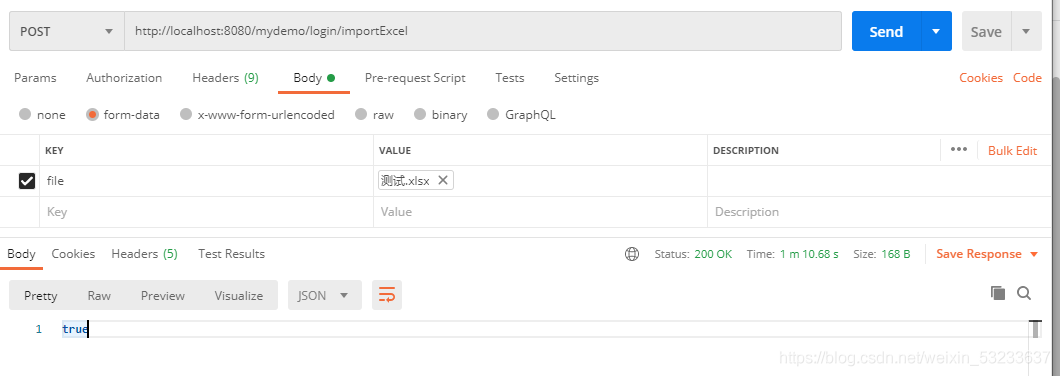
4、使用postman測試
————————————————
版權聲明:本文為CSDN博主「窈岆瀮珊」的原創(chuàng)文章,遵循CC 4.0 BY-SA版權協(xié)議,轉載請附上原文出處鏈接及本聲明。
原文鏈接:
https://blog.csdn.net/weixin_53233637/article/details/114576212
粉絲福利:Java從入門到入土學習路線圖
??????

??長按上方微信二維碼 2 秒
感謝點贊支持下哈 
評論
圖片
表情