從零搭建開發(fā)腳手架 Spring Boot文件上傳的多種方式、原理及遇到的問題
“在這里總結了常見上傳方式、文件上傳原理以及遇到的問題及解決方案。
文件上傳
概述
Spring支持可插拔的MultipartResolver對象進行文件上傳。目前有2個實現(xiàn);
在Servlet 2.5 及早期版本之前,文件上傳需要借助 commons-fileupload 組件來實現(xiàn)。 從Servlet 3.0規(guī)范之后,提供了對文件上傳的原生支持,進一步簡化了應用程序的實現(xiàn)。
commons-fileupload
要使用commons-fileupload的CommonsMultipartResolver處理文件上傳,我們需要添加以下依賴項:
<dependency>
    <groupId>commons-fileupload</groupId>
    <artifactId>commons-fileupload</artifactId>
</dependency>
配置定義CommonsMultipartResolver bean。
@Bean(name = "multipartResolver")
public CommonsMultipartResolver multipartResolver() {
    CommonsMultipartResolver multipartResolver = new CommonsMultipartResolver();
    multipartResolver.setMaxUploadSize(100000);
    return multipartResolver;
}
Servlet 3.0
SpringBoot項目參見MultipartAutoConfiguration.java類,默認會自動配置StandardServletMultipartResolver,我們不需要做任何事情,就能使用了。
@Configuration(proxyBeanMethods = false)
@ConditionalOnClass({ Servlet.class, StandardServletMultipartResolver.class, MultipartConfigElement.class })
@ConditionalOnProperty(prefix = "spring.servlet.multipart", name = "enabled", matchIfMissing = true)
@ConditionalOnWebApplication(type = Type.SERVLET)
@EnableConfigurationProperties(MultipartProperties.class)
public class MultipartAutoConfiguration {

 private final MultipartProperties multipartProperties;

 public MultipartAutoConfiguration(MultipartProperties multipartProperties) {
  this.multipartProperties = multipartProperties;
 }

 @Bean
 @ConditionalOnMissingBean({ MultipartConfigElement.class, CommonsMultipartResolver.class })
 public MultipartConfigElement multipartConfigElement() {
  return this.multipartProperties.createMultipartConfig();
 }

 @Bean(name = DispatcherServlet.MULTIPART_RESOLVER_BEAN_NAME)
 @ConditionalOnMissingBean(MultipartResolver.class)
 public StandardServletMultipartResolver multipartResolver() {
  StandardServletMultipartResolver multipartResolver = new StandardServletMultipartResolver();
  multipartResolver.setResolveLazily(this.multipartProperties.isResolveLazily());
  return multipartResolver;
 }

}
常見文件上傳相關需求,我整理總結如下:
單文件上傳
前端核心代碼
<form method="POST" action="/upload-file" enctype="multipart/form-data">
    <table>
        <tr>
            <td><input type="file" name="file" /></td>
        </tr>
        <tr>
            <td><input type="submit" value="Submit" /></td>
        </tr>
    </table>
</form>
后端核心代碼
@RequestMapping(value = "/upload-file", method = RequestMethod.POST)
public String submit(@RequestParam("file") MultipartFile file) {
    return "ok";
}
多文件上傳
前端核心代碼
<form method="POST" action="/upload-files" enctype="multipart/form-data">
    <table>
        <tr>
            <td>Select a file to upload</td>
            <td><input type="file" name="files" /></td>
        </tr>
        <tr>
            <td>Select a file to upload</td>
            <td><input type="file" name="files" /></td>
        </tr>
        <tr>
            <td>Select a file to upload</td>
            <td><input type="file" name="files" /></td>
        </tr>
        <tr>
            <td><input type="submit" value="Submit" /></td>
        </tr>
    </table>
</form>
后端核心代碼
我們需要注意每個輸入字段具有相同的名稱,以便可以將其作為MultipartFile數(shù)組進行訪問:
    @RequestMapping(value = "/upload-files", method = RequestMethod.POST)
    public String submit(@RequestParam("files") MultipartFile[] files) {
        return "ok";
    }
帶其他參數(shù)的文件上傳
前端核心代碼
<form method="POST" action="/upload-files-with-data" enctype="multipart/form-data">
    <table>
        <tr>
            <td>Name</td>
            <td><input type="text" name="name" /></td>
        </tr>
        <tr>
            <td>Email</td>
            <td><input type="text" name="email" /></td>
        </tr>
        <tr>
            <td>Select a file to upload</td>
            <td><input type="file" name="file" /></td>
        </tr>
        <tr>
            <td><input type="submit" value="Submit" /></td>
        </tr>
    </table>
</form>
后端核心代碼
“在控制器中,我們可以使用@RequestParam注解獲取所有表單數(shù)據(jù),也可以不使用@RequestParam獲取
@PostMapping("/upload-files-with-data")
public String submit(
            @RequestParam MultipartFile file, @RequestParam String name,
            String email) {
    return "ok";
}
優(yōu)雅的后端實現(xiàn)
我們還可以將所有表單字段封裝在類中,當文件中有很多其他字段時,就很方便。
public class FormDataWithFile {
    private String name;
    private String email;
    private MultipartFile file;
}
@PostMapping("/upload-files-with-data")
public String submit(FormDataWithFile formDataWithFile) {
    return "ok";
}
多個(文件+參數(shù))上傳
功能需求類似于上傳如下請求:
[
    {
        "name": "a",
        "emainl": "b",
        "file":
    },
    {
        "name": "a",
        "emainl": "",
        "file":
    }
]
但是這樣寫是行不通的,解決方案如下:
方案一:上傳文件Base64
把文件轉為base64字符串,但是轉換后的字符串大小是原圖片大小的3倍。(慎用)
[
    {
        "name": "a",
        "emainl": "",
        "fileBase64":"xxxxx"
    },
    {
        "name": "b",
        "emainl": "",
        "fileBase64":"xxxxx"
    }
]
方案二:上傳文件url
先把圖片上傳到服務器,獲取文件url,然后再把文件的URL與其他參數(shù)上傳到后端
[
    {
        "name": "a",
        "emainl": "",
        "fileUrl":"xxxxx.png"
    },
    {
        "name": "b",
        "emainl": "",
        "fileUrl":"xxxxx.png"
    }
]
文件上傳原理
通常一個文件上傳的請求內(nèi)容格式如下:
POST /upload HTTP/1.1
Host:xxx.org
Content-type: multipart/form-data, boundary="boundaryStr"

--boundaryStr
content-disposition: form-data; name="name"

Name Of Picture
--boundaryStr
Content-disposition: attachment; name="picfile"; filename="picfile.gif"
Content-type: image/gif
Content-Transfer-Encoding: binary

...contents of picfile.gif...
其中 boundary 指定了內(nèi)容分割的邊界字符串;
Content-dispostion 指定了這是一個附件(文件),包括參數(shù)名稱、文件名稱;
Content-type 指定了文件類型;
Content-Transfer-Encoding 指定內(nèi)容傳輸編碼;
Tomcat 實現(xiàn)了 Servlet3.0 規(guī)范,通過ApplicationPart對文件上傳流實現(xiàn)封裝, 其中,DiskFileItem 描述了上傳文件實體,在請求解析時生成該對象, 需要關注的是,DiskFileItem 聲明了一個臨時文件,用于臨時存儲上傳文件的內(nèi)容, SpringMVC 對上層的請求實體再次封裝,最終構造為MultipartFile傳遞給應用程序。示例如下:
生成的臨時文件如下:
“這個是臨時文件的目錄,可以配置的
 臨時文件打開,查看其內(nèi)容如下:
參數(shù):name 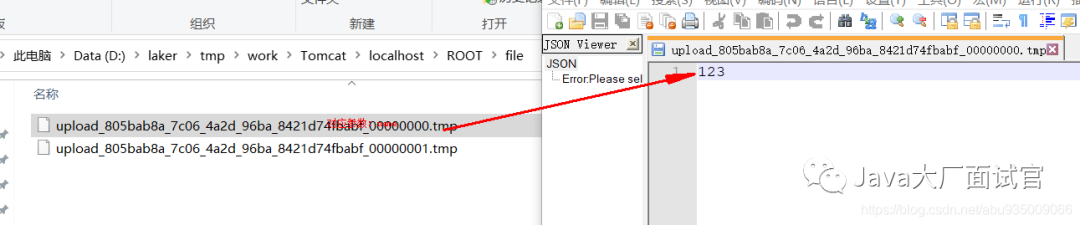
參數(shù):file  上傳完畢后,臨時文件會刪除
“可以看到,不是file類型的參數(shù)也會寫入到臨時文件。
通過Fiddler進行抓包:
POST http://localhost:8080/upload-files-with-data HTTP/1.1
cache-control: no-cache
Accept: */*
Host: localhost:8080
accept-encoding: gzip, deflate
content-type: multipart/form-data; boundary=--------------------------895818005136536360125479
content-length: 268707
Connection: keep-alive

----------------------------895818005136536360125479
Content-Disposition: form-data; name="name"

123
----------------------------895818005136536360125479
Content-Disposition: form-data; name="file"; filename="test.txt"
Content-Type: text/plain

abc123
----------------------------895818005136536360125479
Content-Disposition: form-data; name="file"; filename="1114289-20190110120111312-1475461850.png"
Content-Type: image/png

...contents of png...
----------------------------895818005136536360125479--
到這里,我們就大概就知道了HTTP上傳文件的原理了。HTTP把需要上傳的表單的所有數(shù)據(jù)按照一定的格式存放在請求體中,對于文件也是同樣的。
Content-Type: multipart/form-data; boundary=----WebKitFormBoundaryqj67FUBQUHXZj78G表示要上傳附件,其中 boundary表示分隔符,如果表單中有多項,就要使用boundary進行分隔,每個表單項由------FormBoundary開始,以------FormBoundary結尾。例如這樣:
------FormBoundary
Content-Disposition: form-data; name="param1"

value1
------FormBoundary
這個boundary的值是由瀏覽器生成的,由瀏覽器來保證與上傳內(nèi)容不重復。
在每個分隔項里,需要我們?nèi)ブ攸c關注 Content-Disposition消息頭,其中第一個參數(shù)總是固定不變的form-data,name表示表單元素屬性名,回車換行符后面的內(nèi)容就是元素的值。還有Content-Type表示我們上傳的文件的MIME類型,我們在服務器端需要根據(jù)這個進行文件的區(qū)分。最后一個 boundary的結尾會多兩個--
HTTP就是按照這種格式,把表單中的數(shù)據(jù)封裝成一個請求一股腦的發(fā)給服務器端,服務器端根據(jù)這種規(guī)則對接收到的請求進行解析,從而完成文件上傳功能。
下面是從網(wǎng)上找的一個后臺解析示例。可以DEBUG跟蹤代碼去分析。
@WebServlet(urlPatterns = "/lakerfile")
public class FileUploadDemo extends HttpServlet {
    @Override
    public void doPost(HttpServletRequest request, HttpServletResponse response) throws ServletException, IOException {
        DiskFileItemFactory fac = new DiskFileItemFactory();
        ServletFileUpload upload = new ServletFileUpload(fac);
        upload.setFileSizeMax(10 * 1024 * 1024);
        upload.setSizeMax(20 * 1024 * 1024);
        if (ServletFileUpload.isMultipartContent(request)) { // 只處理Multipart請求
                List<FileItem> list = upload.parseRequest(new ServletRequestContext(request));// 解析報文
                for (FileItem item : list) {
                    if (item.isFormField()) {
                        String fileName = item.getFieldName();
                        String value = item.getString("UTF-8");
                    } else {
                        File file = new File(realPath, name);
                        item.write(file);
                        ...
        }
    }
}
遇到的問題
Spring Boot上傳文件大小限制
spring:
  servlet:
    multipart:
      # 最大文件大小(單個)
      max-file-size: 10MB
      # 文件大于該閾值時,將寫入磁盤,支持B/KB/MB單位
      file-size-threshold: 0B
      # //最大請求大小(總體)
      max-request-size: 100MB
這幾個參數(shù)由SpringMVC控制,用于注入 Servlet3.0 的文件上傳配置,關聯(lián)類如下:
public class MultipartConfigElement {
    private final String location;// = "";
    private final long maxFileSize;// = -1;
    private final long maxRequestSize;// = -1;
    private final int fileSizeThreshold;// = 0;
上傳文件過大異常攔截
@ExceptionHandler(MaxUploadSizeExceededException.class)
public Response handleMaxSizeException(MaxUploadSizeExceededException e) {
    log.error(e.getMessage(), e);
    return Response.error(500, "File too large!");
}
自定義tomcat工作目錄
自定義臨時文件生成目錄
server:
  tomcat:
    basedir: /laker/tmp
使用swagger上傳文件不起作用
allowMultiple=true:表示是數(shù)組格式的參數(shù)dataType = "__file":表示數(shù)組中參數(shù)的類型
@ApiOperation(value = "上傳", notes = "上傳")
@ApiImplicitParams({
            @ApiImplicitParam(paramType = "form", name = "file", value = "文件對象", required = true, dataType = "__file"),
            @ApiImplicitParam(paramType = "form", name = "files", value = "文件數(shù)組", allowMultiple = true, dataType = "__file")
    })
public void test(@RequestParam("file") MultipartFile file, @RequestParam(value = "files", required = false) MultipartFile[] files) throws Exception {
}
參考:
https://www.cnblogs.com/yougewe/p/12916211.html
https://www.baeldung.com/spring-file-upload
我已經(jīng)更新了《10萬字Springboot經(jīng)典學習筆記》,點擊下面小卡片,進入【武哥聊編程】,回復:筆記,即可免費獲取。
點贊是最大的支持