
Docker + Spring Boot + FastDFS 搭建一套分布式文件服務(wù)器!
點擊關(guān)注公眾號,Java干貨及時送達(dá)??

首先說一下從零開始自己去搭一個fastdfs挺麻煩,后來看到有人把做好的 docker 鏡像傳出來了,那搭建起來就很容易了
1.第一步安裝docker:
在 root 權(quán)限下
yum?install?-y?docker-io?#安裝docker
service?docker?star?#啟動docker
docker?-v?#?查看docker版本
2. 拉取鏡像
docker?pull?qbanxiaoli/fastdfs
啟動 fastdfs
docker?run?-d?--restart=always?--privileged=true?--net=host?--name=fastdfs?-e?IP=192.168.127.131?-e?WEB_PORT=80?-v?${HOME}/fastdfs:/var/local/fdfs?qbanxiaoli/fastdfs
IP?后面是你的服務(wù)器公網(wǎng)ip或者虛擬機的IP,-e?WEB_PORT=80?指定?nginx?端口
測試fastdfs是否搭建成功
docker?exec?-it?fastdfs?/bin/bash
echo?"Hello?FastDFS!">index.html
fdfs_test?/etc/fdfs/client.conf?upload?index.html
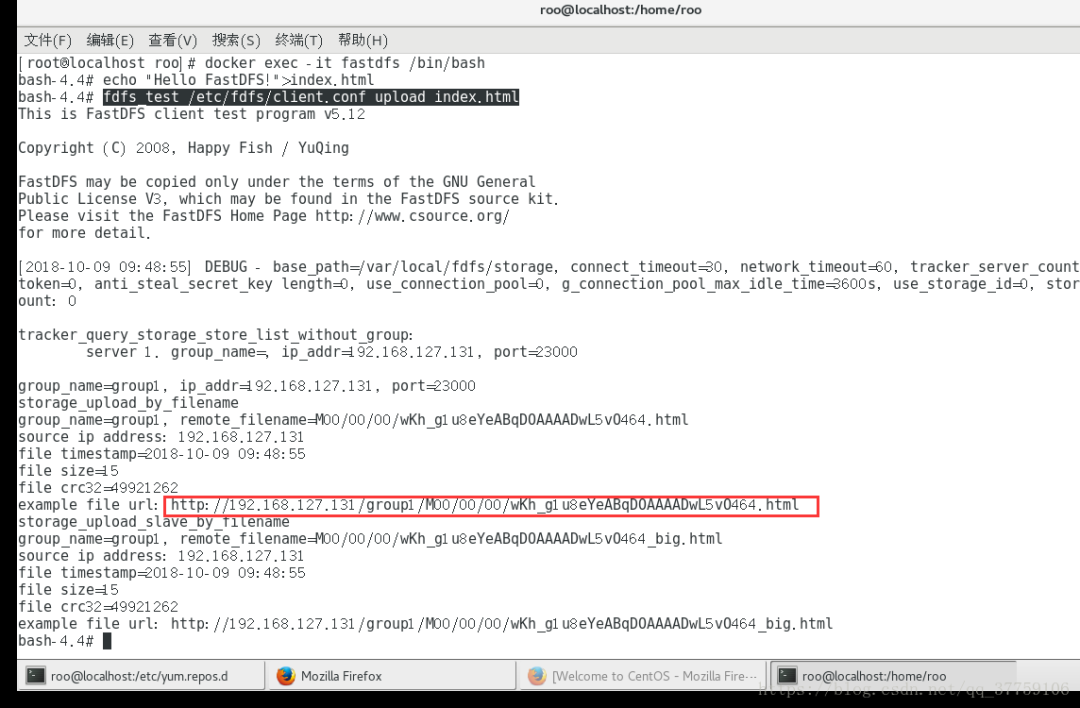
能返回 url 就意見搭建成功
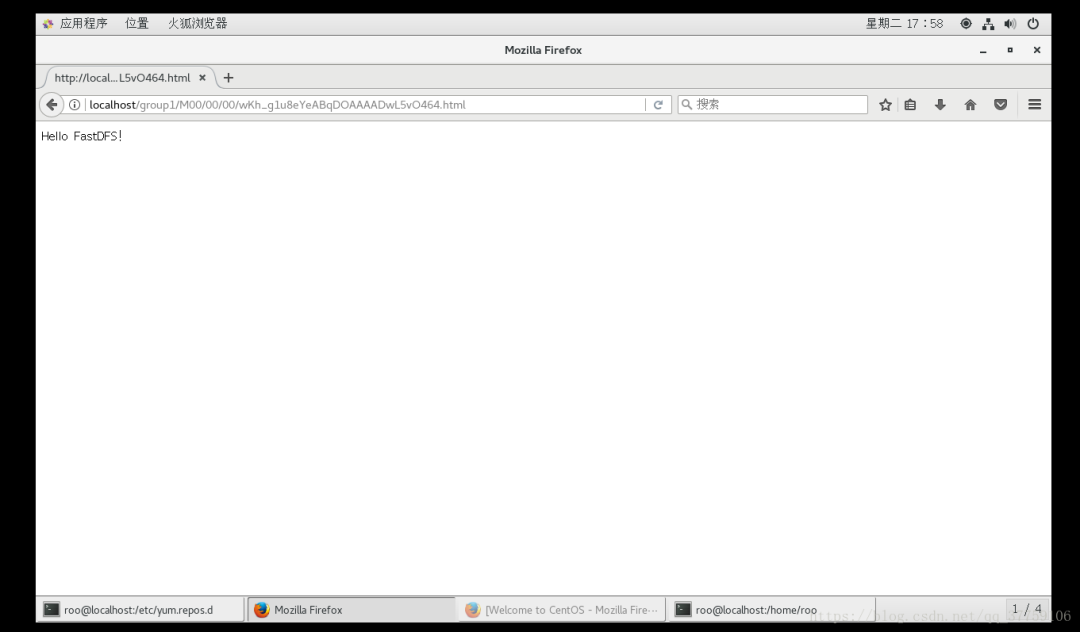
這樣 fastdfs 就搭建好啦。
下面進(jìn)入 Spring Boot 整合部分
com.github.tobato
???fastdfs-client
1.26.2
在 Spring Boot 啟動類上加:
@Import(FdfsClientConfig.class)
@EnableMBeanExport(registration?=?RegistrationPolicy.IGNORE_EXISTING)
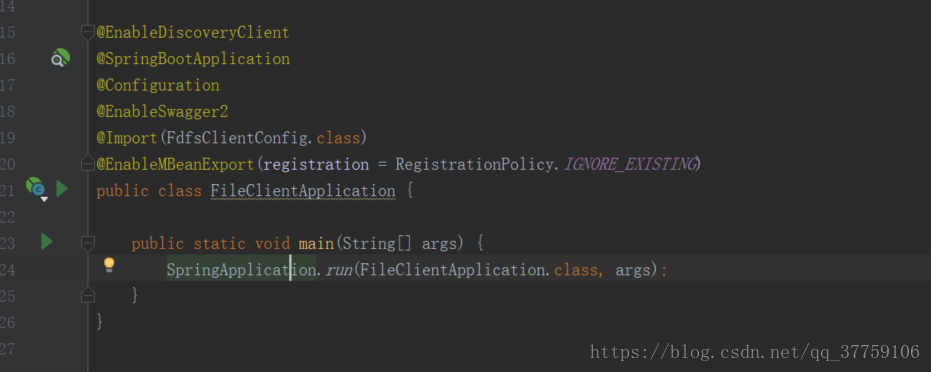
創(chuàng)建FastDFSClient工具類
package?com.yd.client.common;

import?com.github.tobato.fastdfs.conn.FdfsWebServer;
import?com.github.tobato.fastdfs.domain.StorePath;
import?com.github.tobato.fastdfs.proto.storage.DownloadByteArray;
import?com.github.tobato.fastdfs.service.FastFileStorageClient;
import?org.apache.commons.io.FilenameUtils;
import?org.apache.commons.lang3.StringUtils;
import?org.slf4j.Logger;
import?org.slf4j.LoggerFactory;
import?org.springframework.beans.factory.annotation.Autowired;
import?org.springframework.stereotype.Component;
import?org.springframework.web.multipart.MultipartFile;

import?java.io.*;

@Component
public?class?FastDFSClient?{

????private?static?Logger?log?=LoggerFactory.getLogger(FastDFSClient.class);

????private?static?FastFileStorageClient?fastFileStorageClient;

????private?static?FdfsWebServer?fdfsWebServer;

????@Autowired
????public?void?setFastDFSClient(FastFileStorageClient?fastFileStorageClient,?FdfsWebServer?fdfsWebServer)?{
????????FastDFSClient.fastFileStorageClient?=?fastFileStorageClient;
????????FastDFSClient.fdfsWebServer?=?fdfsWebServer;
????}

????/**
?????*?@param?multipartFile?文件對象
?????*?@return?返回文件地址
?????*?@author?qbanxiaoli
?????*?@description?上傳文件
?????*/
????public?static?String?uploadFile(MultipartFile?multipartFile)?{
????????try?{
????????????StorePath?storePath?=?fastFileStorageClient.uploadFile(multipartFile.getInputStream(),?multipartFile.getSize(),?FilenameUtils.getExtension(multipartFile.getOriginalFilename()),?null);
????????????return?storePath.getFullPath();
????????}?catch?(IOException?e)?{
????????????log.error(e.getMessage());
????????????return?null;
????????}
????}

????/**
?????*?@param?multipartFile?圖片對象
?????*?@return?返回圖片地址
?????*?@author?qbanxiaoli
?????*?@description?上傳縮略圖
?????*/
????public?static?String?uploadImageAndCrtThumbImage(MultipartFile?multipartFile)?{
????????try?{
????????????StorePath?storePath?=?fastFileStorageClient.uploadImageAndCrtThumbImage(multipartFile.getInputStream(),?multipartFile.getSize(),?FilenameUtils.getExtension(multipartFile.getOriginalFilename()),?null);
????????????return?storePath.getFullPath();
????????}?catch?(Exception?e)?{
????????????log.error(e.getMessage());
????????????return?null;
????????}
????}

????/**
?????*?@param?file?文件對象
?????*?@return?返回文件地址
?????*?@author?qbanxiaoli
?????*?@description?上傳文件
?????*/
????public?static?String?uploadFile(File?file)?{
????????try?{
????????????FileInputStream?inputStream?=?new?FileInputStream(file);
????????????StorePath?storePath?=?fastFileStorageClient.uploadFile(inputStream,?file.length(),?FilenameUtils.getExtension(file.getName()),?null);
????????????return?storePath.getFullPath();
????????}?catch?(Exception?e)?{
????????????log.error(e.getMessage());
????????????return?null;
????????}
????}

????/**
?????*?@param?file?圖片對象
?????*?@return?返回圖片地址
?????*?@author?qbanxiaoli
?????*?@description?上傳縮略圖
?????*/
????public?static?String?uploadImageAndCrtThumbImage(File?file)?{
????????try?{
????????????FileInputStream?inputStream?=?new?FileInputStream(file);
????????????StorePath?storePath?=?fastFileStorageClient.uploadImageAndCrtThumbImage(inputStream,?file.length(),?FilenameUtils.getExtension(file.getName()),?null);
????????????return?storePath.getFullPath();
????????}?catch?(Exception?e)?{
????????????log.error(e.getMessage());
????????????return?null;
????????}
????}

????/**
?????*?@param?bytes?byte數(shù)組
?????*?@param?fileExtension?文件擴(kuò)展名
?????*?@return?返回文件地址
?????*?@author?qbanxiaoli
?????*?@description?將byte數(shù)組生成一個文件上傳
?????*/
????public?static?String?uploadFile(byte[]?bytes,?String?fileExtension)?{
????????ByteArrayInputStream?stream?=?new?ByteArrayInputStream(bytes);
????????StorePath?storePath?=?fastFileStorageClient.uploadFile(stream,?bytes.length,?fileExtension,?null);
????????return?storePath.getFullPath();
????}

????/**
?????*?@param?fileUrl?文件訪問地址
?????*?@param?file?文件保存路徑
?????*?@author?qbanxiaoli
?????*?@description?下載文件
?????*/
????public?static?boolean?downloadFile(String?fileUrl,?File?file)?{
????????try?{
????????????StorePath?storePath?=?StorePath.praseFromUrl(fileUrl);
????????????byte[]?bytes?=?fastFileStorageClient.downloadFile(storePath.getGroup(),?storePath.getPath(),?new?DownloadByteArray());
????????????FileOutputStream?stream?=?new?FileOutputStream(file);
????????????stream.write(bytes);
????????}?catch?(Exception?e)?{
????????????log.error(e.getMessage());
????????????return?false;
????????}
????????return?true;
????}

????/**
?????*?@param?fileUrl?文件訪問地址
?????*?@author?qbanxiaoli
?????*?@description?刪除文件
?????*/
????public?static?boolean?deleteFile(String?fileUrl)?{
????????if?(StringUtils.isEmpty(fileUrl))?{
????????????return?false;
????????}
????????try?{
????????????StorePath?storePath?=?StorePath.praseFromUrl(fileUrl);
????????????fastFileStorageClient.deleteFile(storePath.getGroup(),?storePath.getPath());
????????}?catch?(Exception?e)?{
????????????log.error(e.getMessage());
????????????return?false;
????????}
????????return?true;
????}

????//?封裝文件完整URL地址
????public?static?String?getResAccessUrl(String?path)?{
????????String?url?=?fdfsWebServer.getWebServerUrl()?+?path;
????????log.info("上傳文件地址為:\n"?+?url);
????????return?url;
????}

}
配置yml文件
#?分布式文件系統(tǒng)fastdfs配置
fdfs:
??#?socket連接超時時長
??soTimeout:?1500
??#?連接tracker服務(wù)器超時時長
??connectTimeout:?600
??pool:
????#?從池中借出的對象的最大數(shù)目
????max-total:?153
????#?獲取連接時的最大等待毫秒數(shù)100
????max-wait-millis:?102
??#?縮略圖生成參數(shù),可選
??thumbImage:
????width:?150
????height:?150
??#?跟蹤服務(wù)器tracker_server請求地址,支持多個,這里只有一個,如果有多個在下方加-?x.x.x.x:port
??trackerList:
????-?192.168.127.131:22122
??#
??#?存儲服務(wù)器storage_server訪問地址
??web-server-url:?http://192.168.127.131/
??spring:
????http:
??????multipart:
????????max-file-size:?100MB?#?最大支持文件大小
????????max-request-size:?100MB?#?最大支持請求大小
**測試類**@RunWith(SpringRunner.class)@SpringBootTestpublic?class?FileClientApplicationTests?{??@Test?public?void?Upload()?{??String?fileUrl?=?this.getClass().getResource("/test.jpg").getPath();??File?file?=?new?File(fileUrl);??String?str?=?FastDFSClient.uploadFile(file);??FastDFSClient.getResAccessUrl(str);?}??@Test?public?void?Delete()?{??FastDFSClient.deleteFile("group1/M00/00/00/rBEAClu8OiSAFbN_AAbhXQnXzvw031.jpg");?}}
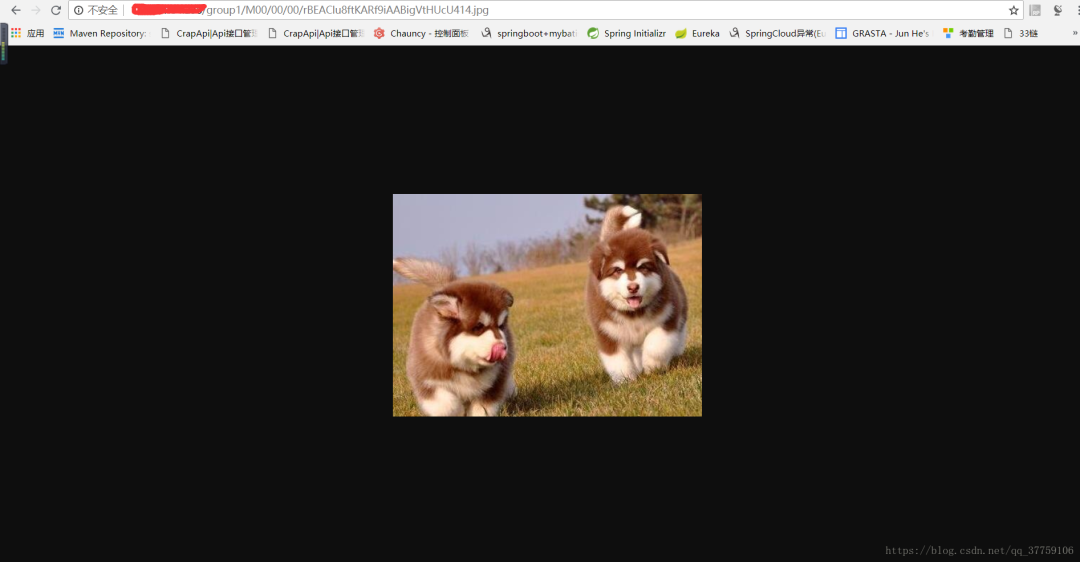
運行測試類
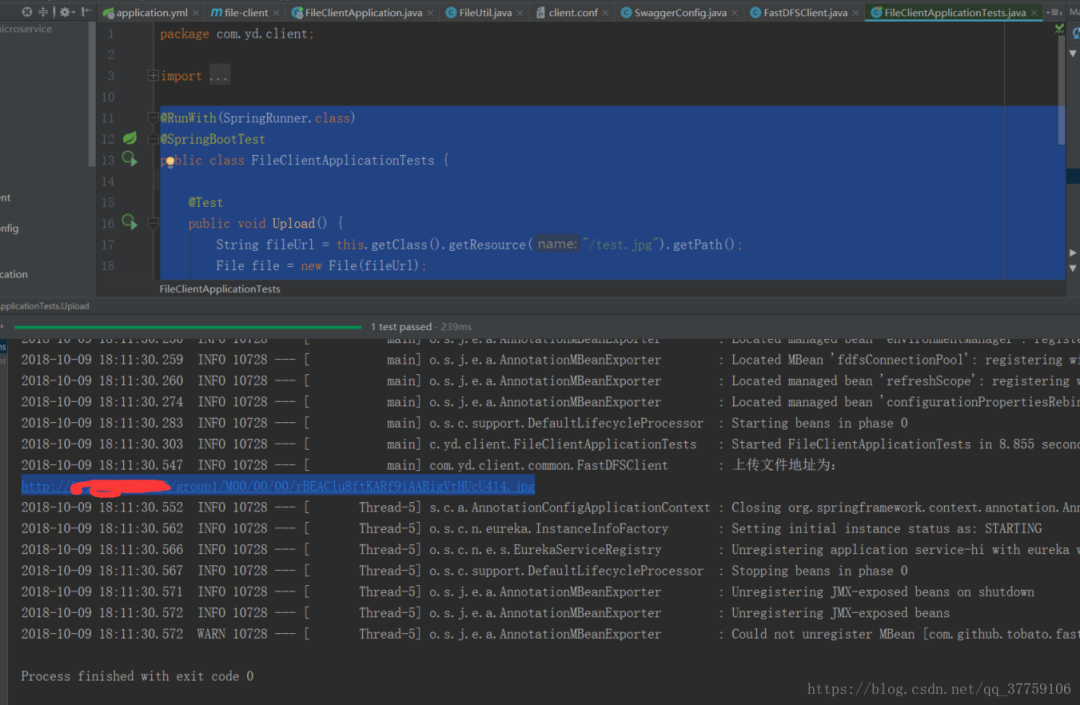
返回的 url 就是能訪問的地址
原文鏈接:https://blog.csdn.net/qq_37759106/article/details/82981023
3.?還在付費使用XShell?我選擇這款國產(chǎn)良心工具,完全免費!
4.?Mybatis插入大量數(shù)據(jù)效率對比:foreach插入、SqlSession批量插入、sql插入
最近面試BAT,整理一份面試資料《Java面試BATJ通關(guān)手冊》,覆蓋了Java核心技術(shù)、JVM、Java并發(fā)、SSM、微服務(wù)、數(shù)據(jù)庫、數(shù)據(jù)結(jié)構(gòu)等等。
獲取方式:點“在看”,關(guān)注公眾號并回復(fù)?Java?領(lǐng)取,更多內(nèi)容陸續(xù)奉上。
文章有幫助的話,在看,轉(zhuǎn)發(fā)吧。
謝謝支持喲 (*^__^*)

評論
圖片
表情