
Android實(shí)現(xiàn)簽到足跡功能
UI 妹紙又給了個(gè)圖叫我做,我一看是這樣的:
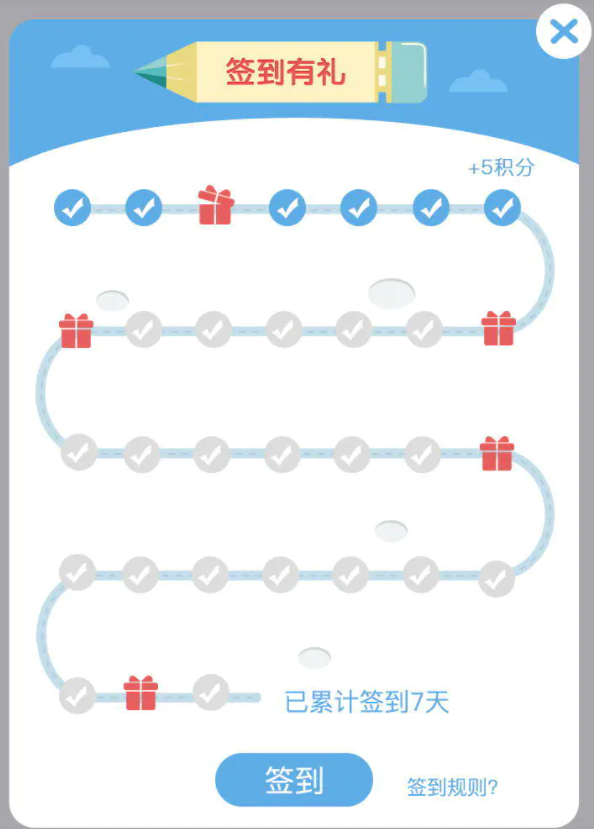
我們首先把這個(gè)控件劃分成 幾個(gè)部分:
1.底下部分的直線 :
2.左右兩邊的半圓弧度 :
3.線上面的小圖標(biāo) :
4.最后的文字說(shuō)明 :
首先我們把線畫(huà)出來(lái),大概這個(gè)樣子
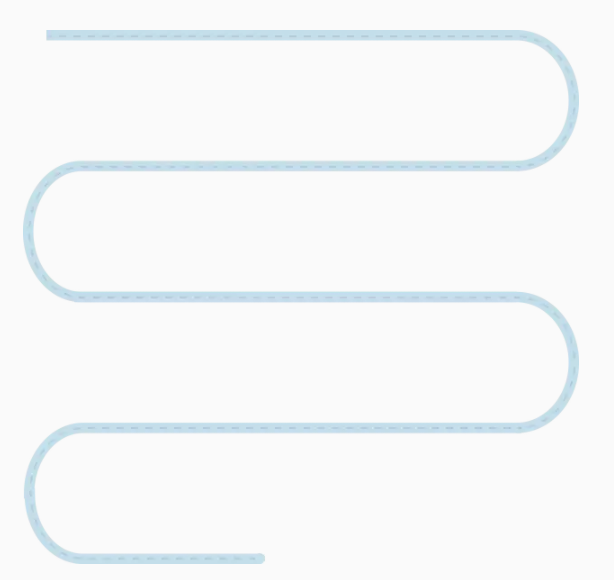
我們這里根據(jù)一個(gè)月得總天數(shù),和一條線上需要畫(huà)七個(gè)圖,計(jì)算出總共需要畫(huà)出的線條數(shù),以及畫(huà)出左邊和右邊的弧度,根據(jù)當(dāng)前線是單數(shù)還是雙數(shù),來(lái)計(jì)算出是否是左半邊的弧度,還是右半邊的弧度,以及是否是最后的一條線,因?yàn)樽詈笠粭l線不需要畫(huà)弧度。
代碼如下:
protected void onDraw(Canvas canvas){paint.setColor(backColor);paint.setStrokeWidth(strokeWidth);int rowCount = (monthDays % 7 == 0 ? monthDays / 7 : monthDays / 7 + 1);int rowHeigh = height / (rowCount);int startX = 0 + rowHeigh / 2;int endX = width - rowHeigh / 2;int days = 0;for (int a = 0; a < rowCount; a++){if (a + 1 == rowCount){endX = (endX - startX) / 7 * (monthDays % 7) + checkBitmap.getWidth() / 2;}paint.setStrokeWidth(strokeWidth);int y = rowHeigh * a + rowHeigh / 2;canvas.drawLine(startX, y, endX, y, paint);paint.setColor(rashColor);paint.setStrokeWidth(1);canvas.drawLine(startX, y, endX, y, paint);// 這里是來(lái)判斷,是否需要畫(huà)出左半邊還是右半邊的半圓弧度?if (a % 2 != 0){if (a + 1 != rowCount){drawLeftOrRightArc(true, canvas, 0 + strokeWidth, y, 0 + rowHeigh + strokeWidth, y + rowHeigh);}} else{if (a + 1 != rowCount){drawLeftOrRightArc(false, canvas, endX - rowHeigh / 2 - strokeWidth, y, endX + rowHeigh / 2 - strokeWidth, y + rowHeigh);}}}}
然后再在線上畫(huà)出禮物數(shù)量
// 這里是來(lái)判斷,本次這根線上畫(huà)出的禮物的點(diǎn),以及順序是順畫(huà),還是倒畫(huà)出。bitmapList.clear();for (int b = 0; b < (a + 1 == rowCount ? (monthDays % 7) : 7); b++){days++;if (days <= signInCount){if (days == 3 || days == 8 || days == 14 || days == 21 || days == monthDays){bitmapList.add(a % 2 != 0 ? 0 : bitmapList.size(), openGiftBitmap);} else{bitmapList.add(a % 2 != 0 ? 0 : bitmapList.size(), checkBitmap);}} else{if (days == 3 || days == 8 || days == 14 || days == 21 || days == monthDays){bitmapList.add(a % 2 != 0 ? 0 : bitmapList.size(), closeGiftBitmap);} else{bitmapList.add(a % 2 != 0 ? 0 : bitmapList.size(), uncheckBitmap);}}}
這里有一個(gè)需要注意的地方,就是,在線為雙數(shù)的時(shí)候,這時(shí)候禮物的排列是需要反過(guò)來(lái)排列的,我這里使用了一個(gè)LinkedList來(lái)保存禮物的排列順序,然后我們通過(guò)計(jì)算平均數(shù),計(jì)算出每個(gè)禮物的位置。
/*** 畫(huà)出的按路線上的圖片,勾選,禮物* @param bitmapList* @param startX* @param endX* @param y* @param canvas*/private void drawImgs(List<Bitmap> bitmapList, float startX, float endX, float y, Canvas canvas){startX = startX - bitmapList.get(0).getWidth() / 2;int count = bitmapList.size();float bitmap_width = (endX - startX) / (count - 1);for (int a = 0; a < count; a++){Bitmap bitmap = bitmapList.get(a);canvas.drawBitmap(bitmap, startX + (bitmap_width * a), y - bitmap.getHeight() / 2, paint);}}
這里也有一個(gè)需要注意的地方,就是,當(dāng)最后一條線是短的時(shí)候,這個(gè)時(shí)候,你的禮物的排列需要按照那條線的開(kāi)始位置和結(jié)束位置來(lái)平均計(jì)算每個(gè)禮物的位置。
最后,我們?cè)谧詈笠粭l線最后的位置,畫(huà)出文字
/*** 畫(huà)出文字* @param canvas* @param y* @param x*/private void drawText(Canvas canvas, float y, float x){int oldColor = paint.getColor();Paint.Style old_style = paint.getStyle();paint.setStyle(Paint.Style.FILL);paint.setColor(textColor);String drawText = "已累計(jì)簽到"+signInCount+"天";paint.setTextSize(DensityUtil.sp2px(getContext(), 15));int textHeigh = getStringHeight(drawText);int textWidth = getStringWidth(drawText);canvas.drawText(drawText, x + textWidth/2, y + textHeigh / 2, paint);paint.setColor(oldColor);paint.setStyle(old_style);}
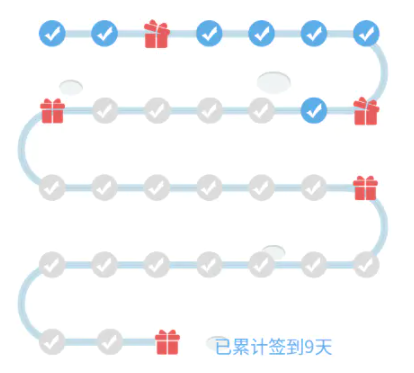
好了,這就是所有的思路。下面貼一下最新完整代碼:
package com.sjl.keeplive.track;import android.content.Context;import android.graphics.Bitmap;import android.graphics.BitmapFactory;import android.graphics.Canvas;import android.graphics.Color;import android.graphics.Paint;import android.graphics.RectF;import android.support.annotation.Nullable;import android.util.AttributeSet;import android.view.View;import com.sjl.keeplive.R;import java.util.LinkedList;import java.util.List;public class SignInView extends View {private int width, height;private int monthDays = 31;//本月有31天private Paint paint;private RectF oval = new RectF();private float strokeWidth = 10;private Bitmap checkBitmap, uncheckBitmap, closeGiftBitmap, openGiftBitmap;private int backColor = Color.parseColor("#C3DEEA"),rashColor = Color.parseColor("#B2CADB"),textColor = Color.parseColor("#60ADE5");private List<Bitmap> bitmapList = new LinkedList<>();private int signInCount = 9;public SignInView(Context context) {this(context, null);}public SignInView(Context context, @Nullable AttributeSet attrs) {this(context, attrs, 0);}public SignInView(Context context, @Nullable AttributeSet attrs, int defStyleAttr) {super(context, attrs, defStyleAttr);init(context, attrs);}private void init(Context context, AttributeSet attrs) {paint = new Paint();paint.setAntiAlias(true);strokeWidth = DensityUtil.dip2px(6);checkBitmap = BitmapFactory.decodeResource(getResources(), R.drawable.icon_sign_in_check_img);uncheckBitmap = BitmapFactory.decodeResource(getResources(), R.drawable.icon_sign_in_uncheck_img);closeGiftBitmap = BitmapFactory.decodeResource(getResources(), R.drawable.icon_close_gift_img);openGiftBitmap = BitmapFactory.decodeResource(getResources(), R.drawable.icon_open_gift_img);}protected void onMeasure(int widthMeasureSpec, int heightMeasureSpec) {height = MeasureSpec.getSize(heightMeasureSpec);width = MeasureSpec.getSize(widthMeasureSpec);super.onMeasure(widthMeasureSpec, heightMeasureSpec);}/*** 設(shè)置本月天數(shù)** @param monthDays*/public void setMonthDays(int monthDays) {this.monthDays = monthDays;if (monthDays == 0) {this.monthDays = 31;}postInvalidate();}/*** 設(shè)置一共簽到了幾天** @param days*/public void setProgress(int days) {this.signInCount = days;postInvalidate();}protected void onDraw(Canvas canvas) {paint.setColor(backColor);paint.setStrokeWidth(strokeWidth);int rowCount = (monthDays % 7 == 0 ? monthDays / 7 : monthDays / 7 + 1);int rowHeigh = height / (rowCount);int startX = 0 + rowHeigh / 2;int endX = width - rowHeigh / 2;int days = 0;for (int a = 0; a < rowCount; a++) {if (a + 1 == rowCount) {endX = (endX - startX) / 7 * (monthDays % 7 == 0 ? 7 : (monthDays % 7)) + checkBitmap.getWidth() / 2;}paint.setStrokeWidth(strokeWidth);int y = rowHeigh * a + rowHeigh / 2;canvas.drawLine(startX, y, endX, y, paint);paint.setColor(rashColor);paint.setStrokeWidth(1);canvas.drawLine(startX, y, endX, y, paint);// 這里是來(lái)判斷,是否需要畫(huà)出左半邊還是右半邊的半圓弧度?if (a % 2 != 0) {if (a + 1 != rowCount) {drawLeftOrRightArc(true, canvas, 0 + strokeWidth, y, 0 + rowHeigh + strokeWidth, y + rowHeigh);}} else {if (a + 1 != rowCount) {drawLeftOrRightArc(false, canvas, endX - rowHeigh / 2 - strokeWidth, y, endX + rowHeigh / 2 - strokeWidth, y + rowHeigh);}}// 這里是來(lái)判斷,本次這根線上畫(huà)出的禮物的點(diǎn),以及順序是順畫(huà),還是倒畫(huà)出。bitmapList.clear();int lastDay = (monthDays % 7) == 0 ? 7 : (monthDays % 7);for (int b = 0; b < (a + 1 == rowCount ? (lastDay) : 7); b++) {days++;if (days <= signInCount) {if (days == 3 || days == 8 || days == 14 || days == 21 || days == monthDays) {bitmapList.add(a % 2 != 0 ? 0 : bitmapList.size(), openGiftBitmap);} else {bitmapList.add(a % 2 != 0 ? 0 : bitmapList.size(), checkBitmap);}} else {if (days == 3 || days == 8 || days == 14 || days == 21 || days == monthDays) {bitmapList.add(a % 2 != 0 ? 0 : bitmapList.size(), closeGiftBitmap);} else {bitmapList.add(a % 2 != 0 ? 0 : bitmapList.size(), uncheckBitmap);}}}drawImgs(bitmapList, startX, endX, y, canvas);}super.onDraw(canvas);}/*** 畫(huà)出的按路線上的圖片,勾選,禮物** @param bitmapList* @param startX* @param endX* @param y* @param canvas*/private void drawImgs(List<Bitmap> bitmapList, float startX, float endX, float y, Canvas canvas) {if (!bitmapList.isEmpty()) {startX = startX - bitmapList.get(0).getWidth() / 2;int count = bitmapList.size();float bitmap_width = (endX - startX) / (count - 1);for (int a = 0; a < count; a++) {Bitmap bitmap = bitmapList.get(a);canvas.drawBitmap(bitmap, startX + (bitmap_width * a), y - bitmap.getHeight() / 2, paint);}}}/*** 這里畫(huà)出左邊半圓弧,還是右邊半圓弧** @param isLeft* @param canvas* @param left* @param top* @param right* @param bottom*/private void drawLeftOrRightArc(boolean isLeft, Canvas canvas, float left, float top, float right, float bottom) {paint.setStrokeWidth(strokeWidth);paint.setColor(backColor);if (isLeft) {paint.setStyle(Paint.Style.STROKE);oval.setEmpty();oval.set(left, top, right, bottom);canvas.drawArc(oval, 90, 180, false, paint);paint.setStrokeWidth(1);paint.setColor(rashColor);canvas.drawArc(oval, 90, 180, false, paint);} else {paint.setStyle(Paint.Style.STROKE);oval.setEmpty();oval.set(left, top, right, bottom);canvas.drawArc(oval, 270, 180, false, paint);paint.setStrokeWidth(1);paint.setColor(rashColor);canvas.drawArc(oval, 270, 180, false, paint);}paint.setStrokeWidth(strokeWidth);paint.setColor(backColor);}}
布局文件使用:
<com.sjl.keeplive.track.SignInViewandroid:layout_width="match_parent"android:layout_height="match_parent"android:visibility="visible"/>
需要源碼的童鞋在公眾號(hào)【龍旋】對(duì)話框中發(fā)送關(guān)鍵字【簽到足跡】即可獲取哦,由于demo集合比較多,單這篇看下面代碼即可:
到這里就結(jié)束啦.