
Pyecharts繪制上下組合圖、左右組合圖、一軸多圖,超經(jīng)典!
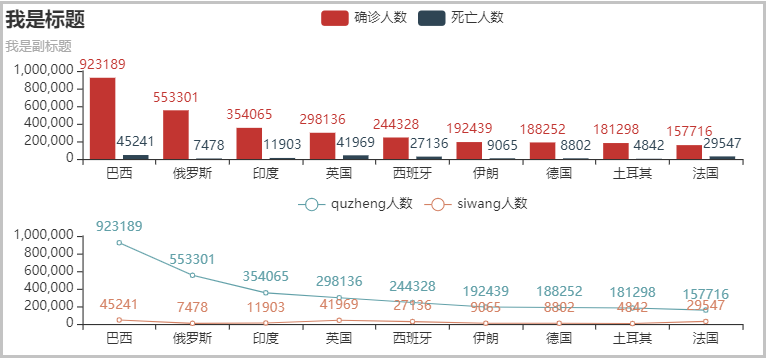
1. 上下組合
from pyecharts.charts import Bar, Line, Grid
from pyecharts import options

# 1、準(zhǔn)備數(shù)據(jù)
country = ['巴西', '俄羅斯', '印度', '英國(guó)', '西班牙', '伊朗', '德國(guó)', '土耳其', '法國(guó)']
quezheng = [923189,553301,354065,298136,244328,192439,188252,181298,157716]
siwang = [45241,7478,11903,41969,27136,9065,8802,4842,29547]

# 2、繪制柱形圖
bar = (
    Bar()
    .add_xaxis(country)
    .add_yaxis("確診人數(shù)", quezheng)
    .add_yaxis("死亡人數(shù)", siwang)
    .set_global_opts(title_opts=options.TitleOpts(title="我是標(biāo)題", subtitle="我是副標(biāo)題"))
)

# 3、繪制線(xiàn)圖
line = (
    Line()
    .add_xaxis(country)
    .add_yaxis("quzheng人數(shù)", quezheng)
    .add_yaxis("siwang人數(shù)", siwang)
    .set_global_opts(legend_opts=opts.LegendOpts(pos_bottom="45%"))
)

# 4、創(chuàng)建組合圖
(Grid(init_opts=opts.InitOpts(width='750px', height='350px'))
 .add(bar,grid_opts=opts.GridOpts(pos_bottom="60%"))
 .add(line,grid_opts=opts.GridOpts(pos_top="60%"))
).render_notebook()
2. 左右組合
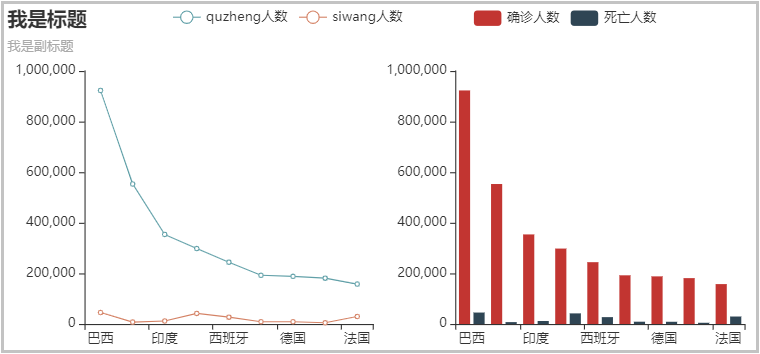
from pyecharts.charts import Bar, Line, Grid
from pyecharts import options

# 1、準(zhǔn)備數(shù)據(jù)
country = ['巴西', '俄羅斯', '印度', '英國(guó)', '西班牙', '伊朗', '德國(guó)', '土耳其', '法國(guó)']
quezheng = [923189,553301,354065,298136,244328,192439,188252,181298,157716]
siwang = [45241,7478,11903,41969,27136,9065,8802,4842,29547]

# 2、繪制柱形圖
bar = (
    Bar()
    .add_xaxis(country)
    .add_yaxis("確診人數(shù)", quezheng, label_opts=opts.LabelOpts(is_show=False))
    .add_yaxis("死亡人數(shù)", siwang, label_opts=opts.LabelOpts(is_show=False))
    .set_global_opts(title_opts=options.TitleOpts(title="我是標(biāo)題", subtitle="我是副標(biāo)題"),
                     legend_opts=opts.LegendOpts(pos_right="20%"))
)

# 3、繪制線(xiàn)圖
line = (
    Line()
    .add_xaxis(country)
    .add_yaxis("quzheng人數(shù)", quezheng, label_opts=opts.LabelOpts(is_show=False))
    .add_yaxis("siwang人數(shù)", siwang, label_opts=opts.LabelOpts(is_show=False))
    .set_global_opts(legend_opts=opts.LegendOpts(pos_left="20%"))
)

# 4、創(chuàng)建組合圖
(Grid(init_opts=opts.InitOpts(width='750px', height='350px'))
 .add(bar,grid_opts=opts.GridOpts(pos_left="55%"))
 .add(line,grid_opts=opts.GridOpts(pos_right="55%"))
).render_notebook()
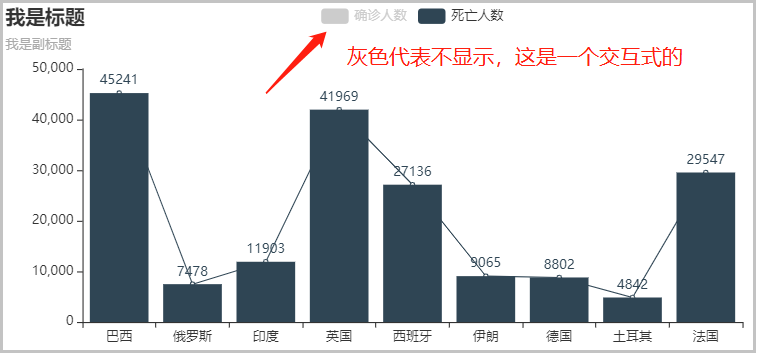
3. 一軸多圖
from pyecharts.charts import Bar, Line, Grid
from pyecharts import options

# 1、準(zhǔn)備數(shù)據(jù)
country = ['巴西', '俄羅斯', '印度', '英國(guó)', '西班牙', '伊朗', '德國(guó)', '土耳其', '法國(guó)']
quezheng = [923189,553301,354065,298136,244328,192439,188252,181298,157716]
siwang = [45241,7478,11903,41969,27136,9065,8802,4842,29547]

# 2、繪制柱形圖
bar = (
    Bar(init_opts=opts.InitOpts(width='750px', height='350px'))
    .add_xaxis(country)
    .add_yaxis("確診人數(shù)", quezheng)
    .add_yaxis("死亡人數(shù)", siwang)
    .set_global_opts(title_opts=options.TitleOpts(title="我是標(biāo)題", subtitle="我是副標(biāo)題"))
)

# 3、繪制線(xiàn)圖
line = (
    Line()
    .add_xaxis(country)
    .add_yaxis("確診人數(shù)", quezheng, label_opts=opts.LabelOpts(is_show=False))
    .add_yaxis("死亡人數(shù)", siwang, label_opts=opts.LabelOpts(is_show=False))
)

# 4、創(chuàng)建組合圖
bar.overlap(line).render_notebook()
--End--
文章點(diǎn)贊超過(guò)100+
我將在個(gè)人視頻號(hào)直播(老表Max)
帶大家一起進(jìn)行項(xiàng)目實(shí)戰(zhàn)復(fù)現(xiàn)
掃碼即可加我微信
老表朋友圈經(jīng)常有贈(zèng)書(shū)/紅包福利活動(dòng)
點(diǎn)擊上方卡片關(guān)注公眾號(hào),回復(fù):1024 領(lǐng)取最新Python學(xué)習(xí)資源
學(xué)習(xí)更多: 整理了我開(kāi)始分享學(xué)習(xí)筆記到現(xiàn)在超過(guò)250篇優(yōu)質(zhì)文章,涵蓋數(shù)據(jù)分析、爬蟲(chóng)、機(jī)器學(xué)習(xí)等方面,別再說(shuō)不知道該從哪開(kāi)始,實(shí)戰(zhàn)哪里找了 “點(diǎn)贊”就是對(duì)博主最大的支持

評(píng)論
圖片
表情