
機(jī)器學(xué)習(xí)分布式框架Ray

1.什么是Ray
https://github.com/ray-project/ray
2. Ray架構(gòu)
Ray: A Distributed Framework for Emerging AI Applications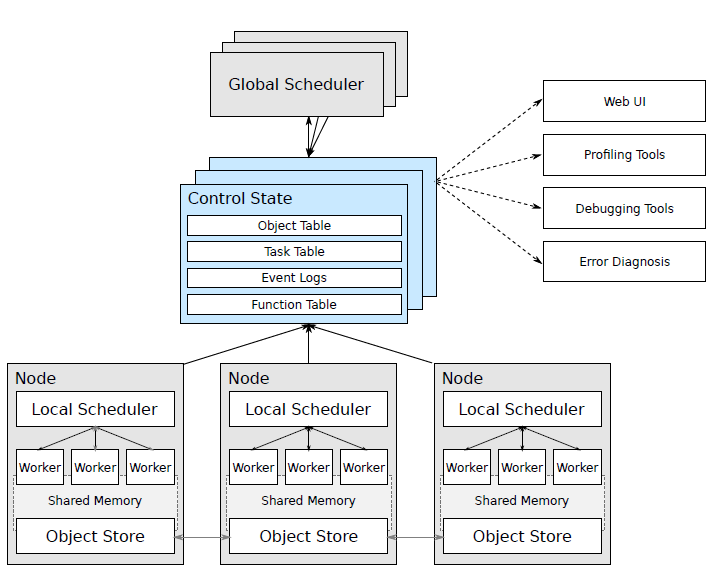
Node: 節(jié)點(diǎn),主要是head和worker, head可以認(rèn)為是Master,worker是執(zhí)行任務(wù)的單元 每個(gè)節(jié)點(diǎn)都有自己的本地調(diào)度器local scheduler object store:一個(gè)內(nèi)存對(duì)象存儲(chǔ),允許Node之間進(jìn)行通信 scheduler:有兩個(gè)調(diào)度器,每個(gè)節(jié)點(diǎn)都有本地的調(diào)度器, 在提交任務(wù)時(shí),Local Scheduler會(huì)判斷是否需要提交給Global Scheduler分發(fā)給其他worker來執(zhí)行。 GCS:全局狀態(tài)控制記錄了Ray中各種對(duì)象的狀態(tài)信息,可以認(rèn)為是meta數(shù)據(jù),是Ray容錯(cuò)的保證
3. 簡(jiǎn)單使用
3.1 安裝部署
pip install --upgrade pip
# pip install ray
pip install ray == 1.6.0

# ImportError: cannot import name 'deep_mapping' from 'attr.validators'
# pip install attr == 19.1.0
3.2 單機(jī)使用
簡(jiǎn)單例子 Ray 通過@ray.remote裝飾器使得函數(shù)變成可分布式調(diào)用的任務(wù)。通過函數(shù)名.remote方式進(jìn)行提交任務(wù),通過ray.get方式來獲取任務(wù)返回值。單擊情況下和多線程異步執(zhí)行的方式類似。 import time
import ray
ray.init(num_cpus = 4) # Specify this system has 4 CPUs.
@ray.remote
def do_some_work(x):
time.sleep(1) # Replace this is with work you need to do.
return x
start = time.time()
results = ray.get([do_some_work.remote(x) for x in range(4)])
print("duration =", time.time() - start)
print("results = ", results)
# duration = 1.0107324123382568
# results = [0, 1, 2, 3]remote返回的對(duì)象的id 如ObjectRef(7f10737098927148ffffffff0100000001000000)。需要通過ray.get來獲取實(shí)際的值, 需要注意的是ray.get是阻塞式的調(diào)用,不能[ray.get(do_some_work.remote(x)) for x in range(4)] 注意小任務(wù)使用情況 需要注意的是ray分布式計(jì)算在調(diào)度的時(shí)候需要發(fā)費(fèi)額外的時(shí)間,如調(diào)度,進(jìn)程間通信以及任務(wù)狀態(tài)的更新等等,所以避免過小的任務(wù)。可以把小任務(wù)進(jìn)行合并 @ray.remote
def tiny_work(x):
time.sleep(0.0001) # Replace this is with work you need to do.
return x
start = time.time()
result_ids = [tiny_work.remote(x) for x in range(100000)]
results = ray.get(result_ids)
print("duration =", time.time() - start)ray.put ray.put() 把一個(gè)對(duì)象放到對(duì)象存儲(chǔ)上,返回一個(gè)object id, 這個(gè)id可以在分布式機(jī)器上都可以調(diào)用,該操作為異步的。通過ray.get()可以是獲取。 num = ray.put(10)
ray.get(num)ray.wait 如果任務(wù)返回多個(gè)結(jié)果,ray.get()會(huì)等所有結(jié)果都完成之后才會(huì)執(zhí)行后續(xù)的操作。如果多個(gè)結(jié)果執(zhí)行的耗時(shí)不同,此時(shí)短板在于最長的那個(gè)任務(wù)。 這個(gè)時(shí)候可以采用ray.wait()方法,ray.wait()返回執(zhí)行完畢的和未執(zhí)行完畢的任務(wù)結(jié)果,執(zhí)行完成的結(jié)果可以繼續(xù)后續(xù)的操作 import random
@ray.remote
def do_some_work(x):
time.sleep(random.uniform(0, 4)) # Replace this is with work you need to do.
return x
def process_incremental(sum, result):
time.sleep(1) # Replace this with some processing code.
return sum + result
start = time.time()
result_ids = [do_some_work.remote(x) for x in range(4)]
sum = 0
while len(result_ids):
done_id, result_ids = ray.wait(result_ids)
sum = process_incremental(sum, ray.get(done_id[0]))
print("duration =", time.time() - start, "\nresult = ", sum)
# duration = 5.270821809768677
# result = 6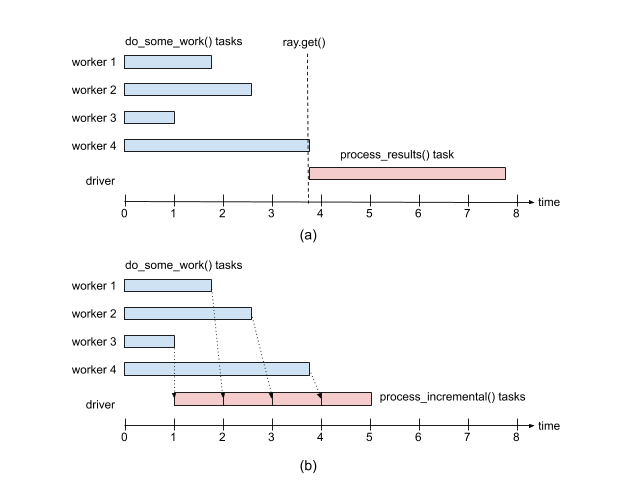
2.3 集群部署
ray start --head, 其他機(jī)器依次啟動(dòng)worker,注意需要指定head Node的地址確定關(guān)系,ray start --address 10.8.xx.3:6379。ray.stop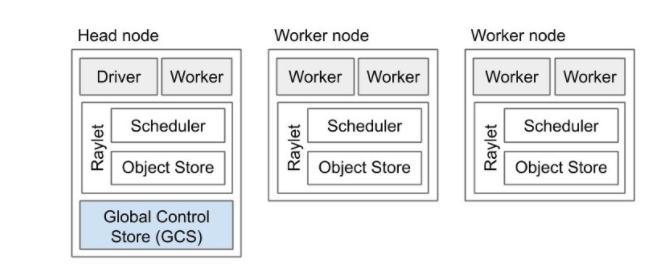
# To start a head node.
#ray start --head --num-cpus=<NUM_CPUS> --num-gpus=<NUM_GPUS>
ray start --head --node-ip-address 10.8.xx.3 --port=6379


# To start a non-head node.
# ray start --address=<address> --num-cpus=<NUM_CPUS> --num-gpus=<NUM_GPUS>
ray start --address 10.8.xx.3:6379 --node-ip-address 10.8.xx.3 --num-cpus 10 --temp-dir={your temp path}

提交任務(wù) 任何一臺(tái)worker機(jī)器都可以提交任務(wù), 先通過init連接Head Node就可以remote起來了。
import ray
ray.init(10.8.xx.3:6379)
3. 不同任務(wù)的例子
任務(wù)依賴 任務(wù)之間存在依賴關(guān)系,Ray和Spark一樣也是通過生成DAG圖的方式來確定依賴關(guān)系,確定可以并行跑的任務(wù)。如下圖所示zeros是可以并行跑的。 import numpy as np
# Define two remote functions. Invocations of these functions create tasks
# that are executed remotely.
@ray.remote
def multiply(x, y):
return np.dot(x, y)
@ray.remote
def zeros(size):
return np.zeros(size)
# Start two tasks in parallel. These immediately return futures and the
# tasks are executed in the background.
x_id = zeros.remote((100, 100))
y_id = zeros.remote((100, 100))
# Start a third task. This will not be scheduled until the first two
# tasks have completed.
z_id = multiply.remote(x_id, y_id)
# Get the result. This will block until the third task completes.
z = ray.get(z_id)
print(z)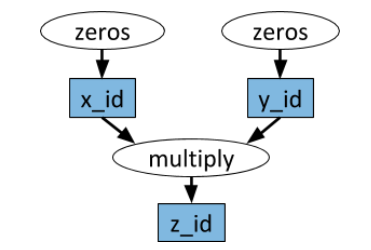
有狀態(tài)任務(wù) 上面提到的任務(wù)都是無狀態(tài)的(除依賴外),即任務(wù)之間都是無關(guān)系的。Ray也是支持有狀態(tài)的任務(wù)成為Actor。常是在python class上加@ray.remote,ray會(huì)跟蹤每個(gè)class內(nèi)部狀態(tài)的不同狀態(tài)。 @ray.remote
class Counter(object):
def __init__(self):
self.n = 0
def increment(self):
self.n += 1
def read(self):
return self.n
counters = [Counter.remote() for i in range(4)]
# 不斷的執(zhí)行可以每個(gè)counter計(jì)數(shù)不斷增加
[c.increment.remote() for c in counters]
futures = [c.read.remote() for c in counters]
print(ray.get(futures))
# [1, 1, 1, 1]
# [11, 11, 11, 11]map-reduce 任務(wù) map-reduce任務(wù)其實(shí)可以其他分布式任務(wù)是一樣的。主要是各種聚合操作。Map-Reduce常規(guī)操作如下 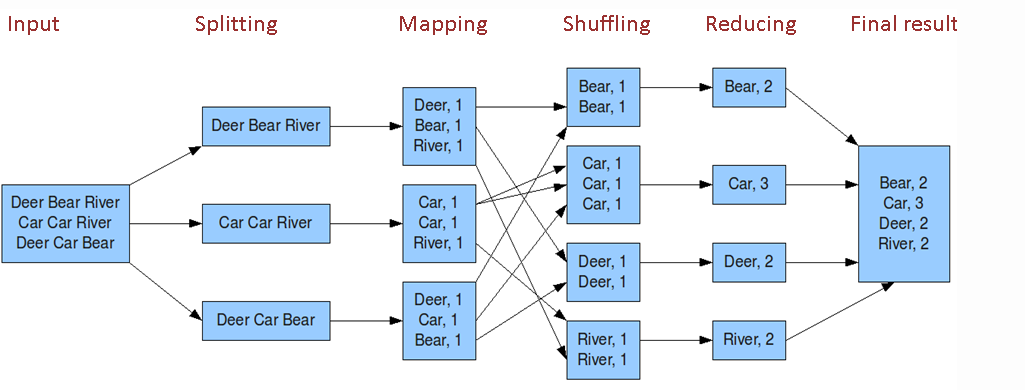
- word count例子見:https://github.com/ray-project/ray/blob/master/doc/examples/streaming/streaming.py這里舉一個(gè)簡(jiǎn)單的例子: @ray.remote
def map(obj, f):
return f(obj)
@ray.remote
def sum_results(*elements):
return np.sum(elements)
items = list(range(100))
map_func = lambda i : i*2
remote_elements = [map.remote(i, map_func) for i in items]
# simple reduce
remote_final_sum = sum_results.remote(*remote_elements)
result = ray.get(remote_final_sum)
# tree reduce
intermediate_results = [sum_results.remote(
*remote_elements[i * 20: (i + 1) * 20]) for i in range(5)]
remote_final_sum = sum_results.remote(*intermediate_results)
result = ray.get(remote_final_sum)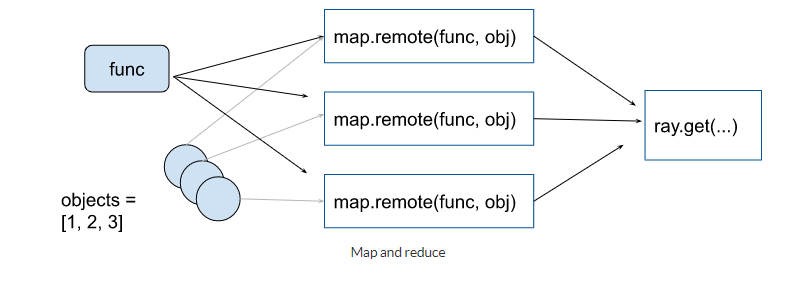
訓(xùn)練模型如pytorch 官網(wǎng)提供了 Best Practices: Ray with PyTorch, 主要是下載訓(xùn)練/測(cè)試數(shù)據(jù)和訓(xùn)練多個(gè)模型(感覺不是很實(shí)用)。訓(xùn)練多個(gè)模型,可以進(jìn)行參數(shù)融合。參見 https://docs.ray.io/en/latest/using-ray-with-pytorch.html
4. 總結(jié)
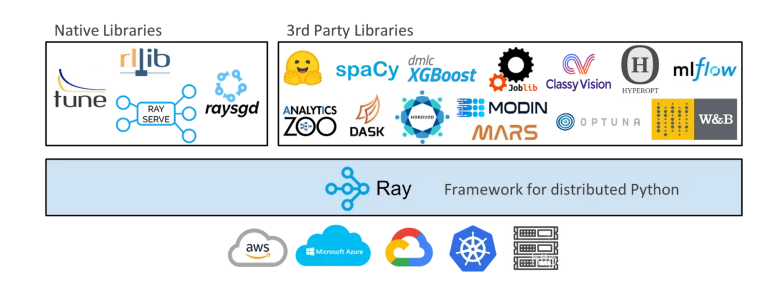
Ray是UC Berkeley RISELab新推出的高性能分布式執(zhí)行框架, Spark也是伯克利出品的 Ray架構(gòu)關(guān)鍵:兩個(gè)調(diào)度器, Head和worker節(jié)點(diǎn),GCS全局狀態(tài)控制保證計(jì)算容錯(cuò) Ray應(yīng)用簡(jiǎn)單:@ray.remote把任務(wù)變成分布式任務(wù), x.remote提交任務(wù), get/wait獲取結(jié)果 集群不是:ray start Ray支持多種任務(wù):有依賴DAG,有狀態(tài)Actor以及深度學(xué)習(xí)支持 不斷豐富的庫:RaySERVE, RaySGD, RayTune, Ray data,rllib
作者簡(jiǎn)介:wedo實(shí)驗(yàn)君, 數(shù)據(jù)分析師;熱愛生活,熱愛寫作
贊 賞 作 者



評(píng)論
圖片
表情