
Android自定義點(diǎn)選驗(yàn)證碼
我們要實(shí)現(xiàn)的是如下圖所示的漢字點(diǎn)選驗(yàn)證碼:
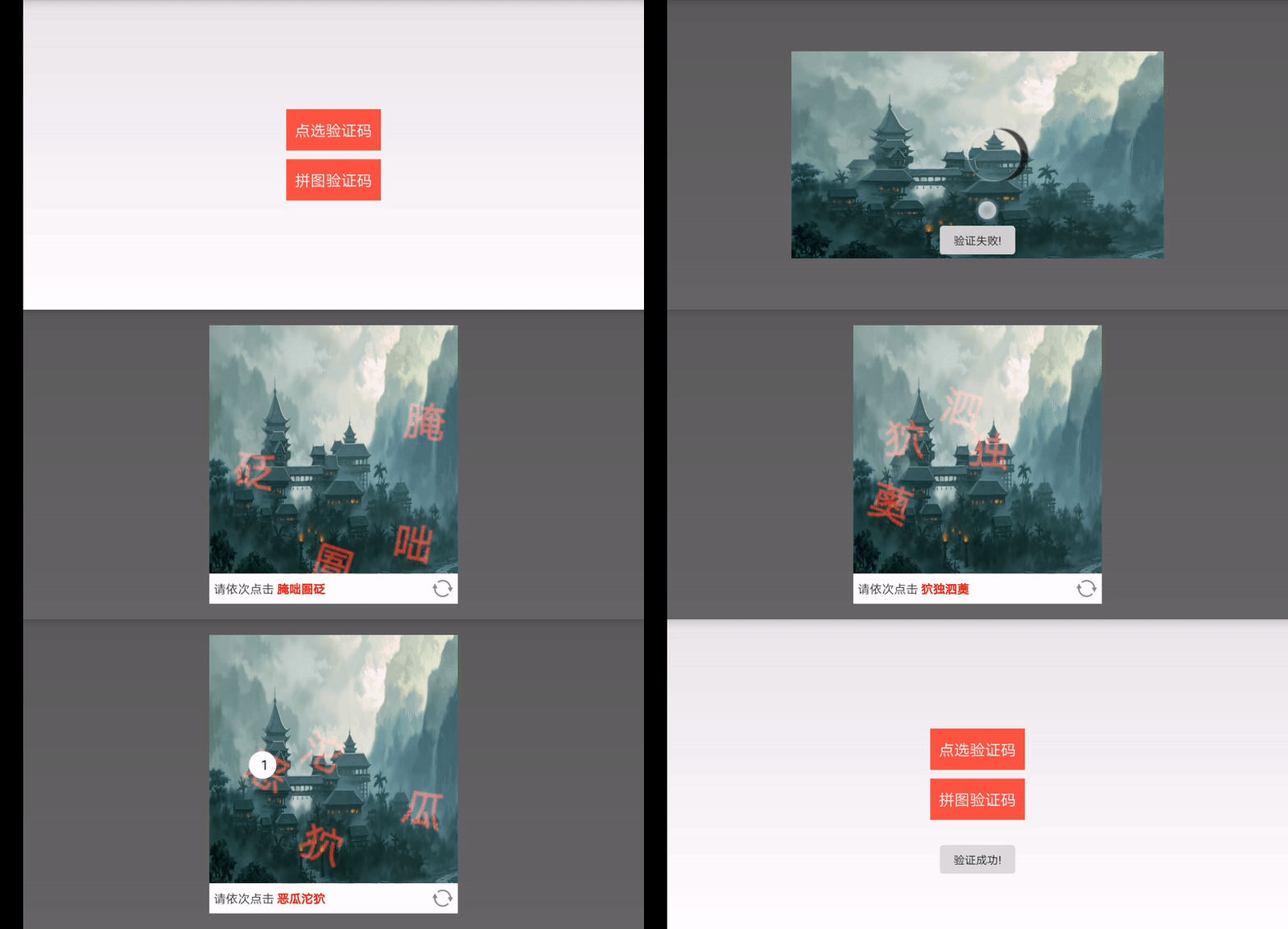
分析
效果圖可以分成上下兩個(gè)部分,其中第 2 可以通過(guò)常規(guī)組合布局的方式實(shí)現(xiàn),我們只需重點(diǎn)關(guān)注第 1 即可,實(shí)現(xiàn)了第 1 ,然后通過(guò)組合布局的方式,把上下兩個(gè)部分放一起,驗(yàn)證碼就算是大功告成了。
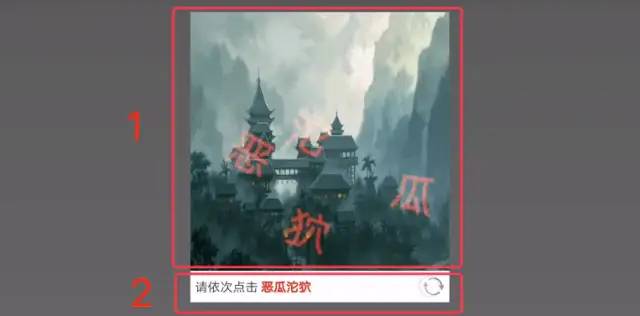
第 1 部分思路分析:
準(zhǔn)備一張圖片,通過(guò)canvas.drawBitmap()方法畫出背景圖
隨機(jī)生成4個(gè)坐標(biāo)點(diǎn),通過(guò)canvas.drawText()方法依次把預(yù)設(shè)的漢字寫到畫板上。這里的隨機(jī),你要考慮以下情況:
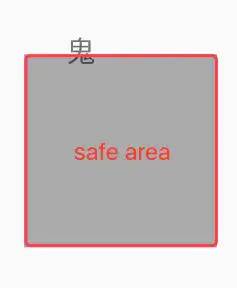
邊界。如果生成的左邊剛好在(x,fontSize)怎么辦,這時(shí)候文字可能跑到畫布邊界外面去了。
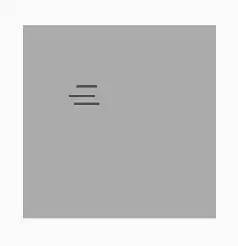
重合。如果第一次生成的坐標(biāo)是(100,100), 第二次生成的坐標(biāo)也是(100,100),或者(101,101),那兩個(gè)漢字豈不是繪制在同一位置了。
繪制正常

繪制重合
所以,除了要結(jié)合畫布大小和文字大小,計(jì)算出一塊安全區(qū)域,在安全區(qū)域內(nèi)隨機(jī)生成坐標(biāo)點(diǎn),還要保存已繪制文字區(qū)域范圍 region,對(duì)下一次要隨機(jī)生成的坐標(biāo)點(diǎn),先判斷是不是在已繪制文字區(qū)域內(nèi),避免文字在同一塊區(qū)域重復(fù)繪制。
在用戶交互上,我們希望點(diǎn)擊點(diǎn)如果在文字區(qū)域內(nèi),則顯示用戶點(diǎn)擊的順序,如果不在,則不處理點(diǎn)擊事件。這里可以點(diǎn)擊點(diǎn)為中心畫圓背景,然后結(jié)合圓背景大小、序號(hào)文字大小,計(jì)算序號(hào)文字需要顯示的位置,盡量顯示在圓正中。
完成界面的繪制后,剩下的就是邏輯判斷和回調(diào)接口處理,根據(jù)記錄的文字和點(diǎn)擊順序判斷就可以了。對(duì)外暴露設(shè)置文字、點(diǎn)擊刷新和判斷結(jié)果回調(diào)。
代碼實(shí)現(xiàn)
TapVerificationView.java
public class TapVerificationView extends View {/*畫布寬高*/private int width;private int height;private Bitmap oldBitmap;/*根據(jù)準(zhǔn)備的圖片重新調(diào)整尺寸后的背景圖*/private Bitmap bgBitmap;private Paint bgPaint;private RectF bgRectF;/*驗(yàn)證碼文字畫筆*/private Paint textPaint;private Paint selectPaint;private Paint selectTextPaint;private List<Region> regions = new ArrayList<Region>();private Random random;private String fonts = "";private int checkCode = 0;private List<Point> tapPoints = new ArrayList<Point>();private List<Integer> tapIndex = new ArrayList<Integer>();private List<Point> textPoints = new ArrayList<Point>();private List<Integer> degrees = new ArrayList<Integer>();private boolean isInit = true;public TapVerificationView(Context context) {this(context, null);}public TapVerificationView(Context context, AttributeSet attrs) {this(context, attrs, 0);}public TapVerificationView(Context context, AttributeSet attrs, int defStyleAttr) {super(context, attrs, defStyleAttr);oldBitmap = BitmapFactory.decodeResource(getResources(), R.mipmap.syzt);bgPaint = new Paint();bgPaint.setAntiAlias(true);bgPaint.setFilterBitmap(true);textPaint = new Paint();textPaint.setAntiAlias(true);textPaint.setFakeBoldText(true);textPaint.setColor(Color.parseColor("#AA000000"));textPaint.setShadowLayer(3, 2, 2, Color.RED);textPaint.setXfermode(new PorterDuffXfermode(PorterDuff.Mode.LIGHTEN));selectPaint = new Paint();selectPaint.setAntiAlias(true);selectPaint.setStyle(Paint.Style.FILL);selectPaint.setColor(Color.WHITE);selectTextPaint = new Paint();random = new Random();int temp = fonts.length() - 1;while (temp > -1) {checkCode += temp * Math.pow(10, temp);temp--;}}@Overrideprotected void onMeasure(int widthMeasureSpec, int heightMeasureSpec) {super.onMeasure(widthMeasureSpec, heightMeasureSpec);int minimumWidth = getSuggestedMinimumWidth();int minimumHeight = getSuggestedMinimumHeight();width = measureSize(minimumWidth, widthMeasureSpec);height = width;bgBitmap = clipBitmap(oldBitmap, width, height);bgRectF = new RectF(0, 0, width, height);textPaint.setTextSize(width / 6);setMeasuredDimension(width, height);}public Bitmap clipBitmap(Bitmap bm, int newWidth, int newHeight) {int width = bm.getWidth();int height = bm.getHeight();float scaleWidth = ((float) newWidth) / width;float scaleHeight = ((float) newHeight) / height;Matrix matrix = new Matrix();matrix.postScale(scaleWidth, scaleHeight);return Bitmap.createBitmap(bm, 0, 0, width, height, matrix, true);}private int measureSize(int defaultSize, int measureSpec) {int mode = MeasureSpec.getMode(measureSpec);int size = MeasureSpec.getSize(measureSpec);int result = defaultSize;switch (mode) {case MeasureSpec.UNSPECIFIED:result = defaultSize;break;case MeasureSpec.AT_MOST:case MeasureSpec.EXACTLY:result = size;break;}return result;}public static int dp2px(float dp) {float density = Resources.getSystem().getDisplayMetrics().density;return (int) (density * dp + 0.5f);}@Overridepublic boolean onTouchEvent(MotionEvent event) {switch (event.getAction()) {case MotionEvent.ACTION_DOWN:int x = (int) event.getX();int y = (int) event.getY();for (Region region : regions) {if (region.contains(x, y)) {isInit = false;int index = regions.indexOf(region);if (!tapIndex.contains(index)) {tapIndex.add(index);tapPoints.add(new Point(x, y));}if (tapIndex.size() == fonts.length()) {StringBuilder s = new StringBuilder();for (Integer i : tapIndex) {s.append(i);}int result = Integer.parseInt(s.toString());if (result == checkCode) {handler.sendEmptyMessage(1);} else {handler.sendEmptyMessage(0);}}invalidate();}}}return false;}private Handler handler = new Handler() {@Overridepublic void handleMessage(Message msg) {super.handleMessage(msg);int result = msg.what;switch (result) {case 1:Toast.makeText(getContext(), "驗(yàn)證成功!", Toast.LENGTH_SHORT).show();listener.onResult(true);break;default:Toast.makeText(getContext(), "驗(yàn)證失敗!", Toast.LENGTH_SHORT).show();postDelayed(new Runnable() {@Overridepublic void run() {reDrew();listener.onResult(false);}}, 1000);break;}}};private boolean checkCover(int x, int y) {for (Region region : regions) {if (region.contains(x, y)) {return true;}}return false;}@Overrideprotected void onDraw(Canvas canvas) {super.onDraw(canvas);regions.clear();canvas.drawBitmap(bgBitmap, null, bgRectF, bgPaint);/*在處理點(diǎn)擊的時(shí)候需要繪制用戶點(diǎn)擊的順序,這時(shí)候要判斷是初始化驗(yàn)證碼,還是用戶在點(diǎn)擊需要繪制點(diǎn)擊的序號(hào)* 如果是初始化驗(yàn)證碼,就隨機(jī)生成文字,繪制文字* 如果是用戶在點(diǎn)擊,需要繪制點(diǎn)擊的順序,這時(shí)候就不能重新隨機(jī)生成坐標(biāo)點(diǎn),要讓文字位置保持不動(dòng)才行,否則會(huì)出現(xiàn)點(diǎn)擊一次,隨機(jī)生成一次驗(yàn)證碼的情況* */if (isInit) {textPoints.clear();degrees.clear();tapIndex.clear();tapPoints.clear();for (int i = 0; i < fonts.length(); i++) {/*這里把文字倒著寫是為了后面的驗(yàn)證方便*/String s = String.valueOf(fonts.charAt(fonts.length() - i - 1));int textSize = (int) textPaint.measureText(s);canvas.save();/*在指定范圍隨機(jī)生成坐標(biāo)點(diǎn)*/int x = random.nextInt(width - textSize);int y = random.nextInt(height - textSize);/*如果檢測(cè)到點(diǎn)和文字區(qū)域有重合,則要重新隨機(jī)生成點(diǎn)坐標(biāo),這里四個(gè)條件,分別是如果以(x,y)為文字繪制坐標(biāo) 的 四個(gè)角的位置* 這里有一點(diǎn)繞,理解困難的最好在草紙上比劃比劃*/while (checkCover(x, y) || checkCover(x, y + textSize) || checkCover(x + textSize, y) || checkCover(x + textSize, y + textSize)) {x = random.nextInt(width - textSize);y = random.nextInt(height - textSize);}textPoints.add(new Point(x, y));canvas.translate(x, y);/*隨機(jī)生成一個(gè)30以內(nèi)的整數(shù),使文字傾斜一定的角度*/int degree = random.nextInt(30);degrees.add(degree);canvas.rotate(degree);canvas.drawText(s, 0, textSize, textPaint);regions.add(new Region(x, y, textSize + x, textSize + y));canvas.restore();}} else {for (int i = 0; i < fonts.length(); i++) {String s = String.valueOf(fonts.charAt(fonts.length() - i - 1));int textSize = (int) textPaint.measureText(s);canvas.save();/*效果圖上用戶點(diǎn)擊文字會(huì)出現(xiàn)序號(hào)顯示這是點(diǎn)擊的第幾個(gè),而驗(yàn)證碼文字沒(méi)有變化,其實(shí)驗(yàn)證碼文字這里也重新繪制了,只不過(guò)還是原來(lái)的位置、角度*/int x = textPoints.get(i).x;int y = textPoints.get(i).y;int degree = degrees.get(i);canvas.translate(x, y);canvas.rotate(degree);canvas.drawText(s, 0, textSize, textPaint);regions.add(new Region(x, y, textSize + x, textSize + y));canvas.restore();}/*繪制點(diǎn)擊的序號(hào)*/for (Point point : tapPoints) {int index = tapPoints.indexOf(point) + 1;String s = index + "";int textSize = width / 6 / 3;selectTextPaint.setTextSize(textSize);canvas.drawCircle(point.x, point.y, textSize, selectPaint);Rect rect = new Rect();selectTextPaint.getTextBounds(s, 0, 1, rect);int textWidth = rect.width();int textHeight = rect.height();canvas.drawText(s, point.x - textWidth / 2, point.y + textHeight / 2, selectTextPaint);}}}public void reDrew() {textPoints.clear();degrees.clear();tapIndex.clear();tapPoints.clear();isInit = true;invalidate();}public void setVerifyText(String s){fonts = s;checkCode = 0;int temp = fonts.length() - 1;while (temp > -1) {checkCode += temp * Math.pow(10, temp);temp--;}invalidate();}private OnVerifyListener listener;public void setVerifyListener(OnVerifyListener listener) {this.listener = listener;}}
然后是組合布局,比較簡(jiǎn)單,這里只放示例代碼:
dialog_verify.xml
<?xml version="1.0" encoding="utf-8"?><LinearLayout xmlns:android="http://schemas.android.com/apk/res/android"android:layout_width="match_parent"android:layout_height="wrap_content"android:background="@android:color/white"android:gravity="center"android:orientation="vertical"><com.example.qingfengwei.myapplication.TapVerificationViewandroid:id="@+id/tap_verify_view"android:layout_width="match_parent"android:layout_height="250dp" /><LinearLayoutandroid:layout_width="match_parent"android:layout_height="wrap_content"android:gravity="center_vertical"android:orientation="horizontal"android:padding="5dp"><TextViewandroid:id="@+id/verify_text"android:layout_width="0dp"android:layout_height="wrap_content"android:layout_weight="1" /><Buttonandroid:id="@+id/refresh_verify"android:layout_width="25dp"android:layout_height="25dp"android:background="@mipmap/jyw_refresh" /></LinearLayout></LinearLayout>
VerifyCationDialog.java
public class VerifyCationDialog extends Dialog {private int style;private TapVerificationView nofTapVerificationView;private Button btnRefresh;private TextView tvVerifyCode;public VerifyCationDialog(Context context, int style) {super(context);this.style = style;init(context);}private void init(Context context) {requestWindowFeature(Window.FEATURE_NO_TITLE);SlidingVerificationView slidingVerificationView = new SlidingVerificationView(context);slidingVerificationView.setVerifyListener(new OnVerifyListener() {@Overridepublic void onResult(boolean isSuccess) {if (isSuccess) {dismiss();}if(listener!=null){listener.onResult(isSuccess);}}});if (style == 1) {setContentView(R.layout.dialog_verify);nofTapVerificationView = findViewById(R.id.tap_verify_view);btnRefresh = findViewById(R.id.refresh_verify);tvVerifyCode = findViewById(R.id.verify_text);setVerifyText();nofTapVerificationView.setVerifyListener(new OnVerifyListener() {@Overridepublic void onResult(boolean isSuccess) {if (isSuccess) {dismiss();} else {setVerifyText();}if(listener!=null){listener.onResult(isSuccess);}}});btnRefresh.setOnClickListener(new View.OnClickListener() {@Overridepublic void onClick(View v) {setVerifyText();nofTapVerificationView.reDrew();}});} else {setContentView(slidingVerificationView);}DisplayMetrics dm = context.getResources().getDisplayMetrics();int displayWidth = dm.widthPixels;int displayHeight = dm.heightPixels;WindowManager.LayoutParams p = getWindow().getAttributes(); //獲取對(duì)話框當(dāng)前的參數(shù)值if (displayWidth > displayHeight) {if (style == 1) {p.width = (int) (displayWidth * 0.4);} else {p.width = (int) (displayWidth * 0.6);}} else {if (style == 1) {p.width = (int) (displayWidth * 0.7);} else {p.width = (int) (displayWidth * 0.9);}}getWindow().setGravity(Gravity.CENTER);getWindow().setAttributes(p);getWindow().setBackgroundDrawableResource(android.R.color.transparent);setCanceledOnTouchOutside(true);setCancelable(true);}private void setVerifyText() {String baseText = "悛醍躞稂怙惡瓜沱狖獨(dú)泗薁臧齬齟腌咄圄砭靁針?lè)铟义缙淞P立軛犄時(shí)孓氣覦鼯綿頂娜旮醐耋孑蘡娉灌瓞臢臬弊裊龍為呶耄煢行踽覬角旯虺蹀餮沆涕休陟莠軒滂囹不婷否龘嗟";Random random = new Random();int start = random.nextInt(baseText.length() - 4 - 1);int end = start + 4;String verifyText = baseText.substring(start, end);nofTapVerificationView.setVerifyText(verifyText);tvVerifyCode.setText(Html.fromHtml("請(qǐng)依次點(diǎn)擊 <font color=\"#FF0000\"><b>" + verifyText + "</b></font>"));}private OnVerifyListener listener;public void setVerifyListener(OnVerifyListener listener){this.listener = listener;}}
代碼都在這里啦,需要的趕緊試試吧!
到這里就結(jié)束啦。