
Python也能操作MongoDB數(shù)據(jù)庫
回復(fù)“書籍”即可獲贈Python從入門到進階共10本電子書
大家好,我是Python進階者。
前言
作為非關(guān)系數(shù)據(jù)庫的代表--Mongo,可以說是讓人又愛又恨,讓人愛的是它的便捷性,讓人恨的是它的配置,實在是坑多。那么今天我們就來深入剖析它吧。
一、下載并導(dǎo)入Python 連接Mongo的模塊
pip install pymongofrom pymongo import MongoClient
二、連接Mongo數(shù)據(jù)庫
1.普通登錄,又稱游客登陸,安全等級低
MongoClient('mongodb://localhost:27017/')2.用戶密碼登陸,安全等級高
MongoClient('mongodb://hwzjj:123456@localhost:27017/hw')這里連接到了用戶名為hwzjj,密碼為123456的用戶。
三、執(zhí)行插入操作
為了安全,我們使用用戶名和密碼登陸,然后創(chuàng)建一個集合,不知道大家對Mongo創(chuàng)建集合還有沒有印象,反正小編還有,廢話不多說,先創(chuàng)建兩個集合。
db.createCollection(name='student',option={capped:true,autoIndexId:true,size:100,max:1000})db.createCollection(name='teacher',option={capped:true,autoIndexId:true,size:200,max:2000})
這樣就創(chuàng)建了一student和teacher的集合了。然后我們再來顯示一下所有的集合名:
show collections;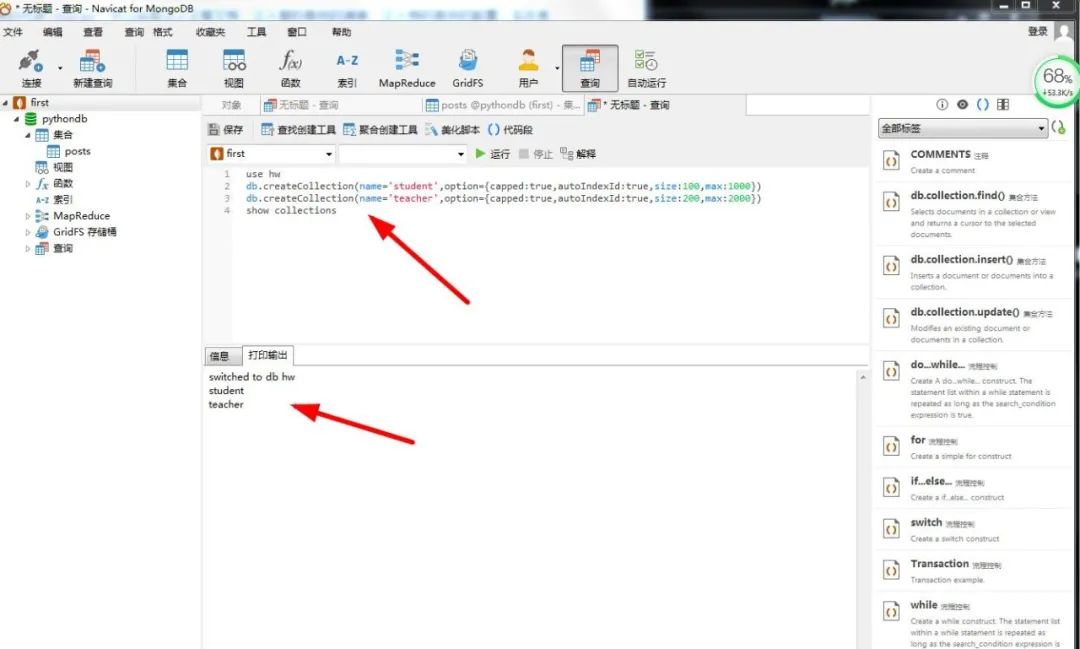
然后我們往集合里插入數(shù)據(jù),在Mongo中是這樣插入的:
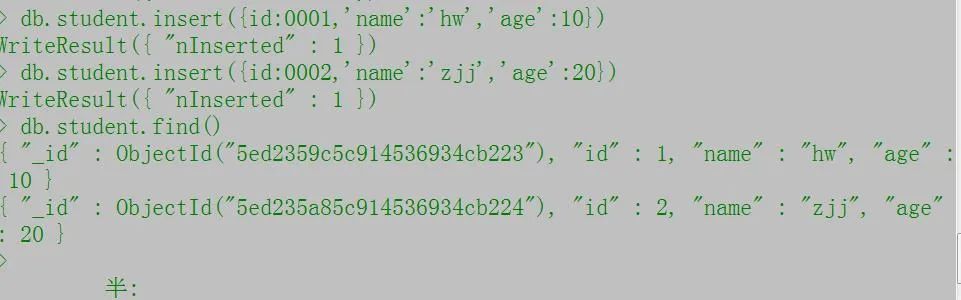
可以看到我們成功插入了兩條數(shù)據(jù),接下來我們利用Python來插入數(shù)據(jù)。
1.直接使用創(chuàng)建好的集合插入數(shù)據(jù)
from pymongo import MongoClientclient=MongoClient('mongodb://hwzjj:123456@localhost:27017/hw') 連接數(shù)據(jù)庫db=client['hw'] 選擇數(shù)據(jù)庫hwcoll=db['student'] 選擇集合res={'id':'0003','name':'任性','age':43}first=coll.insert_one(res) 將數(shù)據(jù)插入到集合中print(first.inserted_id) 打印插入數(shù)據(jù)的id(每個插入數(shù)據(jù)都會有)
2.自己創(chuàng)建集合插入數(shù)據(jù)
from pymongo import MongoClientclient=MongoClient('mongodb://hwzjj:123456@localhost:27017/hw')db=client['hw']db.create_collection('teacher') 創(chuàng)建集合res={'id':'0001','name':'boy','age':36}last=db.student.insert_one(res) 插入數(shù)據(jù)print(last.inserted_id) 打印id
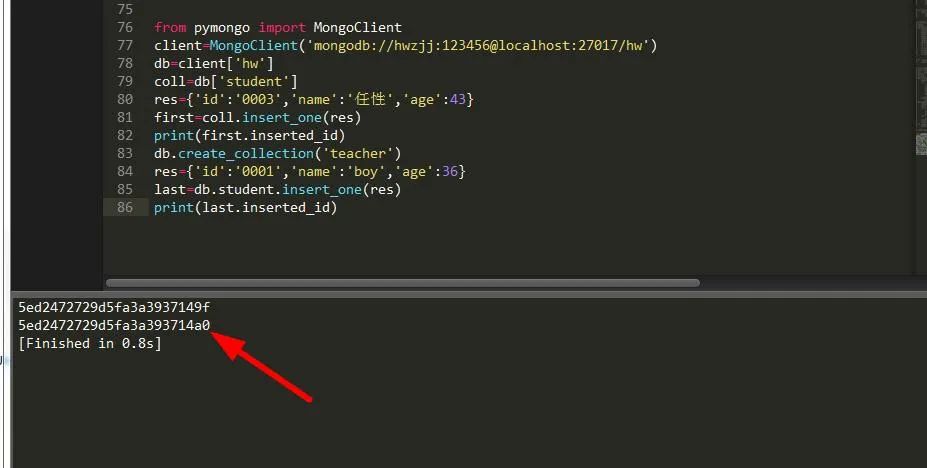
3.插入多條數(shù)據(jù)
import randomfrom pymongo import MongoClientclient=MongoClient('mongodb://hwzjj:123456@localhost:27017/hw')db=client['hw']coll=db['student']def get():for y in range(100000):data={'id':y,'name':'user--'+str(y),'age':random.choice(range(100))}yield datafor y in get():coll.insert(y)
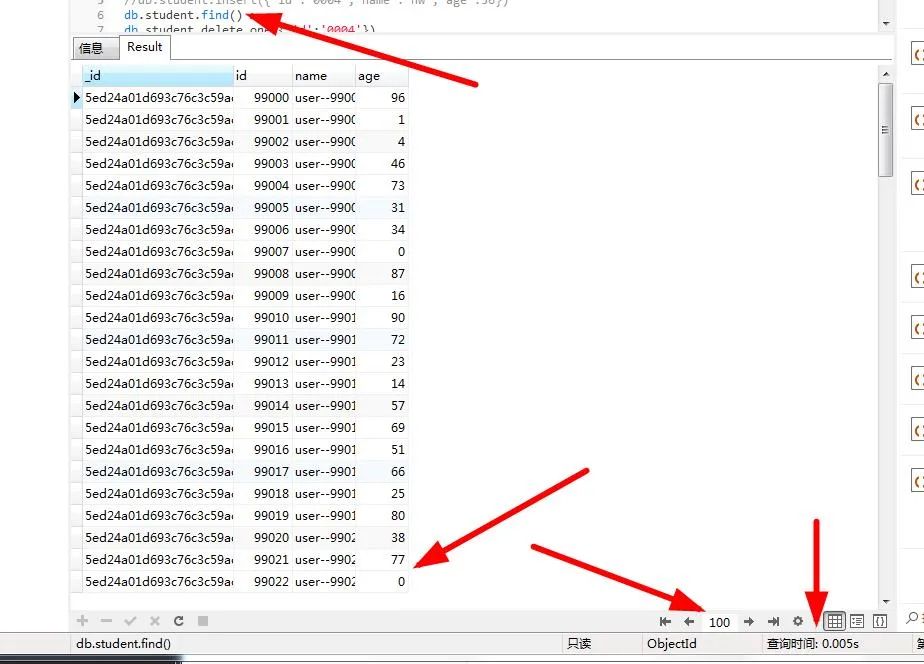
同樣是插入十萬個數(shù)據(jù), 不過數(shù)據(jù)卻是比Mysql慢一點,可自行測試。
注:執(zhí)行插入操作時,Insert最多可插入四條同樣的記錄。
四、執(zhí)行更改操作
仍舊是先要獲取集合,然后對集合中的內(nèi)容進行修改。
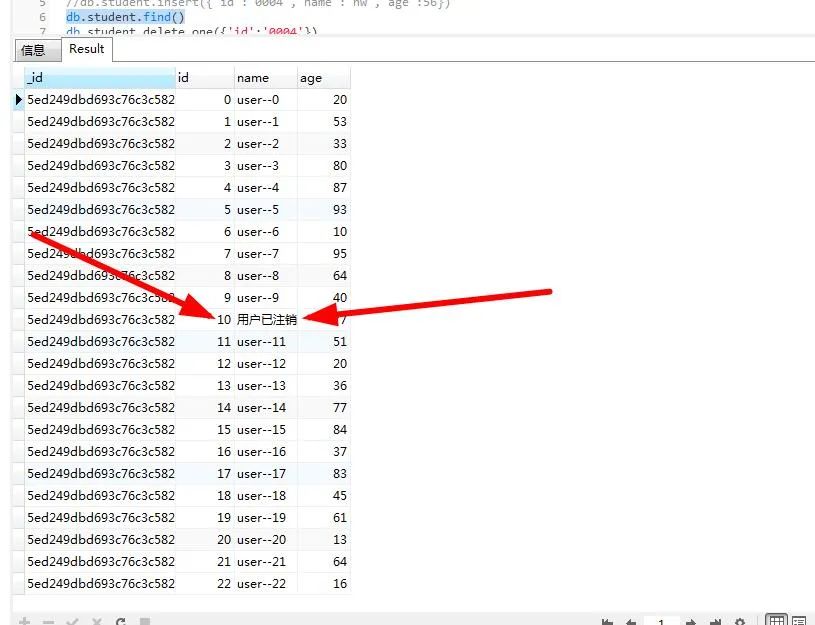
1.更新匹配到的第一條數(shù)據(jù)
from pymongo import MongoClientclient=MongoClient('mongodb://hwzjj:123456@localhost:27017/hw')db=client['hw']coll=db['student']coll.update_one({'name':'user--10'},{'$set':{'name':'用戶已注銷'}}) 更新匹配到的第一條數(shù)據(jù)
2.更新匹配到的所有數(shù)據(jù)
我們創(chuàng)建四個一樣的數(shù)據(jù),將程序執(zhí)行四次即可:
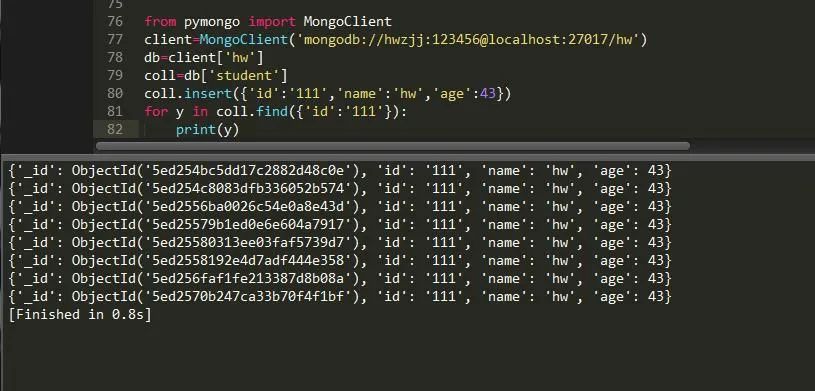
from pymongo import MongoClientclient=MongoClient('mongodb://hwzjj:123456@localhost:27017/hw')db=client['hw']coll=db['student']coll.insert({'id':'111','name':'hw','age':43})
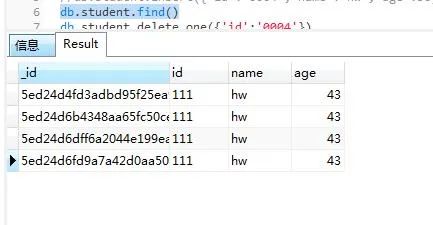
可以看到生成了四個同樣的記錄,當(dāng)然了,只能生成最多4條記錄。然后我們?nèi)繉⑺鼈償?shù)據(jù)修改。
coll.update({'name':'hw'},{'$set':{'name':'用戶已注冊'}})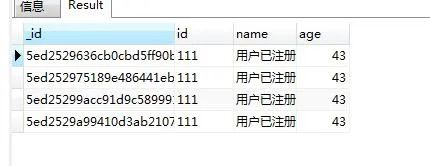
五、執(zhí)行刪除操作
1.刪除所有符合條件的數(shù)據(jù)
from pymongo import MongoClientclient=MongoClient('mongodb://hwzjj:123456@localhost:27017/hw')db=client['hw']coll=db['student']coll.insert({'id':'111','name':'hw','age':43}) 插入數(shù)據(jù)coll.remove({'name':'hw'}) 刪除所有name 為hw的數(shù)據(jù),注意不要以id為條件來刪除,會報錯coll.delete_many({'name':'hw'}) 跟上者功能一樣
2.刪除所有符合條件的第一條數(shù)據(jù)
from pymongo import MongoClientclient=MongoClient('mongodb://hwzjj:123456@localhost:27017/hw')db=client['hw']coll=db['student']coll.insert({'id':'111','name':'hw','age':43})coll.delete_one({'name':'hw'}) 刪除符合條件的第一條數(shù)據(jù)
六、執(zhí)行查詢操作
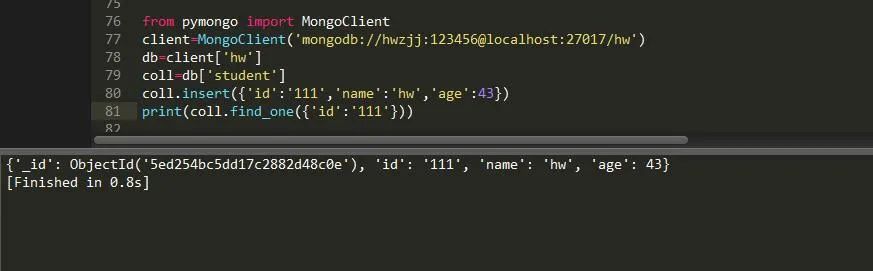
1.查詢符合條件的第一條數(shù)據(jù)
2.查詢符合條件的所有數(shù)據(jù)
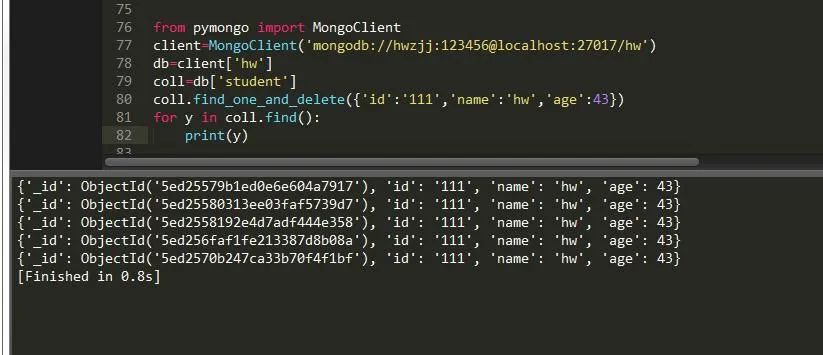
3.查找后刪除
4.查找后替換
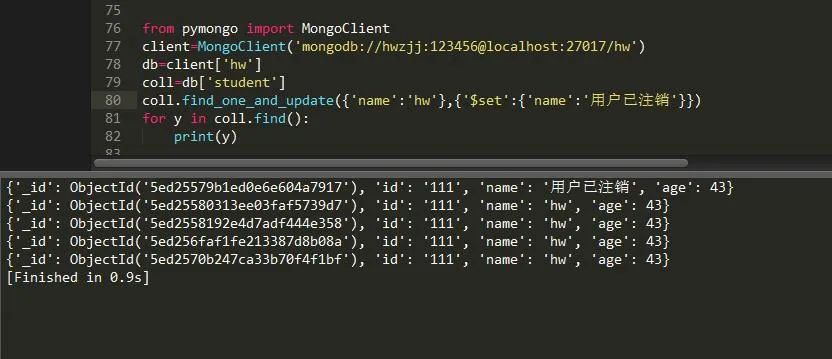
5.查找后更新

6.統(tǒng)計符合條件的記錄數(shù)量
coll.find().count() # 記錄符合條件的數(shù)量7.符合條件的數(shù)據(jù)的排序
coll.find().sort('name', pymongo.ASCENDING) # 升序排序 DESCENDING 降序排序8.符合條件數(shù)量中跳過
coll.find().sort('name', pymongo.ASCENDING).skip(1) # 跳過一個記錄9.限制符合條件輸出數(shù)量
coll.find().sort('name', pymongo.ASCENDING).limit(2) # 輸出兩個符合條件的記錄10.通過Id來查找
每個插入的數(shù)據(jù)都會生成一個id,貌似被加密了,前面我們已經(jīng)和它打過交道了,下面來看下它的使用。
from bson.objectid import ObjectIdfind_one({'_id': ObjectId(id_name)})
七、索引操作
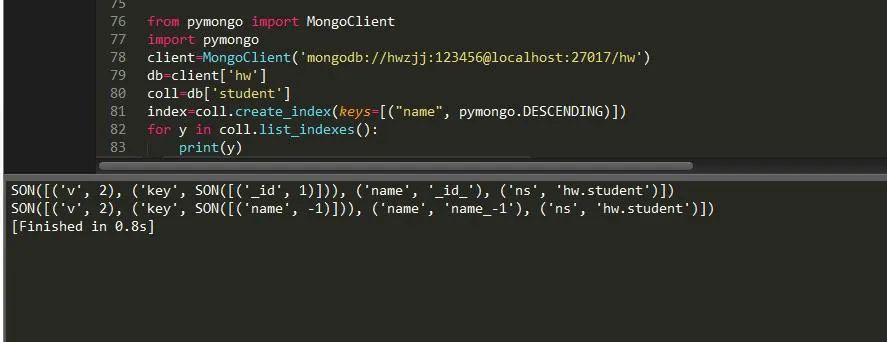
1.創(chuàng)建索引
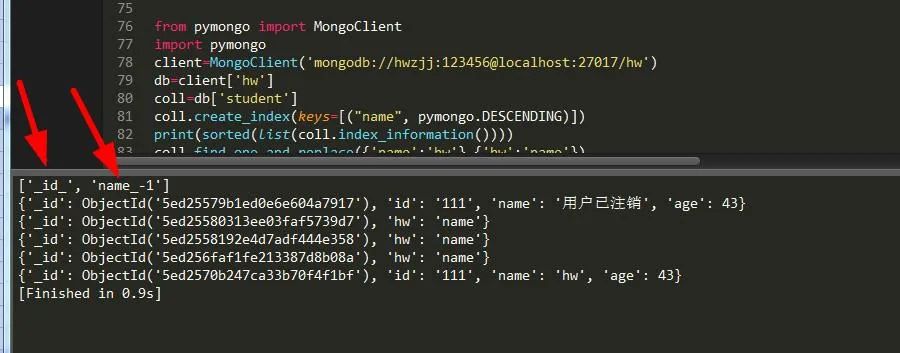
可以看到有兩個索引,一個是Mongo自動創(chuàng)建的在id上的索引,另一個是剛剛創(chuàng)建在name上的索引。
2.獲取索引
for y in coll.list_indexes(): # 獲取所有索引print(y)
3.刪除索引
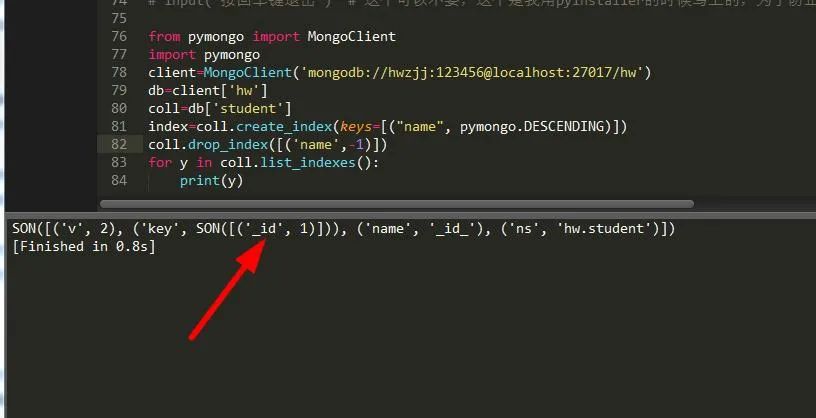
可以看到剛剛的索引name已經(jīng)被刪除了,而且只有一條數(shù)據(jù)了,那么有人就問了,為何不把_id一起刪除,很抱歉,這個是刪不了的。
八、總結(jié)
通過本章對Pymongo的學(xué)習(xí),相信你已經(jīng)可以勝任日常一些開發(fā)了,Pymongo中還有很多值得學(xué)習(xí)的地方,值得你去推敲,在這里就不一一列舉了,希望本文能帶大家零基礎(chǔ)毫無壓力入門Pymongo。
------------------- End -------------------
往期精彩文章推薦:

歡迎大家點贊,留言,轉(zhuǎn)發(fā),轉(zhuǎn)載,感謝大家的相伴與支持
想加入Python學(xué)習(xí)群請在后臺回復(fù)【入群】
萬水千山總是情,點個【在看】行不行
/今日留言主題/
隨便說一兩句吧~~