<kbd id="afajh"><form id="afajh"></form></kbd>
<strong id="afajh"><dl id="afajh"></dl></strong>
    <del id="afajh"><form id="afajh"></form></del>
        1. <th id="afajh"><progress id="afajh"></progress></th>
          <b id="afajh"><abbr id="afajh"></abbr></b>
          <th id="afajh"><progress id="afajh"></progress></th>

          20 個(gè)短小精悍的 Numpy 函數(shù)

          共 13478字,需瀏覽 27分鐘

           ·

          2022-07-13 11:48


          大家好,我是1480君,本篇為大家介紹20個(gè)非常有用的Numpy函數(shù)。
          以下這些函數(shù)并不常見(jiàn),甚至你可能都沒(méi)聽(tīng)說(shuō)過(guò),但是在有些時(shí)候它們真的很有用。

          np.full_like

          我敢打賭,你肯定使用過(guò)像ones_like 或 zeros_like 這樣的常見(jiàn) NumPy 函數(shù)。full_like 和這兩個(gè)完全一樣,除了你可以創(chuàng)建一個(gè)與另一個(gè)矩陣具有相同形狀的矩陣但是這些矩陣是使用自定義值填充的。
          array = np.array([[1468], [9444], [2723]]) 
           
          array_w_inf = np.full_like(array, fill_value=np.pi, dtype=np.float32)

          array_w_inf 
          array([[3.1415927, 3.1415927, 3.1415927, 3.1415927], 
                 [3.1415927, 3.1415927, 3.1415927, 3.1415927], 
                 [3.1415927, 3.1415927, 3.1415927, 3.1415927]], dtype=float32)
          在這里,我們正在創(chuàng)建一個(gè)數(shù)組值都是pi 矩陣。

          np.logspace

          我相信你經(jīng)常使用linspace。它可以在一個(gè)區(qū)間內(nèi)創(chuàng)建自定義的線性間隔數(shù)據(jù)點(diǎn)數(shù)量。它的同類logspace在這方面做得更深入一些。它可以在對(duì)數(shù)尺度上生成均勻間隔的自定義點(diǎn)數(shù)。你可以選擇任何一個(gè)數(shù)作為基數(shù),只要它是非零的:
          log_array = np.logspace(start=1, stop=100, num=15, base=np.e) 
          log_array 
          array([2.71828183e+00, 3.20167238e+03, 3.77102401e+06, 4.44162312e+09, 
                 5.23147450e+12, 6.16178472e+15, 7.25753148e+18, 8.54813429e+21, 
                 1.00682443e+25, 1.18586746e+28, 1.39674961e+31, 1.64513282e+34, 
                 1.93768588e+37, 2.28226349e+40, 2.68811714e+43])

          np.meshgrid

          這是只有在文檔中才能看到的函數(shù)之一。因?yàn)榇蟛糠秩穗y理解它。可以使用meshgrid從給定的X和Y數(shù)組創(chuàng)建每個(gè)可能的坐標(biāo)對(duì)。這里有一個(gè)簡(jiǎn)單的例子:
          x = [1234
          y = [3568
           
          xx, yy = np.meshgrid(x, y) 
          xx 
          array([[1, 2, 3, 4],
          [1, 2, 3, 4],
          [1, 2, 3, 4],
          [1, 2, 3, 4]])
          yy
          array([[3, 3, 3, 3],
          [5, 5, 5, 5],
          [6, 6, 6, 6],
          [8, 8, 8, 8]])
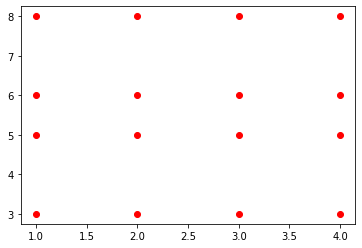
          得到 16 個(gè)唯一坐標(biāo)對(duì),結(jié)果數(shù)組中的每個(gè)索引到索引元素對(duì)對(duì)應(yīng)一個(gè)。可視化一下就很好理解了
          plt.plot(xx, yy, linestyle="none"
                   marker="o", color="red");
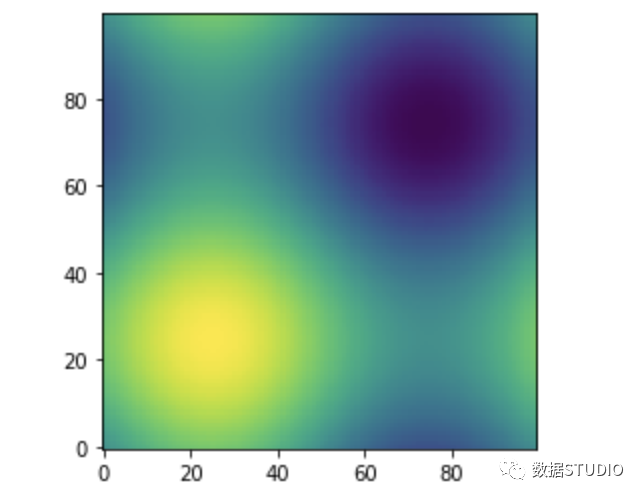
          meshgrid通常用于使用循環(huán)需要很長(zhǎng)時(shí)間的復(fù)雜任務(wù)。如繪制三維正弦函數(shù)等高線圖就是一個(gè)例子:
          def sinus2d(x, y): 
              return np.sin(x) + np.sin(y) 
           
          xx, yy = np.meshgrid(np.linspace(02 * np.pi, 100), np.linspace(02 * np.pi, 100)) 
          z = sinus2d(xx, yy)  # Create the image on this grid 
           
          import matplotlib.pyplot as plt 
           
          plt.imshow(z, origin="lower"
                     interpolation="none"
          plt.show()

          np.triu / np.tril

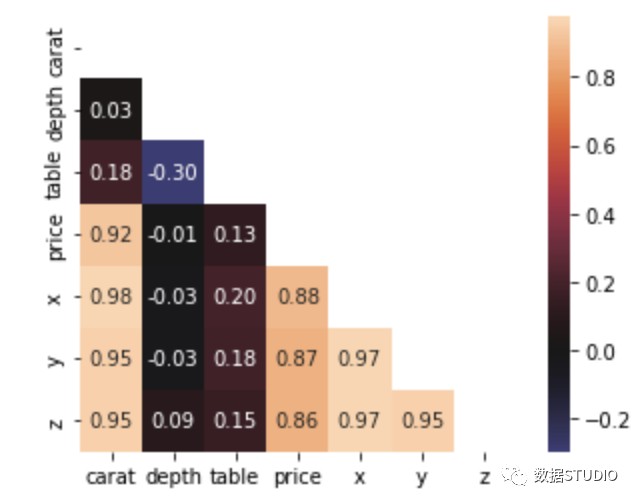
          與ones_like或zeros_like類似,這兩個(gè)函數(shù)在矩陣的某個(gè)對(duì)角線上方或下方返回0。例如,我們可以使用triu函數(shù)在主對(duì)角線上創(chuàng)建一個(gè)值為True的布爾掩碼,并在繪制相關(guān)熱圖時(shí)使用這個(gè)掩碼。
          import seaborn as sns

          diamonds = sns.load_dataset("diamonds")

          matrix = diamonds.corr()
          mask = np.triu(np.ones_like(matrix, dtype=bool))

          sns.heatmap(matrix, square=True
                      mask=mask, annot=True
                      fmt=".2f", center=0);
          如你所見(jiàn),用triu創(chuàng)建的掩碼可以用在相關(guān)矩陣上,去掉不必要的上三角形和對(duì)角線。這使得熱圖更加緊湊,可讀性更強(qiáng)。

          np.ravel / np.flatten

          NumPy是關(guān)于高維矩陣和ndarrays的。但是有時(shí)候你只是想把這些數(shù)組壓縮成一維。這就是你使用ravel或flatten的地方:
          array = np.random.randint(010, size=(45)) 
          array 
          array([[6, 4, 8, 9, 6],
          [5, 0, 4, 8, 5],
          [1, 3, 1, 0, 3],
          [2, 3, 3, 6, 5]])
          array.ravel() 
          array([6, 4, 8, 9, 6, 5, 0, 4, 8, 5,
          1, 3, 1, 0, 3, 2, 3, 3, 6, 5])
          array.flatten() 
          array([6, 4, 8, 9, 6, 5, 0, 4, 8, 5,
          1, 3, 1, 0, 3, 2, 3, 3, 6, 5])
          它們看起來(lái)一樣嗎?不完全是。flatten總是返回一個(gè)1D副本,而ravel則試圖生成原始數(shù)組的1D視圖。也就是說(shuō)如果修改從ravel返回的數(shù)組可能會(huì)改變?cè)瓉?lái)的數(shù)組。

          np.vstack / np.hstack

          在Kaggle上這兩個(gè)函數(shù)經(jīng)常被使用。通常人們從不同的模型對(duì)測(cè)試集有多個(gè)預(yù)測(cè),他們希望以某種方式集成這些預(yù)測(cè)。為了使它們易于處理,必須將它們組合成一個(gè)矩陣。
          array1 = np.arange(111).reshape(-11)
          array2 = np.random.randint(110, size=10).reshape(-11)
          hstacked = np.hstack((array1, array2))
          hstacked
          array([[ 1, 2],
          [ 2, 6],
          [ 3, 6],
          [ 4, 7],
          [ 5, 4],
          [ 6, 6],
          [ 7, 6],
          [ 8, 8],
          [ 9, 2],
          [10, 8]])
          array1 = np.arange(2031).reshape(1-1)
          array2 = np.random.randint(2031, size=11).reshape(1-1)
          vstacked = np.vstack((array1, array2))
          vstacked
          array([[20, 21, 22, 23, 24, 25, 26, 27, 28, 29, 30],
          [21, 23, 23, 26, 29, 26, 27, 27, 28, 25, 25]])
          在將每個(gè)數(shù)組與這些數(shù)組堆疊之前,要對(duì)數(shù)組進(jìn)行重塑,因?yàn)槟J(rèn)情況下它們需要2D數(shù)組。這就是我們使用重塑函數(shù)的原因。這里,reshape(-1,1)表示將數(shù)組轉(zhuǎn)換為具有盡可能多行的單列。
          類似地,reshape(1,-1)將數(shù)組轉(zhuǎn)換為具有盡可能多列的單行向量。

          np.r_ / np.c_

          如果你像我一樣懶惰,不想對(duì)所有數(shù)組調(diào)用重塑,那么有一個(gè)更優(yōu)雅的解決方案。np.r_ / np.c_操作符(不是函數(shù)!)允許將數(shù)組分別堆疊為行和列。
          下面,我們模擬一個(gè)有100個(gè)可能性的預(yù)測(cè)數(shù)組。為了將它們堆疊在一起,我們調(diào)用np.r_用括號(hào)表示(如pandas.DataFrame.loc)。
          preds1 = np.random.rand(100)
          preds2 = np.random.rand(100)

          as_rows = np.r_[preds1, preds2]
          as_cols = np.c_[preds1, preds2]

           as_rows.shape
          (200,)
          as_cols.shape
          (100, 2)
          類似地,np.c_將數(shù)組堆疊在一起創(chuàng)建一個(gè)矩陣。其實(shí)它們的功能并不局限于簡(jiǎn)單的水平和垂直堆棧。要了解更多的功能,我建議你閱讀文檔。http://np.info
          NumPy的函數(shù)非常的多。你可能沒(méi)有時(shí)間和耐心學(xué)習(xí)每個(gè)函數(shù)和類。如果你面對(duì)一個(gè)未知的函數(shù)呢?你不用去看文檔了因?yàn)橛懈玫倪x擇。
          info函數(shù)可以打印NumPy API中任何名稱的docstring。這里是info使用的信息:
          np.info(np.info) 
          info(object=None, maxwidth=76, 
                output=<ipykernel.iostream.OutStream object at 0x0000021B875A8820>, 
                toplevel='numpy'
           
          Get help information for a function, class, or module. 
           
          Parameters 
          ---------- 
          object : object or str, optional 
              Input object or name to get information about. If `object` is a 
              numpy object, its docstring is given. If it is a string, available 
              modules are searched for matching objects.  If None, information 
              about `info` itself is returned. 
          maxwidth : int, optional 
              Printing width.
          還記得我們?cè)趘scode的文章中說(shuō)過(guò)lint要求強(qiáng)制編寫docstring嗎,這就是原因了。

          np.where

          顧名思義,這個(gè)函數(shù)返回一個(gè)條件為True的數(shù)組的所有下標(biāo):
          probs = np.random.rand(100
          idx = np.where(probs > 0.8
           probs[idx] 
          array([0.80444302, 0.80623093, 0.98833642, 0.96856382, 0.89329919, 
                 0.88664223, 0.90515148, 0.96363973, 0.81847588, 0.88250337, 
                 0.98737432, 0.92104315])
          它在搜索稀疏數(shù)組中的非零元素時(shí)特別有用,甚至可以在Pandas DataFrames上使用它來(lái)基于條件進(jìn)行更快的索引檢索。

          np.all / np.any

          當(dāng)與assert語(yǔ)句一起使用時(shí),這兩個(gè)函數(shù)將在數(shù)據(jù)清理期間非常方便。np.all僅當(dāng)數(shù)組中的所有元素都符合特定條件時(shí)返回True:
          array1 = np.random.rand(100)
          array2 = np.random.rand(100)

          >>> np.all(array1 == array2)
          False
          因?yàn)槲覀儎?chuàng)建了兩個(gè)隨機(jī)數(shù)的數(shù)組,所以不可能每個(gè)元素都相等。然而,如果這些數(shù)字是整數(shù),那么它們中至少有兩個(gè)相等的可能性要大得多:
          a1 = np.random.randint(1100, size=100)
          a2 = np.random.randint(1100, size=100)

          >>> np.any(a1 == a2)
          True
          any返回True是因?yàn)閿?shù)組中至少有一個(gè)元素滿足特定條件,

          np.allclose

          如果想要檢查兩個(gè)長(zhǎng)度相等的數(shù)組是否互為副本,簡(jiǎn)單的==操作符不會(huì)將其截?cái)?。但是你可能想要比較浮點(diǎn)數(shù)數(shù)組,但是它們的小數(shù)點(diǎn)長(zhǎng)度使得比較困難。在這種情況下可以使用allclose,如果一個(gè)數(shù)組的所有元素彼此之間距離很近,給定一定的容忍度,它將返回True。
          a1 = np.arange(110, step=0.5
          a2 = np.arange(0.89.8, step=0.5
           
          np.all(a1 == a2) 
          False
          a1 
          array([1. , 1.5, 2. , 2.5, 3. , 3.5, 4. , 4.5, 5. ,
          5.5, 6. , 6.5, 7. , 7.5, 8. , 8.5, 9. , 9.5])
          a2 
          array([0.8, 1.3, 1.8, 2.3, 2.8, 3.3, 3.8, 4.3, 4.8,
          5.3, 5.8, 6.3, 6.8, 7.3, 7.8, 8.3, 8.8, 9.3])
          np.allclose(a1, a2, rtol=0.2
          False
          np.allclose(a1, a2, rtol=0.3)
          True
          只有當(dāng)差異(<)小于rtol時(shí),函數(shù)才返回True,而不是<=!

          np.argsort

          np.sort返回一個(gè)已排序的數(shù)組副本。有時(shí)需要對(duì)數(shù)組進(jìn)行排序的索引,以便為不同的目的多次使用相同的索引。這就是 argsort 派上用場(chǎng)的地方:
          random_ints = np.random.randint(1100, size=20
          idx = np.argsort(random_ints) 
           
          random_ints[idx] 
          array([ 6, 19, 22, 23, 35, 36, 37, 45, 46, 57,
          61, 62, 64, 66, 66, 68, 72, 74, 87, 89])
          它來(lái)自以 arg 開(kāi)頭的一系列函數(shù),這些函數(shù)總是從某個(gè)函數(shù)的結(jié)果返回一個(gè)或多個(gè)索引。例如,argmax 查找數(shù)組中的最大值并返回其索引(分類的TOP N就可以用這種方法)。

          np.isneginf / np.isposinf

          這兩個(gè)布爾函數(shù)檢查數(shù)組中的元素是負(fù)無(wú)窮大還是正無(wú)窮大。但是計(jì)算機(jī)和 NumPy 不理解無(wú)窮大的概念(好吧,我也不知道是為什么)。它們只能將無(wú)窮大表示為一個(gè)非常大或非常小的數(shù)字,這樣才可以放入一個(gè)變量中(我希望我說(shuō)得對(duì))。
          這就是為什么當(dāng)你打印 np.inf 的類型時(shí),它返回浮點(diǎn)數(shù):
          type(np.inf)  # type of the infinity
          float
          type(-np.inf) 
          float
          這意味著無(wú)窮大值可以很容易地被當(dāng)作數(shù)組的正常值。所以你需要一個(gè)特殊的功能來(lái)找到這些異常的值:
          a = np.array([-99999999997897-79897, -np.inf]) 
           
          np.all(a.dtype == "float64"
          True
          np.any(np.isneginf(a)) 
          True

          np.polyfit

          如果要執(zhí)行傳統(tǒng)的線性回歸,則不一定需要 Sklearn。NumPy 也可以的:
          X = diamonds["carat"].values.flatten() 
          y = diamonds["price"].values.flatten() 
           
          slope, intercept = np.polyfit(X, y, deg=1
          slope, intercept 
          (7756.425617968436, -2256.3605800454034)
          polyfit 獲取兩個(gè)向量,對(duì)它們應(yīng)用線性回歸并返回斜率和截距。你只需要使用 deg 指定次數(shù),因?yàn)榇撕瘮?shù)可用于逼近任何次數(shù)多項(xiàng)式的根。
          檢查發(fā)現(xiàn)用 polyfit 找到的斜率和截距與 Sklearn 的 LinearRegression 模型相同:
          from sklearn.linear_model import LinearRegression 
           
          lr = LinearRegression().fit(X.reshape(-11), y) 
          lr.coef_, lr.intercept_ 
          (array([7756.42561797]), -2256.360580045441)

          概率分布

          NumPy 的 random 模塊有多種偽隨機(jī)數(shù)生成器可供選擇。除了我最喜歡的樣本和選擇之外,還有模擬偽完美概率分布的函數(shù)。
          例如,二項(xiàng)式、伽馬、正態(tài)和 tweedie 函數(shù)從它們各自的分布中繪制自定義數(shù)量的數(shù)據(jù)點(diǎn)。
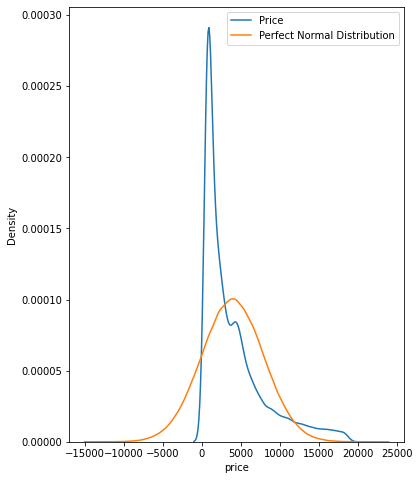
          當(dāng)你必須近似數(shù)據(jù)中特征的分布時(shí),你可能會(huì)發(fā)現(xiàn)它們非常有用。例如,下面我們檢查鉆石價(jià)格是否服從正態(tài)分布。
          fig, ax = plt.subplots(figsize=(68)) 
           
          price_mean = diamonds["price"].mean() 
          price_std = diamonds["price"].std() 
           
          # Draw from a perfect normal distribution 
          perfect_norm = np.random.normal(price_mean, price_std, size=1000000
           
          sns.kdeplot(diamonds["price"], ax=ax) 
          sns.kdeplot(perfect_norm, ax=ax) 
           
          plt.legend(["Price""Perfect Normal Distribution"]);
          這可以通過(guò)在完美正態(tài)分布之上繪制鉆石價(jià)格的 KDE 來(lái)實(shí)現(xiàn),以使差異可見(jiàn)。

          np.rint

          如果你想將數(shù)組的每個(gè)元素四舍五入到最接近的整數(shù), rint 是一個(gè)漂亮的小函數(shù)。當(dāng)你想將類概率轉(zhuǎn)換為二進(jìn)制分類中的類標(biāo)簽時(shí),可以不必調(diào)用模型的 predict 方法改成直接使用它:
          preds = np.random.rand(100
          np.rint(preds[:50]) 
          array([1., 1., 0., 1., 0., 1., 1., 0., 0., 0., 0., 1., 0., 1., 0., 1., 0., 
                 1., 0., 1., 1., 1., 1., 1., 0., 0., 1., 0., 0., 0., 0., 1., 0., 0., 
                 0., 0., 0., 0., 0., 0., 1., 0., 1., 0., 1., 1., 0., 0., 1., 0.])

          np.nanmean / np.nan*

          是否知道如果至少有一個(gè)元素是 NaN,則純 NumPy 數(shù)組上的算術(shù)運(yùn)算會(huì)失?。?/section>
          a = np.array([1245, np.nan, 9, np.nan, 22]) 
          np.mean(a) 
          nan
          要在不修改原始數(shù)組的情況下解決此問(wèn)題,你可以使用一系列 nan 函數(shù):
          np.nanmean(a) 
          22.0
          以上是忽略缺失值的算術(shù)平均函數(shù)的示例。許多其他函數(shù)以同樣的方式工作:
          [func for func in dir(np) if func.startswith("nan")] 
          ['nan',
          'nan_to_num',
          'nanargmax',
          'nanargmin',
          'nancumprod',
          'nancumsum',
          'nanmax',
          'nanmean',
          'nanmedian',
          'nanmin',
          'nanpercentile',
          'nanprod',
          'nanquantile',
          'nanstd',
          'nansum',
          'nanvar']
          但是,如果只使用 Pandas DataFrames 或 Series,可能會(huì)有些不同,因?yàn)樗鼈兡J(rèn)會(huì)忽略 NaN。

          np.clip

          當(dāng)想對(duì)數(shù)組的值施加嚴(yán)格限制時(shí),clip 很有用。下面,我們將裁剪任何超出 10 和 70 硬限制的值:
          ages = np.random.randint(1110, size=100
          limited_ages = np.clip(ages, 1070
          limited_ages 
          array([13, 70, 10, 70, 70, 10, 63, 70, 70, 69, 45, 70, 70, 56, 60, 70, 70, 
                 10, 52, 70, 32, 62, 21, 70, 13, 13, 10, 50, 38, 32, 70, 20, 27, 64, 
                 34, 10, 70, 70, 53, 70, 53, 54, 26, 70, 57, 70, 46, 70, 17, 48, 70, 
                 15, 49, 70, 10, 70, 19, 23, 70, 70, 70, 45, 47, 70, 70, 34, 25, 70, 
                 10, 70, 42, 62, 70, 10, 70, 23, 25, 49, 70, 70, 62, 70, 70, 11, 10, 
                 70, 30, 44, 70, 49, 10, 35, 52, 21, 70, 70, 25, 10, 55, 59])

          np.count_nonzero

          使用稀疏數(shù)組是很常見(jiàn)的。通常,它們是對(duì)具有高基數(shù)(High-Cardinality)或只有許多二進(jìn)制列的分類特征進(jìn)行獨(dú)熱編碼的結(jié)果。
          你可以使用count_nonzero來(lái)檢查任意數(shù)組中非零元素的數(shù)量:
          a = np.random.randint(-5050, size=100000
          np.count_nonzero(a) 
          98993
          100k 隨機(jī)整數(shù)中,~1000個(gè)為零。

          np.array_split

          它可以用來(lái)將 ndarray 或 dataframe 分成 N 個(gè) bucket。此外,當(dāng)你想要將數(shù)組分割成大小不相等的塊(如 vsplit )時(shí),它不會(huì)引發(fā)錯(cuò)誤:
          import datatable as dt 
          df = dt.fread("data/train.csv").to_pandas() 
          splitted_dfs = np.array_split(df, 100
          len(splitted_dfs) 
          100
          作者:Bex.T
          來(lái)源:https://medium.com/
          瀏覽 50
          點(diǎn)贊
          評(píng)論
          收藏
          分享

          手機(jī)掃一掃分享

          分享
          舉報(bào)
          評(píng)論
          圖片
          表情
          推薦
          點(diǎn)贊
          評(píng)論
          收藏
          分享

          手機(jī)掃一掃分享

          分享
          舉報(bào)
          <kbd id="afajh"><form id="afajh"></form></kbd>
          <strong id="afajh"><dl id="afajh"></dl></strong>
            <del id="afajh"><form id="afajh"></form></del>
                1. <th id="afajh"><progress id="afajh"></progress></th>
                  <b id="afajh"><abbr id="afajh"></abbr></b>
                  <th id="afajh"><progress id="afajh"></progress></th>
                  青娱乐福利 | 久久色国产在线 | 日本女人受爱高潮视频网站 | 天天天天天天色 | 久久三级影院 |