<kbd id="afajh"><form id="afajh"></form></kbd>
<strong id="afajh"><dl id="afajh"></dl></strong>
    <del id="afajh"><form id="afajh"></form></del>
        1. <th id="afajh"><progress id="afajh"></progress></th>
          <b id="afajh"><abbr id="afajh"></abbr></b>
          <th id="afajh"><progress id="afajh"></progress></th>

          SpringCloud:服務(wù)注冊與發(fā)現(xiàn)
          共 15877字,需瀏覽 32分鐘

           ·

          2023-08-01 10:00

          走過路過不要錯過

          點擊藍字關(guān)注我們

          一、SpringCloud技術(shù)棧
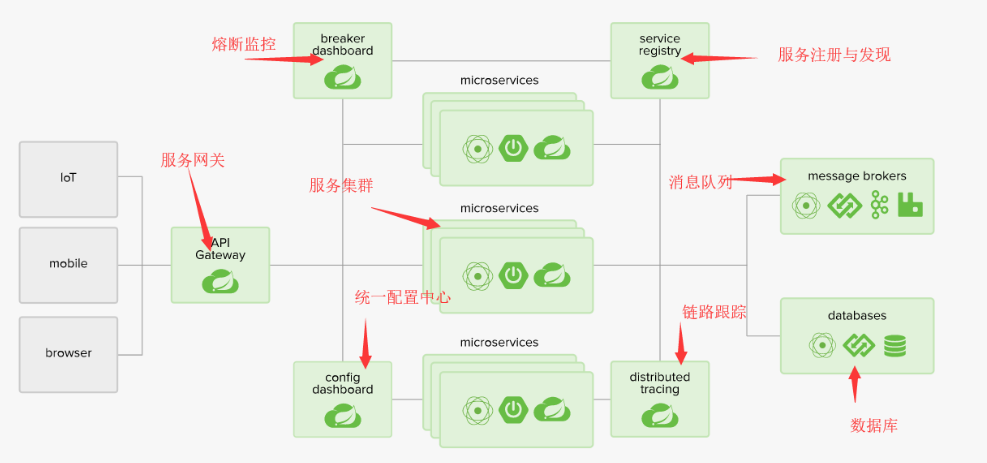
          SpringCloud是一套完整的分布式微服務(wù)架構(gòu),我們可以去官網(wǎng)上看下整體的架構(gòu)圖
          SpringCloud基于SpringBoot提供了一套微服務(wù)解決方案,包括服務(wù)注冊與發(fā)現(xiàn),配置中心,全鏈路監(jiān)控,服務(wù)網(wǎng)關(guān),負載均衡,熔斷器等組件,除了基于NetFlix的開源組件做高度抽象封裝之外,還有一些選型中立的開源組件。
          而SpringBoot并沒有重復(fù)制造輪子,它將目前各家公司開發(fā)的比較成熟、經(jīng)得起實際考驗的服務(wù)框架組合起來,通過SpringBoot風格進行再封裝屏蔽掉了復(fù)雜的配置和實現(xiàn)原理,最終給開發(fā)者留出了一套簡單易懂、易部署和易維護的分布式系統(tǒng)開發(fā)工具包。
          SpringCloud提供了全家桶式技術(shù)解決方案,對我們使用者來說是極其簡單的。但是要學會SpringCloud的前提那必定要學會SpringBoot。
          二、服務(wù)注冊與發(fā)現(xiàn)
          一般架構(gòu)的開發(fā)過程中,我們也會去調(diào)用一些外部服務(wù),這個時候都是直接去調(diào)用,沒有服務(wù)注冊與發(fā)現(xiàn)的概念。但在微服務(wù)架構(gòu)中,我們會按照模塊將系統(tǒng)分為多個微服務(wù),而且每個服務(wù)我們會做成集群,那這些服務(wù)的數(shù)量是很大的,這些服務(wù)之間可能會被前端直接調(diào)用,也有可能互相調(diào)用,而且調(diào)用關(guān)系十分復(fù)雜。
          每個服務(wù)實例的網(wǎng)絡(luò)位置(IP與端口)信息,而且這些服務(wù)有可能會下線(奔潰),也有可能擴容,那這個時候服務(wù)之間相互去記錄這些信息肯定是非常麻煩的,這個時候我們需要一個服務(wù)的治理組件。
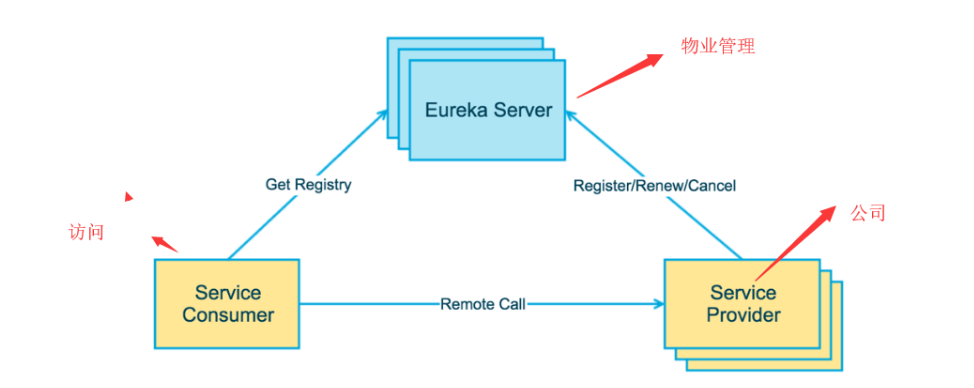
          在定義服務(wù)治理之前,我們可以類比一個場景,就是我們工作大樓的物業(yè),公司入駐這棟大樓,就會在物業(yè)處注冊自己的一些信息,并且交物業(yè)費,那這個物業(yè)管理類似服務(wù)治理。
          公司相當于一個一個服務(wù),當外面的人想要找到公司提供服務(wù)時,可以去物業(yè)處了解我們的信息,然后再找到我們,而本身不需要記錄我們公司的信息,因為他記不想記住這么多信息,而且就算記了,我們公司信息也可能會改變,比如破產(chǎn)倒閉了,或者又發(fā)展壯大換了地方了。
          我們定時向物業(yè)交管理費,一旦我們不交物業(yè)費了,那物業(yè)就認為我們不在這里了,那其他人在來找也當做公司不存在了,Eureka的服務(wù)注冊與發(fā)現(xiàn)就有點類似這種場景。
          Spring Cloud 封裝了 Netflix 公司開發(fā)的 Eureka 模塊來實現(xiàn)服務(wù)注冊和發(fā)現(xiàn),Eureka 采用了 C-S 的設(shè)計架構(gòu)。Eureka Server 作為服務(wù)注冊功能的服務(wù)器,它是服務(wù)注冊中心(物業(yè)管理)。
          而系統(tǒng)中的其他微服務(wù)(公司),使用 Eureka 的客戶端連接到 Eureka Server,并維持心跳連接(交物業(yè)費)。這樣系統(tǒng)的維護人員就可以通過 Eureka Server 來監(jiān)控系統(tǒng)中各個微服務(wù)是否正常運行。
          Spring Cloud 的一些其他模塊(訪問人員)就可以通過 Eureka Server 來發(fā)現(xiàn)系統(tǒng)中的其他微服務(wù),并執(zhí)行相關(guān)的邏輯。
          Eureka包含兩個組件:Eureka Server和Eureka Client
          Eureka Server提供服務(wù)注冊服務(wù)各個節(jié)點啟動后,會在EurekaServer中進行注冊,這樣EurekaServer中的服務(wù)注冊表中將會存儲所有可用服務(wù)節(jié)點的信息,服務(wù)節(jié)點的信息可以在界面中直觀的看到。
          EurekaClient是一個Java客戶端,用于簡化Eureka Server的交互,客戶端同時也具備一個內(nèi)置的、使用輪詢(round-robin)負載算法的負載均衡器。在應(yīng)用啟動后,將會向Eureka Server發(fā)送心跳(默認周期為30秒)。
          如果Eureka Server在多個心跳周期內(nèi)沒有接收到某個節(jié)點的心跳,EurekaServer將會從服務(wù)注冊表中把這個服務(wù)節(jié)點移除(默認90秒)。
          三大角色
          • Eureka Server 提供服務(wù)注冊和發(fā)現(xiàn)。

          • Service Provider服務(wù)提供方將自身服務(wù)注冊到Eureka,從而使服務(wù)消費方能夠找到。

          • Service Consumer服務(wù)消費方從Eureka獲取注冊服務(wù)列表,從而能夠消費服務(wù)。

          三、構(gòu)建
          了解了概念,我們現(xiàn)在來實踐一下,因為還會學習更多的的組件,那么我們創(chuàng)建工程也是從整體來創(chuàng)建,還要了解的一點是,我們現(xiàn)在做的是微服務(wù)項目,那其實這些微服務(wù)就是一個個獨立的項目,這些項目可以是完全分開的,跟之前的模塊概念是不一樣的。
          3.1 創(chuàng)建整體項目
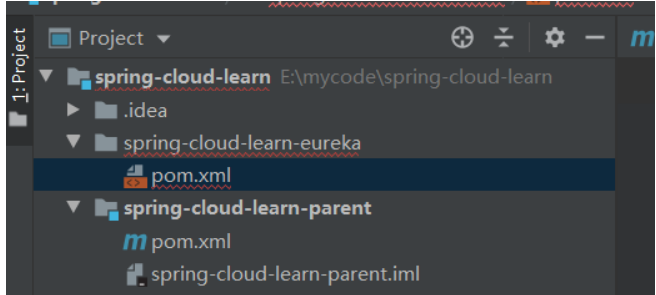
          直接先創(chuàng)建一個名為spring-cloud-learn 的文件夾,這個文件夾是為了放各個工程的,然后通過idea 打開這個文件夾,然后在這個文件夾下面創(chuàng)建一個文件夾:spring-cloud-learn-parent
          然后在這個文件夾下增加一個pom.xml文件:
          <?xml version="1.0" encoding="UTF-8"?><project xmlns="http://maven.apache.org/POM/4.0.0" xmlns:xsi="http://www.w3.org/2001/XMLSchema-instance"         xsi:schemaLocation="http://maven.apache.org/POM/4.0.0 http://maven.apache.org/xsd/maven-4.0.0.xsd">    <modelVersion>4.0.0</modelVersion>    <parent>        <groupId>org.springframework.boot</groupId>        <artifactId>spring-boot-starter-parent</artifactId>        <version>2.0.2.RELEASE</version>    </parent>    <groupId>com.yuanqinnan</groupId>    <artifactId>spring-cloud-learn-parent</artifactId>    <version>1.0.0-SNAPSHOT</version>    <packaging>pom</packaging>    <properties>        <!-- Environment Settings -->        <java.version>1.8</java.version>        <project.build.sourceEncoding>UTF-8</project.build.sourceEncoding>        <project.reporting.outputEncoding>UTF-8</project.reporting.outputEncoding>        <maven.compiler.source>1.8</maven.compiler.source>        <maven.compiler.target>1.8</maven.compiler.target>        <!-- Spring Settings -->        <spring-cloud.version>Finchley.RELEASE</spring-cloud.version>    </properties>    <dependencyManagement>        <dependencies>                <dependency>                    <groupId>org.springframework.cloud</groupId>                    <artifactId>spring-cloud-dependencies</artifactId>                    <version>${spring-cloud.version}</version>                    <type>pom</type>                    <scope>import</scope>                </dependency>        </dependencies>    </dependencyManagement>    <build>        <finalName>spring-cloud-learn-parent</finalName>        <!-- 資源文件配置 -->        <resources>            <resource>                <directory>src/main/java</directory>                <excludes>                    <exclude>**/*.java</exclude>                </excludes>            </resource>            <resource>                <directory>src/main/resources</directory>            </resource>        </resources>        <plugins>            <plugin>                <groupId>org.apache.maven.plugins</groupId>                <artifactId>maven-resources-plugin</artifactId>                <configuration>                    <delimiters>                        <delimit>$</delimit>                    </delimiters>                </configuration>            </plugin>        </plugins>    </build></project>
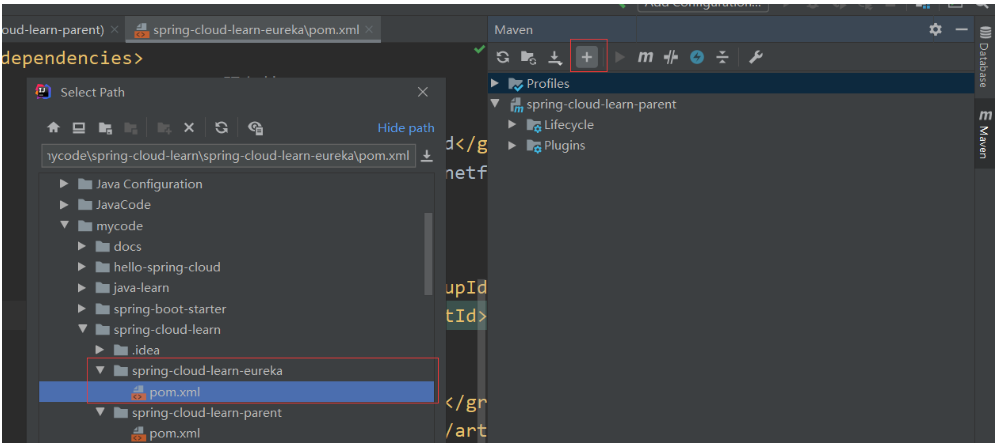
          將這個項目手動托管成maven項目,這個項目是用于管理依賴的,管理一些公共的依賴,就是一些簡單的依賴,需要主要以的是SpringCloud的版本很讓人頭疼,他不僅有數(shù)字,還有字母,這些字母是倫敦地鐵站的開頭字母。
          3.2 創(chuàng)建服務(wù)注冊中心
          主要的項目創(chuàng)建完成之后,我們來創(chuàng)建一個用于服務(wù)注冊的項目,創(chuàng)建過程與spring-cloud-learn-parent相同,也是創(chuàng)建一個文件夾spring-cloud-learn-eureka,然后在文件夾下增加pom.xml文件,然后再手動托管
          <project xmlns="http://maven.apache.org/POM/4.0.0" xmlns:xsi="http://www.w3.org/2001/XMLSchema-instance"         xsi:schemaLocation="http://maven.apache.org/POM/4.0.0 http://maven.apache.org/xsd/maven-4.0.0.xsd">    <modelVersion>4.0.0</modelVersion>
          <parent> <groupId>com.yuanqinnan</groupId> <artifactId>spring-cloud-learn-parent</artifactId> <version>1.0.0-SNAPSHOT</version> </parent> <artifactId>>spring-cloud-learn-eureka</artifactId> <packaging>jar</packaging> <dependencies> <!--eureka-server服務(wù)端 --> <dependency> <groupId>org.springframework.cloud</groupId> <artifactId>spring-cloud-starter-netflix-eureka-server</artifactId> </dependency> </dependencies>
          </project>
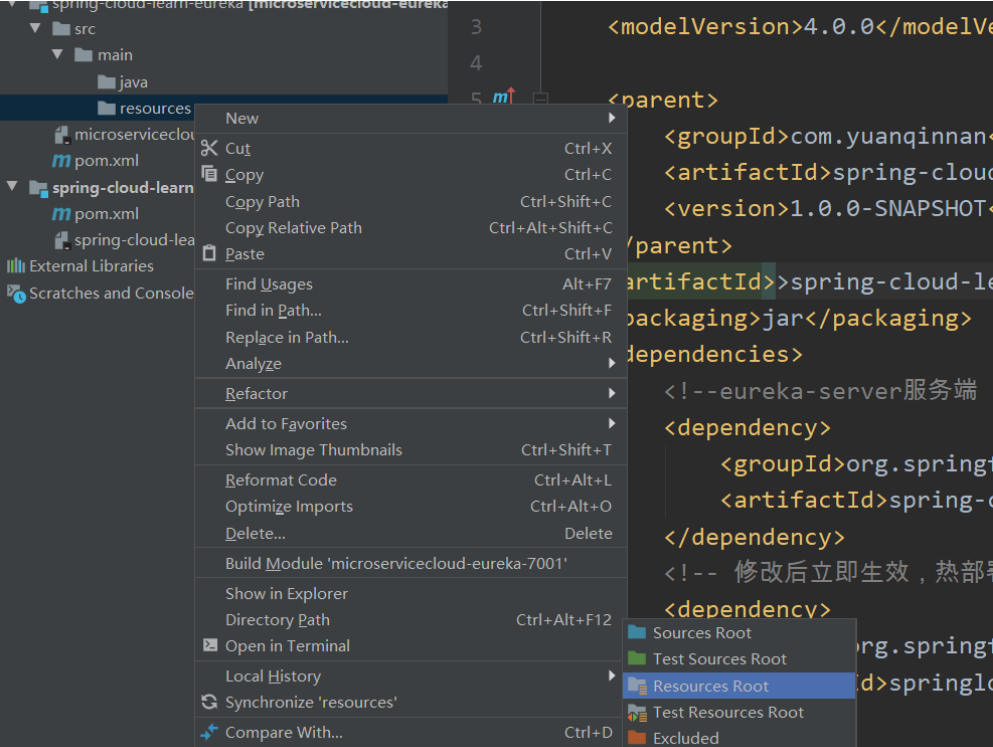
          然后再按照maven的目錄結(jié)構(gòu)來創(chuàng)建目錄
          然后創(chuàng)建一個啟動類,這些都是Springboot項目中的知識,然后再增加一個啟動類,上面增加@EnableEurekaServer
          @EnableEurekaServer@SpringBootApplicationpublic class EurekaApplication {    public static void main(String[] args) {        SpringApplication.run(EurekaApplication.class, args);    }}
          然后增加配置文件application.yml
          spring:  application:    name: spring-cloud-learn-eureka
          server: port: 8761
          eureka: instance: hostname: localhost client: #表示是否將自己注冊到Eureka Server,默認為true。 registerWithEureka: false #表示是否從Eureka Server獲取注冊信息,默認為true。 fetchRegistry: false serviceUrl: #設(shè)置與Eureka Server交互的地址,查詢服務(wù)和注冊服務(wù)都需要依賴這個地址。默認是http://localhost:8761/eureka ;多個地址可使用 , 分隔 defaultZone: http://${eureka.instance.hostname}:${server.port}/eureka/
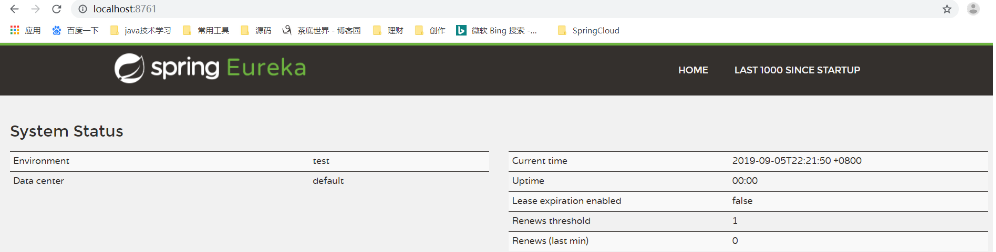
          需要注意的配置都寫在上面了,很好理解,這個時候我們可以啟動項目了:
          這個時候相當于已經(jīng)創(chuàng)建好注冊中心了,也就是Eureka Server,那現(xiàn)在再來創(chuàng)建服務(wù)提供者
          3.3 創(chuàng)建服務(wù)提供者
          按照上面創(chuàng)建注冊服務(wù)的方式我們再創(chuàng)建一個部門服務(wù)提供者,pom.xml文件:
          <?xml version="1.0" encoding="UTF-8"?><project xmlns="http://maven.apache.org/POM/4.0.0" xmlns:xsi="http://www.w3.org/2001/XMLSchema-instance"         xsi:schemaLocation="http://maven.apache.org/POM/4.0.0 http://maven.apache.org/xsd/maven-4.0.0.xsd">    <modelVersion>4.0.0</modelVersion>
          <parent> <groupId>com.yuanqinnan</groupId> <artifactId>spring-cloud-learn-parent</artifactId> <version>1.0.0-SNAPSHOT</version> </parent>
          <artifactId>spring-cloud-learn-provider-dept</artifactId> <packaging>jar</packaging> <dependencies> <!-- Spring Boot Begin --> <dependency> <groupId>org.springframework.boot</groupId> <artifactId>spring-boot-starter-test</artifactId> <scope>test</scope> </dependency> <!-- Spring Boot End -->
          <!-- Spring Cloud Begin --> <dependency> <groupId>org.springframework.cloud</groupId> <artifactId>spring-cloud-starter-netflix-eureka-server</artifactId> </dependency> <!-- Spring Cloud End --> </dependencies>
          </project>
          配置文件:
          spring:  application:    name: spring-cloud-learn-provider-dept
          server: port: 8762
          eureka: client: serviceUrl: #服務(wù)注冊地址 defaultZone: http://localhost:8761/eureka/
          然后創(chuàng)建啟動類:
          @EnableEurekaClient@SpringBootApplicationpublic class ProviderDeptApplication {    public static void main(String[] args) {        SpringApplication.run(ProviderDeptApplication.class, args);    }}
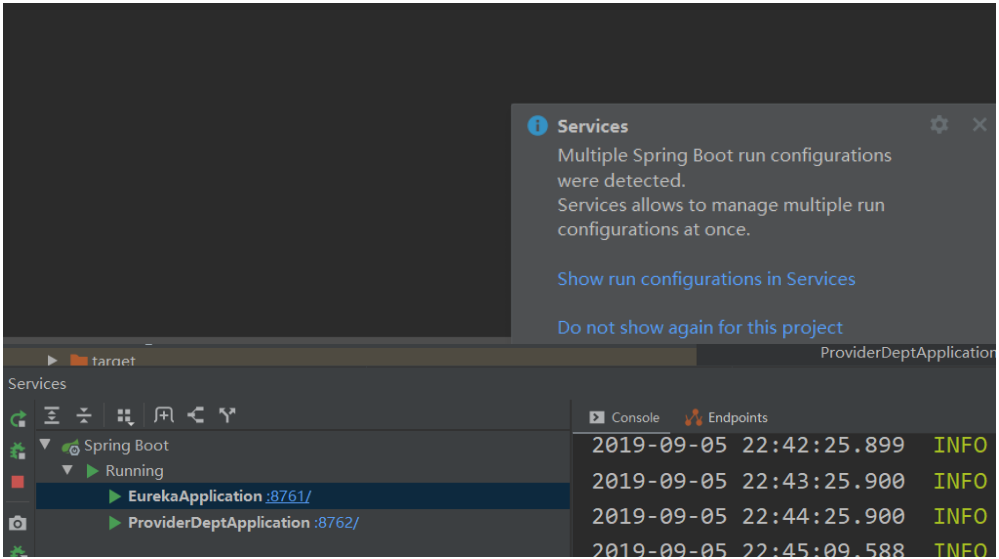
          啟動時idea會彈出此對話框,選擇第一個這個時候我們可以方便的管理多個啟動服務(wù)
          @Configurationpublic class RestTemplateConfiguration {
          @Bean @LoadBalanced public RestTemplate restTemplate() { return new RestTemplate(); }}
          然后我們需要創(chuàng)建一個service,用來請求服務(wù),這里調(diào)用的地方指定了服務(wù)名稱,不用管ip 地址與端口
          @Servicepublic class DeptService {    @Autowired    private RestTemplate restTemplate;
          public String sayHi(String message) { //這里指指定了服務(wù)名稱,不用管ip 地址與端口 return restTemplate.getForObject("http://SPRING-CLOUD-LEARN-PROVIDER-DEPT/hi?message=" + message, String.class); }}
          然后創(chuàng)建一個controller,給前端接口調(diào)用
          @RestControllerpublic class DeptController {    @Autowired    private DeptService deptService;
          @RequestMapping(value = "hi", method = RequestMethod.GET) public String sayHi(@RequestParam String message) { return deptService.sayHi(message); }}
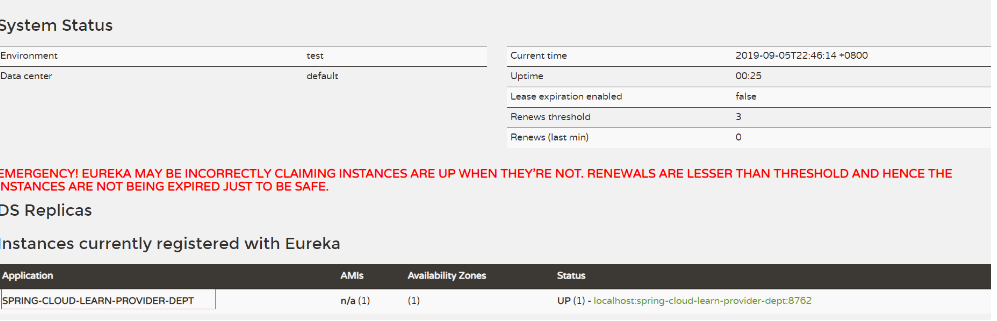
          啟動成功后,刷新Eureka 服務(wù)可以看到服務(wù)已經(jīng)注冊上來了,這里的紅色提示是指Eureka 服務(wù)只部署了一臺,不具備高可用,后面我們再來部署集群
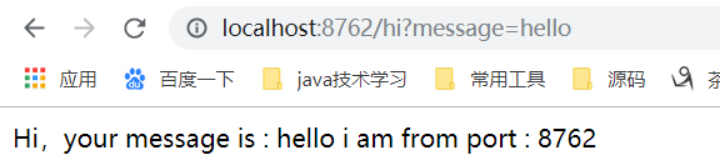
          不過這個時候服務(wù)者沒有提供確切的服務(wù),添加一個方法
          @RestControllerpublic class DeptController {    @Value("${server.port}")    private String port;
          @RequestMapping(value = "hi", method = RequestMethod.GET) public String sayHi(@RequestParam(value = "message") String message) { return String.format("Hi,your message is : %s i am from port : %s", message, port); }}
          這里為了后面顯示集群效果,我們返回端口號
          3.4 創(chuàng)建服務(wù)消費者
          上面的注冊中心和提供者都已建好,那現(xiàn)在來創(chuàng)建一個消費者,我們使用Ribbon,先不用管這個,依然按照上面的創(chuàng)建方式再創(chuàng)建一個工程,pom.xml文件:
          <?xml version="1.0" encoding="UTF-8"?><project xmlns="http://maven.apache.org/POM/4.0.0" xmlns:xsi="http://www.w3.org/2001/XMLSchema-instance"         xsi:schemaLocation="http://maven.apache.org/POM/4.0.0 http://maven.apache.org/xsd/maven-4.0.0.xsd">    <modelVersion>4.0.0</modelVersion>
          <parent> <groupId>com.yuanqinnan</groupId> <artifactId>spring-cloud-learn-parent</artifactId> <version>1.0.0-SNAPSHOT</version> </parent>
          <artifactId>spring-cloud-learn-consumer-dept-ribbon</artifactId> <packaging>jar</packaging>
          <dependencies> <!-- Spring Boot Begin --> <dependency> <groupId>org.springframework.boot</groupId> <artifactId>spring-boot-starter-web</artifactId> </dependency> <dependency> <groupId>org.springframework.boot</groupId> <artifactId>spring-boot-starter-tomcat</artifactId> </dependency> <dependency> <groupId>org.springframework.boot</groupId> <artifactId>spring-boot-starter-test</artifactId> <scope>test</scope> </dependency> <!-- Spring Boot End -->
          <!-- Spring Cloud Begin --> <dependency> <groupId>org.springframework.cloud</groupId> <artifactId>spring-cloud-starter-netflix-eureka-server</artifactId> </dependency> <dependency> <groupId>org.springframework.cloud</groupId> <artifactId>spring-cloud-starter-netflix-ribbon</artifactId> </dependency> <!-- Spring Cloud End --> </dependencies>
          </project>
          配置文件:
          spring:  application:    name: spring-cloud-learn-consumer-dept-ribbonserver:  port: 8764
          eureka: client: serviceUrl: defaultZone: http://localhost:8761/eureka/
          啟動項:
          @EnableDiscoveryClient@SpringBootApplicationpublic class ConsumerDeptRibbonApplication {    public static void main(String[] args) {        SpringApplication.run(ConsumerDeptRibbonApplication.class, args);    }}
          這個服務(wù)我們稍微要給一個配置,因為我們要調(diào)用服務(wù)提供者,會使用到RestTemplate調(diào)用方式,添加一個配置項,這里面還有一個負載均衡功能,用起來也很簡單
          @RestControllerpublic class DeptController {    @Autowired    private DeptService deptService;
          @RequestMapping(value = "hi", method = RequestMethod.GET) public String sayHi(@RequestParam String message) { return deptService.sayHi(message); }}
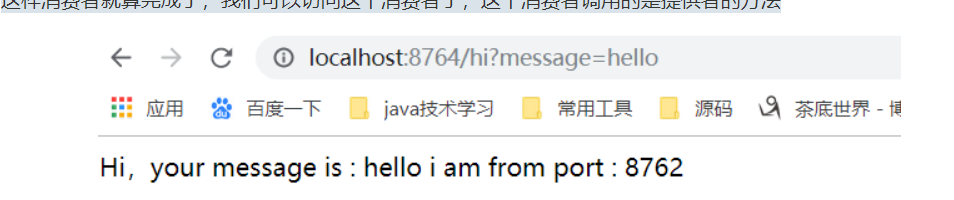
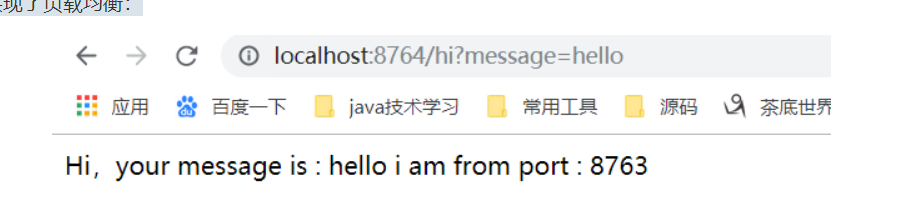
          這樣消費者就算完成了,我們可以訪問這個消費者了,這個消費者調(diào)用的是提供者的方法
          這樣就已經(jīng)完成了服務(wù)的注冊中心開發(fā),提供者開發(fā)及消費者開發(fā),用起來非常簡單,這里我們看到有@LoadBalanced這個注解,但是服務(wù)只有一個,所有沒有效果,我們可以再啟動一個提供者,這里我們可以直接修改端口號再啟動,只要注意修改一個地方的配置
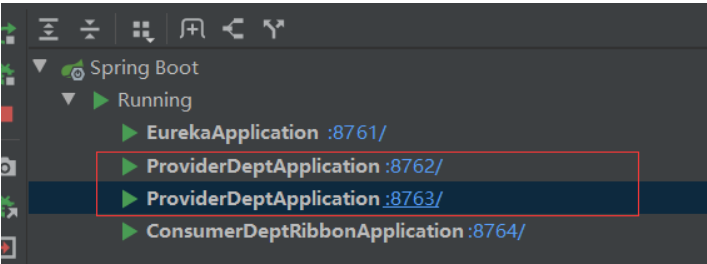
          我們把提供者的端口號改成8763,再啟動一次
          這里啟動了兩個提供者,我們刷新下注冊中心:
          使用這些組件就是這么簡單,這里只是做了最簡單的微服務(wù)注冊與發(fā)現(xiàn),未做服務(wù)中心集群,后面我們將再深入的學習。


          想進大廠的小伙伴請注意,

          大廠面試的套路很神奇,

          早做準備對大家更有好處,

          埋頭刷題效率低,

          看面經(jīng)會更有效率!

          小編準備了一份大廠常問面經(jīng)匯總集

          剩下的就不會給大家一展出來了,以上資料按照一下操作即可獲得

          ——將文章進行轉(zhuǎn)發(fā)評論關(guān)注公眾號【Java烤豬皮】,關(guān)注后繼續(xù)后臺回復(fù)領(lǐng)取口令“ 666 ”即可免費領(lǐng)文章取中所提供的資料。


          往期精品推薦


          騰訊、阿里、滴滴后臺試題匯集總結(jié) — (含答案)

          面試:史上最全多線程序面試題!

          最新阿里內(nèi)推Java后端試題

          JVM難學?那是因為你沒有真正看完整這篇文章


          結(jié)束


          關(guān)注作者微信公眾號 — 《JAVA烤豬皮》


          了解了更多java后端架構(gòu)知識以及最新面試寶典


          看完本文記得給作者點贊+在看哦~~~大家的支持,是作者來源不斷出文的動力~

          瀏覽 64
          點贊
          評論
          收藏
          分享

          手機掃一掃分享

          分享
          舉報
          評論
          圖片
          表情
          推薦
          點贊
          評論
          收藏
          分享

          手機掃一掃分享

          分享
          舉報
          <kbd id="afajh"><form id="afajh"></form></kbd>
          <strong id="afajh"><dl id="afajh"></dl></strong>
            <del id="afajh"><form id="afajh"></form></del>
                1. <th id="afajh"><progress id="afajh"></progress></th>
                  <b id="afajh"><abbr id="afajh"></abbr></b>
                  <th id="afajh"><progress id="afajh"></progress></th>
                  免费A黄色 | 欧美成人A片AAA片在线播放 | 欧美毛片蜜芽免费视频 | 天堂在线网 | 日韩人妻无码精品视频 |