
【W(wǎng)eb技術】748- 總結前端換膚的 N 種方案

作者:令夕
原文鏈接:https://juejin.im/post/5e92ad7a518825736c5b91cd
最近在做網(wǎng)站換膚的需求,也就是主題切換。那么如何切換主題的顏色呢?以下是網(wǎng)站換膚的實現(xiàn)以及基于換膚拓展的一些方案分享給大家,希望大家在做類似需求的時候能夠有些參考。
覆蓋樣式實現(xiàn)
//?light
$color-brand1:?#ffcd32;
$fill-1:?#fff?!default;
$color-text:?#3c3c3c;
$color-text-1:?#757575;
$color-text-2:?#222;

//?dark
$dark-fill-1:?#222?!default;?//?品牌色
$dark-color-text:?#fff;
$dark-color-text-1:?rgba(255,?255,?255,?0.3);
$dark-color-text-2:?$color-brand1;
//?頁面使用
<style?lang="scss">
@import?"./assets/scss/index.scss";

[data-theme="dark"]?{
??body?{
????background:?$dark-fill-1;
??}
??.reaconmend?.reaconmend-list?.item?.name?{
????color:?$dark-color-text;
??}
??.reaconmend?.reaconmend-list?.item?.desc?{
????color:?$dark-color-text-1;
??}
??.header?.text?{
????color:?$dark-color-text-2;
??}
}
style>
利用css優(yōu)先級的原理覆蓋掉原有樣式的實現(xiàn),每定義一套皮膚就要定義對應的sass變量,以及定義一套覆蓋原有樣式的皮膚樣式。如果有多套皮膚的話,覆蓋的代碼量就會n套。
缺點:?樣式不易管理,查找樣式復雜,開發(fā)效率低,拓展性差,維護成本高,多人協(xié)作溝通麻煩。
sass變量實現(xiàn)
//?variable.scss??

//?淺色
$colors-light:?(
??fill-1:?#fff,
??text:?#3c3c3c,
??text-1:?#757575,
??text-2:?#222,
);

//?深色
$colors-dark:?(
??fill-1:?#222,
??text:?#fff,
??text-1:?rgba(255,?255,?255,?0.3),
??text-2:?#ffcd32,
);
//?mixin.scss
//?背景色
@mixin?bg-color($key)?{
??background-color:?map-get($colors-light,?$key);
??[data-theme="dark"]?&?{
????background-color:?map-get($colors-dark,?$key);
??}
}
//?text色
@mixin?text-color($key)?{
??color:?map-get($colors-light,?$key);
??[data-theme="dark"]?&?{
????color:?map-get($colors-dark,?$key);
??}
}
//?頁面使用

<style?lang="scss"?rel="stylesheet/scss">
@import?"../../../assets/scss/variable.scss";
@import?"../../../assets/scss/mixin.scss";
.reaconmend-list?{
????.list-title?{
??????height:?40px;
??????line-height:?40?px;
??????text-align:?center;
????????@include?text-color(text-1);
????}
}
style>
如上所示用到的知識點包含Sass變量(variable),嵌套(nestend rules),混合(mixins), Sass Maps的函數(shù)-map-get(key)。
Maps的含義:Maps可視為鍵值對的集合,鍵被用于定位值 在css種沒有對應的概念。和Lists不同Maps必須被圓括號包圍,鍵值對被都好分割 。Maps中的keys和values可以是sassscript的任何對象。(包括任意的sassscript表達式 arbitrary SassScript expressions) 和Lists一樣Maps主要為sassscript函數(shù)服務,如 map-get函數(shù)用于查找鍵值,map-merge函數(shù)用于map和新加的鍵值融合,@each命令可添加樣式到一個map中的每個鍵值對。Maps可用于任何Lists可用的地方,在List函數(shù)中 Map會被自動轉換為List , 如 (key1: value1, key2: value2)會被List函數(shù)轉換為 key1 value1, key2 value2 ,反之則不能。(網(wǎng)友Soledad提供)
使用scss變量換膚相比覆蓋樣式
拓展性更強 將換膚的邏輯進行了收斂
生成多套皮膚css
使用覆蓋樣式實現(xiàn)與scss變量實現(xiàn)會把多套皮膚的樣式都編譯到一個css文件里面,如果有多套皮膚樣式,這個文件是會非常大的。為了解決這樣的問題,就自然的想出了拆分scss的實現(xiàn):
實現(xiàn)方案,通過編譯工具與構建工具編譯出多套皮膚css,通過js動態(tài)的link對應的皮膚樣式
//?js動態(tài)處理
?var?theme?=?/\bt=(\w+)/.exec(location.search);
?theme?=?theme???theme[1]?:?"light";

?changeTheme(theme);

function?changeTheme(theme)?{
????var?head?=?document.getElementsByTagName("head")[0];
????var?link?=?document.createElement("link");
????link.dataset.type?=?"theme";
????link.href?=?"assets/css/theme-"?+?theme?+?"/pages/home/home.css";
????link.rel?=?"stylesheet";
????link.type?=?"text/css";
????head.appendChild(link);
}
CSS變量實現(xiàn)
//?variable.scss
//?默認變量
:root?{
??--fill-1:?#fff;
??--text:?#3c3c3c;
??--text-1:?#757575;
??--text-2:?#222;

??--font-size-large:?18px;
??--font-size-large-x:?22px;
??--font-size-medium:?14px;
??--font-size-medium-x:?16px;
??--font-size-small-s:?10px;
??--font-size-small:?12px;
}
//?深色變量
[data-theme="dark"]?{
??--fill-1:?#222;
??--text:?#fff;
??--text-1:?rgba(255,?255,?255,?0.3);
??--text-2:?#ffcd32;
}
在頁面對css變量做引入使用
//?頁面使用
@import?"../../assets/scss/variable.scss";

.header?{
??position:?relative;
??height:?70px;
??text-align:?center;
??font-size:?0;?
??.text?{
????display:?inline-block;
????vertical-align:?top;
????line-height:?70px;
????font-size:?var(--font-size-large);
????color:?var(--text-2);
??}
}
具體的實現(xiàn)效果: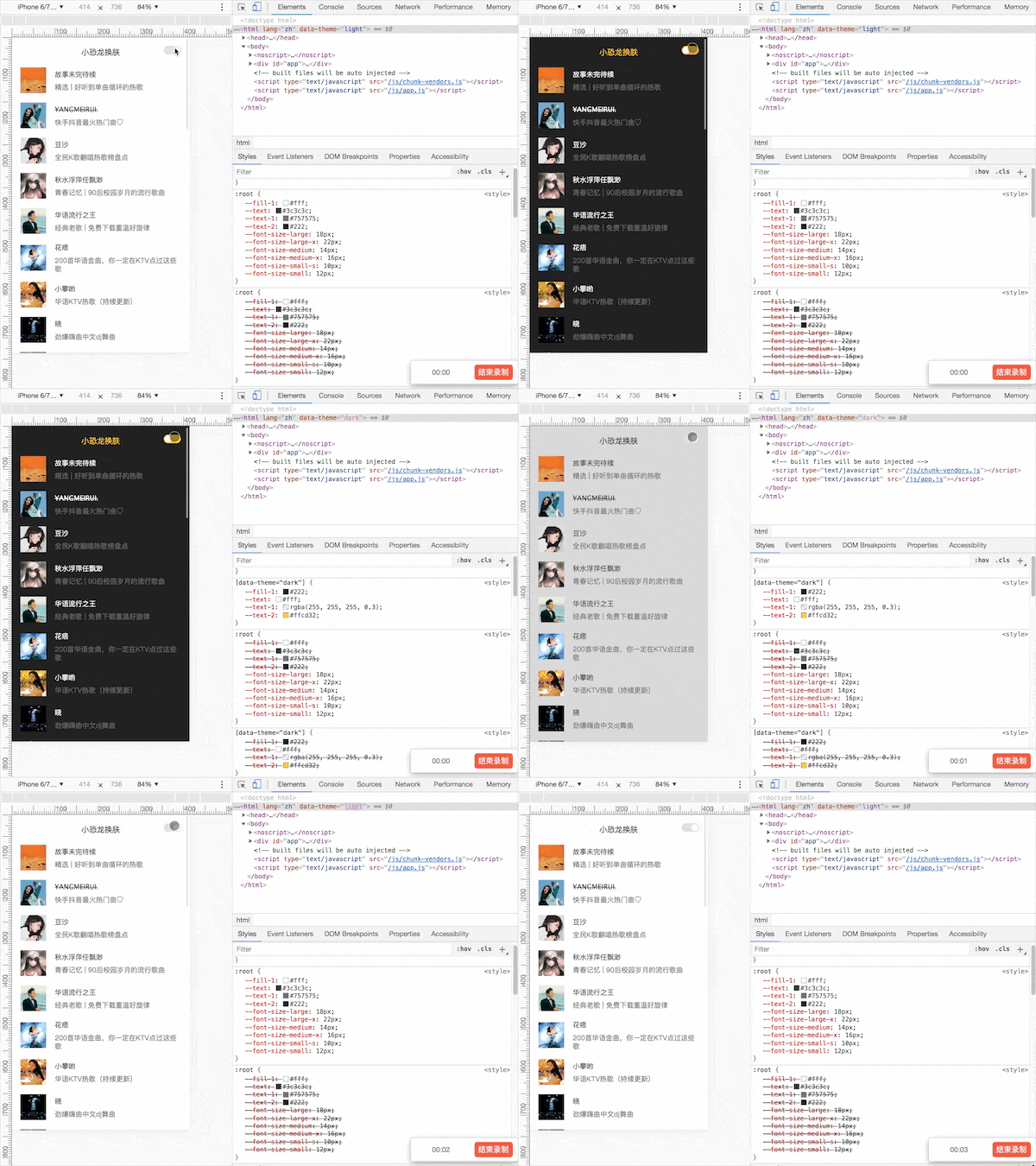
問題點:css變量會存在兼容性問題
css變量兼容性如下: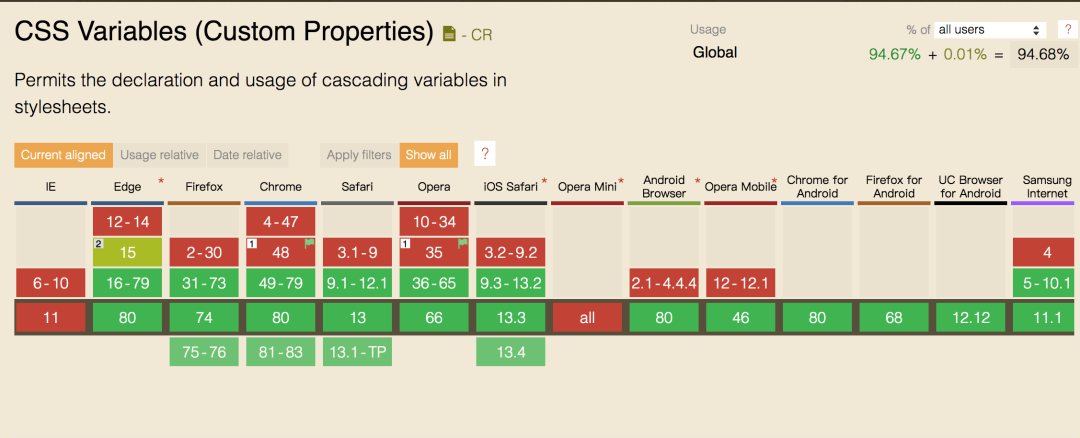 雖然現(xiàn)在大部分主流瀏覽器都可以兼容,但是還要考慮更多的兼容性這塊的請往下看:
CSS變量兼容性實現(xiàn)-1
在css變量的基礎上新增了postcss-custom-properties這個插件 安裝依賴:npm install postcss-custom-properties --save-dev npm install postcss-loader --save-dev
在根目錄新建postcss.config.js增加配置,配置如下:
const?postcssCustompProperties?=?require("postcss-custom-properties");

module.exports?=?{
??plugins:?[
????postcssCustompProperties({
??????importFrom:?"src/assets/scss/variable.scss"
????})
??]
};
postcss 會將css自定義變量直接編譯為確定值,而不是保留。這時就需要 postcss 插件 來為我們保留這些自定義變量,使用 postcss-custom-properties效果如下: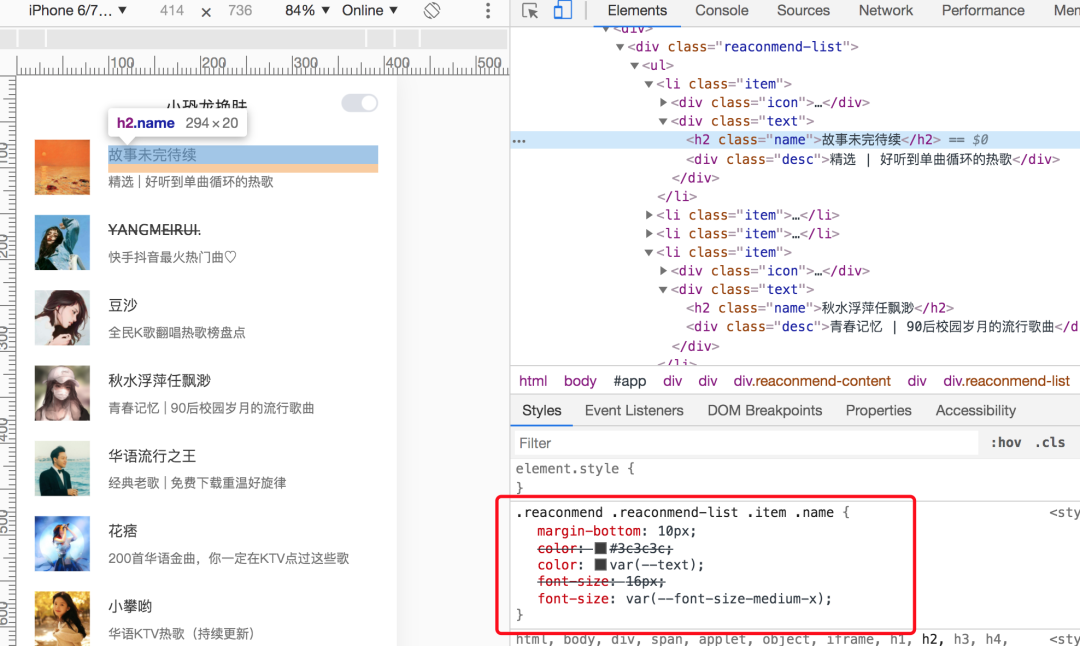
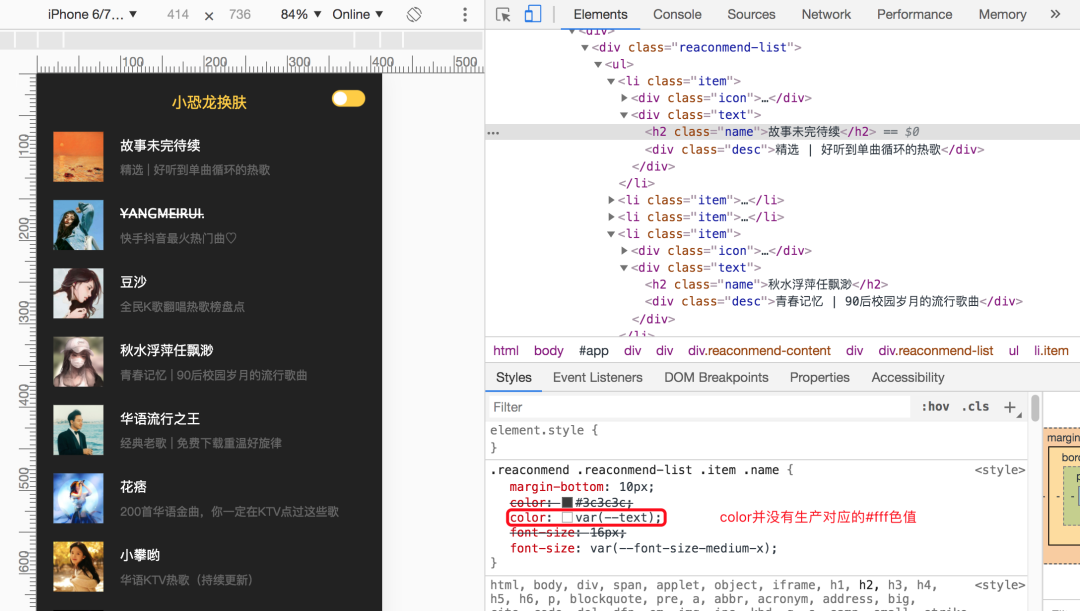
優(yōu)點:會生成一套與css變量對應的css 缺點:在構建時根據(jù)css變量生成對應的css,換膚是運行時并不能生成對應的css。
換膚后樣式:
CSS變量兼容性實現(xiàn)-2
首先需要建一個存放公共css變量的js文件,將需要定義的css變量存放到該js文件,例如(variable.js)
//?variable.js

//?字體變量
const?baseSize?=?{
??"--font-size-large-x":?"22px",
??"--font-size-large":?"18px",
??"--font-size-medium":?"14px",
??"--font-size-medium-x":?"16px",
??"--font-size-small-s":?"10px",
??"--font-size-small":?"12px",
};

//淺色
export?const?lightTheme?=?{
??"--fill-1":?"#fff",
??"--text":?"#3c3c3c",
??"--text-1":?"#757575",
??"--text-2":?"#222",
??...baseSize,
};

//?深色
export?const?darkTheme?=?{
??"--fill-1":?"#222",
??"--text":?"#fff",
??"--text-1":?"rgba(255,?255,?255,?0.3)",
??"--text-2":?"#ffcd32",
??...baseSize,
};
頁面使用css變量,例如:
<style?lang="scss">
?.text?{
????display:?inline-block;
????vertical-align:?top;
????line-height:?70px;
????font-size:?var(--font-size-large);
????color:?var(--text-2);
??}
style>
安裝css-vars-ponyfill 插件
css-vars-ponyfill官方概念:在傳統(tǒng)瀏覽器和現(xiàn)代瀏覽器中為CSS自定義屬性(又名“CSS變量”)提供客戶端支持的ponyfill。(具體用法與概念請查閱官方網(wǎng)站:css-vars-ponyfill)
封裝切換主題的js,在main.js做初始化調用
//?theme.js
import?{?lightTheme,?darkTheme?}?from?"../src/assets/js/variable";
import?cssVars?from?"css-vars-ponyfill";
export?const?initTheme?=?(theme)?=>?{
??document.documentElement.setAttribute("data-theme",?theme???"light"?:?"dark");
??cssVars({
????watch:?true,?//?當添加,刪除或修改其或
<del id="afajh"><form id="afajh"></form></del>
<th id="afajh"><progress id="afajh"></progress></th>
<b id="afajh"><abbr id="afajh"></abbr></b>
<th id="afajh"><progress id="afajh"></progress></th>