在這篇文章中,我將介紹在使用 Git 時(shí)最常使用的 20 個(gè)命令。

作者 | Sahiti Kappagantula
譯者 | 彎月,責(zé)編 | 屠敏以下為譯文:以下是這些Git命令:git config
git initgit clone
git add
git commit
git diff
git reset
git status
git rm
git log
git show
git tag
git branch
git checkout
git merge
git remote
git push
git pull
git stash
下面讓我們逐一介紹。Git 命令git config用法:git config –global user.name “[name]” ?用法:git config –global user.email “[email address]”該命令將分別設(shè)置提交代碼的用戶(hù)名和電子郵件地址。git init用法:git init [repository name]該命令可用于創(chuàng)建一個(gè)新的代碼庫(kù)。git clone用法:git clone [url]該命令可用于通過(guò)指定的URL獲取一個(gè)代碼庫(kù)。
git add用法:git add [file]該命令可以將一個(gè)文件添加至stage(暫存區(qū))。用法:git add *該命令可以將多個(gè)文件添加至stage(暫存區(qū))。git commit用法:git commit -m “[ Type in the commit message]” ?該命令可以在版本歷史記錄中永久記錄文件。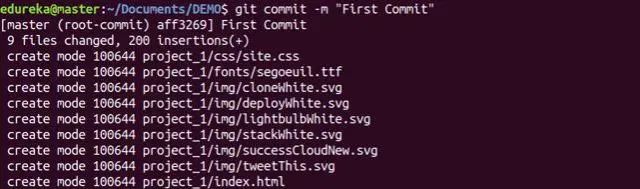
用法:git commit -a該命令將提交git add命令添加的所有文件,并提交git add命令之后更改的所有文件。git diff用法:git diff該命令可以顯示尚未添加到stage的文件的變更。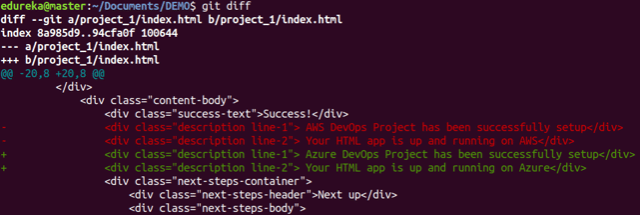
用法:git diff –staged該命令可以顯示添加到stage的文件與當(dāng)前最新版本之間的差異。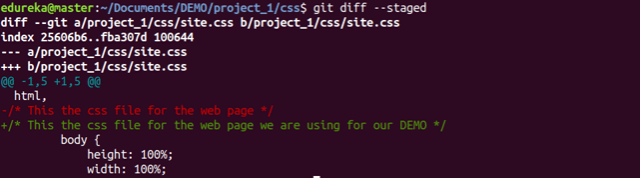
用法:git diff [first branch] [second branch]該命令可以顯示兩個(gè)分支之間的差異。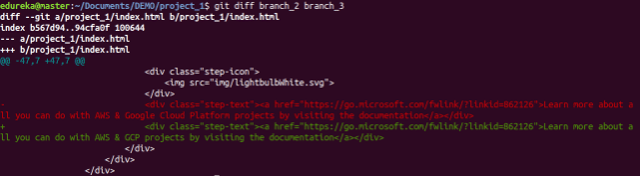
git reset用法:git reset [file]該命令將從stage中撤出指定的文件,但可以保留文件的內(nèi)容。
用法:git reset [commit]該命令可以撤銷(xiāo)指定提交之后的所有提交,并在本地保留變更。用法:git reset –hard [commit]該命令將丟棄所有的歷史記錄,并回滾到指定的提交。git status用法:git status該命令將顯示所有需要提交的文件。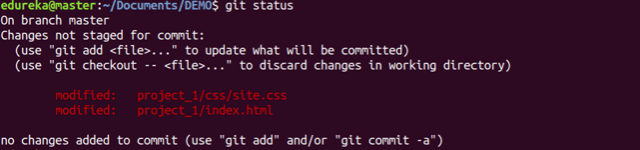
git rm用法:git rm [file]該命令將刪除工作目錄中的文件,并將刪除動(dòng)作添加到stage。git log用法:git log該命令可用于顯示當(dāng)前分支的版本歷史記錄。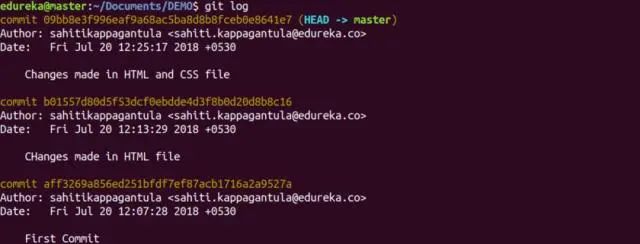
用法:git log –follow[file]該命令可用于顯示某個(gè)文件的版本歷史記錄,包括文件的重命名。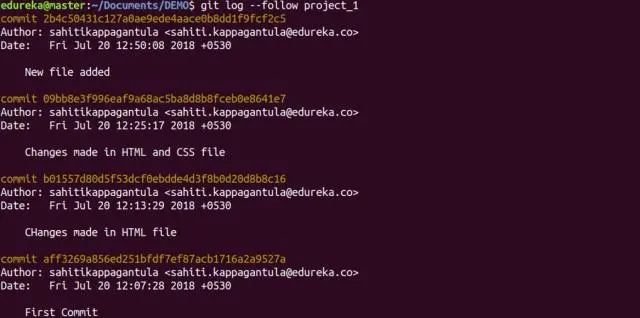
git show用法:git show [commit]該命令經(jīng)顯示指定提交的元數(shù)據(jù)以及內(nèi)容變更。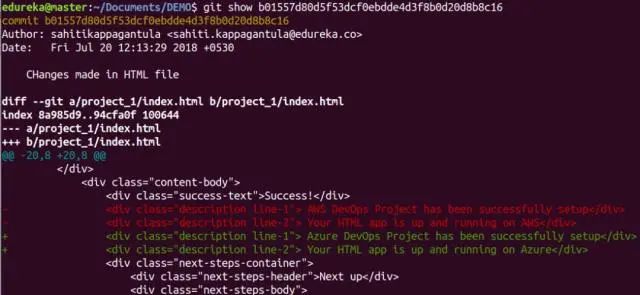
git tag用法:git tag [commitID]該命令可以給指定的提交添加標(biāo)簽。git branch用法:git branch該命令將顯示當(dāng)前代碼庫(kù)中所有的本地分支。用法:git branch [branch name]該命令將創(chuàng)建一個(gè)分支。用法:git branch -d [branch name]該命令將刪除指定的分支。git checkout用法:git checkout [branch name]你可以通過(guò)該命令切換分支。用法:git checkout -b [branch name]你可以通過(guò)該命令創(chuàng)建一個(gè)分支,并切換到新分支上。git merge用法:git merge [branch name]該命令可以將指定分支的歷史記錄合并到當(dāng)前分支。git remote用法:git remote add [variable name] [Remote Server Link]你可以通過(guò)該命令將本地的代碼庫(kù)連接到遠(yuǎn)程服務(wù)器。git push用法:git push [variable name] master該命令可以將主分支上提交的變更發(fā)送到遠(yuǎn)程代碼庫(kù)。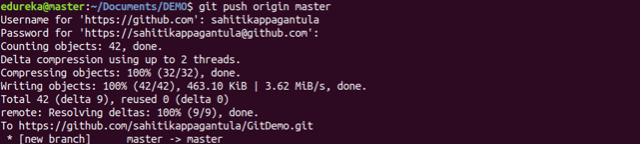
用法:git push [variable name] [branch]該命令可以將指定分支上的提交發(fā)送到遠(yuǎn)程代碼庫(kù)。
用法:git push –all [variable name]該命令可以將所有分支發(fā)送到遠(yuǎn)程代碼庫(kù)。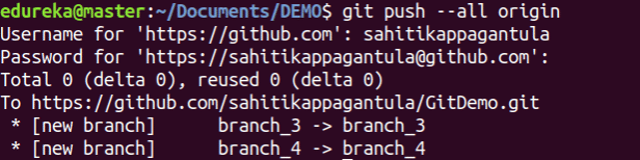
用法:git push [variable name] :[branch name]該命令可以刪除遠(yuǎn)程代碼庫(kù)上的一個(gè)分支。git pull用法:git pull [Repository Link]該命令將獲取遠(yuǎn)程服務(wù)器上的變更,并合并到你的工作目錄。
git stash用法:git stash save該命令將臨時(shí)保存所有修改的文件。用法:git stash pop該命令將恢復(fù)最近一次stash(儲(chǔ)藏)的文件。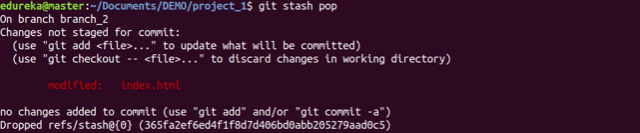
用法:git stash list該命令將顯示stash的所有變更。用法:git stash drop該命令將丟棄最近一次stash的變更。原文:https://dzone.com/articles/top-20-git-commands-with-examples本文為 CSDN 翻譯,轉(zhuǎn)載請(qǐng)注明來(lái)源出處。
怎么接私活?這個(gè)渠道你100%有用!請(qǐng)收藏!
喜歡文章,點(diǎn)個(gè)在看?
