
React:我們的用法習(xí)慣可能是錯誤的
點擊上方 程序員成長指北,關(guān)注公眾號
回復(fù)1,加入高級Node交流群
在我們React的日常開發(fā)中一些常用的寫法,看似運行的很好,實際可能并不優(yōu)雅。學(xué)習(xí)React并不是如何如何使用它,而是如何寫出優(yōu)雅,干凈的代碼。下面舉一些例子,總結(jié)了一些React開發(fā)中不好的寫法及相應(yīng)更好的寫法。(僅代表個人觀點)
過多的聲明state
問題
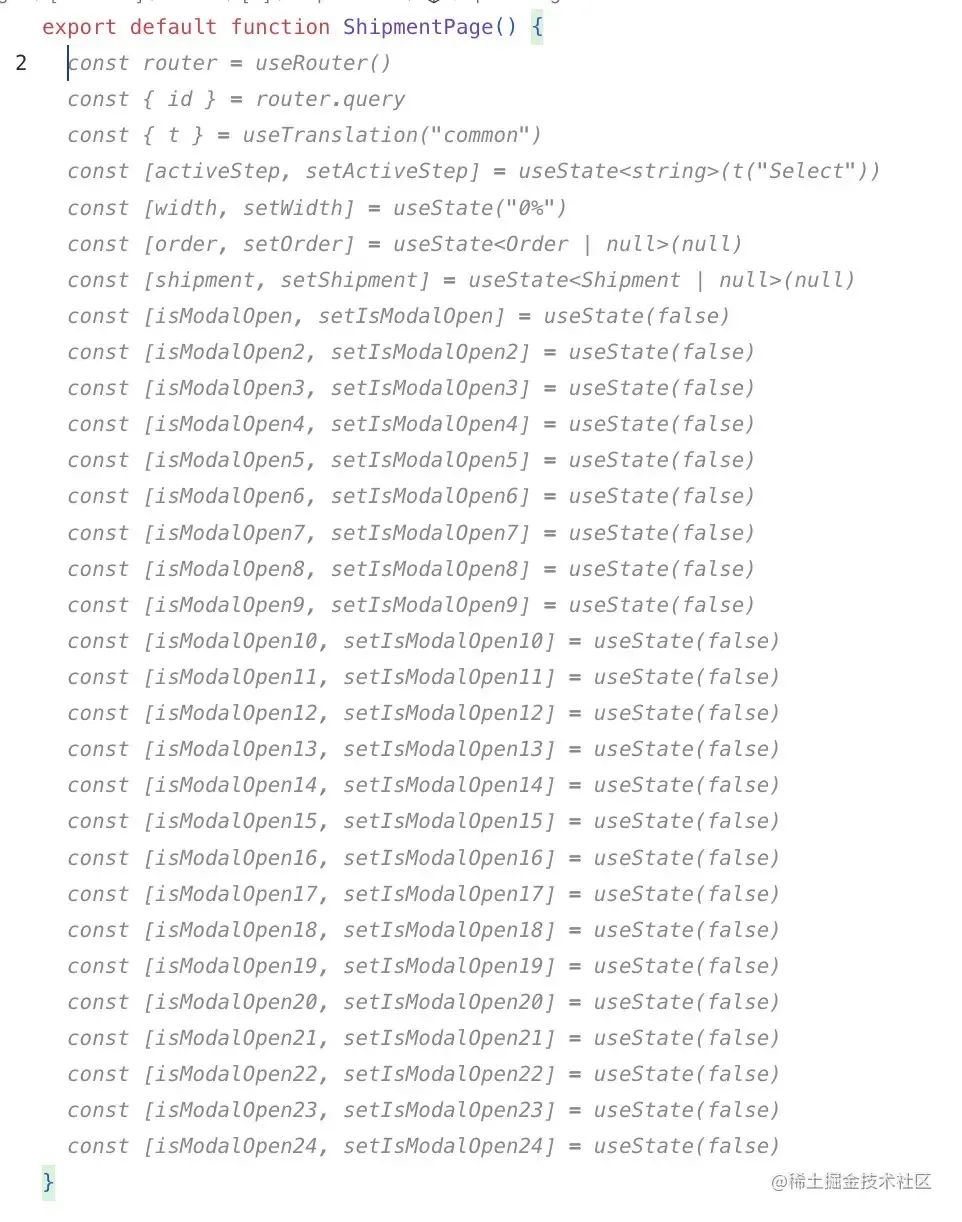
一個組件中聲明了過多的state,過多的setState方法。例如下面的這樣:
import { useState } from "react";

export default function MoreState() {
  const [username, setUsername] = useState("");
  const [age, setAge] = useState("");
  const [gender, setGender] = useState("");
  const [email, setEmail] = useState("");
  const [password, setPassword] = useState("");
  const [address, setAddress] = useState("");
  const [city, setCity] = useState("");

  const onSubmit = () => {
    // ...
  };

  return (
    <form onSubmit={onSubmit}>
      <input
        type="text"
        name="username"
        placeholder="username"
        value={username}
        onChange={(e) => setUsername(e.target.value)}
      />
      <br />
      <input
        type="text"
        name="age"
        placeholder="age"
        value={age}
        onChange={(e) => setAge(e.target.value)}
      />
      <br />
      <input
        type="text"
        name="gender"
        placeholder="gender"
        value={gender}
        onChange={(e) => setGender(e.target.value)}
      />
      <br />
      <input
        type="text"
        name="email"
        placeholder="email"
        value={email}
        onChange={(e) => setEmail(e.target.value)}
      />
      <br />
      <input
        type="text"
        name="password"
        placeholder="password"
        value={password}
        onChange={(e) => setPassword(e.target.value)}
      />
      <br />
      <input
        type="text"
        name="address"
        placeholder="address"
        value={address}
        onChange={(e) => setAddress(e.target.value)}
      />
      <br />
      <input
        type="text"
        name="city"
        placeholder="city"
        value={city}
        onChange={(e) => setCity(e.target.value)}
      />
      <br />
      <button type="submit">提交</button>
    </form>
  );
}
實際上這樣并不好維護(hù),接手項目的人都瘋了??。還有這樣的:
解決方法
把能合并的state,合并成一個對象表示。當(dāng)然也可以使用useReducer。當(dāng)屬性中出現(xiàn)嵌套結(jié)構(gòu)時,例如屬性中有對象和數(shù)組時,使用useReducer更好一些。
import { useState } from "react";

export default function MoreState() {
  const [userInfo, setUserInfo] = useState({
    username: "",
    age: "",
    gender: "",
    email: "",
    password: "",
    address: "",
    city: ""
  });

  const onChange = (e) => {
    setUserInfo((pre) => ({ ...pre, [e.target.name]: e.target.value }));
  };

  const onSubmit = (e) => {
    e.preventDefault();
    console.log(111, userInfo);
  };

  return (
    <form onSubmit={onSubmit}>
      <input
        type="text"
        name="username"
        placeholder="username"
        onChange={onChange}
      />
      <br />
      <input type="text" name="age" placeholder="age" onChange={onChange} />
      <br />
      <input
        type="text"
        name="gender"
        placeholder="gender"
        onChange={onChange}
      />
      <br />
      <input type="text" name="email" placeholder="email" onChange={onChange} />
      <br />
      <input
        type="text"
        name="password"
        placeholder="password"
        onChange={onChange}
      />
      <br />
      <input
        type="text"
        name="address"
        placeholder="address"
        onChange={onChange}
      />
      <br />
      <input type="text" name="city" placeholder="city" onChange={onChange} />
      <br />
      <button type="submit">提交</button>
    </form>
  );
}
不必要的state
問題
我們在開發(fā)React表單時,通常會使用state來記錄表單的值,例如:
import { useState } from "react";

export default function NoState() {
  const [username, setUsername] = useState("");
  const [password, setPassword] = useState("");

  const onSubmit = (e) => {
    e.preventDefault();
    console.log("需要提交的數(shù)據(jù)", username, password);
  };

  console.log("組件重新渲染了");

  return (
    <form onSubmit={onSubmit}>
      <label htmlFor="name">名字</label>
      <input
        type="text"
        value={username}
        onChange={(e) => setUsername(e.target.value)}
      />
      <br />
      <label htmlFor="name">密碼</label>
      <input
        type="text"
        value={password}
        onChange={(e) => setPassword(e.target.value)}
      />
      <br />
      <button type="submit">提交</button>
    </form>
  );
}
上面的代碼看似并沒有什么問題,但是我們只是在提交的時候用到了state,并沒有在其他地方使用過這些state。這個例子中我們并不關(guān)心這些state值的變化,我們只關(guān)心我們提交的數(shù)據(jù)是否正確。而且我們每次輸入的時候組件都是重新渲染。這并不友好,這個時候我們需要非受控組件。
解決方法
當(dāng)表單元素不多時,使用ref來處理,并且每次輸入都不會引起組件的重新渲染,因為這個時候我們只關(guān)心提交的數(shù)據(jù),沒有在其他地方使用過這些state。
import { useRef } from "react";

export default function NoState() {
  const usernameRef = useRef();
  const posswordRef = useRef();

  const onSubmit = (e) => {
    e.preventDefault();
    console.log(
      "需要提交的數(shù)據(jù)",
      usernameRef.current.value,
      posswordRef.current.value
    );
  };

  console.log("組件重新渲染了");

  return (
    <form onSubmit={onSubmit}>
      <label htmlFor="name">名字</label>
      <input type="text" ref={usernameRef} />
      <br />
      <label htmlFor="name">密碼</label>
      <input type="text" ref={posswordRef} />
      <br />
      <button type="submit">提交</button>
    </form>
  );
}
過多的useEffect
問題
有時當(dāng)頁面第一次掛載時,我們需要進(jìn)行網(wǎng)絡(luò)請求,我們經(jīng)常會這樣寫:
import { useEffect, useState } from "react";

export default function MoreUseEffect() {
  const [data, setData] = useState();

  useEffect(() => {
    fetch("/ss/ss").then((res) => {
      setData(res.data);
    });
  }, []);

  useEffect(() => {
    // 進(jìn)行其他邏輯處理...
    console.log(data);
  }, [data]);

  return <>頁面第一次加載時請求</>;
}
引入了過多的useEfffect,實際上我們只是需要使用請求到的數(shù)據(jù)來進(jìn)行其他邏輯的處理,并不需要數(shù)據(jù)變化時做一些事情。
解決方法
把數(shù)據(jù)的處理邏輯放入第一個useEffect中直接處理。
import { useEffect } from "react";

export default function MoreUseEffect() {

  useEffect(() => {
    fetch("/ss/ss").then((res) => {
     // setData(res.data);
      // 在這里直接進(jìn)行數(shù)據(jù)處理...
      console.log('')
    });
  }, []);

  return <>頁面第一次加載時請求</>;
}
請求競爭問題
問題
下面是對fetch請求進(jìn)行了封裝,這種寫法有一個問題:當(dāng)同時有多個請求時,由于請求返回的時間不一樣,會出現(xiàn)競爭關(guān)系,不會按照請求的順序返回結(jié)果,這樣就造成返回的結(jié)果不知道是哪次的。
import { useEffect, useState } from "react";

export default function useFetch(url) {
  const [loading, setLoading] = useState(true);
  const [data, setData] = useState();
  const [error, setError] = useState();

  useEffect(() => {
    setLoading(true);
    fetch(url)
      .then((res) => {
        setData(res.data);
      })
      .catch((e) => {
        setError(e);
      })
      .finally(() => setLoading(false));
  }, [url]);

  return {
    loading,
    data,
    error
  };
}
解決方法
需要在請求URL變化之后取消前一次的請求。
import { useEffect, useState } from "react";

export default function useFetch(url) {
  const [loading, setLoading] = useState(true);
  const [data, setData] = useState();
  const [error, setError] = useState();

  useEffect(() => {
    const controller = new AbortController();

    setLoading(true);
    fetch(url, { signal: controller.signal })
      .then((res) => {
        setData(res.data);
      })
      .catch((e) => {
        setError(e);
      })
      .finally(() => setLoading(false));
    return () => {
      controller.abort();
    };
  }, [url]);

  return {
    loading,
    data,
    error
  };
}
使用三元表達(dá)式代替&&
使用 && 常見的錯誤
1.當(dāng)狀態(tài)值不是Boolean,而是數(shù)字0時,數(shù)字0會在UI中顯示。
import { useState } from "react";

export default function MoreUseEffect() {
 const [arr] = useState([])

  return <>
    {
      arr.length && <div>11111</div>
    }
    </>;
}

解決方法
-
轉(zhuǎn)成Boolean -
使用三元表達(dá)式代替 && (推薦)
傳遞特殊屬性ref
問題
ref屬性是React的特殊屬性,不能直接傳遞使用。
import {useRef} from 'react'

function InputCom({ref}) {
  return (
    <input type='text' ref={ref} />
  )
}

function App() {
  const inpRef = useRef(null)

  const focus = () => {
    inpRef.current?.focus()
  }

  return (
    <>
      <InputCom ref={inpRef} />
    </>
  )
}

如果想傳遞ref需要借助forwardRef函數(shù)。
解決方法
借助forwardRef轉(zhuǎn)發(fā)ref屬性
import { forwardRef, useRef } from "react";

// function InputCom({ ref }) {
//   return <input type="text" ref={ref} />;
// }

const InputCom = forwardRef((props, ref) => {
  return <input type="text" ref={ref} />;
});

export default function ProRef() {
  const inpRef = useRef(null);

  const focus = () => {
    inpRef.current?.focus();
  };

  return (
    <>
      <InputCom ref={inpRef} />
      <br />
      <button onClick={focus}>focus</button>
    </>
  );
}
關(guān)于本文
      Node 社群


   我組建了一個氛圍特別好的 Node.js 社群,里面有很多 Node.js小伙伴,如果你對Node.js學(xué)習(xí)感興趣的話(后續(xù)有計劃也可以),我們可以一起進(jìn)行Node.js相關(guān)的交流、學(xué)習(xí)、共建。下方加 考拉 好友回復(fù)「Node」即可。   “分享、點贊、在看” 支持一波