
SpringBoot系列之前后端接口安全技術(shù)JWT
1. 什么是JWT?
JWT的全稱為Json Web Token (JWT),是目前最流行的跨域認(rèn)證解決方案,是在網(wǎng)絡(luò)應(yīng)用環(huán)境間傳遞聲明而執(zhí)行的一種基于JSON的開(kāi)放標(biāo)準(zhǔn)((RFC 7519),JWT 是一種JSON風(fēng)格的輕量級(jí)的授權(quán)和身份認(rèn)證規(guī)范,可實(shí)現(xiàn)無(wú)狀態(tài)、分布式的Web應(yīng)用授權(quán)
引用官方的說(shuō)法是:
JSON Web令牌(JWT)是一個(gè)開(kāi)放標(biāo)準(zhǔn)(RFC 7519),它定義了一種緊湊且自包含的方式,用于在各方之間安全地將信息作為JSON對(duì)象傳輸。由于此信息是經(jīng)過(guò)數(shù)字簽名的,因此可以進(jìn)行驗(yàn)證和信任。可以使用秘密(使用HMAC算法)或使用RSA或ECDSA的公鑰/私鑰對(duì)對(duì)JWT進(jìn)行簽名。
引用官網(wǎng)圖片,JWT生成的token格式如圖: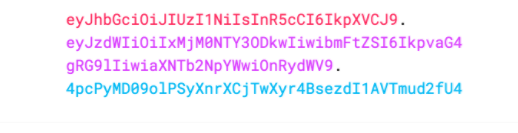
2. JWT令牌結(jié)構(gòu)怎么樣?
JSON Web令牌以緊湊的形式由三部分組成,這些部分由點(diǎn)(.)分隔,分別是:
標(biāo)頭(Header)
有效載荷(Playload)
簽名(Signature)
因此,JWT通常如下所示。xxxxx.yyyyy.zzzzz
ok,詳細(xì)介紹一下這3部分組成
2.1 標(biāo)頭(Header)
標(biāo)頭通常由兩部分組成:令牌的類型(即JWT)和所使用的簽名算法,例如HMAC SHA256或RSA。
* 聲明類型,這里是JWT
* 加密算法,自定義
{
  "alg": "HS256",
  "typ": "JWT"
}
然后進(jìn)行Base64Url編碼得到j(luò)wt的第1部分
Base64是一種基于64個(gè)可打印字符來(lái)表示二進(jìn)制數(shù)據(jù)的表示方法。由于2
的6次方等于64,所以每6個(gè)比特為一個(gè)單元,對(duì)應(yīng)某個(gè)可打印字符。三個(gè)字節(jié)有24
個(gè)比特,對(duì)應(yīng)于4個(gè)Base64單元,即3個(gè)字節(jié)需要用4個(gè)可打印字符來(lái)表示。JDK 中 提
供了非常方便的 B BA AS SE E6 64 4E En nc co od de er r和B BA AS SE E6 64 4D De ec co od de er r,用它們可以非常方便的完
成基于 BASE64 的編碼和解碼
2.2 有效載荷(Playload)
載荷就是存放有效信息的地方。這個(gè)名字像是特指飛機(jī)上承載的貨品,這些有效信息包
含三個(gè)部分:
(1)標(biāo)準(zhǔn)中注冊(cè)的聲明
iss (issuer):表示簽發(fā)人
exp (expiration time):表示token過(guò)期時(shí)間
sub (subject):主題
aud (audience):受眾
nbf (Not Before):生效時(shí)間
iat (Issued At):簽發(fā)時(shí)間
jti (JWT ID):編號(hào)
(2)公共的聲明
公共的聲明可以添加任何的信息,一般添加用戶的相關(guān)信息或其他業(yè)務(wù)需要的必要信息(3)私有的聲明
私有聲明是提供者和消費(fèi)者所共同定義的聲明,一般不建議存放敏感信息,因?yàn)閎ase64是對(duì)稱解密的,意味著該部分信息可以歸類為明文信息。這些私有的聲明其實(shí)一般就是指自定義Claim
定義一個(gè)payload:
{
    "user_id":1,
    "user_name":"nicky",
    "scope":[
        "ROLE_ADMIN"
    ],
    "non_expired":false,
    "exp":1594352348,
    "iat":1594348748,
    "enabled":true,
    "non_locked":false
}
對(duì)其進(jìn)行base64加密,得到payload:
eyJ1c2VyX2lkIjoxLCJ1c2VyX25hbWUiOiJuaWNreSIsInNjb3BlIjpbIlJPTEVfQURNSU4iXSwibm9uX2V4cGlyZWQiOmZhbHNlLCJleHAiOjE1OTQzNTIzNDgsImlhdCI6MTU5NDM0ODc0OCwiZW5hYmxlZCI6dHJ1ZSwibm9uX2xvY2tlZCI6ZmFsc2V9
2.3 簽名(Signature)
jwt的第三部分是一個(gè)簽證信息,這個(gè)簽證信息由三部分組成:
header (base64后的)
payload (base64后的)
secret
簽名,是整個(gè)數(shù)據(jù)的認(rèn)證信息。一般根據(jù)前兩步的數(shù)據(jù),然后通過(guò)header中聲明的加密方式進(jìn)行加鹽secret組合加密,然后就構(gòu)成了jwt的第3部分
ok,一個(gè)jwt令牌的組成就介紹好咯,令牌是三個(gè)由點(diǎn)分隔的Base64-URL字符串,可以在HTML和HTTP環(huán)境中輕松傳遞這些字符串,與基于XML的標(biāo)準(zhǔn)(例如SAML)相比,它更緊湊。
下圖顯示了一個(gè)JWT,它已對(duì)先前的標(biāo)頭和有效負(fù)載進(jìn)行了編碼,并用一個(gè)秘密secret進(jìn)行了簽名編碼的JWT: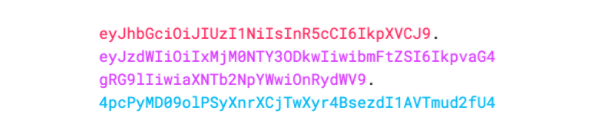
JWT官網(wǎng)提供的在線調(diào)試工具:
https://jwt.io/#debugger-io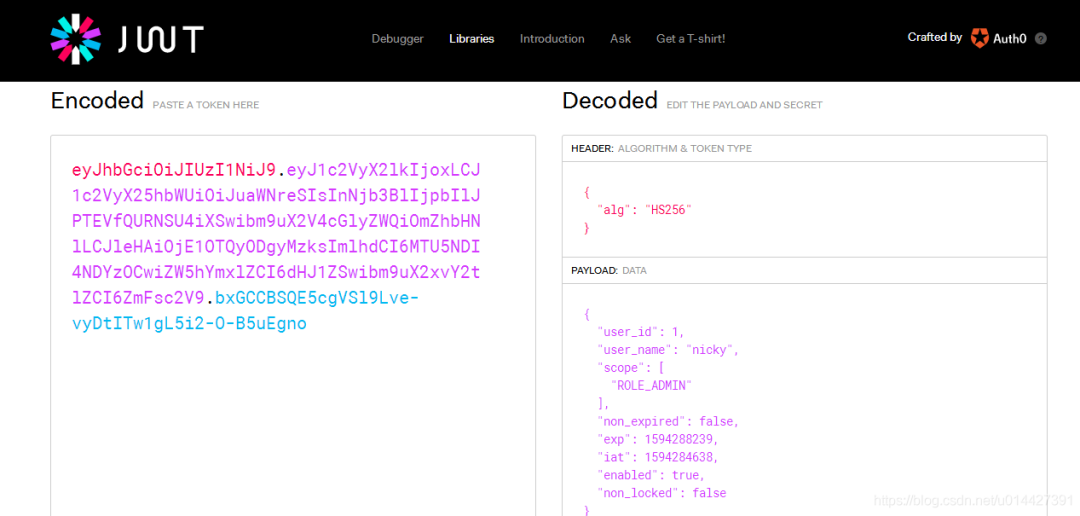
開(kāi)源中國(guó)提供的base64在線加解密:
https://tool.oschina.net/encrypt?type=3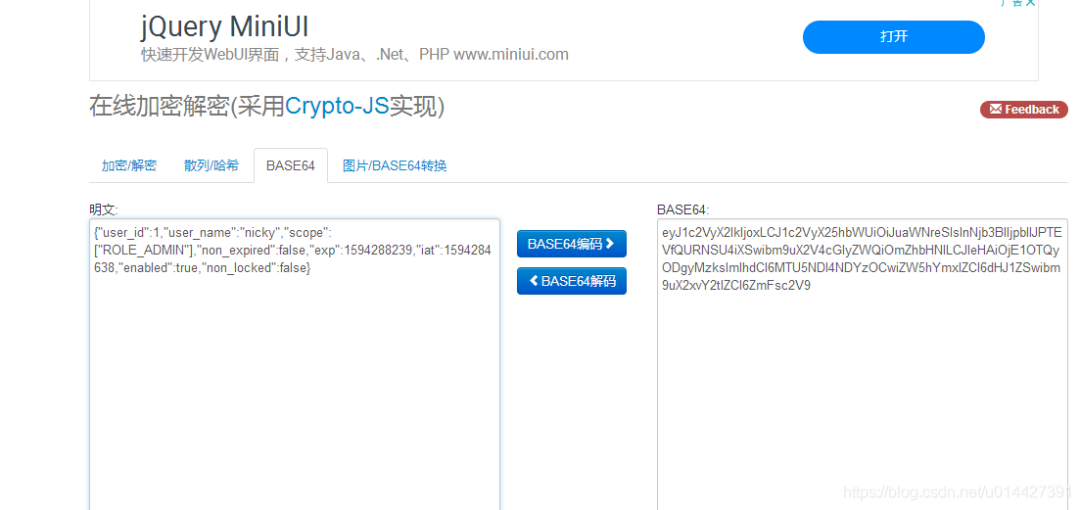
3. JWT原理簡(jiǎn)單介紹
引用官網(wǎng)的圖,用于顯示如何獲取JWT,并將其用于訪問(wèn)API或資源:
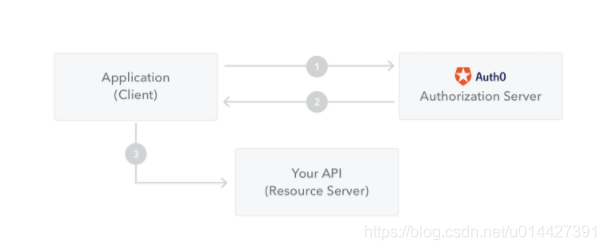
1、客戶端(包括瀏覽器、APP等)向授權(quán)服務(wù)器請(qǐng)求授權(quán)
2、授權(quán)服務(wù)器驗(yàn)證通過(guò),授權(quán)服務(wù)器會(huì)向應(yīng)用程序返回訪問(wèn)令牌
3、該應(yīng)用程序使用訪問(wèn)令牌來(lái)訪問(wèn)受保護(hù)的資源(例如API)
4. JWT的應(yīng)用場(chǎng)景
JWT 使用于比較小型的業(yè)務(wù)驗(yàn)證,對(duì)于比較復(fù)雜的可以用OAuth2.0實(shí)現(xiàn)
引用官方的說(shuō)法:
授權(quán):這是使用JWT的最常見(jiàn)方案。一旦用戶登錄,每個(gè)后續(xù)請(qǐng)求將包括JWT,從而允許用戶訪問(wèn)該令牌允許的路由,服務(wù)和資源。單一登錄是當(dāng)今廣泛使用JWT的一項(xiàng)功能,因?yàn)樗拈_(kāi)銷很小并且可以在不同的域中輕松使用。
信息交換:JSON Web令牌是在各方之間安全地傳輸信息的好方法。因?yàn)榭梢詫?duì)JWT進(jìn)行簽名(例如,使用公鑰/私鑰對(duì)),所以您可以確保發(fā)件人是他們所說(shuō)的人。此外,由于簽名是使用標(biāo)頭和有效負(fù)載計(jì)算的,因此您還可以驗(yàn)證內(nèi)容是否遭到篡改。
5. 與Cookie-Session對(duì)比
了解JWT之前先要了解傳統(tǒng)的Cookie-Session認(rèn)證機(jī)制,這是單體應(yīng)用最常用的,其大概流程:
1、用戶訪問(wèn)客戶端(瀏覽器),服務(wù)器通過(guò)session校驗(yàn)用戶是否登錄
2、 用戶沒(méi)登錄返回登錄頁(yè)面,輸入賬號(hào)密碼等驗(yàn)證
3、 驗(yàn)證通過(guò)創(chuàng)建session,返回sessionId給客戶端保存到cookie
4、接著,用戶訪問(wèn)其它同域鏈接,都會(huì)校驗(yàn)sessionId,符合就允許訪問(wèn)
ok,簡(jiǎn)單介紹這套cookie-session機(jī)制,之前設(shè)計(jì)者開(kāi)發(fā)這套機(jī)制是為了兼容http的無(wú)狀態(tài),這套機(jī)制有其優(yōu)點(diǎn),當(dāng)然也有一些缺陷:
只適用于B/S架構(gòu)的軟件,對(duì)于安卓app等客戶端不帶cookie的,不能和服務(wù)端進(jìn)行對(duì)接
不支持跨域,因?yàn)镃ookie為了保證安全性,只能允許同域訪問(wèn),不支持跨域
CSRF攻擊,Cookie沒(méi)做好安全保證,有時(shí)候容易被竊取,受到跨站請(qǐng)求偽造的攻擊
ok,簡(jiǎn)單介紹了cookie-session機(jī)制后,可以介紹一下jwt的認(rèn)證
1、用戶訪問(wèn)客戶端(瀏覽器、APP等等),服務(wù)器通過(guò)token校驗(yàn)
2、 用戶沒(méi)登錄返回登錄頁(yè)面,輸入賬號(hào)密碼等驗(yàn)證
3、 驗(yàn)證通過(guò)創(chuàng)建已簽名token,返回token給客戶端保存,最常見(jiàn)的是存儲(chǔ)在localStorage中,但是也可以存在Session Storage和Cookie中
4、接著,用戶訪問(wèn)其它鏈接,都會(huì)帶上token,服務(wù)器解碼JWT,如果Token是有效的則處理這個(gè)請(qǐng)求
網(wǎng)上對(duì)于cookie-session機(jī)制和jwt的討論很多,可以自行網(wǎng)上找資料,我覺(jué)得這兩套機(jī)制各有優(yōu)點(diǎn),應(yīng)該根據(jù)場(chǎng)景進(jìn)行選用,JWT最明顯優(yōu)點(diǎn)就是小巧輕便,安全性也比較好,但是也有其缺點(diǎn)。
比如對(duì)于業(yè)務(wù)繁雜的功能,如果一些信息也丟在jwt的token里,cookie有可能不能保存。
續(xù)簽問(wèn)題,jwt不能支持,傳統(tǒng)的cookie+session的方案天然的支持續(xù)簽,但是jwt由于服務(wù)端不保存用戶狀態(tài),因此很難完美解決續(xù)簽問(wèn)題
密碼重置等問(wèn)題,jwt因?yàn)閿?shù)據(jù)不保存于服務(wù)端,如果用戶修改密碼,不過(guò)token還沒(méi)過(guò)期,這種情況,原來(lái)的token還是可以訪問(wèn)系統(tǒng)的,這種肯定是不允許的,不過(guò)這種情況或許可以通過(guò)修改secret實(shí)現(xiàn)
6. Java的JJWT實(shí)現(xiàn)JWT
6.1 什么是JJWT?
JJWT是一個(gè)提供端到端的JWT創(chuàng)建和驗(yàn)證的Java庫(kù)。永遠(yuǎn)免費(fèi)和開(kāi)源(Apache
License,版本2.0),JJWT很容易使用和理解。它被設(shè)計(jì)成一個(gè)以建筑為中心的流暢界
面,隱藏了它的大部分復(fù)雜性。
6.2 實(shí)驗(yàn)環(huán)境準(zhǔn)備
環(huán)境準(zhǔn)備:
Maven 3.0+
IntelliJ IDEA
技術(shù)棧:
SpringBoot2.2.1
Spring Security
新建一個(gè)SpringBoot項(xiàng)目,maven加入JJWT相關(guān)配置
pom.xml:
xmlns ="http://maven.apache.org/POM/4.0.0" xmlns:xsi="http://www.w3.org/2001/XMLSchema-instance"
xsi:schemaLocation="http://maven.apache.org/POM/4.0.0 https://maven.apache.org/xsd/maven-4.0.0.xsd">
application.yml:
spring:
datasource:
url: jdbc:mysql://192.168.0.199:3306/jeeplatform?autoReconnect=true&useUnicode=true&characterEncoding=utf8&characterSetResults=utf8&useSSL=false
username: root
password: secret
driver-class-name: com.mysql.jdbc.Driver
#添加Thymeleaf配置,除了cache在項(xiàng)目沒(méi)上線前建議關(guān)了,其它配置都可以不用配的,本博客只是列舉一下有這些配置
thymeleaf:
# cache默認(rèn)開(kāi)啟的,這里可以關(guān)了,項(xiàng)目上線之前,項(xiàng)目上線后可以開(kāi)啟
cache: false
# 這個(gè)prefix可以注釋,因?yàn)槟J(rèn)就是templates的,您可以改成其它的自定義路徑
prefix: classpath:/templates/
suffix: .html
mode: HTML5
# 指定一下編碼為utf8
encoding: UTF-8
# context-type為text/html,也可以不指定,因?yàn)閎oot可以自動(dòng)識(shí)別
servlet:
content-type: text/html
messages:
basename: i18n.messages
# cache-duration:
encoding: UTF-8
logging:
level:
org:
springframework:
security: DEBUG
com:
example:
springboot:
jwt:
mapper: DEBUG
項(xiàng)目工程: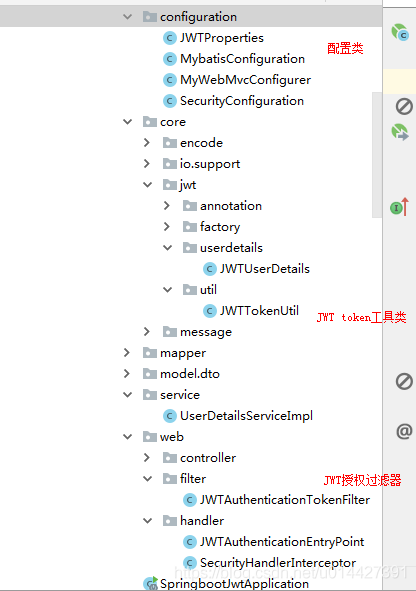
6.3 jwt配置屬性讀取
新建jwt.yml:
# jwt configuration
jwt:
  # 存放Token的Header key值
  token-key: Authorization
  # 自定義密鑰,加鹽
  secret: mySecret
  # 超時(shí)時(shí)間 單位秒
  expiration: 3600
  # 自定義token 前綴字符
  token-prefix: Bearer-
  # accessToken超時(shí)時(shí)間 單位秒
  access-token: 3600
  # 刷新token時(shí)間 單位秒
  refresh-token: 3600
  # 允許訪問(wèn)的uri
  permit-all: /oauth/**,/login/**,/logout/**
  # 需要校驗(yàn)的uri
  authenticate-uri: /api/**
JWTProperties .java
package com.example.springboot.jwt.configuration;

import com.example.springboot.jwt.core.io.support.YamlPropertyResourceFactory;
import lombok.Data;
import lombok.ToString;
import org.springframework.boot.context.properties.ConfigurationProperties;
import org.springframework.context.annotation.PropertySource;
import org.springframework.stereotype.Component;

import java.time.Duration;

/**
 *
 *  JWT配置類
 *
 *
 *
 * @author nicky.ma
 * 修改記錄
 *    修改后版本:     修改人:修改日期: 2020/07/06 11:37  修改內(nèi)容:
 *
 */
@Component
@PropertySource(value = "classpath:jwt.yml",encoding = "utf-8",factory = YamlPropertyResourceFactory.class)
@ConfigurationProperties(prefix = "jwt")
@Data
@ToString
public class JWTProperties {

    /**
     * 存放Token的Header key值
     */
    private String tokenKey;

    /*
     * 自定義密鑰,加鹽
     */
    private String secret;

    /*
     * 超時(shí)時(shí)間 單位秒
     */
    private Duration expiration =Duration.ofMinutes(3600);

    /*
     * 自定義token 前綴字符
     */
    private String tokenPrefix;

    /*
     * accessToken超時(shí)時(shí)間 單位秒
     */
    private Duration accessToken =Duration.ofMinutes(3600);

    /*
     * 刷新token時(shí)間 單位秒
     */
    private Duration refreshToken =Duration.ofMinutes(3600);

    /*
     * 允許訪問(wèn)的uri
     */
    private String permitAll;

    /*
     * 需要校驗(yàn)的uri
     */
    private String authenticateUri;
}
SpringBoot2.2.1版本使用@ConfigurationProperties注解是不能讀取yaml文件的,只能讀取properties,所以自定義PropertySourceFactory
package com.example.springboot.jwt.core.io.support;

import org.springframework.boot.env.YamlPropertySourceLoader;
import org.springframework.core.env.PropertySource;
import org.springframework.core.io.support.DefaultPropertySourceFactory;
import org.springframework.core.io.support.EncodedResource;
import org.springframework.core.io.support.PropertySourceFactory;
import org.springframework.lang.Nullable;

import java.io.IOException;
import java.util.List;
import java.util.Optional;

/**
 *
 *  YAML配置文件讀取工廠類
 *
 *
 *
 * @author nicky.ma
 * 修改記錄
 *    修改后版本:     修改人:修改日期: 2019/11/13 15:44  修改內(nèi)容:
 *
 */
public class YamlPropertyResourceFactory implements PropertySourceFactory {

    /**
     * Create a {@link PropertySource} that wraps the given resource.
     *
     * @param name     the name of the property source
     * @param encodedResource the resource (potentially encoded) to wrap
     * @return the new {@link PropertySource} (never {@code null})
     * @throws IOException if resource resolution failed
     */
    @Override
    public PropertySource createPropertySource(@Nullable String name, EncodedResource encodedResource) throws IOException {
        String resourceName = Optional.ofNullable(name).orElse(encodedResource.getResource().getFilename());
        if (resourceName.endsWith(".yml") || resourceName.endsWith(".yaml")) {
            //yaml資源文件
            List> yamlSources = new YamlPropertySourceLoader().load(resourceName, encodedResource.getResource());
            return yamlSources.get(0);
        } else {
            //返回默認(rèn)的PropertySourceFactory
            return new DefaultPropertySourceFactory().createPropertySource(name, encodedResource);
        }
    }
}
6.4 JWT Token工具類
package com.example.springboot.jwt.core.jwt.util;

import com.alibaba.fastjson.JSON;
import com.example.springboot.jwt.configuration.JWTProperties;
import com.example.springboot.jwt.core.jwt.userdetails.JWTUserDetails;
import io.jsonwebtoken.Claims;
import io.jsonwebtoken.Jwts;
import io.jsonwebtoken.SignatureAlgorithm;
import lombok.extern.slf4j.Slf4j;
import org.springframework.beans.factory.annotation.Autowired;
import org.springframework.security.core.GrantedAuthority;
import org.springframework.security.core.userdetails.UserDetails;
import org.springframework.stereotype.Component;
import org.springframework.util.CollectionUtils;

import java.util.*;


/**
 *
 *   JWT工具類
 *
 *
 *
 * @author mazq
 * 修改記錄
 *    修改后版本:     修改人:修改日期: 2020/07/06 13:57  修改內(nèi)容:
 *
 */
@Component
@Slf4j
public class JWTTokenUtil {

    private static final String CLAIM_KEY_USER_ID = "user_id";
    private static final String CLAIM_KEY_USER_NAME ="user_name";
    private static final String CLAIM_KEY_ACCOUNT_ENABLED = "enabled";
    private static final String CLAIM_KEY_ACCOUNT_NON_LOCKED = "non_locked";
    private static final String CLAIM_KEY_ACCOUNT_NON_EXPIRED = "non_expired";
    private static final String CLAIM_KEY_AUTHORITIES = "scope";
    //簽名方式
    private static final SignatureAlgorithm SIGNATURE_ALGORITHM = SignatureAlgorithm.HS256;


    @Autowired
    JWTProperties jwtProperties;

    /**
     * 生成acceptToken
     * @param userDetails
     * @return
     */
    public String generateToken(UserDetails userDetails) {
        JWTUserDetails user = (JWTUserDetails) userDetails;
        Map claims = generateClaims(user);
        return generateToken(user.getUsername(),claims);
    }

    /**
     * 生成acceptToken
     * @param username
     * @param claims
     * @return
     */
    public String generateToken(String username, Map claims) {
        return Jwts.builder()
                .setId(UUID.randomUUID().toString())
                .setSubject(username)
                .setClaims(claims)
                .setIssuedAt(new Date())
                .setExpiration(generateExpirationDate(jwtProperties.getExpiration().toMillis()))
                .signWith(SIGNATURE_ALGORITHM, jwtProperties.getSecret())
                .compact();
    }

    /**
     * 校驗(yàn)acceptToken
     * @param token
     * @param userDetails
     * @return
     */
    public boolean validateToken(String token, UserDetails userDetails) {
        JWTUserDetails user = (JWTUserDetails) userDetails;
       return validateToken(token, user.getUsername());
    }

    /**
     * 校驗(yàn)acceptToken
     * @param token
     * @param  username
     * @return
     */
    public boolean validateToken(String token, String username) {
        try {
            final String userId = getUserIdFromClaims(token);
            return getClaimsFromToken(token) != null
                    && userId.equals(username)
                    && !isTokenExpired(token);
        } catch (Exception e) {
            throw new IllegalStateException("Invalid Token!"+e);
        }
    }

    /**
     * 校驗(yàn)acceptToken
     * @param token
     * @return
     */
    public boolean validateToken(String token) {
        try {
            return getClaimsFromToken(token) != null
                    && !isTokenExpired(token);
        } catch (Exception e) {
            throw new IllegalStateException("Invalid Token!"+e);
        }
    }

    /**
     * 解析token 信息
     * @param token
     * @return
     */
    public Claims  getClaimsFromToken(String token){
        Claims claims = Jwts.parser()
                    .setSigningKey(jwtProperties.getSecret())
                    .parseClaimsJws(token)
                    .getBody();
        return claims;
    }

    /**
     * 從token獲取userId
     * @param token
     * @return
     */
    public String getUserIdFromClaims(String token) {
        String userId = getClaimsFromToken(token).getId();
        return userId;
    }

    /**
     * 從token獲取ExpirationDate
     * @param token
     * @return
     */
    public Date getExpirationDateFromClaims(String token) {
        Date expiration = getClaimsFromToken(token).getExpiration();
        return expiration;
    }

    /**
     * 從token獲取username
     * @param token
     * @return
     */
    public String getUsernameFromClaims(String token) {
        return  getClaimsFromToken(token).get(CLAIM_KEY_USER_NAME).toString();
    }

    /**
     * token 是否過(guò)期
     * @param token
     * @return
     */
    public boolean isTokenExpired(String token) {
        final Date expirationDate = getExpirationDateFromClaims(token);
        return expirationDate.before(new Date());
    }

    /**
     * 生成失效時(shí)間
     * @param expiration
     * @return
     */
    public Date generateExpirationDate(long expiration) {
        return new Date(System.currentTimeMillis() + expiration * 1000);
    }

    /**
     * 生成Claims
     * @Param user
     * @return
     */
    public Map generateClaims(JWTUserDetails user) {
        Map claims = new HashMap<>(16);
        claims.put(CLAIM_KEY_USER_ID, user.getUserId());
        claims.put(CLAIM_KEY_USER_NAME, user.getUsername());
        claims.put(CLAIM_KEY_ACCOUNT_ENABLED, user.isEnabled());
        claims.put(CLAIM_KEY_ACCOUNT_NON_LOCKED, user.isAccountNonLocked());
        claims.put(CLAIM_KEY_ACCOUNT_NON_EXPIRED, user.isAccountNonExpired());
        if (!CollectionUtils.isEmpty(user.getAuthorities())) {
            claims.put(CLAIM_KEY_AUTHORITIES , JSON.toJSON(getAuthorities(user.getAuthorities())));
        }
        return claims;
    }

    /**
     * 獲取角色權(quán)限
     * @param authorities
     * @return
     */
    public List getAuthorities(Collection authorities){
        List list = new ArrayList<>();
        for (GrantedAuthority ga : authorities) {
            list.add(ga.getAuthority());
        }
        return list;
    }

}
6.5 Spring Security引入
自定義UserDetails:
package com.example.springboot.jwt.core.jwt.userdetails;

import com.fasterxml.jackson.annotation.JsonIgnore;
import lombok.AllArgsConstructor;
import lombok.Data;
import lombok.NoArgsConstructor;
import org.springframework.security.core.GrantedAuthority;
import org.springframework.security.core.userdetails.UserDetails;

import java.time.Instant;
import java.util.Collection;
import java.util.List;

/**
 *
 *  JWTUserDetails
 *
 *
 *
 * @author mazq
 * 修改記錄
 *    修改后版本:     修改人:修改日期: 2020/07/06 14:45  修改內(nèi)容:
 *
 */
@Data
@AllArgsConstructor
@NoArgsConstructor
public class JWTUserDetails implements UserDetails {

    /**
     * 用戶ID
     */
    private Long userId;
    /**
     * 用戶密碼
     */
    private String password;
    /**
     * 用戶名
     */
    private String username;
    /**
     * 用戶角色權(quán)限
     */
    private Collection authorities;
    /**
     * 賬號(hào)是否過(guò)期
     */
    private  Boolean isAccountNonExpired = false;
    /**
     * 賬戶是否鎖定
     */
    private  Boolean isAccountNonLocked = false;
    /**
     * 密碼是否過(guò)期
     */
    private  Boolean isCredentialsNonExpired = false;
    /**
     * 賬號(hào)是否激活
     */
    private  Boolean isEnabled = true;
    /**
     * 上次密碼重置時(shí)間
     */
    private  Instant lastPasswordResetDate;

    public JWTUserDetails(Long id, String username, String password, List mapToGrantedAuthorities) {
        this.userId = id;
        this.username = username;
        this.password = password;
        this.authorities = mapToGrantedAuthorities;
    }

    @Override
    public Collection getAuthorities() {
        return authorities;
    }

    @Override
    public String getPassword() {
        return password;
    }

    @Override
    public String getUsername() {
        return username;
    }

    @JsonIgnore
    @Override
    public boolean isAccountNonExpired() {
        return isAccountNonExpired;
    }

    @JsonIgnore
    @Override
    public boolean isAccountNonLocked() {
        return isAccountNonLocked;
    }

    @JsonIgnore
    @Override
    public boolean isCredentialsNonExpired() {
        return isCredentialsNonExpired;
    }

    @JsonIgnore
    @Override
    public boolean isEnabled() {
        return isEnabled;
    }


}
UserDetailsServiceImpl.java業(yè)務(wù)接口
package com.example.springboot.jwt.service;

import com.example.springboot.jwt.core.jwt.userdetails.JWTUserDetails;
import com.example.springboot.jwt.mapper.UserMapper;
import lombok.extern.slf4j.Slf4j;
import org.springframework.beans.factory.annotation.Autowired;
import org.springframework.beans.factory.annotation.Qualifier;
import org.springframework.security.core.GrantedAuthority;
import org.springframework.security.core.authority.SimpleGrantedAuthority;
import org.springframework.security.core.userdetails.UserDetails;
import org.springframework.security.core.userdetails.UserDetailsService;
import org.springframework.security.core.userdetails.UsernameNotFoundException;
import org.springframework.stereotype.Service;

import java.util.Arrays;
import java.util.List;

/**
 *
 *  UserDetailsServiceImpl
 *
 *
 *
 * @author mazq
 * 修改記錄
 *    修改后版本:     修改人:修改日期: 2020/07/06 18:10  修改內(nèi)容:
 *
 */
@Service("jwtUserService")
@Slf4j
public class UserDetailsServiceImpl implements UserDetailsService {

    @Autowired
    @Qualifier("userMapper")
    UserMapper userRepository;

    @Override
    public UserDetails loadUserByUsername(String username) throws UsernameNotFoundException {
        JWTUserDetails user = userRepository.findByUsername(username);
        if(user == null){
            log.info("登錄用戶[{}]沒(méi)注冊(cè)!",username);
            throw new UsernameNotFoundException("登錄用戶["+username + "]沒(méi)注冊(cè)!");
        }
        return new JWTUserDetails(1L,user.getUsername(), user.getPassword(), getAuthority());
    }

    private List getAuthority() {
        return Arrays.asList(new SimpleGrantedAuthority("ROLE_ADMIN"));
    }
}
自定義AuthenticationEntryPoint進(jìn)行統(tǒng)一異常處理:
package com.example.springboot.jwt.web.handler;

import org.springframework.security.core.AuthenticationException;
import org.springframework.security.web.AuthenticationEntryPoint;
import org.springframework.stereotype.Component;

import javax.servlet.ServletException;
import javax.servlet.http.HttpServletRequest;
import javax.servlet.http.HttpServletResponse;
import java.io.IOException;
import java.io.Serializable;

/**
 *
 *  JWTAuthenticationEntryPoint
 *
 *
 *
 * @author mazq
 * 修改記錄
 *    修改后版本:     修改人:修改日期: 2020/07/09 14:46  修改內(nèi)容:
 *
 */
@Component
public class JWTAuthenticationEntryPoint implements AuthenticationEntryPoint, Serializable {

    @Override
    public void commence(HttpServletRequest httpServletRequest, HttpServletResponse httpServletResponse, AuthenticationException e) throws IOException, ServletException {
        // 出錯(cuò)時(shí)候
        httpServletResponse.sendError(HttpServletResponse.SC_UNAUTHORIZED, "Unauthorized");
    }
}
6.6 JWT授權(quán)過(guò)濾器
package com.example.springboot.jwt.web.filter;

import com.example.springboot.jwt.configuration.JWTProperties;
import com.example.springboot.jwt.core.jwt.userdetails.JWTUserDetails;
import com.example.springboot.jwt.core.jwt.util.JWTTokenUtil;
import lombok.extern.slf4j.Slf4j;
import org.springframework.beans.factory.annotation.Autowired;
import org.springframework.beans.factory.annotation.Qualifier;
import org.springframework.security.authentication.UsernamePasswordAuthenticationToken;
import org.springframework.security.core.context.SecurityContextHolder;
import org.springframework.security.core.userdetails.UserDetailsService;
import org.springframework.security.web.authentication.WebAuthenticationDetailsSource;
import org.springframework.util.AntPathMatcher;
import org.springframework.util.PathMatcher;
import org.springframework.util.StringUtils;
import org.springframework.web.filter.OncePerRequestFilter;

import javax.servlet.FilterChain;
import javax.servlet.ServletException;
import javax.servlet.http.HttpServletRequest;
import javax.servlet.http.HttpServletResponse;
import java.io.IOException;
import java.util.Arrays;
import java.util.List;
import java.util.concurrent.ConcurrentHashMap;
import java.util.concurrent.ConcurrentMap;

/**
 *
 *  JWTAuthenticationTokenFilter
 *
 *
 *
 * @author mazq
 * 修改記錄
 *    修改后版本:     修改人:修改日期: 2020/07/06 16:04  修改內(nèi)容:
 *
 */
@Slf4j
public class JWTAuthenticationTokenFilter extends OncePerRequestFilter {

    private static final ConcurrentMap URI_CACHE_MAP = new ConcurrentHashMap();
    private final List permitAllUris;
    private final List authenticateUris;

    @Autowired
    JWTProperties jwtProperties;
    @Autowired
    JWTTokenUtil jwtTokenUtil;
    @Autowired
    @Qualifier("jwtUserService")
    UserDetailsService userDetailsService;

    public JWTAuthenticationTokenFilter(JWTProperties jwtProperties) {
        this.permitAllUris = Arrays.asList(jwtProperties.getPermitAll().split(","));
        this.authenticateUris = Arrays.asList(jwtProperties.getAuthenticateUri().split(","));
    }

    @Override
    protected void doFilterInternal(HttpServletRequest httpServletRequest, HttpServletResponse httpServletResponse,
                                    FilterChain filterChain) throws ServletException, IOException {
        if (!isAllowUri(httpServletRequest)) {
            final String _authHeader = httpServletRequest.getHeader(jwtProperties.getTokenKey());
            log.info("Authorization:[{}]",_authHeader);
            if (StringUtils.isEmpty(_authHeader) || ! _authHeader.startsWith(jwtProperties.getTokenPrefix())) {
                throw new RuntimeException("Unable to get JWT Token");
            }
            final String token = _authHeader.substring(7);
            log.info("acceptToken:[{}]",token);
            if (!jwtTokenUtil.validateToken(token)) {
                throw new RuntimeException("Invalid token");
            }
            if (jwtTokenUtil.validateToken(token)) {
                String username = jwtTokenUtil.getUsernameFromClaims(token);
                JWTUserDetails userDetails = (JWTUserDetails)userDetailsService.loadUserByUsername(username);
                UsernamePasswordAuthenticationToken usernamePasswordAuthenticationToken = new UsernamePasswordAuthenticationToken(
                        userDetails, null, userDetails.getAuthorities());
                usernamePasswordAuthenticationToken
                        .setDetails(new WebAuthenticationDetailsSource().buildDetails(httpServletRequest));
                SecurityContextHolder.getContext().setAuthentication(usernamePasswordAuthenticationToken);
            }
        }
        filterChain.doFilter(httpServletRequest, httpServletResponse);
    }

    private Boolean isAllowUri(HttpServletRequest request) {
        String uri = request.getServletPath();
        if (URI_CACHE_MAP.containsKey(uri)) {
            // 緩存有數(shù)據(jù),直接從緩存讀取
            return URI_CACHE_MAP.get(uri);
        }
        boolean flag = checkRequestUri(uri);
        // 數(shù)據(jù)丟到緩存里
        URI_CACHE_MAP.putIfAbsent(uri, flag);
        return flag;
    }

    private Boolean checkRequestUri(String requestUri) {
        boolean filter = true;
        final PathMatcher pathMatcher = new AntPathMatcher();
        for (String permitUri : permitAllUris) {
            if (pathMatcher.match(permitUri, requestUri)) {
                // permit all的鏈接直接放過(guò)
                filter = true;
            }
        }
        for (String authUri : authenticateUris) {
            if (pathMatcher.match(authUri, requestUri)) {
                filter = false;
            }
        }
        return filter;
    }
}
WebMvcConfigurer類注冊(cè)過(guò)濾器:
package com.example.springboot.jwt.configuration;

import com.example.springboot.jwt.web.filter.JWTAuthenticationTokenFilter;
import com.example.springboot.jwt.web.handler.SecurityHandlerInterceptor;
import org.springframework.beans.factory.annotation.Autowired;
import org.springframework.boot.web.servlet.FilterRegistrationBean;
import org.springframework.context.annotation.Bean;
import org.springframework.context.annotation.Configuration;
import org.springframework.web.servlet.config.annotation.InterceptorRegistry;
import org.springframework.web.servlet.config.annotation.WebMvcConfigurer;

/**
 *
 *  MyWebMvcConfigurer
 *
 *
 *
 * @author mazq
 * 修改記錄
 *    修改后版本:     修改人:修改日期: 2020/07/07 13:52  修改內(nèi)容:
 *
 */
@Configuration

public class MyWebMvcConfigurer implements WebMvcConfigurer {

    @Autowired
    private JWTProperties jwtProperties;


    @Override
    public void addInterceptors(InterceptorRegistry registry) {
        registry.addInterceptor(new SecurityHandlerInterceptor())
                .addPathPatterns("/**");
    }

    @Bean
    public JWTAuthenticationTokenFilter jwtAuthenticationTokenFilter() {
        return new JWTAuthenticationTokenFilter(jwtProperties);
    }

    @Bean
    public FilterRegistrationBean jwtFilter() {
        FilterRegistrationBean registrationBean = new FilterRegistrationBean();
        registrationBean.setFilter(jwtAuthenticationTokenFilter());
        return registrationBean;
    }


}
6.7 Spring Security配置類
package com.example.springboot.jwt.configuration;


import com.example.springboot.jwt.core.encode.CustomPasswordEncoder;
import com.example.springboot.jwt.web.filter.JWTAuthenticationTokenFilter;
import com.example.springboot.jwt.web.handler.JWTAuthenticationEntryPoint;
import org.springframework.beans.factory.annotation.Autowired;
import org.springframework.beans.factory.annotation.Qualifier;
import org.springframework.context.annotation.Bean;
import org.springframework.context.annotation.Configuration;
import org.springframework.core.annotation.Order;
import org.springframework.security.authentication.AuthenticationManager;
import org.springframework.security.config.annotation.authentication.builders.AuthenticationManagerBuilder;
import org.springframework.security.config.annotation.web.builders.HttpSecurity;
import org.springframework.security.config.annotation.web.builders.WebSecurity;
import org.springframework.security.config.annotation.web.configuration.EnableWebSecurity;
import org.springframework.security.config.annotation.web.configuration.WebSecurityConfigurerAdapter;
import org.springframework.security.config.http.SessionCreationPolicy;
import org.springframework.security.core.userdetails.UserDetailsService;
import org.springframework.security.crypto.bcrypt.BCryptPasswordEncoder;
import org.springframework.security.crypto.password.PasswordEncoder;
import org.springframework.security.web.authentication.UsernamePasswordAuthenticationFilter;

/**
 *
 *  SecurityConfiguration
 *
 *
 *
 * @author mazq
 * 修改記錄
 *    修改后版本:     修改人:修改日期: 2020/04/30 15:58  修改內(nèi)容:
 *
 */
@Configuration
@EnableWebSecurity
@Order(1)
public class SecurityConfiguration extends WebSecurityConfigurerAdapter {

    @Autowired
    @Qualifier("jwtUserService")
    private UserDetailsService userDetailsService;
    @Autowired
    private JWTAuthenticationEntryPoint jwtAuthenticationEntryPoint;
    @Autowired
    private JWTAuthenticationTokenFilter jwtAuthenticationTokenFilter;

    @Bean
    @Override
    public AuthenticationManager authenticationManagerBean() throws Exception {
        return super.authenticationManagerBean();
    }


    @Override
    protected void configure(AuthenticationManagerBuilder auth) throws Exception {
        auth.userDetailsService(userDetailsService)
                .passwordEncoder(new CustomPasswordEncoder());
        auth.parentAuthenticationManager(authenticationManagerBean());

    }

    @Override
    public void configure(WebSecurity web) throws Exception {
        //解決靜態(tài)資源被攔截的問(wèn)題
        web.ignoring().antMatchers("/asserts/**");
        web.ignoring().antMatchers("/favicon.ico");
    }

    @Override
    protected void configure(HttpSecurity http) throws Exception {
        http   // 配置登錄頁(yè)并允許訪問(wèn)
                .formLogin().loginPage("/login").permitAll()
                // 登錄成功被調(diào)用
                //.successHandler(new MyAuthenticationSuccessHandler())
                // 配置登出頁(yè)面
                .and().logout().logoutUrl("/logout").logoutSuccessUrl("/")
                .and().authorizeRequests().antMatchers("/oauth/**", "/login/**", "/logout/**","/authenticate/**").permitAll()
                // 其余所有請(qǐng)求全部需要鑒權(quán)認(rèn)證
                .anyRequest().authenticated()
                // 自定義authenticationEntryPoint
                .and().exceptionHandling().authenticationEntryPoint(jwtAuthenticationEntryPoint )
                // 不使用Session
                .and().sessionManagement().sessionCreationPolicy(SessionCreationPolicy.STATELESS)
                // 關(guān)閉跨域保護(hù);
                .and().csrf().disable();
        // JWT 過(guò)濾器
        http.addFilterBefore(jwtAuthenticationTokenFilter, UsernamePasswordAuthenticationFilter.class);

    }


    @Bean
    public PasswordEncoder bcryptPasswordEncoder() {
        return new BCryptPasswordEncoder();
    }


}
6.8 自定義登錄頁(yè)面
lang="zh" xmlns:th="http://www.thymeleaf.org">
http-equiv="Content-Type" content="text/html; charset=UTF-8" />
name="viewport" content="width=device-width, initial-scale=1, shrink-to-fit=no" />
name="description" content="" />
name="author" content="" />
</span>Signin Template for Bootstrap<span style="color: rgb(0, 0, 255);">
href="../static/asserts/css/bootstrap.min.css" th:href="@{asserts/css/bootstrap.min.css}" rel="stylesheet" />
href="../static/asserts/css/signin.css" th:href="@{asserts/css/signin.css}" rel="stylesheet"/>
class="text-center">
="form-signin" th:action="@{/authenticate}" method="post">
class="mb-4" th:src="@{asserts/img/bootstrap-solid.svg}" alt="" width="72" height="72" />
class
="h3 mb-3 font-weight-normal" th:text="#{messages.tip}">Oauth2.0 Login
="sr-only" th:text="#{messages.username}">Username
type="text" class="form-control" name="username" id="username" th:placeholder="#{messages.username}" required="" autofocus="" value="nicky" />
="sr-only" th:text="#{messages.password} ">Password
type="password" class="form-control" name="password" id="password" th:placeholder="#{messages.password}" required="" value="123" />
class="checkbox mb-3">
type="checkbox" value="remember-me" /> remember me
="btn btn-lg btn-primary btn-block" id="btnSave" type="submit" th:text="#{messages.loginBtnName}">Sign in
class
="mt-5 mb-3 text-muted">? 2019
class="btn btn-sm" th:href="@{/login(lang='zh_CN')} ">中文
class="btn btn-sm" th:href="@{/login(lang='en_US')} ">English
LoginController.java:
    @GetMapping(value = {"/login"})
    public ModelAndView toLogin(){
        ModelAndView modelAndView = new ModelAndView();
        modelAndView.setViewName("login");
        return modelAndView;
    }

    @PostMapping(value = "/authenticate")
    @ResponseBody
    public ResponseEntity authenticate( UserDto userDto, HttpServletRequest request,
                                           HttpServletResponse response) throws Exception {
        // ... 省略用戶登錄校驗(yàn)代碼
        UserDetails userDetails = userDetailsService.loadUserByUsername(userDto.getUsername());
        String token = jwtTokenUtil.generateToken(userDetails);
        response.setHeader(jwtProperties.getTokenKey(),jwtProperties.getTokenPrefix()+token);
        return ResponseEntity.ok(token);
    }
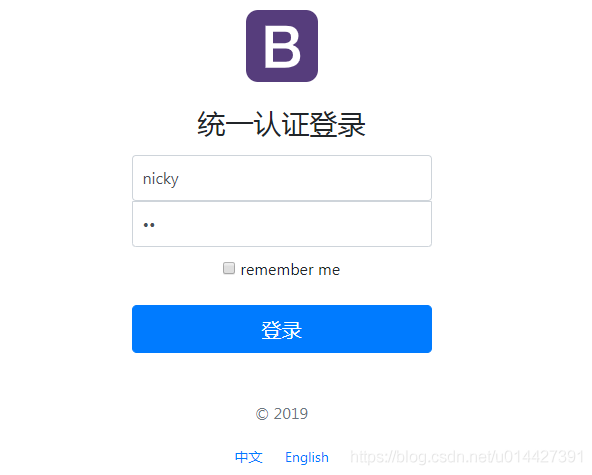
輸入賬號(hào)密碼,校驗(yàn)通過(guò),返回jwt的令牌token
eyJhbGciOiJIUzI1NiJ9.eyJ1c2VyX2lkIjoxLCJ1c2VyX25hbWUiOiJuaWNreSIsInNjb3BlIjpbIlJPTEVfQURNSU4iXSwibm9uX2V4cGlyZWQiOmZhbHNlLCJleHAiOjE1OTQyODgyMzksImlhdCI6MTU5NDI4NDYzOCwiZW5hYmxlZCI6dHJ1ZSwibm9uX2xvY2tlZCI6ZmFsc2V9.bxGCCBSQE5cgVSl9Lve-vyDtITw1gL5i2-O-B5uEgno
測(cè)試令牌,官方測(cè)試鏈接:https://jwt.io/#debugger-io
base64:
package com.example.springboot.jwt.web.controller;

import com.example.springboot.jwt.configuration.JWTProperties;
import com.example.springboot.jwt.core.jwt.util.JWTTokenUtil;
import org.springframework.beans.factory.annotation.Autowired;
import org.springframework.http.ResponseEntity;
import org.springframework.web.bind.annotation.*;

import javax.servlet.http.HttpServletRequest;

/**
 *
 *  UserController
 *
 *
 *
 * @author mazq
 * 修改記錄
 *    修改后版本:     修改人:修改日期: 2020/07/07 14:14  修改內(nèi)容:
 *
 */
@RestController
@RequestMapping(value = "api/user")
public class UserController {

    @Autowired
    JWTProperties jwtProperties;
    @Autowired
    JWTTokenUtil jwtTokenUtil;

    @GetMapping("/auth-info")
    public ResponseEntity authInfo(HttpServletRequest request) {
        String authHeader = request.getHeader(jwtProperties.getTokenKey());
        String token = authHeader.substring(7);
        return ResponseEntity.ok(jwtTokenUtil.getUsernameFromClaims(token));
    }
}
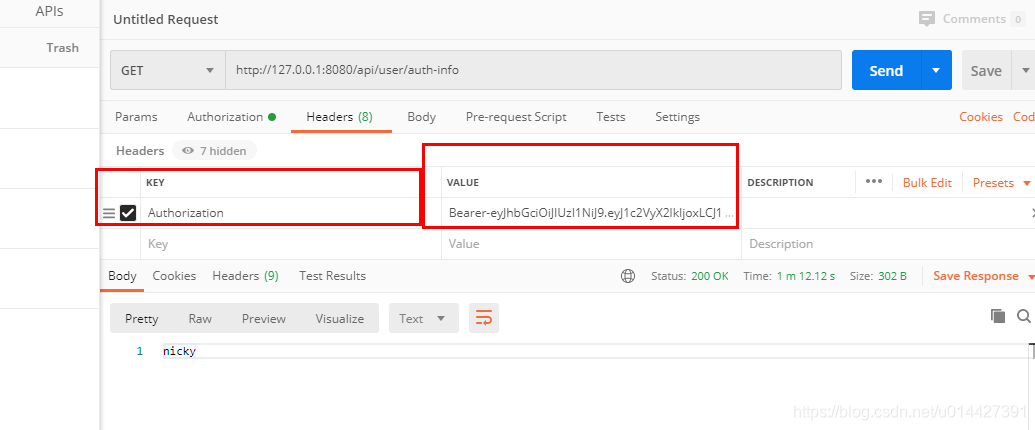
復(fù)制生成的jwt令牌,設(shè)置Request Header

騰訊、阿里、滴滴后臺(tái)面試題匯總總結(jié) — (含答案)
面試:史上最全多線程面試題 !
最新阿里內(nèi)推Java后端面試題
JVM難學(xué)?那是因?yàn)槟銢](méi)認(rèn)真看完這篇文章

關(guān)注作者微信公眾號(hào) —《JAVA爛豬皮》
了解更多java后端架構(gòu)知識(shí)以及最新面試寶典


看完本文記得給作者點(diǎn)贊+在看哦~~~大家的支持,是作者源源不斷出文的動(dòng)力
作者:SmileNicky
出處:https://www.cnblogs.com/mzq123/p/13278935.html