
Python實現(xiàn)進階版人臉識別
原文:https://blog.csdn.net/ChenJ_1012/article/details/121323101
機器學(xué)習(xí)(六)Python實現(xiàn)進階版人臉識別
使用到的庫:dlib+Opencvpython版本:3.8編譯環(huán)境:Jupyter Notebook (Anaconda3)
https://github.com/davisking/dlib-models
視頻:https://pan.baidu.com/s/1yMGgZ7KNhAMGFktGlmWKDQ
〇、Dlib人臉特征檢測原理
提取特征點:請參考 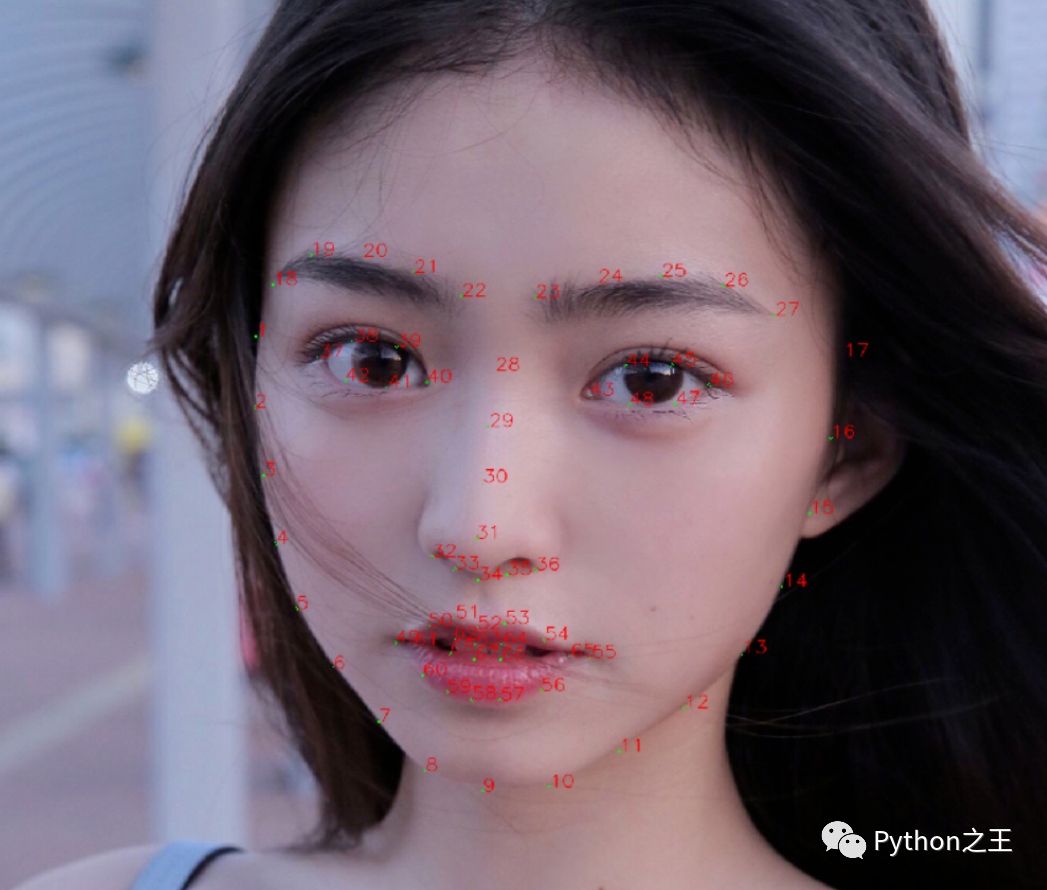
首選抓取多張圖片,從中獲取特征數(shù)據(jù)集和平均特征值然后寫入csv文件 - ?計算特征數(shù)據(jù)集的歐式距離作對比:首先使用Opencv庫將攝像頭中的人臉框出來,再將攝像頭中采取到的人臉特征值與數(shù)據(jù)集中的每個人的特征均值作對比,選取最接近(歐氏距離最小)的值,將其標(biāo)注為歐氏距離最小的數(shù)據(jù)集的人名 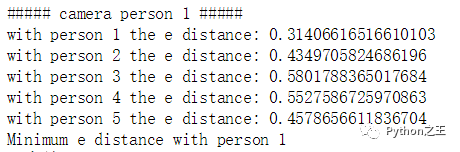
一、構(gòu)建人臉特征數(shù)據(jù)集
1. 安裝Dlib
請參考
2. 構(gòu)建自己的數(shù)據(jù)集
2.1 抓取人臉圖片
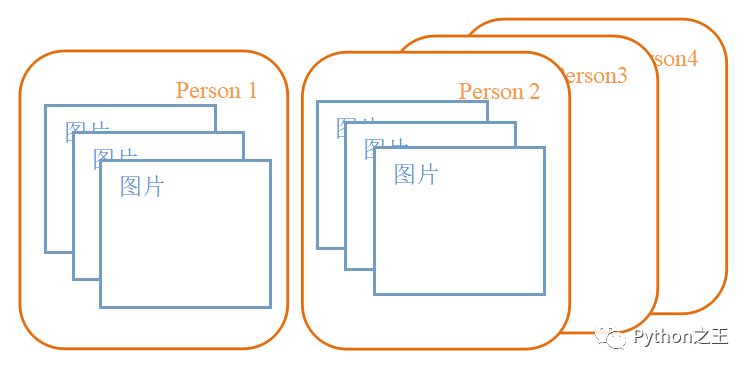
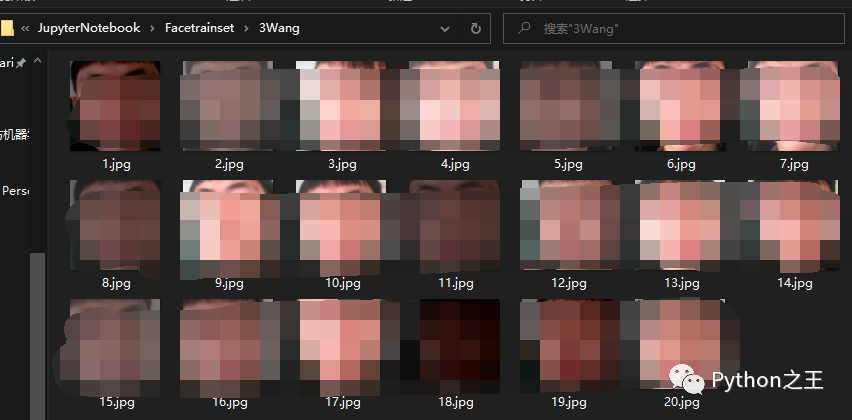
在視頻流中抓取人臉特征,并保存為256*256大小的圖片文件共20張,這就是我們建立數(shù)據(jù)集的第一步,用來訓(xùn)練人臉識別。
不一定是256*256的尺寸,可以根據(jù)自己的需求來調(diào)整大小,圖片越大訓(xùn)練結(jié)果會愈加精確,但也會影響訓(xùn)練模型的時間。
其中:
光線:曝光和黑暗的圖片需手動剔除- 請使用同一個設(shè)備進行數(shù)據(jù)采集,不同設(shè)備的攝像頭采集到的數(shù)據(jù)集會有出入- 這里采用的是從視頻流中進行捕捉截圖,也可以自己準(zhǔn)備20張左右的人臉圖片 代碼:
import?cv2
import?dlib
import?os
import?sys
import?random
#?存儲位置
output_dir?=?'D:/No1WorkSpace/JupyterNotebook/Facetrainset/Num&Name'?#這里填編號+人名
size?=?256?#圖片邊長
?
if?not?os.path.exists(output_dir):
????os.makedirs(output_dir)
#?改變圖片的亮度與對比度
?
def?relight(img,?light=1,?bias=0):
????w?=?img.shape[1]
????h?=?img.shape[0]
????#image?=?[]
????for?i?in?range(0,w):
????????for?j?in?range(0,h):
????????????for?c?in?range(3):
????????????????tmp?=?int(img[j,i,c]*light?+?bias)
????????????????if?tmp?>?255:
????????????????????tmp?=?255
????????????????elif?tmp?<?0:
????????????????????tmp?=?0
????????????????img[j,i,c]?=?tmp
????return?img
?
#使用dlib自帶的frontal_face_detector作為我們的特征提取器
detector?=?dlib.get_frontal_face_detector()
#?打開攝像頭?參數(shù)為輸入流,可以為攝像頭或視頻文件
camera?=?cv2.VideoCapture(0)
#camera?=?cv2.VideoCapture('C:/Users/CUNGU/Videos/Captures/wang.mp4')

index?=?1
while?True:
????if?(index?<=?20):#存儲15張人臉特征圖像
????????print('Being?processed?picture?%s'?%?index)
????????#?從攝像頭讀取照片
????????success,?img?=?camera.read()
????????#?轉(zhuǎn)為灰度圖片
????????gray_img?=?cv2.cvtColor(img,?cv2.COLOR_BGR2GRAY)
????????#?使用detector進行人臉檢測
????????dets?=?detector(gray_img,?1)
?
????????for?i,?d?in?enumerate(dets):
????????????x1?=?d.top()?if?d.top()?>?0?else?0
????????????y1?=?d.bottom()?if?d.bottom()?>?0?else?0
????????????x2?=?d.left()?if?d.left()?>?0?else?0
????????????y2?=?d.right()?if?d.right()?>?0?else?0
?
????????????face?=?img[x1:y1,x2:y2]
????????????#?調(diào)整圖片的對比度與亮度,?對比度與亮度值都取隨機數(shù),這樣能增加樣本的多樣性
????????????face?=?relight(face,?random.uniform(0.5,?1.5),?random.randint(-50,?50))
?
????????????face?=?cv2.resize(face,?(size,size))
?
????????????cv2.imshow('image',?face)
?
????????????cv2.imwrite(output_dir+'/'+str(index)+'.jpg',?face)
?
????????????index?+=?1
????????key?=?cv2.waitKey(30)?&?0xff
????????if?key?==?27:
????????????break
????else:
????????print('Finished!')
????????#?釋放攝像頭?release?camera
????????camera.release()
????????#?刪除建立的窗口?delete?all?the?windows
????????cv2.destroyAllWindows()
????????break
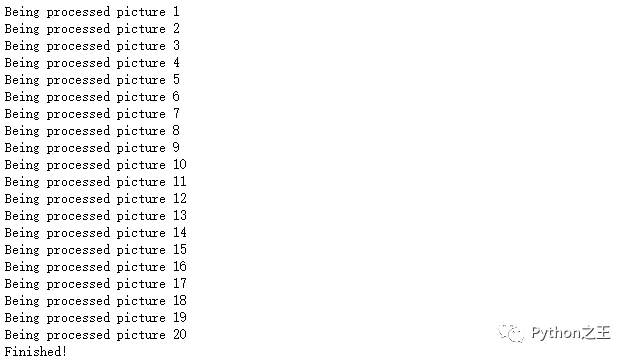
運行效果:
2.2 分析每張人臉的特征值并存入csv文件
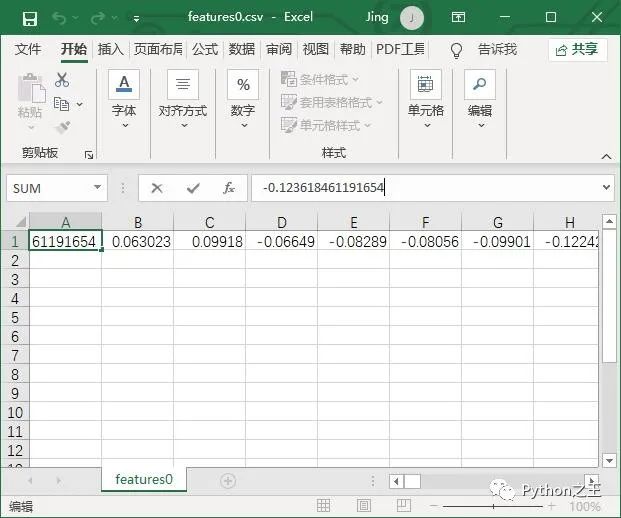
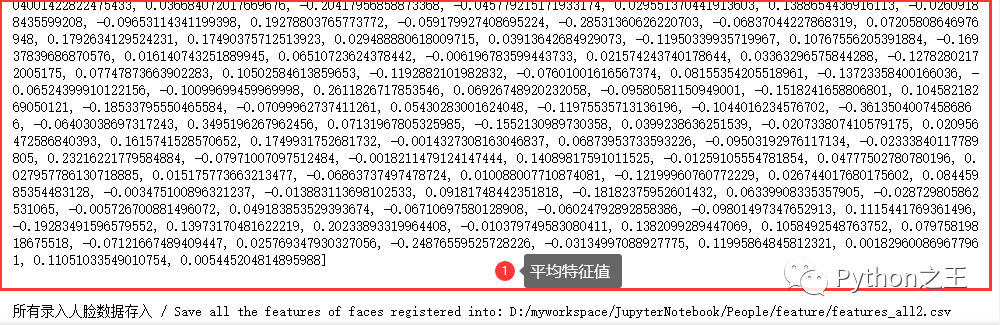
根據(jù)抓取的圖片和人臉識別模型->訓(xùn)練得到的20個的68個特征數(shù)據(jù)集以及1個平均特征值存入csv文件
每張圖片的68個特征數(shù)據(jù)集可以不用存取,他們只是中間量,計算平均值以后就可以拋棄了,這里把他們輸出出來只是為了方便學(xué)習(xí)。
代碼:
#?從人臉圖像文件中提取人臉特征存入?CSV
#?Features?extraction?from?images?and?save?into?features_all.csv

#?return_128d_features()??????????獲取某張圖像的128D特征
#?compute_the_mean()??????????????計算128D特征均值

from?cv2?import?cv2?as?cv2
import?os
import?dlib
from?skimage?import?io
import?csv
import?numpy?as?np

#?要讀取人臉圖像文件的路徑
path_images_from_camera?=?"D:/No1WorkSpace/JupyterNotebook/Facetrainset/"

#?Dlib?正向人臉檢測器
detector?=?dlib.get_frontal_face_detector()

#?Dlib?人臉預(yù)測器
predictor?=?dlib.shape_predictor("D:/No1WorkSpace/JupyterNotebook/model/shape_predictor_68_face_landmarks.dat")

#?Dlib?人臉識別模型
#?Face?recognition?model,?the?object?maps?human?faces?into?128D?vectors
face_rec?=?dlib.face_recognition_model_v1("D:/No1WorkSpace/JupyterNotebook/model/dlib_face_recognition_resnet_model_v1.dat")


#?返回單張圖像的?128D?特征
def?return_128d_features(path_img):
????img_rd?=?io.imread(path_img)
????img_gray?=?cv2.cvtColor(img_rd,?cv2.COLOR_BGR2RGB)
????faces?=?detector(img_gray,?1)

????print("%-40s?%-20s"?%?("檢測到人臉的圖像?/?image?with?faces?detected:",?path_img),?'\n')

????#?因為有可能截下來的人臉再去檢測,檢測不出來人臉了
????#?所以要確保是?檢測到人臉的人臉圖像?拿去算特征
????if?len(faces)?!=?0:
????????shape?=?predictor(img_gray,?faces[0])
????????face_descriptor?=?face_rec.compute_face_descriptor(img_gray,?shape)
????else:
????????face_descriptor?=?0
????????print("no?face")

????return?face_descriptor


#?將文件夾中照片特征提取出來,?寫入?CSV
def?return_features_mean_personX(path_faces_personX):
????features_list_personX?=?[]
????photos_list?=?os.listdir(path_faces_personX)
????if?photos_list:
????????for?i?in?range(len(photos_list)):
????????????with?open("D:/No1WorkSpace/JupyterNotebook/feature/featuresGiao"+str(i)+".csv",?"w",?newline="")?as?csvfile:
????????????????writer?=?csv.writer(csvfile)
????????????#?調(diào)用return_128d_features()得到128d特征
????????????????print("%-40s?%-20s"?%?("正在讀的人臉圖像?/?image?to?read:",?path_faces_personX?+?"/"?+?photos_list[i]))
????????????????features_128d?=?return_128d_features(path_faces_personX?+?"/"?+?photos_list[i])
????????????????print(features_128d)
????????????????writer.writerow(features_128d)
????????????#?遇到?jīng)]有檢測出人臉的圖片跳過
????????????????if?features_128d?==?0:
????????????????????i?+=?1
????????????????else:
????????????????????features_list_personX.append(features_128d)
????else:
????????print("文件夾內(nèi)圖像文件為空?/?Warning:?No?images?in?"?+?path_faces_personX?+?'/',?'\n')

????#?計算?128D?特征的均值
????#?N?x?128D?->?1?x?128D
????if?features_list_personX:
????????features_mean_personX?=?np.array(features_list_personX).mean(axis=0)
????else:
????????features_mean_personX?=?'0'

????return?features_mean_personX


#?讀取某人所有的人臉圖像的數(shù)據(jù)
people?=?os.listdir(path_images_from_camera)
people.sort()

with?open("D:/No1WorkSpace/JupyterNotebook/feature/features_all.csv",?"w",?newline="")?as?csvfile:
????writer?=?csv.writer(csvfile)
????for?person?in?people:
????????print("#####?"?+?person?+?"?#####")
????????#?Get?the?mean/average?features?of?face/personX,?it?will?be?a?list?with?a?length?of?128D
????????features_mean_personX?=?return_features_mean_personX(path_images_from_camera?+?person)
????????writer.writerow(features_mean_personX)
????????print("特征均值?/?The?mean?of?features:",?list(features_mean_personX))
????????print('\n')
????print("所有錄入人臉數(shù)據(jù)存入?/?Save?all?the?features?of?faces?registered?into:?D:/myworkspace/JupyterNotebook/People/feature/features_all2.csv")
如果要輸出每一張圖片的特征數(shù)據(jù)集,這里要用到Python的文件批量生成。
代碼運行效果

二、識別人臉并匹配數(shù)據(jù)集
1. 原理:
通過計算特征數(shù)據(jù)集的歐氏距離作對比來識別人臉,取歐氏距離最小的數(shù)據(jù)集進行匹配。
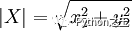
歐氏距離也稱歐幾里得距離或歐幾里得度量,是一個通常采用的距離定義,它是在m維空間中兩個點之間的真實距離。在二維和三維空間中的歐氏距離的就是兩點之間的距離。使用這個距離,歐氏空間成為度量空間。相關(guān)聯(lián)的范數(shù)稱為歐幾里得范數(shù)。較早的文獻稱之為畢達哥拉斯度量。二維空間公式:
,
2. 視頻流實時識別人臉數(shù)據(jù)
代碼:
#?攝像頭實時人臉識別
import?os
import?dlib??????????#?人臉處理的庫?Dlib
import?csv?#?存入表格
import?time
import?sys
import?numpy?as?np???#?數(shù)據(jù)處理的庫?numpy
from?cv2?import?cv2?as?cv2???????????#?圖像處理的庫?OpenCv
import?pandas?as?pd??#?數(shù)據(jù)處理的庫?Pandas


#?人臉識別模型,提取128D的特征矢量
#?face?recognition?model,?the?object?maps?human?faces?into?128D?vectors
#?Refer?this?tutorial:?http://dlib.net/python/index.html#dlib.face_recognition_model_v1
facerec?=?dlib.face_recognition_model_v1("D:/No1WorkSpace/JupyterNotebook/model/dlib_face_recognition_resnet_model_v1.dat")


#?計算兩個128D向量間的歐式距離
#?compute?the?e-distance?between?two?128D?features
def?return_euclidean_distance(feature_1,?feature_2):
????feature_1?=?np.array(feature_1)
????feature_2?=?np.array(feature_2)
????dist?=?np.sqrt(np.sum(np.square(feature_1?-?feature_2)))
????return?dist


#?處理存放所有人臉特征的?csv
path_features_known_csv?=?"D:/No1WorkSpace/JupyterNotebook/feature/features_all.csv"
csv_rd?=?pd.read_csv(path_features_known_csv,?header=None)


#?用來存放所有錄入人臉特征的數(shù)組
#?the?array?to?save?the?features?of?faces?in?the?database
features_known_arr?=?[]

#?讀取已知人臉數(shù)據(jù)
#?print?known?faces
for?i?in?range(csv_rd.shape[0]):
????features_someone_arr?=?[]
????for?j?in?range(0,?len(csv_rd.loc[i,?:])):
????????features_someone_arr.append(csv_rd.loc[i,?:][j])
????features_known_arr.append(features_someone_arr)
print("Faces in Database:",?len(features_known_arr))

#?Dlib?檢測器和預(yù)測器
#?The?detector?and?predictor?will?be?used
detector?=?dlib.get_frontal_face_detector()
predictor?=?dlib.shape_predictor('D:/No1WorkSpace/JupyterNotebook/model/shape_predictor_68_face_landmarks.dat')

#?創(chuàng)建?cv2?攝像頭對象
#?cv2.VideoCapture(0)?to?use?the?default?camera?of?PC,
#?and?you?can?use?local?video?name?by?use?cv2.VideoCapture(filename)
cap?=?cv2.VideoCapture(0)

#?cap.set(propId,?value)
#?設(shè)置視頻參數(shù),propId?設(shè)置的視頻參數(shù),value?設(shè)置的參數(shù)值
cap.set(3,?480)

#?cap.isOpened()?返回?true/false?檢查初始化是否成功
#?when?the?camera?is?open
while?cap.isOpened():

????flag,?img_rd?=?cap.read()
????kk?=?cv2.waitKey(1)

????#?取灰度
????img_gray?=?cv2.cvtColor(img_rd,?cv2.COLOR_RGB2GRAY)

????#?人臉數(shù)?faces
????faces?=?detector(img_gray,?0)

????#?待會要寫的字體?font?to?write?later
????font?=?cv2.FONT_HERSHEY_COMPLEX

????#?存儲當(dāng)前攝像頭中捕獲到的所有人臉的坐標(biāo)/名字
????#?the?list?to?save?the?positions?and?names?of?current?faces?captured
????pos_namelist?=?[]
????name_namelist?=?[]

????#?按下?q?鍵退出
????#?press?'q'?to?exit
????if?kk?==?ord('q'):
????????break
????else:
????????#?檢測到人臉?when?face?detected
????????if?len(faces)?!=?0:??
????????????#?獲取當(dāng)前捕獲到的圖像的所有人臉的特征,存儲到?features_cap_arr
????????????#?get?the?features?captured?and?save?into?features_cap_arr
????????????features_cap_arr?=?[]
????????????for?i?in?range(len(faces)):
????????????????shape?=?predictor(img_rd,?faces[i])
????????????????features_cap_arr.append(facerec.compute_face_descriptor(img_rd,?shape))

????????????#?遍歷捕獲到的圖像中所有的人臉
????????????#?traversal?all?the?faces?in?the?database
????????????for?k?in?range(len(faces)):
????????????????print("#####?camera?person",?k+1,?"#####")
????????????????#?讓人名跟隨在矩形框的下方
????????????????#?確定人名的位置坐標(biāo)
????????????????#?先默認所有人不認識,是?unknown
????????????????#?set?the?default?names?of?faces?with?"unknown"
????????????????name_namelist.append("unknown")

????????????????#?每個捕獲人臉的名字坐標(biāo)?the?positions?of?faces?captured
????????????????pos_namelist.append(tuple([faces[k].left(),?int(faces[k].bottom()?+?(faces[k].bottom()?-?faces[k].top())/4)]))

????????????????#?對于某張人臉,遍歷所有存儲的人臉特征
????????????????#?for?every?faces?detected,?compare?the?faces?in?the?database
????????????????e_distance_list?=?[]
????????????????for?i?in?range(len(features_known_arr)):
????????????????????#?如果?person_X?數(shù)據(jù)不為空
????????????????????if?str(features_known_arr[i][0])?!=?'0.0':
????????????????????????print("with?person",?str(i?+?1),?"the?e?distance:?",?end='')
????????????????????????e_distance_tmp?=?return_euclidean_distance(features_cap_arr[k],?features_known_arr[i])
????????????????????????print(e_distance_tmp)
????????????????????????e_distance_list.append(e_distance_tmp)
????????????????????else:
????????????????????????#?空數(shù)據(jù)?person_X
????????????????????????e_distance_list.append(999999999)
????????????????#?找出最接近的一個人臉數(shù)據(jù)是第幾個
????????????????#?Find?the?one?with?minimum?e?distance
????????????????similar_person_num?=?e_distance_list.index(min(e_distance_list))
????????????????print("Minimum?e?distance?with?person",?int(similar_person_num)+1)
????????????????
????????????????#?計算人臉識別特征與數(shù)據(jù)集特征的歐氏距離
????????????????#?距離小于0.4則標(biāo)出為可識別人物
????????????????if?min(e_distance_list)?<?0.4:
????????????????????#?這里可以修改攝像頭中標(biāo)出的人名
????????????????????#?Here?you?can?modify?the?names?shown?on?the?camera
????????????????????#?1、遍歷文件夾目錄
????????????????????folder_name?=?'D:/No1WorkSpace/JupyterNotebook/Facetrainset/'
????????????????????#?最接近的人臉
????????????????????sum=similar_person_num+1
????????????????????key_id=1?#?從第一個人臉數(shù)據(jù)文件夾進行對比
????????????????????#?獲取文件夾中的文件名:1wang、2zhou、3...
????????????????????file_names?=?os.listdir(folder_name)
????????????????????for?name?in?file_names:
????????????????????????#?print(name+'->'+str(key_id))
????????????????????????if?sum?==key_id:
????????????????????????????#winsound.Beep(300,500)#?響鈴:300頻率,500持續(xù)時間
????????????????????????????name_namelist[k]?=?name[1:]#人名刪去第一個數(shù)字(用于視頻輸出標(biāo)識)
????????????????????????key_id?+=?1
????????????????????#?播放歡迎光臨音效
????????????????????#playsound('D:/myworkspace/JupyterNotebook/People/music/welcome.wav')
????????????????????#?print("May?be?person?"+str(int(similar_person_num)+1))
????????????????????#?-----------篩選出人臉并保存到visitor文件夾------------
????????????????????for?i,?d?in?enumerate(faces):
????????????????????????x1?=?d.top()?if?d.top()?>?0?else?0
????????????????????????y1?=?d.bottom()?if?d.bottom()?>?0?else?0
????????????????????????x2?=?d.left()?if?d.left()?>?0?else?0
????????????????????????y2?=?d.right()?if?d.right()?>?0?else?0
????????????????????????face?=?img_rd[x1:y1,x2:y2]
????????????????????????size?=?64
????????????????????????face?=?cv2.resize(face,?(size,size))
????????????????????????#?要存儲visitor人臉圖像文件的路徑
????????????????????????path_visitors_save_dir?=?"D:/No1WorkSpace/JupyterNotebook/KnownFacetrainset/"
????????????????????????#?存儲格式:2019-06-24-14-33-40wang.jpg
????????????????????????now_time?=?time.strftime("%Y-%m-%d-%H-%M-%S",?time.localtime())
????????????????????????save_name?=?str(now_time)+str(name_namelist[k])+'.jpg'
????????????????????????#?print(save_name)
????????????????????????#?本次圖片保存的完整url
????????????????????????save_path?=?path_visitors_save_dir+'/'+?save_name????
????????????????????????#?遍歷visitor文件夾所有文件名
????????????????????????visitor_names?=?os.listdir(path_visitors_save_dir)
????????????????????????visitor_name=''
????????????????????????for?name?in?visitor_names:
????????????????????????????#?名字切片到分鐘數(shù):2019-06-26-11-33-00wangyu.jpg
????????????????????????????visitor_name=(name[0:16]+'-00'+name[19:])
????????????????????????#?print(visitor_name)
????????????????????????visitor_save=(save_name[0:16]+'-00'+save_name[19:])
????????????????????????#?print(visitor_save)
????????????????????????#?一分鐘之內(nèi)重復(fù)的人名不保存
????????????????????????if?visitor_save!=visitor_name:
????????????????????????????cv2.imwrite(save_path,?face)
????????????????????????????print('新存儲:'+path_visitors_save_dir+'/'+str(now_time)+str(name_namelist[k])+'.jpg')
????????????????????????else:
????????????????????????????print('重復(fù),未保存!')
????????????????????????????
????????????????else:
????????????????????#?播放無法識別音效
????????????????????#playsound('D:/myworkspace/JupyterNotebook/People/music/sorry.wav')
????????????????????print("Unknown?person")
????????????????????#?-----保存圖片-------
????????????????????#?-----------篩選出人臉并保存到visitor文件夾------------
????????????????????for?i,?d?in?enumerate(faces):
????????????????????????x1?=?d.top()?if?d.top()?>?0?else?0
????????????????????????y1?=?d.bottom()?if?d.bottom()?>?0?else?0
????????????????????????x2?=?d.left()?if?d.left()?>?0?else?0
????????????????????????y2?=?d.right()?if?d.right()?>?0?else?0
????????????????????????face?=?img_rd[x1:y1,x2:y2]
????????????????????????size?=?64
????????????????????????face?=?cv2.resize(face,?(size,size))
????????????????????????#?要存儲visitor-》unknown人臉圖像文件的路徑
????????????????????????path_visitors_save_dir?=?"D:/No1WorkSpace/JupyterNotebook/UnKnownFacetrainset/"
????????????????????????#?存儲格式:2019-06-24-14-33-40unknown.jpg
????????????????????????now_time?=?time.strftime("%Y-%m-%d-%H-%M-%S",?time.localtime())
????????????????????????#?print(save_name)
????????????????????????#?本次圖片保存的完整url
????????????????????????save_path?=?path_visitors_save_dir+'/'+?str(now_time)+'unknown.jpg'
????????????????????????cv2.imwrite(save_path,?face)
????????????????????????print('新存儲:'+path_visitors_save_dir+'/'+str(now_time)+'unknown.jpg')
????????????????
????????????????#?矩形框
????????????????#?draw?rectangle
????????????????for?kk,?d?in?enumerate(faces):
????????????????????#?繪制矩形框
????????????????????cv2.rectangle(img_rd,?tuple([d.left(),?d.top()]),?tuple([d.right(),?d.bottom()]),?(0,?255,?255),?2)
????????????????print('\n')

????????????#?在人臉框下面寫人臉名字
????????????#?write?names?under?rectangle
????????????for?i?in?range(len(faces)):
????????????????cv2.putText(img_rd,?name_namelist[i],?pos_namelist[i],?font,?0.8,?(0,?255,?255),?1,?cv2.LINE_AA)

????print("Faces?in?camera?now:",?name_namelist,?"\n")

????#cv2.putText(img_rd,?"Press?'q':?Quit",?(20,?450),?font,?0.8,?(84,?255,?159),?1,?cv2.LINE_AA)
????cv2.putText(img_rd,?"Face?Recognition",?(20,?40),?font,?1,?(0,?0,?255),?1,?cv2.LINE_AA)
????cv2.putText(img_rd,?"Visitors:?"?+?str(len(faces)),?(20,?100),?font,?1,?(0,?0,?255),?1,?cv2.LINE_AA)

????#?窗口顯示?show?with?opencv
????cv2.imshow("camera",?img_rd)

#?釋放攝像頭?release?camera
cap.release()

#?刪除建立的窗口?delete?all?the?windows
cv2.destroyAllWindows()
若直接使用本代碼,文件目錄弄成中文會亂碼
運行效果: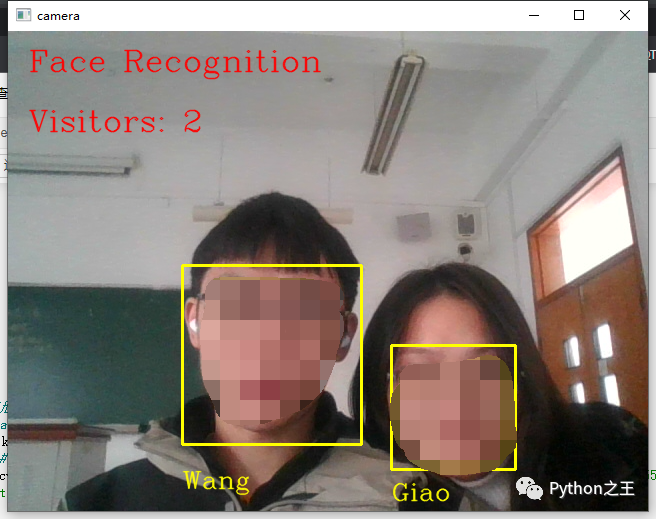 圖中兩人的特征數(shù)據(jù)集均已被收集并錄入,所以可以識別出來,如果沒有被錄入的人臉就會出現(xiàn)unknown。
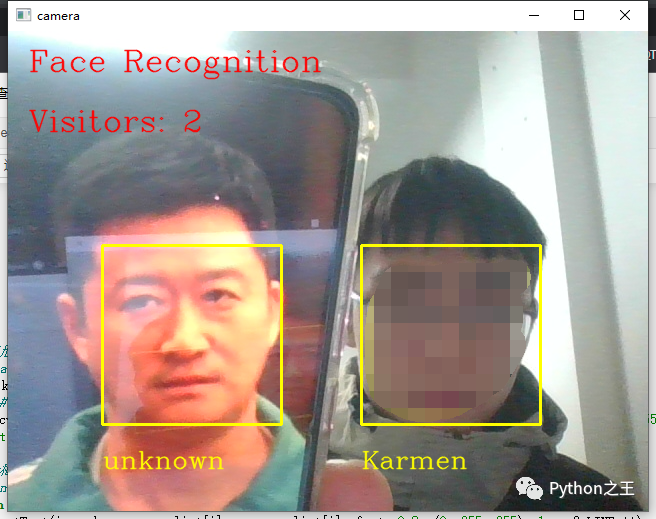
沒有吳京叔叔的數(shù)據(jù)集,所以他是陌生人
三、總結(jié)
本次實驗實踐了dlib人臉識別原理,并復(fù)習(xí)了OpenCV使用原理,從python的角度我們不難發(fā)現(xiàn)現(xiàn)今最基礎(chǔ)的人臉識別并不困難,踩在巨人的肩膀上(兩個模型)通過幾十行代碼就能實現(xiàn)人臉認證的功能,非常有樂趣。


Python“寶藏級”公眾號【Python之王】專注于Python領(lǐng)域,會爬蟲,數(shù)分,C++,tensorflow和Pytorch等等。
近 2年共原創(chuàng) 100+ 篇技術(shù)文章。創(chuàng)作的精品文章系列有:
日常收集整理了一批不錯的?Python?學(xué)習(xí)資料,有需要的小伙可以自行免費領(lǐng)取。
獲取方式如下:公眾號回復(fù)資料。領(lǐng)取Python等系列筆記,項目,書籍,直接套上模板就可以用了。資料包含算法、python、算法小抄、力扣刷題手冊和 C++ 等學(xué)習(xí)資料!