
自學(xué)HarmonyOS應(yīng)用開(kāi)發(fā)(47)- 自定義switch組件

HarmonyOS應(yīng)用開(kāi)發(fā)都會(huì)用到各種各樣的UI組件,開(kāi)發(fā)者可以根據(jù)需求在布局文件設(shè)定UI組件各種屬性。但是需求是多種多樣
例如可以以如下方式使用switch組件:
<Switchohos:id="$+id:btn_switch"ohos:height="30vp"ohos:width="60vp"ohos:text_state_off="OFF"ohos:text_state_on="ON"/>
這段代碼的顯示效果如下:

有效狀態(tài)時(shí)的表示只能說(shuō)差強(qiáng)人意,相關(guān)文檔中倒是提供了使用代碼定制switch組件的方法,但是每次使用,每個(gè)組件都這樣處理的話還是太麻煩了。本文介紹定制switch組件的方法。
定義自定義組件類
我們定義一個(gè)switch組件的派生類,通過(guò)這個(gè)類封裝我們需要的定制處理:
package xwg.harmony.stopwatch;import ohos.agp.colors.RgbColor;import ohos.agp.components.AttrSet;import ohos.agp.components.ComponentState;import ohos.agp.components.Switch;import ohos.agp.components.element.ShapeElement;import ohos.agp.components.element.StateElement;import ohos.agp.utils.Color;import ohos.app.Context;public class ColorSwitch extends Switch {Color textColorOn = Color.BLACK;Color textColorOff = Color.BLACK;public ColorSwitch(Context context, AttrSet attrSet) {super(context, attrSet);Initialize(attrSet);}private void Initialize(AttrSet attrSet) {float switch_radius = 50;if (attrSet.getAttr("switch_radius").isPresent()) {switch_radius = attrSet.getAttr("switch_radius").get().getFloatValue();}// 開(kāi)啟狀態(tài)下滑塊的樣式ShapeElement elementThumbOn = new ShapeElement();elementThumbOn.setShape(ShapeElement.OVAL);elementThumbOn.setRgbColor(RgbColor.fromArgbInt(0xFF1E90FF));elementThumbOn.setCornerRadius(switch_radius);// 開(kāi)啟狀態(tài)下軌跡樣式ShapeElement elementTrackOn = new ShapeElement();elementTrackOn.setShape(ShapeElement.RECTANGLE);elementTrackOn.setRgbColor(RgbColor.fromArgbInt(0xFF87CEFA));elementTrackOn.setCornerRadius(switch_radius);elementTrackOn.setStroke(1, RgbColor.fromRgbaInt(0x000000));// 關(guān)閉狀態(tài)下滑塊的樣式ShapeElement elementThumbOff = new ShapeElement();elementThumbOff.setShape(ShapeElement.OVAL);elementThumbOff.setRgbColor(RgbColor.fromArgbInt(0xFFAFAFAF));elementThumbOff.setCornerRadius(switch_radius);// 關(guān)閉狀態(tài)下軌跡樣式ShapeElement elementTrackOff = new ShapeElement();elementTrackOff.setShape(ShapeElement.RECTANGLE);elementTrackOff.setRgbColor(RgbColor.fromArgbInt(0xFF808080));elementTrackOff.setCornerRadius(switch_radius);elementTrackOff.setStroke(1, RgbColor.fromRgbaInt(0x000000));setTrackElement(trackElementInit(elementTrackOn, elementTrackOff));setThumbElement(thumbElementInit(elementThumbOn, elementThumbOff));}private StateElement trackElementInit(ShapeElement on, ShapeElement off){StateElement trackElement = new StateElement();trackElement.addState(new int[]{ComponentState.COMPONENT_STATE_CHECKED}, on);trackElement.addState(new int[]{ComponentState.COMPONENT_STATE_EMPTY}, off);return trackElement;}private StateElement thumbElementInit(ShapeElement on, ShapeElement off) {StateElement thumbElement = new StateElement();thumbElement.addState(new int[]{ComponentState.COMPONENT_STATE_CHECKED}, on);thumbElement.addState(new int[]{ComponentState.COMPONENT_STATE_EMPTY}, off);return thumbElement;}}
這是ColorSwitch類的完整代碼,讀者直接復(fù)制粘貼之后可以在自己的開(kāi)發(fā)中使用。
代碼中借用了華為官方文檔中的用法,對(duì)switch組件的表示顏色進(jìn)行修改;定義了一個(gè)自定義switch_radius,用于指定組件兩側(cè)的圓弧大小。
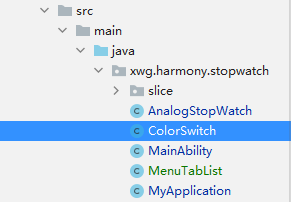
我們將這個(gè)文件放置在如下圖所示的位置:
在布局中使用自定義組件
以下是在布局文件中使用ColorSwitch的示例。請(qǐng)注意這不是完整代碼。
<DirectionalLayoutxmlns:ohos="http://schemas.huawei.com/res/ohos"xmlns:xdw="http://schemas.huawei.com/res/ohos-auto"ohos:height="match_parent"ohos:width="match_parent"ohos:orientation="vertical"ohos:alignment="top"ohos:padding="10vp"><DirectionalLayoutohos:height="50vp"ohos:width="match_parent"ohos:orientation="horizontal"ohos:alignment="top">...<xwg.harmony.stopwatch.ColorSwitchohos:id="$+id:btn_switch"ohos:height="30vp"ohos:width="80vp"ohos:layout_alignment="vertical_center"ohos:text_size="20fp"ohos:text_state_off="$string:off"ohos:text_state_on="$string:on"ohos:text_color_on="#FFFFFF"xdw:switch_radius="50"/></DirectionalLayout>...</DirectionalLayout>
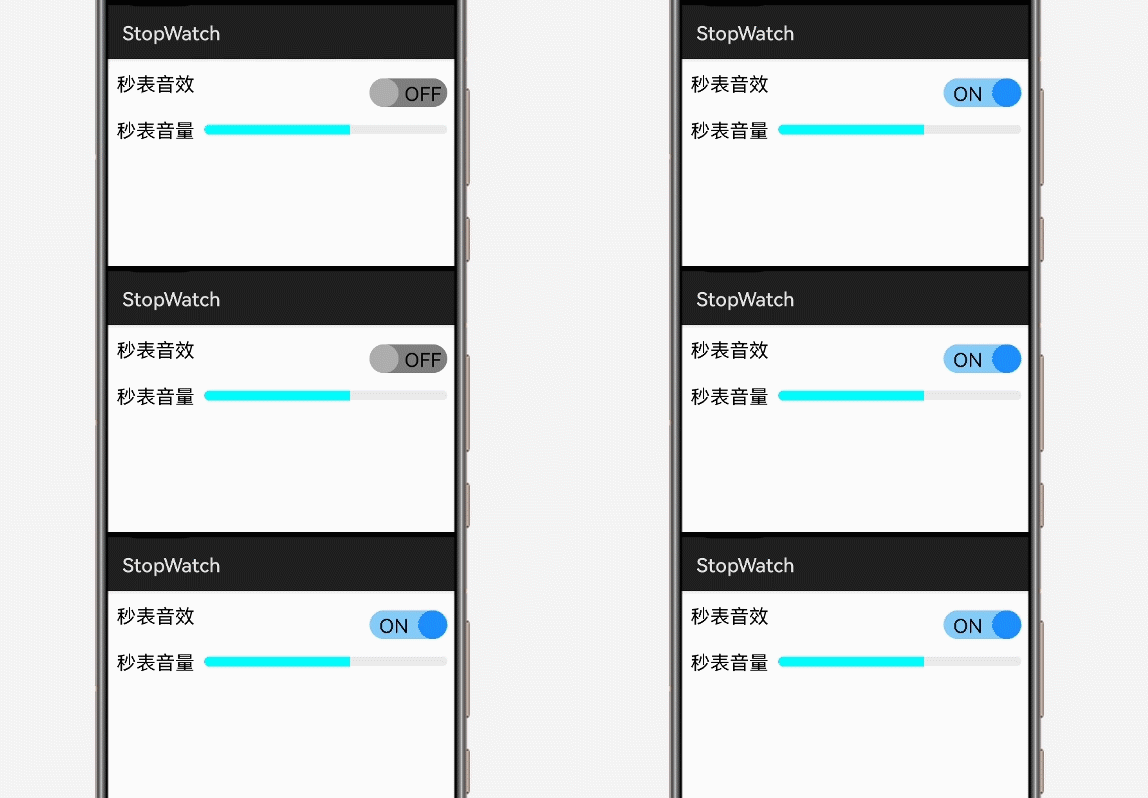
注意16行導(dǎo)入ColorSwitch的記法和25行使用自定義屬性的方法。以下是程序執(zhí)行時(shí)的效果:
參考資料
https://developer.harmonyos.com/cn/docs/documentation/doc-guides/ui-java-overview-0000000000500404
https://developer.harmonyos.com/cn/docs/documentation/doc-guides/ui-java-component-switch-0000001060806006
作者著作介紹
《實(shí)戰(zhàn)Python設(shè)計(jì)模式》是作者去年3月份出版的技術(shù)書(shū)籍,該書(shū)利用Python 的標(biāo)準(zhǔn)GUI 工具包tkinter,通過(guò)可執(zhí)行的示例對(duì)23 個(gè)設(shè)計(jì)模式逐個(gè)進(jìn)行說(shuō)明。這樣一方面可以使讀者了解真實(shí)的軟件開(kāi)發(fā)工作中每個(gè)設(shè)計(jì)模式的運(yùn)用場(chǎng)景和想要解決的問(wèn)題;另一方面通過(guò)對(duì)這些問(wèn)題的解決過(guò)程進(jìn)行說(shuō)明,讓讀者明白在編寫代碼時(shí)如何判斷使用設(shè)計(jì)模式的利弊,并合理運(yùn)用設(shè)計(jì)模式。

對(duì)設(shè)計(jì)模式感興趣而且希望隨學(xué)隨用的讀者通過(guò)本書(shū)可以快速跨越從理解到運(yùn)用的門檻;希望學(xué)習(xí)Python GUI 編程的讀者可以將本書(shū)中的示例作為設(shè)計(jì)和開(kāi)發(fā)的參考;使用Python 語(yǔ)言進(jìn)行圖像分析、數(shù)據(jù)處理工作的讀者可以直接以本書(shū)中的示例為基礎(chǔ),迅速構(gòu)建自己的系統(tǒng)架構(gòu)。
覺(jué)得本文有幫助?請(qǐng)分享給更多人。
關(guān)注微信公眾號(hào)【面向?qū)ο笏伎肌枯p松學(xué)習(xí)每一天!
面向?qū)ο箝_(kāi)發(fā),面向?qū)ο笏伎迹?/span>