
【Vue 進(jìn)階】從 slot 到無(wú)渲染組件
什么是插槽
插槽(slot)通俗的理解就是“占坑”,在組件模板中占有位置,當(dāng)使用該組件的時(shí)候,可以指定各個(gè)坑的內(nèi)容。也就是我們常說(shuō)的內(nèi)容分發(fā)
值得一提的是,插槽這個(gè)概念并不是 Vue 提出的,而是 web Components 規(guī)范草案中就提出的,具體入門可以看 使用 templates and slots[1] ,Vue 只是借鑒了這個(gè)思想罷了
在 Vue 2.6.0 中,我們?yōu)榫呙宀酆妥饔糜虿宀垡肓艘粋€(gè)新的統(tǒng)一的語(yǔ)法 (即 v-slot 指令)。它取代了 slot 和 slot-scope,這兩個(gè)目前已被廢棄但未被移除且仍在文檔中的 attribute
本文的例子基于 Vue 2.6.X,所以用的都是 v-slot 的語(yǔ)法。
本文 DEMO 已全部放到 Github[2] 和 沙箱[3] 中,供大家學(xué)習(xí),如有問(wèn)題,歡迎評(píng)論提出。
默認(rèn)插槽
我們新建父組件 Parent 和子組件 Child,結(jié)構(gòu)如下:
父組件:
<!-- 默認(rèn)插槽 -->
<h3>默認(rèn)插槽</h3>
<Child>
    <div class="parent-text">Hi, I am from parent.</div>
</Child>
子組件:
<div class="child">
    <slot></slot>
    <div>Hello, I am from Child.</div>
</div>
父組件調(diào)用 Child 組件的時(shí)候,會(huì)在 Child 標(biāo)簽中將內(nèi)容傳入到子組件中的 <slot> 標(biāo)簽中,如下所示
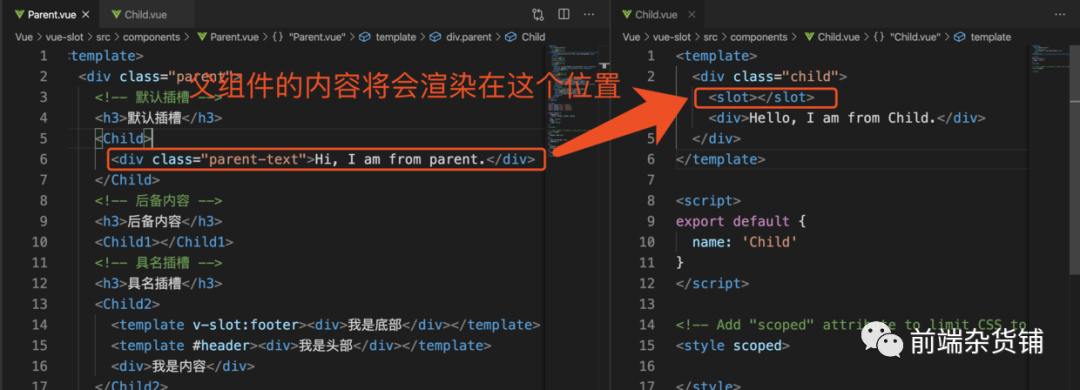
也就是最后的渲染結(jié)果如下:
<div class="child">
    <div class="parent-text">Hi, I am from parent.</div>
    <div>Hello, I am from Child.</div>
</div>

后備內(nèi)容
我們可以在子組件中的 <slot> 中加入一些內(nèi)容,像下面一樣
<div class="child">
  <slot>當(dāng)父組件不傳值的時(shí)候,我就展示,我只是一個(gè)后備軍</slot>
  <div>Hello, I am from Child.</div>
</div>
當(dāng)父組件調(diào)用的時(shí)候, 子組件標(biāo)簽內(nèi)沒(méi)有相關(guān)的內(nèi)容時(shí)候,<slot> 標(biāo)簽內(nèi)的內(nèi)容就會(huì)生效,否則就不會(huì)渲染,可以理解就是個(gè)“備胎”
如父組件調(diào)用上面子組件:
    <!-- 后備內(nèi)容 -->
    <h3>后備內(nèi)容</h3>
    <Child1></Child1>
結(jié)果如下:
具名插槽
當(dāng)然,插槽可以不止一個(gè),這個(gè)主要是為了能夠靈活的控制插槽的位置以及組件的抽象。我們可以通過(guò)在子組件的 slot 標(biāo)簽中設(shè)置 name 屬性,然后在父組件中通過(guò) v-slot:(或者使用簡(jiǎn)寫 #) + 子組件 name 屬性值的方式指定要插入的位置。如果是默認(rèn)插槽的話,v-slot:default 即可
如下父組件:
    <!-- 具名插槽 -->
    <h3>具名插槽</h3>
    <Child2>
      <template v-slot:footer><div>我是底部</div></template>
      <template #header><div>我是頭部</div></template>
      <template v-slot:default>
        <div>我是內(nèi)容</div>
      </template>
    </Child2>
子組件
  <div class="child">
    <slot name="header"></slot>
    <slot></slot>
    <div>Hello, I am from Child.</div>
    <slot name="footer"></slot>
  </div>
需要留意的是,最后渲染的順序是以子組件的順序?yàn)橹鳎簿褪巧厦娴睦樱秩境鰜?lái)如下:
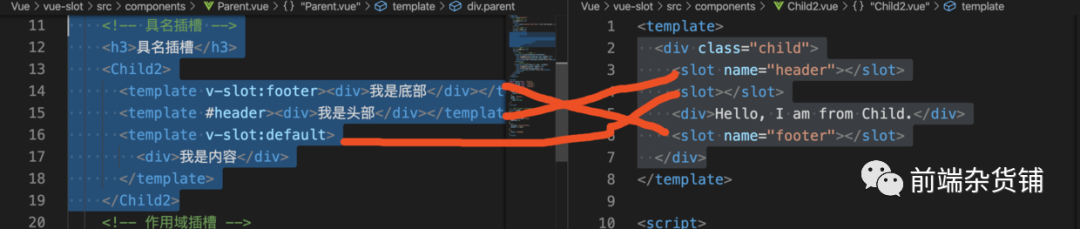

作用域插槽
有時(shí)候,我們想在一個(gè)插槽中使用子組件的數(shù)據(jù)和事件,類似如下(注意:user 是定義在 Child3 組件中的數(shù)據(jù)):
    <Child3>
      <template>
        <div>我的名字:{{user.name}}</div>
        <div>我的年齡:{{user.age}}</div>
        <button @click="callMe">Clicl Me</button>
      </template>
    </Child3>
會(huì)直接報(bào)錯(cuò):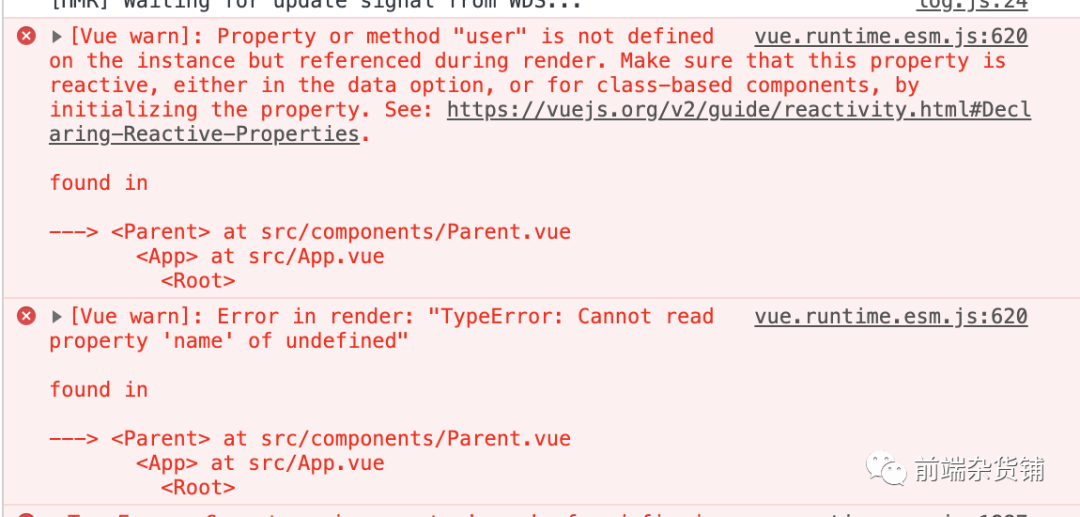
原因在于父組件取不到子組件的數(shù)據(jù),這里記住一個(gè)原則:父級(jí)模板里的所有內(nèi)容都是在父級(jí)作用域中編譯的;子模板里的所有內(nèi)容都是在子作用域中編譯的。
那我們?cè)鯓硬拍塬@取到子組件的數(shù)據(jù)或者事件呢?我們可以直接在子組件中通過(guò) v-bind 的方式將數(shù)據(jù)或者事件傳遞給父組件中,如下所示
  <div class="child">
    <div>Hello, I am from Child.</div>
    <!-- 將user和callMe通過(guò) v-bind 的方式傳遞 -->
    <slot :user="user" :callMe="callMe"></slot>
  </div>
然后在父組件中的插槽內(nèi),通過(guò)類似 v-slot:default="slotProps" 接受子組件傳遞過(guò)來(lái)的數(shù)據(jù)
    <Child3>
      <!-- slotProps 可以自定義-->
      <template v-slot:default="slotProps">
        <div>我的名字:{{slotProps.user.name}}</div>
        <div>我的年齡:{{slotProps.user.age}}</div>
        <button @click="slotProps.callMe">Clicl Me</button>
      </template>
    </Child3>
以上 slotProps 可以自定義,而且可以使用解構(gòu)賦值的語(yǔ)法
<!-- 解構(gòu)賦值 -->
<template v-slot:other="{ user, callMe}">
  <div>我的名字:{{user.name}}</div>
  <div>我的年齡:{{user.age}}</div>
  <button @click="callMe">Clicl Me</button>
</template>
實(shí)例:解耦業(yè)務(wù)邏輯和視圖
我們經(jīng)常會(huì)遇到一個(gè)場(chǎng)景,就是兩個(gè)組件的業(yè)務(wù)邏輯是可以復(fù)用的,但是視圖卻不一樣,比如我們經(jīng)常會(huì)有類似切換開(kāi)關(guān)的需求,功能包括:
關(guān)閉開(kāi)關(guān) 打開(kāi)開(kāi)關(guān) 切換開(kāi)關(guān) 開(kāi)關(guān)關(guān)閉或者打開(kāi)的時(shí)候不一樣的內(nèi)容
我們可以很快的寫出它的一個(gè) JS 業(yè)務(wù)邏輯代碼:
export default {
  data() {
    return {
      currentState: this.state
    }
  },
  props: {
    state: {
      type: Boolean,
      default: false
    }
  },
  methods: {
    openState() {
      this.currentState = true;
    },
    closeState() {
      this.currentState = false;
    },
    toggle() {
      this.currentState = !this.currentState;
    }
  }
}
但是可能現(xiàn)在我的樣式一是這樣的

然而另外一個(gè)地方的樣式是這樣的(只是舉個(gè)例子,現(xiàn)實(shí)可能更加的復(fù)雜,甚至有可能一些按鈕直接就隱藏掉了)

這個(gè)時(shí)候,插槽就派上了用場(chǎng)。上面提到作用域插槽可以將數(shù)據(jù)和事件從子組件傳遞給父組件,這就相當(dāng)于對(duì)外暴露了接口。而且可以將 HTML 中的 DOM 以及 CSS 交給父組件(調(diào)用方)去維護(hù),子組件通過(guò) <slot> 標(biāo)簽插入的位置即可,主要邏輯如下:
子組件:
<template>
  <div class="toggle-container">
    <slot :currentState="currentState" :setOn="openState" :setOff="closeState" :toggle="toggle"></slot>
  </div>
</template>
父組件:
<Toggle1 :state="state" class="toggle-container-two">
  <template v-slot:default="{currentState, setOn, setOff, toggle }">
    <button @click="toggle">切換</button>
    <button @click="setOff">關(guān)閉</button>
    <button @click="setOn">打開(kāi)</button>
    <div v-if="currentState">我是打開(kāi)的內(nèi)容</div>
    <div v-else>我是關(guān)閉的內(nèi)容</div>
  </template>
</Toggle1>
我們現(xiàn)在采用的是單文件的方式書(shū)寫的,實(shí)際上子組件還是會(huì)有相關(guān)的 HTML 結(jié)構(gòu),如何做到子組件完全不需要渲染自己的 HTML 呢?那得了解下無(wú)渲染組件的實(shí)現(xiàn)
進(jìn)階:無(wú)渲染組件的實(shí)現(xiàn)
無(wú)渲染組件(renderless components)是指一個(gè)不需要渲染任何自己的 HTML 的組件。相反,它只管理狀態(tài)和行為。它會(huì)暴露一個(gè)單獨(dú)的作用域,讓父組件或消費(fèi)者完全控制應(yīng)該渲染的內(nèi)容。Vue 中,提供了單文件組件的寫法。像上面的示例一樣,我們始終還是在子組件中進(jìn)行了一些渲染的操作,那如何做到真正的不渲染組件呢?
比如上面的 toggle 例子,我們已經(jīng)做到了子組件暴露一個(gè)單獨(dú)的作用域,讓父組件或消費(fèi)者完全控制應(yīng)該渲染的內(nèi)容。現(xiàn)在我們需要將單文件中的 template 結(jié)構(gòu)(slot 標(biāo)簽外層的 div)完全交給父組件,但單文件組件中 slot 標(biāo)簽是不能作為 template 的根元素的
這個(gè)時(shí)候,我們需要了解一下 Vue 渲染函數(shù)(render function)
歸根結(jié)底,Vue 及其所有的組件都只是 JavaScript。單文件組件最后會(huì)被構(gòu)建工具,如 webpack,將 CSS 抽取形成一個(gè)文件,其他的內(nèi)容會(huì)被轉(zhuǎn)換成 JavaScript,類似如下:
export default {
  template: <div class="mood">...</div>,
  data: () => ({ todayIsSunny: true })
}
當(dāng)然,這個(gè)不是它的最終形態(tài),模板編譯器會(huì)提取 template 屬性內(nèi)容并將其內(nèi)容編譯為 JavaScript,然后通過(guò) render 函數(shù)添加到組件對(duì)象中。最終形態(tài)應(yīng)該是如下:
render(h) {
  return h(
    'div',
    { class: 'mood' },
    this.todayIsSunny ? 'Makes me happy' : 'Eh! Doesn't bother me'
  )
}
具體的渲染函數(shù)可參見(jiàn)官網(wǎng)[4],雖然寫 render 函數(shù)的成本會(huì)高一些,但是它的性能會(huì)比單文件組件好很多。
以上的例子,只有插槽的時(shí)候,我們只需要在 render 函數(shù)中,使用 this.$scopedSlots.default 代替掉 <slot> 標(biāo)簽即可
代碼如下:
export const toggle = {
  data() {
    return {
      currentState: this.state
    }
  },
  render() {
    return this.$scopedSlots.default({
      currentState: this.currentState,
      setOn: this.openState,
      setOff: this.closeState,
      toggle: this.toggle,
    })
  },
  props: {
    state: {
      type: Boolean,
      default: false
    }
  },
  methods: {
    openState() {
      this.currentState = true;
    },
    closeState() {
      this.currentState = false;
    },
    toggle() {
      this.currentState = !this.currentState;
    }
  }
}
以上就可以做到子組件完全不渲染自己的 HTML了
總結(jié)
本文介紹了一些 Vue 插槽的基本知識(shí),包括
默認(rèn)插槽 后備內(nèi)容 具名插槽 作用域插槽
然后介紹了一下,如何通過(guò)插槽實(shí)現(xiàn)業(yè)務(wù)邏輯和視圖的解耦,再結(jié)合渲染函數(shù)實(shí)現(xiàn)真正的無(wú)渲染函數(shù)
本文 DEMO 已全部放到 Github[5] 和 沙箱[6] 中,供大家學(xué)習(xí),如有問(wèn)題,可以評(píng)論提出。
這么用心了,求個(gè)贊,哈哈
希望對(duì)大家有所幫助~
往期優(yōu)秀文章推薦
【Vue進(jìn)階】——如何實(shí)現(xiàn)組件屬性透?jìng)鳎?/span>[7] 前端應(yīng)該知道的 HTTP 知識(shí)【金九銀十必備】[8] 最強(qiáng)大的 CSS 布局 —— Grid 布局[9] 如何用 Typescript 寫一個(gè)完整的 Vue 應(yīng)用程序[10] 前端應(yīng)該知道的web調(diào)試工具——whistle[11]
參考:
Vue 插槽(slot)使用(通俗易懂)[12]
vue 2.6 中 slot 的新用法[13]
(譯)函數(shù)式組件在Vue.js中的運(yùn)用[14]
Building “Renderless” Vue Components[15]
參考資料
使用 templates and slots: https://developer.mozilla.org/zh-CN/docs/Web/Web_Components/Using_templates_and_slots
[2]Github: https://github.com/GpingFeng/vue-slot
[3]沙箱: https://codesandbox.io/s/hopeful-nash-id826?file=/src/main.js
[4]官網(wǎng): https://cn.vuejs.org/v2/guide/render-function.html
[5]Github: https://github.com/GpingFeng/vue-slot
[6]沙箱: https://codesandbox.io/s/hopeful-nash-id826?file=/src/main.js
[7]【Vue進(jìn)階】——如何實(shí)現(xiàn)組件屬性透?jìng)鳎? https://juejin.im/post/6865451649817640968
[8]前端應(yīng)該知道的 HTTP 知識(shí)【金九銀十必備】: https://juejin.im/post/6864119706500988935
[9]最強(qiáng)大的 CSS 布局 —— Grid 布局: https://juejin.im/post/6854573220306255880
[10]如何用 Typescript 寫一個(gè)完整的 Vue 應(yīng)用程序: https://juejin.im/post/6860703641037340686
[11]前端應(yīng)該知道的web調(diào)試工具——whistle: https://juejin.im/post/6861882596927504392
[12]Vue 插槽(slot)使用(通俗易懂): https://juejin.im/post/6844903920037281805
[13]vue 2.6 中 slot 的新用法: https://juejin.im/post/6844903885476200461
[14](譯)函數(shù)式組件在Vue.js中的運(yùn)用: https://juejin.im/post/6844903752164442120
[15]Building “Renderless” Vue Components: https://css-tricks.com/building-renderless-vue-components/