
用Qt寫一個簡單的Markdown編輯器
ID:技術(shù)讓夢想更偉大
作者:李肖遙
Markdown編輯器
Markdown 是一種具有純文本格式語法的輕量級標記語言,Markdown Editor 演示了如何使用 QWebChannel 和 JavaScript 庫為自定義標記語言提供富文本預覽工具。
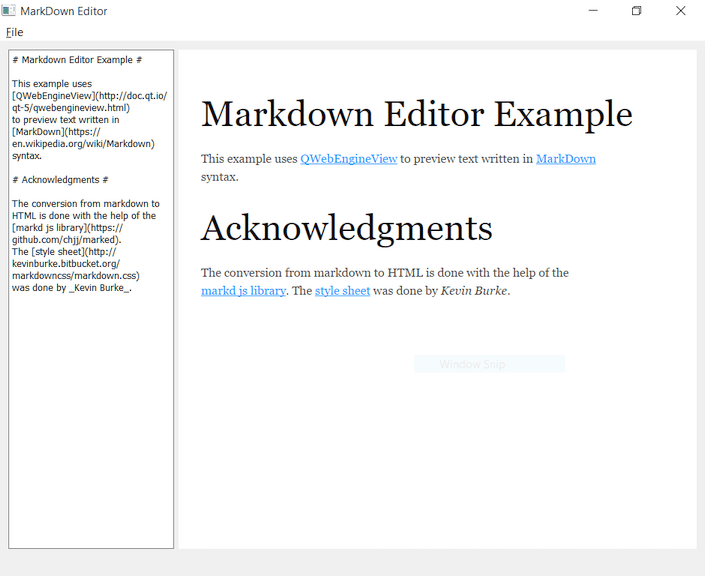
Markdown 編輯器主窗口分為編輯器和預覽區(qū),編輯器支持 Markdown 語法,使用 QPlainTextEdit 實現(xiàn);文檔在預覽區(qū)渲染為富文本,通過QWebEngineView實現(xiàn)。
為了呈現(xiàn)文本,Markdown 文本在 Web 引擎內(nèi)的 JavaScript 庫的幫助下轉(zhuǎn)換為 HTML 格式,預覽是通過 QWebChannel 從編輯器更新的。
下圖演示如何將 Web 引擎集成到混合桌面應(yīng)用程序中。
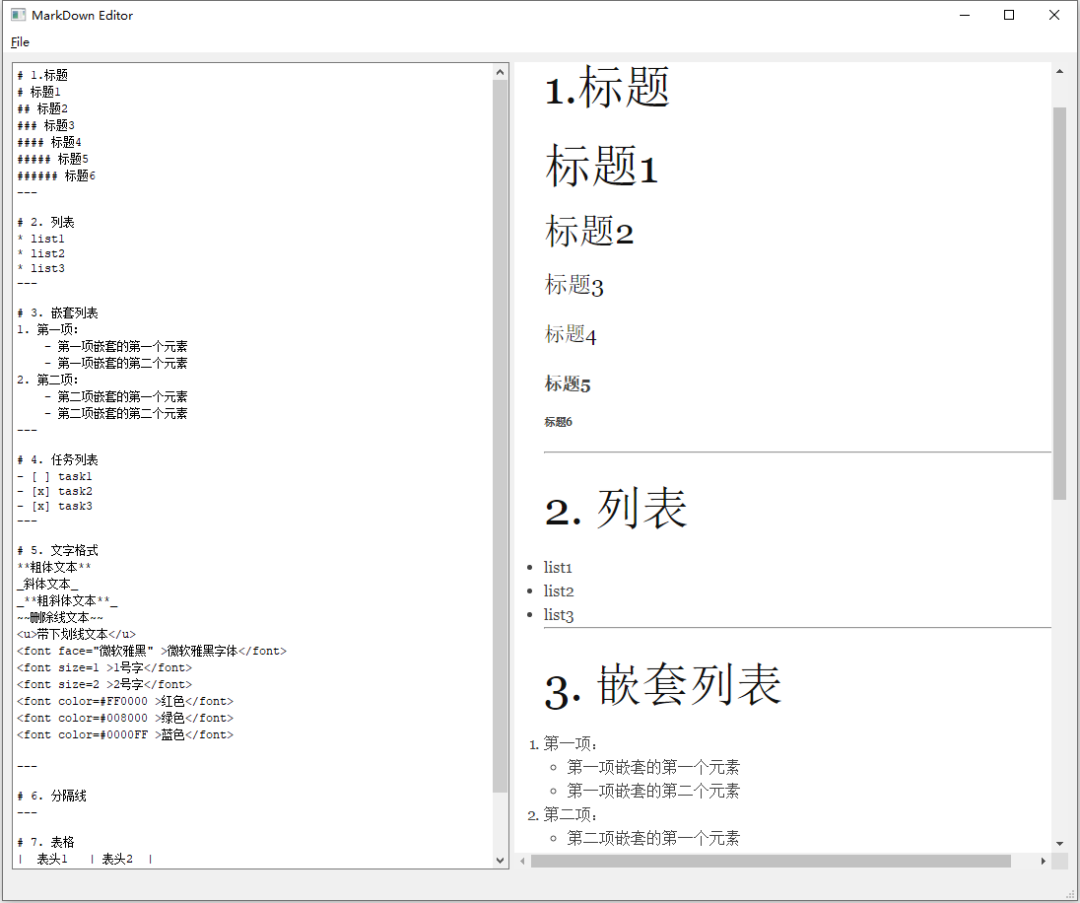
我們使用例子,左側(cè)輸入Markdown語法的文本,右側(cè)就是其預覽的樣式了。
實現(xiàn)原理以及步驟
公開文檔文本
通過 QWebChannel 將要渲染的當前 Markdown 文本暴露給 Web 引擎,所以我們需要以某種方式通過 Qt 元類型系統(tǒng)使當前文本可用,這是通過使用將文檔文本公開為 Q_PROPERTY 的專用 Document 類來完成的:
通過 QWebChannel 將要渲染的當前 Markdown 文本暴露給 Web 引擎,將文檔文本公開為 Q_PROPERTY 的專用 Document 類,然后通過 Qt 元類型系統(tǒng)使當前文本可用。
Document 類使用setText()方法包裝要在C++ 端設(shè)置的 QString,并在運行時將其作為帶有 textChanged 信號的文本屬性公開。
定義 setText 方法如下:
void Document::setText(const QString &text)
{
    if (text == m_text)
        return;
    m_text = text;
    emit textChanged(m_text);
}
預覽文本
實現(xiàn)自己的 PreviewPage 類,該類公開繼承自 QWebEnginePage。
重新實現(xiàn)了虛擬的 acceptNavigationRequest 方法來阻止頁面導航離開當前文檔,從而將外部鏈接重定向到系統(tǒng)瀏覽器,代碼如下:
bool PreviewPage::acceptNavigationRequest(const QUrl &url,
                                          QWebEnginePage::NavigationType /*type*/,
                                          bool /*isMainFrame*/)
{
    // Only allow qrc:/index.html.
    if (url.scheme() == QString("qrc"))
        return true;
    QDesktopServices::openUrl(url);
    return false;
}
創(chuàng)建主窗口
MainWindow 類繼承了 QMainWindow 類,該類聲明了與菜單中的操作相匹配的私有槽,以及 isModified() 輔助方法。
主窗口的實際布局在.ui文件中指定,小部件和操作在運行時在 ui 成員變量中可用。
m_filePath 保存當前加載文檔的文件路徑, m_content 是 Document 類的一個實例。
不同對象的實際設(shè)置是在 MainWindow 構(gòu)造函數(shù)中完成的,代碼如下:
MainWindow::MainWindow(QWidget *parent) :
    QMainWindow(parent),
    ui(new Ui::MainWindow)
{
    ui->setupUi(this);
    ui->editor->setFont(QFontDatabase::systemFont(QFontDatabase::FixedFont));
    ui->preview->setContextMenuPolicy(Qt::NoContextMenu);
構(gòu)造函數(shù)首先調(diào)用 setupUi 來根據(jù) UI 文件構(gòu)造小部件和菜單操作,文本編輯器字體設(shè)置為具有固定字符寬度的字體,并且 QWebEngineView 小部件不顯示上下文菜單。
PreviewPage *page = new PreviewPage(this);
ui->preview->setPage(page);
這里構(gòu)造函數(shù)確保我們的自定義 PreviewPage 被 ui->preview 中的 QWebEngineView 實例使用。
connect(ui->editor, &QPlainTextEdit::textChanged,
        [this]() { m_content.setText(ui->editor->toPlainText()); });

QWebChannel *channel = new QWebChannel(this);
channel->registerObject(QStringLiteral("content"), &m_content);
page->setWebChannel(channel);
這里編輯器的 textChanged 信號連接到更新 m_content 中的文本的 lambda, 然后這個對象被QWebChannel以content為名暴露給JS端。
ui->preview->setUrl(QUrl("qrc:/index.html"));
現(xiàn)在我們實際上可以從資源中加載 index.html 文件。有關(guān)該文件的更多信息,請參閱創(chuàng)建索引文件。
connect(ui->actionNew, &QAction::triggered, this, &MainWindow::onFileNew);
connect(ui->actionOpen, &QAction::triggered, this, &MainWindow::onFileOpen);
connect(ui->actionSave, &QAction::triggered, this, &MainWindow::onFileSave);
connect(ui->actionSaveAs, &QAction::triggered, this, &MainWindow::onFileSaveAs);
connect(ui->actionExit, &QAction::triggered, this, &MainWindow::onExit);
connect(ui->editor->document(), &QTextDocument::modificationChanged,ui->actionSave, &QAction::setEnabled);
菜單項連接到相應(yīng)的成員槽,保存項目的激活或停用取決于用戶是否已編輯內(nèi)容。
QFile defaultTextFile(":/default.md");
defaultTextFile.open(QIODevice::ReadOnly);
ui->editor->setPlainText(defaultTextFile.readAll());
}
最后,我們從資源中加載一個默認文檔 default.md就可以了。
創(chuàng)建索引文件
<!doctype html>
<html lang="en">
<meta charset="utf-8">
<head>
  <link rel="stylesheet" type="text/css" href="3rdparty/markdown.css">
  <script src="3rdparty/marked.js"></script>
  <script src="qrc:/qtwebchannel/qwebchannel.js"></script>
</head>
<body>
  <div id="placeholder"></div>
  <script>
  'use strict';

  var placeholder = document.getElementById('placeholder');

  var updateText = function(text) {
      placeholder.innerHTML = marked(text);
  }

  new QWebChannel(qt.webChannelTransport,
    function(channel) {
      var content = channel.objects.content;
      updateText(content.text);
      content.textChanged.connect(updateText);
    }
  );
  </script>
</body>
</html>
在 index.html 中加載了一個自定義樣式表和兩個 JavaScript 庫。markdown.css 是一個 Markdown 友好樣式表;marked.js 是一個 Markdown 解析器和編譯器,旨在提高速度;qwebchannel.js 是 QWebChannel 模塊的一部分。
在 元素中,首先定義一個占位符元素,并將其作為 JavaScript 變量使用,然后定義 updateText 輔助方法,最后設(shè)置 Web 通道來訪問內(nèi)容代理對象,并確保在 content.text 更改時調(diào)用 updateText()。
最后
Qt安裝目錄找到源碼
\Q{你的Qt版本}\Examples{你的Qt版本}\webenginewidgets\markdowneditor
相關(guān)鏈接
https://doc.qt.io/qt-5/qtwebengine-webenginewidgets-markdowneditor-example.html
嵌入式編程專輯 Linux 學習專輯 C/C++編程專輯 Qt進階學習專輯
關(guān)注我的微信公眾號,回復“加群”按規(guī)則加入技術(shù)交流群。
點擊“閱讀原文”查看更多分享。