
手把手教你使用Python第三方庫PyAudio打造一款錄音工具
回復(fù)“書籍”即可獲贈Python從入門到進(jìn)階共10本電子書
大家好,我是【??(這是月亮的背面)】。今天給大家分享Python使用PyAudio制作錄音工具,文章目錄如下:
應(yīng)用平臺
音頻錄制部分
音頻播放部分
GUI窗口所需屬性值代碼部分
pynput監(jiān)聽鍵盤
總結(jié)
最近有在使用屏幕錄制軟件錄制桌面,在用的過程中突發(fā)奇想,使用python能不能做屏幕錄制工具,也鍛煉下自己的動手能力。接下準(zhǔn)備寫使用python如何做屏幕錄制工具的系列文章:
錄制屏幕制作視頻 錄制音頻 合成視頻,音頻 基于Pyqt5制作可視化窗口
大概上述四個部分,希望自己能夠盡快完善,上一篇文章利用opencv制作了屏幕錄制部分,接下繼續(xù)更新系列,使用python錄制音頻。
應(yīng)用平臺
windows 10 python 3.7
音頻錄制部分
音頻錄制與視頻錄制相似,也是以數(shù)據(jù)幀的方式錄制保存,這次使用強(qiáng)大的第三方包PyAudio和內(nèi)置的wave模塊編寫主要部分代碼:pip install PyAudio
如果出現(xiàn)安裝失敗,可點(diǎn)擊去此處下載對應(yīng).whl文件,cp37代表python3.7環(huán)境,64代表64位操作系統(tǒng)。假如不是下載對應(yīng)的whl包會導(dǎo)致安裝失敗,下載完成后,cmd窗口下進(jìn)入whl的所在目錄,使用pip install PyAudio-xx.whl即可完成安裝。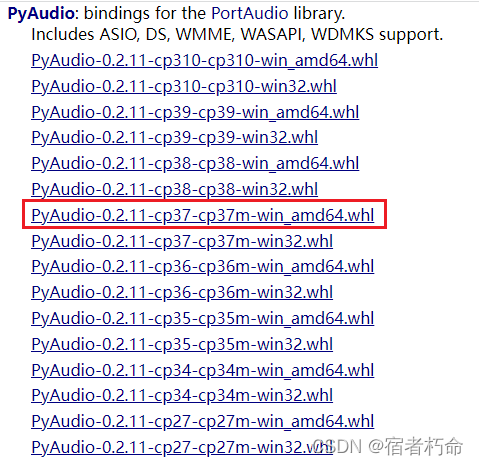 音頻錄制主要代碼:
from?pyaudio?import?PyAudio,?paInt16,?paContinue,?paComplete

#?設(shè)置固定參數(shù)
chunk?=?1024??#?每個緩沖區(qū)的幀數(shù)
format_sample?=?paInt16??#?采樣位數(shù)
channels?=?2??#?聲道:1,單聲道;2,雙聲道
fps?=?44100??#?采樣頻率

#?這里采用回調(diào)的方式錄制音頻
def?callback(in_data,?frame_count,?time_info,?status):
????"""錄制回調(diào)函數(shù)"""
????wf.writeframes(in_data)
????if?xx:??#?當(dāng)某某條件滿足時
????????return?in_data,?paContinue
????else:
????????return?in_data,?paComplete

#?實(shí)例化PyAudio
p?=?PyAudio()
stream?=?p.open(format=format_sample,
????channels=channels,
????rate=fps,
????????????????frames_per_buffer=chunk,
????????????????input=True,
????????????????input_device_index=None,??#?輸入設(shè)備索引,?None為默認(rèn)設(shè)備
????????????????stream_callback=callback???#?回調(diào)函數(shù)
????????????????)
#?開始流錄制
stream.start_stream()
#?判斷流是否活躍
while?stream.is_active():
?time.sleep(0.1)????#?0.1為靈敏度
#?錄制完成,關(guān)閉流及實(shí)例
stream.stop_stream()
stream.close()
p.terminate()
采取流式并用回調(diào)函數(shù)錄制,需要先定義保存音頻文件,用wave新建音頻二進(jìn)制文件:
import?wave
wf?=?wave.open('test.wav',?'wb')
wf.setnchannels(channels)
wf.setsampwidth(p.get_sample_size(format_sample))
wf.setframerate(fps)
為了后續(xù)代碼可以很好的與之結(jié)合復(fù)用,將上面的代碼包裝成類
from?pyaudio?import?PyAudio

class?AudioRecord(PyAudio):

????def?__init__(self,):
源碼于文末補(bǔ)充。
音頻播放部分
播放部分代碼與錄制部分代碼相差不大,核心部分:
wf?=?wave.open('test.wav',?'rb')
def?callback(in_data,?frame_count,?time_info,?status):
?data?=?wf.readframes(frame_count)
?return?data,?paContinue

stream?=?p.open(format=p.get_format_from_width(wf.getsampwidth()),
????channels=wf.getnchannels(),
????????????????rate=wf.getframerate(),
????output=True,
????output_device_index=output_device_index,??#?輸入設(shè)備索引
????stream_callback=callback??#?輸出用回調(diào)函數(shù)
????????????????)
stream.start_stream()
while?stream.is_active():
?time.sleep(0.1)
目前暫時測試了.wav和.mp3格式可以正常錄制及播放,其它類型格式音頻可以自行調(diào)用代碼進(jìn)行測試。
GUI窗口所需屬性值代碼部分
考慮到GUI窗口能較為人性化的輸出及輸入值,編寫該部分代碼,內(nèi)容含音頻時長及獲取輸入設(shè)備及輸出設(shè)備。
#?音頻時長
duration?=?wf.getnframes()?/?wf.getframerate()
#?獲取系統(tǒng)目前已安裝的輸入輸出設(shè)備
dev_info?=?self.get_device_info_by_index(i)
default_rate?=?int(dev_info['defaultSampleRate'])
if?not?dev_info['hostApi']?and?default_rate?==?fps?and?'映射器'?not?in?dev_info['name']:
?if?dev_info['maxInputChannels']:
??print('輸入設(shè)備:',?dev_info['name'])
?elif?dev_info['maxOutputChannels']:
??print('輸出設(shè)備:',?dev_info['name'])
pynput監(jiān)聽鍵盤
在這部分代碼也暫時使用pynput監(jiān)聽鍵盤來對錄音做中斷處理。可以調(diào)用上一篇文章中的鍵盤監(jiān)聽代碼。
def?hotkey(self):
????"""熱鍵監(jiān)聽"""
????with?keyboard.Listener(on_press=self.on_press)?as?listener:
????????listener.join()

def?on_press(self,?key):
????try:
????????if?key.char?==?'t':??#?t鍵,錄制結(jié)束,保存音頻
????????????self.flag?=?True
????????elif?key.char?==?'k':??#?k鍵,錄制中止,刪除文件
????????????self.flag?=?True
????????????self.kill?=?True
????except?Exception?as?e:
????????print(e)
功能與上一篇類似,不再贅述。
總結(jié)
大家好,我是【??(這是月亮的背面)】。以上就是使用PyAudio調(diào)用windows的音頻設(shè)備進(jìn)行錄制及播放的內(nèi)容了,這篇文章帶大家整體學(xué)習(xí)了使用類及其繼承相關(guān)知識,用法在這只是展示了冰山一角,還有更多的知識等待著我們一起去探索!
于二零二一年十二月二十日作
源碼:
import?wave
import?time
from?pathlib?import?Path
from?threading?import?Thread
from?pyaudio?import?PyAudio,?paInt16,?paContinue,?paComplete
from?pynput?import?keyboard??#?pip?install?pynput


class?AudioRecord(PyAudio):

????def?__init__(self,?channels=2):
????????super().__init__()
????????self.chunk?=?1024??#?每個緩沖區(qū)的幀數(shù)
????????self.format_sample?=?paInt16??#?采樣位數(shù)
????????self.channels?=?channels??#?聲道:1,單聲道;2,雙聲道
????????self.fps?=?44100??#?采樣頻率
????????self.input_dict?=?None
????????self.output_dict?=?None
????????self.stream?=?None
????????self.filename?=?'~test.wav'
????????self.duration?=?0???#?音頻時長
????????self.flag?=?False
????????self.kill?=?False

????def?__call__(self,?filename):
????????"""重載文件名"""
????????self.filename?=?filename

????def?callback_input(self,?in_data,?frame_count,?time_info,?status):
????????"""錄制回調(diào)函數(shù)"""
????????self.wf.writeframes(in_data)
????????if?not?self.flag:
????????????return?in_data,?paContinue
????????else:
????????????return?in_data,?paComplete

????def?callback_output(self,?in_data,?frame_count,?time_info,?status):
????????"""播放回調(diào)函數(shù)"""
????????data?=?self.wf.readframes(frame_count)
????????return?data,?paContinue

????def?open_stream(self,?name):
????????"""打開錄制流"""
????????input_device_index?=?self.get_device_index(name,?True)?if?name?else?None
????????return?self.open(format=self.format_sample,
?????????????????????????channels=self.channels,
?????????????????????????rate=self.fps,
?????????????????????????frames_per_buffer=self.chunk,
?????????????????????????input=True,
?????????????????????????input_device_index=input_device_index,??#?輸入設(shè)備索引
?????????????????????????stream_callback=self.callback_input
?????????????????????????)

????def?audio_record_run(self,?name=None):
????????"""音頻錄制"""
????????self.wf?=?self.save_audio_file(self.filename)
????????self.stream?=?self.open_stream(name)
????????self.stream.start_stream()
????????while?self.stream.is_active():
????????????time.sleep(0.1)
????????self.wf.close()
????????if?self.kill:
????????????Path(self.filename).unlink()
????????self.duration?=?self.get_duration(self.wf)
????????print(self.duration)
????????self.terminate_run()

????def?run(self,?filename=None,?name=None,?record=True):
????????"""音頻錄制線程"""
????????thread_1?=?Thread(target=self.hotkey,?daemon=True)
????????if?record:
????????????#?錄制
????????????if?filename:
????????????????self.filename?=?filename
????????????thread_2?=?Thread(target=self.audio_record_run,?args=(name,))
????????else:
????????????#?播放
????????????if?not?filename:
????????????????raise?Exception('未輸入音頻文件名,不能播放,請輸入后再試!')
????????????thread_2?=?Thread(target=self.read_audio,?args=(filename,?name,))
????????thread_1.start()
????????thread_2.start()

????def?read_audio(self,?filename,?name=None):
????????"""音頻播放"""
????????output_device_index?=?self.get_device_index(name,?False)?if?name?else?None
????????with?wave.open(filename,?'rb')?as?self.wf:
????????????self.duration?=?self.get_duration(self.wf)
????????????self.stream?=?self.open(format=self.get_format_from_width(self.wf.getsampwidth()),
????????????????????????????????????channels=self.wf.getnchannels(),
????????????????????????????????????rate=self.wf.getframerate(),
????????????????????????????????????output=True,
????????????????????????????????????output_device_index=output_device_index,??#?輸出設(shè)備索引
????????????????????????????????????stream_callback=self.callback_output
????????????????????????????????????)
????????????self.stream.start_stream()
????????????while?self.stream.is_active():
????????????????time.sleep(0.1)
????????print(self.duration)
????????self.terminate_run()

????@staticmethod
????def?get_duration(wf):
????????"""獲取音頻時長"""
????????return?round(wf.getnframes()?/?wf.getframerate(),?2)

????def?get_in_out_devices(self):
????????"""獲取系統(tǒng)輸入輸出設(shè)備"""
????????self.input_dict?=?{}
????????self.output_dict?=?{}
????????for?i?in?range(self.get_device_count()):
????????????dev_info?=?self.get_device_info_by_index(i)
????????????default_rate?=?int(dev_info['defaultSampleRate'])
????????????if?not?dev_info['hostApi']?and?default_rate?==?self.fps?and?'映射器'?not?in?dev_info['name']:
????????????????if?dev_info['maxInputChannels']:
????????????????????self.input_dict[dev_info['name']]?=?i
????????????????elif?dev_info['maxOutputChannels']:
????????????????????self.output_dict[dev_info['name']]?=?i

????def?get_device_index(self,?name,?input_in=True):
????????"""獲取選定設(shè)備索引"""
????????if?input_in?and?self.input_dict:
????????????return?self.input_dict.get(name,?-1)
????????elif?not?input_in?and?self.output_dict:
????????????return?self.output_dict.get(name,?-1)

????def?save_audio_file(self,?filename):
????????"""音頻文件保存"""
????????wf?=?wave.open(filename,?'wb')
????????wf.setnchannels(self.channels)
????????wf.setsampwidth(self.get_sample_size(self.format_sample))
????????wf.setframerate(self.fps)
????????return?wf

????def?terminate_run(self):
????????"""結(jié)束流錄制或流播放"""
????????if?self.stream:
????????????self.stream.stop_stream()
????????????self.stream.close()
????????self.terminate()

????def?hotkey(self):
????????"""熱鍵監(jiān)聽"""
????????with?keyboard.Listener(on_press=self.on_press)?as?listener:
????????????listener.join()

????def?on_press(self,?key):
????????try:
????????????if?key.char?==?'t':??#?t鍵,錄制結(jié)束,保存音頻
????????????????self.flag?=?True
????????????elif?key.char?==?'k':??#?k鍵,錄制中止,刪除文件
????????????????self.flag?=?True
????????????????self.kill?=?True
????????except?Exception?as?e:
????????????print(e)


if?__name__?==?'__main__':
????audio_record?=?AudioRecord()
????audio_record.get_in_out_devices()
????#?錄制
????print(audio_record.input_dict)
????audio_record.run('test.mp3')
????#?播放
????print(audio_record.output_dict)
????audio_record.run('test.mp3',?record=False)
小伙伴們,快快用實(shí)踐一下吧!如果在學(xué)習(xí)過程中,有遇到任何問題,歡迎加我好友,我拉你進(jìn)Python學(xué)習(xí)交流群共同探討學(xué)習(xí)。

小伙伴們,快快用實(shí)踐一下吧!如果在學(xué)習(xí)過程中,有遇到任何問題,歡迎加我好友,我拉你進(jìn)Python學(xué)習(xí)交流群共同探討學(xué)習(xí)。
-------------------?End?-------------------
往期精彩文章推薦:
Py自動化辦公—Word文檔替換、Excel表格讀取、Pdf文件生成和Email自動郵件發(fā)送實(shí)戰(zhàn)案例
手把手教你用Python腳本調(diào)用 DeepL API Pro 進(jìn)電子書的行進(jìn)行中英文自動翻譯
手把手教你用Python批量創(chuàng)建1-12月份的sheet表,每個表的第一行都有固定3個列標(biāo)題:A,B,C

歡迎大家點(diǎn)贊,留言,轉(zhuǎn)發(fā),轉(zhuǎn)載,感謝大家的相伴與支持
想加入Python學(xué)習(xí)群請?jiān)诤笈_回復(fù)【入群】
萬水千山總是情,點(diǎn)個【在看】行不行
/今日留言主題/
隨便說一兩句吧~~