關(guān)于 defineAsyncComponent 延遲加載組件 在 vue3 中的使用總結(jié)

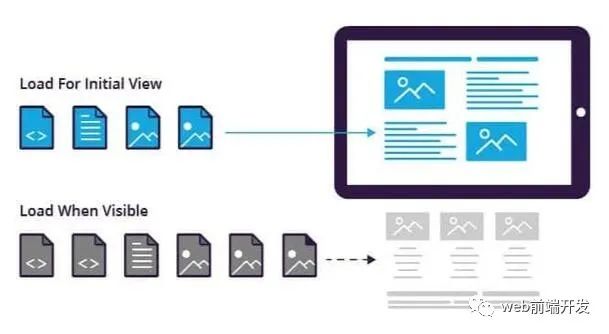
在本教程中,我們將學(xué)習(xí) defineAsyncComponent 的全部內(nèi)容,并看一個例子,該例子將一個彈出窗口的加載推遲到我們的應(yīng)用程序需要的時候。
好了,讓我們開始吧。
什么是defineAsyncComponent
// SOURCE: https://v3.vuejs.org/guide/component-dynamic-async.htmlconst AsyncComp = defineAsyncComponent(() =>new Promise((resolve, reject) => {resolve({template: '<div>I am async!</div>'})}))
defineAsyncComponent 接受一個返回Promise的工廠函數(shù)。當(dāng)我們成功地從服務(wù)器獲取組件時,這個Promise應(yīng)該會被 resolve ,如果出現(xiàn)錯誤則會被 reject 。
要使用它,我們必須從Vue中導(dǎo)入它,然后才能在腳本的其余部分中使用它。
我們也可以使用工廠函數(shù)中的 import ,輕松地從其他文件中添加Vue組件。
import { defineAsyncComponent } from "vue"// 簡單使用const LoginPopup = defineAsyncComponent(() => import("./components/LoginPopup.vue"))
這是使用 defineAsyncComponent 的最簡單方法,但我們也可以傳入一個完整的選項對象,配置幾個更高級的參數(shù)。
// with optionsconst AsyncPopup = defineAsyncComponent({loader: () => import("./LoginPopup.vue"),loadingComponent: LoadingComponent, /* 在加載時顯示 */errorComponent: ErrorComponent, /* 顯示是否有錯誤 */delay: 1000, /* 在顯示加載組件之前延遲毫秒 */timeout: 3000 /* 這個毫秒之后的超時 */})
就我個人而言,我發(fā)現(xiàn)自己更經(jīng)常使用第一種較短的語法,它對我的大多數(shù)使用情況都有效,但這完全取決于你。
就這么簡單,讓我們進入我們的例子。
使用defineAsyncComponent延遲加載彈出組件
在本例中,我們將使用一個由單擊按鈕觸發(fā)的登錄彈出窗口。
每當(dāng)我們的應(yīng)用程序加載時,我們不需要我們的應(yīng)用程序加載此組件,因為只有在用戶執(zhí)行特定操作時才需要它。
所以這就是我們的登錄組件的樣子,它只是通過用 position: fixed 將屏幕的其余部分涂黑來創(chuàng)建一個彈出窗口,并且有一些輸入和一個提交按鈕。
<template><div class="popup"><div class="content"><h4> Login to your account </h4><input type="text" placeholder="Email" /><input type="password" placeholder="Password" /><button> Log in </button></div></div></template><script></script><style scoped>.popup {position: fixed;width: 100%;top: ;left: ;height: 100%;background-color: rgba(, , , 0.2);display: flex;justify-content: center;align-items: center;}.content {min-width: 200px;width: 30%;background: #fff;height: 200px;padding: 10px;border-radius: 5px;}input[type="text"], input[type="password"] {border: ;outline: ;border-bottom: 1px solid #eee;width: 80%;margin: auto;font-size: 0.5em;}button {border: ;margin-top: 50px;background-color:#8e44ad;color: #fff;padding: 5px 10px;font-size: 0.5em;}</style>
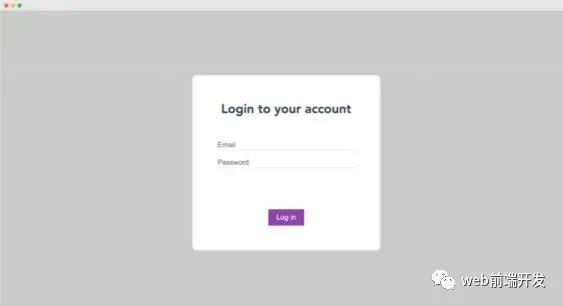
而不是像我們通常那樣導(dǎo)入它并將其納入我們的 components 選項中。
<!-- "Standard" way of doing things --><template><button @click="show = true"> Login </button><login-popup v-if="show" /></template><script>import LoginPopup from './components/LoginPopup.vue'export default {components: { LoginPopup },data() {return {show: false}}}</script>
我們可以改為使用 defineAsyncComponent 僅在需要時加載它(意味著單擊按鈕并切換我們的 v-if)。
<!-- Use defineAsyncComponent --><template><button @click="show = true"> Login </button><login-popup v-if="show" /></template><script>import { defineAsyncComponent } from 'vue'export default {components: {"LoginPopup" : defineAsyncComponent(() => import('./components/LoginPopup.vue'))},data() {return {show: false}}}</script>
雖然這在我們使用我們的應(yīng)用程序時可能看起來是一樣的,但讓我們檢查元素 > 網(wǎng)絡(luò)來理解這個小而重要的區(qū)別。
如果我們不使用 defineAsyncComponent,一旦我們的頁面加載,我們就會看到我們的應(yīng)用程序從服務(wù)器上獲得LoginPopup.vue。
雖然在這個例子中,這可能不是最大的性能問題,但它仍然會減慢加載速度,如果我們有幾十個組件這樣做,它真的會加起來。
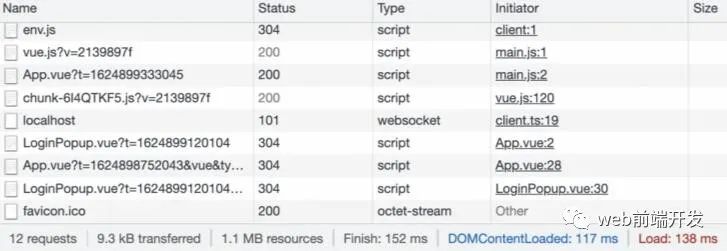
但是,如果我們使用 defineAsyncComponent 查看同一個選項卡,我們會注意到當(dāng)我們的頁面加載時,LoginPopup.vue 不見了,這是因為它還沒有加載。
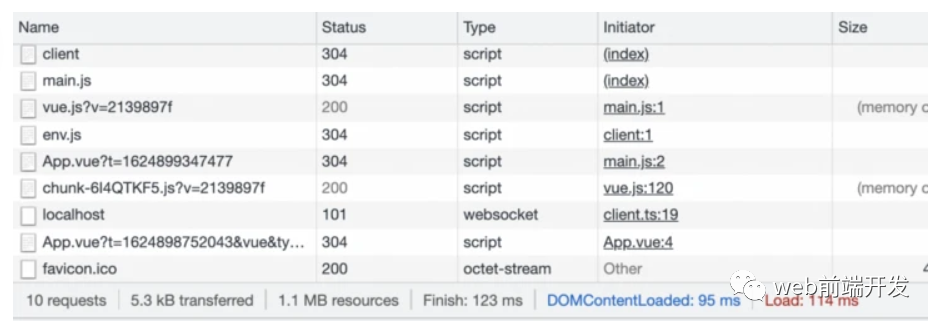
但是一旦我們點擊我們的按鈕并告訴我們的應(yīng)用程序顯示我們的彈出窗口,這時它就會從服務(wù)器加載,我們可以在網(wǎng)絡(luò)標(biāo)簽中看到它。
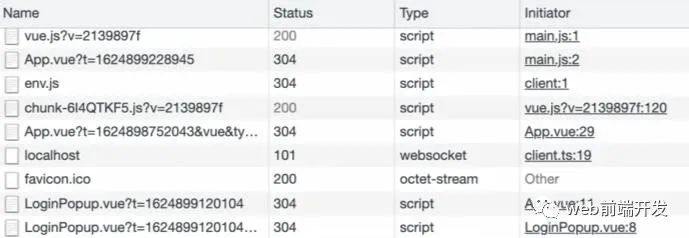
這有助于我們實現(xiàn)最佳性能。我們只想在我們的頁面初始加載時加載需要的組件。有條件渲染的組件在我們的頁面加載時往往是不需要的,所以為什么要讓我們的應(yīng)用程序加載它們呢?
如何使用異步設(shè)置功能
無論我們是否使用 defineAsyncComponent 延遲加載,任何具有異步設(shè)置功能的組件都必須用 <Suspense> 包裝。
簡而言之,創(chuàng)建一個異步設(shè)置函數(shù)是我們的一個選擇,可以讓我們的組件在渲染前等待一些API調(diào)用或其他異步動作。
這是我們具有異步設(shè)置的組件。它使用 setTimeout() 模擬 API 調(diào)用。
<template><div class="popup"><div class="content"><p> Loaded API: {{ article }} </p><h4> Login to your account </h4><input type="text" placeholder="Email" /><input type="password" placeholder="Password" /><button> Log in </button></div></div></template><script>const getArticleInfo = async () => {// wait 3 seconds to mimic API callawait new Promise(resolve => setTimeout(resolve, 1000));const article = {title: 'My Vue 3 Article',author: 'Matt Maribojoc'}return article}export default {async setup() {const article = await getArticleInfo()console.log(article)return {article}}}</script>
我們可以在有或沒有 defineAsyncComponent 的情況下將它導(dǎo)入到我們的組件中。
import LoginPopup from './components/LoginPopup.vue'// ORconst LoginPopup = defineAsyncComponent(() => import("./components/LoginPopup.vue"))
但是如果我們想讓它在我們的模板中渲染,我們需要將它包裝在一個 Suspense 元素中。這將等待我們的 setup 函數(shù)在嘗試渲染我們的組件之前解析。
<template><button @click="show = true"> Login </button><Suspense v-if="show"><template #default><login-popup /></template><template #fallback><p> Loading... </p></template></Suspense></template>
這就是結(jié)果。用戶會看到 "正在加載......",然后在3秒后(我們的setTimeout的硬編碼值),我們的組件將渲染。
默認情況下,我們使用 defineAsyncComponent 定義的所有組件都是可暫停的。
這意味著如果一個組件的父鏈中有 Suspense,它將被視為該 Suspense 的一個異步依賴。我們的組件的加載、錯誤、延遲和超時選項將被忽略,而是由 Suspense 來處理。
最后的想法
defineAsyncComponent 在創(chuàng)建有幾十個組件的大型項目時是有好處的。當(dāng)我們進入到懶惰加載組件時,我們可以有更快的頁面加載時間,改善用戶體驗,并最終提高你的應(yīng)用程序的保留率和轉(zhuǎn)換率。
學(xué)習(xí)更多技能
請點擊下方公眾號